
They say AI is coming for all our jobs. And depending on who you listen to, we’re only a few years away from software doing everything humans used to do.
Construction is a different story.
AI can’t pour concrete, frame a wall, troubleshoot a bad electrical run, or make a judgment call when the plans don’t match what’s actually happening on site. The physical, skilled, and unpredictable nature of construction makes most field jobs difficult to automate.
But the office side of construction is already changing. Estimating, scheduling, invoicing, reporting, document review, and other repetitive admin work are exactly the kinds of tasks AI is getting better at handling. That doesn’t necessarily mean those jobs disappear—but contractors may need fewer hours to get the same paperwork done.
So, will AI replace construction workers? For most people in the trades, probably not. But it will change who does the paperwork, how much time it takes, and what construction companies expect from their office teams.
Key points:
- AI fits rule-based tasks like AI estimating support, scheduling checks, invoice handling, and report drafting
- People still handle field decisions like quality control, crew coordination, safety calls, and code sign-off
- Labor demand is still high, with 341,000+ open U.S. construction jobs reported in March 2023
- AI exposure in construction stays low, with Microsoft Research scoring “other construction and related workers” at 0.06
In short: software helps with repeat admin tasks; people own the work that needs judgment, accountability, and hands-on skill.
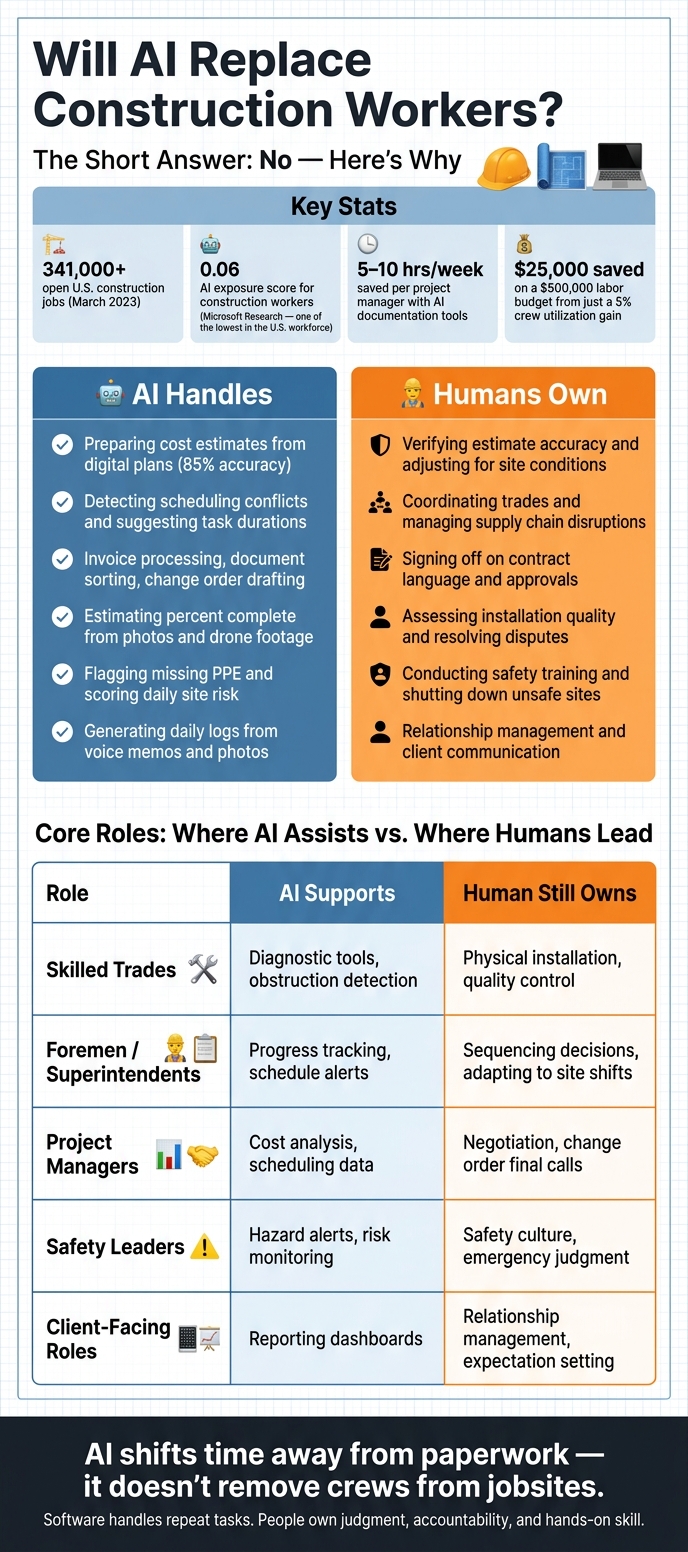
AI vs. Human Roles in Construction: What Gets Automated and What Doesn’t
Construction Tasks AI Is Most Likely to Automate
AI tends to help most when the work is repetitive, data-heavy, and driven by clear rules. That’s why it fits best in estimating, scheduling, reporting, and other repeatable back-office tasks. In plain terms, AI changes which tasks people spend time on, not whether crews are needed in the first place.
Estimating, Takeoffs, Scheduling, and Admin Work
AI estimating tools can read uploaded blueprints and pull material quantities straight from digital plans. Residential plan-reading tools are about 85% accurate, which is useful, but not enough to trust on autopilot. A person still has to check quantities before pricing or ordering. One missed count can turn into a costly headache fast.
Scheduling is similar. AI can review a project timeline, catch logic conflicts, and suggest task durations based on past job data. The same pattern shows up in invoice processing, document sorting, and change orders. These are all information-heavy tasks, and AI tends to do well with that kind of work.
Contractor Foreman brings estimating, financial tracking, scheduling, and document management into one place, which cuts down on manual entry and paperwork. Paired with AI tools, that can save both field and office teams a lot of time on repeat tasks.
Progress Tracking, Safety Alerts, and Site Documentation
In the field, AI works best as a reporting and documentation tool, not as a stand-in for labor. Its strongest use on jobsites comes from photo capture, drone footage, and sensor data. Those tools can estimate percent complete by trade, compare site progress against the schedule, and flag jobsite risks like missing hard hats or unsecured scaffolding.
Daily logs are another strong use case. Voice memos and jobsite photos can be turned into formatted reports automatically. Contractors using AI-powered project management tools report saving 5 to 10 hours per week per project manager on documentation alone.
There’s still a hard line here: AI can assist, but it doesn’t make the final call. It might flag a hazard in a photo, but it can’t decide to shut down a site. It can score daily site risk, but someone still has to review it and sign off. Contractor Foreman’s daily logs, safety meeting records, and document management tools help keep that information organized so the right person can move fast when it matters.
Here’s the simple split between automation and human judgment:
| Task | AI Can Automate | Human Judgment Still Required |
|---|---|---|
| Estimating | Preparing cost estimates from digital plans | Verifying accuracy and adjusting for conditions |
| Scheduling | Detecting conflicts, suggesting task durations | Coordinating trades and supply chain disruptions |
| Admin Work | Invoice processing, document sorting, change orders | Signing off on contract language and approvals |
| Progress Tracking | Estimating percent complete from photos and drone footage | Assessing installation quality and resolving disputes |
| Safety Alerts | Flagging missing PPE and scoring daily site risk | Conducting training and shutting down unsafe sites |
Even with those time savings, the line is pretty clear. Once the work depends on field judgment, coordination, and accountability, people still lead.
sbb-itb-5eea312
Construction Roles That Still Depend on Human Skill
When AI moves beyond single tasks and starts brushing up against whole roles, the weak spots show fast. AI is good with repeatable data work. But a jobsite doesn’t stay still. Conditions shift by the hour, sometimes by the minute. That’s where automation runs into a wall, and human judgment stays at the center.
Skilled Trades, Foremen, and Superintendents
Electricians, plumbers, carpenters, and other trades still rely on hands-on precision, problem-solving, and the ability to adjust on the fly. Semi-automated tools can help with repetitive work, sure. But crews still deal with layout changes, hidden obstructions, and quality checks that can’t be left to software.
Foremen and superintendents face the same issue, just at a different level. Software can flag a problem. It can’t walk the site, read the mood of the crew, or rework the day’s plan in real time. Their job is built around sequencing decisions and making calls when site conditions change faster than any schedule can keep up with.
Project Managers, Safety Leaders, and Client-Facing Roles
Project managers still have to interpret contract language and field-specific terms, manage change orders, and sort through jurisdiction-specific details that software can’t standardize.
Safety leaders carry responsibility that AI can’t take on. AI can send alerts, but people enforce standards and decide when work stops. Building a safety culture, holding crews accountable, and responding in high-risk moments all depend on human authority and judgment.
Client-facing roles are just as human. Trust, clear communication, and expectation management can’t be boiled down to a dashboard or a neat data summary.
Here’s what that split looks like across core roles:
| Role | AI Can Support | Human Still Owns |
|---|---|---|
| Skilled Trades | Diagnostic tools, semi-automated drilling, obstruction detection | Physical installation, quality control, on-the-spot troubleshooting |
| Foremen / Superintendents | Reality capture, progress tracking, schedule conflict alerts | Sequencing decisions, adapting when site conditions shift unexpectedly |
| Project Managers | Drafting email summaries, cost impact analysis, scheduling data | Negotiation, subcontractor trust, final calls on change orders |
| Safety Leaders | Hazard alerts, monitoring high-risk environments | Safety culture, accountability, emergency judgment calls |
| Client-Facing Roles | Data summaries, reporting dashboards | Relationship management, communication, managing expectations |
That’s why AI fits construction best as a decision aid, and many AI tools for construction project management are already proving that value, not a replacement. These limits are the reason AI will assist construction work long before it replaces it.
Why AI Will Not Fully Replace Workers on Real Jobsites
Construction still runs on people because jobsites are messy, physical, and hard to turn into a neat system.
Jobsites Are Variable, Physical, and Hard to Standardize
Every jobsite shifts from day to day. Deliveries show up late, weather slows crews down, and renovation work can expose hidden conditions behind walls, under floors, or above ceilings. On top of that, several trades often need to adjust on the fly while working in tight spaces. That kind of coordination is tough to hand over to software.
AI also has no accountability of its own. It can’t hold a license, take on liability, or sign off on code compliance. Licensed pros still have to do that. At the end of the day, a person owns the call.
Codes and construction language also change from one jurisdiction to another, which makes it hard for software to treat every decision the same way.
That’s why AI tends to help most when it cuts office drag, not when it tries to take over field judgment.
Demand for Skilled Labor Stays High Even as Software Improves
Microsoft Research rated “other construction and related workers” at 0.06, one of the lowest AI-exposure scores in the U.S. workforce.
That lines up with what contractors see in practice: repetitive admin work is the part most open to automation. As software takes care of routine tasks, field know-how matters even more.
Variable site conditions, legal accountability, local code differences, and low AI exposure all put limits on full automation.
So the near-term role of AI is pretty clear. It’s a productivity tool first. It helps with repetitive work, but it doesn’t replace skilled labor. The next question is where AI saves time right now, and that starts with repetitive estimating, scheduling, and reporting work.
How Contractors Can Get Real Value from AI Today
AI pays off most when you use it as a workflow tool, not a stand-in for your crew. The fastest wins usually come from cutting back on the paperwork that keeps project managers and foremen stuck behind a screen instead of out in the field.
Start by Removing Repetitive Work with Software
Start with the basics: get your records into one system before you try to automate anything. Schedules, budgets, RFIs, daily logs, and safety records all need to live in the same place before AI can do much that helps.
That’s where an all-in-one platform like Contractor Foreman can help small and mid-sized contractors in a practical way. It brings together schedules, financials, daily logs, safety records, timecards, documents, and QuickBooks integration, with plans starting at $49/month.
A 5% improvement in crew utilization from better workload data can save $25,000 on a $500,000 labor budget. That kind of gain doesn’t come from magic. It comes from clean, steady data.
And clean data only matters if the crew updates it on site.
Train Teams to Use AI Alongside Field Experience
Once the data is in one place, the next step is getting crews to use it in the field. Adoption gets better when people can see the payoff. If a foreman knows that uploading a daily photo helps AI track progress and flag safety issues on its own, that update feels a lot less like busywork and a lot more like time saved.
AI does its best work when it backs up field judgment instead of trying to overrule it. Crews need tools they can use without slowing the job down. Contractor Foreman’s mobile app supports location-verified timecards, photo-annotated daily logs, and safety sign-offs from the field. Those features cover the daily logs, photo tracking, timecards, and safety sign-offs already discussed, and they sync to cost codes and project records in real time.
Pilot one project for 90 days, track time saved and delays avoided, then expand. Starting small gives teams room to fix the workflow before rolling it out to more jobs. Use the data, then let field judgment decide the next move.
FAQs
Which construction jobs are safest from AI?
Jobs are safest from AI when they depend on hands-on skill, split-second judgment, and the kind of on-site problem-solving that happens in messy, hard-to-predict settings.
That’s why skilled trades like electricians, plumbers, HVAC technicians, and concrete or structural specialists are tougher to automate. Every job site throws something different at them. One project may have tight access, another may have old wiring, bad plans, or surprise issues behind a wall. The work isn’t just about following steps. It’s about reading the situation and making the right call in the moment.
Project managers and site supervisors matter just as much. They’re still the people making site calls, managing relationships, and carrying final accountability when something has to get done right.
What construction tasks can AI handle today?
Today, AI does its best work on repetitive, data-heavy tasks that tend to bog projects down. Think estimating, proposal drafts, daily logs, schedule updates, and sorting through RFIs, permits, and submittals.
On the jobsite, it can help watch for PPE compliance, spot hazards, track progress, predict equipment problems, and flag schedule risk before it turns into a bigger headache.
That said, AI works best as a support tool. It can help teams move faster and stay organized, but it doesn’t replace human skill, field judgment, or the relationships that keep a job moving.
How can contractors start using AI without disrupting crews?
Use a phased, hybrid approach that starts with office work, not field work. Pick one repetitive task – like estimates, daily logs, or after-hours calls – and run a 90-day pilot to see how it performs.
To keep things simple, start with AI tools that are already built into your current project management software. Think of AI as a co-pilot, not a replacement, and make human review mandatory for estimates, schedules, and safety reports.
Related Blog Posts
- 5 Things AI Still Can’t Replace in Construction
- AI in Construction: Benefits and Opportunities for Residential Builders
- Why More Contractors are Using AI in Construction Management
- How AI Is Used in Construction Today







