
Let’s be real—ChatGPT sucks at a lot of things.
Giving legal advice.
Understanding sarcasm.
Explaining why your client suddenly stops replying right after approving the estimate…
But when it comes to construction admin work?
It’s actually pretty useful!
Because contractors deal with hundreds of repetitive tasks every week: emails, schedules, RFIs, meeting notes, daily logs, material lists, safety paperwork, scopes, reports…exactly the kind of stuff ChatGPT is surprisingly good at.
It automates tasks like drafting daily logs, creating client communication templates, and building schedules or budgets. For example, you can turn raw notes into polished reports in seconds or generate a Scope of Work (SOW) draft in under a minute. It even flags potential design errors, like missing elements in plans, helping you avoid costly rework.
In this article, we’ll break down where ChatGPT actually helps in construction (and where you probably shouldn’t trust it unsupervised).
Key benefits of using Chatgpt in construction:
- Daily Logs: Quickly generate professional reports by inputting bullet points.
- Client Communication: Draft polished updates, emails, or RFIs in construction tailored to your audience.
- Scheduling & Budgeting: Create detailed project timelines and preliminary budgets in minutes.
- Team Training: Develop safety materials, training modules, and risk assessments.
While ChatGPT excels at drafting and organizing, always review its output to ensure accuracy and alignment with project specifics. Pairing it with tools like Contractor Foreman integrates AI-generated content into live project management, streamlining your workflow.
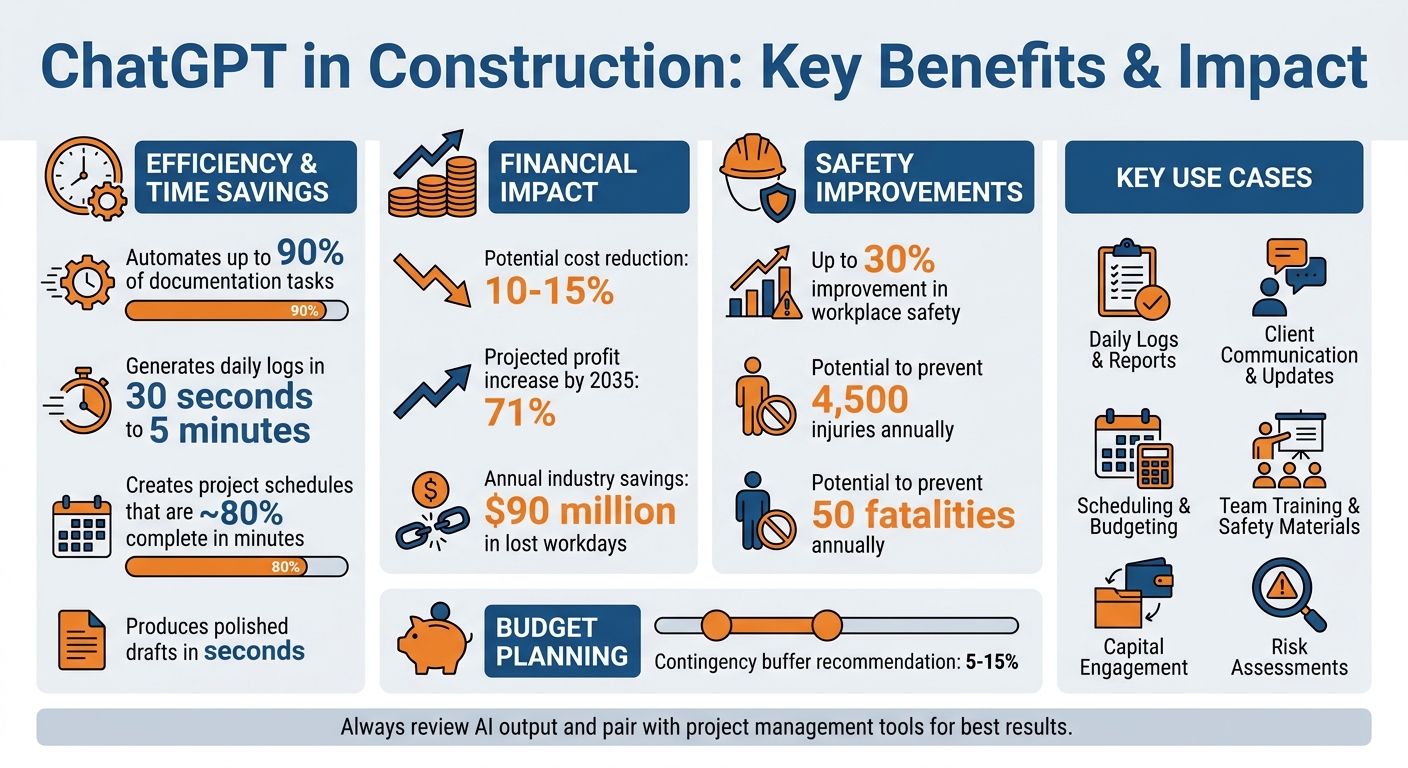
ChatGPT Benefits for Construction: Key Statistics and Time Savings
How to Use ChatGPT for Daily Logs
Daily logs play a key role in keeping construction projects on track and ensuring compliance. While they’re essential for protecting against legal issues and keeping everyone informed, they can also be a major time drain. ChatGPT offers a solution by automating up to 90% of documentation tasks. Instead of spending hours writing reports, you can now generate polished daily logs in seconds by feeding raw bullet points into ChatGPT.
Writing Daily Reports with ChatGPT
The quickest way to generate a daily log with ChatGPT is through the “Brain Dump” Method.
At the end of the day, jot down key bullet points covering areas like weather, completed work, safety updates, manpower, and delays.
Then, prompt ChatGPT with something like:
“Act as a site supervisor. Using these bullet points, write a concise daily report for [Date] with headings for Weather, Work Completed, Issues/Delays, Safety, and Manpower.”
ChatGPT will take your notes and create a professional, well-structured report in as little as 30 seconds to 5 minutes. For instance, if you provide input like:
“Weather: Sunny, 75°F. Work: Poured foundation slab. Safety: Morning briefing held, no incidents. Manpower: 12 workers on-site,”
ChatGPT will turn it into a clear, narrative-style report with headings and complete sentences.
Once ChatGPT generates the draft, review it for accuracy. Double-check details like labor hour totals or any calculations, and add context that the AI might not capture – such as why a delivery was delayed. After making necessary adjustments, your report is ready to go.
Adding ChatGPT Logs to Contractor Foreman
Once your report is finalized, transferring it to Contractor Foreman is straightforward.
Simply copy the formatted log from ChatGPT and paste it into the daily log field in Contractor Foreman. If needed, you can ask ChatGPT to format the report in Markdown for clear headings or export it as a CSV file for easy integration.
Pasting the log into Contractor Foreman centralizes your documentation, making it searchable and organized. This system automatically timestamps entries, creating a reliable audit trail for tracking project progress or resolving disputes. However, always avoid including sensitive personal or financial details in your ChatGPT prompts. Stick to general site information and anonymized data to maintain privacy and security.
sbb-itb-5eea312
Creating Client Communication Templates with ChatGPT
Keeping client communication smooth and efficient is essential for staying on top of project timelines and ensuring client satisfaction. ChatGPT can act as your reliable assistant, drafting professional updates so you can stay focused on fieldwork.
Think of ChatGPT as your co-pilot for crafting first drafts. Instead of struggling to get started, you can produce a polished draft in just seconds. It’s a great way to avoid writer’s block while maintaining a consistent tone in all your communications [8, 13].
Writing Client Emails and Project Updates
When creating client updates, use a structured approach that addresses four main points:
- What’s been completed
- What’s coming up
- Any heads-up items (like delays)
- What you need from the client
Something like:
“Act as a senior project manager. Write a professional weekly update for a residential remodel client. Include: Work Completed (kitchen demo and plumbing rough-in), What’s Next (electrical rough-in starting 5/6/2026), Heads-Up (tile delivery delayed 3 days due to supplier backorder), and Need from You (final cabinet hardware selection by 5/10/2026).”
ChatGPT can generate a professional email tailored to your audience. Use technical terms for commercial clients or a more approachable tone for homeowners. If you need to address sensitive topics like budget changes or delays, ask ChatGPT to draft a message that includes a clear summary of the issue, your proposed solution, and an updated timeline to keep the conversation transparent.
For Requests for Information (RFIs), you can prompt ChatGPT to include the key details you need, explain the potential impact of missing information (like delays or rework), and specify a response deadline. Similarly, when following up on subcontractor bids or updates, you can ask for a “polite but firm” tone to maintain professionalism.
Keep in mind, ChatGPT doesn’t have access to real-time project data like current costs or site photos unless you provide it manually. Always verify details like timelines, costs, or technical specifics and add any context the AI might miss – such as unique material choices or weather-related delays.
Once your draft is finalized, you can easily integrate it into your project records using your client portal.
Using Templates with Contractor Foreman’s Client Portal
After finalizing your message, simply copy and paste it into Contractor Foreman’s Client Portal. This keeps your communication organized in a centralized, searchable, and timestamped record.
Posting updates through the portal ensures clients receive automatic notifications and helps build a complete project history. This can be invaluable for referencing past conversations or showing how issues were handled. You can also pair text updates with photos uploaded to Contractor Foreman, creating a visual record that gives clients a clear view of project progress.
Building Task Schedules and Budgets with ChatGPT
Planning a project from scratch can feel overwhelming, but ChatGPT makes it easier. Instead of starting with a blank spreadsheet, you can quickly generate a detailed task list. In fact, ChatGPT can produce a draft that’s about 80% complete in just minutes, giving you a solid foundation to refine into a full project schedule.
ChatGPT also understands how construction projects flow.
For instance, it knows that tasks like MEP rough-ins and inspections should come before insulation or drywall installation. If you ask ChatGPT to map out the steps for building a 2,500 sq. ft. single-family home, it can highlight often-overlooked details – like permitting timelines and final inspections – and organize everything into logical phases.
When it comes to budgeting, ChatGPT can help you break down costs into categories such as materials, labor, equipment, permitting, and subcontractors. It can even include a contingency buffer of 5%–15%. This gives you a structured starting point to compare against current supplier quotes and local rates.
“ChatGPT acts as a co-pilot, not a replacement. Think of it as an experienced project manager you can bounce ideas off of.”- Spencer Lanoue, The Bricks
Creating Project Schedules with ChatGPT
Once you’ve got a preliminary task list, the next step is to assign durations and dependencies. A multi-step prompt works best here. Start by asking ChatGPT to organize tasks into major phases like site prep, foundation, framing, and finishes. Then, request estimated durations (in working days) and logical dependencies, outlining which tasks need to be completed before others can begin.
For more precise results, give ChatGPT detailed project information. Specify the type of project (e.g., residential remodel or commercial build-out), location (to factor in weather and building codes), and constraints (such as material lead times). For example, you could say:
“Create a construction schedule for a 3,000 sq. ft. retail renovation in Phoenix, AZ. Include demo, rough-ins, inspections, and finishes. Custom storefront glass has an 8-week lead time.”
You can also request phase-specific details.
For example:
“Break down the Framing phase for a two-story residential home.”
This will give you a list of tasks and their durations for that specific phase.
To ensure everything runs smoothly, validate the schedule with subcontractors and include some extra float time to account for potential delays.
Importing Schedules into Contractor Foreman
Once your schedule is finalized, ChatGPT can reformat it into CSV text with columns for Task ID, Task Description, Duration (Days), and Predecessors. This format allows you to easily import the schedule into tools like Contractor Foreman.
After importing, you can enhance the schedule by assigning costs to tasks, tracking spending against estimates, and monitoring progress with features like photo documentation and GPS-verified timesheets. This transforms your initial plan into a dynamic tool for managing your project in real time.
Using ChatGPT for Team Training and Communication
ChatGPT can quickly create role-specific training modules tailored to various positions, from crane operators to project managers. It even simulates real-world scenarios, guiding new hires through tasks like equipment handling and safety protocols. To make training more engaging, ChatGPT generates quizzes and case studies that challenge workers to apply situational thinking – offering a more interactive experience than traditional PowerPoint presentations. Below, we’ll explore how to use specific prompts to craft targeted safety materials and clear team messages.
By leveraging ChatGPT for real-time training, workplaces can see safety improvements of up to 30%, potentially avoiding 4,500 injuries and 50 fatalities each year. This also translates to fewer lost workdays and an estimated $90 million in annual savings for the industry.
ChatGPT can also analyze safety logs to identify recurring issues.
For instance, if multiple slip incidents occur in one area, it can flag the hazard, draft OSHA-compliant risk assessments, and simplify complex regulations – like California’s fire safety codes – into actionable checklists.
Writing Safety Training Materials with ChatGPT
Creating effective safety materials requires precise and detailed prompts. For example, if your project is in Chicago during winter, include cold-weather risks in your request. Similarly, if your site faces monsoon flooding, ask for flood-specific strategies.
Here’s how you can use prompts to generate targeted training content:
| Category | Sample Input Prompt | Output/Application |
|---|---|---|
| Onboarding | “Draft a 5-day training plan for onboarding new site supervisors. Include modules on safety and team management.” | A structured schedule covering safety protocols, leadership skills, and digital tool usage. |
| Risk Mitigation | “Analyze a scenario where a site is prone to flooding. Provide a risk assessment and suggest mitigation strategies.” | A detailed report with flood-proofing measures, temporary drainage options, and cost estimates. |
| Compliance | “Summarize the building code requirements for fire safety in commercial buildings in California.” | A simplified checklist of fire safety requirements for design and construction phases. |
| Daily Briefings | “Using these bullet points [list work tasks], write a concise daily safety briefing for today’s crew.” | A professional summary of hazards tied to specific tasks like concrete pouring. |
| Incident Response | “Write a professional email informing stakeholders of a project delay due to a crane malfunction, including safety steps taken.” | A clear email explaining the issue, safety measures, and updated project timelines. |
Always have a qualified professional review AI-generated safety materials before sharing them. This ensures the content aligns with current local regulations and specific site conditions.
Beyond training, ChatGPT is a valuable tool for crafting concise and effective team communications.
Writing Clear Team Messages
ChatGPT doesn’t just streamline training – it also enhances day-to-day communication on job sites. To ensure messages are accurate and relevant, include enough context in your prompts, such as specific site conditions or project details.
Using the “act as” prompt can help set the tone and language for professional contexts. If the initial draft feels too long or technical, you can refine it by asking ChatGPT to “make this more concise” or “simplify this for a general audience”.
Here are some practical ways to use ChatGPT for team communication:
- Task Assignments: Input your checklist and ask ChatGPT to clarify responsibilities for each team member.
- Delay Notifications: When delays occur, like equipment malfunctions, ask it to draft a message summarizing the issue, proposed solutions, and a revised timeline.
- Safety Briefings: Generate quick “toolbox talks” or 5-minute briefings for high-risk tasks, such as working at heights or welding.
Once your message is ready, attach it to tasks in tools like Contractor Foreman. This creates a centralized source for updates, ensuring critical information doesn’t get buried in email threads and everyone stays informed.
Conclusion
ChatGPT can take on tasks like drafting logs, writing client emails, creating preliminary construction schedules, and preparing safety materials. By managing time-consuming administrative work, it allows you to focus more on what’s happening on-site. That said, ChatGPT doesn’t have access to real-time project data, cost tracking, or site conditions. Pairing it with a Procore alternative like Contractor Foreman bridges this gap, integrating AI-generated content with live project files for a more cohesive workflow.
Instead of keeping AI-generated schedules separate from your actual project data, you can bring them directly into your project management system. This syncs them with budgets, timecards, and client portals, turning AI suggestions into tools that are practical and context-aware. By combining features like daily logs, client templates, schedules, and safety documents, you can streamline administrative duties while strengthening overall project management.
Studies suggest that AI tools could reduce costs by 10–15%, increase profits by 71% by 2035, and enhance safety by up to 30%, potentially preventing thousands of injuries and saving around $90 million in lost workdays.
The best approach is to treat ChatGPT as a co-pilot, not a replacement. Use it to draft safety plans, RFIs, and weekly updates, but always cross-check its output against your project details.
As Emma Locarnini from Arizona Building Contractors explains:
“ChatGPT helps me move faster and catch issues earlier, but it does not replace any of our roles. You still eed to think critically about everything it gives you”.
FAQs
What should I avoid putting into ChatGPT prompts on a jobsite?
When using ChatGPT prompts, steer clear of sharing unverified, inaccurate, or poorly structured project data. For example, avoid using inconsistent file formats, unsearchable PDFs, or vague descriptions. These issues can lead to outputs that are unclear or unreliable. Instead, aim to provide clear, well-organized, and accurate information to ensure the best results.
How do I verify ChatGPT’s schedules and budgets before using them?
To make sure ChatGPT’s schedules and budgets align with your project’s needs, take some time to review and cross-check its suggestions against your actual data and constraints. Think of the AI-generated plans as a starting point rather than a finished product. Compare them with your own cost estimates, timelines, and project plans. It’s also a good idea to have someone on your team with the right expertise validate the output. Use real-time data and expert insights to refine the plans, ensuring they’re accurate and practical before moving forward.
What’s the best way to turn ChatGPT drafts into Contractor Foreman records?
To make the most of ChatGPT, use it to draft materials like schedules, reports, or documentation. Once you have a draft, follow these steps to integrate it with Contractor Foreman:
- Create drafts in ChatGPT: Provide project specifics to generate initial content.
- Review and refine: Double-check the draft for accuracy and make necessary edits.
- Input into Contractor Foreman: Manually enter or upload the polished content using Contractor Foreman’s standard data entry process.
This approach ensures your data is accurate and seamlessly integrated.







