
- Quick Comparison
- What AI Actually Improves in Construction Project Management
- Contractor Foreman as the Core Project Management Hub
- 1. Scheduling & risk forecasting
- 2. Document control & workflow automation
- 3. Field visibility & progress tracking
- 4. Cost, bidding & team coordination
- How to Compare These AI Tools for Your Projects
- Conclusion
- FAQs
- Related Blog Posts
You just woke up. Your inbox has 40 unread emails, three RFIs are aging like milk, and someone in the field just texted “what’s the status on this again?” and a few second later, you received a photo of the wrong wall, asking if it’s the right one…
It’s incredible how — no matter how late you stay up to clear the backlog and how early you wake up to get ahead of it — something always slips through.
Welcome to construction project management — where relaxing even for one day can build management chaos.
Don’t worry! You don’t have to be a slave to construction paperwork and stress anymore. Especially now that technology is catching up real fast.
All that mental load — the tracking, the chasing, the remembering — AI can actually take a good chunk of it off your plate!
This list covers 20 AI tools across the areas that matter most:
- For scheduling: look at nPlan, Outbuild, Planaut, Construct AI, and Nahla AI
- For document control: check Constructable, Qamaq, BridgeDoc InSite, Aultech, and Modunex
- For field tracking: start with DroneDeploy Progress AI, Siteflo, NowVision.ai, FieldGrid, and Fieldwire
- For accurate bids: construction cost estimates, or margins drift: review ConstructWise, BuildEngine, Briq (Otto), Construct AI, and OptiServe AI
- For data management: a central hub like Contractor Foreman can help keep schedules, costs, logs, and documents in one place
The article also points to a few numbers worth knowing: AI tools can predict delays up to 45 days ahead, cut manual admin work by 30% to 40%, reduce document processing time by about 80%, and shorten RFI response times by 38%.
Pro Tip: Don’t start with the longest feature list. Start with the one problem that costs you the most time or money, test one tool on one project, and track the results. This approach is key to improving construction productivity across your entire operation.
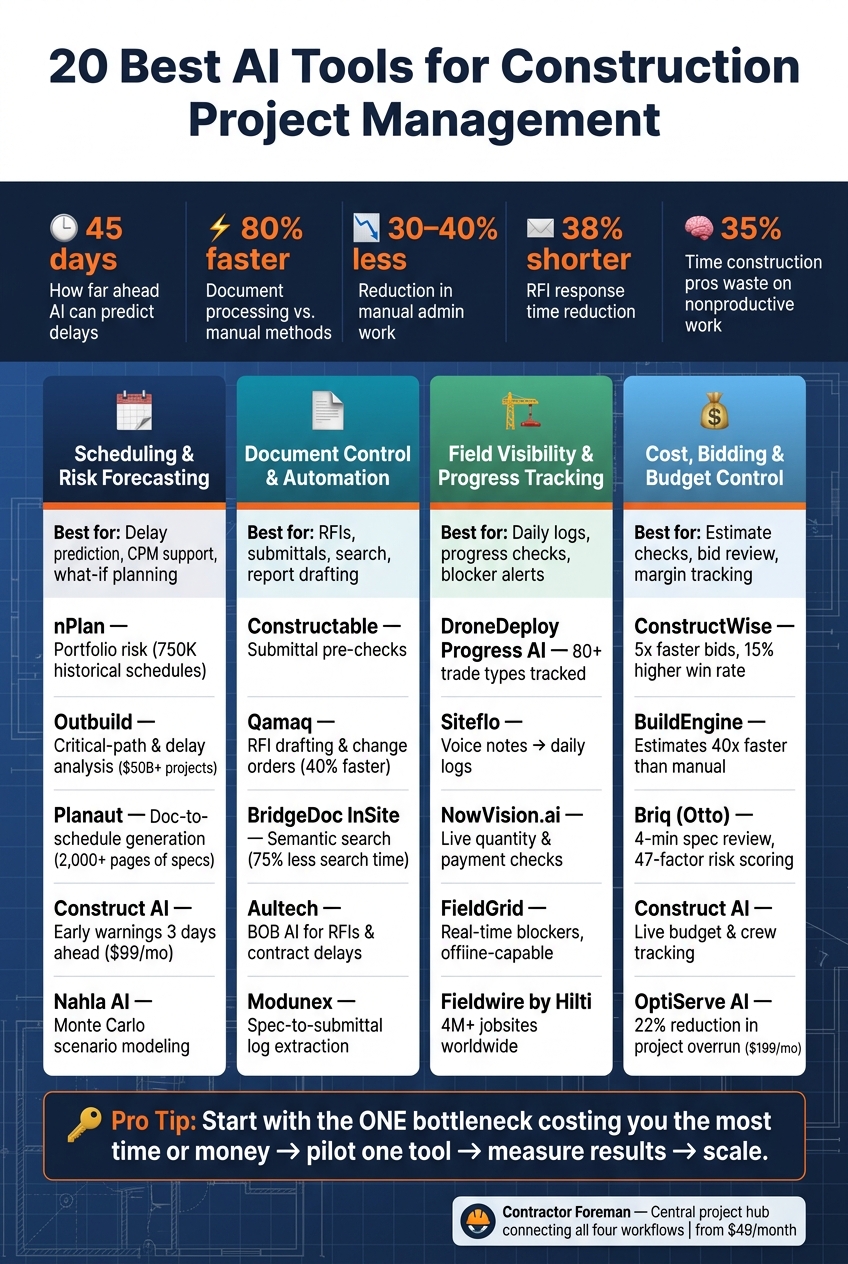
20 Best AI Tools for Construction Project Management: At-a-Glance Comparison
Quick Comparison
| Area | Best For | Tools Covered |
|---|---|---|
| Scheduling & risk | Delay prediction, CPM support, what-if planning | nPlan, Outbuild, Planaut, Construct AI, Nahla AI |
| Document control | Construction RFI software, submittals, search, report drafting | Constructable, Qamaq, BridgeDoc InSite, Aultech, Modunex |
| Field visibility | Daily logs, progress checks, blocker alerts | DroneDeploy Progress AI, Siteflo, NowVision.ai, FieldGrid, Fieldwire |
| Cost & bidding | Estimate checks, bid review, margin tracking | ConstructWise, BuildEngine, Briq (Otto), Construct AI, OptiServe AI |
| Project hub | One place for project records | Contractor Foreman |
If you want a simple way to read this list, think of it like this: pick the bottleneck first, then pick the tool type that fits it.
sbb-itb-5eea312
What AI Actually Improves in Construction Project Management
A lot of construction delays come down to one simple problem: bad or hard-to-find information.
Old schedules, missing submittals, and project files buried in random folders slow everything down. AI helps by catching schedule issues, document problems, and field-data gaps earlier.
Schedule prediction is one of the clearest areas where AI helps.
Predictive scheduling tools can spot slippage weeks before crews feel it on-site. They look at past job patterns, crew and material availability, and activity dependencies to flag risk before it turns into a jobsite problem. Some tools also model build sequences to trim time and labor, with reported gains of 17% shorter schedules and 14% lower labor costs.
Documents are another pain point.
AI can speed up contract review, submittal checks, and RFI tracking. Automated document processing can handle extraction and risk flagging up to 80% faster than manual methods. AI-assisted RFI management has also been shown to cut average response times by 38%. When decisions need to happen fast, that kind of time savings can keep work moving instead of leaving teams stuck waiting.
Field visibility is another big one.
This is where AI gives teams something many standard software tools struggle to provide: objective progress tracking. Computer vision systems can match 360-degree site footage to floor plans or BIM models and track progress at the element level.
So instead of relying on rough updates or gut calls, teams get a clearer picture of what’s done and what’s not. That matters even more when schedules, documents, field updates, and costs all sit in one place.
The time drain is bigger than most teams want to admit.
Construction pros spend 35% of their time on nonproductive work, including hunting for project information. AI-powered search cuts into that waste by letting teams ask plain-language questions like, “What is the slab thickness in Section B?” and get cited answers in seconds. That’s a strong argument for using one project hub that ties each workflow together.
Contractor Foreman as the Core Project Management Hub
Contractor Foreman gives AI tools one place to pull from for schedules, costs, field logs, and documents. That matters a lot because most small and mid-sized contractors keep project data scattered across too many systems. And when data is split up, AI tends to fall apart.
Contractor Foreman brings key project data into one hub, including scheduling, budget-to-actual tracking, QuickBooks sync, document control, GPS timecards, daily logs, safety meetings, and client portals. Plans start at $49/month, which makes it a solid fit for small crews. That shared record is what makes the AI tools below more accurate and more useful.
As James McCann, PMP notes, “machine learning works best when the data is clean.”
When cost codes, schedule updates, and field logs stay consistent and live in one place, AI has something solid to work with. Contractor Foreman also includes a “Project Brain” feature that stores job history, so the AI can answer questions with full project context.
With that base in place, the next sections break down the AI tools that help with scheduling, documents, field visibility, and cost control.
1. Scheduling & risk forecasting
Start with schedule tools. Delay risk is often the first place AI shows clear, measurable impact.
These five tools help contractors spot schedule risk, tighten timelines, and test changes without waiting around. Some focus on portfolio forecasting. Others help with schedule creation or early warning alerts.
nPlan – Portfolio-level risk forecasting
nPlan’s AI is trained on 750,000 historical schedules representing over $2 trillion in construction spend. It estimates the uncertainty around each activity based on past performance data, which can cut bias in risk estimates on large or complex jobs. It’s best suited for portfolio-level risk forecasting across big, complicated schedules.
Outbuild – Critical-path and delay analysis
Outbuild connects your master schedule with your look-ahead plan so both stay aligned. Its AI assistant lets project managers ask plain-English questions about critical paths, overdue tasks, and trade impacts. It’s used across more than $50 billion in active construction projects.
Planaut – Document-to-schedule generation
Planaut reads 2,000+ pages of specs and drawings and turns them into a linked CPM schedule in minutes. Pricing starts with the Basic plan at $49/month, while the Professional plan costs $349/month.
Construct AI – Early warning alerts
Construct AI flags issues about 3 days before they hit the job site by looking at crew availability, receivables, and past project data. Its Core plan starts at $99/month, and the Scale plan is $599/month.
Nahla AI – Monte Carlo scenario modeling
Nahla goes past a single finish-date target. It uses Monte Carlo simulations to show the odds of hitting specific completion dates, from P10 to P90, and suggests schedule changes. The PM reviews and approves changes before anything is applied.
2. Document control & workflow automation
If schedule forecasting helps teams spot trouble early, document control stops small mistakes from turning into bigger ones. And that matters, because document errors lead to rework, while teams still lose hours hunting for the right file. The tools below handle submittals, RFIs, reports, and search without dragging down review cycles.
Constructable – Submittal pre-checks and plan review
Constructable checks submittals for missing or wrong information before they get to consultants. That means issues get caught at the source, not later when fixes cost more time. It also keeps plan reviews in sync and makes topic tracking easier to follow.
Qamaq – RFI drafting and change order analysis
Qamaq drafts RFIs from site photos, BIM clashes, or voice notes. It also reviews proposed changes against schedule and budget effects, then drafts change-order documentation. AI-driven workflows can result in 40% faster change order processing.
BridgeDoc InSite – Automated reporting and semantic search
BridgeDoc InSite pulls from daily logs and meeting minutes to draft weekly progress reports on its own. Its semantic search helps teams find document versions or contract clauses using plain-language questions, which feels a lot more like asking a coworker than digging through folders. Platforms with semantic search can reduce project document search time by 75%.
Aultech – BOB AI module for RFIs and contract delays
Aultech’s BOB AI module auto-drafts RFIs and flags contract delay triggers based on document activity. It puts a lot of weight on audit trails, with time-stamped records for every revision and approval to support claims defense.
Modunex – Spec-to-submittal log extraction
Modunex turns specification PDFs into CSI-based submittal logs in seconds. It also connects with Procore and Autodesk BIM 360.
3. Field visibility & progress tracking
Once the office has clean documents, the next choke point is the jobsite.
Field visibility helps keep work moving. These tools turn photos, voice notes, and drone footage into progress reports, daily logs, and blocker alerts. That matters because GCs often spend 4+ hours per day chasing field updates. With the right setup, jobsite activity becomes current progress data instead of a pile of scattered check-ins.
DroneDeploy Progress AI – Visual percent-complete by trade
DroneDeploy’s Progress AI uses drone and 360-camera footage to show percent complete by location and trade status across 80+ trade types. It can verify installed work without needing a pre-existing BIM model or schedule. That’s a big deal on jobs where the plan isn’t neatly mapped from day one.
Siteflo – Voice notes turned into daily logs
Siteflo takes field photos and voice notes and turns them into daily logs, stage progress updates, and task lists on its own. For crews that report by voice, this can cut a lot of back-and-forth. It also helps teams avoid missed draw requests.
NowVision.ai – Live quantity and payment checks
NowVision.ai links field captures to a digital twin and checks quantities against payment records in real time. It also sends predictive delay alerts. So instead of finding out late that something is off, teams can spot trouble while there’s still time to act.
FieldGrid – Real-time blockers and automatic summaries
FieldGrid flags blockers and delays as they happen, then creates daily logs and progress summaries automatically. Its mobile app also works offline and syncs when service comes back. That’s useful on sites where signal drops in and out all day.
Fieldwire by Hilti – AI-synced task updates and daily reports
Fieldwire by Hilti turns field photos, notes, and digital field forms into synced task updates and daily reports, with data moving back to the office in real time. It supports more than 4,000,000 jobsites worldwide.
4. Cost, bidding & team coordination
Once field updates are current, AI can turn that information into sharper estimates and tighter budget control.
Cost issues usually don’t show up all at once. They creep in through missed scope, slow change orders, and budgets that drift off track. These five tools help estimating, budget control, and team alignment from bid to closeout.
ConstructWise – Historical data that tightens estimates
ConstructWise checks new estimates against past project data to flag outliers before a bid goes out. Users report 5x faster bid preparation and 15% higher win rates when using dynamic data instead of stale price books.
BuildEngine – Fast, weighted cost modeling
BuildEngine puts the focus on the small set of cost drivers that shape most of the budget. It can generate estimates in minutes, up to 40x faster than manual methods.
Briq (Otto) – Faster bid screening
Briq’s Otto reviews spec books in 4 minutes, pulling out buried scope items and hidden contract terms that estimators often miss. Its 47-factor risk scoring helps teams decide which bids are worth chasing – and which ones to pass on.
Construct AI – Live budget and crew tracking
Construct AI tracks budget, crew hours, AR, and SOV in one place. It also flags issues before costs start to snowball .
OptiServe AI – Live projected-vs.-actual tracking
OptiServe AI compares projected and actual labor and material costs in real time. It also flags overdue deliverables and margin risk. The platform is associated with a 22% reduction in average project overrun, with plans starting at $199/month.
Next, compare these tools by workflow, project size, and the type of data they already use.
How to Compare These AI Tools for Your Projects
Use the workflows above to pick the tool that fixes your biggest bottleneck first. Start there, not with a long feature list.
So go ahead: Name the ONE problem that’s costing you the most time or money.
Then compare each tool across six areas:
- Team size: Smaller crews often do better with low-overhead, mobile-first tools. Larger teams can usually take on deeper setup.
- Project complexity: BIM-heavy, multi-trade jobs tend to call for deeper planning and tracking than simpler jobs.
- Data requirements: Ask what the tool needs from you on day one before it can be useful.
- Setup effort: Training and migration can shape ROI just as much as the AI itself.
- Mobile usability: If crews don’t use the app on a steady basis, the AI won’t have good data to work with.
- System fit: Check that it works with the accounting, scheduling, and document systems you already have.
These filters cut the list down fast and keep AI tied to the jobsite issue you need to fix.
Use the criteria below to match each pain point to the right tool type:
| Pain Point | Tool Type to Prioritize |
|---|---|
| Slow submittals | Submittal pre-checks and workflow automation |
| Weak schedule forecasting | Portfolio risk forecasting and critical-path analysis |
| Fragmented field reporting | Voice-to-log and visual progress tracking |
| Poor document search | Semantic search and automated reporting |
| Limited cost visibility | Live budget tracking and bid screening |
Pilot one tool on one project, measure delay and admin-time reduction, then scale.
Conclusion
No single AI tool fixes every project-management issue. The right choice comes down to the part of your workflow that needs the most help.
Across the tools above, four use cases stand out. Predictive scheduling tools, document automation platforms, field-progress trackers, and cost-control systems each deal with a different bottleneck on the job.
The best setup is usually a central project hub paired with a small set of tools aimed at your biggest pain point. When project data lives in one hub, AI tends to be more accurate and more useful.
Start with the workflow that costs you the most time or money, pilot one tool, and measure what changes. Used well, AI cuts admin drag and gives contractors faster, clearer control over the job.
FAQs
How do I choose the right AI tool for my project?
Start by figuring out which documentation or admin task eats up the most time. That might be progress reports, estimates, RFIs, or change orders.
Then pick a tool that fixes that specific, measurable problem, fits into the software you already use, and holds up in a simple side-by-side test. Do one task by hand and then with the AI. If the tool cuts the time by more than half and gives you output you can use right away, it’s worth using.
What data do AI construction tools need to work well?
AI construction tools work best when they have clean, well-structured data to work from. A lot of these tools lean on past project data to help with scheduling and prediction.
Common inputs include:
- Digital blueprints and plan sets
- RFIs, submittals, and change orders
- Real-time site data from sensors or cameras
- BIM models
- Financial records
Should I start with one tool or a full AI stack?
Start with one specific tool, not a full AI stack.
Pick a clear, measurable problem like estimating takeoffs, contract review, or document search. Then choose a tool built to handle that job.
A full stack can bring extra setup cost and more complexity than most teams need at the start. One proven tool lets you get value fast, learn what works, and build some hands-on experience before you roll AI into more parts of a project.
Related Blog Posts







