
Manual takeoffs on a 50,000 sq. ft. building typically take 40 to 60 hours.
With AI? Just 6 to 8 hours.
Proposals usually take 4 hours to write.
With AI? Around 20 minutes.
By using AI in construction, you’ll have time to focus on what actually wins bids: making decisions, not counting fixtures.
The best approach is simple: let AI handle the repeatable work, and keep the judgment calls for your estimators.
That means using AI to count items, measure areas and lengths, compare drawing revisions, check plans against specs, pull pricing from past projects, and draft proposal text. Your estimators still review scope gaps, crew productivity, site risks, exclusions, markups, and the final bid.
How to Maximize AI in Your Estimating Workflow:
- Start with clean files — use searchable PDFs when possible, scan at 300 DPI+ if needed, merge addenda into the current set, keep file names and spec sections organized
- Use AI where it works best — drywall, concrete, roofing, framing, flooring, plumbing fixtures, electrical device counts
- Add a review stop before pricing — check sheet dates, confirm addenda status, strip cover pages and logs from counts, review low-confidence flags, verify scale against a known dimension
- Let AI help after takeoff — spot missing line items from specs, compare drawing changes between revisions, pull labor/material/equipment pricing from past jobs, draft bid summaries and proposal sections
- Roll it out in a controlled way — test on one trade or project type, run AI alongside manual estimating for five bids, track time spent on plan review/takeoff/pricing/proposal assembly, check estimate variance before using it on live bids
Takeaway: AI helps most when your process is already organized. It can shrink the counting, sorting, checking, and drafting work. But I’d still keep human control over scope, costs, risk, and bid strategy.
The rest of the article explains how to set up files, review AI output, speed up pricing, manage addenda, and move estimate data into the rest of the business without extra re-entry.
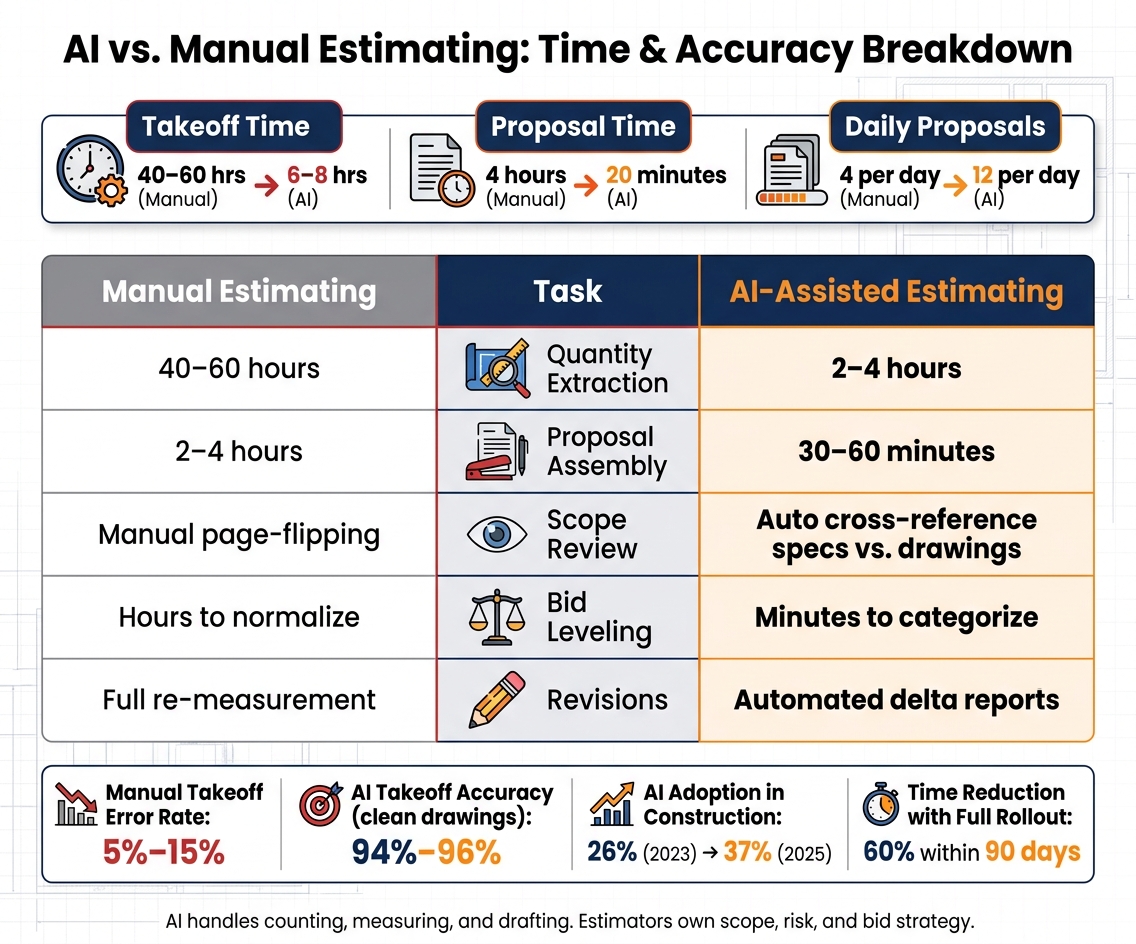
AI vs. Manual Estimating: Time & Accuracy Breakdown
Set Up AI for Reliable Takeoffs
AI takeoffs work best when the plan set is clean and complete.
Prepare Digital Plans, Specs, and File Naming Standards
Searchable PDFs tend to process faster and with better accuracy than scanned images. If your plans are scanned, aim for 300 DPI or higher. Once you drop below 200 DPI, accuracy can fall off quite a bit.
Before upload, merge addenda into the base drawing set in chronological order. It also helps to remove or clearly mark revision clouds so the system doesn’t double-count revised areas.
For U.S. contractors, make sure the platform is set to feet, inches, square feet, and cubic yards. Clean file names and organized spec sections also make it easier for AI to match plan callouts with spec requirements.
Once the files are in good shape, AI can start pulling quantities from the scopes it handles best.
Use AI to Extract Quantities for Common Scopes
AI tends to do best with common scopes like drywall, concrete, roofing, framing, flooring, plumbing fixtures, and electrical outlets. On clear, complete drawings, accuracy for these standard items can hit 94% to 96%. It can also pull linear footage, square footage, and counts through computer vision and OCR.
Before those quantities move into pricing, pause for a short review. Look for overlapping geometry, duplicate sheets, and notes that change the counting rules. Then verify scale against a known dimension before accepting any quantity.
Build a Review Checkpoint Before Quantities Move to Pricing
Check the sheet set dates, confirm addenda status, and exclude non-drawing pages like cover sheets, energy reports, and RFI logs so they don’t pollute the count. Most platforms also assign confidence scores, which makes low-confidence pages or items the first place to review by hand.
Some systems sort pages first and send each sheet type to the right processing step. That shifts more of the estimator’s time toward validation instead of manual counting.
In one 2026 commercial project, an 80-page set was processed in under 12 minutes, producing a $686,646 estimate.
A senior estimator confirmed the result was within the expected range.
With the quantities checked, pricing tends to involve less rework.
sbb-itb-5eea312
Use AI to Catch Scope Gaps and Price Faster
Once quantities are locked in, the next big risk is simple: a scope item never makes it into the estimate. That’s why scope review often becomes the next bottleneck after takeoff.
Flag Missing Line Items and Drawing Mismatches
A lot of scope gaps hide in the specs, not the drawings. AI can parse specs and cross-check plan callouts to spot missing items. Some systems go a step further with a multi-pass workflow. The first pass tags page types like floor plans, schedules, and RFIs. The second handles rule-based measurements. The third pulls out trade items that are easy to miss, like fire protection, roof patching, and structural reinforcement.
In a 2026 case study, that workflow flagged missing scope items in under 12 minutes.
That said, this isn’t a set-it-and-forget-it process. Low-confidence flags should go to human review, and estimators still need to use judgment on project-specific exclusions, alternates, and site conditions.
Apply Historical Cost Data to Labor, Material, and Equipment Pricing
After missing scope is accounted for, the same data can help speed up pricing. AI can pull unit prices from past job costs and standardized cost codes, then flag line items that drift from your historical baseline.
Many teams test the setup on a finished project before they bid with it. If the variance is more than 12%, it’s time to review the rates and cost codes. That matters because the whole system depends on clean historical data. If past projects don’t use a consistent cost-code structure, the comparisons fall apart.
Those prices can then flow straight into proposal language and revision tracking.
AI-Assisted Pricing vs. Manual Pricing: A Side-by-Side Comparison
The table below shows where AI cuts the most time and where estimator review still plays a key role.
| Task | Manual Pricing | AI-Assisted Pricing | Estimator Review |
|---|---|---|---|
| Quantity Extraction | 40–60 hours of manual counting/tracing | 2–4 hours of automated processing | Verify scale and edge cases |
| Cost Lookup | Static rate books or spreadsheets | Real-time integration with historical actuals | Adjust for crew productivity |
| Scope Review | Depends on estimator memory and page-flipping | NER cross-references specs vs. drawings automatically | Confirm exclusions and site conditions |
| Bid Leveling | Hours spent normalizing disparate sub-quotes | Minutes to extract and categorize sub-bid line items | Final selection of trusted partners |
| Revisions | Manual re-measurement of affected areas | Automated delta reports showing quantity changes | Review changed quantities and cost impacts |
The pattern is pretty clear. AI shrinks the mechanical work, while the estimator spends more time on the calls that shape bid quality.
Generate Clearer Proposals and Manage Revisions
Turn Estimate Data into Bid Summaries and Proposal Language
Once pricing is locked in, the next job is turning estimate data into a bid package a client can scan fast. Doing that by hand usually takes 2–4 hours per estimate. AI can trim that to 30–60 minutes by filling prebuilt templates with headers, terms, inclusions, exclusions, and signature blocks.
The big time-saver isn’t AI writing from zero. It’s using templates. Build reusable scope blocks for common work like framing, MEP, and finishes, then have AI pull them into the proposal based on the estimate.
One contractor cut proposal creation from 4 hours to 20 minutes and tripled daily output.
That said, don’t let speed turn into sloppiness. Review every AI-generated proposal before it goes out. Check contract alignment, exclusions, and any wording that could create a promise you never meant to make.
Track Addenda, Quantity Changes, and Estimate Revisions
Once the proposal is drafted, the bigger danger is a late change slipping past the team. A last-minute addendum or sheet update can throw off the whole bid before submission.
AI can compare revised drawings against the baseline and flag only the quantities and cost impacts that changed. That means the estimator can review the flagged items and confirm repricing instead of starting a full re-measurement from scratch.
It also helps to keep a clean revision log. Track each revision event, what changed, the issue date, and the cost impact. Keep that record in one place so each estimate version stays traceable. If a client challenges a number after award, you can point to when it changed and why.
Connect Estimating Outputs to the Rest of the Business
Approved estimate data shouldn’t sit trapped inside the bid file. Push approved line items, quantities, and cost codes into budgets, schedules, and procurement.
Contractor Foreman supports this kind of connected workflow, letting growing contractors push approved estimate data into budgets, schedules, and accounting integrations without re-entering data, with mobile access for field teams who need to reference scope and cost details on-site.
The point is simple: move estimate data into the job without typing it all in again.
Conclusion: Start Small, Measure Results, and Keep Human Control
AI can make a good estimating process much faster. It won’t repair a broken one.
The upside shows up across takeoff, scope review, pricing, proposals, and revisions. And those gains build on each other. Firms that roll out digital takeoff, pricing integration, and proposal automation in sequence can see a 60% time reduction within 90 days. That’s why it makes sense to begin with one use case you can repeat.
A smart place to start is one repeatable trade or project type, like drywall, concrete, or residential additions. Run AI next to manual estimating for five bids, then compare the results before you use it on live work.
Before rollout, track how long three manual estimates take at each stage:
- Plan review
- Takeoff
- Pricing
- Proposal assembly
That gives you a clean baseline to measure against.
AI can handle the counting, structure the data, and flag issues. The estimator still owns unit costs, markups, and scope gaps. When that line is clear, the estimator can spend more time on work that matters more: value engineering, risk assessment, and relationship management. That’s where experience helps protect margin.
FAQs
What estimating tasks should I automate first with AI?
Start with the tasks that eat up the most time and tend to cause the most mistakes. Quantity takeoff is usually the best place to begin. AI can scan blueprints or BIM models, pull measurements, count fixtures, and build material quantities much faster than doing it by hand.
Next, move to proposal assembly and line-item drafting based on job descriptions. AI can put together the first draft, but a person should still do the final check on pricing and scope.
How accurate are AI takeoffs on real construction drawings?
AI takeoff accuracy depends on two big things: document quality and project complexity. On standard residential or light commercial drawings, it usually falls between 80% and 98%.
That range sounds strong, and in many cases it is. AI can handle measurements and counts fast, which makes it useful when speed matters. But the numbers can slip when the source files are messy. Hand-drawn plans, low-resolution scans, and complex MEP systems tend to cause more errors.
Here’s the simple way to look at it: AI is great for speed, but people still need to check the work. Human review is still needed to validate edge cases and narrative-based requirements.
How do I roll out AI without risking live bids?
Treat AI as a drafting tool, not a hands-off decision-maker.
Start small. Pick one low-risk project type first, then track time saved and accuracy before you roll it out any further. That gives you a clean way to see what the tool can do without putting too much on the line.
A smart first test is to run a finished past project through the AI – one where you already know the actual costs. Then compare the AI’s estimate to what happened in the field. If the variance comes in above 8% to 12%, tighten up your material categories and test again.
Most of all, keep human oversight in place for final numbers, scope checks, and completeness. AI can help you get a first pass done faster. It still shouldn’t be the last word.







