
- Quick Comparison
- What Makes an AI Feature Worth Paying For
- 1. Contractor Foreman AI Safety and Documentation Tools
- 2. Predictive Scheduling and Delay Risk Analytics
- 3. Automated Daily Logs and Site Reporting Summaries
- 4. Cost and Budget Variance Detection
- 5. Document Search and Data Extraction
- 6. Risk Detection and Safety Monitoring
- 7. Resource Forecasting and Crew Planning
- 8. AI-Powered Communication and Collaboration Tools
- AI Feature Comparison at a Glance
- How to Match AI Features to Your Construction Workflow
- Red Flags to Watch for When Evaluating AI in Construction Software
- Conclusion
- FAQs
- Related Blog Posts
Somewhere right now, a PM is buried in RFIs, chasing down a change order, and re-doing a daily log for the third time this week.
It’s not just incredibly annoying. It’s expensive and time-consuming, too!
Now if only they started to integrate AI into their workflow, they’d be sipping coffee at their kid’s soccer game instead — and saving thousands like the rest of those who have.
The right AI-powered features — from predictive scheduling and analytics to smarter communication tools — don’t just save time on daily logs and documentation. They catch budget drift before it eats your margins, flag scheduling risks before they cause real delays, and spot safety hazards before they become incidents.
The numbers back this up:
- 5 to 10 hours saved per week per project manager on documentation
- 15% to 25% fewer schedule-related delays
- 20 minutes saved per daily log
- 10% to 20% fewer unplanned change orders
- Up to 60% fewer recordable safety incidents in some cases
But not all AI features deliver the same value for every team — because it’s not about buying AI like it’s some magic fix for all your construction headaches — you have to know which feature solves which problem, so you’re actually fixing something instead of just paying for a shinier version of the same mess.
Below, we break down the seven core AI capabilities reshaping construction management:
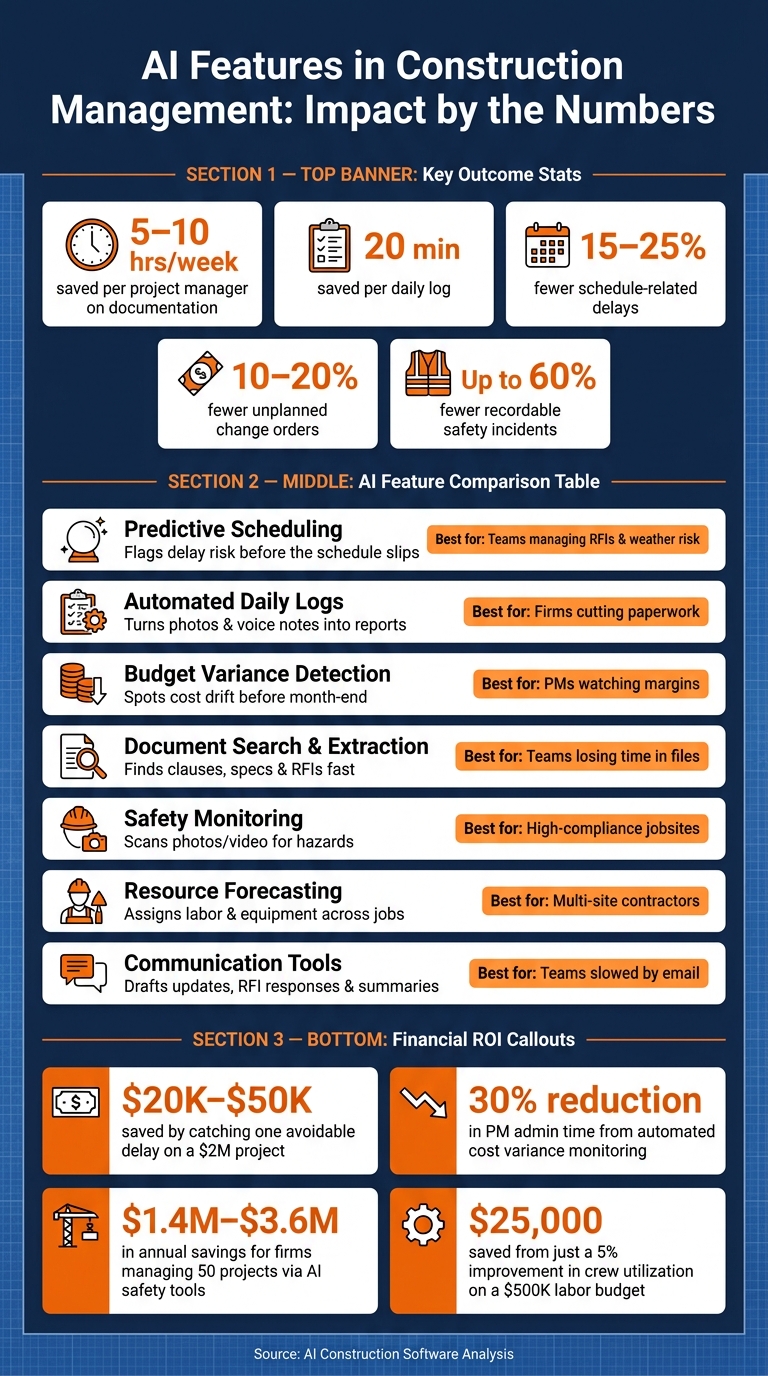
AI in Construction: Key Features, Time Savings & ROI at a Glance
Quick Comparison
| Feature | Main job it does | Best fit |
|---|---|---|
| Predictive scheduling | Flags delay risk before the schedule slips | Teams dealing with RFIs, coordination issues, and weather risk |
| Automated daily logs | Turns photos, voice notes, and field updates into reports | Firms trying to cut paperwork and improve recordkeeping |
| Budget variance detection | Spots cost drift before month-end | PMs watching margins across active jobs |
| Document search and extraction | Finds clauses, specs, RFIs, and submittals fast | Teams losing time digging through files |
| Safety monitoring | Scans photos and video for hazards | Jobs with heavy compliance and safety exposure |
| Resource forecasting | Helps assign labor and equipment across jobs | Contractors balancing crews on multiple sites |
| Communication tools | Drafts updates, summaries, and RFI responses | Teams slowed by email, meetings, and client updates |
A simple buying filter works best.
Ask the following questions to know if the AI feature is actually serving you:
- Does it solve a repeated bottleneck?
- Does it use existing project data?
- Does it reduce double entry?
- Can the team trace answers back to source files?
Tools that only look polished in a demo, but need clean manual inputs, tend to fall short once live project data gets messy.
sbb-itb-5eea312
What Makes an AI Feature Worth Paying For
Not every AI feature belongs on a jobsite. A lot of vendors slap the label “AI-powered” on almost anything. But the real test is simple: does it fix a bottleneck that burns time or money?
The best AI tools don’t ask your team to learn a whole new system or type the same info twice. They sit on top of the data you already collect and fit into the workflow you already use, instead of acting like a separate tool your crew has to keep feeding by hand.
A good way to judge any feature is to tie it to the problem it solves. Think in plain terms: slow RFIs, late daily logs, weak budget visibility, or trouble finding the right document when someone needs it now.
Use the outcomes below as your filter before you buy.
These are the ones that matter most when you’re comparing AI tools:
| Outcome | What Good AI Does | Why It Matters |
|---|---|---|
| Schedule reliability | Flags scheduling mistakes and delay risks 3–4 weeks in advance | Gives you time to act, not just react |
| Documentation speed | Builds daily logs from photos and voice notes | Removes one of the heaviest daily admin tasks |
| Cost protection | Alerts on budget variances in real time | Catching one avoidable delay on a $2 million job can save $20,000–$50,000 |
| Information access | Searches drawings, specs, RFIs, and submittals in plain language | Cuts time spent hunting for project details |
| Safety oversight | Analyzes site photos for missing PPE or unsecured scaffolding | Helps close gaps in manual safety checks |
There’s one catch. If your project data is scattered across spreadsheets, text messages, and paper logs, even strong AI features will produce weak results. That’s the lens to use as you look at the features below.
1. Contractor Foreman AI Safety and Documentation Tools
Workflow Problem Solved
Safety paperwork often ends up scattered across handwritten notes, phone photos, and long email chains. That creates extra admin work and makes compliance harder than it should be. For many contractors, this is the first AI feature that feels worth the spend because it cuts down daily paperwork while helping keep records in order. Contractor Foreman pulls that work into one place, so daily activity is entered once and sorted automatically.
Type of AI Capability
Contractor Foreman uses generative AI, computer vision, and geofencing to handle safety and documentation tasks. It can create OSHA-aligned safety topics in English or Spanish, scan jobsite photos for hazards, and automate visitor logs and man-hour tracking.
Operational Impact on Jobsites
Photo analysis turns routine progress pictures into safety records without adding more admin work. That matters on busy jobsites, where even small paperwork tasks can pile up fast. The system also records weather each day automatically, which helps document delays and site conditions that affect progress.
Financial or Risk Visibility Gained
The geofencing and AI vision tools track visitors and labor hours with 99% accuracy, which can help cut billing mistakes tied to unverified hours. The platform also tracks certifications and sends insurance expiration alerts. On top of that, daily logs create a searchable audit trail for disputes and compliance.
Once safety and documentation are handled automatically, the next step is figuring out whether the software can flag schedule risk before delays hit the job.
2. Predictive Scheduling and Delay Risk Analytics
Workflow Problem Solved
Most scheduling issues don’t show up with a big warning label. It’s usually more subtle than that: a slow RFI response, a missed coordination detail, a field note that doesn’t get enough attention. Then, before anyone can point to one clear cause, the schedule starts to drift.
AI helps connect those dots. It links RFIs, emails, and field notes so teams can spot delay risk before the schedule starts slipping. From there, the key is turning those early signals into a forecast the team can use.
Type of AI Capability
At the center of this is machine learning. The system compares RFI timing, change orders, and budget trends against past project data to flag drift with predictive analytics. So if RFI response times are running 40% slower than your past average, a good platform can treat that as an early warning for a schedule slip before it shows up on the timeline.
Some tools go further. They bring in weather forecasts to predict disruptions and suggest mitigation steps. Others use natural language processing (NLP) to scan field notes and project communications for patterns tied to slow responses or stalled decisions.
Operational Impact on Jobsites
This matters because timing is everything on a jobsite. AI-driven systems can flag risks 3–4 weeks before they affect the timeline, which gives project managers time to step in. Contractors using predictive analytics report 15–25% fewer schedule-related delays.
The other big win is focus. AI ranks open issues by schedule impact, so teams spend time on the problems that can actually hold up the job. That means they can resequence crews, push for approvals, or shift labor before one delay turns into a chain reaction.
On a busy project, a PM might be staring at 200 open items; AI surfaces the 5 that actually threaten the timeline.
Financial or Risk Visibility Gained
AI won’t remove risk from construction. That’s not how the work goes. But it can help teams act sooner, and up to 70% of predicted risks can be prevented through AI-recommended interventions.
These systems also score subcontractor reliability based on capacity and past performance. That gives project managers a better read on who to assign and when, before a bottleneck becomes a missed milestone. Those same alerts also support cleaner daily reporting, which leads into automated daily logs.
3. Automated Daily Logs and Site Reporting Summaries
Workflow Problem Solved
Daily logs often get written after the shift, from memory. That’s when details go missing, reports come in late, and people start doubting what’s in them. AI changes that by pulling in photos, voice notes, and field updates during the day, so the log gets built while the work is still happening.
Type of AI Capability
NLP turns rough field notes into clean, past-tense writeups for reports and claims. Computer vision tags photos and video. Automated integrations also pull in weather data and clock-in records.
Operational Impact on Jobsites
AI-powered logging tools can save superintendents about 20 minutes per daily log. That time adds up fast on a busy jobsite.
And speed isn’t the only point. A daily log only helps if it’s detailed enough to back up reporting and disputes later. If the crew is working in a dead zone, offline capture lets them record updates without a signal and sync everything later.
Financial or Risk Visibility Gained
When logs are completed in real time, they become time-stamped evidence for delay claims or legal disputes. That can make a big difference when the story of the job is being picked apart weeks or months later.
They also help project managers compare planned costs with actual costs and spot budget variances early. Better records support delay claims and budget disputes because they show why the schedule started slipping, not just the fact that it slipped.
One practical note: superintendents should review AI-generated text before filing to verify accuracy.
Those same daily records also reveal budget drift, which leads into variance detection.
4. Cost and Budget Variance Detection
Workflow Problem Solved
After daily logs are up and running, the next issue is simple: is the job starting to slip on cost? Most project managers don’t spot budget trouble until the overrun has already landed. AI helps teams catch that drift earlier, before it shows up in month-end reports.
Type of AI Capability
AI variance detection estimates final cost at completion by comparing actual costs, open commitments, and pending change orders against construction cost estimates. It also uses machine learning to scan past project data and flag cost codes that are more likely to run over, based on patterns from similar jobs.
Operational Impact on Jobsites
This gives project managers a head start. AI can surface budget risk 3–4 weeks before it hits the bottom line, which means there’s still time to reforecast, make course corrections, and have cleaner cost talks with the field team and accounting before small gaps turn into bigger ones.
There’s also a time savings piece here. Automating cost variance monitoring can cut project manager admin time by about 30%.
Financial or Risk Visibility Gained
Contractors using these tools report 10–20% fewer unplanned change orders. On a $2 million project, catching even one avoidable overrun early can save between $20,000 and $50,000.
There’s a catch, though. AI only works as well as the data fed into it. If field crews aren’t logging hours and costs the right way, the alerts get less dependable. That’s why variance detection works best as a control tool, not just another reporting layer.
5. Document Search and Data Extraction
Workflow Problem Solved
After budget control, the next bottleneck is getting to the right information fast. Construction teams lose a lot of time digging through clauses, drawing notes, RFI answers, and submittal details. AI cuts that search time and helps teams miss fewer details.
Type of AI Capability
AI document tools are good at three jobs. Natural language querying lets someone ask a plain-English question like, “What do we do if there’s a delay?” and pull up the right clause fast. Automated classification tags and routes uploaded drawings, specs, and submittals without manual filing. Cross-checking specs and drawings spots conflicts before they make their way to the field.
That matters because it turns slow document hunting into near-instant answers.
Operational Impact on Jobsites
These tools can also cut the time needed to draft an RFI response from 30 minutes to about 30 seconds. At Balfour Beatty US, field teams query contracts directly instead of sending every question to legal.
Financial or Risk Visibility Gained
AI document tools can flag risky contract language such as delay provisions, liquidated damages clauses, and ambiguous scope definitions. Better document visibility helps teams catch risky clauses, scope gaps, and delay exposure earlier.
Fast document access also helps teams spot safety and compliance issues before they reach the field.
6. Risk Detection and Safety Monitoring
Workflow Problem Solved
Once teams can pull up the right info fast, the next step is simple: spot trouble on the jobsite before it turns into an incident.
AI safety monitoring helps fill the gap between inspections. It scans photos and camera feeds in real time, so hazards don’t sit unnoticed until someone files a report. That matters because slow reporting cuts into the time crews have to respond. With continuous monitoring, teams can catch issues as they happen instead of finding out later.
Type of AI Capability
Computer vision can flag missing PPE, fall hazards, and standing water in jobsite images. At the same time, NLP can capture and translate toolbox talks so key hazards are written down and easy to find later.
Put those tools together, and scattered photos, video, and spoken updates become a searchable risk record. That cuts down on manual review and helps supervisors step in faster.
In plain terms, it turns raw image and audio data into a safety feed teams can actually use.
Operational Impact and Financial Value
The payoff isn’t hard to see. Teams using AI safety monitoring have found repeat-risk areas that need fast attention, and they’ve predicted a meaningful share of incidents before they happened. Suffolk Construction‘s model predicted 20% of safety incidents with 80% accuracy.
The cost case is just as strong. Companies using these tools have seen a 60% drop in recordable jobsite incidents and a 20% drop in insurance premiums. For a company managing 50 projects, AI-driven risk abatement can mean $1.4 million to $3.6 million in yearly savings.
That early warning window gives crews time to make changes before conditions get worse. They can shift schedules, bring in more safety support, or brief teams on what to watch for.
Safety alerts also shape staffing decisions, which leads to the next AI feature: crew and resource forecasting.
7. Resource Forecasting and Crew Planning
Workflow Problem Solved
After safety issues are flagged, the next step is simple: get the right people and equipment to the right job before downtime starts eating into the day.
Resource forecasting helps contractors staff multiple active sites without stretching key people too thin or letting equipment sit unused. AI looks at how one job affects the next, then shows where labor is needed most.
Type of AI Capability
Predictive models use past project data to estimate task durations and spot labor patterns. Some tools can also suggest crew changes – or even automate reassignments – when one job wraps up early.
Operational Impact on Jobsites
Crew dispatching can match workers to jobs based on real-time proximity, certifications, and current workload. That matters on busy schedules, where one delay can throw off the rest of the week. AI-powered workload balancing also helps contractors shift manpower when priorities change, cutting dead time between jobs and keeping crews moving.
Financial or Risk Visibility Gained
AI gives contractors a clearer view of labor costs by comparing actual labor rates with past trends and estimating a likely final labor cost. The math gets convincing fast: even a 5% improvement in crew utilization on a $500,000 labor budget can save $25,000.
There’s one catch. These forecasts get better only when teams keep daily logs, progress photos, and cost updates consistent. Many tools need at least 6 months of data before predictions become reliable.
Those forecasts also work better when field and office updates move through one system without lag, which is why communication tools matter next.
8. AI-Powered Communication and Collaboration Tools
Workflow Problem Solved
Projects still get stuck when communication slips. One missed RFI response, one client question that sits too long, or one meeting task that never gets written down can eat up time and money fast. Even when the schedule and budget are under control, communication often becomes the choke point that slows the whole job down. AI communication tools help cut the back-and-forth so PMs can keep decisions moving.
Type of AI Capability
The main capabilities here are generative drafting and natural language summarization. In plain English, the software can write a first draft for you based on project context you already have. That might be an RFI response, an email to a subcontractor, or a progress update for a client. It can also turn meeting notes into action items.
Some platforms go a step further and use client-portal assistants to answer routine schedule and status questions. That matters because a lot of project communication isn’t hard – it’s just repetitive.
Operational Impact on Jobsites
The time savings can be hard to ignore. Contractors using AI documentation tools report saving 5–10 hours per week per project manager on admin work alone. RFI response drafting, which usually takes about 30 minutes, can drop to around 30 seconds with AI help.
That changes the pace of the job. Field updates get sent faster, teams can standardize them more easily, and important details are less likely to disappear inside scattered text threads.
Financial or Risk Visibility Gained
This isn’t only about saving time. AI can also flag slow-response patterns. For example, if RFI response times start slipping compared to your historical average, that can be an early warning sign of a delay.
On a $2 million project, catching and avoiding just one delay through better communication tracking can save $20,000 to $50,000. And when RFIs, updates, and change orders are logged automatically, you get a searchable record for disputes and decision tracking.
That makes these tools pretty easy to judge: how much admin do they take off your plate, and how well do they keep project decisions from falling through the cracks?
AI Feature Comparison at a Glance
Now that the main features are on the table, it helps to compare them by workflow impact, not just by whatever name a software company gives them.
A simple way to do that: look at the problem each feature solves, the data it needs, and the result it gives you.
| AI Feature | Main Use Case | Problem Addressed | Inputs | Benefit |
|---|---|---|---|---|
| Predictive Risk Analytics | Schedule and budget control | Schedule drift and cost overruns | Schedules, RFI response times, change orders, weather | Flags delay and cost risk early |
| Automated Daily Logs | Field-to-office reporting | High admin load and inconsistent records | Jobsite photos, voice memos, weather data | Turns field notes and photos into usable logs |
| AI Budget Forecasting | Financial oversight | Missed cost trends | Actual costs, change orders, and budget trends | Spots overruns before month-end |
| Document Extraction | Procurement and accounting | Manual data entry errors and lost files | PDF quotes, invoices, submittals, and receipts | Builds purchase orders from supplier PDFs and flags overcharges before payment |
| Smart Scheduling | Crew and timeline planning | Crew conflicts, labor downtime, and weather-related drift | Skills, location, and weather | Reduces crew conflicts, downtime, and weather-related drift |
| Photo Analysis | Safety and progress tracking | Jobsite hazards and slow manual progress review | Jobsite photos and trade data | Flags hazards from photos and supports progress tracking |
| Communication AI | Stakeholder and client updates | Slow updates and missed action items | Daily logs, project milestones, emails, and meeting notes | Speeds approvals and surfaces action items |
Some of these features rely on similar inputs, but they do different jobs. Predictive risk analytics and AI budget forecasting are a good example. Both may pull from schedules, costs, and change activity, but they answer different questions: Will the job slip? Or will the job go over budget?
Photo analysis is another one to watch. It can help with safety checks and progress tracking at the same time. That kind of overlap matters. If one feature can support two workflows, your team does less duplicate work and gets more from the data it already has.
That’s the bigger point here. The best platforms cut repeat work between the field, the office, and reporting.
And that matters because most software features never get used by the average buyer. So instead of chasing the longest feature list, use the table to match one capability to your biggest bottleneck.
That makes it much easier to narrow the field before you line features up against your day-to-day workflow.
How to Match AI Features to Your Construction Workflow
Once you know what each feature does, the next step is figuring out where it fits in your day-to-day work. The best AI feature isn’t the one with the flashiest pitch. It’s the one that helps where your business is leaking time and money.
That matters because not every contractor gets stuck on the same problems. A general contractor juggling several subcontractors deals with very different pressure points than a self-performing crew handling its own labor, equipment, and field reports.
For teams running multiple trades, the biggest wins usually come from coordination tools. General contractors often lose time when one trade is waiting on another, documents are hard to find, or issues show up late. In that setup, predictive risk analytics, document search, and AI drafting tend to matter most.
Self-performing contractors and specialty trades usually feel the strain in labor costs and field execution. That puts AI-powered job costing, resource forecasting, and automated daily logs at the top of the list. The goal is simple: keep crews lined up and field reporting steady without piling more office work onto the team.
Residential builders and remodelers deal with a different kind of friction. In many cases, the main headache is client communication – keeping homeowners up to date on selections and timelines without endless back-and-forth. AI tools that draft client updates and track selection deadlines can help with that right away.
For smaller operations under $5M in annual revenue, start with AI that cuts admin work fast. That usually means daily logs, expense coding, document search, and scheduling suggestions.
That workflow fit test leads straight into the red flags to watch for next.
Red Flags to Watch for When Evaluating AI in Construction Software
Once you’ve matched AI features to your workflow, use these red flags to weed out tools that look good in a polished demo but fall apart on live project data. That matters most when a vendor says its AI will cut admin time, trim delays, and lighten reporting work.
One big warning sign is generic AI with no construction logic behind it. If the system doesn’t understand WIP, retention, union wage rules, and managing construction subcontractors and compliance, it’s going to miss the stuff that drives jobsite problems. And that’s not a small gap. Fewer than 1% of construction firms have managed to scale AI across multiple projects.
Another issue is manual exports. If the AI can’t pull straight from project files, schedules, and cost data, your team ends up doing double entry and working from old information. That defeats the point. And if a dashboard only shows status updates without adjusting the schedule or assigning follow-up, it’s just noise.
During a demo, don’t stick to the vendor’s clean sample files. Upload a messy field photo or a complex subcontractor PDF quote instead. If the AI needs cleanup before it can pull the data, or if it can’t point to the exact source document, page, or paragraph, it’s not ready for project use.
Use this filter to separate AI that can help in the field from features that only look sharp in a demo.
Conclusion
Taken together, these features point to a simple standard: AI should reduce risk, save time, or take manual work off your plate in the parts of the job that slow everything down.
That’s where the payoff shows up. Contractors using AI-powered predictive analytics report 15–25% fewer schedule-related delays, and AI-enhanced safety monitoring has been linked to a 60% reduction in recordable safety incidents. On the day-to-day side, the biggest gains usually come from the repetitive work crews and managers deal with all the time: logs, budgets, documents, and communication. AI can save project managers 5–10 hours a week on documentation and admin.
In practice, the best platforms work like a layer over your existing job data, not another system your team has to babysit.
Start with the feature tied to your biggest bottleneck first – margin, schedule, or admin time. A tool that goes deep on the problem you need to fix will do more for you than a long list of flashy features.
The right AI does not make construction easy. It helps fewer problems slip through.
FAQs
Which AI feature should I start with first?
Start with AI features that handle the repetitive admin work every project seems to pile up. Estimating, scheduling, daily logs, and document control often give you the fastest return.
The first move is simple: get your project data into digital form and automate the routine paperwork around it. That can mean using voice-to-text for daily logs or having AI sort project emails, messages, and files so the team spends less time digging through admin clutter.
One rule matters here: keep a human review step in place before anything AI-generated is finalized. That extra check helps protect accuracy and keeps your team in control.
How much project data does AI need to work well?
AI works best when it has clean, steady data to work with. That means using one central system that pulls together structured data like schedules, budgets, labor hours, and equipment use, along with semi-structured inputs like daily logs, meeting summaries, and RFIs.
Past project data matters too. It gives AI more to learn from when estimating costs and timelines. But if records are missing, spotty, or entered in different ways, the system has less useful information to work with.
How can I tell if an AI feature will work on real jobsites?
Check whether it fits construction-specific workflows, uses your current project data, and does more than just report information.
The right AI should trigger alerts, spot what may happen next, or assign tasks. It should also rely on clean past data and be simple for field crews to use without a lot of extra steps. A small pilot is a smart way to test time savings and risk detection before you roll it out across the whole company.
Related Blog Posts
- Why More Contractors are Using AI in Construction Management
- 20 Best AI Tools for Construction Project Management
- Top AI Features in construction management software
- How AI Is Used in Construction Today







