
They say change is the only constant in life—and construction proves it daily.
Plans shift. Site conditions surprise you. And “one small change” shows up right after materials are ordered. All of this is expected in construction—and honestly, it’s not really a problem. The problem starts when the work changes, the schedule changes, the cost changes…and yet the contract somehow stays the same.
For contractors, that’s where money leaks out of a job. When a project is close to the finish line, everyone remembers asking for the change (of course), but no one remembers agreeing to pay for it!
Change orders exist to stop that nonsense. They turn verbal requests into written commitments and protect your margin before it disappears. Being meticulous about them isn’t paperwork for paperwork’s sake—it’s how contractors stay in control of the job, the scope, and the check at the end.
The basics:
- Purpose: Ensures all changes are documented, approved, and validated.
- Key Components: Scope details, cost breakdowns, and timeline adjustments.
- Common Triggers: Hidden site issues, client-driven changes, or external factors (e.g., weather, material costs).
- Impact: Poor handling can lead to profit loss, delays, and disputes, while effective management ensures transparency and accountability.
Digital tools like Contractor Foreman make change orders harder to ignore and easier to enforce. By centralizing documentation, automating approvals, and tying changes directly to budgets and schedules, contractors can stop relying on memory, minimize disputes, and make sure every change is accounted for—and most importantly, paid for.
What Goes Into a Change Order
A well-structured change order process brings together documentation, scope, cost, and timeline details to ensure clarity and accountability. At its core, a documented change order includes essential components to safeguard all parties involved. It starts with administrative details – these include the project name, location, contract number, contractor and owner names, change order number, and the date issued. These details establish a clear audit trail for future reference.
The centerpiece of any change order is a detailed scope description. This section outlines precisely what’s being altered, where the changes apply, and why they’re necessary compared to the original agreement. To support this, technical specifications and drawings – like updated plans, sketches, or revised code requirements – offer a level of clarity that words alone cannot achieve.
Financial documentation also plays a critical role. An itemized breakdown should clearly list all cost components, such as labor hours, material quantities, equipment rentals, subcontractor expenses, overhead, and markups. Additionally, the document must outline the original contract value, the cost of the current change, and the resulting new total contract sum. This transparency helps avoid disputes over whether additional work falls under the original agreement or requires extra compensation.
Changes to the Scope of Work
The scope section defines what work is being added, removed, or modified from the original contract. A clear narrative explains the “what” and “why” of each adjustment. For instance, if a contractor encounters previously undisclosed underground utilities, the change order should detail the obstruction’s exact location, its nature, and the necessary adjustments to the work plan.
Visual evidence significantly enhances scope documentation. High-resolution photos or 3D digital twins provide time-stamped records of site conditions. In fact, Wesbuilt Construction reported in 2025 that using digital twins and construction management software to track project milestones reduced document errors and omissions by 61%, creating a reliable source for scoping and pricing changes. Revised plans should also highlight specific work locations.
Cost and Budget Changes
Once the scope is defined, it’s crucial to outline the financial implications of the changes. Every change order must include a detailed cost breakdown. This should include labor hours, material quantities with unit prices, equipment rental costs, and subcontractor charges. Overhead and profit markups should be clearly stated and agreed upon before any work begins.
The payment method must also be determined upfront. Options may include a lump sum, time and materials, unit pricing, or zero cost. Each method has its own impact on risk and cash flow.
“Work should never start without a signature under the assumption that the property owner will approve a change later.” – Juan Rodriguez, Construction Professional
Tracking contract values provides a comprehensive view of the project’s financial standing. The change order should display the original contract amount, the total value of previous changes, the current change amount, and the revised contract total. Without this tracking, even minor changes can quickly erode profits.
Timeline Adjustments
Changes in the schedule must be documented with the same level of detail as cost adjustments. The change order should specify the exact number of additional working days needed and the new projected completion date.
Critical path analysis determines whether a time extension is justified. Only changes that directly affect the project’s critical path should result in a deadline adjustment. For example, altering interior finishes in one room may not delay the overall project if other tasks can proceed concurrently. The change order should clearly document how the modification impacts the work sequence and introduces new dependencies.
A side-by-side comparison of the original and revised schedules can illustrate the impact, making it easier for all parties to understand why additional time is necessary. Proper timeline documentation also protects contractors from being unfairly blamed for delays caused by owner-driven changes rather than construction issues.
When these components are addressed thoroughly, the change order process promotes transparency and accountability across the project.
sbb-itb-5eea312
How to Process a Change Order
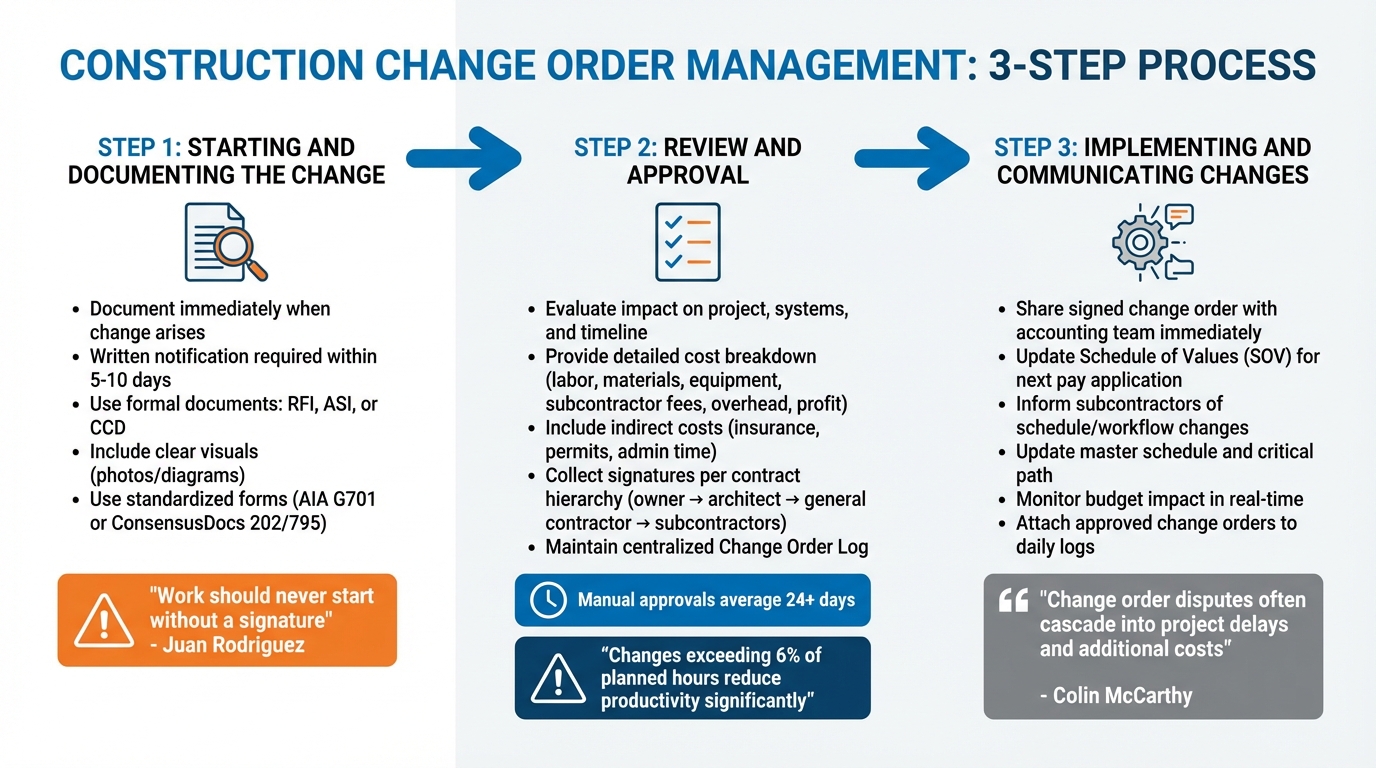
Construction Change Order Management Process: 3 Key Steps
Handling a change order involves several key steps, from identifying the issue to implementing the changes. This process ensures that everyone stays on the same page regarding scope, costs, and schedules, while maintaining thorough documentation at every stage.
Starting and Documenting the Change
As soon as a potential change arises – whether due to unforeseen site conditions, design updates, or client requests – it’s crucial to document it right away. Early documentation creates an audit trail, which can help avoid disputes about when the issue was first identified. This step is essential for protecting all parties involved.
Most construction contracts require written notification within 5 to 10 days of identifying the need for a change. Missing this deadline can lead to rejected claims or unpaid work. To formally initiate the process, you might use documents like a Request for Information (RFI) for clarifications, an Architect’s Supplemental Instruction (ASI) for minor adjustments, or a Construction Change Directive (CCD) when work needs to begin before pricing is finalized.
Including clear visuals – like images or diagrams – can minimize miscommunication and strengthen your case during negotiations.
“Work should never start without a signature under the assumption that the property owner will approve a change later.” – Juan Rodriguez, Construction Professional
Whenever possible, use standardized forms such as the AIA G701 or ConsensusDocs 202/795. These templates ensure all necessary legal and project details are captured, leaving no room for oversight.
Review and Approval Steps
Once documented, the change order moves into the review phase. Here, all parties evaluate its impact on the project, including how it affects related systems, downstream trades, and the overall timeline.
Provide a detailed cost breakdown that covers labor, materials, equipment, subcontractor fees, overhead, and profit. Don’t forget to include indirect costs like insurance, permits, and administrative time – these are legitimate expenses that protect your business. Ensure the breakdown aligns with the cost documentation standards already established.
On average, manual workflows for approvals can take over 24 days. For more complex changes, it’s often helpful to hold a meeting with the owner and contractor to agree on scope and costs verbally before drafting the formal document. This step can reduce the need for multiple revisions and speed up the process.
Make sure signatures are collected according to the contract hierarchy, which typically involves the owner, architect, general contractor, and any affected subcontractors. Some projects may have specific thresholds for approval – for example, Caltrans requires Division of Construction approval for any change order exceeding $350,000. Always wait for signed approval before beginning work to ensure proper compensation and maintain leverage.
Keep a centralized Change Order Log to track the status of each change (pending, approved, or rejected) and its overall impact on the project budget. Research from the Construction Industry Institute shows that if more than 6% of planned hours are spent on changes, productivity often suffers significantly. A well-maintained log can help monitor this risk.
Once approvals are secured, the focus shifts to implementation.
Implementing and Communicating Changes
After receiving formal approval, the project manager should immediately share the signed change order with the accounting team to update the Schedule of Values (SOV) for the next pay application. This ensures that the modified contract sum is reflected in billing, preventing payment delays.
Subcontractors should be informed of any changes to schedules and workflows. Even minor adjustments could disrupt sequencing or require additional crews, so clear communication is essential to avoid coordination issues.
update the master schedule to reflect the revised timeline and address any conflicts in work dependencies, especially those on the critical path. If the change affects the critical path, notify all stakeholders in writing about the updated completion date. Proper documentation will protect you from being unfairly blamed for delays caused by owner-driven changes.
Using construction management software can streamline the process, ensuring field crews have accurate, up-to-date information. Attach approved change orders to daily logs and task assignments to reduce errors. Additionally, monitor how each change impacts your budget in real time to catch early signs of potential overruns.
“Change order disputes can profoundly impact a project, especially if you stop work while the parties dispute the change order. If they are not resolved in a timely manner, change order disputes often cascade into project delays and additional costs for both parties.” – Colin McCarthy, Principal, Lanak & Hanna
During implementation, keep a close eye on field execution. A high volume of changes can significantly disrupt productivity, particularly when multiple trades are working in tight spaces. Adjust crew sizes and schedules as needed to maintain efficiency and prevent delays.
How Change Orders Affect Projects
Change orders influence every aspect of a construction project, from the overall budget to the final deadline. This highlights the importance of having a structured process in place to manage them. A clear understanding of these effects can help contractors safeguard their profits and maintain control over project timelines.
Managing Costs and Budgets
Change orders adjust the original contract amount, but their financial impact often goes further than the immediate cost. Even a series of small changes can drain contingency funds before budget overruns become noticeable.
The financial ripple effects can be significant. For instance, moving ductwork might also require changes to electrical systems, extended equipment rentals, or added supervision costs. These indirect expenses are part of the total cost and should be included in change order documentation.
| Cost Category | How Change Orders Add Costs |
|---|---|
| Labor | Extra hours for rework, demolition, or specialized tasks |
| Materials | Increased quantities, replacing damaged items, or price hikes |
| Equipment | Longer rental periods for machinery and added mobilization costs |
| Overhead | More supervision, extended project management, and general conditions |
| Contingency | Reduced reserves, limiting flexibility for future issues |
Digital tools can help minimize errors in documentation, making cost tracking more accurate. By monitoring how each change affects your contingency reserves in real time, you can avoid treating adjustments as isolated events and instead see the broader financial picture.
But the impact of change orders isn’t just about money – they can also disrupt schedules.
Staying on Schedule
Change orders can throw even the best-planned schedules off track. Manual approval processes alone can add over 24 days to a project, and that’s before any work related to the change even begins. The real concern is whether a change disrupts the critical path – the sequence of tasks that determines the project’s completion date.
Data from the Construction Industry Institute shows that productivity tends to stay on track when changes account for less than 6% of total project hours. Once changes exceed this threshold, productivity can take a significant hit. The situation worsens when multiple trades are working in tight spaces, as this can reduce efficiency by up to 30%.
To manage this, tools like Gantt charts with baseline tracking can help you quickly identify how changes affect the critical path. If a change impacts the timeline, document the delay and notify stakeholders in writing. This ensures you won’t be unfairly blamed for delays caused by changes initiated by the client.
“Change order disputes can profoundly impact a project, especially if you stop work while the parties dispute the change order. If they are not resolved in a timely manner, change order disputes often cascade into project delays and additional costs for both parties.”
- Colin McCarthy, Principal, Lanak & Hanna
For urgent changes, Construction Change Directives (CCDs) allow work to continue while costs are negotiated later. This helps prevent work stoppages and keeps the project moving forward.
As delays accumulate, clear documentation becomes even more critical to avoid misunderstandings and disputes.
Reducing Disputes and Improving Clarity
A structured change order process is essential for maintaining transparency and protecting all parties involved. Poorly managed changes can lead to legal claims that drain resources faster than the construction itself.
The key is to maintain a detailed audit trail. A comprehensive Change Order Log, complete with visual records, reduces the risk of disputes by clearly outlining what was agreed upon and when. This documentation can also be a powerful tool during payment disputes, providing evidence of the agreed terms.
Clear communication is vital when dealing with unexpected conditions. Including photos or 3D scans in change order documentation provides an objective record, minimizing the chances of misinterpretation.
“Digital twins can serve as a single source of truth and provide photorealistic 3D imagery, which means every little detail your teams and stakeholders need for success is readily and immediately available.”
- Steven Allen, Senior Solutions Engineer for AEC, Matterport
Avoid relying on verbal agreements. Every decision should be documented and signed by all parties before work begins. Subcontractors should also provide a monthly change order log to the General Contractor to ensure both parties stay informed about the financial exposure.
Using Software for Change Order Management
Managing change orders in construction can be a headache, especially when relying on paper documents and scattered spreadsheets. Construction management software for small businesses offers a better way by centralizing everything in one digital platform. Instead of chasing signatures or manually updating budgets, contractors can use these tools to keep everyone on the same page with real-time updates. The result? A smoother, more efficient process for handling change orders.
Advantages of Software Solutions
Switching from manual methods to digital tools eliminates many of the common delays and inefficiencies in change order management. For instance, mobile access allows field teams to log site conditions immediately – whether it’s snapping photos, taking measurements, or jotting down notes as issues arise. This instant documentation reduces the risk of forgetting important details or losing handwritten notes.
Automated workflows are another game-changer. Instead of waiting on paper approvals, teams can use e-signatures and receive automated notifications to keep the process moving. The software also tracks the status of each change order – whether it’s in Draft, Pending, Approved, or Rejected – so nothing falls through the cracks.
Financial integration is a major perk, too. Once a change order is approved, it syncs directly with project budgets and accounting tools like QuickBooks. This ensures financial reports stay consistent and gives teams real-time visibility into contingency spending.
“Digital twins can serve as a single source of truth and provide photorealistic 3D imagery, which means every little detail your teams and stakeholders need for success is readily and immediately available.”
- Steven Allen, Senior Solutions Engineer for AEC, Matterport
Contractor Foreman takes digital workflows to the next level by connecting all aspects of change order management. The software links change orders with financial tracking and scheduling tools, ensuring that any budget or timeline adjustments are automatically updated across the project.
Field teams can use the mobile app to document on-site changes with real-time photos and notes. When it’s time to formalize a change, contractors can create polished change order proposals and send them out for digital signatures. This ensures no work begins without proper authorization.
The platform also maintains a centralized log of all project updates, comments, and attachments. This complete audit trail reduces miscommunication between field and office teams and provides the documentation needed to settle disputes. Plus, integration with QuickBooks simplifies accounting by automatically updating records.
By replacing manual workflows with digital solutions, Contractor Foreman not only saves time but also ensures accuracy and accountability throughout the project.
Manual vs. Software-Based Processes
| Aspect | Manual Method | Software Benefits |
|---|---|---|
| Documentation | Paper-based, scattered notes prone to errors | Digital, centralized, and time-stamped records |
| Communication | Delayed, fragmented, and memory-dependent | Real-time updates, automated alerts, and instant sharing |
| Approval Process | Slow (avg. 24+ days) with physical signatures | E-signatures and automated workflows for faster processing |
| Tracking and Reporting | Time-consuming, lacks budget synchronization | Automated reports with real-time financial integration |
This isn’t just about making life easier – it’s about protecting your bottom line. Manual methods can lead to lost information, approval delays, and unexpected costs. Digital tools fill these gaps, ensuring every stakeholder has access to accurate, up-to-date information throughout the entire process.
Conclusion
Key Takeaways
Managing change orders effectively is crucial for protecting your budget. Remember, change orders can significantly alter the total contract value. By documenting changes, confirming costs before work begins, and keeping a clear audit trail, you can reduce disputes and avoid potential legal issues.
The contrast between manual and digital systems is striking. Manual workflows often lead to approval delays – sometimes over 24 days – while creating scattered documentation and disconnects in budgeting. In contrast, digital tools streamline the process by centralizing records, automating notifications, and updating financials in real time. This minimizes delays and cost overruns, making robust management tools an absolute necessity.
Why Digital Tools Matter
To tackle these challenges, digital management tools offer a comprehensive solution. Contractor Foreman, for example, integrates change order management with financial tracking and scheduling. Field teams can instantly document changes with photos and notes, while automated workflows and digital signatures speed up approvals. Plus, with QuickBooks integration, every approved change is automatically reflected in your financial records.
A centralized, time-stamped log ensures transparency, aligning office and field teams while reducing miscommunication. This detailed documentation is invaluable if disputes arise. Recognized as a “Top 5 most recommended product” by Software Advice and a consistent winner of Top Product Awards from Construction Executive Magazine (2015–2024), Contractor Foreman has earned its reputation across thousands of projects.
FAQs
What are the biggest challenges in managing change orders effectively?
Managing change orders often comes with its fair share of challenges. One major issue is poor documentation and delayed approvals. When clear records or timely sign-offs are missing, disputes over costs can arise, and project timelines may suffer as a result. Another common problem is communication breakdowns. With so many stakeholders involved – owners, architects, subcontractors – it’s easy for misalignment to lead to misunderstandings or even rework.
There’s also the issue of inaccurate cost and schedule estimates, which can throw budgets off track and lead to missed deadlines. These errors are often rooted in planning mistakes or inefficiencies. On top of that, managing multiple change orders simultaneously can overwhelm teams, making coordination more difficult and potentially straining client relationships.
A centralized construction management platform, like Contractor Foreman, can simplify this process. Tools such as change-order tracking, automated workflows, and real-time cost updates ensure that changes are documented properly, approved quickly, and seamlessly incorporated into project budgets. This reduces potential disputes and helps keep projects moving forward smoothly.
How can digital tools simplify change order management?
Digital tools streamline change order management, making it quicker, more organized, and easier to monitor. By swapping out manual processes and paperwork for cloud-based systems, these tools ensure that every change – whether it’s a scope modification, cost adjustment, or schedule tweak – is documented in real time. This approach minimizes errors, prevents lost documents, and ensures that all stakeholders have access to the latest updates.
Modern construction management software goes a step further by integrating change orders with financial and scheduling systems. Budgets, purchase orders, and timelines are automatically updated as changes are approved, keeping everything aligned. Mobile apps add even more convenience, allowing teams to submit and review change orders straight from the job site. Tools like Contractor Foreman bring all these capabilities together in one platform, helping contractors save time, cut costs, and enhance communication.
Why is it important to document changes immediately in construction projects?
Documenting changes the moment they happen is crucial for keeping construction projects on schedule and within budget. When updates to the project scope are recorded immediately, it ensures that revised costs, timelines, and responsibilities are clearly outlined before work progresses. This proactive approach helps avoid delays and unexpected expenses caused by untracked changes. Plus, having a detailed record can be invaluable for resolving disputes and minimizing the risk of legal complications.
Change orders often stem from unexpected site conditions, design mistakes, or owner-driven requests. By capturing these details right away, all parties can stay on the same page and approve adjustments without unnecessary delays. A construction management platform like Contractor Foreman makes this process seamless by allowing teams to log changes in real time directly from the job site. This not only speeds up approvals but also helps safeguard profit margins and keeps the project running smoothly.
Related Blog Posts







