
“…24, 25…uhhh, 29… OH CRAP!”
“What?”
“I lost count of the studs. Starting over!”
“Again?! That’s the third recount.”
“Third time’s the charm, Dave.”
They won the bid. A few weeks in, once framing wraps and drywall crews show up, we hear Dave say:
“Uhhh Matt, why are we short a whole wall of drywall? You counted, didn’t you?”
This isn’t unusual—not for Dave, and not for even the most meticulous estimator. In fact 70% of construction cost overruns trace back to errors in the first cost or quantity takeoff estimate. So totally common.
Common doesn’t mean unpreventable, though. And if there’s a way to prevent construction estimating errors, it’s worth knowing about ASAP— because it can save you thousands in rework.
When choosing a construction estimating software, you’ll realize that while all of them have the same goal, they get there in very different ways. The strongest fit for your team depends on four things: takeoff speed, pricing accuracy, accounting handoff, and team access.
And in this article, we’ll break down exactly how each option stacks up — so you can match the software to your team instead of guessing.
OUR RECOMMENDATIONS AT A GLANCE:
- Contractor Foreman fits teams that want broad coverage at a low monthly cost.
- STACK fits teams that bid often and need cloud-based takeoff with multi-user access.
- PlanSwift fits crews that still want a Windows desktop setup and offline use.
- Buildertrend fits residential companies that want estimating linked with job execution.
- ProEst fits commercial teams that need tighter cost control.
- Sage Estimating fits firms already built around Sage finance tools.
Quick Comparison
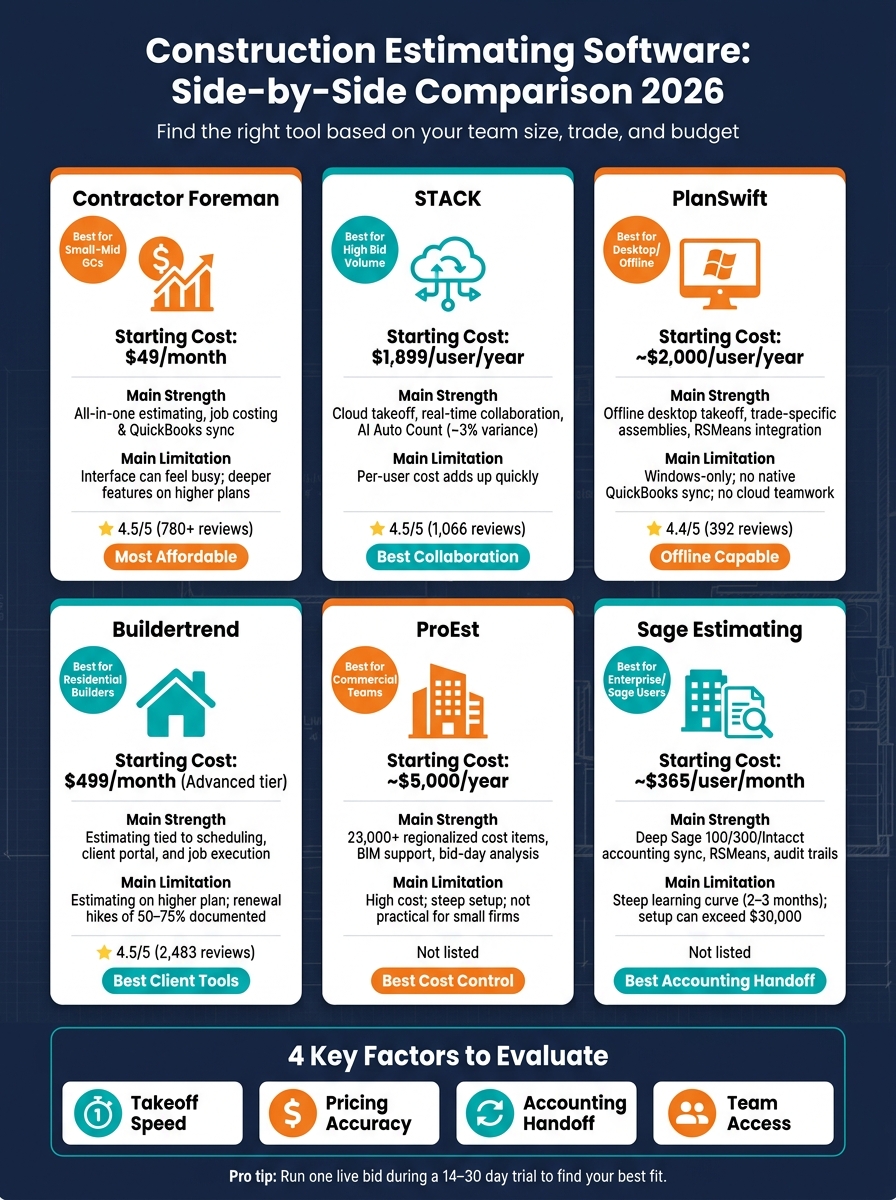
Construction Estimating Software Comparison 2026
| Product | Best Fit | Main Strength | Main Limitation | Starting Cost |
|---|---|---|---|---|
| Contractor Foreman | Small to mid-size contractors | Estimating, job costing, and QuickBooks sync in one system | Interface can feel busy; some tools are on higher plans | $49/month |
| STACK | High bid volume teams | Cloud takeoff, live teamwork, AI count tools | Per-user cost adds up | $1,899/user/year |
| PlanSwift | Office-based specialty trades | Offline desktop takeoff and assemblies | No native QuickBooks sync; no cloud teamwork | About $2,000/user/year |
| Buildertrend | Residential builders and remodelers | Estimating tied to scheduling and client workflows | Estimating starts on higher plan; renewal cost risk | $499/month for estimating tier |
| ProEst | Commercial estimating teams | Regional pricing, bid-day analysis, BIM support | Higher cost and steeper setup | About $5,000/year |
| Sage Estimating | Large firms using Sage accounting | Tight finance handoff and audit trails | Training time and setup cost are high | About $365/user/month |
Remember: the best tool is not the one with the longest feature list. It is the one that cuts manual work with top takeoff software, keeps cost data current, and sends estimate data into the next step without extra typing.
sbb-itb-5eea312
1. Contractor Foreman
Contractor Foreman brings estimating, takeoff, and job costing into one system for small-to-mid-sized contractors. The big thing to look at is simple: does it connect takeoff, pricing, and job costing without piling on extra admin work?
Takeoff & Quantity Workflow
Users can upload project plans right into the platform and measure quantities on-screen. There’s also a built-in AI assistant that helps calculate measurements from plans. Those quantities then move straight into estimate line items, so there’s no need to type them in again.
Estimates can be grouped into Assemblies, which are prebuilt sets of labor and material items. That makes repeat bids a lot faster. The platform also supports bulk markups, so contractors can change pricing across an entire estimate in one move, like adding 5% to labor on a bid.
Costing & Job Budgeting
Contractor Foreman pulls pricing from a cost database through 1build.com for current labor and material costs. Contractors can also build their own cost libraries with SKUs, supplier details, and non-disclosed markup buffers. That gives them room to cover waste or handling without showing those buffers on the proposal the client sees.
When a bid gets approved, it can turn into purchase orders or subcontracts with one click. From there, actual costs from GPS-enabled time cards, expenses, and purchase orders tie back to specific cost codes. That gives teams a live look at committed costs versus actual costs.
Integrations & Handoff
The platform includes two-way sync with QuickBooks Online and QuickBooks Desktop, which helps cut down on double entry between estimating and accounting. Field data from GPS-enabled time cards and expenses also flows back into cost codes, so the budget stays current after the project starts.
It also connects with Gusto for payroll, CompanyCam for photo documentation, and Zapier for workflow automation. On the subcontractor side, subs can send in bids through a bid link without needing their own account, which can help speed up responses.
Deployment & Team Fit
Contractor Foreman is cloud-based and has native iOS and Android apps. Field crews can use GPS-stamped time tracking and access plans offline from their phones. That matters because once a bid turns into a job, bad field tracking can throw the whole budget off.
Pricing starts at $49/month, billed annually, for one user. QuickBooks Online sync requires the Plus tier or above, which starts at $125/month, billed annually, for up to 8 users. It holds a 4.5/5 rating on Capterra across 780+ reviews, and users often point to the price and the long list of features as strong selling points.
The trade-off is pretty clear. There’s a lot in the system, so it can feel like a lot at first, and some of the deeper features sit behind higher-tier plans.
The next step is checking whether a tool matches your bid volume, team size, and estimating workflow.
2. STACK
STACK is a cloud-based platform for digital takeoff and estimating software. It’s a good fit for contractors that bid often and need to move fast without turning every estimate into a spreadsheet marathon.
Takeoff & Quantity Workflow
STACK works with PDF, CAD, and 3D BIM files. Its measurement tools handle area, length, arc, pitch, count, and volume. On top of that, the AI-powered Auto Count feature can spot and count repeated plan symbols on its own.
That matters because manual takeoff work is where small mistakes can snowball. AI-assisted takeoff helps cut down on hand-counting and measurement slipups, and testing on complex commercial plans showed about 3% variance.
Of course, clean measurements are only half the job. They also need to feed into a bid without adding friction.
Costing & Job Budgeting
STACK pushes takeoff quantities straight into priced bids. It comes with a pre-built database for equipment, labor, and material costs, and it also pulls live supplier catalog pricing from sources like Home Depot so material pricing stays current.
It also supports custom and pre-built assemblies. That makes it easier to build repeatable cost items once and use them again across similar jobs. If your team estimates the same kinds of projects again and again, that can save a lot of time.
Integrations & Handoff
STACK connects with Procore, Sage 100 Contractor, Sage 300 CRE, QuickBooks, Buildertrend, and Xero. It also offers an open API for custom connections.
In plain terms, estimate data can move into accounting and project management without the usual manual export mess. Real-time multi-user collaboration helps too, especially when several people are working in the same bid and you want to avoid duplicate counts.
Deployment & Team Fit
STACK offers iOS and Android apps for field use. Pricing runs from about $1,899 to $2,999 per user per year, with the Premium tier at $2,999 per user per year and AI features included. There’s also a limited free version.
On the review side, STACK holds a 4.5/5 rating on Capterra from 1,066 reviews. The main trade-offs are the price and reporting that may feel a bit light if your team wants deeper financial analysis.
For teams that want a different mix of speed, depth, and setup work, the next profile shifts the workflow.
3. PlanSwift
PlanSwift is a Windows-only desktop app built for takeoff and estimating. It isn’t a cloud-first system, and that shapes the whole experience. If your team does most estimating in the office and wants offline access, that setup can work well. If you want web access and team-wide collaboration, it can feel tight pretty fast.
Takeoff & Quantity Workflow
The takeoff process is simple: upload a PDF blueprint, set the scale by clicking two known points, and trace areas, lengths, and counts right on the screen. The drag-and-drop setup keeps things moving, and the color-coded markups make it easier to split scopes by trade. That’s handy for crews like electrical, roofing, and flooring.
The 2026 version adds “Takeoff Boost AI,” which automates measuring, counting, and scaling. For estimators, that kind of help can save a lot of time. Users of takeoff software like PlanSwift report a 30% to 50% reduction in time per estimate.
Costing & Job Budgeting
PlanSwift ties takeoff quantities to assemblies, so one measurement can pull in labor hours and material quantities from a pre-built template. That cuts down on repeat work and helps keep estimates more consistent from job to job.
It also connects to RSMeans cost data through ConstructConnect, which gives estimators a maintained baseline for labor and material pricing.
PlanSwift stays in its lane. It’s strong at takeoff and estimating, but it does not include scheduling, invoicing, CRM, or project management.
Integrations & Handoff
This is where the desktop-first model shows its limits. There’s no native QuickBooks integration, so handoff usually means exporting to Excel and dealing with one more manual step.
PlanSwift does connect to other ConstructConnect tools, including Pipeline and On Center, but outside that ecosystem, the options are limited.
Deployment & Team Fit
PlanSwift runs on Windows only, with no cloud sync, web access, or mobile app. That makes teamwork harder than it should be. In many cases, sharing an estimate means manually transferring files or having people use the same machine.
The tradeoff is simple: you give up modern collaboration, but you get a tool that works fully offline. For teams dealing with weak internet on job sites, that still matters.
As of July 2026, pricing is about $2,000 per user per year, plus around $400 per year for maintenance and support renewals. On Capterra, PlanSwift has a 4.4/5 rating from 392 reviews as of July 2026.
PlanSwift makes the most sense for specialty subcontractors that want fast takeoff in a desktop workflow. If your team also needs job management, billing, or smoother handoff across the business, it probably won’t be enough on its own.
4. Buildertrend
Buildertrend is a good fit for contractors who want bidding, scheduling, and job execution tied together in one place.
Takeoff & Quantity Workflow
Buildertrend has a native digital takeoff tool that lets users upload plans and measure linear distances, areas, and counts right inside the platform. That setup works well for residential work, but it doesn’t go as deep as dedicated takeoff software. If a contractor needs more detail, Buildertrend integrates with STACK. That way, estimating stays connected to scheduling and job tracking instead of living in a separate process.
Teams can also import existing pricebooks from Excel and build reusable estimate templates for repeat jobs.
Costing & Job Budgeting
The estimate screen breaks out builder cost, margin, client price, and profit for each line item, giving contractors tight control over markup. Once an estimate gets approved, it can turn into purchase orders, bid requests, or a project schedule.
Buildertrend also added a Job Costing Budget tool in February 2026 that tracks real-time variance against the original budget during the project. Change orders connect back to the original estimate and carry unit costs forward on their own, which helps keep pricing in line.
Integrations & Handoff
Buildertrend syncs natively with QuickBooks Online and Xero on the Advanced tier and up. It also connects with Gusto, HubSpot, Salesforce, and The Home Depot Pro Xtra. That said, some users still feel the built-in financial module doesn’t go far enough for more involved accounting work. So in practice, many teams use the accounting sync as the core financial system and rely on Buildertrend for project-level budget tracking.
One gap stands out: there are no native integrations for EagleView, Hover, or Xactimate. For roofing and restoration contractors, that can be a deal breaker.
Deployment & Team Fit
Buildertrend is cloud-based and comes with native iOS and Android apps, so teams can use it from the office or the job site. As of 2026, the platform serves more than 20,000 residential builders worldwide and has a 4.5/5 rating on Capterra from 2,483 reviews.
It fits best for residential GCs, custom home builders, and remodelers with roughly 5 to 50 employees. For a solo operator or a very small crew, it’s often more system than they need. There’s also a pricing catch: contractors need at least the Advanced tier to get estimating and takeoff, and that plan costs $499/month with annual billing. The Essential tier costs $339/month and does not include those modules.
Onboarding fees run from $500 to $2,000, and most teams need about 2 to 4 weeks to get up to speed. One more thing worth watching: renewal prices have gone up 50% to 75%, so it’s smart to lock down year-two terms before signing.
If a contractor wants something more centered on estimating, the next option may be a better match.
5. ProEst
ProEst puts less weight on speed alone and more on cost control and a smoother budget handoff.
Takeoff & Quantity Workflow
ProEst comes with cloud-based 2D takeoff for scanned blueprints. It also supports 3D quantity takeoff from BIM models. After measurements are captured, they flow into pre-built cost assemblies on their own, so quantities move straight into the estimate without manual re-entry.
Costing & Job Budgeting
ProEst uses a regional cost database to price labor, materials, and equipment by city and ZIP code. That helps estimators work from local market rates instead of broad national averages. In places where labor and material costs shift fast, that can help cut down on underbidding. It also includes bid-day analysis, which lets estimators compare subcontractor bids side by side and track inclusions and exclusions before the bid is finalized.
Integrations & Handoff
ProEst connects with QuickBooks, Sage 100/300, Viewpoint, Procore, and Autodesk Construction Cloud, and it offers an open API for custom links. In plain terms, approved estimates can move into project budgets with less re-entry and fewer scope mistakes.
Deployment & Team Fit
ProEst is cloud-based, so more than one estimator can work in the platform at the same time. It’s a better match for commercial estimating teams that need detailed pricing control and shared access than for crews looking for field-first project management. The main downsides are a steep learning curve and a mobile app that does less than the desktop version. Pricing starts at about $5,000 per year, which puts it more in line with larger commercial teams than small residential crews.
If your team wants estimating to connect more closely with accounting workflows, the next tool is built around that need.
6. Sage Estimating
Sage Estimating fits large commercial GCs best, especially those already using Sage for accounting. If clean handoff from estimating to finance is the big priority, this is where Sage stands out.
Takeoff & Quantity Workflow
The software uses AI-assisted takeoff to trace building components in vector PDFs by detecting connected lines. It also uses Smart Assemblies, which group related items into one kit. So if you apply a “standard interior wall” assembly, Sage can pull in studs, drywall, tape, and labor in one move.
That can save time, but there’s a catch: the learning curve is steep. Many teams need 2–3 months before they feel comfortable with the system.
That time investment tends to make the most sense when estimating needs to flow straight into accounting and job budgeting without a messy handoff.
Costing & Job Budgeting
Sage Estimating pulls from RSMeans and trade-specific cost databases with regionalized rates. It also includes detailed audit trails that track transactions by date, category, type, and value. For CFOs and bonding companies, that level of record-keeping can matter a lot.
Integrations & Handoff
This is the main selling point: accounting handoff.
Sage Estimating connects natively with Sage 300 CRE, Sage 100 Contractor, and Sage Intacct, so approved bids can move into budgets, purchase orders, or subcontracts without re-entry. That means less copy-and-paste, fewer handoff errors, and a smoother path from estimate to job cost.
Deployment & Team Fit
Sage Estimating runs on-premise or in the cloud, but it does not include a native mobile app. In practice, that usually keeps estimators tied to dedicated workstations. Because of that, it tends to fit office-based teams better than field-heavy crews.
Pricing starts at about $365 per user per month. For larger firms, first-year setup and training can go past $30,000.
That mix of tight accounting ties, detailed cost controls, and heavier setup is what makes Sage a strong fit for some teams and a poor fit for others.
Pros and Cons at a Glance
Use this summary to trim your shortlist based on fit, cost, and handoff. The big things to watch are takeoff speed, accurate construction estimates, accounting handoff, and team access.
| Product | Best For | Pros | Cons | Typical U.S. Buyer Considerations |
|---|---|---|---|---|
| Contractor Foreman | Small to mid-size GCs on a budget | Predictable flat pricing, 35+ modules, unlimited users, predictable renewal pricing | Shallower takeoff tools; interface can feel dense | Starts at $49/month; 30-day trial; native iOS and Android apps |
| STACK | Cloud-based takeoff and multi-user collaboration | About 3% variance on complex commercial plan sets; real-time collaboration; easy to learn | Cloud-only; no native scheduling or PM; expensive per seat | $1,899–$2,999/user/year; 7-day trial with real projects |
| PlanSwift | Desktop-based power users and specialty trades needing offline access | One-time license option; offline capable; trade-specific assemblies | Windows-only; no native cloud sync; aging interface | About $1,495–$1,749 one-time; support costs extra after year one |
| Buildertrend | Residential custom builders and remodelers | Polished client portal; Selections module; native mobile apps | Quote-only pricing; documented renewal hikes of 50%–75%; less robust takeoff tools | Onboarding fees can add to first-year cost |
| ProEst | Large commercial GCs with dedicated estimating staff | 23,000+ regionalized cost items; BIM/Autodesk integration; bid day analysis | High cost; longer implementation time; not practical for small firms | High implementation fees; cloud-based preconstruction |
| Sage Estimating | Enterprise and heavy civil firms in the Sage ecosystem | Deep Sage 100/300 accounting sync; RSMeans integration; detailed audit trails | Steep learning curve; high license and implementation cost | High license and implementation cost; requires professional training; office-centric access |
The hidden costs usually show up in pricing model and onboarding time. Per-seat pricing can climb fast as your team grows, and enterprise systems often need more training before people can use them well.
How to Pick the Right Tool for Your Business
Pick the tool that fixes your biggest bottleneck first. That one choice will shrink your shortlist fast.
For specialty contractors like electrical, HVAC, roofing, and plumbing, the bottleneck is often takeoff speed. Every hour spent measuring pushes the next bid back. Trade assemblies help you reuse standard rough-ins on future bids, which saves time where it counts. And digital takeoff tools can cut quantity takeoff time by 50–70%.
For growing general contractors, the pain usually shows up after the estimate is done. Numbers get entered again in separate job costing and accounting systems, and that’s often where margin starts to slip. In that case, look for software that moves estimate data into the budget, schedule, and invoicing without re-entry.
Residential work is a little different. Price matters, of course, but presentation can matter just as much. Client-facing tools, selection portals, and local pricing should sit near the top of your list.
On larger commercial teams, the focus shifts from speed to control. Regional pricing and team collaboration matter more. You may also need several estimators working on the same bid at once, which means real-time collaboration, BIM integration, and deep ERP/accounting connections are part of the deal.
The main thing is simple: match the tool to the types of construction estimates your team actually measures, prices, and hands off.
Then test it on one real bid during a 14- to 30-day trial and compare the total cost at your actual headcount.
FAQs
How do I know which estimating features my team will actually use?
Start by mapping your current workflow. Then test features with real plan sets during the free trial. You want to see which tools help your estimators get through the whole job faster: takeoff, priced line items, and the final proposal or export.
Focus on features that fit the way your team already bids. That usually means digital takeoff, cost assemblies, linked labor and material pricing, proposal generation, integrations, and mobile access.
Here’s the simple rule: if a feature doesn’t get used in the pilot bid, skip it.
What hidden costs should I check before choosing estimating software?
The advertised subscription price is usually not the full price you’ll pay.
Look past the monthly or annual fee and check for onboarding charges, setup costs, training time, and the short-term productivity drop that often comes with getting a new system in place. Those costs don’t always show up in the sales pitch, but they still hit your budget.
You’ll also want to watch for per-user pricing. It may look fine for a small team, then get expensive fast as you add more people.
A few other costs are easy to miss:
- Extra fees for modules or integrations you need
- Manual work that still falls on your team, like re-entering data into accounting software
- Paying for a separate takeoff tool if it’s not included
That’s where the math can change in a hurry.
What is the best way to test estimating software before I commit?
Use a free trial to run one of your own projects through the system. Vendor demos can look smooth, but they often use polished sample files that don’t match how your team works day to day.
During the trial, put a bid you’ve already finished into the system and compare the output with your final numbers. Then test the other jobs that tend to expose gaps fast:
- Quick quotes
- Change orders
- Material cost updates
- The handoff from estimate to project execution
That kind of side-by-side test gives you a much clearer picture of how the tool will perform with your actual workflow.
Related Blog Posts
- What Construction Takeoff Services Actually Do
- 5 of the Best Construction Quantity Estimating Software Tools – Ranked
- What Is a Construction Takeoff and Why Does It Matter?
- Construction Estimating Software: A Key to More Accurate Bids







