
- Quick Comparison
- What Construction Takeoff Software Does Day to Day
- 1. Accurate Quantity Measurements from Digital Blueprints
- 2. Better Estimating Accuracy and Fewer Missed Items
- 3. Faster Bids and the Ability to Price More Work
- 4. Stronger Cost Control and Budget Visibility
- 5. Fewer Errors and Lower Project Risk
- 6. Easier Collaboration Between Office and Field Teams
- 7. Better Organization and Version Control for Digital Plans
- Manual vs. Software-Based Takeoffs: A Side-by-Side Look
- How Takeoff Data Feeds Estimating, Budgeting, and Job Costing
- What to Consider Before Switching to Takeoff Software
- Conclusion
- FAQs
“128… 129… 130…”
“Hey Sam, how many outlets do we need for the second floor?”
“SHHH! I’m still counting the tiles! 135… 136…137…”
“But I need to know now so I can start pricing this out!”
“Ughhh! Now I lost count and have to start again. Let’s do this tomorrow!”
But then, of course, tomorrow came — and so did 101 other things demanding attention. The count never happened. The numbers never got delivered. And somewhere along the way, a potential client just… moved on.
What could have helped?
Construction takeoff software.
It measure lengths, areas, counts, and volumes right from PDFs or CAD files, then send those numbers into estimating, budgeting, and job cost tracking, saving hours of headache, stress, and most of all— the client that almost walked away.
Main Benefits of having a Construction Takeoff Software:
- More accurate quantities from calibrated digital plans
- Fewer missed items through visible markups and item tracking
- Faster bid turnaround with less manual measuring and re-entry
- Better cost control by linking quantities to labor, material, and equipment costs
- Lower risk from fewer math, scale, and unit errors
- Better team coordination when office and field use the same numbers
- Cleaner plan revision control with overlays and version tracking
Quick Comparison
| Benefit | What it helps with | Main result |
|---|---|---|
| Accurate measurements | Scale, lengths, areas, volumes | Cleaner quantity lists |
| Better estimating accuracy | Missed scope, double counts | Fewer pricing gaps |
| Faster bids | Manual measuring time | More bids in the same week |
| Stronger cost control | Budget setup, design changes | Better budget visibility |
| Fewer errors and lower risk | Math, unit, and scale mistakes | Less rework and fewer surprises |
| Easier team collaboration | Shared cloud data | Same numbers in office and field |
| Better version control | Addenda and plan revisions | Less rework on changed sheets |
Takeoff software does more than measure plans – it helps keep bidding, budgeting, and cost tracking aligned from the start.
sbb-itb-5eea312
What Construction Takeoff Software Does Day to Day
Takeoff software turns a PDF plan set into a digital measurement workspace.
An estimator uploads the drawings, then sets the scale using a known dimension, like a doorway, a column bay, or a gridline.
Once that’s in place, the software reads the sheet at its true size. And because each sheet uses its own scale, revisions and sheet swaps stay accurate instead of throwing the whole job off. That’s where the time and accuracy edge starts to show.
The main takeoff types are:
| Measurement Type | What It Measures | Common U.S. Examples |
|---|---|---|
| Linear | Length of a line | Wall plates, piping, conduit, headers, trim |
| Area | Square footage | Flooring, roofing, drywall, paint, paving |
| Count | Discrete objects | Doors, windows, fixtures, outlets, columns |
| Volume | Cubic yards/feet | Concrete slabs, footings, excavation fill |
Counts are usually where the time savings jump out first.
If you’re dealing with repeated items like light fixtures, electrical outlets, or windows, manual tallying gets old fast. With software, the estimator clicks each symbol, and the system keeps track automatically.
That simple shift cuts busywork. It also helps keep the takeoff clean, which leads to a cleaner estimate. From there, the quantity data can export to Excel or CSV, or move into estimating and project management tools, which cuts down on re-entry mistakes.
Those clean quantities are what make the first benefit possible: more accurate measurements from the start.
1. Accurate Quantity Measurements from Digital Blueprints
How the Measurement Task Improves
Accuracy starts with one thing: getting the scale right.
When an estimator clicks two known endpoints on a digital plan to set the scale, the software sets a precise reference for every measurement that comes after. If that calibration is off by even a little, every measurement on that sheet is off too. That’s the kind of small mistake that can snowball fast.
Once the scale is set, digital takeoff tools track the plan’s linework closely and convert lengths, areas, and volumes without needing a calculator or a spreadsheet in the middle. The result is a cleaner quantity list before pricing even starts.
The Day-to-Day Benefit for Contractors
For contractors, the payoff shows up in the daily work: faster measurements you can check.
Each measurement creates a visible, color-coded markup on the plan. That markup stays tied to the quantity list, so it’s easy to see what was counted, verify the numbers, and make sure nothing slipped through the cracks.
The Downstream Effect on Estimating and Job Costing
Clean quantities drive everything that happens next.
A precise takeoff gives you clean quantities for the job, which makes estimating and job costing easier to update when drawings change. Bad quantities eat into margins and weaken bids. Good ones move straight into estimating and budget updates with far less friction.
2. Better Estimating Accuracy and Fewer Missed Items
Once quantities are measured the right way, the next win is simple: you catch more of the job before you price the bid.
How It Helps Catch Missing Scope
Manual takeoffs depend on the estimator noticing every wall, fixture, and material run across a full drawing set. Miss a piece, and the pricing that follows is off. Bad quantities don’t stay small. They ripple through labor, materials, and schedule.
Takeoff software helps with this through visual verification. Each item you measure shows up as a color-coded markup on the drawing. So if something isn’t highlighted, it hasn’t been counted. That makes gaps much easier to spot before the bid goes out.
This is even more useful with assemblies. One measured item can pull in several related materials at the same time. In plain terms, you measure one wall, roof, or floor system, and the software can attach the linked parts that belong with it. Assemblies and trade-specific templates help estimators bring in related materials like framing parts, fasteners, and adhesives. Those small items are easy to miss by hand, and they add up fast.
Manual takeoffs leave more room for errors. Digital tools cut down math mistakes and make omissions easier to see.
And missed items hit the budget right away. If drywall is undercounted by 15%, labor and schedule assumptions fall short by that same margin. On a $150,000 remodel, a 10% error can cost $15,000 – often enough to wipe out the profit on the job.
3. Faster Bids and the Ability to Price More Work
Speed is the most obvious win with takeoff software. A mid-complexity 20,000-sq.-ft. commercial takeoff can take 12 to 20 hours by hand. Digital tools cut that by 60% to 70%. That’s a big chunk of time back.
Once the takeoff is clean, estimators can price more jobs without rebuilding every sheet by hand. In a busy bid cycle, that changes the pace of the whole team.
The Day-to-Day Benefit for Contractors
Those saved hours stack up fast. Instead of spending all day measuring and rechecking sheets, estimators can put more time into scope review, subcontractor outreach, and pricing strategy.
That shift matters. Measuring is part of the job, but it shouldn’t eat up the whole day.
The Downstream Effect on Estimating and Job Costing
Digital takeoffs cut re-entry by sending quantities straight into the estimate. That removes the manual transcription step, which is one of the places where errors can slip in. The result is tighter alignment between streamlining cost calculations, procurement, and job costing.
The speed also helps when drawings change in the middle of a bid. Software makes it easier to compare versions and update quantities without rebuilding the takeoff from scratch. On active bids, that can save a lot of time.
4. Stronger Cost Control and Budget Visibility
Cost issues don’t usually show up all at once. They creep in through missed scope, bad counts, and small quantity errors until the job is already off budget.
After quantities are measured, the next job is to turn those numbers into a budget you can trust. Takeoff software helps by linking measured quantities to material unit prices, labor productivity rates, and equipment costs during preconstruction. That gives contractors a solid budget baseline before work begins.
How It Supports Cost Control from the Start
When quantities connect to actual cost data, estimators can spot the dollar impact of design changes right away. If a revision changes a wall assembly or roofing material, the software updates the affected quantities and the cost impact at once. Each cost line item also connects back to a visible markup on the plan. That direct link makes it much easier to catch overruns before they snowball.
The Day-to-Day Benefit for Contractors
This kind of visibility helps teams find trouble early, while there’s still time to fix it. With a planned quantity set in the estimate, contractors can compare planned quantities against actual usage as the job moves ahead. That sounds simple, but it matters a lot. Even a 2% to 5% quantity error on a 200-unit apartment building can move a material budget by $15,000 to $30,000. Finding that gap early beats discovering it at closeout, when the money is already gone.
The Downstream Effect on Estimating and Job Costing
It also keeps estimates, budgets, and job-cost reports working from the same quantity set. That cuts down on mismatches between what was priced, what was planned, and what gets tracked in the field. Estimators can also use takeoff software to compare different design scenarios or construction methods in real time. So if the team wants to test one material option against another, they can see the cost effect early, before pricing is locked in.
5. Fewer Errors and Lower Project Risk
Once quantities set the budget, risk becomes the next issue: what happens if the count is off? Even a small takeoff mistake can spread through the whole job. It can throw off labor planning and scheduling, lead to short material orders, and leave crews waiting, hurting overall productivity. That helps explain why takeoff errors account for 32% of all construction cost overruns and play a role in 52% of project delays.
How Takeoff Software Reduces Common Measurement Errors
Manual takeoffs tend to break down in the same places again and again. Scale misreads cause 34% of mistakes, math errors during aggregation make up 28%, and missed plan pages add another 22%.
Digital takeoff software cuts down on those problems by handling the math, helping with scale calibration, and showing clear markups on the plans. That makes missed items and double counts much easier to catch.
The accuracy gap is hard to ignore. In side-by-side testing, digital takeoff software reached 97.1% accuracy, compared with 84.3% for manual methods. On a $500,000 project, that difference can mean about $65,000 in quantity deviation.
The Day-to-Day Benefit for Contractors
For contractors, the payoff is simple: fewer nasty surprises once work starts.
On a $1.1 million school renovation, a manual linear-foot measurement was used instead of square feet, which made the drywall budget nine times too low. That’s the kind of error that can hit a job like a brick. Software helps keep measurement units in line and applies standard waste factors, which cuts the chance of this sort of unit mix-up.
The Downstream Effect on Estimating and Job Costing
Clean takeoffs help the rest of the job stay in sync. When quantities are right, labor projections, material orders, and job costing line up better from the start.
There’s also a cost difference in when the mistake gets fixed. Catching an error during takeoff usually costs very little. Catching it in the field can add 5% in rework. Accurate quantities also make it easier for office and field teams to work from the same plan data without stepping on each other.
6. Easier Collaboration Between Office and Field Teams
That accuracy matters most when office and field teams need to use the same numbers while work is happening. Poor data causes 52% of all construction rework around the world, and takeoff software tackles that issue head-on.
How Takeoff Software Improves Communication and Data Sharing
When takeoffs are stored in the cloud, everyone sees the same quantity data. A field superintendent can pull up those same numbers on a tablet during a site walkthrough. If drawings change, the office and the field can stay in sync with the latest quantities. And version comparison tools make it easier to catch plan changes before a crew starts working from the wrong sheet.
The Day-to-Day Benefit for Contractors
The day-to-day gain is pretty simple: estimators and field teams use one shared quantity set, without entering the same data twice. That saves time and cuts down on mix-ups. It also means field crews can answer material quantity questions right there on site, while shared takeoff data helps preconstruction teams move faster and stay on the same page.
The Downstream Effect on Estimating and Job Costing
Quantities measured during preconstruction can move straight into field updates and cost tracking. That link helps keep the estimate and field data in line through the life of the project, which supports more dependable job costing. Cloud platforms also leave an audit trail showing who measured what and when, making scope disputes easier to sort out.
Once teams are working from the same quantities, the next step is keeping plan versions in order as revisions start piling up.
7. Better Organization and Version Control for Digital Plans
Plan revisions are one of the biggest time drains in preconstruction. When an addendum lands in the middle of a bid, paper takeoffs can turn into a mess. You often have to rework large chunks just to keep the takeoff matched to the current plan set, instead of starting over from scratch.
How Takeoff Software Helps Teams Manage Plan Revisions
Instead of laying two printed sheets next to each other and hunting for differences by hand, overlay tools let estimators place the new revision right on top of the old one. The software points out what changed, so the estimator only updates the quantities tied to those areas. What used to feel like a full rebuild becomes a short, focused fix.
Each measurement also stays linked to a markup on the drawing itself. So if someone reviews the takeoff later, they can trace that quantity back to the exact spot on the plan instead of just taking a spreadsheet number at face value.
The Day-to-Day Benefit for Contractors
This saves estimators time on change tracking and gives them more room to focus on pricing. On busy jobs with big plan sets, that matters a lot. Consistent layer names and trade color-coding help keep everything in order, and when a revision comes in, the team updates only the area that changed.
That kind of control becomes even more useful once bids start moving from revised plans into pricing.
The Downstream Effect on Estimating and Job Costing
When quantities stay tied to the latest revision, they can flow into estimating and job costing without manual re-entry. That helps the estimate stay matched to the most current drawings.
It also makes side-by-side checks against manual takeoffs much easier.
Manual vs. Software-Based Takeoffs: A Side-by-Side Look
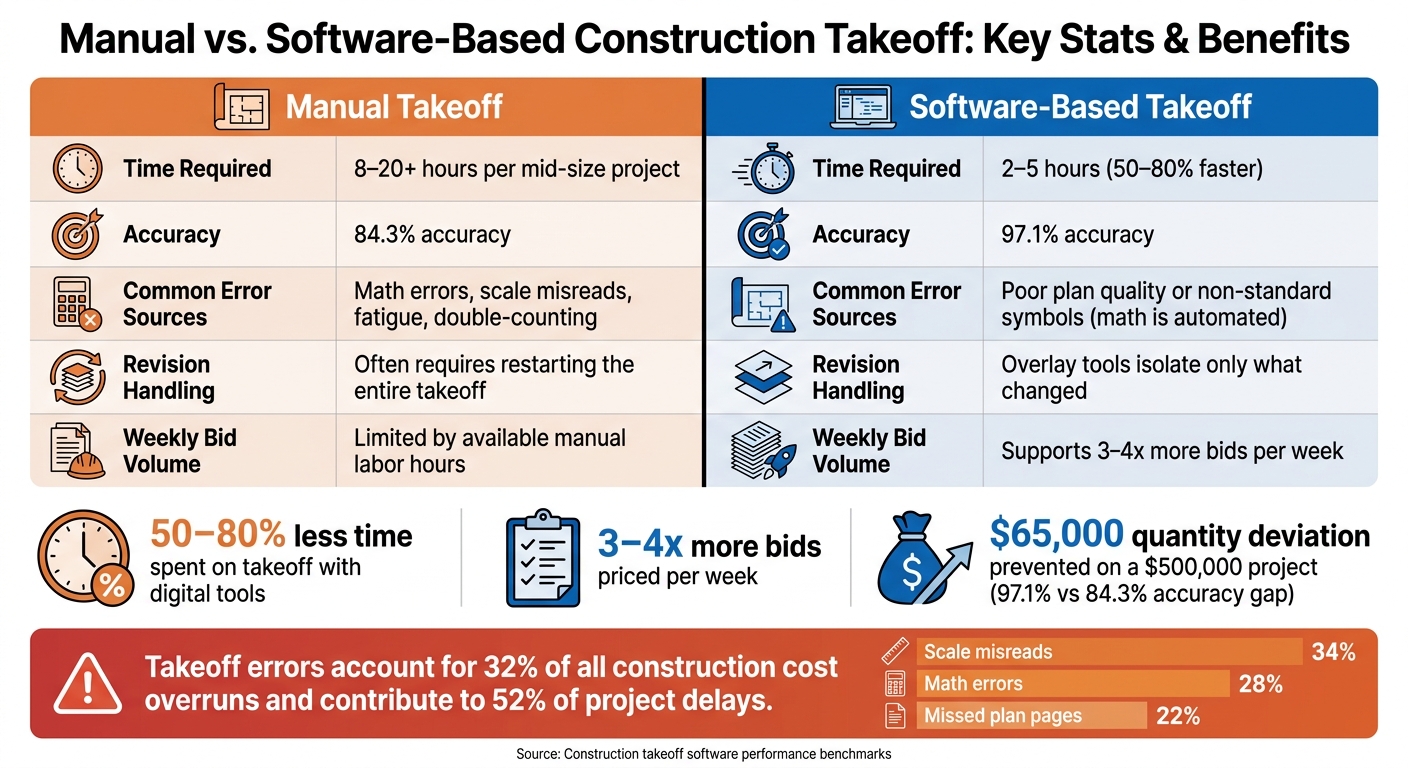
Manual vs. Software-Based Construction Takeoff: Key Stats & Benefits
Manual and software-based takeoffs differ in speed, scope accuracy, and revision handling. You see it in the day-to-day work: measuring quantities, catching missed items, and dealing with plan changes.
A manual takeoff for a mid-size commercial project usually takes 8 to 20+ hours. With digital tools, that often drops to 2 to 5 hours. That’s a 50% to 80% cut in time.
The risk of errors shifts too. Manual takeoffs tend to break down in familiar ways: bad scale reads, transposed numbers, double-counting, and plain old fatigue. Software handles the math for you, so the main trouble spots move to calibration issues and poor plan quality.
Here’s how the two methods compare on the factors teams deal with most:
| Factor | Manual Takeoff | Software-Based Takeoff |
|---|---|---|
| Time Required | 8–20+ hours per mid-size project | 2–5 hours (50–80% faster) |
| Common Error Sources | Math errors, scale misreads, fatigue, double-counting | Poor plan quality or non-standard symbols (math is automated) |
| Revision Handling | Often requires restarting the entire takeoff | Overlay tools isolate only what changed |
| Bid Turnaround Speed | Slow; often a scramble to meet deadlines when addenda arrive | Faster responses to addenda and bid changes |
| Weekly Bid Volume | Limited by available manual labor hours | Supports 3–4x more bids per week |
These gaps show up fast when takeoff quantities feed estimating, budgets, and job costs. Put simply, takeoff data only helps if it moves cleanly into estimating, budgeting, and job costing.
How Takeoff Data Feeds Estimating, Budgeting, and Job Costing
The payoff from takeoff software starts after the measuring is done. Once quantities are pulled from the plans, they flow into estimating, purchasing, and job costing. That means the same numbers can guide material buyouts, budget setup, and cost tracking in the field.
A QTO records the measured scope shown on the drawings. An MTO builds on that by adding waste, cuts, extra material, packaging minimums, and overage needed for purchasing. Keeping those as two separate layers matters. If the plans change, you can update purchasing assumptions without touching the original measured scope, which keeps the record clean and easy to audit.
Here’s a simple example. A single fixture count doesn’t have to stay just a count. It can expand into an assembly that includes the device, plate, box, plaster ring, wire connectors, and the labor hours needed for installation. So one takeoff quantity turns into a priced line item. Better yet, that same setup helps keep budgets and job-cost reports tied back to the original takeoff instead of drifting off into a spreadsheet maze.
Different takeoff outputs feed different money decisions:
| Takeoff Output | Unit | Financial Application |
|---|---|---|
| Linear Feet | LF | Material purchase plans for framing, conduit, and piping; labor productivity tracking per run |
| Square Footage | SF | Procurement for flooring, roofing, and drywall; surface area labor productivity tracking |
| Cubic Yards | CY | Bulk concrete and fill orders; equipment rental durations for placement and haul-off |
| Fixture Counts | EA | Unit-priced purchase orders; fixture schedules; assembly-based labor estimates |
The trouble starts when teams move this data by hand between takeoff, estimating, and budgeting. That opens the door to transcription mistakes and version drift. On a large project, even a 2% to 5% count error can hit hard. For a 200-unit apartment building, that kind of miss can move a material budget by $15,000 to $30,000.
For teams using Contractor Foreman, drawings, takeoffs, budgets, and budget vs. actual tracking stay in one place. That lets measured quantities carry forward without re-entry, which cuts out a common source of mistakes.
What to Consider Before Switching to Takeoff Software
Those gains only matter if the software fits your plans, devices, and the tools you use after takeoff. Before you switch, make sure it lines up with your plans, devices, units, and day-to-day workflow.
Start with the conditions your team deals with every day. Hardware and internet access shape how well the software runs in the office and in the field. Cloud tools depend on steady internet for sync and team work, while crews in low-coverage areas need software that offers offline local access. In the office, high-resolution monitors make a big difference when you’re measuring fine details on large architectural or MEP plan sets.
Plan quality has a direct effect on measurement reliability. High-quality CAD-exported PDFs are the safest bet for precise measurements, while low-resolution scanned drawings can hurt accuracy. Calibrate every sheet to a known dimension, like a gridline or labeled measurement.
Check imperial units, CSI divisions, and export formats before rollout. If the platform doesn’t support U.S. measurement conventions or steady naming rules, handoffs to estimating or accounting can get messy.
Then look at how the software fits into the systems you already use. Integration shapes whether quantities move cleanly into estimating and accounting. Test the actual data flow into estimating, accounting, or project management before you buy. It also helps to run one project first so you can spot workflow gaps before a full rollout.
Conclusion
Taken together, these gains turn takeoff software into a preconstruction tool, not just something for measuring. It helps commercial general contractors move with more speed, better accuracy, and tighter control across the full bid cycle – from the first measurement to the final price.
The effect shows up where it counts: faster bids and fewer mistakes. Software-based takeoffs can cut quantity errors by up to 60%, and that carries into estimating, budgeting, and job costing without re-entry or version drift.
That move – from manual measuring to faster pricing and better risk control – is where the main edge shows up. When teams spend less time counting and double-checking, they can spend more time on scope review, pricing, and risk management. Measure, estimate, price, control costs, manage revisions: takeoff software helps teams bid faster, miss less, and keep a tighter grip on costs at every step.
FAQs
How hard is it to switch from manual takeoffs?
Switching from manual takeoffs to digital takeoff software is usually pretty simple. That said, there’s a short learning curve as you move from rulers, paper plans, and calculators to on-screen tools.
Most modern platforms are built to feel intuitive. They can automate manual math, counting, and scaling, which often cuts takeoff time by 50% to 80%.
What kind of plans work best for digital takeoffs?
Digital takeoffs work best with electronic plan files, especially PDFs. Many takeoff tools also support DWG files and images.
For the most reliable results, use a complete, organized set of drawings on the same revision. That usually means architectural, structural, civil, and MEP sheets that line up with each other. Clean, well-documented digital files make scale calibration and on-screen measurement more accurate.
Can takeoff software connect with estimating and job costing?
Yes. Takeoff software connects with estimating and job costing by sending measured quantities straight into your estimating catalog.
That cuts down on manual data entry and helps prevent human error. It also ties quantities to material and labor costs, which helps support accurate budgets, bids, and project execution.







