
- Quick Comparison
- Why Expense Control Fails on Construction Projects
- 1. Set Project Budgets Before Work Begins
- 2. Build and Enforce Standard Cost Codes
- 3. Set Up Clear Approval Flows for Spending
- 4. Record Job Costs and Expenses Every Day
- 5. Review Variances Between Estimates, Budgets, and Actual Costs
- How Contractor Foreman Supports These 5 Practices
- Disciplined vs. Reactive Cost Control: A Side-by-Side Look
- Conclusion
- FAQs
Construction margins are razor-thin.
One budget overrun—from a “simple” mistake like ordering the wrong quantity of materials or missing a line item in an estimate—can wipe out a project’s profit.
And the problem isn’t just bad math. It’s keeping track of a hundred moving pieces at once.
Because construction cost control can feel like trying to hit a moving target while someone keeps moving the target.
Did you know that in the U.S., only 3 in 10 construction projects finish within their planned budget?
That means 7 in 10 projects exceed their budget, putting even more pressure on an industry where average net profit margins are already around 6.2%.
Strong expense control comes down to five actions:
- Set budgets before work starts
- Use one cost code setup from bid to closeout
- Require clear spending approvals
- Enter costs daily— labor, material, and field
- Review costs on a fixed schedule— estimate, budget, committed, and actual costs
A common failure is delayed visibility. A signed $10,000 subcontract affects the budget at once, even before the first invoice arrives. A $500,000 renovation can drift to $60,000 over budget when costs sit in separate systems or land in the wrong codes.
The strongest results come from one shared workflow. When estimating, purchasing, payroll, field logs, and accounting use the same job data, overruns show up early enough for crews, project managers, and finance teams to respond.
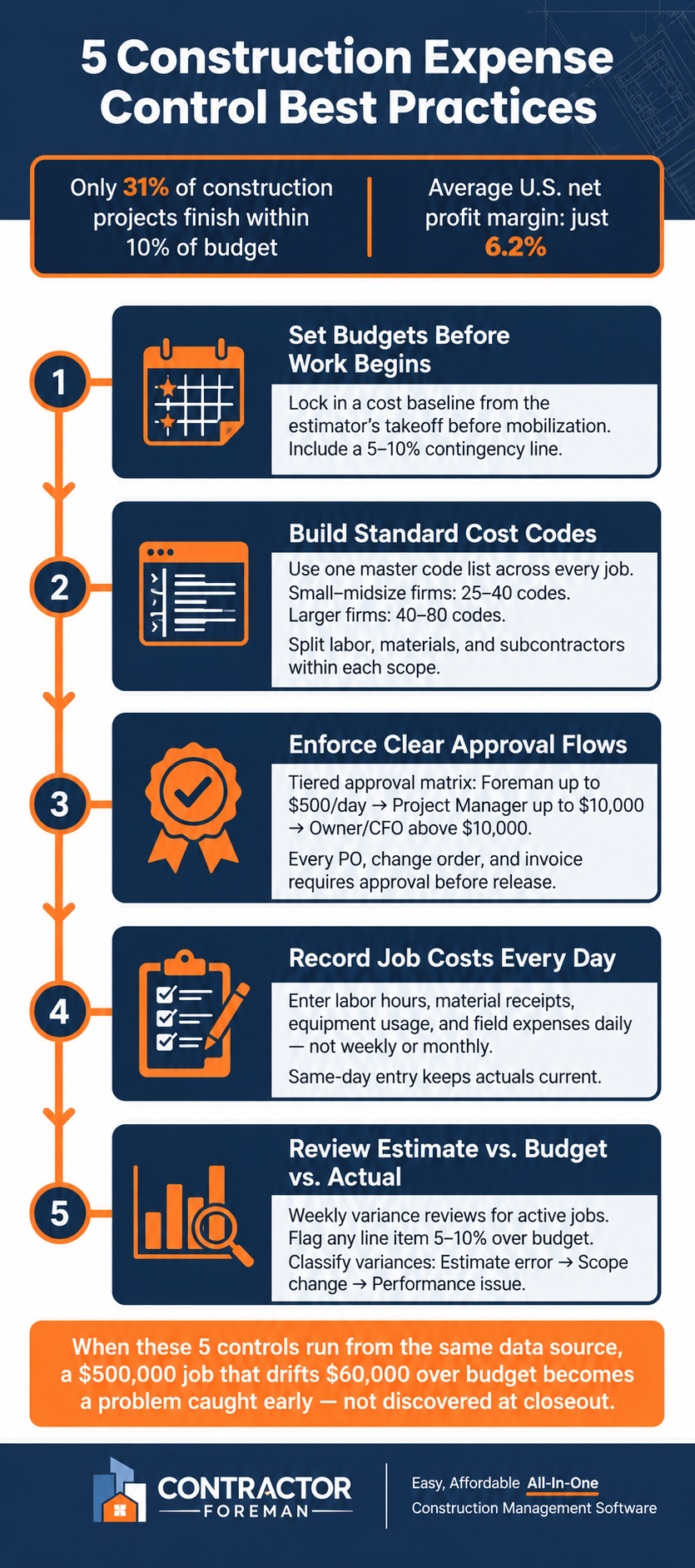
5 Construction Expense Control Best Practices
Quick Comparison
| Practice | What it controls | What happens without it |
|---|---|---|
| Budget set before mobilization | Starting cost baseline | Spending starts without a firm target |
| Standard cost codes | Clean job costing by scope and cost type | Labor and materials get mixed together |
| Approval flow | Spending before commitment | Field purchases hit the job with no check |
| Daily cost entry | Current labor and expense data | Margin drift stays hidden until later |
| Variance review | Early overrun detection | Problems surface near month-end or closeout |
Each step supports the next. Budgets set the baseline, cost codes sort the data, approvals limit off-plan spending, daily entry keeps numbers current, and variance reviews turn those numbers into action.
sbb-itb-5eea312
Why Expense Control Fails on Construction Projects
Expense control breaks down when estimating, payroll, purchasing, and accounting all track costs in separate systems. Project budgets, cost codes, approvals, daily updates, and variance checks need to run from the same data source.
When cost data sits in too many places, the gap between what a job looks like it costs and what it actually costs can grow fast. On a $500,000 office renovation, accounting may show $75,000 in material costs without showing which scope those charges belong to. By closeout, the job may be $60,000 over budget with no clear reason and no clean trail showing whether the cause was underbidding, production problems, or scope creep. That kind of fragmented reporting is exactly what makes estimate vs. budget vs. actual comparisons break down in practice.
Budget-to-actual tracking also fails when estimators, payroll, and accounting use different labels for the same work. A single cost code structure, used from bid through closeout, makes variance analysis possible. Only 31% of construction projects finish within 10% of budget, and about 32% of overruns trace back to estimating errors.
Committed costs create another blind spot. Paid invoices show only part of the picture. Money already locked in through signed purchase orders and subcontracts also counts against the budget. A signed $10,000 subcontract hits the budget before the first invoice shows up. If that cost is not counted until invoicing starts, the budget problem may surface too late to correct it.
Five practices address these failure points before they turn into overruns.
1. Set Project Budgets Before Work Begins
A project budget needs to be set before mobilization starts. The budget should come from the estimator’s detailed takeoff and tie directly to cost codes, so labor, materials, equipment, and subcontract costs can be tracked from day one. Avoid lump-sum lines. Break each scope into separate line items so variances are easy to spot.
A separate contingency line should also be included at 5%–10% of direct construction costs, based on project complexity. That starting point gives the team a clear standard for every commitment that comes next.
2. Build and Enforce Standard Cost Codes
Once the budget is set, the coding structure needs to stay fixed so every dollar lands in the right place. One master cost code list should be used across every job. When each project uses a different setup, labor, materials, equipment, and subcontract costs end up in different buckets, and budget-versus-actual reporting stops being dependable. New projects should start with that master list, then turn off unused codes instead of adding job-specific ones.
For small-to-midsize contractors, a practical setup often starts with 25–40 core codes grouped by division or trade, such as Site Work, Concrete, Framing, and Electrical. Larger firms may run 40–80 active codes to get more detail without making the system hard to use. One rule matters most: split cost types inside each scope. If Framing is one scope, labor, materials, and subcontractor costs should each have their own code. That makes each cost type easier to track and review on its own.
The system also needs plain documentation. Each code should include a definition, a scope note, and a default unit of measure like HR, SF, LF, or EA. That gives field and office staff the same frame of reference, which cuts down on miscoding. A simple cost code dictionary that both groups can access helps keep everyone on the same page.
Every timesheet, PO, invoice, and change order should require a valid cost code. Field timecards should show only the codes tied to that job or trade. That small limit helps prevent miscoding and keeps crews from dumping time into a catch-all miscellaneous code.
Cost codes should also map to construction cost estimates and the schedule of values. When planned and actual costs line up from the start, budget-to-actual reporting stays direct and avoids manual cleanup later.
With cost codes standardized, the next control point shifts to who can approve spending before it hits the job.
3. Set Up Clear Approval Flows for Spending
Without a written approval process, unapproved spending can hit the job before anyone has a chance to stop it. A written approval matrix sets the rules: who can approve a cost, the dollar limit, and the method. A tiered setup keeps control in place without slowing field work to a crawl.
A common model for small to midsize contractors looks like this:
| Role | Approval Limit | Typical Scope |
|---|---|---|
| Foreman / Superintendent | Up to $500 per day | Consumables and routine materials under pre-approved cost codes |
| Project Manager | Up to $10,000 | Budgeted materials, equipment rentals, and subcontract POs |
| Owner / CFO | Above $10,000 | Any unbudgeted item, high-risk scope, or large commitment |
Limits should match job size, but high-risk work needs tighter control.
Dollar caps by themselves don’t fix the problem. The same workflow needs to apply to every document tied to cost. That includes change orders, subcontracts, invoices, and budget transfers. Each request should show the job number, the right cost code, and enough backup to support the spend, such as a supplier quote. After approval, the request should become a formal PO or subcontract, not a verbal go-ahead.
A single approver can slow everything down. Tiered approvals reduce that pressure by allowing Project Managers to handle mid-range purchases while keeping executive review for large or unbudgeted items. Urgent field purchases can move under a fast-track limit for preapproved vendors and cost codes, with retroactive approval documented within 24 hours.
Once spending is approved, it still needs to be recorded the same day.
4. Record Job Costs and Expenses Every Day
Once spending is approved, record it that same day to maintain project cost control. Approved costs should never sit until the end of the week or month.
Daily records should cover a few core items:
- Labor hours by employee and cost code
- Material receipts with quantities, unit prices, and the related purchase order
- Equipment usage
- Jobsite costs such as fuel, rentals, and small tools
Each entry needs the correct project and cost code so the data flows cleanly into budget-vs.-actual reports.
Waiting until month-end can wipe out margin visibility and mask cash flow trouble. Same-day entry keeps committed and actual costs lined up in real time. If a foreman sees that concrete forming labor ran over budget this week because hours were entered daily, crew size or work methods can still be adjusted before the overrun gets worse.
Crew-based time entry often happens at shift end, with the foreman logging crew hours by cost code in a mobile app. Material receipts should be photographed at delivery and tagged to the job, cost code, and PO. Field expenses should be recorded right away with a receipt photo. An end-of-day review by the superintendent or project manager can catch missing entries before they turn into bigger problems. Daily capture gives managers current numbers for variance checks.
Many contractors connect payroll processing to approved daily timecard entries and reimburse field expenses only when a receipt is attached. Daily entry should be built into SOPs and foreman onboarding so it becomes a required workflow. That daily data then serves as the baseline for estimate, budget, and actual reviews.
5. Review Variances Between Estimates, Budgets, and Actual Costs
Daily cost entry only matters when the numbers get checked against the plan. The original estimate, approved budget, and actual costs should sit side by side for each cost code. Looking at only one number can hide an overrun. Labor, materials, subcontractors, and other major cost codes need to be broken out for the review to mean anything.
That review also needs two things: a fixed schedule and committed costs.
A package estimated at $120,000, budgeted at $125,000, and showing $110,000 in actual costs can still end up underwater once committed costs and remaining work are added in. Actuals alone never tell the whole story. Committed costs should be reviewed every time, right next to actuals.
Variance reviews should happen on a set cadence. Weekly checks tend to fit active jobs best. Lower-risk, slower-moving work can be reviewed monthly at a minimum. What matters most is consistency. The same PM, estimator, and accounting lead should review the same reports on the same schedule.
Once that rhythm is in place, each variance can be sorted by cause:
- Estimate variance: the original takeoff was too low
- Scope variance: the scope changed
- Performance variance: the scope stayed the same, but costs climbed because of rework, downtime, or poor sequencing
Each cause calls for a different response. A bad takeoff points back to estimating. A scope change needs scope control and billing follow-up. A performance problem points to field execution. The review should lead to action, not just a report.
Thresholds should also be set ahead of time so escalation is not left to guesswork. Any line item that runs 5% to 10% over budget, or hits a dollar amount that cuts into margin in a meaningful way, should be flagged. A $2,000 overrun on a $20,000 labor allowance is a much bigger problem than the same $2,000 on a $250,000 subcontract package. The response should already be clear: monitor, investigate, or correct.
When budgets, commitments, and actual costs sit in one system, these reviews can take minutes instead of hours.
How Contractor Foreman Supports These 5 Practices
With the controls already in place, Contractor Foreman helps keep them in force during day-to-day work.
Budget setup begins with estimate-to-budget conversion. The Financial Tab shows budget, committed costs, and actuals by category, while over-budget notifications help teams catch problems early. That keeps the estimate, budget, and actuals lined up from day one.
Cost coding stays steady because standardized codes carry across estimates, purchase orders, timecards, and expenses.
Approval flows run through POs and change orders that are routed for approval before release.
Daily cost capture relies on daily logs, timecards, and mobile expense entry to keep costs current, so actuals are ready for immediate variance review.
Variance reviews get simpler when estimates, budgets, commitments, and actuals sit in one system. Weekly budget checks become fast and easier to act on.
Disciplined vs. Reactive Cost Control: A Side-by-Side Look
The contrast below shows how each control shapes daily project results. It works as a quick gut check: are project controls stopping overruns, or just recording them after the damage is done?
| Practice | With Disciplined Implementation | Without Disciplined Implementation |
|---|---|---|
| Budget Setup | Budget stays tied to a baseline, so changes are measured instead of guessed. | Work starts without a confirmed baseline; budgets are rebuilt from invoices that show up weeks into the project. |
| Cost Codes | Every cost lands in the same code structure, so overruns can be traced by trade or scope. | Expenses land in “General” or “Misc” accounts; labor is tracked as one lump sum, which makes it hard to see which activity caused the overrun. |
| Approval Flows | Purchases need documented approval before ordering; change order management ensures approvals are signed before work moves ahead. | Field staff buy materials without approval; finance finds out about commitments only when invoices arrive. |
| Daily Job Costing | Costs are recorded daily, so actuals stay current. | Receipts pile up and get entered weekly or monthly; labor hours are posted late. |
| Variance Checks | Weekly budget-vs.-actual reviews catch labor drift early enough to adjust crew size or sequencing. | Variances show up at month-end or project closeout, after the concrete is poured and the margin is already gone. |
The pattern stays the same. On reactive teams, overruns rarely come from one big mistake. They build from a dozen small misses: an uncoded receipt here, an unapproved material run there, labor hours that do not get posted until payroll forces the issue. At that stage, recovery options are narrow.
Disciplined teams also separate committed costs from actual costs. Committed costs are amounts promised through POs or subcontracts. Actual costs are amounts already paid. Tracking both shows total financial exposure at any point in the project, not just what has gone out the door, but also what is already owed.
When a project system looks more like the right-hand column than the left, margin is already slipping away. If accounting has to guess expense codes, or PMs hear about purchases only after invoices arrive, cost control has already turned reactive.
Conclusion
Construction expense control works only when those five routines stay linked. Average net profit margins for U.S. construction companies sit at 6.2%, or about $62,000 for every $1 million in revenue. That margin is thin, and even small overruns or unapproved spending can do damage.
Contractors that use these controls on every job spot issues earlier, avoid nasty surprises at closeout, and keep margins intact.
Completed-job variance data also sharpens future estimates. Each finished job gives estimating teams a better read on labor, materials, and job cost patterns, which makes the next budget more dependable from day one. Strong expense control shortens the gap between plan and actuals fast enough for corrective action.
FAQs
What are committed costs?
Committed costs are formal obligations to spend money. They usually come from purchase orders or subcontract agreements.
Recording those costs when a purchase order is issued or a contract is signed lets the budget show future expenses before invoices arrive. That creates a clearer, real-time view of project health and helps prevent cash flow surprises.
How often should job costs be reviewed?
Review job costs at least weekly so budget gaps and margin loss show up while the project is still active.
During busy phases, or when labor and material costs jump, costs should be checked daily. Real-time monitoring and variance alerts make it possible to respond at once instead of waiting until month-end, when the damage may already be done.
How many cost codes should a contractor use?
A good target is 16 to 25 cost codes per job. Some contractors also find 20 to 40 effective, depending on project complexity and the team’s ability to manage the data.
The goal is a Work Breakdown Structure that’s detailed enough to spot budget variances fast, but simple enough for field teams to use the same way every time.







