
Ahhh… isn’t it nice that construction estimating software exists?
No more spending your precious evenings buried in spreadsheets, punching numbers into a calculator, and wondering whether you accidentally left $8,000 worth of materials out of the bid.
Well… ideally.
Because while estimating software is supposed to make your life easier, picking the wrong one can just move the headache somewhere else.
Sure, it might help you crank out an estimate and win the job.
But then what?
You still have to turn that estimate into a budget. Track actual costs against it. Handle change orders. Update quantities. Watch your margins. And somehow make sure the numbers you bid three months ago still mean something when the job is halfway done.
That’s why the best estimating software isn’t necessarily the one that makes bidding fastest. It’s the one that fits what happens after the bid, too.
In other words, your estimating software needs to match with your workflow. Because what’s the point of getting the numbers right if you’re just going to re-enter them, rebuild them, or lose track of them once the project is underway?
So instead of asking, “Which estimating software has the most features?”
Ask: “Which one fits the way I actually run my jobs?”
The best fit depends on the builder’s workflow. JobTread is the strongest all-around pick for estimate-to-budget control, Buildertrend fits custom home builders with heavy selections work, Contractor Foreman is the low-cost option, and STACK is best when takeoff speed matters more than project management.
Best construction estimating software by use case:
- Contractor Foreman — Best for affordability: Starts at $49/month
- Buildertrend — Best for selections and client approvals
- JobTread — Best for live margin and budget tracking
- STACK — Best for takeoff-focused estimating
- ProEst — Best for advanced preconstruction estimating: Geared toward larger contractors
- CoConstruct — Legacy option: No longer offered to new customers
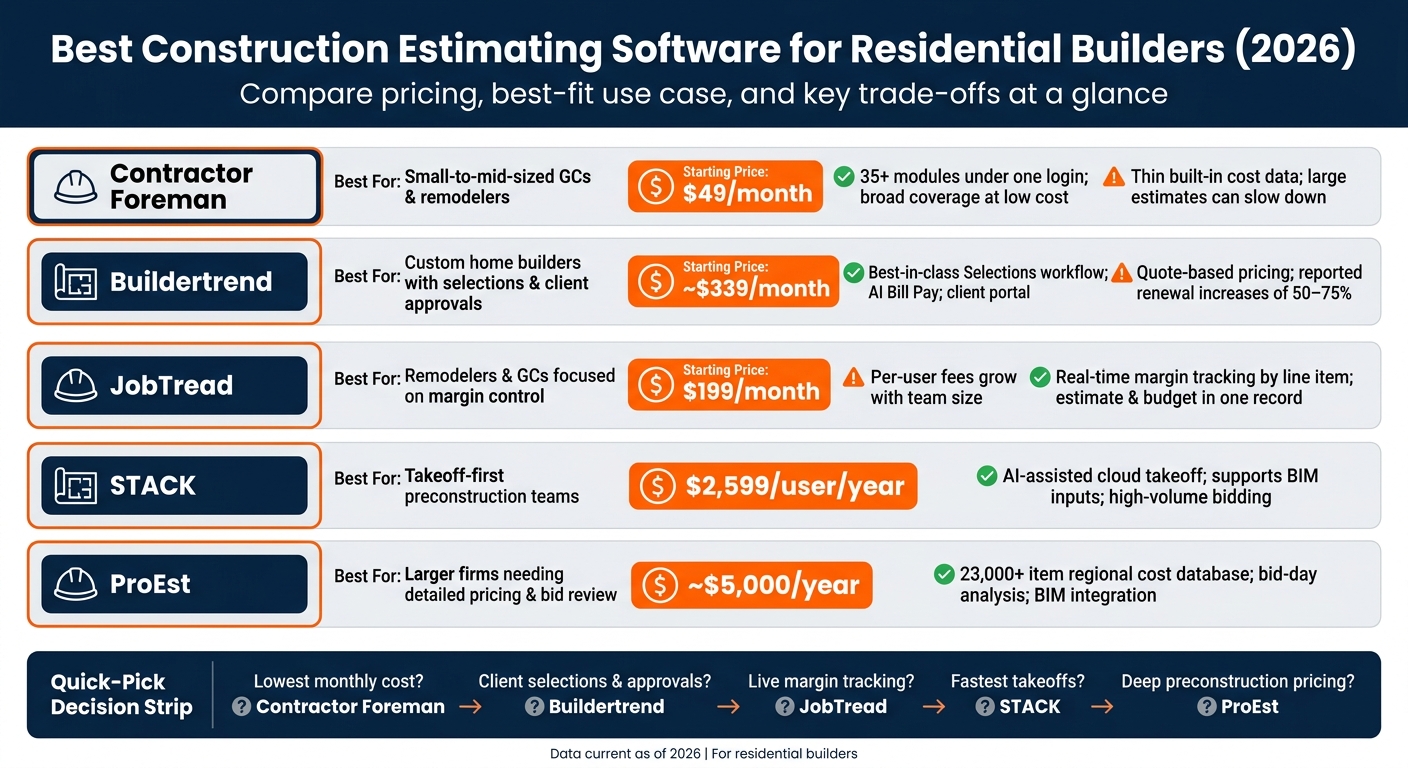
Best Construction Estimating Software for Residential Builders (2026)
Quick Comparison
| Software | Best for | Starting price | Main trade-off |
|---|---|---|---|
| Contractor Foreman | Small-to-mid-sized GCs and remodelers | $49/month | Thin built-in cost data; large estimates can slow down |
| Buildertrend | Custom homes, selections, client approvals | About $339/month | Quote-based pricing and reported renewal jumps of 50–75% |
| CoConstruct | Legacy users only | N/A | No new customers |
| JobTread | Remodelers and GCs focused on margin control | $199/month | Per-user cost grows with team size |
| STACK | Takeoff-first preconstruction teams | $2,599/user/year | No full job costing or field management |
| ProEst | Larger firms needing detailed pricing and bid review | About $5,000/year | Higher setup cost and heavier system |
The takeaway is this: software should match the job after the bid, not just the bid itself. Residential builders dealing with allowances, change orders, and cost drift usually get more from JobTread, Buildertrend, or Contractor Foreman than from takeoff-only tools.
sbb-itb-5eea312
1. Contractor Foreman
Contractor Foreman is a solid fit for small-to-mid-sized residential GCs and remodelers that want estimating tied directly to the rest of their project workflow. Estimates can flow into job costing, budgets, change orders, and other project financials, so you’re not rebuilding the same numbers once the job starts.
Pricing starts at $49/month for one user and goes up to $332/month for unlimited users with annual billing. That combination of estimating and project management makes it especially practical for custom home builders and remodelers that want to manage the job beyond the initial bid.
Takeoff & Quantities
Builders can upload plan sheets right into the platform and measure plans on screen. If they want automated takeoffs, Contractor Foreman connects with Kreo AI, and quantities can be exported into estimates by CSV.
The built-in cost database is thin on many day-to-day items, so many builders end up importing past pricing by CSV and building their own custom pricebook. That matters because if the takeoff is off at the start, the whole estimate can drift off course.
Estimate to Budget
Approved estimates convert straight into project budgets, and purchase orders and change orders update costs on their own. Builders can also set up Groups and Assemblies to bundle items they use again and again, which helps on repeat work like kitchen remodels and bathroom additions.
Change Orders & Proposals
After the estimate is done, the next hurdle is turning it into a proposal a client can read and sign without friction. Proposals come with branded cover sheets, custom formatting, and e-signature support. The Estimate Opened alert also helps with follow-up. Change orders can be created from RFIs or pulled from existing estimates, and both contract amounts and job costs update on their own.
Cost Tracking & Integrations
Live material and labor pricing comes in through the 1build integration, which cuts down on manual price checks. Contractor Foreman also has two-way sync with QuickBooks Online, although the QuickBooks Desktop integration ended on January 1, 2026. Other integrations include Gusto for payroll, Stripe for payments, and CompanyCam for photo documentation. Large estimates with 500+ line items can slow down on complex custom homes. That means estimate data stays tied to accounting, payroll, payments, and field photos instead of getting scattered across a stack of tools.
2. Buildertrend
Buildertrend is a strong fit for residential builders that want estimating tied closely to selections, proposals, and job-cost tracking. Pricing is quote-based, but third-party estimates put Essential at about $339/month, Advanced at about $499/month, and Complete at about $829/month. Essential covers project management. Advanced adds estimating, proposals, purchase orders, and bid requests. Complete adds Selections and warranty management.
Takeoff & Quantities
Buildertrend includes a native digital takeoff tool that measures linear, area, and count straight from uploaded plans. If you need more depth, it also connects with STACK for advanced takeoffs and local cost data.
Estimate-to-Budget Workflow
Once an estimate is approved, it can flow into project budgets, purchase orders, and project schedules. The platform also supports multiphase builds, which helps contractors estimate different parts of a large custom home separately. That’s handy when one job has a lot of moving pieces.
Builders can also save custom estimating templates with preset cost items, descriptions, and quantities. That cuts down repeat work and helps teams turn around bids faster.
Change Orders & Proposals
The Selections module, available on the Complete tier, stands out for custom home builders. Homeowners can pick finishes through a branded portal, and over-allowance selections can flow into change orders with the budget impact attached.
Buildertrend also lets teams generate proposals from estimates with one click. Those proposals can be sent as branded PDFs with native e-signatures, and approvals are logged with timestamps and approver names through the mobile-optimized Client Portal.
Cost Tracking & Integrations
Buildertrend’s Job Costing Budget tool, refreshed in early 2026, tracks costs against budgets and shows variances in real time. It also added AI Bill Pay at IBS 2026 to digitize and categorize vendor invoices for approval routing against live job-cost data.
On the accounting side, Buildertrend syncs natively with QuickBooks Online, Xero, and Sage for cost codes, bills, invoices, and payments. For most builders, Buildertrend acts as the job-cost tracking layer, while QuickBooks Online stays in place as the accounting system.
The biggest downside is pricing transparency. Buildertrend moved to a quote-based model in 2026, and users have reported renewal price increases of 50–75% after the first contract term. If you’re a remodeler or a smaller GC keeping a close eye on margin, that kind of pricing swing is hard to ignore before you sign.
Builders that want a more estimate-first workflow may lean toward another tool.
3. CoConstruct
CoConstruct is now in maintenance mode and no longer takes new customers after Buildertrend bought it. Current users are being moved over, so this section is mostly for reference if you already use CoConstruct, not if you’re shopping for new software. In that sense, CoConstruct works best here as a legacy point of comparison for estimating, selections, and job-cost workflows.
Takeoff & Quantities
CoConstruct includes basic online takeoff for residential plans, but that was never its main strength. Its stronger side was the estimate-to-job-cost workflow, not deep quantity extraction. If you need more advanced quantity takeoff, it may feel limited.
Estimate-to-Budget Workflow
Where CoConstruct stood out was its one-entry estimating flow. When you created a cost estimate, the system also built the project specifications, which cut down on repeated data entry. Its smart bid templates also flowed straight into proposals and job costing records, helping keep the handoff from sales to production in good shape.
That setup made CoConstruct a strong match for custom home builders and remodelers.
Change Orders & Proposals
Change management was built right into the estimating flow, so once a change order was approved, the budget, projected costs, and project documents updated on their own. CoConstruct also gave clients selection sheets through the portal, where homeowners could review finish choices, see allowance impacts right away, and approve selections online.
Cost Tracking & Integrations
CoConstruct syncs with QuickBooks Desktop, QuickBooks Online, and Xero for budget, change order, and expense tracking. It also supports both fixed-price and cost-plus jobs, with prices updating right after a selection or change order gets approved.
The main downside was setup. Templates and labor categories could take a lot of time to build out.
For builders comparing active options, the next tool is built for a more current estimating workflow.
4. JobTread
JobTread is a strong fit for builders who want estimating and job costing in the same workflow. It links estimates and job budgets to one live record, so once a line item gets approved, it moves into production without anyone re-entering it. For custom homes and remodels, that can save a lot of hassle, especially when allowances and selections shift halfway through the job.
Takeoff & Quantities
In 2026, JobTread added native digital takeoff. That means builders can measure plans and build estimates inside the same platform instead of bouncing between tools.
Estimate-to-Budget Workflow
JobTread tracks margin by line item in real time, which gives builders a clear view of margin slip while the project is still moving, not weeks later when the job is done. It also supports selections and allowances, which is a big deal for custom home builders dealing with client finish choices and mid-project swaps.
Change Orders & Proposals
Proposals, e-signatures, and change orders all stay in one workflow. Customers, vendors, and subcontractors get free, unlimited portal access, so approvals, updates, and back-and-forth communication stay in one place instead of getting scattered across email threads and text messages.
Cost Tracking & Integrations
JobTread has two-way sync with QuickBooks Online, but it does not support QuickBooks Desktop. It also connects with The Home Depot and Lowe’s for ordering and price matching, which helps keep purchasing and accounting lined up without duplicate entry. As of March 2026, the platform offers 23 integrations, including CompanyCam, DocuSign, and Salesforce.
Pricing starts at $199 per month for the first internal user, or $159 per month when billed annually. Additional internal users are billed in tiers. External users, including customers, vendors, and subcontractors, get free, unlimited access.
Next, the estimating focus moves toward tools built for larger takeoff and bid workflows.
5. STACK
STACK is a cloud-based platform built around takeoffs first. It pulls quantities from plan sets and turns them into priced estimates with less duplicate entry. That’s a big deal for custom homes and remodels, where framing, roofing, and finish quantities need to flow cleanly into the bid.
Takeoff & Quantities
STACK supports area, linear, volume, and count measurements from 2D digital plans. It also accepts 3D BIM model inputs for quantity extraction. On top of that, its automatic counting feature can save time on repetitive measurements.
Estimate-to-Budget Workflow
After measurements are pulled, STACK feeds them into assembly-based pricing. Builders can set up reusable assemblies for repeat scopes, which helps price similar jobs the same way instead of rebuilding each estimate from zero.
Where STACK shines is preconstruction. Where it falls short is full job-cost and field management. Once a project moves into production, it does not include scheduling, subcontractor management, or full job-cost tracking.
Change Orders & Proposals
STACK supports markup changes inside the estimating workflow, but it fits preconstruction better than day-to-day project control. If a builder needs change orders and site management after the bid, STACK usually works best alongside a separate project management system.
Cost Tracking & Integrations
For material pricing, STACK pulls live supplier catalog data, including Home Depot pricing, which helps keep cost inputs current. It connects with QuickBooks, Sage, and Viewpoint through API connections. It also integrates natively with Buildertrend for AI-powered takeoff and local cost data.
Pricing starts at $2,599 per user per year for the Standard plan and $2,999 per user per year for the Premium plan, which includes AI features. Teams with three or more users can bring that down to about $2,199 per user per year. STACK also offers a 7-day free trial. It’s smart to test it with actual project files, not demo data, before signing on.
Builders who need more than preconstruction tools may want a broader estimating option. If your workflow needs more production management, the next option takes a different path.
6. ProEst
Where STACK puts more weight on preconstruction speed, ProEst leans more into regional pricing detail and bid analysis. It’s a cloud estimating platform built for detailed takeoffs, regional pricing, and bid review on larger residential projects. That makes it a strong fit for custom homes, high-value remodels, and larger GC workflows where precision in calculating building costs and scope documentation matter most.
Takeoff & Quantities
ProEst pulls quantities from digital plans and BIM models, then applies a regional cost database with more than 23,000 items keyed to city and ZIP code. That level of local pricing helps keep custom home and remodel estimates in line with labor and material costs in a given market.
Estimate-to-Budget Workflow
This pricing depth matters most when bids need a line-by-line check before contract award. After quantities are pulled, ProEst moves them into a job budget without re-entering data. Its bid-day analysis feature lets builders compare subcontractor bids side by side against the original estimate, which helps confirm scope coverage and spot gaps in subcontractor pricing before the contract is signed.
Change Orders & Proposals
ProEst generates proposals with customizable templates and line-item cost detail. That makes it easier to show inclusions and exclusions clearly on custom homes and larger remodels.
Cost Tracking & Integrations
For residential builders, the most useful integrations include QuickBooks Online, Sage, and Excel for accounting and reporting. It also connects with Procore and Autodesk Construction Cloud for teams already working in those systems.
ProEst is best suited to mid-to-large general contractors managing high-value projects, often around $5 million and up. Pricing starts at about $5,000 per year. For mid-to-large contractors, estimated pricing runs about $500 to $800 per user, per month. Implementation costs, including training and data migration, can sometimes cost more than the software itself.
The next section weighs these tools based on the features that have the biggest effect on residential estimating speed, accuracy, and profit.
How These Tools Compare on the Criteria That Matter Most to Builders
Pros and Cons of Each Tool
The table below turns the comparison into a quick buyer’s guide for residential builders. Use it to line up each platform with your workflow, budget, and team size.
| Tool | Strengths | Limits | Best-Fit Builder Type | Pricing Notes (USD) |
|---|---|---|---|---|
| Contractor Foreman | 35+ modules under one login; covers estimating, job costing, and field management together | Interface feels dense; takeoff tools are shallow compared with specialists | Small-to-mid-sized GCs and remodelers who need broad coverage at a lower monthly cost | $49–$332/mo (annual billing) |
| Buildertrend | Strong selections workflow for custom home finishes; client portal for selections and approvals; AI bill pay | No published pricing tiers; reported renewal increases of 50–75%; steep learning curve | Established custom home builders and high-end remodelers | Est. $339–$829/mo + $400–$1,500 onboarding |
| CoConstruct | Legacy-only; no longer a current purchase option | – | Existing legacy users only | No longer available for new purchase |
| JobTread | Transparent per-user pricing; estimate and live job budget share one record; real-time margin tracking by line item | Per-user fees add up as the team grows; client portal is less feature-rich than Buildertrend’s | Remodelers and GCs who prioritize margin visibility and cleaner change-order workflows | $199/mo (first user); additional internal users billed in tiers |
| STACK | AI-assisted cloud takeoff speeds up measurements; supports collaborative bidding on high-volume plan sets | No scheduling, daily logs, or job costing – builders need a separate tool once the project moves into execution | Mid-size GCs and trade contractors where blueprint takeoff speed is the main bidding bottleneck | $2,999/user/yr (Premium) |
| ProEst | Commercial-grade quantity takeoff; regional cost database with 23,000+ items; structured bid analysis | Busy interface; not designed around the residential homeowner experience; enterprise-level pricing | Large residential firms or commercial GCs running enterprise-grade workflows | Custom quote |
Two caveats matter here. CoConstruct is legacy-only, so it’s not an option for new buyers. And STACK and ProEst sit more on the preconstruction side, which means most smaller residential firms will likely find them more tool than they need.
Conclusion
There’s no one best construction estimating software for every residential builder. The right pick comes down to how your business works every day.
Here’s a simple way to sort it out. If you want broad coverage at a low monthly cost, Contractor Foreman starts at $49/mo and includes 35+ modules under one login, plus a price-lock guarantee that won’t change as your project count grows. If you build custom homes and deal with lots of client selections, Buildertrend stands out for its Selections workflow and homeowner approval process, but you’ll want to plan for quote-based pricing and onboarding fees. JobTread makes sense for remodelers who want estimates and live job budgets to stay aligned, with clear pricing that starts at $199/mo. If takeoff speed is the main issue, STACK is built for high-volume cloud-based takeoff and commercial-grade bidding. And if your team needs deeper estimating tools for complex drawings, BIM integration, and large historical cost databases, ProEst is a solid match.
Before you sign up, do the full cost math. A tool that looks cheap at one seat can get expensive fast when you add your whole team. You’ll also want to check that your shortlist connects cleanly with QuickBooks or Xero. If the accounting sync is messy, it can wipe out the time your estimating software is supposed to save.
“The tool that feels fast on your actual plans is the right one, regardless of the spec sheet.” – Louis Corneloup, Founder, Dupple
The smartest next step is to use a 14–30 day free trial and run a real past project through the software before you commit. That one test will tell you more than any feature chart ever will.
FAQs
How do I choose the right estimating software for my workflow?
Start by pinpointing the biggest gap in your current workflow. That could be slow quoting, schedules that don’t line up, weak change order control, or messy handoffs to accounting.
If measurement-led estimating is your top concern, use digital takeoff tools like PlanSwift or STACK. If you want estimates to move straight into scheduling and job execution, look at an integrated platform like Contractor Foreman.
The best way to judge it? Use the free trials and run a real bid through each tool. That gives your team a clear, hands-on sense of what fits and what just gets in the way.
What features matter most for residential estimating?
For residential contractors, the estimating features that matter most are:
- Digital plan takeoff for accurate measurements
- Assemblies and templates for repeat scopes like kitchens or baths
- Real-time margin and markup visibility
- Branded PDF proposals with e-signature
- Accounting integration and live material pricing
Taken together, these tools help keep estimates accurate, consistent, current, and profitable.
How can I test software before committing?
Use the free trial – usually 14 to 30 days – and put it to work on an actual project bid with your own data, not just a polished sales demo. That’s the best way to see how the software fits your day-to-day workflow.
Before you sign, ask for a rollout plan that covers data imports, template setup, and team training. It’s also smart to confirm the current price and ask whether renewal rates could go up later.







