
- Why Resource Conflicts Keep Happening Across Projects
- 1. Centralize Crew Calendars to Prevent Double-Booking
- 2. Level Resources Across Projects Before Conflicts Grow
- 3. Rank Jobs Using Priority Rules and Job Cost Data
- 4. Build Material Buffers and Track Procurement Status
- 5. Balance Field Supervisor Coverage by Territory and Workload
- 6. Unify Staff, Equipment, and Vehicle Calendars
- 7. Set Clear Escalation Rules for Resource Conflicts
- 8. Use Short-Interval Planning and Daily Control Loops
- 9. Forecast Capacity Using Historical Logs and Cost Data
- How Daily Logs, Calendars, and Job Cost Data Work Together
- Quick Reference Table: Which Data Source Resolves Which Conflict
- Conclusion
- FAQs
- Related Blog Posts
“Where’s Mike?”
“Site A.”
“What? He’s supposed to be at Site B.”
“I know.”
“And the skid steer?”
“Site C.”
“Well… Mike needs that at Site B.”
“Yep.”
Site A was supposed to wrap up yesterday. It didn’t. Now Mike is stuck at Site A, the skid steer is tied up at Site C, and Site B is waiting on both.
One delay has now created resource conflicts across three projects.
That’s not unusual in construction.
The solution isn’t to run such a tight ship that nobody has room for delays. It’s to spot delays and resource conflicts early enough to adjust before they start affecting other jobs.
You can’t prevent every delay. But you can keep one from turning into three scheduling problems.
Here are nine ways to do that.
The fix is not more guesswork. It is a tighter system built around shared calendars, daily logs, and job cost data. When those three stay aligned, crews can be moved sooner, blocked work can be resequenced, and priority calls can be backed by cost impact instead of noise.
A few numbers show the stakes:
- A 10-person crew sitting idle for 2 hours can burn close to a day of wages.
- Material issues account for about 30%–40% of project delays.
- Look-ahead planning has lifted Percent Plan Complete from 56% to 82% in reported cases.
- Better resource allocation explains about 33.4% of project performance.
| Conflict | First fix | What settles the decision |
|---|---|---|
| Double-booked crews | Central crew calendar | Float, readiness, and margin risk |
| Late materials | Buffer stock and procurement tracking | Delay cost vs. expedite cost |
| Supervisor overlap | Territory and workload limits | Site count, crew load, and open issues |
| Shared equipment | Unified asset calendar | Idle crew cost vs. rental cost |
The strongest approach follows a simple loop: log the issue, check the calendar, compare the cost. That keeps labor, equipment, and materials tied to what the field can actually start each day.
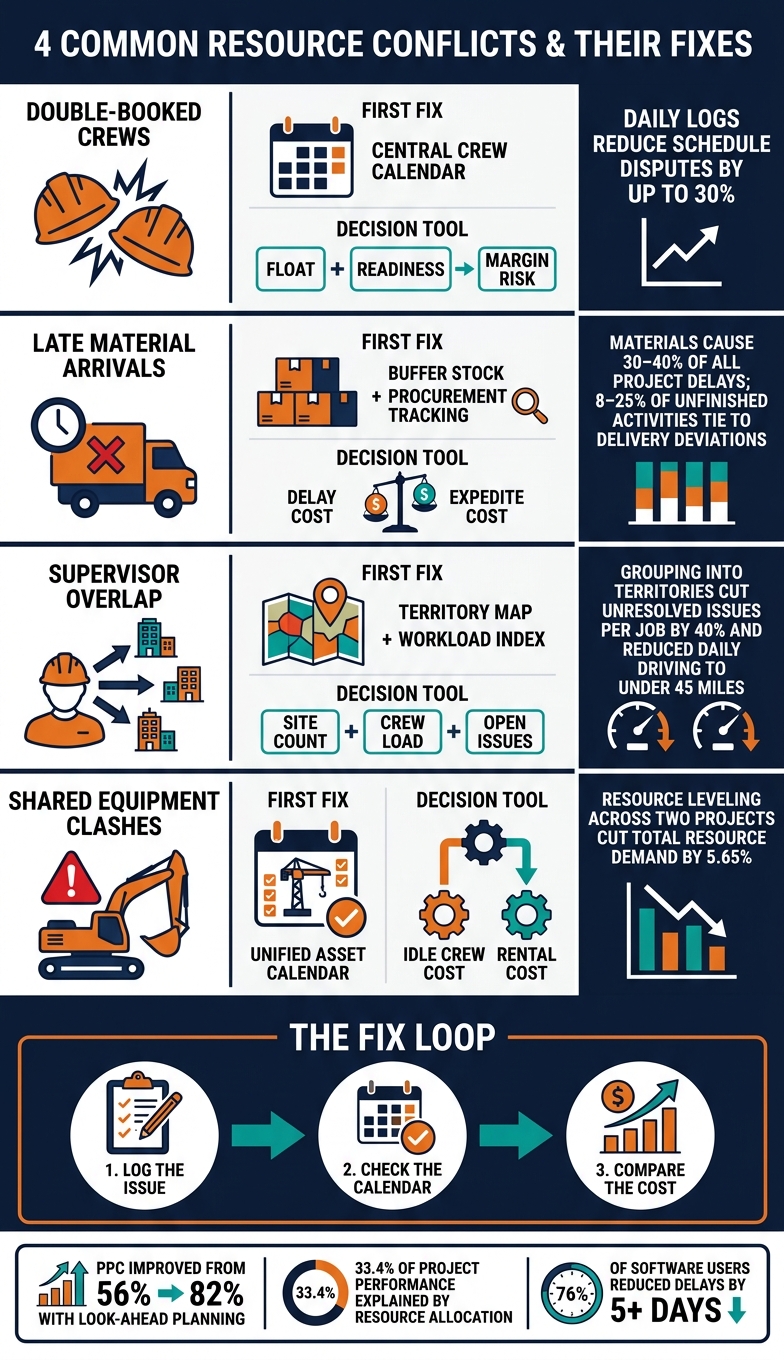
4 Resource Conflicts & How to Fix Them: Data-Backed Construction Guide
Why Resource Conflicts Keep Happening Across Projects
When labor, equipment, and material updates sit in separate places, cross-project conflicts tend to show up too late. Each system can look correct on its own. The problem appears only when the crew gets to the jobsite and finds the needed equipment is already booked somewhere else.
Construction teams gather plenty of data, but that data often stays trapped in separate systems with inconsistent labels and no shared definitions. A scheduler can set a start date without seeing that materials are delayed. A piece of equipment can get assigned to one job without anyone noticing another project already has it booked for the same morning.
Field updates often make the gap even worse. If a daily log doesn’t note that a lift broke down, a material delivery slipped, or a supervisor had to split time across two sites, the office may treat those resources as still available. That assumption rolls into the next schedule, and the next schedule gets built on stale data. Research consistently ranks poor coordination and communication, ineffective planning, and delays in material procurement among the most frequent causes of project delays. The pattern is pretty clear: weak visibility causes many of these clashes more than one-off mistakes do.
Missing daily logs leave the office working from outdated availability, which then drives the scheduling mistakes. That’s why the fixes below center on shared calendars, better reporting, and faster priority calls.
These conflicts usually pile up across labor, equipment, materials, and field supervision at the same time.
The nine fixes below use calendars, daily logs, and job cost data to surface conflicts before they spread.
sbb-itb-5eea312
1. Centralize Crew Calendars to Prevent Double-Booking
A shared calendar stops construction schedule issues like double-booking before crews leave the yard. When crew assignments sit in one place, a scheduler can spot conflicts fast. The concrete crew may already be set for a pour across town at 7:00 a.m., which prevents a second booking at that same time.
If it isn’t on the shared calendar, it isn’t booked.
One calendar gives every team the same current crew status, whether staff are in the office or on-site. Contractor Foreman supports that kind of centralized crew calendar, with overlapping events flagged before the crew ever leaves the yard.
Daily logs should mark crews unavailable when work runs long, a lift breaks down, or weather cuts production. A 2022 study in the Journal of Construction Engineering and Management found that consistent daily reports reduce schedule disputes by up to 30%. The calendar should then show that crew as unavailable the next day.
A packed calendar often points to a second problem: too many crews tied to the same day. At that stage, demand needs to be balanced across projects. If two jobs still need the same crew, the conflict should be flagged for priority review. Priority rules handle the exceptions, and workload balancing keeps those exceptions from stacking up.
2. Level Resources Across Projects Before Conflicts Grow
Once every crew sits on one calendar, demand needs to be leveled across all active jobs before the same trade gets booked twice. Scheduling each job on its own is one of the fastest ways to trigger a resource crunch. If three projects all need the same concrete crew on Wednesday, no single schedule will flag the issue. A portfolio-wide view will.
Resource leveling means shifting task timing across active jobs so total demand for any crew, equipment item, or material supply stays within what’s actually on hand.
One two-project study found that leveling together cut total resource demand by 5.65%. That’s what happens when planning looks at the full portfolio instead of one job at a time.
Daily logs make resource strain easier to spot because they show actual crew hours, equipment use, and task slips. When foremen log crew sizes, hours worked, and equipment usage each day, patterns show up fast. One framing crew may be working 10- to 12-hour days on Job A while another framing crew sits underused on Job B. Without steady logging, that mismatch can stay hidden until overtime hits the budget or a milestone slips.
A few habits make those conflicts easier to catch:
- Color-code crew entries by project to spot overlap fast.
- Include transport and setup time in equipment bookings, not just active use.
- Review logs each week and move noncritical work into open float before demand spikes.
Contractor Foreman centralizes calendars, daily logs, schedules, and job cost data so office staff and field teams work from the same resource view.
If demand still runs past supply after leveling, priority rules and job cost data can determine which work moves first.
3. Rank Jobs Using Priority Rules and Job Cost Data
When leveling still leaves more demand than supply, a written ranking rule needs to take over. Without it, the loudest request usually gets the crew. Using the same rules across every job keeps labor pointed at the work that protects schedule and margin first.
Start with schedule pressure. Rank jobs by float, critical-path status, and successor count. Then check the money side: cost-to-complete, burn rate, committed costs, and variance from estimate. Jobs with less slack, more follow-on work, and more margin risk move ahead of work with fewer constraints.
After the ranking is set, readiness decides whether a crew can move now. A permitted, supplied job with a near-term deadline should sit above one still waiting on materials or inspections.
Tier labels can speed up field decisions under pressure:
- Emergency
- Time-sensitive
- Standard
- Deferrable
That kind of simple structure gives superintendents a fast way to sort work without opening a spreadsheet.
Daily logs then test whether a job still deserves the crew. A job may fall in rank by the next update if steel slips or an inspection fails. Logs that track crew productivity, equipment downtime, missing materials, and site access problems show whether a job can actually absorb labor – or just looks urgent on paper.
Effective resource allocation explains about 33.4% of project performance, which shows how much these calls matter. Re-rank when job cost data and daily log updates point the same way. If a cost report shows Job B heading toward a margin loss and the daily log confirms materials are on site with the area ready to start, shifting a foreman from a blocked Job A to Job B is financially defensible and operationally sound. The reason should be documented so the decision holds up later.
If the conflict starts with a missing delivery, the issue is no longer just priority. At that point, material buffering becomes the next move.
Contractor Foreman brings scheduling, daily logs, and financial tracking into one platform, so managers can compare cost variance, task readiness, and crew availability across jobs without pulling data from separate systems. Faster access to that combined view can turn a priority conflict into a managed decision instead of a field argument.
4. Build Material Buffers and Track Procurement Status
Late deliveries rarely hurt just one job. They can set off a domino effect across the schedule. A missing material can leave crews standing around, push trades out of sequence, and force last-minute crew moves or trade stacking on other sites. Research shows that 8–25% of unfinished activities on construction projects tie back to delivery deviations, and material-related problems make up about 30–40% of total construction project delays.
A practical defense is a targeted material buffer. That means keeping a small, planned reserve of the materials most likely to stop work if they run short. Not every item needs one. The focus should stay on long-lead, high-use, or mission-critical materials such as structural steel, roofing membrane, or specialty fixtures. A workable range is:
- 2–3 days of usage for fast-moving items
- Up to one full week of use for one crew for critical items with long supplier lead times
After the buffer is set, each critical item should be tracked by its required-on-site date. A portfolio-wide procurement log helps the office see risk before the field feels it. The log should include each critical item, its required-on-site date, supplier, order date, confirmed ship date, and current status. Simple status codes like Not ordered, Ordered, Shipped, Delivered, and Issue make it easy to scan across jobs and spot trouble early. Automated alerts tied to required-on-site dates can flag items still marked Not ordered or Not shipped, giving managers time to press the supplier or shift work sequences.
Daily logs help surface shortages early too. When foremen note partial deliveries and remaining quantities – Rebar: 2 days left at current pour rate, for example – the office can check that against the procurement log and respond across active jobs before the shortage turns into downtime.
If a delivery still slips, job cost data should drive the call on expediting. An eight-person carpenter crew running at $5,600 per day in fully loaded labor and equipment costs burns $11,200 over two idle days. If expedited freight costs $2,000, the math is hard to argue with. Expediting makes sense when total delay cost – idle labor, extended overhead, and any liquidated damages exposure – costs more than faster shipping. That decision should also be documented so it stands up during a job cost review later.
Contractor Foreman ties daily logs, purchase orders, expenses, and job costing together in one platform. That setup lets managers connect a foreman’s material-shortage log entry straight to the procurement record and the running labor cost, turning the expediting decision into a cost comparison instead of a field argument.
5. Balance Field Supervisor Coverage by Territory and Workload
Crews and materials may be in place, but supervision often becomes the choke point. In multi-project work, field supervisors are usually among the tightest resources. A practical span of control is 1:8 to 1:12 workers per supervisor, and one superintendent should usually cover no more than 2–3 large or complex sites before quality starts to slip.
A strong starting point is a territory map. Active jobs can be grouped by ZIP code cluster or by a driving radius, usually 30–40 miles, so each supervisor runs a sane daily route instead of bouncing between scattered addresses.
One mid-sized U.S. concrete contractor used three months of daily logs and site-visit data to group jobs into two main territories and cap supervisors at five active projects each. Within two months, unresolved issues per job fell by 40%, and average daily driving distance per supervisor dropped below 45 miles.
Territory, though, only solves part of the problem. Workload needs its own measure.
A workload index that combines site count, crew headcount, project complexity, and open-issue volume gives a much clearer view of demand.
A simple model works well:
- Small jobs count as 1 unit
- Large or complex jobs count as 2–3 units
- Supervisors stay capped at 8–10 total units
If a supervisor’s open-issue ratio rises above 30% after three days, pressure is building. At that point, assignments should be redistributed or backup support should be added to the jobs carrying the most strain.
Daily logs usually show overload before anything else does. Missing logs, unresolved safety items, and slow RFI responses are common signs that a supervisor is stretched too thin. A weekly review of those patterns gives managers time to rebalance coverage before a schedule slip turns into rework.
Contractor Foreman puts supervisor calendars, daily logs, site visits, and job cost data in one place. That makes it easier to spot duplicate visits to low-risk jobs, missed visits to unattended sites, and high-burn jobs much earlier.
6. Unify Staff, Equipment, and Vehicle Calendars
After supervisor coverage is balanced, the next move is to line up the equipment and vehicles tied to that work. When labor, equipment, and vehicles sit in separate systems, project managers miss conflicts between jobs. A foreman might be assigned to a project that needs a dump truck already booked at another site for 7:00 a.m., and the problem stays hidden until the truck never shows.
A unified calendar solves that by giving each resource its own line in one shared view. If a scheduler books an excavator for one job, that asset shows as unavailable everywhere else during that time window. Staff, equipment, and vehicle availability become visible at the same time across jobs.
Maintenance blocks and vehicle inspection time should sit in that same calendar. A simple rule keeps it under control: if an asset is down for service, it gets blocked on the calendar so nobody books it by mistake. That habit cuts one of the most common causes of last-minute schedule changes before crews ever feel the hit in the field. Once assets are protected on the calendar, the next move is to set a clear conflict rule for what shifts first.
Contractor Foreman ties crew schedules, equipment records, and vehicle assignments to the same project timeline, letting supervisors check one calendar before dispatching equipment or assigning a vehicle. That means fewer extra calls and smoother morning starts.
7. Set Clear Escalation Rules for Resource Conflicts
Even with unified calendars, resource conflicts still happen. When there’s no clear path for escalation, calls get made case by case, and records often fall through the cracks.
A practical escalation framework uses three tiers. At Tier 1, the foreman and project manager try to fix the issue inside the project by changing task order or adjusting shifts. If the conflict isn’t resolved within 48 hours, it moves to Tier 2, where an operations manager reviews schedules and job cost data across the affected projects and reassigns resources. Tier 3 involves an executive or owner and is reserved for high-dollar or client-critical conflicts, such as jobs facing liquidated damages risk or cases where a client relationship is at stake.
Each tier also needs the right data before a decision is made:
- Tier 1 requires the last 3 to 5 daily logs, current resource assignments, and a labor-vs.-budget snapshot.
- Tier 2 requires a 2- to 3-week look-ahead, resource calendars, utilization logs, and job cost reports.
Daily logs give decision-makers proof, not guesswork. If a log shows zero framing progress, notes that the crew never arrived, and includes a timestamp for the gap, the operations manager has a clear basis for reassigning that crew. Job cost data helps settle the harder call: which job keeps the crew. A project that is already tight on budget and facing a hard completion date should keep its crew ahead of a lower-margin job with schedule float.
Contractor Foreman keeps the escalation record linked to the schedule and cost file, so when a Tier 2 issue comes up, the operations manager can pull the needed data fast. The decision is then recorded back into the schedule, and once the conflict is settled, that update should carry into the next day’s plan.
8. Use Short-Interval Planning and Daily Control Loops
After escalation rules are set, the next move is keeping conflicts out of the weekly plan. Long-range schedules often miss near-term resource clashes. Short-interval planning closes that gap with a one- to two-week look-ahead that confirms crews, materials, and constraints before work is released.
The weekly look-ahead meeting is where conflicts tend to show up early. Superintendents and project managers review upcoming tasks across all active jobs and run a constraint check on each one: labor, materials, equipment, permits, and inspections. If a task is missing even one constraint, it stays out of the plan and does not take up a crew, equipment slot, or delivery window. That keeps crews and equipment from being sent to work that is not ready. If two ready jobs still need the same crew, job cost data should decide the assignment, with priority going to the higher-risk job.
Daily logs show whether the plan still matches field conditions. At the end of each shift, foremen record manpower by trade, equipment use, quantities completed, and delays with a reason code such as material delay, inspection not complete, or another trade in the area. During the morning huddle, crews can be moved off blocked jobs and onto ready work. If a log shows zero progress because an inspection did not clear, that crew can be resequenced to a task that is ready instead of sitting idle. Those same logs also feed the capacity forecast in the next step.
Research on projects using this look-ahead and daily-huddle structure found that weekly Percent Plan Complete scores rose from 56% to 82% after look-ahead planning was introduced. That gain comes from faster resequencing across projects before idle time or overtime starts to build.
Contractor Foreman centralizes daily logs, crew calendars, and schedules so managers can update the look-ahead and reassign resources the same day.
9. Forecast Capacity Using Historical Logs and Cost Data
When weekly planning keeps missing the same bottlenecks, historical logs usually show where the next clash is likely to happen. Short-interval planning helps in the near term, but the bigger gain happens earlier, before a new project even hits the schedule. Daily logs and job cost records can reveal repeat labor spikes, late-material risk, and weeks where crews get stretched too thin. Repeated production rates help set a baseline output by trade. A data-driven approach like this has been shown to reduce delays by about 18% and improve resource estimation accuracy by roughly 25% compared to older planning methods.
Historical records also show where overload kept showing up. A common pattern is several jobs moving into the same phase at the same time. Job cost records from those periods often show overtime premiums or cost overruns tied to rushed resequencing. That gives schedulers a chance to stagger those phases before the conflict takes shape. Those limits still need to be checked against live calendars before work gets released.
Job cost history can also set a dollar-based capacity ceiling. If past projects show that crews can reliably handle about $200,000 in monthly labor spend without heavy overtime or quality issues, then a schedule projecting $350,000 in one month is a clear warning sign. At that point, starts may need to move, staff levels may need to change, or more work may need to go to subcontractors.
Contractor Foreman (contractorforeman.com) connects daily logs, job cost data, and project calendars so past patterns can help set practical capacity limits. That only works when the history stays tied to current schedules and daily updates.
How Daily Logs, Calendars, and Job Cost Data Work Together
These three inputs work best as a set: daily logs show what changed, calendars show what is blocked, and job cost data decides which job moves first.
The loop is simple: log the issue, check the calendar, rank by cost impact. A supervisor records a late delivery or a drop in productivity. The calendar then shows whether the same crew or equipment is double-booked on another project. Job costing data settles the next move by showing which job has more margin at risk and more penalty exposure.
If a forming crew is short two carpenters and starts falling behind, the logs show the slowdown. The calendar shows that the crew is booked somewhere else. Cost data then shows whether the delayed job should get the labor.
Contractor Foreman (contractorforeman.com) supports this workflow by putting daily logs, crew calendars, and job cost data in one place. Supervisors can log delays, managers can reassign labor, and cost impacts stay visible without jumping between systems.
Use the table below to match each data source to the conflict it resolves.
| Data source | What it shows | Conflict it resolves |
|---|---|---|
| Daily logs | What changed on the jobsite, such as late deliveries or productivity issues | Whether a delay or slowdown is happening now |
| Calendars | Crew and equipment availability across projects | Whether labor or equipment is double-booked |
| Job cost data | Margin at risk and penalty exposure by job | Which job should get priority first |
Quick Reference Table: Which Data Source Resolves Which Conflict
After the nine fixes, the table below shows which data source to check first. It helps when a conflict needs a fast, defensible call. For double-booked crews, late material arrivals, field-supervisor overlap, and shared equipment, the table points to the source that should be trusted first.
Top daily log apps, shared calendars, and job cost reports work best together. Logs show what changed. Calendars show what is booked. Cost reports show what is at stake.
| Conflict Type | Decision | Daily Logs | Crew/Equipment Calendars | Job Cost Reports |
|---|---|---|---|---|
| Double-booked crews | Which job keeps the crew, and which gets delayed or supplemented? | Show actual crew use and productivity. | Primary source. Flag the overlap before the shift starts. | Show labor cost per hour, remaining cost by cost code, and penalty exposure to confirm which job can absorb the delay with lower financial risk. |
| Late material arrivals | Resequence work, expedite shipping, or extend the schedule? | Primary source. Record delivery delays, shortages, and workarounds. | Track expected delivery dates against critical-path tasks so material-dependent work is not scheduled before realistic arrival windows. | Measure delay exposure in dollars to justify rush freight versus a schedule extension. |
| Field-supervisor overlap | How do you redistribute field coverage without overload? | Document which supervisor covered each site each day – gaps in the record can signal overload before quality suffers. | Primary source. Show each supervisor’s daily schedule across all sites; flag when one person is assigned to too many locations on the same day. | Reveal supervisory labor allocation by project and rising rework costs, supporting a reallocation decision before nonconformance charges build up. |
| Shared equipment | Re-prioritize work, rent equipment, or shift use to off-hours? | Track engine hours, downtime, and maintenance to confirm whether a conflict is real or the equipment is already underused on one site. | Primary source. Reserve specific time windows per machine and block overlapping bookings. | Compare idle-crew cost against rental rates to make the financial case for a second unit. |
Conclusion
Cross-project resource conflicts tend to show up again on the next job when schedules, field updates, and cost data live in separate places. That’s why the fixes above center on one shared process, not one-off schedule tweaks. The process needs to catch conflicts early, rank them the same way each time, and update the plan based on what’s happening in the field.
The approach works because the same three inputs keep decisions in sync. When calendars, logs, and cost data stay current and connected, a project manager can sort out a double-booked concrete crew faster and support that call with numbers instead of gut instinct. A study of construction management software users found that 76% reduced project delays by five or more days on average, and 83% improved cash flow.
Contractor Foreman supports that workflow by keeping scheduling, logs, time tracking, and job costs tied together across unlimited projects. Shared visibility, daily feedback, and cost-based priorities help stop the same conflicts from coming back.
FAQs
What causes resource conflicts across projects?
Resource conflicts usually start with weak planning, patchy communication, and poor visibility into what’s already booked. When teams miss task dependencies or treat labor, equipment, and materials like an endless supply, double-booking happens fast. A crew gets assigned to two places at once. A lift is already on another site. Materials show up late, or not at all.
Some causes show up again and again:
- Labor gets overcommitted across jobs
- Equipment is shared between sites without a clear schedule
- Material deliveries slip and throw off downstream work
- Skill needs aren’t tracked closely enough
- Past project data isn’t used to spot patterns before they turn into delays
Once those issues stack up, schedules start to crack. Work slows down, handoffs get messy, and field teams end up reacting instead of staying ahead.
How do daily logs help prevent scheduling conflicts?
Daily logs cut down scheduling conflicts because they create a real-time record of site activity, material deliveries, and weather conditions. That record shows what actually happened on-site, not just what the plan said would happen. When delays show up early, crews, equipment, and deliveries can be shifted before one small issue turns into a bigger mess.
Daily logs also keep the office and the field in sync. With the same up-to-date information on both sides, schedule changes happen faster and project timelines stay on track.
When should job cost data override the schedule?
Job cost data should take priority over the schedule when delays or weak productivity start hitting the budget. Tying job costs to tasks and timelines makes it easier to see whether a schedule change saves money or opens the door to cost overruns.
With real-time financial tracking in an all-in-one platform like Contractor Foreman, teams can forecast expenses, cut bottlenecks, and put profitability ahead of an outdated plan.
Related Blog Posts







