
“Sure, but not now.”
That’s probably been your answer every time someone on your team suggests integrating your construction systems with an ERP.
And understandably so. It does sound like a lot of work. Your team already has enough on its plate, and besides, you’ve been managing projects just fine without it.
But here’s the thing: Just because you’re not losing money doesn’t mean you’re making as much as you could.
Think about the hours your team spends entering the same information into different systems. The paperwork that piles up after a long day on-site. The costly rework that could have been avoided if everyone had access to the same updated information.
That’s time you could have spent growing your business, taking on more profitable projects, or simply heading home earlier to enjoy some family time.
And the potential gains aren’t small…not at all.
Connected construction systems have been associated with 20% less rework, 15% lower project management costs, and 20% better on-time delivery. Some digital workflows have also reduced the time needed to transfer daily logs and inspection records from 25 minutes to just 3–4 minutes.
Imagine what those saved hours and reduced costs could mean for your business.
There’s a saying: “The best time to plant a tree was 20 years ago. The second-best time is now.”
The same idea applies to construction ERP integration.
What Construction ERP Integration Syncs
An approved change order does more than authorize additional work: it can affect the job budget, the next invoice, and the construction schedule.
Yet those records often live in different applications used by different teams. Construction ERP integration connects project, financial, labor, and scheduling data so approved updates can reach the people who need them without repeated manual transfers.
Project and Financial Records
Budgets, estimates, and job cost codes link project management with accounting, so vendor bills, change orders, and other job costs update budgets without manual re-entry. Progress billing and retainage depend on invoice amounts and contract balances that match, which reduces billing errors. A connected workflow also helps ensure approved change orders move into the budget and invoicing process.
Field and Labor Records
Daily logs, production updates, timecards, and field records affect payroll accuracy and job cost reporting. Automatic sync assigns labor costs to the correct job cost codes without manual re-entry. Certified payroll on U.S. government projects requires hours tied to the employee, project, and cost code before payroll runs. Field notes and photos captured on mobile devices also provide documentation for progress billing and change order requests.
Schedule and Reporting Data
Schedules, task completion, and forecast reports depend on current field and office data. When schedule updates remain isolated in a standalone tool, dashboards become outdated and margin forecasts lose accuracy. Integration brings together task status, percent complete, and financial data so managers and executives can see each job clearly. Those shared records drive the seven benefits below.
7 Benefits of Construction ERP Integration
To give you even more reasons to get started, here are seven benefits of construction ERP integration:
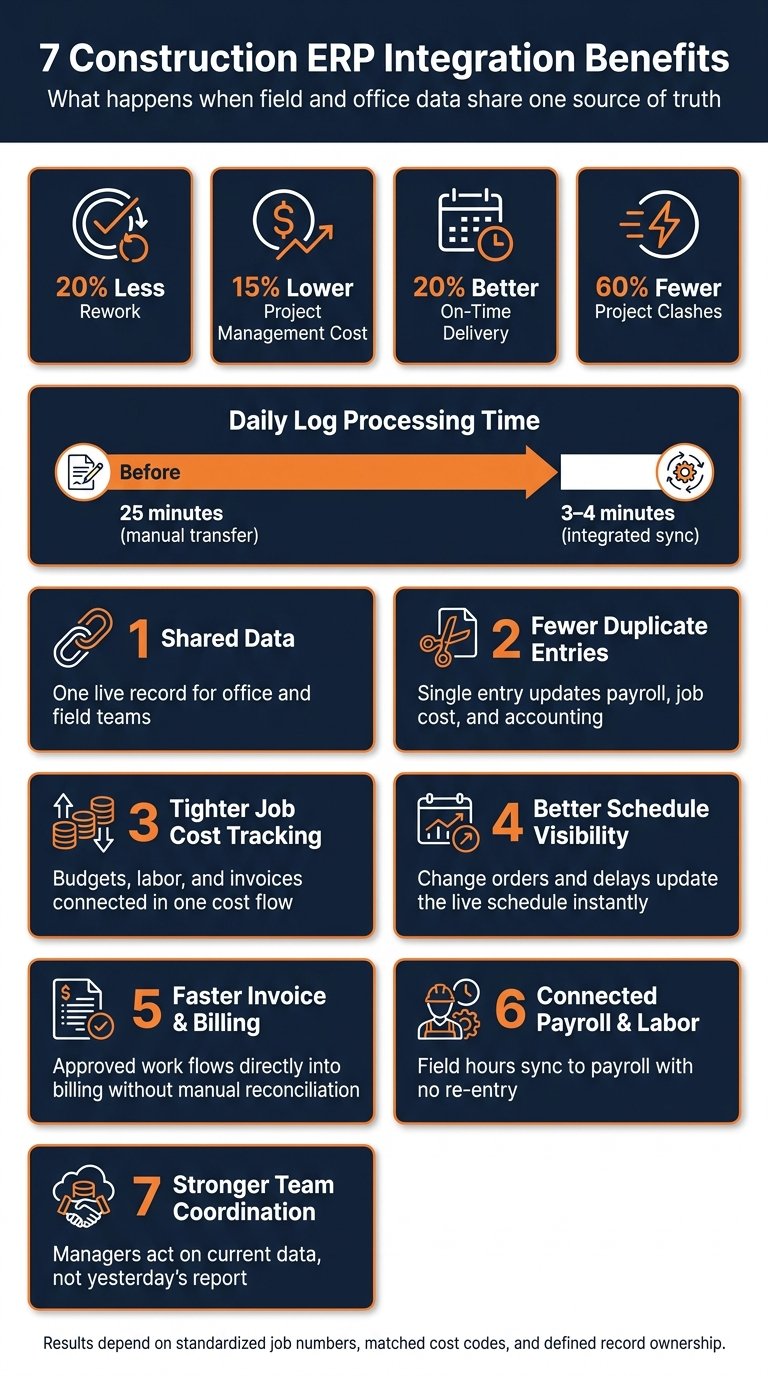
1. Shared Data Across Office and Field Teams
A superintendent may complete a daily report at the jobsite while the project manager needs the same information to assess progress and accounting needs it to support billing. If those teams rely on separate exports, they can make decisions using different versions of the project. Shared job records help field and office teams work from current information instead of waiting for someone to update a spreadsheet.
Field logs, inspections, change orders, and drawings sync between the office and the jobsite, which keeps crews aligned with the latest information. Daily logs and inspections move from the field to the office without manual transfer, reducing processing time from 25 minutes to 3–4 minutes. When a field team converts an approved estimate into a change order on-site, office financial records update at the same time, which removes the lag that often leads to billing errors and schedule misreads.
A shared record also reduces duplicate entry, which leads directly to the next benefit.
2. Fewer Duplicate Data Entries
Consider a single timecard: the field supervisor records hours, payroll processes them, and accounting assigns the labor expense to a job and cost code. Without integration, someone may enter those same hours several times, creating more opportunities for mistakes. Connected systems reduce duplicate entry by transferring approved records between the applications that need them.
Labor hours recorded in the field are often entered again for payroll. Estimating software may contain one budget, while accounting holds another, which leads to manual reconciliation. Change orders approved on-site may never reach the final invoice if there is no automated connection between field approval and billing. Manual CSV imports can become a weekly routine simply to keep systems aligned.
Integration replaces those manual handoffs with automatic updates. When an estimate is approved, an integrated system can generate budget cost codes and the related budget record without re-entry. A two-way sync between Contractor Foreman and QuickBooks can also move a field change order into accounting automatically, while payment updates move back to the project team without a separate entry step.
The result is that a single entry updates payroll, job cost, and accounting. A field supervisor logs hours once, and payroll and job cost records update without another manual pass.
The savings depend on clear record ownership.
Each record type should have one source of truth:
- accounting for vendor records and invoices
- project management for change orders
- the field app for daily logs and photos
Without that structure, two systems may edit the same record. That creates sync conflicts and adds manual correction work. When every record has a single owner, other systems only read from it, so changes flow one way and the manual cleanup disappears.
3. Tighter Job Cost Tracking
Once shared data is in place, the next gain is tighter cost control. Job cost tracking breaks down when budgets, labor, and invoices remain in separate systems. Integration keeps estimates, labor, materials, change orders, and invoices connected within a single cost flow.
When project, field, and accounting records are in sync, budget updates and invoices move automatically, which makes unbilled work easier to identify. That same connection brings margin changes into view earlier.
Mid-project margin visibility exposes overruns before margins erode, allowing contractors to respond while corrective action is still possible instead of finding shortfalls after project closeout. Clearer cost data also supports the next benefit: schedule visibility.
4. Better Schedule Visibility
Weather holds, approved change orders, and calendar updates all move the schedule, but they rarely reach it at the same speed. Connecting the systems behind each one puts them on the live schedule the day they happen.
Construction Workflow Affected
A two-day weather delay can shift inspections, material deliveries, and the start dates of downstream trades. The schedule needs to reflect those consequences while there is still time to coordinate the affected work.
After job cost data is connected, the next gain is a live schedule that reflects field conditions without delay. ERP integration keeps approved change orders and field delays on the active schedule instead of leaving them pending until someone enters a manual update. Weather delays recorded in daily reports should update the schedule immediately.
Systems and Data Connected
A schedule alone cannot explain why a milestone is slipping. Field reports, approved scope changes, and calendar updates provide the context needed to evaluate the next steps.
That level of visibility depends on syncing the tools already used by field crews. Schedule visibility improves when scheduling, field, and calendar data sync within one system. Two-way calendar sync allows milestones and deadlines to appear automatically in the tools used by field teams, while imported schedules keep office and field teams aligned on milestones and deadlines.
Each data type below plays a direct role in keeping the live schedule current:
| Data Type | Source of Truth | Schedule Impact |
|---|---|---|
| Project Schedule | Project Management / Scheduling Tool | Sets the baseline for deadlines |
| Field Photos/Logs | Field App | Provides real-time updates on site progress and delays |
| Change Orders | PM Approval Workflow | Adjusts the timeline based on scope changes |
| Time Cards | Payroll / Time Tracking | Tracks labor availability and productivity |
Condition Required for Success
Ownership for logs, photos, and change orders should be assigned before go-live. Without that control, schedule updates can conflict. When multiple systems edit the same record and no clear owner is defined, manual correction becomes necessary. With ownership assigned, schedule updates remain accurate across office and field.
5. Faster Invoice and Billing Flow
Construction Workflow Affected
A completed task is not automatically ready to bill. Accounting may still need to verify an approved change order, confirm expenses, and find documentation before issuing an invoice. When those records sit in separate systems, staff must assemble them manually. Connected billing workflows reduce the time between approved work and invoicing.
Systems and Data Connected
Billing relies on records created by several departments: project managers approve changes, field teams document work, and accounting tracks invoices and payments. Those records need to connect before an invoice can accurately reflect completed and approved work.
Faster billing depends on syncing invoices, bills, expenses, time cards, payments, and supporting documents between the project management platform and the accounting system. The accounting system should remain the source for invoices and payment status, while the project management platform should remain the source for change order management approvals. Field applications capture time cards and pass those records into accounting.
| System Type | Data to Connect | Billing Benefit |
|---|---|---|
| Accounting | Invoices, Bills, Expenses | Eliminates double entry and keeps job costing accurate |
| Payment Processors | Online Payments | Speeds payment collection and reconciliation |
| Field Apps | Time Cards, Daily Reports | Captures billable labor and field expenses in near real time |
| Document Management | Photos, Submittals, Plans | Keeps supporting documents available for invoice approval |
Two-way sync keeps invoice drafts and payment status current.
Automated flows for time cards, expenses, and change orders keep billable work tied to the correct job record, along with the supporting documentation needed for review.
Condition Required for Success
Billing accuracy depends on matching cost codes and terminology between the field application and the ERP. If the systems use different labels, staff must reconcile records manually before an invoice is finalized. A defined approval status such as “Field Approved” allows the invoice process to move forward without delay.
The same approved hours and costs then flow into payroll and labor tracking.
6. Connected Payroll and Labor Data
Construction Workflow Affected
A timecard coded to the wrong project can cause both a payroll correction and an inaccurate job cost report. Construction payroll therefore depends on more than the total hours worked: approved time entries must also carry the right employee, project, and cost code. Connected labor reporting helps those records move from the field into payroll without being re-entered.
Systems and Data Connected
Payroll needs the details behind each approved time entry, not just the weekly total. Employee names, overtime, project assignments, and cost codes all affect how labor is processed and reported.
A connected payroll workflow links field time tracking to the payroll provider and the accounting system. Data that must sync includes employee names, total hours, overtime, project IDs, and cost codes. A single export replaces CSV imports and duplicate entry.
Contractor Foreman supports direct payroll and accounting syncs that keep labor costs assigned to each job. That process depends on time entry and cost codes following one approved structure.
Condition Required for Success
Time entry should remain in the field application, with supervisor approval required before hours sync to payroll. Cost code alignment matters just as much. If cost codes in the field application do not exactly match the budget line items in the accounting system, the mismatch can produce incorrect coding and distort job costing.
7. Stronger Team Coordination and Decision-Making
A project manager approves additional work, a superintendent adjusts the crew plan, and accounting prepares the next invoice. All three teams need details of the same change, but each uses them differently. When the update reaches one team late, field decisions and financial records can fall out of alignment. Connected project records help everyone act on the same approved information.
Coordination problems rarely result from a lack of information. In many cases, the information exists, but one team cannot see it soon enough. Integrated systems display updates at once, so superintendents and project managers make decisions based on current data rather than yesterday’s report.
When an approved change order updates the project budget, that change reaches the teams that need it without manual transfers.
Online reviews and approvals have produced a 60% reduction in project clashes. These gains come from reducing the delay between when information is created and when it reaches the teams responsible for acting on it.
Coordination also depends on clear data ownership. Without defined control over who enters, approves, and maintains records, sync conflicts can slow decisions.
That shared visibility also makes job-cost reporting easier, as the table below shows.
Job Cost Visibility Table
A total project cost figure can reveal that spending is above budget, but it does not show whether the cause is labor, materials, equipment, or subcontractor commitments. Contractors need those details to decide what to investigate and where to act. The table below shows how connected cost records contribute to clearer job-cost reporting and earlier identification of variances.
These connections help teams identify labor, material, equipment, and billing variances earlier to prevent budget overruns.
| Data Source | ERP Connection | Job-Costing Value |
|---|---|---|
| Labor Hours | Payroll sync | Tracks labor spend against estimates and helps identify productivity-driven budget variances |
| Materials | Accounts payable sync (bills/POs) | Monitors actual material spend against estimates and flags price increases or excess ordering |
| Equipment | Expense and receipt tracking | Allocates operating costs and rental fees to specific jobs for more accurate total cost analysis |
| Subcontractor Commitments | Contract and bill integration | Tracks committed and actual costs and manages subcontractor billing and retainage |
| Invoices & Payments | Accounts receivable sync | Provides immediate visibility into cash flow, billing status, and margin |
Cost codes should remain consistent across field and accounting systems so variance reporting and forecasting remain reliable.
Setup Conditions That Protect These Benefits
An integration can transfer a record successfully and still put its cost against the wrong budget line if the two systems use different codes. Reliable results begin with consistent identifiers, clearly assigned ownership, and tested approval rules.
These gains depend on correct integration setup. The connection performs as intended only when job numbers, ownership, and approval rules are standardized. Those controls protect job cost and margin reporting.
Once reporting is visible, the next requirement is a clean setup that prevents errors at the source.
Standardize Job Numbers and Cost Codes
Before anything syncs, both systems need to speak the same language. If the field app calls a job 2041 and accounting calls it 2041-A, every sync after that inherits the mismatch. The same goes for cost codes: a framing crew logging hours to one code while the office books them to another quietly scrambles job cost and billing. Settle on one set of job numbers and cost codes first, and shared data stays accurate on both sides.
Set Approval Rules and Data Ownership
Before go-live, decide who owns what, and write it down. Each record type gets one owner and one source of truth. Accounting holds customers, vendors, and invoices. Estimating holds estimates. The field app holds photos and logs. Change orders are approved in project management, and budgets follow the project and accounting workflow. When someone asks which number is right, the answer is already settled, and nobody has to track down who changed a record or why.
Ownership should be assigned before go-live, and each record should be mapped to one system:
| Data Type | Recommended Source of Truth |
|---|---|
| Customers/Vendors | Accounting System |
| Estimates | Estimating Tool |
| Job Budget | Project/Accounting Workflow |
| Field Photos/Logs | Field App |
| Change Orders | PM Approval Workflow |
| Invoices | Accounting System |
| Margin Reporting | Reporting Layer |
Timecards should be approved in the field app before they move to payroll, and change orders should be reviewed before they update the budget in the ERP. Without these control points, unreviewed data reaches the accounting system and creates errors that are difficult to trace.
Test Field Mappings and Monitor Sync Errors
Before full rollout, field mappings should be verified against actual project scenarios. Cost codes, job numbers, vendor records, and sync direction should be checked for accuracy. The integration should also match the ERP version and deployment model.
After go-live, sync logs should be reviewed on a regular schedule to protect report accuracy. Manual rework removes the efficiency gain. Early review also catches mapping gaps before they distort reports.
Conclusion
The value of integration appears in everyday handoffs: a supervisor approves hours, accounting sees the labor cost, and the project manager can compare it against the estimate. The same principle applies to approved changes, billing records, and schedule updates.
These seven benefits lead to one result: a single source of truth shared by the office and the field. With that connection in place, teams work from one current record, which improves cost control, billing speed, payroll accuracy, and decision-making. The workflow stays connected from estimate to budget, schedule, field logs, change orders, invoice, and margin reporting. That continuity reduces rework and keeps project data aligned.
Construction ERP integration delivers the most value when field and office teams operate from a single, synchronized source of truth. When both sides rely on the same data, cost control, billing, labor reporting, and decisions improve. That is the core value of construction ERP integration.
FAQs
What should we integrate first?
First, clean and standardize the data. Remove duplicates, use consistent names for jobs, customers, vendors, and cost items, and align the QuickBooks Chart of Accounts with field operations.
Then begin by syncing foundational financial records and estimates. This creates a reliable one-to-one connection and reduces errors.
How do we avoid sync errors?
Clean and standardize data before integration. Remove duplicate records, retire outdated cost codes, and apply consistent naming for jobs, clients, and vendors. Then map fields such as cost codes and invoice structures carefully between Contractor Foreman and the accounting system.
After setup, use two-way synchronization, monitor integration logs, set automated alerts, and test manual and integrated workflows in parallel before going live.
How long does ERP integration take?
Modern construction software integrations are built for efficiency, so setup often takes minutes or hours rather than weeks.
For a smoother rollout, the integration should be tested on one active pilot project first. That step helps confirm that data mapping and cost codes are aligned before expanding across the company.







