
It’s Friday afternoon. Everyone’s packing up, talking about weekend plans, counting on you to hit “submit” on payroll so they can walk out happy.
But you’re staring at a screen full of question marks.\
One crew finished a remodel. Another pushed late on a custom home. A couple guys bounced between jobs. And so now, you’ve got to sort out the hours!
To make things worse, half the hours came in by text, so now you’re matching screenshots to timesheets.
It’s days like this that you just want to launch your laptop into the nearest jobsite dumpster.
Construction pay isn’t easy! Complex pay structures, multiple job sites, overtime that changes by project…And every single hour has to be coded exactly right!
One wrong classification? Compliance issue.
Missed overtime? Angry employee.
Hours on the wrong job? Blown labor costs.
And when you’re tracking hours from multiple job sites, paper timesheets and manual entry, it feels like you’re piecing together a puzzle with half the pieces missing.
It shouldn’t take this much effort just to pay people correctly.
The solution?
Automated time tracking. With reliable construction tools such as Contractor Foreman, hours come in as they happen, job codes stay accurate, and compliance is built in — not bolted on after the fact.
The Main Benefits of Automated Time Tracking:
- Reduces Payroll Errors: Integrated time tracking and payroll can cut data-entry mistakes and help avoid expensive corrections (about $291 per error on average).
- Addresses Construction-Specific Challenges: Automation helps reduce time theft, misclassification, and reporting issues tied to prevailing wage and certified payroll workflows.
- Improves Accuracy & Efficiency: Features like GPS-enabled time tracking and real-time capture reduce human error and improve time-entry accuracy.
- Supports Compliance: By standardizing hours, classifications, and wage rules, automated tracking helps streamline compliance with complex labor laws like theDavis-Bacon Act (though it doesn’t replace legal obligations).
Switching to automated systems not only cuts costs but also ensures accurate pay, boosts employee trust, and streamlines payroll processing for growing businesses.
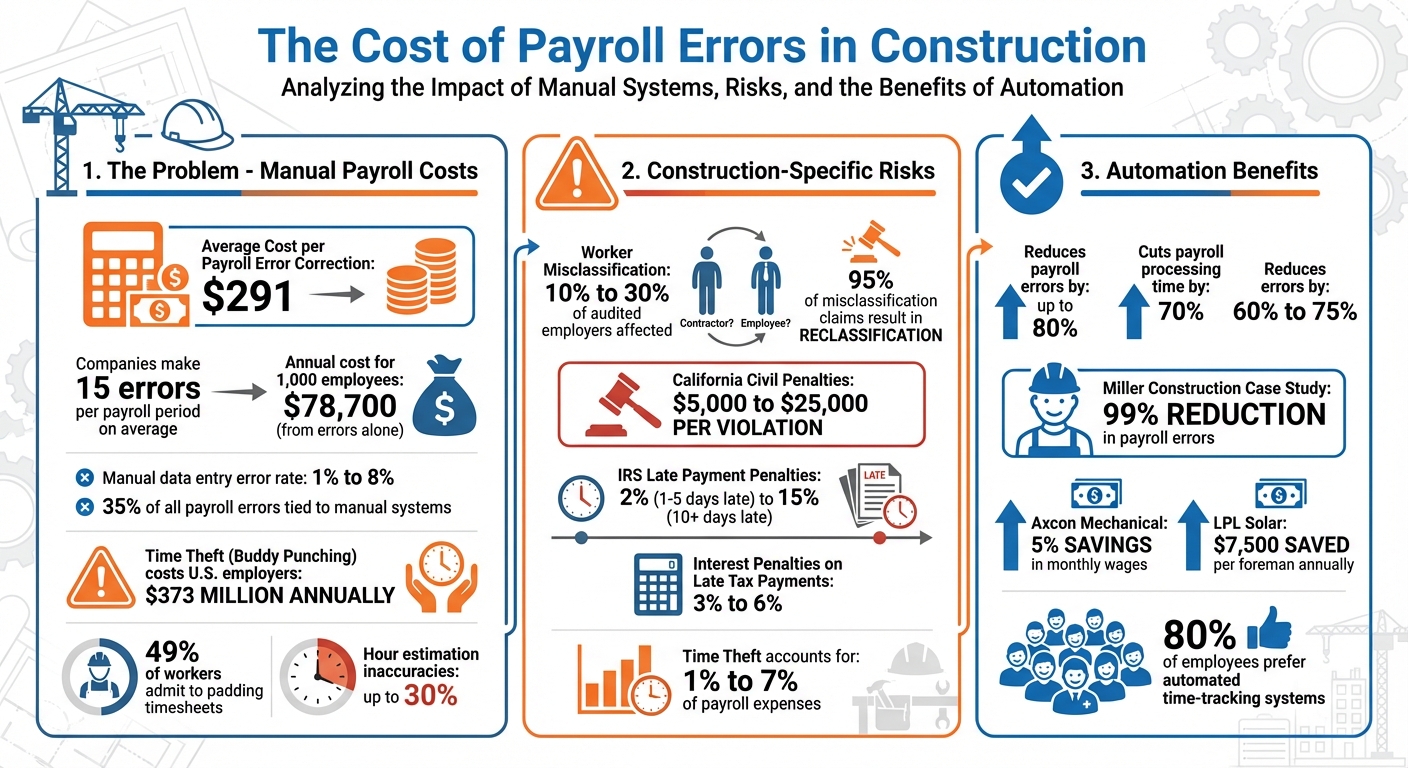
The Cost of Payroll Errors in Construction: Key Statistics and Automation Benefits
Common Payroll Errors in Construction
Payroll mistakes in the construction industry can be a financial drain and lead to legal troubles.
On average, companies make 15 errors per payroll period, leading to a staggering annual cost of about $78,700 for every 1,000 employees. Many of these issues arise from outdated, manual processes.
Here are some key problem areas where these errors occur:
Manual Time Tracking Mistakes
Paper timesheets are a breeding ground for errors. Manual data entry has an error rate of 1% to 8%, and 35% of all payroll errors are tied to manual systems.
One major issue is “buddy punching”, where one employee clocks in for another who is late or absent. This practice costs U.S. employers an estimated $373 million annually. Time padding is equally problematic, with 49% of workers admitting to occasionally adding extra time to their timesheets. Additionally, when employees estimate their hours at the end of the week, inaccuracies can swing as much as 30% – either underreporting or overreporting billable hours.
In construction, time tracking is even more complex. Workers often move between multiple jobsites, trades, and cost codes within a single shift. Manual systems frequently fail to capture these transitions accurately, leading to misallocated labor costs. This not only skews project budgets but also hides the true profitability of a job.
Worker Misclassification and Prevailing Wage Issues
Misclassifying workers is one of the most expensive payroll mistakes a construction company can make. Between 10% and 30% of audited employers have been found to misclassify at least some workers, and up to 95% of workers who claimed misclassification were later reclassified as employees after review.
The financial fallout can be severe. Companies may face back taxes, unpaid overtime, missed fringe benefits, and legal penalties. In California, deliberate misclassification can result in civil penalties ranging from $5,000 to $25,000 per violation. For example, in 2021, a Chesterfield Township-based electrical subcontractor had to pay $94,000 in back wages and benefits after misclassifying workers during a Department of Labor investigation.
Government-funded projects introduce additional risks. Under the Davis-Bacon Act, contractors must pay specific hourly rates and fringe benefits for federal projects. Failing to comply can lead to contract termination, hefty wage payouts, and even disqualification from future government bids.
Data Entry Errors and Poor Record-Keeping
Manually re-entering data from handwritten forms into payroll systems is a recipe for mistakes. Common issues include transposed numbers, incorrect tax withholdings that trigger IRS penalties, and missing documentation that leaves companies vulnerable during audits. In fact, 18% of accountants report daily financial data entry errors, while 60% admit to making multiple errors per month.
Correcting payroll mistakes costs an average of $291 per error, not including penalties or delays. Late payroll tax payments can incur interest penalties of 3% to 6%, and the IRS penalty structure ranges from 2% for deposits 1–5 days late to 15% for those over 10 days late.
Poor record-keeping adds to the chaos during tax season. Missing W-4s, incomplete timesheets, and insufficient documentation for union fringe benefits can create bottlenecks, delay payroll processing, and increase compliance risks. Without proper records, companies face higher penalties and the potential loss of contracts during Department of Labor audits.
These challenges highlight the importance of automating payroll processes to reduce errors and improve efficiency.
sbb-itb-5eea312
How Automated Time Tracking Fixes Payroll Problems
Manual time tracking methods, like handwritten timesheets or end-of-week estimates, often lead to costly payroll mistakes. automated construction management systems solve this by recording exact clock-in and clock-out times, reducing payroll errors by up to 80%. For context, manual entry methods typically have error rates between 1% and 8%.
These systems work by syncing field data directly with payroll software, eliminating the need for office staff to manually re-enter information. Take Miller Construction, a Florida-based commercial general contractor, as an example. After adopting hh2 Remote Payroll integrated with Sage, the company reduced payroll and coding errors by an impressive 99%.
Automation also shortens payroll processing times – by as much as 70%. This frees up supervisors and office staff to focus on more strategic priorities. Next, let’s see how GPS functionality takes accuracy a step further.
GPS Time Tracking for Accurate Clock-Ins
GPS-enabled time tracking tackles time theft and payroll fraud by ensuring employees can only clock in when physically present at job sites. Geofencing technology sets virtual boundaries around work locations, and every clock-in or clock-out is logged with precise GPS coordinates. This creates a transparent audit trail, which is particularly valuable for industries like construction, where time theft can account for 1% to 7% of payroll expenses.
Some systems even combine GPS tracking with photo verification to ensure the right employee is clocking in. Axcon Mechanical, a nationwide contractor, implemented such a system and saw significant results. By eliminating padded hours, they saved 5% in monthly wages and reduced administrative costs by $246 per employee annually.
Real-time visibility also allows managers to monitor attendance and address unauthorized absences or early departures immediately. Some systems even send automated reminders to employees as they enter or leave geofenced zones, ensuring accurate time tracking. Beyond location verification, these tools streamline wage calculations as well.
Automatic Overtime and Wage Calculations
Calculating overtime manually can be tricky, especially when workers switch between different pay rates or job codes. Automated systems simplify this by tracking hours in real time and flagging overtime as it occurs. This helps prevent unexpected labor costs. For projects with prevailing wages, the software automatically applies the correct pay rates as workers move between tasks.
These systems also ensure compliance with union fringe benefits and certified payroll requirements by applying appropriate hourly rates, overtime multipliers, and benefits based on labor laws. Automated wage calculations reduce errors by 60%, saving an average of $291 per correction. For instance, LPL Solar, a solar contractor, replaced flat-hour estimates with verified time tracking and saved $7,500 per foreman annually.
Connecting Time Tracking with Payroll Software
Integrating automated time tracking with payroll software eliminates the hassle of manual data entry and reduces errors caused by duplicate entries – responsible for 35% of payroll mistakes. By syncing field data in real time, this system ensures a smooth transfer from mobile time cards to platforms like QuickBooks or Sage, delivering accurate labor cost reports and allowing instant updates when tasks are completed.
These advanced integrations handle multi-rate shifts, automatically applying union or prevailing wage rates to specific tasks while calculating fringe benefits required under the Davis-Bacon Act. Take Anchor 41, a California-based construction firm working on government projects: they used to spend one to three days each week transferring data and chasing down missing timesheets. After adopting mobile time tracking integrated with their accounting system in 2024, they cut their certified payroll processing time to just 30 minutes per week.
Meeting Prevailing Wage and Certified Payroll Requirements
Government contracts come with complex reporting requirements, which can overwhelm contractors relying on manual processes. For example, compiling certified payroll manually for eight employees takes about 55 minutes. Integrated time tracking systems automate this process entirely. These systems generate federal WH-347 forms and state-specific certified payroll reports directly from verified time cards. They also ensure the correct prevailing wage rates are applied based on each worker’s trade classification and task. For instance, they can track when an electrician switches from installing conduit to pulling wire, ensuring the proper rates are applied for each activity.
Real-time error detection is another key feature, catching issues like missing fringe benefit details or incorrect wage rates, which lowers the risk of audits and penalties. GPS-enabled time cards provide a digital trail verifying that workers were on-site, offering crucial documentation for compliance reviews. The system also calculates and records complex fringe benefits required under the Davis-Bacon Act while centralizing payroll records to meet the Fair Labor Standards Act requirement of retaining data for at least three years.
By automating compliance-heavy tasks, these systems not only reduce stress but also streamline workflows. Tools like Contractor Foreman are leading examples of this efficiency.
Contractor Foreman simplifies payroll management by integrating with QuickBooks and Zapier, ensuring verified time data is transferred seamlessly. It supports multiple wage rates, correct tax deductions, and accurate worker classifications across unlimited projects. Customizable timesheet templates allow you to gather project-specific details, such as job codes or equipment usage. The integration with QuickBooks eliminates the need for manual data entry, while Zapier enables automated workflows with other business tools, letting you tailor a tech stack to your unique needs.
With plans starting at $49 per month, Contractor Foreman provides construction companies – big or small – with access to payroll automation that feels like it’s built for enterprises.
Benefits of Automated Payroll for Construction Companies
Lower Costs and Fewer Errors
Automating payroll can immediately slash costs and reduce mistakes. Did you know that manual data entry is responsible for 35% of payroll errors? Each of these errors costs an average of $291. For a construction company with 1,000 employees, that can rack up to a staggering $922,131 annually. Automation not only cuts payroll processing time by up to 70% but also reduces errors by 60% to 75%.
Take Miller Construction, for example. This Florida-based contractor struggled with payroll errors every cycle due to manual data entry into Sage. But after switching to digital time tracking alternatives in 2025, they slashed payroll and coding errors by 99%. Considering that every manual HR task costs around $5, eliminating these tasks frees up resources that can fuel growth. Plus, accurate payroll boosts trust and keeps employees happier – something no business can afford to overlook.
Better Employee Satisfaction and Trust
Payroll errors can destroy trust. For construction crews, where accurate pay for overtime, prevailing wages, and fringe benefits is critical, trust is everything. Automated payroll ensures workers are paid precisely for their hours, avoiding common issues like rounding errors. This level of consistency reinforces the advantages of automation.
“Payroll errors erode trust. Employees expect accurate and timely paychecks, and repeated mistakes signal negligence.”
– Caitlin Kapolas, Lift HCM
Interestingly, 80% of employees not only accept automated time-tracking systems – they actually prefer them. When paychecks are accurate and on time, it strengthens the bond between field crews and the back office. This reduces frustration, boosts morale, and creates a smoother working environment for everyone.
Easier Business Growth and Scaling
When operational mistakes are minimized and employee trust is solidified, automated payroll becomes a key driver for growth. Expanding a construction business often means managing more job sites, trades, and varying pay structures. With automation, you can handle multi-classification entries and complex union or prevailing wage rules without adding to your payroll team’s workload.
Supervisors can save 2–3 hours weekly using digital systems, while real-time job costing allows for quick budget adjustments. Automated payroll also generates audit-ready documentation, which is essential for securing larger government-funded projects. And as your workforce expands across remote job sites, GPS-enabled geofencing helps prevent time theft – a problem that can cost 1.5% to 5% of gross payroll annually. The result? A business that grows efficiently while staying accurate, compliant, and profitable.
Conclusion
Payroll mistakes can eat into profits and lead to costly compliance penalties. For example, a company with a $2 million annual payroll could lose tens of thousands of dollars from just a 1% error rate. On top of that, errors in reporting for prevailing wage or union projects can result in steep fines and compliance issues. These problems don’t just hit the bottom line – they also hurt workforce retention, a major challenge in an industry already facing a shortage of skilled labor.
Automation offers a powerful solution to these challenges. By reducing manual data entry, automated systems help minimize errors and discrepancies. Tools like GPS geofencing can curb time theft – which can account for 1.5% to 5% of gross payroll annually – while direct integration with accounting software ensures labor costs are accurately reflected in job reports.
Contractor Foreman is designed to deliver this level of precision and efficiency. With GPS-enabled timecards, geofencing, and seamless QuickBooks integration, it captures and transfers accurate time data in real-time. Its mobile-friendly platform allows supervisors to review and approve hours directly from the field, catching potential errors before they reach payroll. Plus, with unlimited projects and free training included, Contractor Foreman helps you grow your business without adding extra administrative strain.
FAQs
How can automated time tracking help improve payroll accuracy in construction?
Automated time tracking plays a key role in improving payroll accuracy within the construction industry. By cutting down on manual data entry, it reduces the chances of errors and addresses common issues like buddy punching and time theft. This ensures that employee hours are logged correctly, simplifying payroll tasks and helping to avoid expensive mistakes.
These systems also offer precise tracking of job codes, overtime, and labor costs. This level of detail helps construction teams stay compliant with labor laws while offering a clear view of project expenses. The result? Saved time, smoother operations, and better financial oversight for construction projects.
How does GPS-enabled time tracking improve compliance?
GPS-enabled time tracking adds a layer of accuracy to monitoring employee attendance by capturing precise location data. This helps confirm that employees are present at designated worksites, cutting down on problems like time theft. It also ensures that attendance records are consistent with labor laws. Automating this process not only reduces mistakes but also makes payroll more dependable and aligned with legal requirements.
How does automated time tracking help reduce payroll errors and save costs?
Automated time tracking takes the guesswork out of payroll by removing manual data entry errors and ensuring precise calculations. Mistakes like recording incorrect hours, missing payments, or miscalculating overtime can seriously add up – sometimes costing businesses between 1% and 8% of their payroll expenses.
By simplifying workflows and delivering real-time data, automation minimizes human error, saves valuable time, and ensures employees receive accurate paychecks. The result? Lower unnecessary costs, smoother operations, and happier employees.
Related Blog Posts







