
- Step 1: Record weather and site conditions with time-stamped details
- Step 2: Log labor, subcontractors, materials, and equipment by activity and location
- Step 3: Document jobsite changes, delays, safety issues, and the daily narrative
- Using standardized site notes for team updates and stronger records
- Conclusion: Clear daily site notes create better jobsite records
- FAQs
- Related Blog Posts
Daily construction site notes are a must.
But if your notes look like hieroglyphics that need to be decoded, or they’re so vague they just say “rainy” or “client delay,” you might as well not have written them.
A good site note should tell the story of the day without someone having to track you down three weeks later asking, “Wait a minute, so…what actually happened here?”
The best notes are factual, time-stamped, and specific.
They tell you where it happened, who was involved, what happened, and how it affected the work.
Because there’s a big difference between:
“Rainy.”
and
“Rain started at 10:15 AM and stopped at 1:40 PM. Exterior concrete work at the north entrance was suspended. Six-person crew reassigned to interior prep.”
“Rainy” could mean ten minutes of drizzle or a washout. Weeks later, when someone asks if weather caused the delay, that one word can’t tell them. The longer note can.
And “client delay”? That raises more questions than it answers.
What was delayed? Why? Where? For how long? Which crew was affected? Who gave the direction? What happened next?
Those details might feel excessive at the end of a long day on site. But weeks or months later—when someone is reviewing the schedule, checking costs, following up on a safety issue, or figuring out why work slipped—they matter.
What makes a good site note:
- Weather entries need start and stop times, temperature in °F, and the effect on work.
- Labor records need names or badge numbers, trade, hours, task, and exact location.
- Material logs need supplier, delivery time, ticket or batch number, quantity, and installed amount.
- Equipment notes need ID, run time, idle time, breakdowns, and crew impact.
- Delay and safety records need cause, timing, location, action taken, and who gave direction.
- Daily narratives need completed work, changes from plan, open issues, and verbal instructions.
But remember:
Clarity and consistency matters more than length.
The same format each day, often managed through top daily log apps, turns field notes into a usable job record.
Below is a step-by-step guide to writing each section of your daily report, so you’ll have a complete record that answers questions before they’re asked.
Step 1: Record weather and site conditions with time-stamped details
Record weather in time-stamped entries because it can change work, cause delays, and support claims later. A clear entry looks like this: “Rain from 6:30 AM to 11:15 AM delayed excavation in Area C because the formation was waterlogged.” The same format should be used for site conditions that change the day’s work.
How to write weather entries that stand up in the record
Record conditions at the same check-in times every day so the report shows how the site changed across the shift.
| Check-In | Temperature | Precipitation | Wind/Visibility | Site Condition |
|---|---|---|---|---|
| Morning | Start-of-shift temperature | Type and intensity | Initial conditions | Frost, mud, standing water, limited access |
| Midday | Peak temperature | Changes or stoppages | Wind speed and visibility | Dust, standing water, safety impacts |
| Afternoon | End-of-shift conditions | Total daily accumulation | Final conditions | Ground firm and workable, or waterlogged |
Log the start and end times, temperatures, precipitation, and site impact. “High 106°F, Low 88°F; exceeded pour spec limits” says something clear. “It was hot” does not.
The same rule applies to site impacts. If temperature limits affect work, cite local weather data that confirms the threshold. That outside record can matter if a claim is filed later.
How to connect site conditions to work impacts
A weather note without a stated result is incomplete. The entry should directly connect the condition to the work that stopped, slowed, or moved because of it. If standing water in Area C forced the excavation crew to move to Area D, both details belong in the same note. That shows the crew was ready to work but blocked by site conditions.
Use numbers whenever possible. Record how many workers stood idle, which equipment was affected, and for how long. For example: “4 operatives and 1 excavator stood for 4.75 hours due to rainfall; the team was redeployed to Area D.” That kind of detail can support delay claims and schedule changes. Using construction management software features to log these events ensures the data is searchable and secure. In one Arizona federal highway project, a contractor defended a $2.3 million delay claim using daily weather logs showing temperatures above 105°F for 11 consecutive days, which justified halting concrete pours under contract specifications.
Each site condition should be tied to a location and a work impact. “Frost on subgrade at grid B4–B7” works. “Frosty conditions on site” does not.
sbb-itb-5eea312
Step 2: Log labor, subcontractors, materials, and equipment by activity and location
After weather and site conditions, record the people, materials, and machines that shaped the day’s work. Each entry should show who did what, where, and when.
Labor and subcontractor entries
Each crew should be tracked by trade, task, and location so the office can see who worked where and on what. A headcount by itself doesn’t do the job. The log should include full names or badge numbers, trade, hours, activity, and location.
Location details matter. Grid lines, station numbers, elevations, or room numbers make the record far more useful than a vague note like “north side” or “level 2.” Labor hours should also be broken out by bid item or activity so productivity and cost can be tracked with less guesswork.
Absences, partial-day work, and overlapping crews should stay in the record as well. If two subcontractors shared a tight work area, that overlap should be noted along with any sequencing problem. That way, slower progress has a clear cause instead of looking like poor performance.
Material status and delivery notes to verify installed quantities
Material entries should do more than show that a delivery arrived.
The log should record:
- Supplier
- Delivery time
- Quantity
- Batch or ticket number
- Condition on arrival
Installed quantities should also be recorded in LF, SF, CY, or LB. Those quantities should be confirmed at the end of the day so the record is locked in while the work is still fresh.
Equipment usage and issue logs linked to schedule effects
Equipment logs should track type, ID number, operating hours, idle hours, and location. If a problem occurs, the log should also show the cause, downtime, and effect on the schedule.
Example: CAT 320 Excavator #EX-04 worked from 7:00 AM to 11:30 AM at Sta. 14+20 to 14+60, failed at 11:30 AM, and left three crew members idle until a rental arrived at 3:15 PM.
| Equipment Log Field | What to Record |
|---|---|
| Type & ID | CAT 320 Excavator, ID #EX-04 |
| Status | Operating, Idle, or Breakdown |
| Location | Sta. 14+20 to 14+60 |
| Activity | Trenching – Bid Item #12 |
| Downtime Cause | Hydraulic failure; waiting for rental replacement |
| Production Impact | 3 crew idle 3.5 hrs; $1,200 rental cost incurred |
Downtime, replacement time, and crew idle hours should all be documented. That level of detail gives schedule and cost records the support they need.
Next, tie these records to delays, changes, and safety issues.
Step 3: Document jobsite changes, delays, safety issues, and the daily narrative
After weather, labor, materials, and equipment are logged, the record should capture anything that changed the plan.
How to write jobsite change and delay notes with cause, time, and affected work
Each change or delay note should record who made the change, what happened, where it happened, when it happened, and why. The same facts-and-timestamps standard should apply to every entry.
Stick to facts, not blame. For example: “John Smith, owner’s rep, instructed the crew to stop work at 9:15 AM.” When a verbal instruction changes the scope or sequence of work, the note should record who gave the direction, the exact time, what was directed, and how the crew responded. If the crew had to move to another area, that consequence should be recorded too. The strongest notes are written during the event, not hours later when details get fuzzy.
| Field | What to Record |
|---|---|
| Instruction Source | Name, title, and time of the directive |
| Delay Cause | Specific reason – utility conflict, access restriction, design change |
| Crew/Equipment Impact | Number of workers idled and specific equipment affected |
| Duration | Exact start and stop times of the interruption |
| Response | Steps taken to work around the issue |
Safety, quality, and inspection notes that show corrective action
The same factual format should be used for safety and quality issues.
Safety and quality entries should stay factual. Record the hazard or issue, the location, who was notified, and the immediate corrective action taken. Time matters here too, so the note should show when the hazard was found and when the corrective action happened.
Every note should tie to a specific location, such as a grid line, station number, or room, and name the responsible party. When corrective action is taken, the record should state exactly what was done and when it occurred. For inspections and testing, include the test type, who performed it, the result, and whether it met the specification.
Then the day should be wrapped up with one end-of-shift summary.
How to write a daily narrative that summarizes progress clearly
The shift should end with a brief summary of work completed, deviations from plan, delays, instructions received, and unresolved issues.
Quantities should be confirmed before the shift ends. If there is a disagreement over installed amounts, that disagreement should be documented at once instead of being handled informally and left out of the record.
That daily narrative becomes a usable project record.
Using standardized site notes for team updates and stronger records
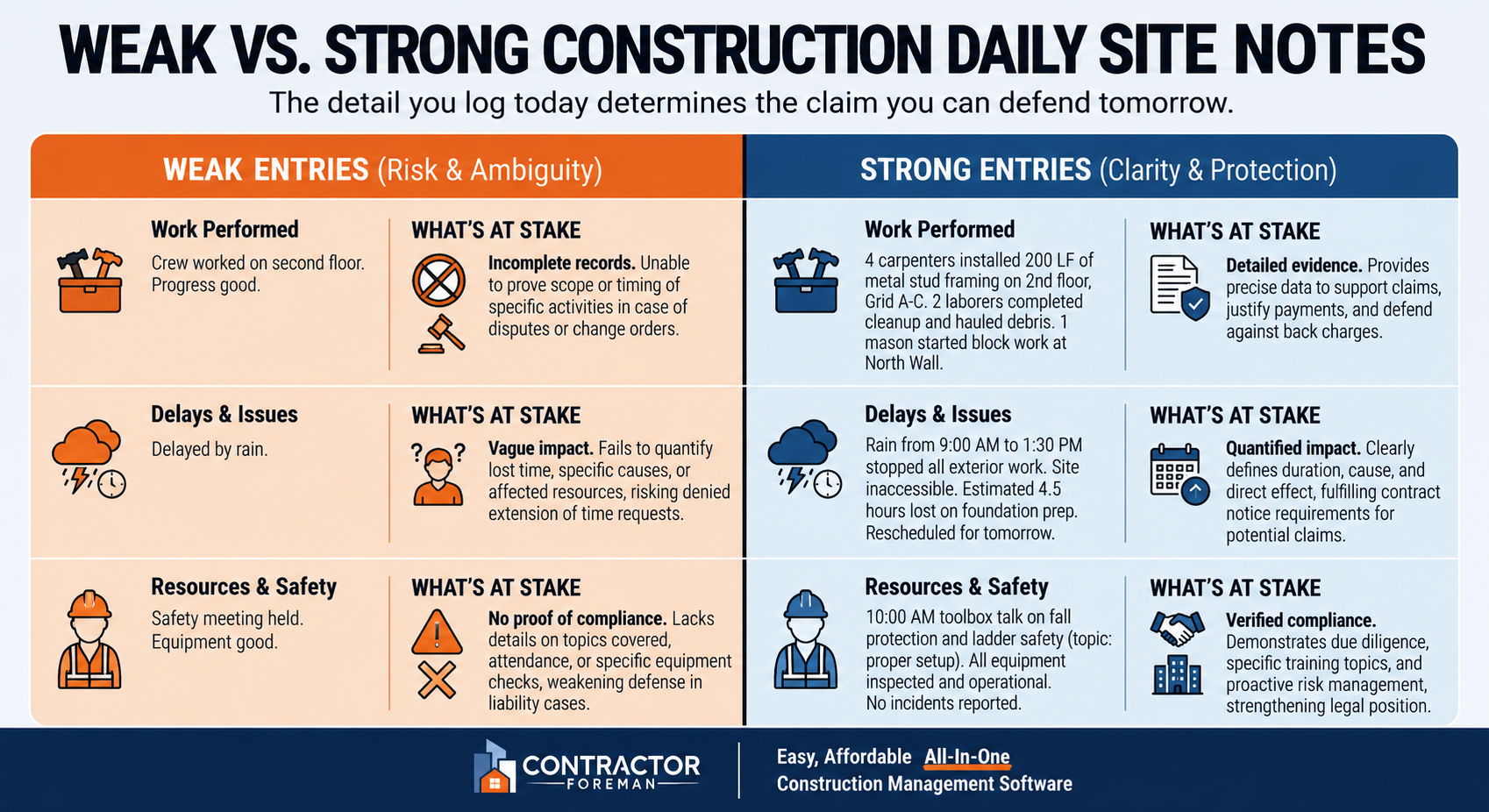
Weak vs. Strong Construction Daily Site Notes: What’s at Stake
Once the day’s facts are logged, a standard format keeps everyone tied to the same record. Superintendents, foremen, project managers, and office staff can all work from the same set of facts. Foreman notes flow into the daily log, and that record can matter later if a dispute shows up.
Documentation gaps sit behind many construction disputes, while steady daily reporting helps settle them faster and at lower cost.
Structured fields vs. narrative notes: when to use each
The format should match the kind of information being recorded.
| Structured Fields | Narrative Notes | |
|---|---|---|
| Best for | Weather, manpower counts, equipment hours, material quantities | Changes, delays, verbal instructions, site visitors, unusual conditions |
| Primary goal | Accuracy and cost verification | Proof for delays and changes |
| Easy to filter | High – easy to filter and track trends across projects | Moderate – provides context but requires reading for detail |
Structured fields work best for counts, names, and checkboxes. Narrative notes work better for causes, conversations, and unusual conditions. One records the hard numbers. The other explains what was going on.
Minimal entries vs. thorough entries: what the difference costs you
Weak foreman reports can cost entitlement when time and cost impacts are reduced for lack of detail.
| Entry Type | Weak Example | Strong Example | What’s at Stake |
|---|---|---|---|
| Work performed | “Poured concrete” | “Poured 47 CY of 4,000 PSI concrete at column footings F-1 through F-12, southeast quadrant” | Productivity disputes and quality claims |
| Weather | “Rainy” | “Rainfall 06:30–11:15 (18mm), unable to excavate Area C; 4 workers and 1 excavator standing for 4.75 hours” | Weather-related schedule issues and compensation |
| Instructions | “Owner caused delay” | “Owner’s rep John Smith verbally instructed crew at 9:15 AM to stop work on east wall pending RFI #47“ | Claim defensibility and schedule impact records |
Strong daily notes cover who, what, where, when, and why. That extra detail can be the difference between a vague complaint and a record that holds up under review.
How Contractor Foreman helps standardize daily site notes
Digital daily logs help field crews use the same note format each day. Contractor Foreman supports daily logs, custom fields, and mobile access, which makes it easier to record weather, labor, materials, equipment, and narrative notes from the field. It also allows materials marked as delivered in a daily log to update related purchase orders, helping keep field activity aligned with procurement.
Conclusion: Clear daily site notes create better jobsite records
Daily site notes only help when the habit is solid. Conditions need to be logged as they happen, each entry needs to link to a trade and a location, and every shift needs the same format. That kind of consistency makes the record useful later.
Consistent daily reporting resolves disputes faster and at lower cost.
Material deliveries, idle equipment, verbal instructions, and weather impacts should be logged as separate entries. When a foreman records that equipment was idle and notes the reason – such as waiting for an RFI response – that detail can support a standing-time claim.
Consistent reporting also makes daily reports more useful for project records and team updates.
FAQs
What should I do if weather changes several times in one shift?
When weather shifts more than once during a single shift, general notes don’t do much. Log the exact conditions at key points – start of shift, midday, and end of shift – and note how each change affected production.
For example: “Heavy rain from 6:00 AM to 9:00 AM delayed grading until 10:30 AM due to a wet subgrade.” That level of detail helps create a solid project record and supports time or cost claims.
How detailed should location notes be in a daily report?
Location notes should be specific, not vague. “Worked on the bridge” leaves too much room for doubt. Exact identifiers like station numbers, grid references, street names, or elevation levels make the record far more useful.
For example, a note that a crew “poured 15 CY of concrete at the north abutment stem wall, Sta. 12+40” shows exactly what happened and where. Clear location details make progress easier to track and give project records more weight during disputes.
Who should be responsible for writing daily site notes?
Daily site notes usually fall to site supervisors or project managers who are present on the jobsite. In some cases, assistant superintendents or project engineers handle them instead.
The assigned person should be on-site and able to record job activity, progress, and safety measures as they happen. That keeps the notes accurate and on time.
Related Blog Posts
- The Workflow Habits That Separate Good Contractors From Great Ones
- Best Practices for Construction Daily Logs
- Construction Weather Tracking: Ultimate Guide
- Weather Forecast Integration For Daily Logs







