
Construction billing automation is something most contractors would welcome—and for good reason.
Payment delays remain a major headache in construction.
How many times have you had to chase a client for payment because an invoice was sent late or missing some paperwork? Or had to awkwardly explain why you’re sending a revised invoice—again—because someone forgot to include an approved change order?
And the worst part? You’re spending all this time trying to get paid for work you’ve already done!
Surely, there are better things to do with your time.
That’s why construction billing automation sounds like a dream. It can help you get invoices out faster, reduce manual work, and keep payments moving.
But there’s a catch.
If your cost estimates are wrong, change orders aren’t approved, or supporting documents like lien waivers are missing, automation won’t magically fix those mistakes. It’ll just send the wrong information faster.
So, how do you automate billing without creating a whole new mess?
A reliable billing workflow follows five stages:
- Stage 1 – Estimate & Contract Setup: Lock the baseline and payment terms.
- Stage 2 – Cost Approval Gate: Approve labor, materials, and subcontractor costs.
- Stage 3 – Invoice Assembly: Apply the billing method and calculate retainage.
- Stage 4 – Accounting Sync & Posting: Post approved invoices and separate retainage from A/R.
- Stage 5 – Payment Follow-Up: Track due dates, send reminders, and match payments correctly.
In this article, we’ll show you how to automate each stage while keeping billing accurate, controlled, and easy to track.
How Billing Automation Works from Estimate to Payment
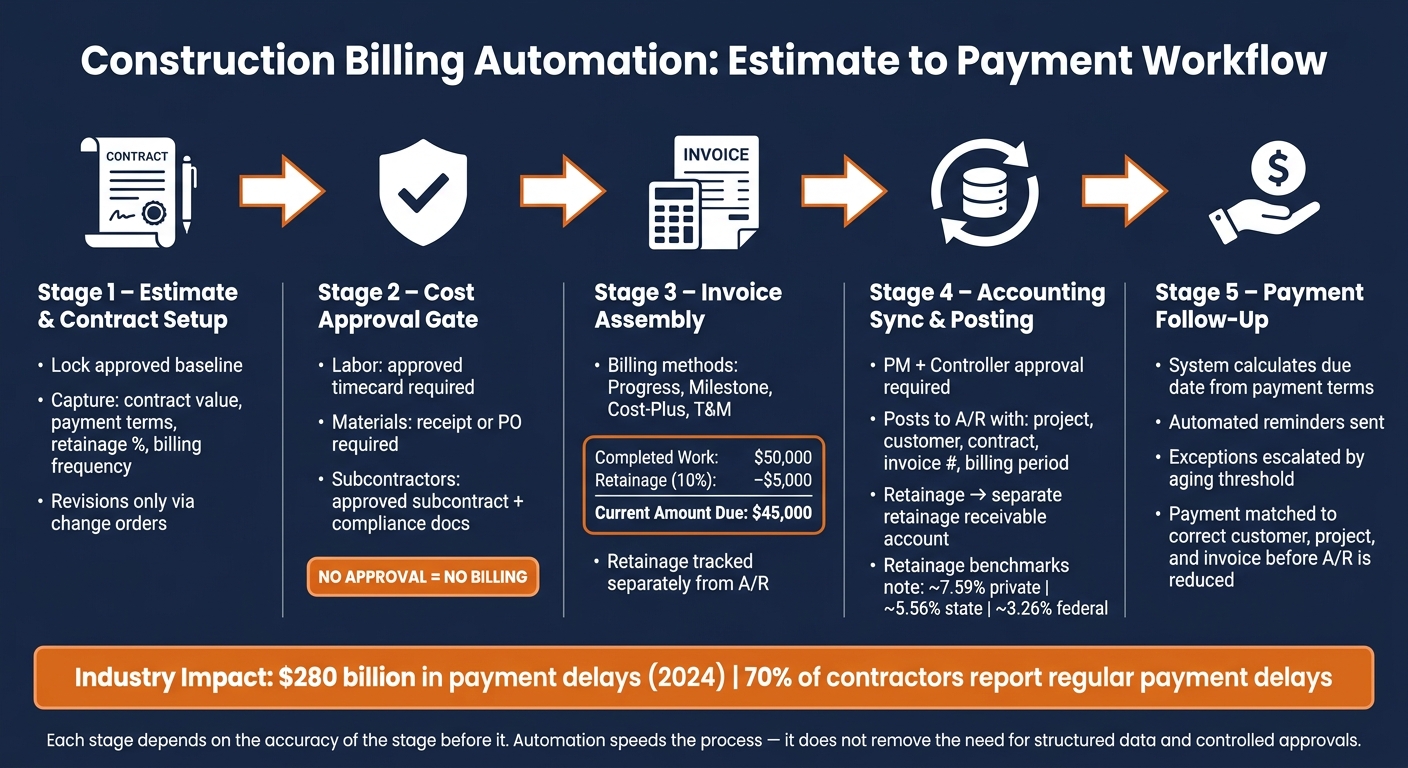
Construction Billing Automation: Estimate to Payment Workflow
With the billing foundation approved, the workflow moves from estimate to payment. Once an estimate is approved, billing automation transfers that data into budgets, invoices, accounting, and collections. Each stage depends on the accuracy of the stage before it. Automation speeds the process, but it does not remove the need for structured data and controlled approvals.
Estimate and Contract Data That Build the Billing Foundation
Structured fields should be organized into three groups:
- Contract details: customer, project address, contract value, scope, payment terms, billing frequency, retainage, and milestone or line-item billing rules
- Billing terms: quantities, markup, taxes, allowances, and exclusions
- Cost codes: job, phase, cost type, unit, quantity, unit cost, and billing category
After the contract is signed, automation should convert the approved estimate directly into the project record, job budget, and billing schedule. The billing schedule may show a simpler schedule of values to the customer, while the internal budget keeps full cost-code detail. The approved baseline should be locked. Any revision should move through a documented change order rather than an undocumented edit to the original estimate.
Approved Project Costs That Feed Billable Amounts
Field costs become billable only after passing a defined set of checks. Labor hours require an approved timecard with a valid project and cost code. Equipment usage requires an approved log with a confirmed rate and usage quantity. Materials require a receipt, purchase order, or delivery record. Subcontractor charges require an approved subcontract, invoice, compliance documentation, and job assignment. A change-order cost must be linked to an approved change order before it can appear on a customer invoice.
No approval, no billing. Missing approvals, unassigned cost codes, duplicate transactions, or costs posted after a billing cutoff should route to an exception queue rather than move into an invoice automatically. An unapproved $2,400.00 material receipt, for example, may be recorded as a pending cost, but it should not increase the customer invoice until the project manager confirms that it belongs to the job and is billable under the contract terms.
Invoice Release, Accounting Posting, and Payment Follow-Up
Once costs are approved, the system can assemble the correct invoice type. Each billing method – progress, milestone, cost-plus, or time-and-materials – requires the billing engine to apply the contract’s specific rules rather than a single formula.
Retainage must be tracked separately from ordinary receivables. If completed work totals $50,000.00 and the contract withholds 10% retainage, the invoice should show $50,000.00 gross work, $5,000.00 retainage withheld, and $45,000.00 currently due. A partial payment of $30,000.00 reduces the current balance without closing the invoice, and the $5,000.00 retainage remains in a separate retainage receivable rather than past-due A/R. Industry data indicates that average retainage runs approximately 7.59% on private projects, 5.56% on state projects, and 3.26% on federal projects, though the contract controls the actual rate on a given job.
After project manager and controller approval, the invoice posts to accounts receivable with the project, customer, contract, invoice number, billing period, and retainage detail attached. The system then calculates the due date from the payment terms, sends reminders, and escalates exceptions based on aging thresholds. Payment records must be matched to the correct customer, project, and invoice before the accounts receivable balance is reduced.
Those invoice postings depend on clean cost-to-account mappings, which the next section covers.
sbb-itb-5eea312
How Project Costs Connect with Accounting Records
Project software tracks jobs, budgets, commitments, and costs. Accounting software tracks invoices, bills, payments, taxes, and general ledger entries. Billing automation works only when both systems use the same codes, IDs, and approval rules. Those controls determine whether approved costs post cleanly or fail before billing.
Field Mappings That Control Sync Accuracy
Each transaction moving from the project system into accounting carries coded identifiers. Inconsistent IDs, such as “Job 2407” in one system and “Main Street Renovation” in another, can cause a rejected transaction, a duplicate record, or a misposted cost.
The mapping must cover each transaction class, not only invoices. A subcontractor bill should include the vendor, job, purchase order or subcontract number, cost code, cost type, approval status, retainage amount, tax treatment, and payable account before it can post correctly. A labor entry should include the job, cost code, cost type, approved hours, rate, and payroll or expense account.
Budget, committed, and actual costs should remain separate. Budget reflects planned work. Commitments reflect signed exposure. Actuals reflect posted costs. The project system reports all three. The accounting system reflects posted actuals and, where the platform supports it, open commitments.
Map these fields before turning on sync:
| Project Field | Accounting Field | Sync Direction | Role Responsible for Corrections |
|---|---|---|---|
| Job ID and project name | Customer or project/job record and job-cost dimension | Project system → accounting | Controller or accounting administrator |
| Customer name and billing contact | Customer master record | Accounting ↔ project system | AR administrator |
| Vendor or subcontractor name | Vendor master record | Accounting ↔ project system | AP administrator |
| Cost code | Job-cost category, class, phase, or project dimension | Project system → accounting | Project accountant and controller |
| Cost type (labor, material, equipment, subcontract) | Labor, material, subcontract, equipment, or other expense category | Project system → accounting | Controller |
| Budget category and amount | Budget or job-cost budget record | Project system → accounting | Project manager and controller |
| Schedule of values | Contract-line or invoice-line structure | Project system → accounting | Project manager and billing administrator |
| Purchase order or subcontract | Commitment, encumbrance, or purchasing record | Project system ↔ accounting | Project manager and AP administrator |
| Subcontractor invoice | Vendor bill or accounts-payable invoice | Project system → accounting | AP administrator |
| Labor entry or timecard | Payroll, labor-cost, or expense transaction | Project system → accounting/payroll | Payroll administrator and project manager |
| Change order management IDs, status, and value | Contract modification, revised budget, and billing adjustment | Project system ↔ accounting | Project manager and controller |
| Accounts-receivable invoice | Customer invoice and revenue posting | Project system → accounting | Billing administrator and controller |
| Payment receipt | Customer payment and AR settlement | Accounting → project system | AR administrator |
| Retainage billed or withheld | Retainage receivable or payable account | Accounting ↔ project system | Controller |
| Sales-tax jurisdiction and amount | Tax code, tax liability, and invoice tax line | Project system → accounting | Controller or tax administrator |
| General-ledger account | Revenue, expense, asset, liability, or clearing account | Project system → accounting | Controller |
Retainage must post to a separate receivable or payable account. That separation allows the contractor to distinguish amounts that are collectible now from funds withheld until substantial completion or another contract milestone.
Once the fields are mapped, the next decision is how the two systems should exchange data.
Sync Models and Their Controls
The sync model should be selected based on which system owns each record type. Two-way sync should be used only when both systems have clear field ownership and conflict rules.
| Sync Model | Typical Use Case | Main Control | Primary Risk |
|---|---|---|---|
| One-way: project system → accounting | Approved invoices, bills, costs, or time entries originate in the project system | Approval gate and required-field validation | Incorrect source data posts automatically |
| One-way: accounting → project system | Customers, vendors, payments, or chart-of-accounts values are maintained centrally in accounting | Master-data ownership and inactive-record controls | Field teams lack current records or cannot see changes |
| Two-way sync | Both teams need shared customers, vendors, commitments, invoices, and payment status | Conflict rules, source-of-truth definitions, and locked records | Edits can overwrite one another or create duplicates |
| Batch export or import | Smaller contractors, legacy systems, period-end posting, or limited integrations | File template validation, control totals, and import logs | Delayed data, manual file errors, and duplicate imports |
| Approval-first posting | High-value bills, change orders, progress billings, or transactions requiring review | Role-based approval matrix and posting-status control | Workflow bottlenecks or unposted costs if queues are ignored |
Sync should be controlled through duplicate detection, failed-sync alerts, rules that determine which system prevails when values conflict, closed-period locks, audit history, and post-run reconciliation.
Once the data map and sync controls are in place, the next step is choosing the billing workflow each job should follow.
Common Automated Billing Workflows for Contractors
Once mappings and sync rules are in place, the billing workflow should follow the contract type. Progress vs. milestone billing and time-and-materials billing rely on different source records, review steps, and approval controls. The table below links each workflow to its billing trigger, required records, approval point, and principal risk.
| Workflow | Billing Trigger | Required Records | Approval Point | Principal Risk |
|---|---|---|---|---|
| Estimate-to-invoice | Customer accepts the estimate and contract permits invoicing | Customer record, accepted estimate, line items, quantities, prices, tax treatment, payment terms, attachments, project budget | Project manager or authorized owner approves estimate and invoice draft | Billing from an outdated estimate, incorrect customer details, duplicate invoicing, or missing contract terms |
| Progress billing | Billing period closes or defined percentage of work is complete | Executed contract, schedule of values, daily reports, quantity or percent-complete evidence, stored-material documentation, prior applications, retainage terms, approved change orders | Project manager verifies progress; accounting or owner’s representative approves the payment application | Overbilling, unsupported percent complete, incorrect retainage, or failure to subtract prior billings |
| Time and materials | Approved labor, equipment, material, or subcontractor charges reach the billing cutoff | Timecards, labor rates, equipment logs, receipts, supplier invoices, cost codes, markup rules, customer approval records | Supervisor or project manager approves source charges; billing staff approves the invoice | Unapproved hours, incorrect rates, missing receipts, or inconsistent markup |
| Change order | A change is signed or otherwise authorized under the contract | Change-order request, scope, price, schedule impact, cost breakdown, supporting correspondence, approval, updated budget or schedule-of-values line | Authorized customer or contract administrator approves before billable work begins, unless the contract permits emergency work | Performing or billing extra work without authorization, margin loss, disputes, or omitted revenue |
| AR follow-up | Invoice is issued, becomes due, or reaches a collection milestone | Invoice, delivery record, due date, payment terms, communications log, remittance, credit memo, aging record | Finance or an authorized manager approves credits, write-offs, and escalations | Misapplied cash, missed collection actions, duplicate reminders, or inaccurate aging |
| Accounts payable and job cost | Supplier or subcontractor invoice is received and matched | Vendor record, purchase order, receipt or completion evidence, subcontract, lien-waiver status, invoice, cost code, job assignment | Field or project manager approves the work; accounting approves posting and payment | Unrecorded costs, duplicate payments, wrong job assignment, distorted margin, and unreliable billing decisions |
Each workflow includes control points meant to reduce billing errors before invoices are issued.
Estimate-to-Invoice and Progress-Billing Workflows
The estimate-to-invoice workflow uses the accepted estimate as the commercial baseline for later billing records. Only billing-critical fields should move forward: customer, project, line items, quantities, prices, tax status, terms, and approved markup or exclusions. The accepted version should be locked, or its revision history should be retained. Any later scope revision should move through a separately approved change order rather than an informal edit to the original estimate. The audit trail should show who changed the amount, when the change occurred, and what authorization supported it.
Progress billing starts from the approved schedule of values (SOV). The SOV assigns the contract sum across work packages, and each billing cycle updates completed work, stored materials, prior billings, retainage, and the remaining balance. Payment applications are typically submitted at monthly intervals.
Use this calculation:
Current payment due = Completed and stored work − Retainage − Previous payments
The contract may also require other adjustments, including approved changes, credits, or taxes.
The table below defines each amount in a progress-billing application and the record that supports it:
| Amount | Definition | Supporting Record |
|---|---|---|
| Scheduled value | Contract value assigned to a work package or SOV line | Executed contract and approved SOV |
| Percent complete | Portion of the SOV line completed as of the cutoff date | Quantity records, inspection approval, daily reports, photographs, or project-manager certification |
| Work completed this period | Value earned during the current billing period | Progress measurement and current-period production records |
| Work completed to date | Cumulative value earned through the current period | Current and prior payment applications |
| Stored materials | Eligible materials purchased and delivered to the site or approved storage but not yet incorporated | Supplier invoice, delivery ticket, inventory or storage evidence, and title or insurance documentation where required |
| Previous applications | Amounts already billed or certified in earlier periods | Prior invoices, payment applications, and accounting ledger |
| Current gross billing | Current completed-work value plus eligible stored materials and authorized additions | SOV calculation and approved change-order records |
| Retainage | Contractually withheld percentage or amount | Contract clause and calculation history |
| Current amount due | Current gross billing less retainage and prior amounts | Approved payment application and invoice |
| Remaining contract balance | Current contract value less cumulative earned or billed value, including approved changes | Contract, SOV, prior billings, payments, and change-order log |
A progress invoice should not be released from percent complete alone. The billed amount should be checked against production records, prior billings, and approved change orders. Stored materials also require a separate review. Supplier invoices, delivery records, storage evidence, and contract permission, where required, should confirm that the same materials are not counted twice as both stored and installed work.
Time-and-Materials, Change-Order, and Accounts-Receivable Workflows
Time-and-materials billing depends on source-cost accuracy before invoice creation. Approved labor hours, equipment usage, material receipts, and subcontractor charges should move into a draft invoice only after project, date, cost-code, and approval checks are complete. The workflow should proceed in sequence: timecard submission, approval, rate application, markup, review, and invoice issuance. Contract-approved labor, equipment, material, and markup should remain separate. Missing customer signatures, duplicate receipts, time posted after the billing cutoff, and costs charged to a nonbillable phase should each create a flag rather than pass through without review.
Change-order billing requires authorization before billable work begins, not after cost has accumulated. The control sequence starts with the triggering event, such as a customer request, design revision, concealed condition, or regulatory requirement, and ends with billing only after the required approval status is confirmed. Unapproved changes lead to billing leakage and disputed revenue. Each payment tied to change-order work should trace back to the authorized change and its cost code. Track these fields for each change order: change number, reason, approval date, contract impact, affected SOV line, billing status, and lien-waiver status. Internal changes used only for cost tracking should stay off customer invoices unless separate billing approval has been granted.
For AR follow-up, automation should run from the invoice due date and invoice status set by the contract, not from a generic calendar. Invoice delivery, receipt confirmation, pre-due reminders, post-due escalations, payment matching, and reconciliation should follow rules set by the contract and customer account terms. Any difference between the amount invoiced and the amount received should be classified before settlement as an approved retainage release, deduction, dispute, credit, or unapplied amount. The AR subledger should be reconciled to the general ledger, and billed, certified, and collected amounts should remain separate.
Accounts-Payable and Job-Cost Workflows That Protect Billing Accuracy
Accounts payable affects billing accuracy because vendor and subcontractor costs drive job cost and margin. The invoice should be captured, matched to the purchase order, receipt, or subcontract, checked for compliance documents, assigned to the correct job and cost code, and approved before posting. Once approved, the invoice posts to accounting, updates actual cost and margin forecasts, and reconciles to the general ledger and vendor statement.
Unrecorded costs create a lag that can distort project reporting. If a subcontractor has completed $40,000.00 of work but the invoice has not been recorded, the project may appear $40,000.00 more profitable than it is. That can lead to an inflated progress percentage, an understated cost-to-complete forecast, or owner billing that lacks support. Automation should support accruals or committed-cost reporting when incurred costs have not yet reached accounts payable. Those estimates should be labeled separately from posted invoices. Unrecorded costs affect both the next invoice and the project margin.
These workflow controls depend on complete data, approved review paths, and accounting sync before go-live.
What to Check Before Turning On Automation and How Contractor Foreman Fits
Before go-live, data, approval paths, and accounting sync should be verified. Automation increases the speed of existing errors as well as valid transactions.
Data, Workflow, and Accounting Readiness Checks
Automated billing depends on clean records and consistent setup. Before any automated transaction is posted, each active project should have a single job ID used the same way in both the project-management system and the accounting system. Customer, vendor, employee, and subcontractor records should be reviewed for duplicate names, inactive entries, missing tax details, and inconsistent addresses. Cost codes, cost types, labor and material units, tax categories, payment terms, retainage percentages, and account mappings should be standardized. Progress billing should not be automated unless the schedule of values matches the contract value and retainage has been defined.
Roles and approval paths should be documented in plain terms. That includes who creates estimates, approves contracts and change orders, reviews costs, approves invoices, posts transactions, monitors failed syncs, and reconciles balances. Approval thresholds should be stated clearly. For example, any change order above $10,000.00 may require approval from both a project manager and a finance reviewer. In the accounting system, the customer, job, income, A/R, A/P, retainage, tax, deposit, payment, and payment-method mappings should already be in place. Duplicate invoices should be blocked using invoice number, project ID, customer, amount, and billing period.
After those controls are set, they should be tested in a nonproduction job before release.
Compliance, Testing, and Go-Live Controls
A project-specific compliance checklist should be used before automation is turned on. Common items include billing forms, labor and material support, lien waivers, certified payroll, tax records, insurance certificates, portal rules, e-signatures, and record-retention periods. AIA guidance recommends submitting lien waivers with every payment application, so waiver collection should be built into the billing workflow rather than handled later. The contract, invoice, approvals, attachments, signatures, transmission records, and revision history should be stored together so an auditor or customer can reconstruct the billing decision.
The test environment should include the following cases:
| Test Condition | Expected Result | Reviewer | Evidence Retained |
|---|---|---|---|
| Approved progress billing with retainage | Correct current billing, retainage, tax, and balance due | Controller | Test invoice and reconciliation |
| Unapproved change order | Amount is excluded from automated billing | Project manager | Change-order status record |
| Duplicate invoice submitted | Duplicate is blocked or routed for review | Billing manager | Exception log |
| Failed accounting sync | Error is visible, assigned, and recoverable without duplicate posting | System administrator | Error notification and resolution record |
| Payment application | Payment reduces the correct customer balance and job receivable | AR manager | Deposit record and AR reconciliation |
| Compliance package | Required waivers and supporting documents accompany submission | Compliance reviewer | Submission confirmation |
Go-live should require written sign-off from operations, project management, billing, accounting, and, when applicable, compliance. Before activation, records should be backed up, opening balances should be reconciled, user permissions should be confirmed, and a rollback procedure should be documented. Automation should begin with a limited pilot, such as one internal project or a small group of low-risk customers, before expansion across the full job list.
If those tests pass, the next step is to verify the platform-specific sync rules before full rollout.
Using Contractor Foreman to Support Controlled Billing Automation
The software should support these controls rather than bypass them. Contractor Foreman can function as the operating center for projects, estimates, schedules, daily logs, time tracking, expenses, documents, financial tracking, and invoicing. Contractor Foreman’s integration documentation advises users to create bills, invoices, expenses, and payments in Contractor Foreman and let the integration push the financial data to QuickBooks. That workflow should be tested against the contractor’s accounting policy before adoption.
Contractor Foreman states that its QuickBooks Online integration is included in its subscription, but a separate QuickBooks Online subscription from Intuit is required. For workflows outside the native integration, Zapier connectivity can extend selected automations to other applications, but each connection still requires a defined trigger, mapped fields, an assigned owner, and an exception process.
Before synchronization is enabled, permissions, approval roles, field mappings, sync direction, handling of edits and voids, and failure notifications should all be verified in the contractor’s own environment. The retainage account should be mapped to the retainage code before progress bills are synced.
Conclusion: The Controls That Make Billing Automation Reliable
Across each workflow, construction billing automation functions first as a control system and second as a labor-saving tool. Approved estimates, schedules of values, verified costs, and authorized change orders need to flow into invoices through validated field mappings and approval gates. If that chain fails at any stage, automation multiplies the error rather than preventing it.
Field mappings determine posting accuracy. An incorrect mapping can misclassify costs, distort job margin, and disrupt reconciliation with the general ledger. Approval controls do not correct a faulty mapping.
Automation is most effective when it handles repeatable transfers and calculations, while personnel review cost, scope, retainage, and compliance decisions. A system may calculate 40% completion on a progress invoice, but that calculation still depends on a project manager confirming that the work is physically complete and that the contract allows billing at that milestone.
Contract terms, tax treatment, retainage, lien waivers, payroll, and owner billing rules vary by project and by jurisdiction. A single rule cannot govern all jobs. Automation should reflect those terms only after a qualified reviewer has confirmed them, not determine them on its own.
Once the pilot confirms the setup, performance should be judged by system output. Metrics such as invoice rejection rate, sync failures, uncoded cost volume, exception resolution time, and variance between project records and accounting records show whether automation is producing reliable invoices or merely producing invoices faster.
FAQs
What should I automate first?
Start with data cleanup and standardization. Duplicate records should be removed, and job names, customer names, vendor names, and cost item descriptions should follow a consistent format.
Next, synchronize core financial records and estimates before addressing other workflows. That sequence establishes a reliable connection between project management and accounting systems, which supports accurate job costing.
After the financial link is in place, bills should be created from purchase orders or subcontracts. That process keeps committed costs and actual costs aligned.
How do I handle retainage correctly?
Use automated tracking instead of manual calculations and spreadsheets. In Contractor Foreman, retainage is calculated automatically, which makes it easier to see the amount being held and the amount due. If terms change during the project, the system updates those amounts without manual rework.
For subcontracts, retainage should be set in the contract terms, and Retainage Codes should be used to keep withheld funds aligned with the accounting software. Any pending retainage should be finalized during project closeout.
What can break billing automation?
Billing automation often fails when data is not organized or mapped in a consistent way across systems.
Common causes include mismatched cost codes, inconsistent job or vendor names, transactions entered directly in accounting software instead of the project management platform, imports made outside the Schedule of Values for progress billing, weak API connections, and duplicate data that was not removed before integration.







