
- 1. Record the safety issue and create a corrective action
- 2. Assign responsibility, priority, and due dates
- 3. Track work with status updates, photo proof, and supporting records
- 4. Verify the fix, close the action, and maintain audit-ready history
- 5. Corrective action tracking in Contractor Foreman
- Conclusion: Build a reliable corrective action process from report to closeout
- FAQs
Corrective Action Tracking in construction is making sure that once a safety problem gets found, it actually gets resolved — not just noted down and forgotten.
So when a guardrail goes missing on the third floor, that gets flagged and tied to a corrective action: install a replacement guardrail before work resumes on that level.
Or when John the site supervisor forgets to enforce PPE again — that gets flagged and tied to a corrective action: mandatory PPE refresher before his next shift.
This isn’t just a nice-to-do, it’s a requirement.
OSHA expects incident review, root-cause analysis, and action tracking through closeout.
Here’s how to actually track a corrective action:
- Record the hazard clearly with project, location, time, risk level, and source record
- Assign one owner and one verifier
- Set a due date and priority
- Track status changes from open work to verified closeout
- Store photos, notes, and documents in one record
- Review trends such as overdue items, repeat hazards, and root causes
Benefits of a Complete Audit Trail:
An audit trail with names, dates, status history, and photo proof gives safety teams and project leaders a clean record for inspections and internal reviews — often managed through top construction compliance software.
That same record continues to provide value after closeout. Aggregated over time, it can reveal recurring fall hazards, owners with consistently delayed closures, and training gaps spanning multiple projects.
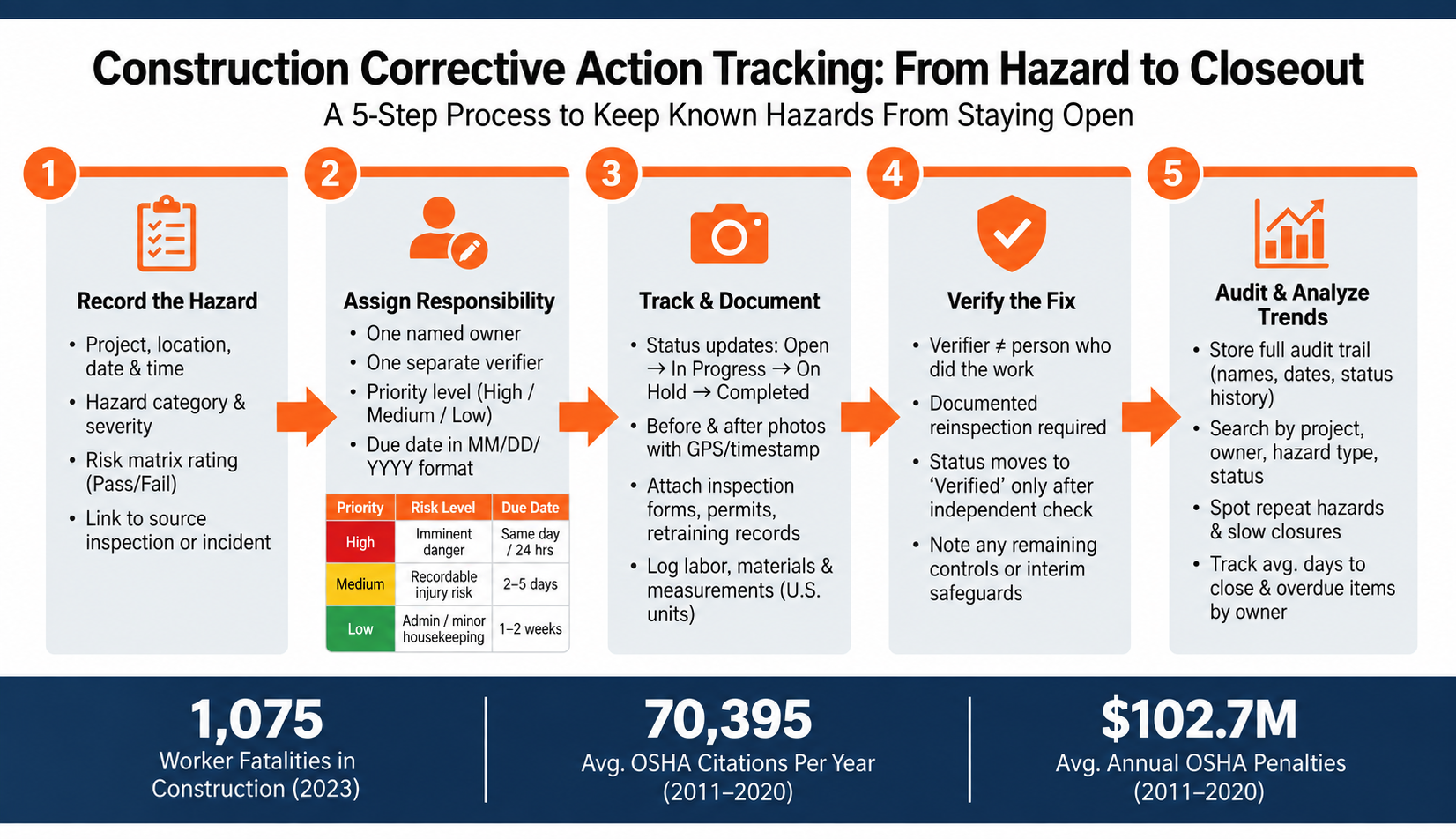
Construction Corrective Action Tracking: From Hazard to Closeout
1. Record the safety issue and create a corrective action
Start with a complete issue record so the hazard can be assigned and closed.
A corrective action addresses an existing hazard, such as a missing guardrail, a damaged cord, or a lockout/tagout violation.
Capture the issue report with project, location, and risk details
The more specific the initial report, the easier everything downstream becomes.
That means include the project name, exact location, date, time, trade, hazard category, severity, and a clear description of the unsafe condition.
Make sure to write descriptions with enough specificity that anyone reading the record later — an auditor, a new safety officer, a lawyer — can picture exactly what happened without needing to ask follow-up questions.
A strong description reads: “At 09/10/2026, 2:45 PM, on Building B roof level at the east parapet, an unprotected leading edge about 30 ft above grade was observed. Three roofers were working within 6 ft of the edge without guardrails or fall protection.”
Not “Roof crew missing fall protection.”
To keep records consistent, use dropdowns for hazard categories and a risk assessment matrix for severity. Record measurements in U.S. units, such as inches, feet, and pounds. Record pass/fail results like “Fall Protection: Fail” so the corrective action owner knows exactly what must be fixed.
Link the report to the originating inspection, incident, or observation
A corrective action shouldn’t exist as a standalone note — it should always trace back to where the issue was first identified.
Link the corrective action to the source inspection, incident, or observation so the record shows the reporter, subcontractor, standard, and original record ID. Source links, reporter identity, and the applicable standard help support the record during an OSHA review or client audit.
Accurate record-keeping isn’t just about compliance; it’s about creating a safer work environment.
Once the record is complete, assign ownership and a due date.
sbb-itb-5eea312
2. Assign responsibility, priority, and due dates
A record with no owner is just a to-do list nobody’s committed to. Every corrective action needs one owner, one verifier, a priority, and a due date before it can move forward.
Assign a responsible owner and define who verifies completion
One person should own the fix and have the authority to make it happen. That might be a superintendent for site-wide issues, a foreman for crew-level items, or a subcontractor supervisor for trade-specific work. Record the owner’s full name, role, company, phone number, and email so field follow-up and reporting don’t stall.
A separate verifier should confirm that the hazard was fixed before closeout. In many cases, that role falls to a superintendent, safety manager, or project manager. Keeping the verifier separate adds an independent check before the item is closed.
Set priority, due date, and estimated cost
Once ownership is clear, the next step is priority and timing.
A three-tier scale helps field teams focus on the highest-risk items first:
| Priority | Risk Basis | Target Due Date |
|---|---|---|
| High | Imminent danger or serious injury potential, such as missing fall protection, electrical hazards, scaffolding issues, or excavation risks | Same day or within 24 hours |
| Medium | Hazards that could cause recordable injuries, such as poor housekeeping, inadequate signage, or minor PPE issues | Within 2–5 days |
| Low | Administrative updates, minor housekeeping, or documentation changes | Within 1–2 weeks |
Due dates should use MM/DD/YYYY format and line up with crew availability, lead times, and project milestones.
If the correction carries a cost, record estimated labor, materials, equipment, and overhead in U.S. dollars.
Use reminders and escalation for approaching or overdue items
Manual follow-up tends to slip, especially on busy jobsites. Contractor safety software reminders keep open items in view. A well-set system can send alerts as the due date gets close, then move late items into an Overdue list on the dashboard and notify the project manager or safety director. Dashboard alerts and mobile notifications help keep unresolved hazards visible.
After the action is assigned and dated, it can move into status tracking and closeout documentation.
3. Track work with status updates, photo proof, and supporting records
After assignment, every change should be tracked until the fix is confirmed. Each update needs to show what changed, who changed it, when it changed, and why it changed. Work stays open until a separate verifier signs off. Status updates, photos, and supporting records keep the fix visible all the way to closeout.
Update status from Open to Verified with time-stamped activity
A consistent set of status codes keeps the jobsite aligned, a feature often highlighted in top contractor safety software solutions.
Each status needs a clear meaning and a named role to update it.
| Status | What it means | Common updater |
|---|---|---|
| Open | Issue logged, action created, work not yet started | Inspector, Foreman, Safety staff |
| In Progress | Work to correct the hazard is actively underway | Action owner / Foreman |
| On Hold | Work paused because of a dependency or constraint | Foreman, Project Manager |
| Completed | Physical work finished; verification still pending | Action owner / Foreman |
| Verified | Fix inspected and confirmed to meet safety requirements | Safety Manager / Superintendent |
Each status change should be stored in a read-only timeline with the user’s name, role, date, time, before/after status, and a short note. Key transitions need a brief explanation. If work moves to On Hold, the record should note the reason, such as waiting for guardrail materials.
Completed and Verified are not the same thing. Completed means the physical work is done. Verified means a different person checked the work and confirmed the hazard is gone. The shift from Completed to Verified should come from someone other than the person who did the work.
Once the status is logged, the next step is evidence from the field.
Attach before-and-after photos, documents, and field notes
Photos are the clearest proof that a hazard was fixed in the field. A before photo should show the hazard and enough of the area to make the condition clear. The after photo should be taken from a similar angle. Mobile uploads with automatic date, time, and GPS tags tie each image to a jobsite location and a specific moment.
Documents matter too. Files should show the issue, the fix, and any follow-up work. Labor, materials, and measurements should also be logged so the record shows what it took to finish the correction.
| Evidence type | What it proves | Most useful for |
|---|---|---|
| Before/after photos | Hazard condition and physical fix | OSHA reviews, client safety audits |
| Inspection forms | When and how the hazard was identified and rated | Internal audits, OSHA documentation |
| Retraining records | Workers received updated safety training | OSHA, insurance, legal defense |
| Invoices / purchase orders | Resources spent to correct the hazard | Financial audits, insurance claims |
| Permits / approvals | Work was performed under proper authorization | Regulatory audits, legal defense |
| Updated drawings | Design or layout changed to reduce risk | Client audits, engineering reviews |
| Daily logs / field notes | Narrative of work performed and site conditions | Internal audits, incident investigations |
Attaching these files directly to the corrective action record creates one place to review the full history. That gives the verifier a clean path to confirm the fix.
Log labor, materials, and measurements used to correct the hazard
Labor, materials, and measurements should be logged so the fix connects to cost and compliance records. Entries need enough detail to stand on their own and should use standard U.S. units.
Replacing damaged guardrails along a mezzanine edge might be logged like this: 2 carpenters × 4.5 hours each = 9.0 hours; 24 linear feet of steel guardrail installed; top rail at 42 in, midrail at 21 in, posts at 6 ft on center.
Adding fall protection anchors might read: 6 roof anchors rated at 5,000 lb each, spaced 8 ft apart; 1 safety technician × 3.0 hours.
Removing debris from an access route could be recorded as: 3.5 yd³ removed; pathway cleared to minimum 28 in width.
Every entry should show who made the change, when it happened, and why it was made, with a link back to the original inspection, incident, or observation.
4. Verify the fix, close the action, and maintain audit-ready history
Once the fix is finished, closeout depends on a documented reinspection.
Verify the hazard was corrected and update the final completion record
Marked Completed is not closed. A supervisor or safety professional must recheck the hazard and record the result.
A documented reinspection catches problems that a verbal update can miss: partial fixes, temporary fixes, or new hazards created during the repair. The final record should show the actual completion date, the verifier, the verification method, and a short closure note.
If any risk remains, mark the action controlled or mitigated and list the safeguards still in place. That may include interim guarding, required inspection frequency, or posted signage. The next reviewer needs to see, at a glance, what still stands.
Store an audit trail for OSHA reviews and internal safety audits
A complete audit record should include the original issue report, owner, due date changes, status history, comments, and closure notes.
The construction industry averaged 70,395 OSHA citations per year between 2011 and 2020, with penalties averaging $102.7 million annually during that same period. Clear documentation during an inspection shows what happened, when it happened, and who approved each step.
Records should live in a centralized system that can be searched by project, date, hazard type, responsible person, and status. Related OSHA injury and illness records can carry a five-year retention requirement, and corrective action records tied to those files should stay on the same timeline. Paper forms, text messages, and disconnected spreadsheets leave gaps that are hard to explain during a review.
Report trends by project, owner, and root cause
After closeout, use the record to spot repeat hazards and slow closures.
Closed corrective actions become far more useful when grouped. Repeated guardrail-related corrections across multiple projects may point to a training gap. Delayed closures concentrated under one owner may signal a staffing or scheduling problem. Grouping by root cause turns single records into input for future safety work.
| Root Cause Category | Common Corrective Action Focus |
|---|---|
| Fall Hazards | Installation of fall protection systems and guardrails |
| Safety Training | Refresher courses, toolbox talks, certification tracking |
| Equipment Failure | Maintenance logs, lockout/tagout steps, replacement records |
| Electrical Risks | Updated safety-related work practices and installations |
| Excavation/Cave-in | Protective systems and documented hazard assessments |
| Near Misses | Protocol updates, safety alerts, safety-focused toolbox talks |
Track average days to close, overdue items by owner, and repeat issues by project.
5. Corrective action tracking in Contractor Foreman
After status, evidence, and verification are logged, the software keeps the full corrective action record in one place. Contractor Foreman stores corrective actions, photos, and closeout records across unlimited projects.
Create and assign corrective actions from daily logs and safety records
Safety issues in Contractor Foreman can be logged from daily logs, incident reports, near-miss reports, and inspections. After a hazard is documented, it can be turned into a corrective action with a clear owner, priority, due date, and a direct link back to the original form or inspection record.
The mobile app allows crews to complete logs, upload photos, and open project documents from the field. Mobile incident reports can also feed into corrective actions.
After assignment, the item moves into photo-backed closeout tracking.
Attach photos, comments, and documents for full closeout support
Photos and files added to daily logs are automatically stored under the correct project, which helps keep corrective action evidence organized. A common workflow is simple: attach a before photo when the hazard is logged, then add an after photo once the fix is done.
Comments, annotated photos, and supporting documents stay tied to the same record.
Monitor open items and keep safety work visible across projects
Open and overdue corrective actions can be tracked in list and Kanban views, which makes open, in-progress, and complete items easy to follow. Assigned items can also sync to the project calendar, so due dates stay visible after the task is created.
When a subcontractor or outside party needs to act on an item, notifications and PDF attachments can be sent even without a system login.
That gives supervisors one record for open items, evidence, and completion status.
Conclusion: Build a reliable corrective action process from report to closeout
A corrective action process works only when every step gets finished, from the moment a hazard is spotted to the day the fix is verified.
Failure usually starts with unclear ownership. Open actions slip when owners and due dates aren’t easy to see. Automated reminders help, but the bigger shift comes when open items stay visible to supervisors and safety leaders across shifts, meetings, and projects.
When those items stay linked to the original report, patterns show up earlier. Linked corrective actions turn daily logs, inspections, and incident reports into searchable safety records. Trend reports by project, owner, or root cause expose repeat hazards and slow closures. When corrective actions are tracked from report to verification, they stay visible, defensible, and much harder to ignore.
FAQs
Who should own a corrective action?
A corrective action should be assigned to one specific responsible party. That party might be a crew member, an internal team member, a subcontractor, or an outside vendor.
In Contractor Foreman, a common best practice is to choose that owner from the task drop-down menu. When more than one company is involved, separate action items should be created for each one. That keeps accountability clear and the audit trail organized through closeout.
What proof is needed to close a safety issue?
To close a safety issue in Contractor Foreman, verified and documented proof needs to be on file. The goal is a clear audit trail that holds up during a compliance or safety review.
That proof includes timestamped photos or videos that show the fix, along with electronic signatures. When those records stay in the system, the full history is documented from the initial report through final resolution.
How can teams prevent overdue corrective actions?
Teams can reduce overdue corrective actions with automated alerts, real-time dashboards, and clear accountability in Contractor Foreman.
The software tracks deadlines and sends notifications when tasks slip past due dates, so issues can be handled before they grow into bigger problems.
Color-coded status tracking and custom views make pending items easy to spot and sort by priority. Assigned tasks and automated reminders also keep work moving and help teams stay on schedule.







