
You obsessed over subcontractor safety training.
You color-coded the binders. You made every foreman sit through the orientation video THRICE, just to be sure.
You did not want to be the company explaining to an inspector why a worker with no hazard training was running equipment on your site. And yet — the citation still shows up. The card that lapsed in March nobody noticed until August. The worker roster that says fourteen names, but the crew that showed up had sixteen. The orientation that was “basically done.”
So here’s what’s actually going on: Most subcontractor safety violations don’t come from bad training — they come from bad bookkeeping. It happens because the records behind it fell behind — late, expired, or split between the office and the field.
A worker gets waved through the gate because someone assumed the paperwork was handled, and by the time anyone checks, the OSHA card’s expired or the roster’s out of date. And under the Multi-Employer Citation Policy, CPL 02-00-124, that failure isn’t limited to the subcontractor — of course, the controlling contractor (aka you) can be cited for it too.
The solution isn’t more paperwork; it’s clearer ownership.
The subcontractor is responsible for its workers’ training and credentials. The controlling contractor is responsible for site-specific orientation and who gets let in. Problems start the moment those two responsibilities blur — when nobody’s sure who verified what, or the office’s records don’t match what’s happening at the trailer.
The failures that actually cause citations are almost always the boring ones:
- Manual tracking
- Missing OSHA 10/30 cards
- Expired First Aid/CPR or equipment records
- Rosters that don’t match the actual crew
- Gate approvals granted before paperwork is complete
The rule that prevents most of it is short enough to put on a sign: no approval, no access.
No approval, no access. Nobody works until training, orientation, and sign-offs are on file — not “in progress,” on file.
Hold that line, and the rest takes care of itself.
Subcontractor Onboarding and Pre-Start Verification
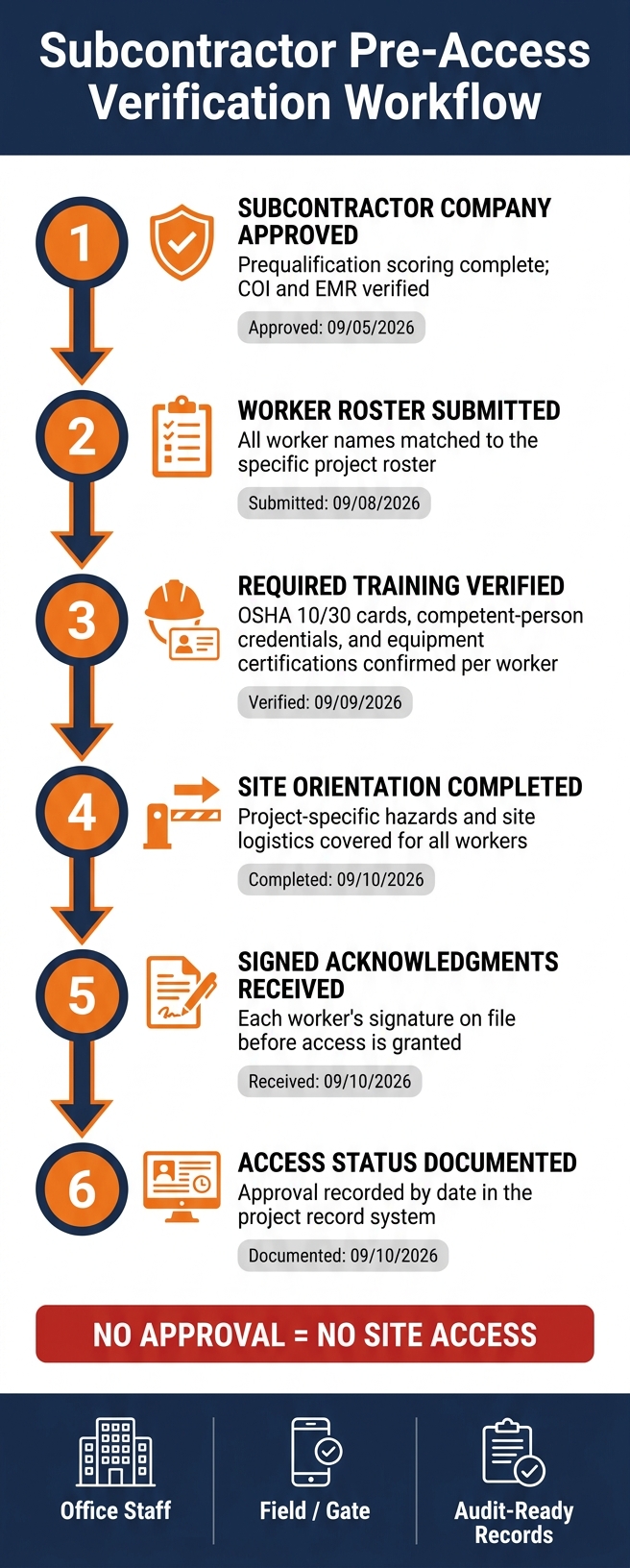
Subcontractor Safety Training Verification Workflow
Subcontractor onboarding establishes the project’s compliance baseline. This is the step that decides whether every record downstream can be trusted.
Both company and worker records should be verified before mobilization to confirm that required documentation and training are in place. Once responsibilities are assigned, pre-start verification becomes the next control point.
Documents Required Before Mobilization
Before mobilization, the controlling contractor should review both company-level and worker-level documentation to confirm that the subcontractor meets project requirements.
At the company level, the controlling contractor should verify a Certificate of Insurance (COI) with minimum coverage limits and additional-insured endorsements. The review should also include the subcontractor’s Experience Modification Rate (EMR), OSHA recordable incident rates, signed subcontract agreement, business licenses, and project safety plan.
Worker records require the same level of verification. Every person on the project roster should have proof of OSHA 10 or OSHA 30 training, applicable trade-specific certifications, and required equipment licenses or certifications. The roster should match the crew assigned to the project rather than a general company employee list.
| Document Level | Required Record | Verification Purpose |
|---|---|---|
| Company | Certificate of Insurance (COI) | Confirm coverage limits and additional-insured endorsements |
| Company | EMR and OSHA incident rates | Assess historical safety performance |
| Company | Project safety plan | Align with site hazards and logistics |
| Worker | OSHA 10/30 Cards | Confirm baseline safety training |
| Worker | Trade-Specific Certifications | Verify competency for specialized tasks |
| Worker | Equipment Operator Licenses | Ensure legal and safe operation of machinery |
| Worker | Signed Site Orientation Acknowledgment | Document that site-specific rules were communicated |
Pre-Access Verification Checklist
Each approval step should happen in sequence, with a date stamp for every action. Skipping a step or approving out of order is how gaps slip through unnoticed — a worker roster submitted before training is verified, for instance, can let an unqualified crew member get approved by default.
A practical pre-access workflow looks like this:
- Subcontractor company approved – prequalification scoring complete, COI and EMR verified (for example, approved 09/05/2026)
- Worker roster submitted – all names matched to the project, not just the company (submitted 09/08/2026)
- Required training verified – OSHA cards, competent-person credentials, and equipment certifications confirmed for each worker (verified 09/09/2026)
- Site orientation completed – project-specific hazards and site logistics covered (completed 09/10/2026)
- Signed acknowledgments received – each worker’s signature on file before access is granted (received 09/10/2026)
- Access status documented – approval recorded by date in the project record
Access should not be granted until training records and signed acknowledgments are complete. Treat this checklist as a hard gate, not a formality — if any step is missing a date stamp, the worker isn’t cleared yet, regardless of how far along the rest of the file is.
Role-Based Training Matrix for Crews and Supervisors
Training needs are not the same across the crew. Supervisors often need OSHA 30 and competent-person training for certain hazards, while general crew members may only need OSHA 10 and site-specific orientation.
| Role | Typical Training Requirements | Verification Frequency |
|---|---|---|
| General Crew / Laborer | OSHA 10, site-specific orientation | Before mobilization / at expiration |
| Equipment Operator | Equipment-specific certifications, OSHA 10 | Per machine type / expiration date |
| Foreman | OSHA 30, competent-person training for applicable hazards | Before mobilization / at expiration |
| Site Supervisor | OSHA 30, competent-person training for applicable hazards | Before mobilization / at expiration |
The matrix guides field clearance decisions: who is approved, which tasks are allowed, and what limits apply.
For smaller subcontractors, it also makes expiring credentials, pre-mobilization courses, and task-specific clearance easier to track. Safety materials and orientations should be available in English and Spanish for bilingual crews. These verified records then serve as the baseline for ongoing training tracking.
sbb-itb-5eea312
Training Records and OSHA Course Tracking
Once pre-access verification is done and workers are on site, the focus moves from approval to live record control. Those records need to stand up during an inspection, incident review, or owner audit. Incomplete or messy files increase risk during inspections, incidents, and audits.
Minimum Fields Every Training Record Should Include
Each training record should include the worker’s name, subcontractor, project, topic, completion date, expiration date, trainer or provider, proof of completion, and any task or equipment limits. When a qualification applies only to a certain task or piece of equipment, that limit should be recorded. Supervisors then know exactly what work the worker is cleared to perform.
Tracking OSHA Cards, Certifications, and Recurring Training
Renewal-based credentials should be tracked separately, including First Aid/CPR, forklift, crane signaling, and rigger certifications. Those records stay valid only when renewals are tracked before expiration. Automated alerts should be set for 90, 60, and 30 days before expiration. Contractor Foreman’s certificate tracking and safety meeting tools help office staff stay ahead of renewals.
Comparison Table: Onboarding Records vs. Active-Project Records vs. Renewal Records
Not all records are created equal — and filing them like they are is where problems start.
Each record type serves a different function, has a different owner, and needs a different update rhythm. Treating all records the same creates gaps. In some cases, records never get created. In others, they go out of date in the middle of a project without anyone noticing.
| Record Type | Purpose | Primary Owner | Update Frequency | Retention Needs |
|---|---|---|---|---|
| Onboarding Records | Initial training file before mobilization | GC / Subcontractor Office | Once per project start | Project duration plus required retention period |
| Active-Project Records | Document daily training and safety activity | Superintendent / Foreman | Daily or weekly | Active project file; audit-ready for OSHA |
| Renewal Records | Track recurring training (First Aid/CPR, equipment certifications, silica) | Safety Manager / HR | As needed, based on alerts | Continuous; updated before expiration |
Onboarding records are created once and act as the entry gate. Active-project records are living documents that grow throughout the job. Renewal records need the most active management – a missed alert can keep a worker off the site and create compliance problems. These records stay useful only when version control and deadline tracking keep them current.
Document Control, Deadlines, and Audit Readiness
Once training records are current, keeping them that way is a separate job — the files crews use every day still need a current version, a known expiration date, and one place they live, so field teams and auditors are always pulling from the same set.
Version Control for Orientations, SOPs, SDS Files, and Acknowledgments
Every safety document in active use needs a revision date and a clear archive rule. If an orientation or SOP changes, the old version should be removed from circulation, and each acknowledgment should be linked to the revision the worker received.
Workers must have the current orientation, SOP, and SDS before work starts. A central system like Contractor Foreman can keep one controlled record set for orientations, SOPs, SDS files, and acknowledgments.
Daily reports, inspections, meetings, RFIs, change orders, and safety observations should be saved in a timestamped digital file.
Version control keeps the right file in use. Deadline alerts make sure it stays valid.
Expiration Tracking and Deadline Alerts
Manual spreadsheets often miss renewals. Automated alerts should flag upcoming expirations before credentials lapse, and site access should stop when required documents expire.
When compliance status is tied straight to site access, workers with expired certifications are blocked from entering the site. That closes a gap that paper logs and scattered files often leave open.
Storage and Retrieval for Audits, Incidents, and Owner Requests
Records should be indexed by worker, employer, project, and date range, then kept with the same level of control. That makes OSHA inspections, owner requests, and incident reviews much easier to handle under pressure.
Under OSHA’s Multi-Employer Citation Policy (CPL 02-00-124), general contractors can be cited for hazards created by their subcontractors, including expired certifications and missing safety documentation. The same file access should work at the gate, in the trailer, and in the office.
Field Access for Crews and Office Staff
Once records and expirations are under control, the next checkpoint is the gate. Training records only help prevent incidents when they connect directly to site access. The rule is simple: no approval, no access. Every crew member, supervisor, and subcontractor representative needs a verified, current status before stepping past the gate. That status also needs to be visible to the office and the field at the same time. Mobile access makes gate checks workable on most jobs.
Mobile Verification at the Gate, Trailer, and Jobsite
A superintendent checking in a crew at the gate should be able to confirm a worker’s fall protection certification from a phone or tablet before the crew arrives. The field view should show the worker’s name, company, role, required training status, expiration dates, site orientation completion, and who approved access. A color-coded indicator – approved, hold, or expired – helps supervisors make fast calls without digging through files.
The gate should check the same record set controlled by the office. Contractor Foreman puts documents, mobile access, and approvals in one place, so office and field teams work from the same live record set. When a subcontractor swaps a foreman mid-project or adds a new crew member, the update happens once and shows up right away for everyone. A denial blocks every entry point until the record is cleared.
That same status needs to stay current as crews change and credentials expire.
Workflow for Ongoing Monitoring
The live record set should feed a repeatable approve-and-renew process. This isn’t a one-time checklist — it runs for as long as the worker is on the project, since credentials expire, crews rotate, and new hazards get added mid-job.
Each worker follows the same sequence:
- collect documents
- verify training against the site matrix
- assign site orientation
- approve access
- monitor expirations
- reverify before renewals or crew changes
Expiration monitoring matters. A forklift operator whose certification expires in 10 days should be flagged now, not on the day it lapses. If the record expires before renewal is confirmed, site access is temporarily restricted. That restriction is a field-access control, not just an administrative note. When a new worker is added mid-project, the same sequence applies: collect, verify, orient, approve, and notify the superintendent before the worker shows up at the gate.
When office and field teams use the same live status, access stays consistent from mobilization through closeout.
Conclusion: The Controls That Keep Subcontractor Training Current
Together, these controls form one workflow. Subcontractor training stays current when role-based requirements, pre-start verification, and centralized records operate as a single system.
Version control keeps orientations, SOPs, and SDS files current. Expiration alerts give teams time to renew credentials before they lapse. Expired cards and missing records can block site access and increase citation exposure.
A single current record keeps office staff and field crews working from the same status. Contractor Foreman centralizes documents and gives teams mobile access in the office and in the field. When those controls stay connected, subcontractor training remains current from mobilization through closeout.
FAQs
Who is responsible for subcontractor training records?
Responsibility usually falls to a designated compliance officer or compliance team. That group oversees protocols, audits, and recordkeeping so training documentation stays up to date.
Support often comes from administrators, compliance officers, field supervisors, and project managers. Those roles may handle subcontractor onboarding, track issues, and confirm that required training is finished.
What should block site access?
Site access should be blocked when subcontractors fail to meet critical compliance requirements. That includes missing or expired documents, such as insurance certificates, along with expired or incomplete certifications and required safety training.
Blocking access until documentation and training are current helps maintain compliance, reduce liability, and make sure only qualified crews are allowed on site.
How often should training records be reviewed?
Review training records during quarterly audits to confirm safety procedures are being followed, spot missing documentation, and make sure current protocols still fit the work being done.
For steady compliance, management software can send automated alerts before documents expire. Contractor Foreman can track certifications, schedule refresher courses, and generate reports for those reviews.







