
Construction progress tracking is bad for your health.
Don’t believe us? Well…
Imagine this conversation between a PM and his site foreman.
“Hey Paul, did you log today’s progress?” the PM asked.
“Uhmm… I’ll do it tonight. Don’t worry,” said Paul.
“But that’s what you said yesterday.”
“I know. I’ll catch up tonight. CHILL!”
Except “tonight” turns into tomorrow. Tomorrow turns into Friday. And before anyone realizes it, two full weeks of progress logs are missing.
Now the PM isn’t just annoyed. His blood pressure is through the roof!
For two weeks, he’s been flying blind. He doesn’t know whether the project is actually on schedule, whether crews are falling behind, whether labor hours are blowing past the budget…or whether a small site problem from last Monday has turned into an expensive delay.
And now Paul has to somehow remember 14 days of construction activity (we know that’s impossible!).
Teams that skip daily tracking end up exactly where Paul did: late logs, weak handoffs, slow RFI follow-up, and cost drift nobody catches until it’s too late.
This is why having a reliable construction progress tracking system is crucial to running a construction business. At its core, progress tracking follows one simple rule: compare daily field data against a locked baseline.
In other words, you need a clear view of planned vs. actual across your schedule, labor, costs, tasks, photos, and site reports. That’s how you catch gaps early—before a small deviation becomes a costly problem.
Construction Progress Tracking in 4 Steps:
- Set a baseline for dates, labor hours, production targets, and budgets by cost code.
- Log daily field actuals with timecards, task status, quantities, photos, delays, and notes.
- Check variance early across schedule, labor output, cost codes, and blocked tasks.
- Route alerts fast so missed logs, failed inspections, and budget drift get handled on time.
Contractor Foreman fits into this system by putting daily logs, GPS timecards, scheduling, job costing, notifications, and mobile field reporting in one place, which helps keep office and field teams on the same set of facts.
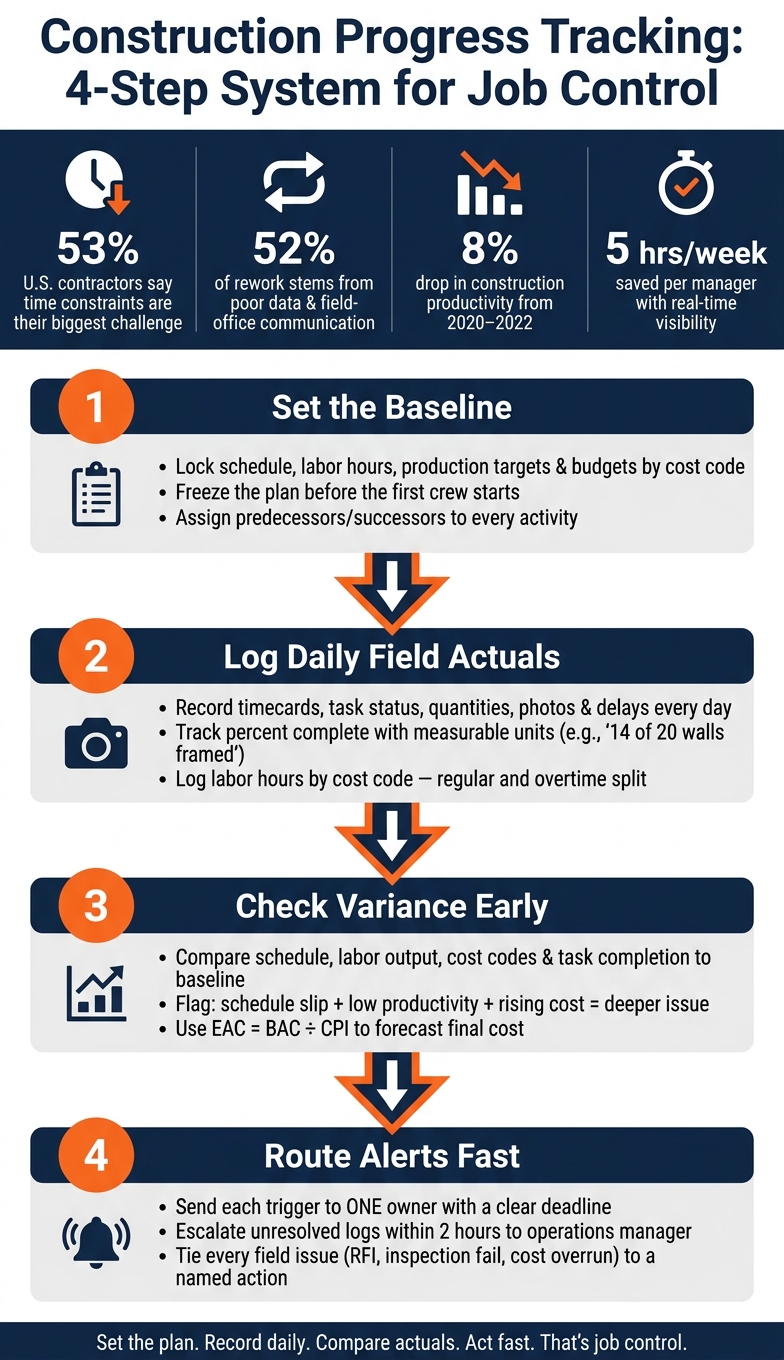
Construction Progress Tracking: 4-Step System for Job Control
Set the Baseline Before Work Starts
Before you track daily work, lock the reference point. The baseline is the approved plan for schedule, labor, cost, and scope before work begins. Build it from a work breakdown structure, then freeze it before the first crew starts. After that, every field update gets measured against that plan.
Build a Schedule Baseline with Activities, Milestones, and Deadlines
Start by splitting the project into phases like sitework, foundation, framing, rough-ins, and finishes. Then break each phase into specific activities with planned start and finish dates. Use MM/DD/YYYY for every date.
Each activity should have a duration and clear links to the work around it. Give every activity a predecessor and a successor. For example, rough framing inspection needs to finish before drywall installation starts. If one task slips, the delay shows up in the next task instead of getting buried in the schedule.
Add permit milestones and inspection sign-offs as zero-duration milestones. Also, build inspection lead times into the baseline from the start. Then track planned vs. actual dates so you can catch slippage early.
Contract dates like Notice to Proceed, substantial completion, and final completion should sit in the schedule as fixed milestones with locked dates.
Set Labor, Production, and Cost Targets by Cost Code
Once the schedule is in place, assign resources and dollars to each activity with a cost code structure. In the U.S., cost categories usually break out into labor, materials, equipment, subcontractors, and overhead. Each category should have its own code and its own budget line in U.S. dollars.
For example, Cost Code 03-010 might cover foundation labor: a 6-person crew, 8 hours per day for 10 days, or 480 planned hours, at $45/hour, for a total of $21,600. You might also set a production target of 50 cubic yards per day for the concrete work. Later, if the field crew reports, > “poured 40 cubic yards today,”
you have a direct comparison against the daily target. That gives the team a clear way to measure actual output and job cost in the field.
Base production rates on your own job-cost history, then check them with trade partners. A framing subcontractor on a tight urban site may frame 600 sq ft of walls per day, not 800–1,000 sq ft like they might on an open suburban job. That gap needs to show up in the baseline at the start, not halfway through the project. Use imperial units in field reporting, such as square feet, linear feet, cubic yards, and tons. Keep those same units in the field so percent-complete math stays accurate.
The sum of all budgeted cost codes should match your contract value. That keeps the schedule cost-loaded and lets progress billing follow the same structure.
With the baseline in place, daily field updates can be checked against it in real time.
sbb-itb-5eea312
Capture Real-Time Field Progress Every Day
Once the baseline is in place, the next job is simple: record what happened in the field every day.
That matters more than a lot of teams think. Industry analysis shows that 52% of construction rework comes from bad data and poor communication between field and office teams. Daily field actuals become the yardstick for variance tracking, so if the data is loose, the comparison will be loose too.
Use Daily Logs, Timecards, and Task Updates to Record Actual Work
Use daily logs, timecards, and task updates to record actual work against the plan. Each one serves a different purpose:
- Daily logs track field conditions
- Timecards track labor hours
- Task updates track job progress
A solid daily log should include the date (MM/DD/YYYY), weather and temperature in °F, crew headcount by trade, regular and overtime hours, equipment on site, materials delivered and installed, work completed with quantities, inspections, delays, and safety notes.
Be specific when you track percent complete. Use measurable units instead of rough guesses. For example, write 14 of 20 walls framed or 2,400 of 3,000 sq ft installed. That keeps percent-complete data tied to what was actually done, not what someone thinks was done.
Labor hours should also be logged by cost code, with regular and overtime split out. If a concrete crew worked 32 regular hours and 8 overtime hours on footings, those hours should go to the footing cost code, not get smeared across the whole project. That level of detail feeds productivity dashboards and budget-vs.-actual reporting.
Document Progress with Photos, Notes, and Field Issues
Photos need labels that make sense later, not just today. Tag them by area, scope, and date, like “Level 2 east wing, drywall, 07/26/2026.” Take photos of finished work, but also document problems such as rework, damage, or blocked access. When the photos sit inside the task or daily log they relate to, people can actually find them during reviews.
Field issues – RFIs, construction punch list items, quality defects, safety incidents, and change triggers – should connect to that day’s report instead of living in some separate folder no one checks. If a drywall crew stops work because an RFI is still open, that should show up in both the daily log and the task update. Otherwise, the delay can disappear when the team reviews schedule and cost.
Use plain, objective wording in notes. “concrete delivery arrived 4 hours late at 1:30 PM” holds up much better than a vague comment about a slow day.
Use Contractor Foreman to Standardize Field Reporting
The cleanest way to do this is to standardize reporting in one mobile system. Contractor Foreman puts daily logs, GPS-based timecards, task tracking, and photo uploads in one place.
Field crews can clock in and out from their phones with GPS verification and geofencing, so labor hours are tied to the right location and cost code before they move into payroll. Photos uploaded from the jobsite are tagged and stored in the correct project folder automatically, which cuts the manual sorting that often gets skipped when the day gets hectic.
Field and office teams can see the same updates right away, so nobody is working off old information. That shared record makes variance checks much faster in the next step.
Compare Actuals to Plan and Act on Variances
Once daily field data is coming in, put it next to the baseline and look for drift early. That’s the whole point. Small gaps are a lot easier to deal with before they turn into missed dates, extra labor, and budget trouble.
Measure Schedule, Labor, and Cost Variance
Focus on four signals: schedule, labor, cost, and task completion. Together, they show where the job is starting to slide.
Schedule variance is usually the first thing people notice. Compare planned start and finish dates, milestone dates, and percent complete with actual dates and progress. But a late task is only a problem if it affects successor work, inspections, or the critical path.
Labor productivity is where early warning signs often get missed. Don’t just look at total hours. Look at hours per unit of work. For example, if the budget assumed 0.8 labor hours per sq ft of drywall but the field team is averaging 1.1 hours per sq ft, productivity is below plan. That means the crew is using 37.5% more labor hours per unit than expected. One rough day might just be noise. The same pattern over and over is a labor problem.
Cost performance needs a three-number check: original budget, committed cost, and incurred cost. Looking at invoices by themselves can give a false sense of control. If materials are already committed at higher prices, or labor is running above plan, the overrun is already taking shape even if it hasn’t shown up in the books yet.
| Tracking Area | Baseline Data | Actual Field Data | Key Variance Metric | Action Taken |
|---|---|---|---|---|
| Schedule | Planned start/finish dates | Actual start/finish & % complete | Days ahead/behind schedule | Resequence tasks or expedite approvals |
| Labor | Budgeted hours per unit (by cost code) | Timecard hours & daily log output | Actual vs. planned hours per unit | Reallocate labor or address site conditions |
| Cost | Estimated budget per cost code | Committed & incurred costs | Budget vs. actual variance | Review procurement or issue change orders |
| Task Status | Planned % complete | Verified % complete & open blockers | Incomplete tasks / bottlenecks | Expedite submittals or reassign to-dos |
Task completion status also needs its own check. A task that shows 90% complete can still block the next trade if inspection items are open or panel terminations are still missing. In plain terms, it’s not done enough to hand off. Verify completion with installed quantities, passed inspections, or closed punch items.
Turn Field Data into Forecasts and Corrective Actions
Variance data matters only when it leads to action. One of the clearest warning patterns is this: schedule slip, lower productivity, and rising cost in the same cost code. When those three show up together, you’re usually looking at a deeper issue, not a random bump in the road.
When you can see the trend, update the Estimate at Completion (EAC) right away. A simple formula is EAC = BAC / CPI, where BAC is the original budget and CPI is the cost performance index. If CPI drops below 1.0, the job is spending more per unit of work than planned. If nothing changes, final cost will likely come in over budget. Weekly data is often telling the story before month-end reports do.
The fix should match the cause. If a crew is stuck waiting on an inspection, move them to another area instead of paying for idle labor. If an RFI is holding up rough-in work, push it up the chain fast. If a vendor keeps missing dates, adjust procurement lead times in the schedule so the same delay doesn’t hit the next phase.
Use those variance signals to trigger immediate alerts and corrective action. Once variance shows up, notifications and workflow rules can send it straight to the right people without delay.
Use Notifications and Workflow Rules to Keep Office and Field Aligned
Once you spot a variance, send it straight to the person who can fix it. That’s where notifications and workflow rules do the heavy lifting across schedule, labor, cost, tasks, and field issues. Instead of waiting for a PM to open a dashboard or a foreman to fire off a text, the system flags the issue and sends it to the person who needs to act.
Don’t blast every alert to every user. Send each trigger to one owner with a clear deadline.
| Trigger Condition | Recipient | Required Action | Response Time |
|---|---|---|---|
| Missing daily log by 4:30 PM local time | Project Manager / Superintendent | Call or text the foreman, help complete the log, and verify labor and equipment entries | Within 30–60 minutes |
| Overdue critical path task | Project Manager / Scheduler | Review the schedule, adjust successor tasks, and approve overtime or extra labor if needed | Same day |
| Inspection failure | Superintendent / Trade Foreman / Project Engineer | Log punch items, assign rework tasks, and reschedule the inspection | Within 24 hours |
| Cost code at 75% of budget with only 50% of scope complete | Project Manager / Project Accountant | Review quantities, update the forecast, and evaluate whether a change order or cost mitigation plan is needed | Within 1–2 business days |
| Safety incident or near miss | Safety Manager / Superintendent / HR | Secure the area, document the incident, and perform root cause analysis | Immediate for serious incidents; same shift for near misses |
Build these rules into the job workflow so the same triggers run the same way on every project. One simple escalation rule is worth adding on top: if a missing daily log is still unresolved two hours after the first alert, the notification should move up to the operations manager. That keeps one missed report from turning into a two-day hole in the job records.
Set Up a Progress Tracking Workflow in Contractor Foreman
Use the same triggers to link field reporting, cost control, and schedule action. Contractor Foreman’s daily logs, scheduling, financial tracking, and mobile access send field data to the office in real time.
Start with the baseline you already set. Use the same cost codes, milestones, and field reports to configure company-level settings like:
- cost code structure
- project templates
- user roles
- required form fields
That way, every project starts from the same setup instead of from scratch.
Then choose one active job as a pilot. Set up its budget, schedule, cost codes, and notification rules. Use Contractor Foreman’s free training and support to get field users comfortable with the mobile app, daily logs, and photo uploads, and to help office users work with schedules, approvals, and financial dashboards.
During the pilot, track three metrics: the percentage of daily logs submitted on time, the average time to approve a log, and how often cost alerts lead to action. If certain thresholds create too much noise, adjust them. If others are missing issues, tighten them up. After that, clone the setup as a template and roll it out to three to five more jobs.
QuickBooks keeps timecards aligned with accounting. Zapier can send critical alerts to the right channel.
Conclusion: Build a Repeatable System for Better Project Control
Construction progress tracking works best when you treat it like a repeatable routine, not a one-off task. The process is simple: set a baseline, capture daily field data, compare actual results to the plan, and act when things drift.
That kind of discipline matters more than ever. Construction productivity declined about 8% from 2020 to 2022, which points to a clear need for tighter job control. And that’s where real-time visibility helps. When managers can see performance as it happens, they spend less time chasing updates, cleaning up spreadsheets, and sorting out miscommunication. On average, that saves about five hours per week per manager.
Using one system makes that process much easier to keep in place. Contractor Foreman puts daily logs, timecards, scheduling, job costing, notifications, free training, and support in one platform.
The next step is to standardize your templates, cost codes, and alert thresholds across every job. Once that happens, progress tracking stops being something each team handles their own way and starts becoming a company-wide process.
FAQs
What should I include in a daily progress log?
Include the core project details up front: project name, site location, date, shift times, and the author’s name.
Then log what happened on the jobsite during the day. That includes workforce activity by trade, hours worked, tasks completed, material deliveries, equipment status, weather, and safety and compliance details such as incidents, near-misses, toolbox talks, PPE inspections, inspector instructions, and timestamped, geotagged photos.
How do I measure percent complete accurately?
Use consistent, real-time documentation and objective data instead of estimates. Track daily progress against scheduled milestones so you can compare actual task status with the plan.
Update task-level percentages in tools like Gantt charts, then verify the results with indicators such as the Schedule Performance Index and Percent Plan Complete. It also helps to cross-check dashboard data with daily logs or cost reports to make sure the numbers line up.
When should a variance trigger an alert?
A variance should trigger an alert when it points to possible project delays or money risk.
Set alerts when cost variances go past 5% of the total project budget. If any cost code variance goes over 10%, look into it right away.
You should also flag:
- Critical path tasks that fall behind
- Submittals that take more than five to seven days
- Milestones that slip past the planned timeline
Daily tracking helps you spot issues early, before they turn into bigger problems.
Related Blog Posts
- The Workflow Habits That Separate Good Contractors From Great Ones
- How to Manage Residential Construction Projects Without the Usual Chaos
- What Is Data-Driven Decision Making in Construction?
- How Construction Software Links Field and Office







