
Not all construction scheduling apps are created equal.
It’s easy to think, “Scheduling is scheduling.” After all, every app lets you put a name on a calendar and assign a crew to a job. They may go about it differently, but surely they all get you to the same place, right?
Not quite!
What looks like a minor difference on a feature list can be the reason you end up with payroll errors, idle labor, and missed handoffs.
Some apps only show where your crew is supposed to be. Others confirm where they actually were and for how long. Some sync hours to your accounting software. Others make you re-enter them by hand.
Some work fine for a single homeowner visit but fall apart when three crews and a delivery hit the same site.
So ow do you choose the best workforce scheduling apps?
Know which type of scheduling app fits your operation best.
Three things determine which app is right for you:
- How you track time: Do you need to see where crews actually were, or just where they’re scheduled?
- How you handle payroll: Do hours need to flow straight into your accounting software?
- How you coordinate jobs: Do you manage one crew at a time, or several crews, trades, and deliveries on the same site?
An app that doesn’t match these needs is how payroll errors, idle labor, and missed handoffs sneak back in.
Here’s how the most popular options compare.
Quick Comparison
| App | Best Fit | Standout Use | Main Limit |
|---|---|---|---|
| Contractor Foreman | Small GCs and remodelers | Scheduling tied to job costing and QuickBooks | Interface can feel busy |
| Connecteam | Field crews with frequent shift changes | Scheduling plus crew messaging and alerts | Limited costing depth |
| Workyard | Small to midsize contractors | GPS-backed hours and dispatch visibility | Manual setup for trade rules |
| Fieldwire | Commercial field teams | Task assignments tied to plans and drawings | Weak payroll and dispatch depth |
| Jobber | Residential service crews | Appointment scheduling and client updates | Not built for multi-crew site logistics |
| Cal.com | Solo trades | Calendar booking and payment links | No dispatch, payroll, or field time tools |
Our Recommendation:
Contractor Foreman stands out when labor hours, job costs, and crew assignments need to stay in one system.
It combines dispatch status, mobile time cards, cost-code tagging, and QuickBooks Online/Desktop sync. That makes it a stronger fit for contractors tracking both schedule movement and labor dollars.
Workyard leans harder into GPS time records and labor checks. It works well where verified hours matter more than plan-based task control.
Connecteam sits closer to shift coordination, alerts, and crew acknowledgments than deep construction costing.
Fieldwire serves a different job. It ties work to drawings, locations, and task lists, which suits commercial jobsites where foremen manage work from plans. Jobber is better suited to repeat service visits and customer-facing schedule updates than active multi-crew production work.
Cal.com is the outlier. It handles booking and calendar sync, but not dispatch, mobile timesheets, geofencing, payroll flow, or job costing. Contractors using it for field labor still need another system.
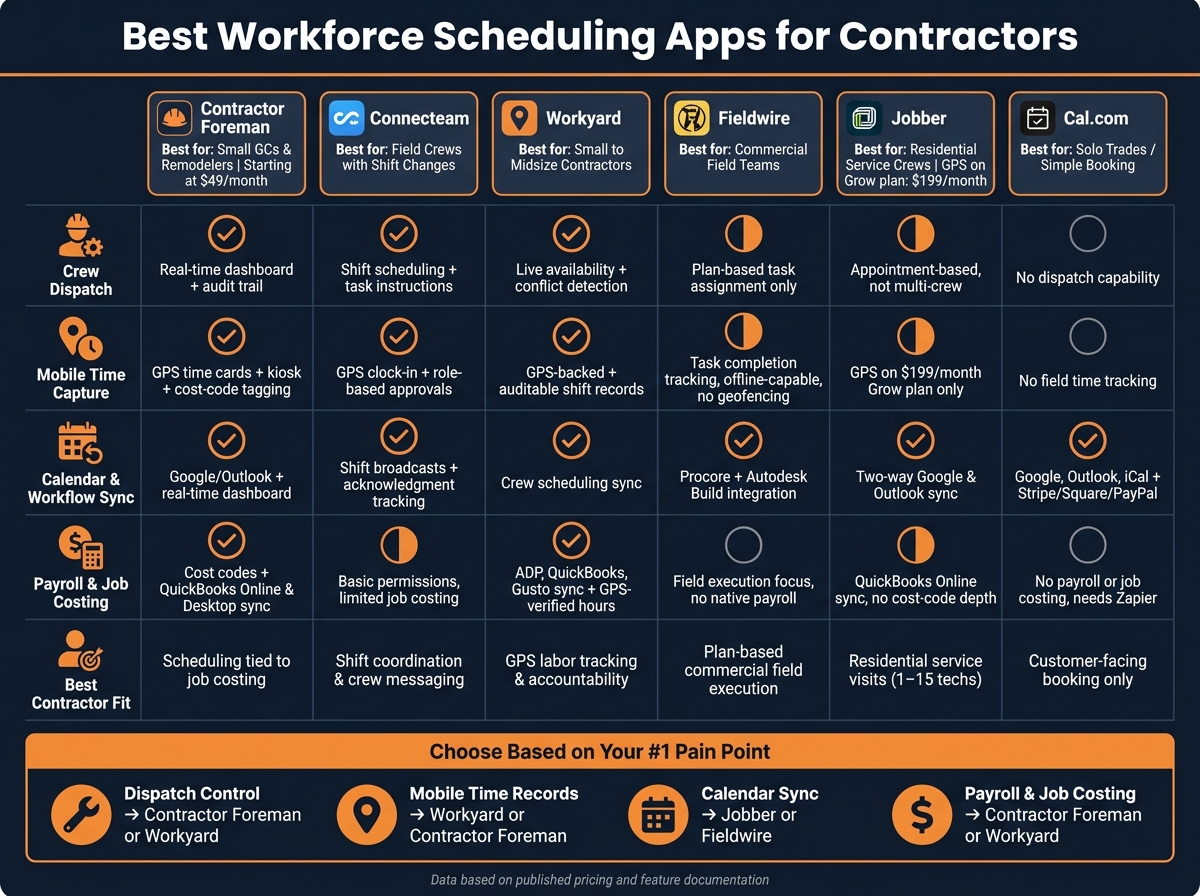
Best Workforce Scheduling Apps for Contractors: Feature Comparison
1. Contractor Foreman
Contractor Foreman links scheduling with project management, financial tracking, and daily logs. Pricing starts at $49/month. For contractors, the draw is simple: dispatch, time, and job cost data sit inside one workflow.
Its scheduling strength shows up first in dispatch.
Crew Dispatch
The real-time dispatch dashboard shows jobs as assigned, in progress, or completed. Coordinators can assign crews or subcontractors to jobsites, update work orders, and send automated notices to crew members who were assigned to the job. Assignment history also creates an audit trail that shows who changed what and when. That traceability earned a 9.2/10 dispatch rating.
Mobile Time Capture
Field crews can clock in and out from mobile devices, with arrival and departure timestamps recorded for each shift. Hours can also be tagged to cost codes in the field, which helps with job costing and reporting.
Calendar and Platform Sync
Scheduling uses Gantt-style views with task dependencies and drag-and-drop rescheduling for multi-day, multi-project planning. Calendar and timesheet sync can lag behind real-time schedule changes. That gap matters most when schedule updates need to stay in line with labor costs.
Payroll and Job Costing
Contractor Foreman connects scheduling to financial tracking through two-way sync with QuickBooks Online and QuickBooks Desktop. Hours and job data feed into estimates, invoices, and purchase orders, while reporting compares scheduled work with completed work by job. Certified payroll exports are limited.
2. Connecteam
Connecteam focuses on crew scheduling and field communication for contractors. Managers can build and publish shift schedules, assign workers to specific jobsites by role, and send real-time notifications when assignments change.
The platform also includes mobile GPS-enabled time tracking. Field crews can clock in and out from their phones, and each entry includes a GPS timestamp. That setup helps tie hours to place and time without extra paperwork.
Connecteam also supports timesheet exports for payroll processing. Its scheduling views can sync with external calendars, which helps keep crew availability lined up with active job demands.
3. Workyard
Workyard centers on dispatch, GPS time tracking, and job-status updates for field crews. That makes it a solid fit for contractors that need scheduling tied closely to field time and live status changes.
Crew Dispatch
Workyard uses a dispatch board to coordinate crews, with built-in conflict detection that helps cut down on double-booking and job-status changes that trigger schedule alerts. Skill-based assignment rules need a fair amount of manual setup, and the interface can slow down when job volume climbs. That gives contractors tighter control over crew movement, but with less automation than higher-end dispatch systems.
Mobile Time Capture
Field crews can clock in and update job status on-site through GPS-backed mobile entries. Managers can compare scheduled hours against hours actually worked, which helps spot labor variance across crews and jobsites. Offline clock-ins are limited, so crews working in low-connectivity areas may run into issues.
Calendar and Platform Sync
Workyard supports calendar sync to keep scheduled visits aligned with team calendars, and work order software integration helps keep job records connected from assignment through completion.
Payroll and Job Costing
Shift-level records support project and crew labor allocation, but reporting is lighter for contractors with complex cost-code needs. For companies that need deeper labor-cost detail, that gap can matter.
Next, the comparison shifts to a more jobsite-focused scheduling workflow.
4. Fieldwire
Fieldwire puts the focus on plan-based execution instead of dispatch boards. It turns tasks tied to project plans into crew assignments on the jobsite. That setup fits foremen who run work by location rather than crews that depend on full dispatch automation. In practice, it works best when crews follow drawings and task lists instead of a central dispatch board.
Crew Dispatch
Fieldwire handles dispatch through task lists connected to exact locations on a project plan. Foremen can reassign tasks as field conditions change. There’s no dispatch board, route optimization, or route mapping, so routing across multiple crews stays manual.
Mobile Time Capture
Fieldwire tracks labor through task-linked activity updates attached to plan items. That gives supervisors a direct link between labor and tasks, which helps speed up progress checks. The platform also supports offline mobile daily reporting, a useful feature on jobsites with weak or spotty service.
It does not include native geofenced clock-ins or biometric attendance. Teams that depend on those controls need a separate time-tracking tool.
Calendar and Platform Sync
Task updates show up in both the plan view and task list. Calendar coordination exists, but it is not the main strength of the platform.
Payroll and Job Costing
Fieldwire records labor hours against tasks, but it does not include native payroll or certified payroll workflows. Payroll exports depend on outside systems or manual template-based integration. Contractors that need detailed cost-code tracking or payroll functions need another system in place.
5. Jobber
Jobber puts the emphasis on appointment management, not crew-heavy dispatch. That setup fits recurring service work, especially for residential and service contractors handling repeat visits. It works better for home-service schedules than for complex jobs that involve several crews moving across active sites.
Crew Dispatch
Jobber’s dispatch flow is built around appointment changes and client notifications, which can cut missed appointments and make schedule updates easier. When a job gets moved or reassigned, Jobber sends automatic alerts to both crews and clients.
The trade-off is pretty clear. Jobber is not built for complex multi-crew logistics. It does not serve as a deep route-optimization system or an advanced capacity-planning tool for larger, multi-depot operations.
That same scheduling setup carries into the field through simple status updates instead of tight time-tracking controls.
Mobile Time Capture
Jobber tracks job progress more than exact labor hours. Field crews use mobile job-status updates to mark work orders complete from the field. For contractors that need detailed cost-code tracking, that level of detail is missing in Jobber.
Recurring service workflows can feed basic reporting, but they do not support deep cost-code control.
Calendar and Platform Sync
Jobber syncs with common calendar clients, which helps keep appointment windows lined up across team schedules and customer communication channels. Recurring service templates can auto-generate repeat work orders and visits, so ongoing service schedules do not need to be rebuilt by hand every time.
Payroll and Job Costing
Jobber gives small to midsize contractors a clear record from scheduled visit to completed job, which helps support basic accounting workflows. The weak spot is detailed cost-code tracking. That makes Jobber a poorer fit for commercial contractors that need more granular job costing.
6. Cal.com
Cal.com fits a different job: calendar-based booking, not crew dispatch. It works for contractors when simple appointment scheduling is the main goal, but it is not built as a field dispatch system.
Crew Dispatch
Cal.com has no dispatch board, route planning, or geofenced arrival tracking. That means it cannot assign crews by trade, availability, or jobsite.
Mobile Time Capture
Cal.com does not track field time. There are no GPS clock-ins, geofencing, or construction time tracking apps, so a separate tool is needed for verified hours and labor tracking.
Calendar and Platform Sync
Cal.com syncs with Google Calendar, Outlook, and iCal. It also connects to payment tools like Stripe, Square, and PayPal for deposits.
Payroll and Job Costing
Cal.com does not track labor hours or cost codes. As a result, it cannot feed payroll or job costing workflows.
Its strengths end at booking. The next section compares how the other apps handle field dispatch, time capture, and job costing.
How These Apps Compare on Key Scheduling Priorities
The profiles above break down each app in detail. Here, the focus shifts to the scheduling issues contractors use to make a decision. No app leads in every category. The choice usually comes down to the pain point causing the most trouble: dispatch, time capture, calendar sync, or payroll flow. The biggest split is simple. Some tools are built around dispatch, some around time verification, and some around project workflow.
| App | Crew Dispatch (Trade/Role) | Mobile Time Capture | Calendar & Workflow Sync | Payroll & Job Costing |
|---|---|---|---|---|
| Contractor Foreman | Real-time dashboard; full assignment traceability | GPS time cards, kiosk mode, cost-code tagging | Google/Outlook sync | Cost codes tied to jobs; QuickBooks Online/Desktop sync |
| Connecteam | Shift scheduling with task-level instructions | Mobile time clock with GPS and role-based approvals | Shift broadcasts with tracked acknowledgments | Basic permissions; limited job costing |
| Workyard | Assignments aligned with live labor availability | GPS-backed time tracking with auditable shift records | Crew scheduling for field teams | GPS time tied to job costing; ADP, QuickBooks, and Gusto sync |
| Fieldwire | Plan-centric; tied to drawings and work items | Mobile task updates and completion tracking; offline-capable reporting | Connects with Procore and Autodesk Build | Field execution focus; limited financial flow |
| Jobber | Drag-and-drop calendar; best for small residential crews | On-my-way texts and ETA tracking; GPS on Grow only ($199/month) | Two-way sync with Google and Outlook | QuickBooks Online sync; automated invoicing |
| Cal.com | Appointment booking only; has no native construction dispatch | No native field time tracking | Workflow automation; no native FSM bridge | No native payroll/job costing; needs third-party tools |
Crew Dispatch by Trade, Role, and Jobsite
Contractor Foreman and Workyard fit best when dispatch needs to stay tied to field activity. Contractor Foreman gives managers a live view of job status and full audit trails, which makes it a strong match for contractors that need both live dispatch and assignment history. Workyard keeps assignments lined up with labor availability and traceable shift records.
Fieldwire handles assignments through drawings and work items, not through a dispatch board. Connecteam works well for crews that change often, with shift instructions sent to workers and acknowledgments tracked. Jobber fits simple service routing better than multi-crew commercial dispatch.
Mobile Time Capture in the Field
Contractor Foreman supports GPS-enabled time cards, kiosk mode, and cost-code allocation, so labor can be tied to job tasks at the time of entry. Workyard offers GPS-backed tracking with shift records managers can audit. Connecteam includes a mobile time clock with GPS and role-based approval workflows.
Fieldwire leans more toward task completion and offline-capable field reporting than geofenced clock-ins. Jobber includes GPS tracking only on its Grow plan, priced at $199/month.
Calendar Sync and Construction Workflow Fit
Jobber keeps scheduling simple with two-way calendar sync for Google and Outlook, which cuts manual re-entry and keeps appointment changes cleaner. Contractor Foreman ties schedule changes to its real-time dashboard, which helps reduce spreadsheet drift.
Fieldwire connects with Procore and Autodesk Build, so it fits teams already working inside a larger project management stack. Fewer integration gaps usually mean fewer schedule mistakes and less manual re-entry. That matters most when schedule changes need to reach the field without delay.
Payroll, Accounting, and Job Costing Flow
Payroll flow often comes down to one test: whether hours move into payroll without re-entry. Contractor Foreman ties GPS time cards to cost codes and syncs with both QuickBooks Online and QuickBooks Desktop. Workyard connects with ADP, QuickBooks, and Gusto, with GPS-verified time feeding directly into job costing.
Jobber syncs appointments and invoices to QuickBooks Online and fits service-based residential crews well. Fieldwire stays centered on field execution rather than financial flow. Cal.com has no native payroll or job costing path, so contractors need Zapier or another third-party tool to push scheduling data toward payroll. That adds setup work and leaves more room for a data gap.
Pros and Cons by App
Each app fits a different scheduling job. Some are built for dispatch. Others are better for time capture, field coordination, or customer booking.
| App | Pros | Cons | Best Contractor Fit |
|---|---|---|---|
| Contractor Foreman | Strongest when scheduling must stay tied to job costing; flat-rate pricing for unlimited users | Interface feels crowded | Small GCs and remodelers needing low-overhead scheduling |
| Connecteam | Best for shift coordination and accountability | Limited construction costing | Field crews needing shift coordination and messaging |
| Workyard | GPS-verified time with auditable shift records | Skill-based rules take manual setup | Small and midsize contractors needing precise labor tracking |
| Fieldwire | Best for plan-based field coordination | Weak on dispatch and payroll depth | Commercial GCs focused on field execution |
| Jobber | Strong mobile booking and reminders | Not built for large fleets or complex routing | Residential service teams with 1–15 technicians |
| Cal.com | Strong self-booking | No dispatch tools or construction workflow bridge | Solo trades needing customer-facing booking |
The table gives the fast read. The notes below show where the tradeoff shows up in day-to-day use. Understanding how software solves construction scheduling problems can help you navigate these trade-offs.
Where Each App Stands Out
Contractor Foreman works best when scheduling needs to stay connected to job costing and crew assignments in one place. That cuts down on back-and-forth between separate systems and helps keep assignment history tied to the job record.
Workyard is the clearest fit when labor accountability matters most. GPS-backed shift records give managers auditable data instead of relying on self-reported hours.
Fieldwire stands out on commercial jobs where teams need to pin tasks to exact drawing locations. That setup makes field coordination much easier when crews are working from plans in active jobsite conditions.
Where Each App Falls Short
Contractor Foreman can feel crowded for basic users, and the platform tends to work better after time is put into setup and configuration.
Workyard does a solid job with GPS tracking and conflict detection, but crews with mixed certifications or trade licenses need manual rule setup for assignments.
Fieldwire is built around field execution. Dispatch depth and payroll support are limited, so contractors expecting both in the same system will run into limits fast.
Jobber fits small residential service teams well, especially when mobile booking and reminders matter. Larger fleets and more complex routing needs tend to push it past its comfort zone.
Cal.com is built around calendar-based self-booking, not dispatch. Field crew coordination and construction workflow management are outside its scope, which leaves a big gap for contractors trying to run jobs through it.
Conclusion
No app fits every contractor. The right choice depends on the first scheduling problem that slows the operation down most: dispatch accuracy, labor visibility, communication platform, or customer booking. Once that bottleneck is clear, the right app usually stands out.
The tool should fit the workflow, not just the feature list.
FAQs
How do I choose the right scheduling app?
Start by checking whether the construction management platform already includes scheduling tied to project and financial data. That setup cuts out extra handoffs and keeps dates, costs, and job progress in the same place.
If a standalone app makes more sense, focus on a clear visual calendar and simple drag-and-drop rescheduling. If moving tasks feels clunky, the tool usually becomes dead weight fast.
For field teams, offline access matters. Crews don’t stop working just because the signal drops.
Before committing, test the mobile app with a non-technical team member. That quick reality check often shows whether the app is simple enough for daily use or headed for pushback.
A simple tool usually fits residential work better. Larger commercial jobs often call for CPM logic and audit trails, where schedule changes need a clear record.
What features matter most for payroll accuracy?
The most important features include approval-controlled timesheets, labor-change workflows, job and cost-code tagging, and audit-ready traceability that links field time to the work order and the schedule decision.
Mobile time capture, along with integrations with payroll or accounting, helps cut missing or late data and keeps recorded field hours aligned with paid hours.
Which app works best for residential vs. commercial contractors?
Residential builders often do best with tools that offer strong client portals, automatic task handoffs, and support for a high number of jobs.
Commercial contractors usually need deeper integrations to handle more complex workflows and large workforce updates across crews and subcontractors.
The right fit comes down to the core workflow:
- Appointment-based service calls for scheduling and dispatch tools built around time slots, technician routing, and customer updates.
- Construction-focused project controls call for stronger budgeting, scheduling, document tracking, and crew coordination.
- Field-linked dispatch evidence matters when teams need jobsite proof tied to work in the field, such as status updates, photos, and service records.







