
- 1. Assess Your Business and Team Needs
- Evaluate Project-Specific Requirements
- Set Your Budget and Compare Pricing Plans
- Key Features to Look for in a Communication Platform
- How to Select and Implement the Right Platform
- Why Contractor Foreman Works as a Centralized Platform
- Conclusion
- FAQs
- Related Blog Posts
WhatsApp. Gmail. Trello. Discord. Google Docs…PHEW!
Welcome to peak productivity culture, where your ten-person crew now has a dozen places to (mis)communicate instead of one.
And this is scary because construction isn’t just a hobby club or a fantasy football league where a missed message means someone’s lineup is slightly off. Construction runs on million-dollar budgets, binding contracts, and timelines. One wrong move — or one right move nobody heard about — and you’re looking at penalties!
Construction projects often fail due to poor communication, costing the industry billions annually.
That’s why it’s extremely important to have only one reliable platform — so there’s less chance of critical information slipping through the cracks.
How do you know which is the right one for you?
Here’s what you need to know to choose effectively:
- Assess Your Needs: Understand your team size, structure, and current communication gaps.
- Key Features: Look for real-time messaging, document sharing with version control, mobile access, and integration with tools like QuickBooks.
- Scalability: Ensure the platform can grow with your business without performance issues.
- Budget: Compare pricing models, including per-user and flat-rate plans, while considering hidden costs like training and implementation.
- Trial and Training: Test platforms with free trials and provide role-specific training for smooth adoption.
The right platform streamlines workflows, reduces errors, and keeps projects on track. Contractor Foreman offfers features tailored to construction teams at competitive pricing.
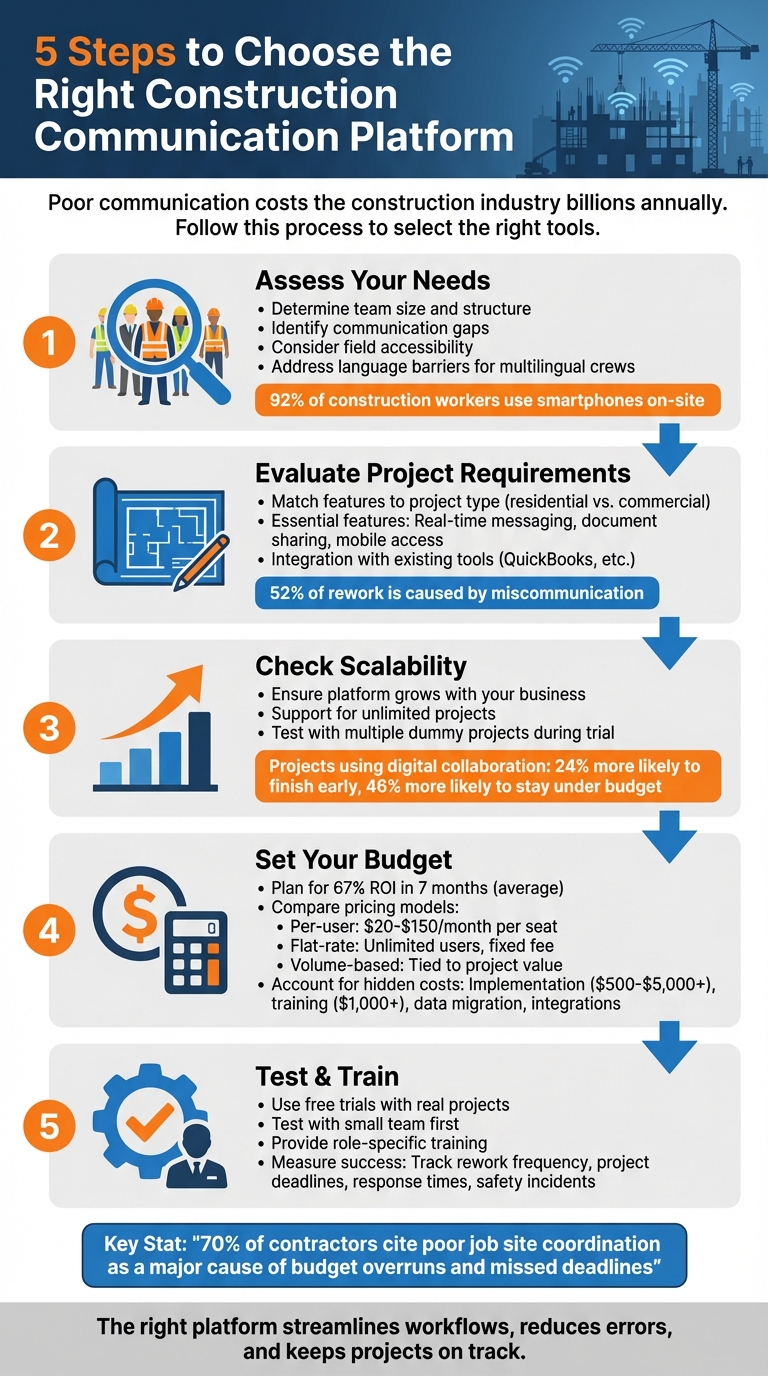
5-Step Guide to Choosing the Right Construction Communication Platform
1. Assess Your Business and Team Needs
To choose the right tools for your business, start by understanding your team’s structure and where communication is breaking down. Whether you’re managing a small crew or a large, dispersed workforce, the tools you pick should simplify workflows and eliminate miscommunication – not add unnecessary complexity.
Determine Your Team Size and Structure
Your team’s size and organization play a major role in deciding which platform fits best.
- Small businesses (with annual revenue under $7 million) typically need simple, budget-friendly tools that are easy to use. For teams of 10–20 people, look for platforms that work right out of the box without a steep learning curve.
- Medium-to-large businesses face more complex challenges. Managing dozens of subcontractors, design teams, and office staff across multiple job sites requires a scalable solution with role-based access. For example, project managers often coordinate with architects and engineers, while site superintendents handle daily communication with trades. Your platform must accommodate these distinct workflows without forcing everyone into a rigid system.
Field accessibility is another must. Since 92% of construction workers use smartphones on-site, tools with SMS-based communication are ideal. These platforms boast 98% read rates and don’t rely on app downloads or steady Wi-Fi, making them perfect for remote areas or workers using basic phones.
OSHA‘s official training policy states:
“An employer must instruct its employees using both a language and vocabulary that the employees can understand. If an employee does not speak or comprehend English, instruction must be provided in a language the employee can understand.”
OSHA further notes that employers are expected to recognize that if they customarily communicate work instructions in a language other than English, they must also provide safety and health training to employees in the same manner.
Platforms offering real-time translation or visual tools can address these gaps effectively. Once you’ve assessed your team’s structure, it’s time to dig into where communication is failing.
Identify Your Communication Problems
Start by auditing how your team currently communicates.
Are critical updates stuck in WhatsApp chats, text messages, or casual phone calls that don’t reach everyone?
Without construction daily log software, these updates often fail to become part of the permanent project record. When important information is buried in “side conversations”, it creates silos that leave parts of your team in the dark.
Next, evaluate if communication flows freely up and down the chain of command. If workers hesitate to speak up – whether out of fear or habit – you’re likely missing early warnings that could prevent costly mistakes.
“Poor communication doesn’t just cause job site mistakes. It causes bottlenecks in your business. Unhappy clients. Burnt-out staff. Lost referrals. Lower margins.” – Will Blunt, Association of Professional Builders
Clarify your chain of command so everyone knows who to contact for specific issues. A simple contact list with roles can prevent delays caused by confusion. Also, test how well schedule changes reach your crews. If updates are spread through word-of-mouth rather than official channels, trust in leadership can erode quickly.
Finally, assess your meetings. Are safety meetings one-sided lectures, or do they encourage open dialogue? When meetings feel like monologues, workers tune out and stop engaging. A platform that promotes two-way communication can make a big difference. For example, when workers feel heard, near-miss reporting increases by 32%, giving you the opportunity to address issues before they escalate.
sbb-itb-5eea312
Evaluate Project-Specific Requirements
Once you’ve identified your team’s structure and pinpointed communication gaps, the next step is aligning your platform’s features with your project’s specific needs. A tool that works perfectly for a small home remodel might fall short on a complex, multi-phase commercial project involving numerous subcontractors.
Features Tailored to Construction Projects
The type of project you’re managing determines which features are most critical. For residential contractors, tools that enhance client communication are key. These might include portals where homeowners can view progress updates, approve invoices, and access project photos. Scheduling tools that are simple and user-friendly also tend to be essential.
In contrast, commercial and industrial projects demand more advanced capabilities. These include efficient subcontractor coordination, compliance tracking for safety protocols, and centralized document management to handle the sheer volume of paperwork involved. Consider this: teams spend an average of 5.5 hours per week just searching for project information, and nearly half of all rework on U.S. construction sites is caused by miscommunication or poor data management.
For projects of any scale, certain features are indispensable. Real-time messaging ensures everyone stays updated on schedule changes, while document sharing with version control prevents errors that could be costly. Field teams, often working in areas with unreliable internet connectivity, benefit greatly from mobile access with offline functionality. This allows them to log daily reports, annotate plans, and stay productive even when Wi-Fi drops. Additionally, daily logs and scheduling tools help maintain an official record of on-site activities, which is crucial for resolving disputes and accurately tracking labor hours.
Client portals are another standout feature. By giving owners the ability to check project status and review invoices online, you reduce the barrage of “Where are we at?” questions. This not only saves time but also fosters trust by offering greater transparency.
Integration capabilities are equally important. If your platform doesn’t sync with your accounting software (like QuickBooks), you could lose hours to redundant data entry. Poor job site coordination is cited by nearly 70% of contractors as a leading cause of budget overruns and missed deadlines. A platform that integrates seamlessly with your existing tools can help avoid these pitfalls.
Lastly, it’s crucial to ensure your platform can adapt to your business as it grows.
Scalability for Expanding Operations
As your business takes on more projects, you need a platform that can scale without requiring a complete overhaul or adding unnecessary administrative burdens. Scalable systems rely on a single database to manage unlimited projects, eliminating the hassle of juggling multiple systems or searching through scattered files.
A strong example comes from Boston Children’s Hospital, which implemented a scalable platform in 2014 to manage its $3 billion capital plan. This system standardized project delivery across hundreds of initiatives, with financial data automatically syncing across systems to eliminate manual reconciliation tasks.
When evaluating platforms, look for those that support unlimited projects without charging per job. As Marc Viano, Project Manager at Vicano Construction Limited, noted:
“If we didn’t have a good construction platform, we wouldn’t be able to handle the many projects we have in our pipeline. It removes the tedious time-wasters like filling out reports and spreadsheets, giving us time to do other things, like going after more work”.
Automation is another factor that enhances scalability. Gabriel Gutierrez, Financial Controller at Dolan Concrete, shared how automating the alignment of data across systems cut a task that previously took hours down to just 30 seconds, saving at least two hours every week.
The benefits of digital collaboration are clear. Projects that embrace these tools are 24% more likely to finish ahead of schedule and 46% more likely to stay under budget. Considering that 80% of large construction projects exceed their timelines and 70% go over budget, selecting a scalable platform isn’t just practical – it’s a competitive edge.
During your trial period, test the platform’s scalability. Add multiple dummy projects and invite a mix of users, including office staff, field teams, and subcontractors. Pay attention to whether performance slows or the interface becomes cluttered. A truly scalable system should handle growth effortlessly, offering full visibility into all active projects so you can address potential risks before they escalate.
Set Your Budget and Compare Pricing Plans
Once you’ve identified the communication tools and features your team needs, the next step is aligning those solutions with a budget that maximizes your return on investment.
It’s also essential to ensure the platform you choose can scale with your projects. From there, figure out what fits within your financial comfort zone and which pricing model aligns best with your team’s structure. Keep in mind: the upfront price isn’t the full picture. Many tools operate on subscription models, but billing metrics can significantly influence the total cost.
How to Budget for Communication Tools
Start by evaluating how communication breakdowns impact your operations. For instance, field teams often lose valuable hours on manual tasks, which drives up labor costs. Implementing construction management software can help address these inefficiencies. Research shows these tools can deliver a 67% ROI in just seven months, thanks to significant time savings (billing time reduced by up to 50%) and a 3% boost in revenue.
When planning your budget, don’t stop at the monthly subscription fee. Extra expenses can add up quickly, including:
- Implementation fees: These range from $500 to $5,000 for smaller firms, and $35,000 to $200,000 for enterprise-level systems.
- Training costs: Often exceed $1,000 if not included.
- Data migration charges: Especially for large BIM models or drone imagery.
- Storage overages: If your projects require significant data storage.
- Integration fees: For connecting with tools like QuickBooks or Zapier.
Pricing models can also vary. Per-user licenses, priced between $20 and $150 per month per seat, work well for smaller teams. However, they can become expensive if subcontractors need access. Flat-rate plans, which allow unlimited users for a fixed fee, are a better option for firms with frequent subcontractor turnover. Volume-based pricing, tied to project value, can be unpredictable. Some platforms even charge based on a percentage of your annual revenue – this approach can cost up to 10 times more than other pricing structures offering similar benefits. To avoid unexpected cost increases, negotiate a renewal price cap of no more than 3%.
Once you’ve established a clear budget, compare pricing models to find the one that best suits your operation.
Compare Contractor Foreman Pricing Plans
Contractor Foreman provides a range of pricing plans tailored to different needs. Here’s a breakdown of their current options:
| Plan | Price (Monthly, Billed Annually) | User Limit | Description |
|---|---|---|---|
| Basic | $49 | 1 user | Ideal for solo contractors or very small teams. |
| Standard | $105 | Up to 3 users | Designed for growing teams needing extra support. |
| Plus | $166 | Up to 8 users | Offers advanced features for scaling teams. |
| Pro | $221 | Up to 15 users | Suitable for larger teams with complex needs. |
| Unlimited | $332 | Unlimited | Perfect for firms that need unlimited access for field crews, subcontractors, and office staff. |
The Unlimited plan, at $332 per month, is a great option for firms looking to add users without worrying about per-seat fees. On the other hand, solo contractors or smaller teams may find the Basic plan at $49 per month to be a cost-effective starting point. When researching, be sure to document public pricing details. These can be helpful during negotiations, especially if vendors attempt to upsell you on features that may not be essential for your team.
Key Features to Look for in a Communication Platform
Once you’ve set your budget, the next step is identifying features that not only enhance team efficiency but also safeguard your bottom line. Miscommunication and poor project data are responsible for 52% of construction project rework, making it clear that the right tools are more than a convenience – they’re a necessity. The right platform can help eliminate delays, reduce rework costs, and tackle the daily challenges contractors face, like keeping field teams aligned, ensuring access to the latest documents, staying connected in areas with poor signal, and tracking progress without adding extra administrative work. Let’s take a closer look at the features that meet these needs.
Real-Time Messaging and Notifications
Instant messaging is a game-changer for avoiding the delays that come with email chains or missed calls. Platforms that offer centralized chats let you organize conversations by project, task, or team. For example, you can keep discussions between architects and laborers separate, ensuring that critical messages don’t get lost in cluttered group threads. Features like @Mentions send immediate alerts, making sure urgent updates get noticed. Plus, real-time chat creates a digital paper trail, which is essential for accountability.
Clear guidelines on when responses need to be immediate versus when they can wait can significantly improve productivity. In fact, 60% of general contractors cite poor coordination and communication as a major cause of lower labor productivity.
But communication isn’t just about messaging – it also involves managing documents effectively.
Document Sharing and Client Portals
Version control is essential to ensure everyone is working from the most up-to-date documents. Centralized storage with access controls allows sensitive files to be edited only by authorized personnel, while others can view the materials they need.
Client portals add another layer of transparency. Property owners can log in to view real-time updates, such as progress photos, change orders, and approval requests. This reduces the need for constant phone calls and speeds up decision-making, keeping projects on track.
The best platforms integrate document sharing with communication tools. For instance, if a team member references a specific drawing or contract in a discussion, they can pull it up instantly without switching to another app or digging through email attachments.
Mobile Access and Integrations
Construction work often happens in areas with unreliable connectivity, so a platform that functions offline is essential. A mobile-first design ensures workers can access project details and input data even without a signal. Once they’re back online, the system automatically syncs the updates.
Integration with accounting tools like QuickBooks can simplify financial workflows. When time tracking, material costs, and communications feed into the same system, you avoid duplicate data entry and reduce administrative headaches. For instance, Contractor Foreman integrates with QuickBooks and Zapier, enabling seamless data flow between your communication platform and financial tools.
SMS integration is another must-have. With read rates as high as 98%, SMS ensures critical updates like safety alerts or schedule changes reach everyone, even if they don’t have the app or Wi-Fi access.
Daily Logs and Scheduling Tools
Daily logs act as an on-site record, documenting everything from weather conditions and crew activities to equipment usage and incidents. These logs are invaluable during disputes, and the easier they are to complete via mobile devices, the more likely they are to be maintained consistently.
Scheduling tools that integrate with communication features make team coordination smoother. When a schedule changes, notifications are sent immediately to the affected crew members. GPS-enabled time clocks also help with accurate labor tracking, which is important for payroll and understanding project costs.
How to Select and Implement the Right Platform
To choose the best platform for your needs, start by gathering recommendations, scheduling demos, and comparing Procore alternatives by testing shortlisted options through free trials. This hands-on approach helps you assess how well the platform performs in real-world scenarios. Pay attention to the interface – does it feel intuitive? Can it be customized to fit your team’s workflows? Also, confirm it has the capacity to scale alongside your business growth. When comparing costs, look beyond the monthly subscription fee. Watch for hidden charges, like fees for extra users, premium features, or integrations. Once you’ve made your choice, map out an implementation timeline. This should include data migration and ensure the new platform integrates seamlessly with existing tools, such as QuickBooks. These steps build on the groundwork you’ve already laid by evaluating your project requirements and budget.
Use Testing and Trial Periods
Trial periods are your opportunity to see how the platform performs under real conditions. Test it with a small team on an active project to get a feel for its capabilities. During this time, establish clear communication protocols. For example, set expectations for response times and experiment with features like read receipts and urgent flags to improve responsiveness. Appoint project managers or team leaders to moderate discussions and keep chats focused. Utilize @mentions to assign tasks directly to team members, reducing confusion about responsibilities.
Once the trial confirms the platform is a good fit, the next step is ensuring your team adopts it effectively through proper training.
Train Your Team
Even the best software is only as good as the people using it.
Start with onboarding sessions to familiarize everyone with the basics, and follow up with ongoing support for questions or refresher training as new features are introduced. Tailor the training to different roles. For instance, focus on mobile features for field crews and integrations for office staff. Address any resistance by showcasing specific benefits, such as improved efficiency and fewer redundant tasks. Highlight how the platform can simplify daily operations. If your team includes workers who speak different languages, choose a platform with automatic translation capabilities to ensure everyone receives instructions in their preferred language.
Measure Success After Implementation
After implementation, continuous evaluation is key to ensuring the platform meets your needs over time. Monitor metrics like rework frequency, project deadlines, field adoption rates, response times for urgent messages, and safety incidents. User feedback is also invaluable for refining workflows. Keep an eye on rework frequency and costs – miscommunication and poor data account for 52% of construction project rework. Check if projects are being completed on time and whether field crews are consistently using the tool or if a Fieldwire alternative would better suit their needs. Safety incidents are another critical metric, as many injuries stem from communication failures. Use these insights to make adjustments and ensure the platform continues to support your team effectively as your projects evolve.
Why Contractor Foreman Works as a Centralized Platform
When managing construction projects, juggling multiple apps for scheduling, finances, and communication can lead to inefficiencies. Contractor Foreman simplifies this by bringing over 35 features into one centralized platform. Instead of switching between tools, you have everything you need in one place, making it easier to manage schedules, documents, and communication seamlessly.
Complete Feature Set for Contractors
Contractor Foreman is packed with tools designed specifically for construction professionals. These features tackle the communication and project management challenges contractors face. Key highlights include:
- Team Chat for instant messaging.
- Client Portals to share updates with stakeholders.
- Notifications Manager to ensure everyone stays informed.
Project management tools cover everything from Gantt scheduling and daily logs to work orders, inspections, and permit tracking. When it comes to documentation, you’ll find centralized RFI management, submittals, photos, and access to over 100 reports, including 50 pre-built forms and custom checklists.
Field crews benefit from GPS-enabled timecards and mobile apps that mirror the platform’s web functionality. As Brian M. from Morrell Electric remarked:
“This app has everything you need to run your projects, no need to have multiple apps anymore”.
The platform also integrates with over 50 systems and includes a library of toolbox talk resources, making it a comprehensive solution for contractors.
Affordable Pricing Plans
Contractor Foreman’s pricing model is designed to grow with your team. Unlike per-user pricing, it offers per-company rates, making it a budget-friendly choice as your team expands. Plans start at $49/month for small teams and go up to $332/month for unlimited users. All plans lock in rates at signup and come with a 100-day money-back guarantee. You can upgrade anytime, with unused credits applied to your new plan, ensuring flexibility as your needs evolve.
Easy to Use with Free Support
Forbes recognized Contractor Foreman as the “Easiest-To-Use” construction management software.
Brian T. from Tower Interiors Group LLC shared:
“Contractor Foreman is more intuitively understandable to me and our type of business. They use the same terminology as we do”.
The platform boasts a 13-second average response time for support, with 95% of chats rated 5 stars. Free weekly group training is available for all users, while higher-tier plans include private training sessions. With apps for iOS and Android, the platform works across devices, and offline timecard functionality ensures crews can log hours without internet access. Lindsey-Leigh M. from JWH Construction Services, Inc. summed it up:
“This software delivers impressive capabilities at an affordable price”.
Conclusion
Choosing the right communication platform for your construction needs is critical. Picking the wrong one can lead to scattered information, wasted time, and more rework. In fact, nearly 70% of contractors report that poor coordination on job sites is a key reason projects exceed budgets or miss deadlines.
To avoid these issues, start by evaluating your team size, the types of projects you handle, and the main challenges you face – whether it’s scheduling conflicts, tracking budgets, or bridging the gap between field crews and office staff. Opt for platforms with a mobile-first design and offline capabilities, as construction often takes place in areas with unreliable internet access. Features like real-time messaging, document version control, client portals, and seamless integration with your current tools can help create a single source of truth.
Make sure to take advantage of trial periods. testing alternatives to Raken with your team will help you determine if its interface is user-friendly enough for on-site adoption. Involve both field workers and office administrators in the evaluation process to ensure the software aligns with your daily operations.
FAQs
How do I know if my team will actually use it in the field?
To get your team to actively use a communication platform in the field, prioritize features that are easy to use – think mobile compatibility, real-time updates, and visual tools. Make sure to set up clear communication guidelines, offer training sessions, and actively seek feedback to boost adoption. A well-thought-out communication plan paired with accessible tools can help field workers stay connected and use the platform consistently.
What should I test during a free trial on a live job?
When using a free trial for a live project, take the opportunity to evaluate the platform’s communication tools. Pay close attention to how well real-time messaging, group chats, and direct messages work for keeping your team connected. Look for features like instant updates and notifications – these are crucial for smooth on-site coordination and ensuring safety. Strong communication tools can help prevent delays and clear up misunderstandings during active projects.
How can I estimate the true cost beyond the monthly fee?
When calculating the total cost of a construction communication platform like Contractor Foreman, it’s important to think beyond just the monthly subscription fee. Additional expenses to consider include:
- Implementation and onboarding: Getting your team set up and familiar with the platform may require extra time and resources.
- Training: Providing proper training for your staff ensures they can use the platform effectively.
- Customizations: Tailoring the platform to meet your specific needs might come with added costs.
- Ongoing support and upgrades: Regular updates or support services could also contribute to the overall expense.
By accounting for these factors upfront, you can get a clearer picture of the full investment and avoid unexpected costs later on.
Related Blog Posts
- Best Mobile Tools for Construction Teams 2026
- How Centralized Messaging Improves Construction Teams
- Ultimate Guide to Construction Collaboration Software







