
- 1. Collecting labor data in daily logs and timecards
- 2. Reviewing and approving time before payroll runs
- 3. Exporting approved payroll data to payroll and accounting systems
- 4. Posting payroll to job costs, the general ledger, and compliance records
- Conclusion: The payroll data flow points contractors must control
- FAQs
- Related Blog Posts
“Wait, why did I get an extra $600? Did I just get a bonus?!” Mike asked, eyes lighting up.
And because Mike is apparently an optimist, he treated himself to the new TV he’d been eyeing for months.
Except, of course, it wasn’t a bonus…
Payroll had mapped his hours wrong. So now someone has to tell Mike that the company would, unfortunately, like its $600 back.
Awkward.
This happened right after you started connecting field time, payroll, and job costing through your brand-new construction software.
You had second thoughts about using a software for payroll but then when you check the math, it just makes sense. Manual payroll can cost a 30-person firm an extra $3,700 to $5,000 per year in admin work, while automated workflows can move job cost accuracy from 70%–80% to 92%–97%.
So, yes. You take the automation route.
But the difference between 70% accuracy and 97% accuracy is in how you set up the flow.
Automation can move payroll data in seconds. It can also move the WRONG payroll data in seconds.
The usual suspects?
Missing cost codes, wrong job tags, off-site clock-ins, broken field mapping, and payroll getting posted without labor burden.
Here’s how payroll data should flow instead:
- Field entry sets the baseline. Missing job IDs, cost codes, breaks, or clock times create problems later.
- Approval must stay separate from automation. Approved hours should move at once, but only after review.
- Export mapping must match across systems. A bad cost code match can distort payroll and job cost records.
- Posting must include burden and correct dates. Labor can rise by 35%–65% once taxes, workers’ comp, and benefits are added.
Clean payroll flow depends on controlling each handoff, not fixing errors after payroll closes.
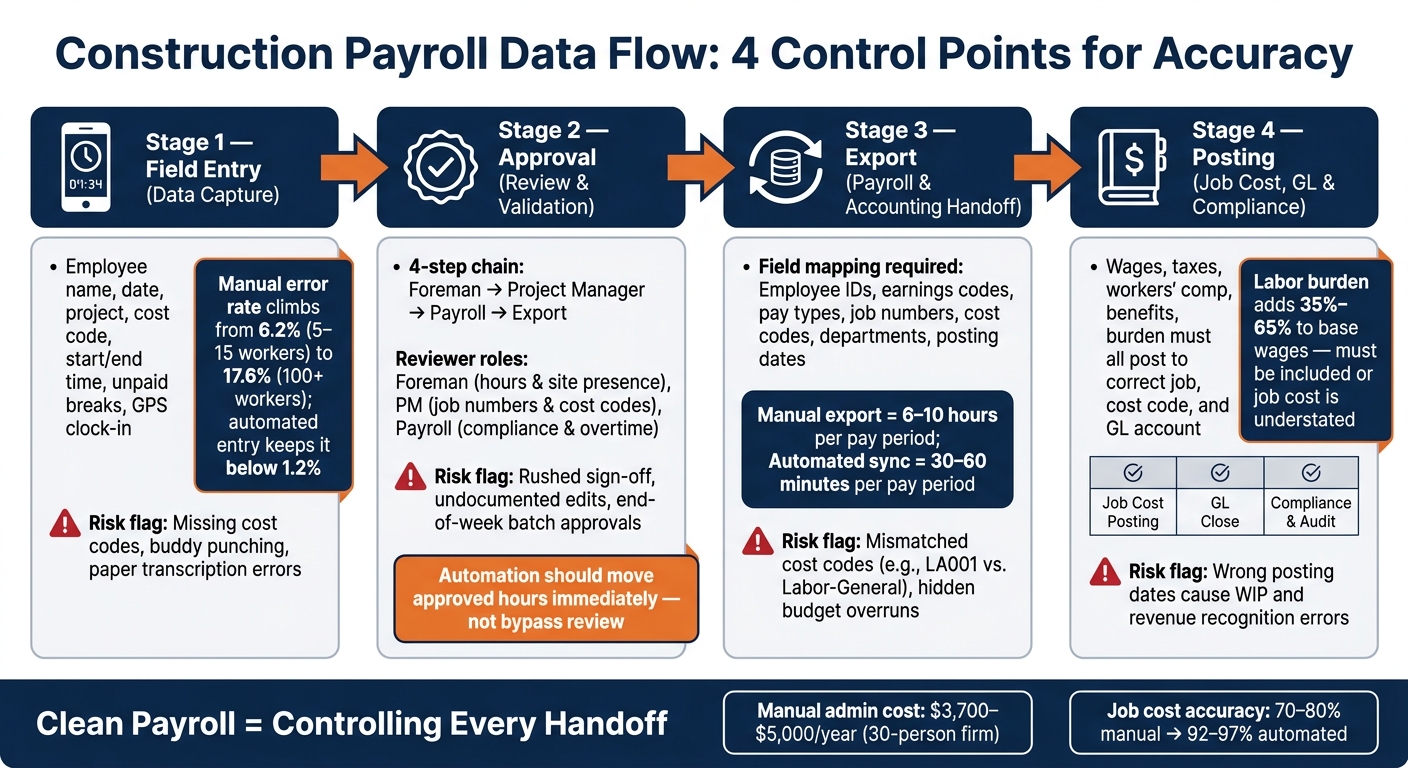
Construction Payroll Data Flow: 4 Control Points for Accuracy
1. Collecting labor data in daily logs and timecards
Payroll data starts in the field. Every hour logged on the jobsite affects both paychecks and job costs later on.
Required fields to collect at first entry
At the first entry, collect the employee name, date, project, cost code, start time, end time, and unpaid breaks. Doing this up front helps you avoid re-entry later. GPS clock-in and clock-out also create a site verification trail. Contractor Foreman lets you narrow cost code lists by project, which helps cut down on miscoding right at the point of entry.
That matters because approvals move a lot faster when reviewers can compare labor records to the job record without hunting down missing details.
Crew entries versus individual time entries
There are two common ways to enter time into the system: a foreman can clock in the whole crew at once, or each worker can handle their own timecard. Both options can use GPS and geofencing, and both flow into the same payroll and job-costing reports.
| Entry Method | Best Fit | Accountability |
|---|---|---|
| Individual timecards | Distributed teams and workers moving between different cost codes | High individual accountability |
| Crew-based entries | Fixed crews, workers without devices, single-task teams | Group-level, supervisor-verified |
Both methods move into the same approval step. The main difference is how much control you want at the field level.
Where errors start on the jobsite
Most payroll mistakes begin at entry.
Common trouble spots include paper timecard transcription, late-day estimates, rounded hours, buddy punching, skipped breaks, and bad cost codes. Manual error rates climb as crews get bigger, moving from 6.2% with 5–15 workers to 17.6% with 100 or more. Automated entry keeps that rate below 1.2%, no matter the headcount.
GPS clock-ins and geofencing help confirm that workers were on-site, discourage buddy punching, and push teams to close out the day before payroll runs.
After time is captured, the next place things can go wrong is approval, where bad entries need to be caught before export.
sbb-itb-5eea312
2. Reviewing and approving time before payroll runs
Once crews log time in the field, the next stop is approval. This is where teams catch mistakes before they turn into payroll problems. After approval, that same record can move to payroll export without anyone having to enter it again.
Who reviews payroll data and in what order
Time approval usually moves through a four-step chain: foreman, project manager, payroll, export.
A foreman or supervisor checks the hours and confirms the worker was actually on site. The project manager reviews the project and cost code details so labor hits the right budget lines. Payroll, or an office admin, checks compliance items like overtime rules and prevailing wage requirements before clearing the data for export.
Each person is looking for a different kind of problem. The foreman focuses on hours and site presence. The PM checks job numbers and cost codes. Payroll looks at compliance. When those lines get muddy, mistakes slip through. That setup gets the data ready for validation before export.
Checks that catch bad payroll data before approval
Before time gets approved, it should pass a basic validation check. This helps catch errors before they flow into payroll and job cost records.
Teams should look for a few common trouble spots:
- Missing cost codes
- Duplicate entries
- Overtime overruns
- Time charged to the wrong project
Overtime rules should also match the job location, not the company home office, since requirements can vary by jurisdiction.
Automation should move approved hours immediately, but it shouldn’t bypass review. Validation and approval come first; automation handles the transfer after.
GPS and geofencing data add one more checkpoint. If someone clocked in outside the jobsite boundary, that should be flagged and looked into before approval, not after.
Common approval breakdowns
The biggest issue is rushed sign-off.
A foreman approves a full week of timecards without closely checking the entries. An office admin changes hours directly in the system without an audit trail. Or crews wait until the end of the week to deal with time tracking, which turns approval into cleanup instead of review.
Undocumented edits can cause even bigger headaches.
If someone in the office changes hours after the field submits them but before export, and there’s no audit trail, it becomes tough to track what happened. Contractor Foreman tracks approvals with audit trails and role-based permissions, which helps keep the handoff from field to office accountable. Once approval is clean, the next risk is export mapping.
3. Exporting approved payroll data to payroll and accounting systems
Once payroll is approved, the next step is getting that data into accounting. That sounds simple, but this is where small setup issues can turn into a mess fast. Approved time still needs clean field mapping before it can post to payroll or accounting. Employee IDs, earnings codes, pay types, job numbers, cost codes, departments, and posting dates all need to match on both sides.
If cost codes don’t line up across systems – for example, LA001 in one system and Labor-General in another – automatic posting can produce financial reports that are hard to use. Those mismatches can also hide budget overruns until the job is already done. That’s why the safest move is to standardize cost codes before turning on any sync.
Manual exports versus automated sync
Manual exports usually mean pulling a report, cleaning up the format, and typing the same data into another system. It works, but it eats up time and leaves room for mistakes. Automated sync cuts out much of that re-entry and reduces manual handling in a big way.
| Feature | Manual | Automated |
|---|---|---|
| Setup Effort | Low (no technical configuration) | Moderate (requires field mapping) |
| Processing Speed | 6–10 hours per pay period | 30–60 minutes per pay period |
| Re-entry Risk | High (transcription errors) | Low (direct data transfer) |
| Mapping Consistency | Prone to human error | Enforced by system rules |
How Contractor Foreman supports payroll handoff
This handoff works best when the software applies those mappings for you instead of leaving them up to memory or spreadsheets. Contractor Foreman includes a two-way sync with QuickBooks Online and QuickBooks Desktop, so approved hours and labor data can flow into accounting automatically. Approved timecards can also be exported to Gusto with a single click, with hours sorted by employee, project, and cost code.
If your payroll system doesn’t have a native connection, Contractor Foreman uses Zapier to send approved timecard data into other apps.
Before a full rollout, test the sync in parallel.
4. Posting payroll to job costs, the general ledger, and compliance records
How posted payroll becomes job cost and GL data
Once approved payroll is exported, it turns into accounting data. At that point, it has to post cleanly to job cost, the GL, and compliance records.
A payroll run should post wages, taxes, workers’ comp, benefits, and burden to the right job, cost code, and GL account. Burden has to be included here. It can add 35%–65% to base wages, so if you post wages only, your labor cost looks lower than it is.
After export, this is no longer a timecard issue. It becomes a posting issue.
Dates matter just as much as dollar amounts. The pay period end, posting date, and close date need to line up. If June labor gets posted in July, it throws off WIP, percent complete, and revenue recognition. Once that timing is off, the problem flows straight into job cost, WIP, and the GL.
Where accounting accuracy breaks down after payroll
Mistakes in job or cost code postings can skew both job cost and the GL. And once the data lands in the GL, the mistake is often buried inside a summary entry, which makes it much harder to track down. One job ends up looking over budget, while the job that should hold the cost looks too low.
Posting wages without burden creates another gap. It leaves true job cost understated. And when payroll is pushed into collapsed summaries, it’s harder to audit, harder to check for prevailing wage, and harder to use when a dispute comes up.
Data checkpoints that keep records clean
Fixing errors after payroll is posted can get expensive fast. The table below shows the main post-payroll checkpoints through compliance, along with the errors each one is meant to catch.
| Checkpoint | Fields Reviewed | Typical Error Caught | Impact on Payroll, Job Costing & Compliance |
|---|---|---|---|
| Job Cost Posting | Job ID, cost code, burden, posting period | Wrong phase, missing burden, wrong period | Keeps job cost reports and WIP reliable; flags budget overruns early |
| GL Close | GL account, dates, cutoff | Timing errors, wrong expense account, missing accruals | Prevents distorted monthly financials and period-over-period variances |
| Compliance & Audit | Employee ID, classification, rate, hours, dates | Missing detail, wrong prevailing wage | Supports certified payroll, Davis-Bacon compliance, and insurance audits |
These controls keep payroll data lined up all the way through close.
Conclusion: The payroll data flow points contractors must control
Once payroll posts to job cost and the general ledger, accuracy comes down to one thing: controlling every handoff. Construction payroll is a chain. If one link slips, the error can carry through the rest of the process.
That’s why each step needs its own check. The jobsite entry, the review, the payroll export, and the accounting post all matter.
The biggest gains usually happen at the start, often by streamlining cost calculations through software. If time is entered cleanly in the field and approved the right way, the rest of the flow gets a lot less messy. In plain terms, field capture is the first control and approval is the second.
Key takeaways for improving payroll accuracy
- Capture: Require a job ID, cost code, and GPS-verified clock-in at the point of entry.
- Approval: Finish supervisor review and keep an audit trail before any data moves to payroll. Automation should move approved hours right after review, not before.
- Posting: Standardize field mapping so cost codes line up across systems, and let approved time post straight to job costing and the general ledger.
Contractor Foreman can connect time approvals with QuickBooks and Gusto, which cuts manual re-entry. The goal is a clean, auditable record from the first clock-in to the final GL posting. When you control the handoff points, payroll stays accurate all the way through.
FAQs
What payroll fields matter most?
The most important payroll fields are the timecard basics and the mapping fields that keep labor tied to the right job and cost bucket:
- date worked
- employee name
- total hours
- project mapping fields: Customer/Subcustomer
- cost code mapping fields: Product/Services
A clean payroll record isn’t just about hours on a sheet. It also depends on GPS clock-in and clock-out data, a clear split between regular and overtime hours, and checking that each entry includes the required cost codes. Miss those details, and labor costs can land in the wrong place fast.
How do approval delays affect payroll accuracy?
Approval delays can throw off payroll accuracy.
If hours get entered or edited after they should’ve been checked, there’s a bigger chance that employee time, project or cost codes, and overtime calculations won’t line up with the work that was actually done.
And when time cards sit too long without review and approval, mistakes tend to surface later, not sooner. That can send misallocated labor costs and wrong records straight into accounting before anyone catches them.
Why does payroll burden matter in job costing?
Payroll burden matters because labor cost is about more than hours worked. To get the full picture, you need loaded costs built in, including regular hours, overtime, and burden rates. Those costs also need to land on the right project and cost codes, so your actuals match what’s happening in the field.
When field time cards sync fast, job costing moves fast too.
That means teams can spot cost issues earlier instead of waiting until month-end. But when systems are disconnected or the process is manual, things can go sideways. Costs show up late, numbers come in wrong, and overruns can stay hidden longer than they should. The result? A distorted view of job profitability.
Related Blog Posts
- How Time Tracking Improves Payroll Accuracy
- Top 7 Construction Payroll Software Tools
- Solving Payroll Errors with Automated Time Tracking
- Payroll Integration Checklist for Construction







