
“RELAX. We’re totally on budget!” No one in construction says this and means it for long.
Because here’s a stat nobody frames and hangs in their office: 9 out of 10 residential construction projects go over budget. That’s right, overbudgets don’t happen occasionally. Not in exceptional cases. But as a near-universal rule! And yet every new construction job kicks off with the same certainty that this one will be different.
Sadly, it won’t. It will cost more, finish later, and somewhere around week three, a client will ask to “just move one wall” — which alone accounts for 56% of cost overruns. Meanwhile, materials have gone up 38.7% since 2020 and show no signs of guilt.
Residential construction runs on thin margins and thinner schedules. When the bleed starts, there’s no buffer catching it before it becomes a real problem. By the time the numbers look wrong, you’re already too deep into a job to course-correct without eating the difference yourself.
So how do smart contractors prevent budget overruns?
By using these strategies:
- Accurate Estimates: Use up-to-date material prices, detailed cost breakdowns, and contingency funds (10–20%) for surprises.
- Historical Data: Audit past projects to refine estimates and avoid repeating mistakes.
- Real-Time Tracking: Monitor expenses with construction management software to catch issues early.
- Change Order Management: Implement a clear process for pricing and approving scope changes.
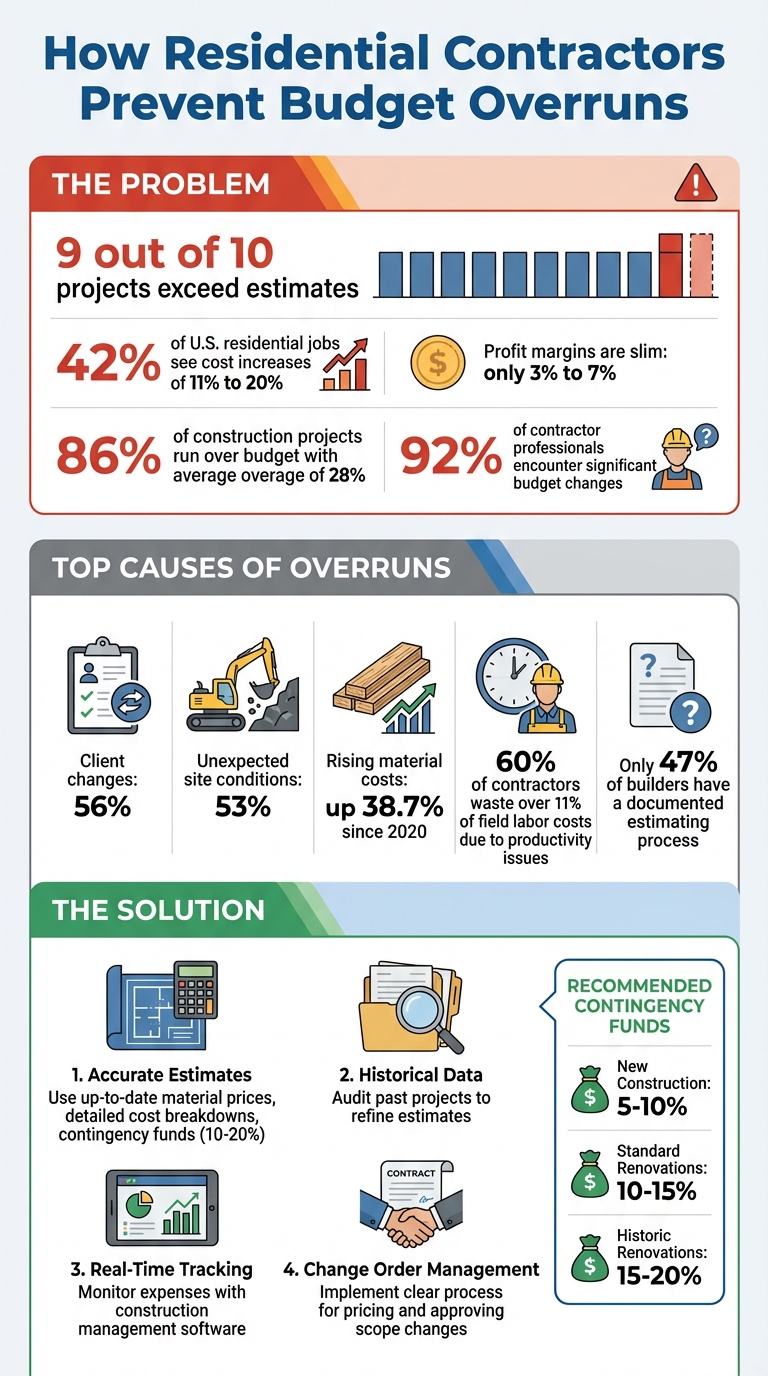
Construction Budget Overrun Statistics and Prevention Strategies
How to Create Accurate Project Estimates
Getting your project estimates right from the start can make or break your profit margins. With 86% of construction projects running over budget and the average overage reaching 28%, precision is no longer optional – it’s a necessity.
One major challenge is outdated material pricing. If your data is 60 to 90 days old, you’re already setting yourself up for losses before construction even begins. Materials like lumber, drywall, and fixtures no longer follow predictable pricing trends. The fix? Stay in constant contact with your suppliers or use software that syncs with dealer databases to pull the most up-to-date prices into your estimates.
Breaking down your estimate into clear categories – materials, labor, permits, equipment, and indirect costs – can help you identify problem areas early. For instance, separating these costs allows you to pinpoint whether an overrun is due to a one-time material price spike or a recurring issue like underestimating labor. Yet, only 47% of builders have a documented estimating process, which explains why many projects veer off course.
Don’t overlook smaller but essential items like dumpster rentals, temporary utilities, insurance, bonds, and permit fees. Checklists can help ensure these “soft costs” are included in your base estimate. For renovations, add a contingency of 10% to 15%, and for historic restorations, increase that to 15% to 20%. These aren’t just extra padding – they’re safeguards against the surprises older properties often reveal.
Using Historical Data and Cost Databases
Your past projects hold the key to improving your estimates. By tracking actual labor hours and material usage and comparing them to your original estimates, you can see where your assumptions hold up – and where they don’t.
For example, 60% of contractors waste over 11% of their field labor costs due to productivity issues that weren’t accounted for in their estimates. If you assume a task takes three hours but it consistently takes five, that’s money slipping through your fingers. Post-project audits can highlight these discrepancies, helping you refine your database and avoid repeating mistakes.
Another helpful approach is using “assemblies” or “recipes” to group related items. For instance, a wall assembly might include studs, insulation, drywall, fasteners, tape, and paint. This method ensures you don’t miss smaller components that can quickly add up.
“When they see the level of detail, it blows their mind. They rarely come back with questions.” – Steve Griffin, Just Building Group
It’s also crucial to adjust your historical data for specific risks. For example, if you’ve worked in areas with strict HOAs or older homes prone to hidden structural issues, factor these patterns into your estimates. Not every job is average, and your pricing should reflect that reality.
With refined data and well-categorized costs, you’ll have sharper control over your budget.
Breaking Down Costs into Specific Categories
Generic line items like “construction costs” don’t give you enough detail to manage your budget effectively. When a project starts going over budget, you need to know exactly which part of the job is causing the problem – and that’s impossible without granular cost codes.
Categorizing expenses into specific buckets ensures every charge – whether it’s a receipt, credit card payment, or invoice – gets properly allocated. Without this level of detail, costs can either vanish from your invoicing or end up lumped into general operating expenses, skewing your profitability.
Separate direct costs like labor, materials, and subcontractors from indirect costs such as administrative wages, insurance, and utilities. This distinction helps you determine whether a project itself is losing money or if your overhead allocation needs adjusting.
For items clients haven’t chosen yet, like fixtures or appliances, use “allowances.” Instead of guessing or leaving these out of your budget, rely on historical averages to create placeholders. If the final selection exceeds the allowance, treat it as a specific adjustment rather than letting it eat into your margins.
Here’s a breakdown of typical budget categories and their line items:
| Budget Category | Typical Line Items |
|---|---|
| Site Preparation | Permitting, excavation, utilities, foundation |
| Framing | Structure, window/door installation |
| Mechanicals | HVAC, plumbing, electrical |
| Exterior | Masonry, insulation, siding |
| Interior | Drywall, carpentry, flooring |
| Closeout | Inspections, occupancy permits, punch list |
| Indirect Expenses | Overhead, rentals, insurance, utilities |
“I can see my profit and loss per job, labor percentage, material lists, and purchase orders in one view.” – Keith Perez, TXN Remodeling & Construction
This level of clarity ensures you stay on top of your budget. Accurate estimates feed directly into real-time tracking systems, letting you monitor expenses and address issues as they arise.
sbb-itb-5eea312
How to Track Budgets in Real-Time with Construction Management Software
Real-time budget tracking is a game-changer for keeping construction projects on track financially. Instead of waiting until a project wraps up to assess costs, this approach allows you to address issues as they arise. With 84% of construction firms reporting higher-than-expected costs and 42% of U.S. projects exceeding budgets by 11% to 20%, tracking expenses in real time is no longer optional – it’s essential.
Construction management software simplifies this process by acting as a central hub for all your project data. It automatically syncs crew logs, field reports, and invoices, cutting down on time-consuming manual entries. This instant access to accurate data highlights budget concerns early, enabling you to adjust resources, modify material orders, or pause non-essential tasks before costs spiral out of control.
The key difference between reacting to problems and staying ahead of them lies in visibility. With automated tools, change orders are updated immediately in your financial reports, ensuring your budget reflects the latest project changes.
Setting Up Real-Time Financial Dashboards
A well-designed financial dashboard gives you a clear picture of your project’s financial health. Tools like Contractor Foreman’s Financial Dashboard provide instant updates on costs related to labor, materials, and equipment. This helps you spot rising expenses before they start eating into your profits.
To make the most of your dashboard, focus on the metrics that matter most to your specific projects. For example, residential remodelers might prioritize tracking labor costs and material price fluctuations, while new construction projects might focus on subcontractor expenses. Customize your dashboard to highlight these key areas, and use Kanban-style views to organize financial items by status – such as “waiting on approval”, “paid”, or “overdue” – so bottlenecks are easy to identify.
Your dashboard will also automatically reflect approved change orders, displaying both original and revised budgets side by side. It tracks purchase orders by showing what’s been ordered, delivered, and billed, while also monitoring retainage funds and their release schedule.
“The integration of the whole platform is very good, including externally with QuickBooks Online. Ability to do time sheets in the field without separate software. Cost codes and cost items that can be used for different jobs, this is huge for us.” – Chuck A., Liercke Construction, LLC
If you’re switching from manual tracking, start with high-impact features like digital time tracking. This will give you immediate control over labor costs, which are often the hardest to predict. Once that’s in place, add material tracking and subcontractor billing to build a more complete system that delivers quick results and proves its worth.
These dashboards also lay the groundwork for managing change orders and tracking variances as your project progresses.
Connecting with QuickBooks for Accounting
For a seamless financial workflow, integrating your construction management software with accounting tools like QuickBooks is key. Manual data entry across multiple systems can lead to costly mistakes, but linking Contractor Foreman with QuickBooks Online eliminates this risk. It automatically syncs bills, invoices, customers, line items, and payments, ensuring your financial data stays accurate. For example, when crew members log hours in the field, the data is instantly assigned to the correct cost code and sent to QuickBooks without any extra steps.
Subcontractor costs are also streamlined. Bills created in the Subcontract screen sync immediately, giving your accounting team instant access to process payments. Built-in safeguards prevent duplicate entries, keeping your records clean. Plus, you can track both original and revised budgets, factoring in change orders for unified reporting.
Payment processing is another area where integration shines. Contractor Foreman works with Stripe and WePay to handle online payments – ACH payments at 1% and credit card payments at 2.9% – which are automatically synced with QuickBooks to close out invoices. For larger transactions, you can set limits to restrict invoices over $20,000 to ACH payments, reducing credit card fees.
When setting up the integration, you can import your existing QuickBooks data into Contractor Foreman to maintain consistency in customer details and project history. Permission settings allow you to control who can access and edit financial data, ensuring sensitive information stays secure while project managers retain the visibility they need.
Note: Starting January 1, 2026, Contractor Foreman will only support integration with QuickBooks Online, as support for QuickBooks Desktop will be discontinued.
How to Manage Change Orders and Track Budget Variances
Change orders are an inevitable part of construction projects. In fact, about 35% of construction projects face major changes that can alter their scope or outcomes. Without a structured approach, these changes can eat into profits, delay timelines, and strain relationships with clients.
Given that 92% of contractor professionals encounter significant budget changes during projects and 42% of U.S. projects exceed their budgets by 11% to 20%, managing these changes effectively is crucial. A lack of clarity in handling change orders only worsens budget overruns.
Using real-time tracking methods alongside a well-defined change order process can help ensure that unexpected adjustments don’t undermine your financial goals.
Creating a Standard Change Order Process
A clear and consistent approach to managing change orders is essential for protecting both profits and schedules. Start by outlining this process in your initial contract. Include details on how changes will be initiated, how pricing will be calculated (with markup percentages), and how timelines might be affected.
One golden rule: never proceed without a signed agreement.
As Construction Cost Accounting warns:
“When work is performed without a signed change order, you’re working on a handshake and handshakes don’t hold up when it’s time to get paid”.
Construction management software can streamline the process significantly, with studies showing that change order approvals happen 33% faster when digital tools are used.
When pricing change orders, account for three key areas: direct costs (labor, materials, equipment), indirect costs (overhead, typically 15% to 25% of direct costs), and impact costs (such as schedule disruptions). Assign a unique cost code to each change order to track actual expenses against approved amounts in real time. Additionally, consider charging a minimum fee for investigating proposed changes, as tasks like sourcing materials and coordinating trades are billable.
Notify the client in writing as soon as a potential change is identified. When estimating the cost and time impact, lean toward slightly overestimating to avoid undercharging and losing profit.
Once a solid change order process is in place, regular variance analysis can help you keep the overall budget on track.
Running Regular Variance Analysis
Variance analysis involves comparing your planned budget against actual spending. The formula is straightforward: Cost Variance = Budgeted Cost – Actual Cost. A positive result means cost savings, while a negative one signals the need for immediate action.
Focus on the 80/20 rule, which suggests that 80% of budget problems often stem from just 20% of the cost codes. Reviewing job cost reports weekly allows you to address variances quickly. When a variance arises, determine whether it’s a quantity issue (more materials or hours than planned) or a rate issue (higher costs than estimated). Each scenario requires a different solution.
Here’s an example: A residential contractor working on a $500K project had budgeted $45,000 for the foundation. Four weeks in, costs hit $62,000 – 37% over budget. Real-time tracking revealed specific issues: $6,000 for rock blasting, $4,500 for deeper footings, $3,000 for engineering redesign, and $3,500 for dewatering. By documenting these conditions, the contractor secured a $15,500 change order and recovered $10,000 from the client.
To dig deeper into variances, interview field teams to understand the root causes of extra hours or material waste. You can also use the Cost Performance Index (CPI) formula: CPI = Earned Value / Actual Cost. A CPI below 1.0 indicates that the project is running over budget. With profit margins often as slim as 2% to 5%, even small variances can completely erode project profitability.
| Project Type | Recommended Contingency Fund |
|---|---|
| New Construction | 5–10% |
| Standard Renovations | 10–15% |
| Historic Renovations | 15–20% |
Contractor Foreman Plans for Budget Control
After implementing effective change management and variance tracking, the next step in managing project finances is selecting software that aligns with your project scale and budget. Contractor Foreman offers pricing plans designed for teams of all sizes, ensuring financial control without unnecessary expenses. All plans include essential financial tools like Estimates, Expenses, Invoices, Bills, Purchase Orders, Change Orders, and Job Costing Reports, allowing contractors to manage their budgets effectively – even for unlimited projects.
For solo contractors or larger teams, Contractor Foreman provides features like real-time budget tracking and integration with QuickBooks Online. The Profit Control feature stands out by enabling contractors to monitor margins in real time, with separate markups for materials and labor. This ensures project profitability is always visible, helping to prevent cost overruns. These tools seamlessly integrate with the strategies outlined earlier, offering a user-friendly approach to budget management.
“Everything is in one place, and the entire team can see the same data at the same time. No more paper estimates, schedules, change orders, time tracking, etc. It is all online.”– Vicky V., Sycon, LLC
Flexible Pricing for Every Team
Contractor Foreman’s pricing is based on the number of users rather than project volume, making it easy to pick a plan that suits your team size:
- Standard: $105/month (billed annually) for up to 3 users
- Plus: $166/month for up to 8 users
- Pro: $221/month for up to 15 users
- Unlimited: $332/month for larger teams
Each plan includes private training sessions to streamline onboarding, ranging from two sessions with the Standard plan to unlimited sessions with the Unlimited tier.
Contractor Foreman Pricing Plans Comparison
| Plan | Monthly Price (Annual) | User Limit | Private Training Sessions | Best For |
|---|---|---|---|---|
| Basic | $49 | 1 | 0 | Solo contractors starting out |
| Standard | $105 | 3 | 2 | Small residential teams |
| Plus | $166 | 8 | 3 | Growing remodeling crews |
| Pro | $221 | 15 | 4 | Mid-sized general contractors |
| Unlimited | $332 | Unlimited | Unlimited | Large residential firms |
All plans come with a 30-day free trial, and annual subscriptions include a 100-day money-back guarantee. With a support system boasting a 95% satisfaction rate and an average response time of just 13 seconds, Contractor Foreman ensures you get help when you need it. Recognized as the 2023 Best Construction Management Software by Forbes Advisor, it’s a trusted solution for keeping project finances under control, no matter the scale.
Conclusion
Effective budgeting and real-time monitoring are the backbone of successful construction projects. Staying on budget doesn’t happen by chance – it requires proper systems and planning from the very start. By combining accurate building construction cost estimates with real-time financial tracking, contractors can identify cost variances early enough to protect their profit margins. A structured change order process also helps manage scope creep, a common pitfall in many projects.
Contractors who consistently hit their budget targets have moved beyond traditional spreadsheets and manual methods. Instead, they rely on centralized platforms that seamlessly connect field crews, office teams, and clients. This approach not only safeguards profit margins but also fosters trust with homeowners by ensuring transparency and professionalism.
With 92% of contractor professionals experiencing significant budget changes during projects, the real question isn’t whether challenges will arise – it’s whether you’re equipped to address them before they spiral into financial setbacks. The strategies discussed here – like using historical cost databases and setting up automated variance alerts – shift the focus from reactive problem-solving to proactive management.
Digitizing time tracking and adopting electronic change orders are practical ways to control labor costs and close billing gaps. As Karl E. from Effectual Construction, LLC shared:
“Contractor Foreman saved our company from bouncing through three different BIM packages… We now have our company estimating, project management, and invoicing all in order”.
Even small adjustments can make a big difference when every team member works from the same financial playbook.
FAQs
What’s the fastest way to tighten up my estimates?
The fastest way to make your estimates better is to rely on detailed data from past projects, use estimating templates, and take advantage of construction management software. By building a solid database of cost items, you can skip the hassle of starting from zero every time. Make it a habit to update your project scope regularly, keep an eye on costs in real-time, and set aside contingency funds to improve accuracy and make the entire process smoother.
Which real-time budget metrics should I monitor weekly?
Keeping a close eye on your budget is crucial for staying on track financially. Some essential metrics to monitor include project costs, expenses, and cash flow. These give you a clear picture of how funds are being allocated and spent.
Pay special attention to KPIs like:
- Budget variance: Measures the difference between planned and actual spending, helping you identify overspending early.
- Cost performance index (CPI): A ratio that shows how efficiently your budget is being used.
- Expense tracking: Keeps tabs on all project-related expenditures to avoid surprises.
To make this process easier, consider using dashboards and automated reporting tools. These tools provide visual insights into your metrics, ensuring transparency and accountability for the entire team.
How do I stop client changes from blowing up the budget?
Managing change orders effectively is key to avoiding budget headaches caused by client changes. Always insist on written approval for any scope modifications before beginning the work. Make sure to price each change accurately and secure the client’s sign-off to eliminate unexpected costs.
Keep thorough records of all approvals and associated costs. Using construction management software can help you track changes efficiently and prevent scope creep. These practices ensure transparent communication and help maintain the project within budget.
Related Blog Posts







