
Most contractors hit a ceiling around $500K. It’s not because they lack ambition, it’s just because there are only so many hours in a day — and when you’re handling pricing, payroll, and schedules on top of everything else, you’re burnt out before the day is even done!
And when you’re tired, growth becomes the last thing on your mind.
The good news?
You don’t need to work harder. You need a system that handles the heavy lifting so you can focus on the work that actually grows your business.
Here’s what successful contractors do differently:
- Streamline workflows: Avoid chaotic scheduling and time-consuming manual tasks by using top construction apps.
- Track finances accurately: Know your real-time costs and profit margins.
- Improve communication: Use centralized tools to keep clients and teams aligned.
Key takeaway: Scaling isn’t about being on-site 24/7. It’s about creating systems that let your business run smoothly – even when you’re not there.
Tools like Contractor Foreman simplify project management. It keep projects organized without you hovering over every detail. That gives you the time you need to actually level up and make big moves that change your revenue.
Main Obstacles to Scaling Residential Construction
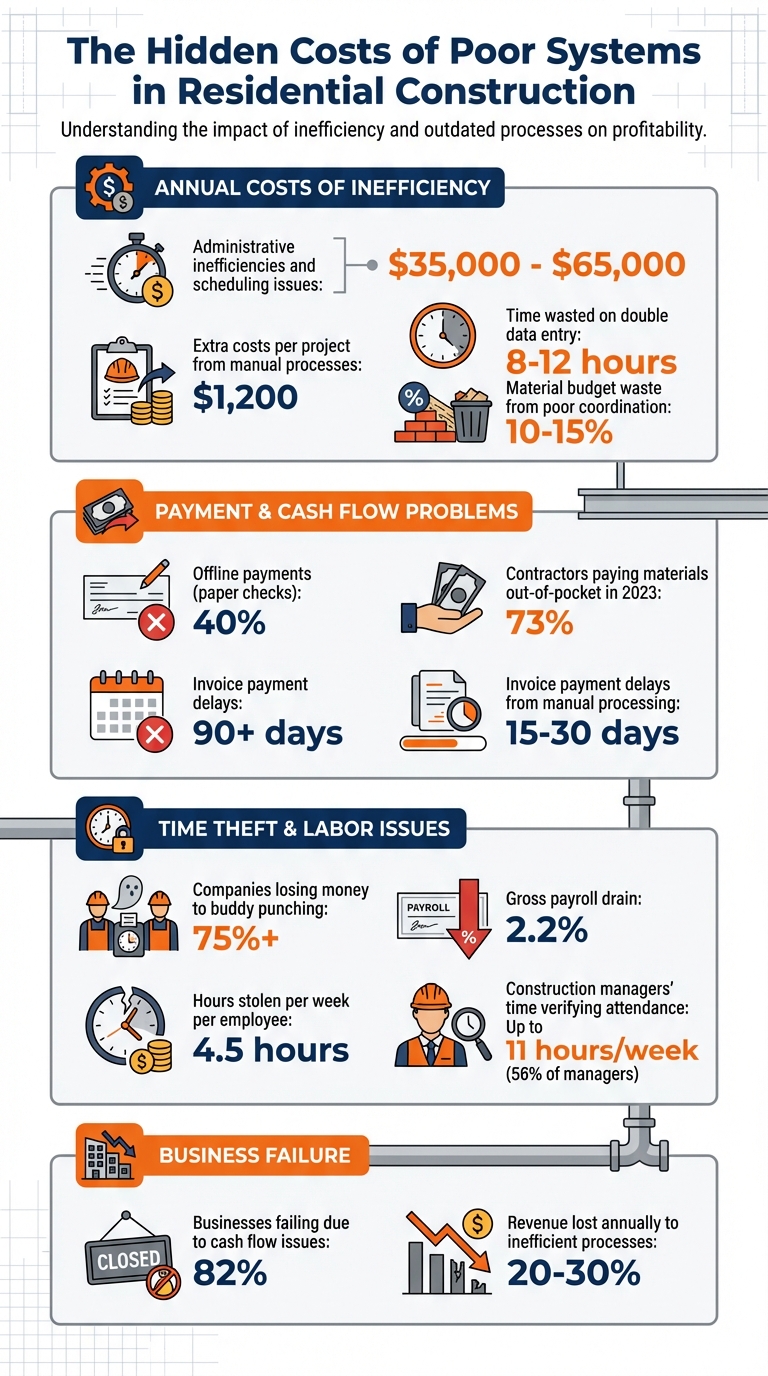
The Cost of Inefficiency: How Poor Systems Impact Residential Construction Businesses
Transitioning from a hands-on builder to a full-fledged business owner in residential construction comes with its fair share of hurdles. The biggest challenges? Chaotic workflows, unclear finances, and poor communication. These aren’t just small headaches – they can cost residential contractors between $35,000 and $65,000 annually due to administrative inefficiencies and scheduling issues. And when workflows fall apart, financial and communication problems often follow.
Poor Workflows and Time Management
Inefficient workflows are a major drain. For instance, manual processes rack up about $1,200 in extra costs per project. Tasks like double-entering data across different systems waste 8–12 hours every week, while crucial details often get lost in the shuffle. On top of that, decision fatigue and scattered project information only make things worse.
The best construction management software for home builders can make a world of difference by removing bottlenecks tied to the owner’s memory. Without one, builders often rely on outdated tools like whiteboards for scheduling, which leads to crews showing up at the wrong job site or without the right materials. Manual invoicing adds another layer of trouble, delaying payments by 15–30 days and putting cash flow in a chokehold. These workflow issues ripple through the entire business, affecting budgets, timelines, and overall efficiency.
Weak Financial Tracking and Budget Control
When financial tracking tools don’t work together, contractors lose sight of real-time job costs and profit margins. Labor overruns and overlooked expenses quietly eat into profits, often going unnoticed until it’s too late. To make matters worse, 40% of construction payments are still made offline using paper checks, and invoices can take over 90 days to get paid. This delay creates cash flow problems – 73% of contractors in 2023 reported paying for materials out of their own pockets while waiting for client payments. Many end up relying on personal credit or emergency funds to fill these gaps.
Material tracking is another weak spot. Poor coordination and over-ordering can waste 10–15% of material budgets. Without comparing “estimates vs. actuals”, contractors risk repeating the same pricing mistakes in every bid. Instead of scaling profitably, these financial blind spots increase risks and strain resources.
Communication Problems with Clients and Teams
As your business grows, trying to handle every decision or emergency yourself just doesn’t work. Without centralized tools, communication breaks down between teams and job sites. Undefined roles lead to task duplication, misunderstandings, and wasted labor, all of which slow down progress. Relying on personal text messages or verbal agreements for changes often results in billing disputes and disrupts project timelines. Paper records and memory-based updates? They’re a recipe for errors, like missed material deliveries or crews showing up at the wrong time.
Client communication is another pain point. Handling requests manually can fail to address how changes affect costs or schedules, leading to disputes and delays. This not only impacts your bottom line but also risks damaging your reputation and losing referrals.
Addressing these challenges is essential if you want to shift from being a hands-on builder to running a thriving construction business. Streamlining workflows, tightening financial systems, and improving communication can set the stage for sustainable growth.
sbb-itb-5eea312
Managing a residential construction business often feels like juggling too many moving parts – scattered workflows, misplaced documents, and lack of visibility can cause delays and inefficiencies. Contractor Foreman addresses these challenges by bringing project management, field tracking, and document storage together in one platform. This integration gives you real-time insights across all active jobs, streamlining your operations.
Project Management for Scheduling and Task Tracking
Contractor Foreman uses Gantt charts to help you identify critical tasks and scheduling flexibilities, ensuring you stay on track and avoid delays.
Field crews can update their progress through a mobile app, providing instant status reports. With baseline tracking, you can compare current progress against your original schedule, helping you pinpoint where delays are happening – whether it’s framing taking longer than planned or trim work falling behind.
The platform offers Kanban and list views, making it easy to monitor and manage task statuses.
If weather or material shortages force a schedule change, updated timelines can be sent to all employees and subcontractors with just one click. You can also import schedules from Microsoft Project or use pre-built templates to simplify project setup. This approach directly addresses the workflow disruptions that often plague residential construction projects.
For contractors juggling multiple projects, project-based permissions ensure employees only see the tasks relevant to them. Daily logs capture key details like weather conditions, site visitors, and productivity metrics. These logs not only protect you in case of disputes but also help refine future construction cost estimates.
GPS Timecards and Field Tracking
Labor costs are one of the biggest variable expenses in construction, and GPS-driven timecards offer the precision you need to manage them effectively. Geofencing ensures employees can only clock in when they’re actually on-site, eliminating issues like buddy punching. This is no small matter – over 75% of companies lose money to buddy punching, with employees stealing an average of 4.5 hours per week. This can drain around 2.2% of your gross payroll.
Real-time crew tracking also saves time. Nearly 56% of construction managers spend up to 11 hours a week verifying attendance. GPS timecards eliminate this hassle while feeding accurate labor data directly into your job costing system.
“The time tracking software for my crew allows me to keep track of all my guys’ hours, where they are, and what they’re doing. This helps on renovations all the way up to high-production framing jobs where I can cross-reference their productivity on linear feet of wall and square feet completed per hour, etc.”- Matthew S., M. Smith Contracting
This system integrates with QuickBooks, automating payroll and reducing errors from manual data entry. By linking labor hours to specific tasks and budgets, you get early warnings about potential cost overruns, giving you a chance to address issues before they affect your bottom line. Accurate labor tracking not only helps control costs but also contributes to a more cohesive and efficient operation.
Document Management for Organized Files
Centralizing operations isn’t just about schedules and labor – it extends to document management as well. Contractor Foreman organizes all your project files – RFIs, submittals, photos, contracts, permits, and blueprints – into one cloud-based system accessible from any device. The platform automatically creates folder structures for projects and allows you to customize how files are sorted, whether by job name, date, or type.
You can edit Word and Excel documents directly within the software, avoiding the need to download and re-upload files. PDF markup tools let you redline documents and annotate photos, making it easier to address site issues. Version control ensures everyone is working with the most current documents, while permissions protect sensitive files by limiting access to authorized personnel.
The client portal feature allows you to share select files and photos with homeowners, offering transparency that builds trust and reduces disputes over change orders. With unlimited storage included in every plan, your file management system can grow alongside your business.
For contractors transitioning from paper-based systems, this centralized approach eliminates the chaos of scattered files and outdated records. When permits, inspection reports, and client communications are all stored in one searchable location, new team members can quickly get up to speed without needing extensive guidance from the owner.
Financial Tools for Better Profitability
Job Costing and Budget Tracking
When you’re scaling your business, understanding every expense is crucial. Contractor Foreman’s job costing system provides a clear view of costs, helping you transition from a busy builder to a confident business owner. It tracks real-time comparisons of estimated versus actual costs, allowing you to see how budgets stack up against bills, expenses, and labor. This makes it easier to catch overruns early – whether it’s labor costs exceeding projections or materials coming in higher than expected.
The financial dashboard offers a comprehensive snapshot of project finances, with options to dive into the details. Approved change orders are automatically reflected in both contracts and budgets, helping you keep scope creep in check. Plus, labor costs are calculated using GPS timecards and burden rates, giving you an immediate and accurate picture of field work expenses.
“The integration of the whole platform is very good, including externally with QuickBooks Online. Ability to do time sheets in the field without separate software. Cost codes and cost items that can be used for different jobs, this is huge for us”- Chuck A., Liercke Construction, LLC
The system also tracks “Billed” versus “Delivered” quantities on purchase orders, ensuring you only pay for materials actually received. Pre-set markups and integrated market rates simplify your estimating process, helping you maintain consistent profit margins. By integrating with 1build.com, the platform pulls in current local material and labor costs, reducing the risk of underbidding in a market that’s always changing. With over 100 pre-built reports – like Work in Progress (WIP) and Budget vs. Actual reports – you can pinpoint which residential projects generate the best returns before committing to new jobs.
By combining detailed job costing with a user-friendly interface, Contractor Foreman ensures your financial operations keep pace with your growing business.
QuickBooks Integration for Easier Accounting
Accurate cost tracking is only part of the equation – seamless accounting integration is just as important. Contractor Foreman’s bidirectional sync with QuickBooks Online eliminates the hassle of manual data entry. Projects, contacts, estimates, invoices, bills, expenses, purchase orders, and timecards flow effortlessly between the two platforms, cutting down on errors and saving time. For instance, payments made in one system are instantly reflected in the other.
GPS timecards also make payroll a breeze. Field labor hours are automatically transferred to QuickBooks, doing away with spreadsheets and manual transcription errors. The platform supports AIA G702 and G703 style invoicing, a must-have for contractors dealing with retainage and progress payments on larger residential or multi-family projects.
Given that QuickBooks Desktop support ended on January 1, 2026, Contractor Foreman now focuses solely on QuickBooks Online. Their team includes QuickBooks experts who assist with setup and ensure your data stays accurate. With an average support wait time of just 13 seconds and 95% of chats earning 5-star ratings, you’ll have help whenever you need it.
For contractors managing multiple projects, this level of automation eliminates administrative bottlenecks, allowing you to focus on growing your business without getting bogged down by paperwork.
Improving Client and Team Relationships
While efficient operations and accurate financial management are essential, building strong connections with your clients and team is what truly drives growth. These relationships are the backbone of a business transitioning from simply managing projects to leading a thriving enterprise. By empowering your team and engaging clients, you create a cycle of repeat business, valuable referrals, and reduced turnover. In fact, reducing turnover alone can cut costs by up to 50% while increasing your capacity to take on more projects.
Poor communication, on the other hand, can be a major liability. It’s a leading cause of project delays and budget overruns. Only 37% of projects finish on time, and just 48% stay within budget. Compare that to projects using management software, where the numbers jump to 71% and 76%, respectively, with some metrics hitting as high as 80%. These improvements are particularly important when juggling multiple residential projects.
Client Portals for Project Transparency
Contractor Foreman’s client portal makes life easier for both you and your clients by offering real-time access to essential project details. This includes schedules, photos, documents, and messaging, which can reduce client inquiries by 40–60%. Clients can track progress through daily photos, approve change orders digitally, and view a financial summary showing the original contract amount, total billed, and remaining balance – all without disrupting your team’s workflow.
The benefits go beyond convenience. Portals can reduce disputes over change orders by 35% and raise Net Promoter Scores by 20–30 points. For instance, a mid-sized residential builder saw a 30% boost in client satisfaction and a 25% increase in referrals after adopting the portal.
“I like that it has almost everything in one place from the client portal to schedules, to budgets, and so on.” – Shawn B., Avan Company LLC
The portal also helps prevent delays by highlighting client action items, like pending approvals or finish selections. If you’re managing multiple properties for the same client, the system’s single login feature allows easy access to all projects through a dropdown menu. And with 88% of users less likely to return after a poor digital experience, offering a professional and centralized interface is no longer optional – it’s essential.
Custom Fields for Residential Project Needs
In addition to transparent portals, custom fields allow you to tailor data collection to the unique demands of residential projects. Whether it’s specific cabinetry options, HOA compliance details, or appliance upgrades, custom fields ensure that everyone – clients and team members alike – has access to consistent, project-specific information.
These fields can be applied across various modules, including Projects, Work Orders, RFIs, Submittals, and Daily Logs. Using input types like dropdown menus or radio buttons standardizes data entry, making it easier to generate reports and track details like regulatory compliance for older homes or specialized upgrades.
To get started, identify common project variations – like flooring choices, paint colors, or appliance specifications – and map them to custom fields in the software. A quick, one-hour training session followed by testing on a single project can help your team adapt quickly. This process has been shown to reduce errors by 25% and improve team handoffs. When paired with client portals, custom fields can cut internal miscommunication by 40%, enabling teams to double their project load without added stress. The result? A business that’s better equipped to focus on growth and strategic planning.
Pricing Plans for Growing Businesses
Choosing the right software plan can make all the difference when scaling your business. Contractor Foreman’s pricing is designed to support growth, offering tiers that cover all your projects and storage needs without piling on extra fees. Plus, their price-lock ensures your rates stay consistent as long as you’re actively using the service, making budgeting straightforward. This structure helps you transition smoothly from managing builds on-site to running a streamlined business.
Plan Features and Costs
Contractor Foreman’s plans are based on user limits rather than restricting features. The Basic plan includes essential tools like project management, financial tracking, client portals, and QuickBooks integration. As your team expands, you can move to higher tiers for added benefits, such as private training sessions and advanced tools.
| Plan | Monthly Cost (Annual Billing) | User Limit | Private Training Sessions | Additional Benefits |
|---|---|---|---|---|
| Basic | $49 | 1 | 0 | Core project management, financials, time cards, client portal |
| Standard | $105 | 3 | 2 | Scheduling, leads manager |
| Plus | $166 | 8 | 3 | Crew scheduling, advanced reporting |
| Pro | $221 | 15 | 4 | AIA invoicing, retainage tracking |
| Unlimited | $332 | Unlimited | Unlimited | Free implementation assistance |
The Pro plan stands out as the “Most Popular” choice. It’s tailored for residential builders managing multiple crews and office staff, with a user capacity of 15 and features like AIA-style invoicing. For businesses managing multiple companies, Contractor Foreman offers a 50% discount on additional accounts.
To make things even better, the software comes with a 30-day free trial and a 100-day money-back guarantee for annual plans. Combined with consistently high support ratings, these plans provide the flexibility and value needed to keep up with your business’s growth.
Steps to Move from Builder to Business Owner
Transitioning from working in your business to working on it starts with taking a hard look at where you’re losing both time and money. Did you know that businesses lose an estimated 20% to 30% of their revenue annually due to inefficient processes? These inefficiencies – like delays, miscommunication, and redundant tasks – add up quickly. Identifying these problem areas is the first step toward making meaningful changes.
Review Current Processes and Identify Bottlenecks
Begin by mapping out your entire workflow, from the first client call to the final payment. Pinpoint every handoff, approval stage, and delay along the way. This visual representation will help you see where projects are stalling or doubling back for clarification. Start with high-frequency tasks, like time tracking or invoice approvals, since even small improvements here can lead to big time savings over the long run.
Don’t overlook document management. If your team is constantly searching for updated blueprints or calling the office to confirm change orders, you’ve uncovered a major bottleneck. Poor document organization slows everything down. Before jumping into solutions, take stock of your current numbers. For example, how long does it take to generate an invoice? How many hours per week are wasted in unproductive meetings? Tracking these metrics now will give you a clear benchmark to measure progress later.
Leverage Contractor Foreman for Targeted Improvements
Once you’ve identified your biggest pain points, use specific features in Contractor Foreman to address them. Focus on one core problem at a time – like invoicing or time tracking – before adding more tools. For example, if payroll is eating up your Sunday nights, start with GPS Timecards. If clients keep asking for updates, prioritize setting up the Client Portal. By integrating Contractor Foreman with QuickBooks, you can also automate your financial data flow and cut down on manual errors.
To make the transition smoother, assign a “tech lead” on each crew. This person can test new features first and then train the rest of the team. When introducing a new system, tie the training to a real project. This makes the learning process practical and immediately useful.
Mark Taylor of MLT Builders shared how implementing structured systems allowed him to stop working weekends entirely. His sites now run on their own, while he maintains 20–25% profit margins.
The secret to success? Take it step by step. Nail down one system before moving on to the next. A phased approach ensures that each improvement sticks before you layer on more changes.
Conclusion
Growing a residential construction business isn’t about putting in more hours – it’s about creating systems that do the heavy lifting for you. As we’ve outlined, the key difference between being a busy builder and a true business owner lies in whether your operation relies on you being on-site all the time or if your team can manage projects independently. Tackling workflow inefficiencies and financial blind spots is crucial, and that’s where Contractor Foreman steps in. By centralizing scheduling, financials, and communication, it eliminates the chaos of juggling fragmented data and outdated manual processes.
Consider this: 82% of businesses fail due to cash flow issues, and businesses with streamlined systems see an average gross profit increase of $108,000. Real-time job costing isn’t just a feature – it’s an advantage, turning bookkeeping from guesswork into a precise understanding of your margins before the project’s even done.
Contractor Foreman offers a suite of tools designed to overhaul your operations, from automated scheduling to real-time financial tracking. It integrates everything – project management, GPS timecards, client portals, QuickBooks compatibility – into one platform, starting at just $49/month. Plus, their support team is top-notch, with a 13-second average response time and a 95% 5-star rating for customer chats. It’s no wonder Forbes Advisor named it the “Best Construction Management Software” in both 2023 and 2024, specifically highlighting its ease of use.
The next steps are clear: identify your bottlenecks, implement focused solutions, and track the outcomes. By streamlining crew hours, approvals, and profit margins, you’ll move from putting out fires every day to focusing on strategic growth. Contractor Foreman makes this transition easier, offering a risk-free way to reclaim your time and take your business to the next level.
FAQs
What systems are essential for scaling a residential construction business?
To grow a residential construction business, having the right systems in place is essential. Project management tools play a key role in handling multiple projects, maintaining schedules, and managing changes in scope. This not only helps avoid delays but also boosts profitability.
On the financial side, tools for cost estimation, budgeting, and tracking are indispensable. These systems help maintain strong profit margins and improve cash flow. When integrated with accounting software, they make decision-making easier and set the stage for sustained growth.
Finally, construction management software can enhance communication with teams, clients, and subcontractors. It also improves workflows and fosters better collaboration. By adopting these systems, you can shift your focus from managing daily operations to building a business that is efficient, scalable, and profitable.
How does Contractor Foreman help streamline financial tracking and manage budgets effectively?
Contractor Foreman makes it easier to track finances and manage budgets by offering real-time updates on your project’s financial status. Its features include job costing, expense tracking, and automated reporting, allowing you to keep a close eye on budgets and make quick, informed decisions.
It also works effortlessly with accounting tools like QuickBooks, keeping your financial records organized and current. By consolidating these tasks, Contractor Foreman helps you save time, minimize mistakes, and stay on top of your project’s financial management.
How does a client portal improve transparency in residential construction projects?
A client portal offers a centralized hub where clients can access real-time updates, important documents, and schedules. This keeps them informed about project progress and any changes, cutting down on confusion or miscommunication.
By simplifying communication and ensuring key information is always at their fingertips, a client portal strengthens trust, boosts client satisfaction, and encourages a more collaborative partnership.







