
- What Makes a Good Progress Billing Template
- 1. Contractor Foreman Progress Billing Tools
- 2. Free Excel Progress Billing Template
- 3. Google Sheets Milestone Billing Template
- 4. AIA G702/G703 Schedule of Values Template
- 5. Contractor Progress Payment Application Template
- 6. General Contractor Invoice Progress Template
- 7. Smartsheet Progress Invoice Template
- 8. Architect's Milestone/Progress Billing Template
- 9. ProjectManager Construction Billing Template
- 10. Customizable PDF Progress Billing Template
- How to Customize Progress Billing Templates
- Using Progress Billing Templates with Contractor Foreman
- Conclusion
- FAQs
Cashflow is non-negotiable — in residential construction, a late payment doesn’t just hurt, it halts.
Small residential contractors run fewer jobs at a time, so without steady cash coming in, you’re the one bridging the gap — paying your guys on Friday while waiting on a client check that was “sent yesterday,” and fronting material costs on a job that hasn’t invoiced in weeks.
The solution?
Progress billing instead of fixed-price billing. When you do progress billing, each completed phase triggers a payment — retainage (usually 5–10%) gets tracked, change orders get documented, and you’re not waiting until project close to see a dollar.
Main benefits of progress billing:
- Cash Flow Management: Bill clients incrementally based on project milestones or percentage completion.
- Clarity and Transparency: Detailed breakdowns help prevent disputes and improve client trust.
- Streamlined Processes: Digital tools automate calculations, integrate with accounting software, and reduce manual errors.
- Flexibility: Templates work across devices and formats, from AIA G702/G703 forms to simple spreadsheets.
So which template actually works for a small residential crew?
Here are some of the best templates for progress billing in construction.
These templates break down construction cost estimates into manageable sections, such as completed work, retainage (typically 5–10%), and change orders. With options ranging from Excel and Google Sheets to software like Contractor Foreman and Smartsheet, contractors can choose tools that align with their needs.
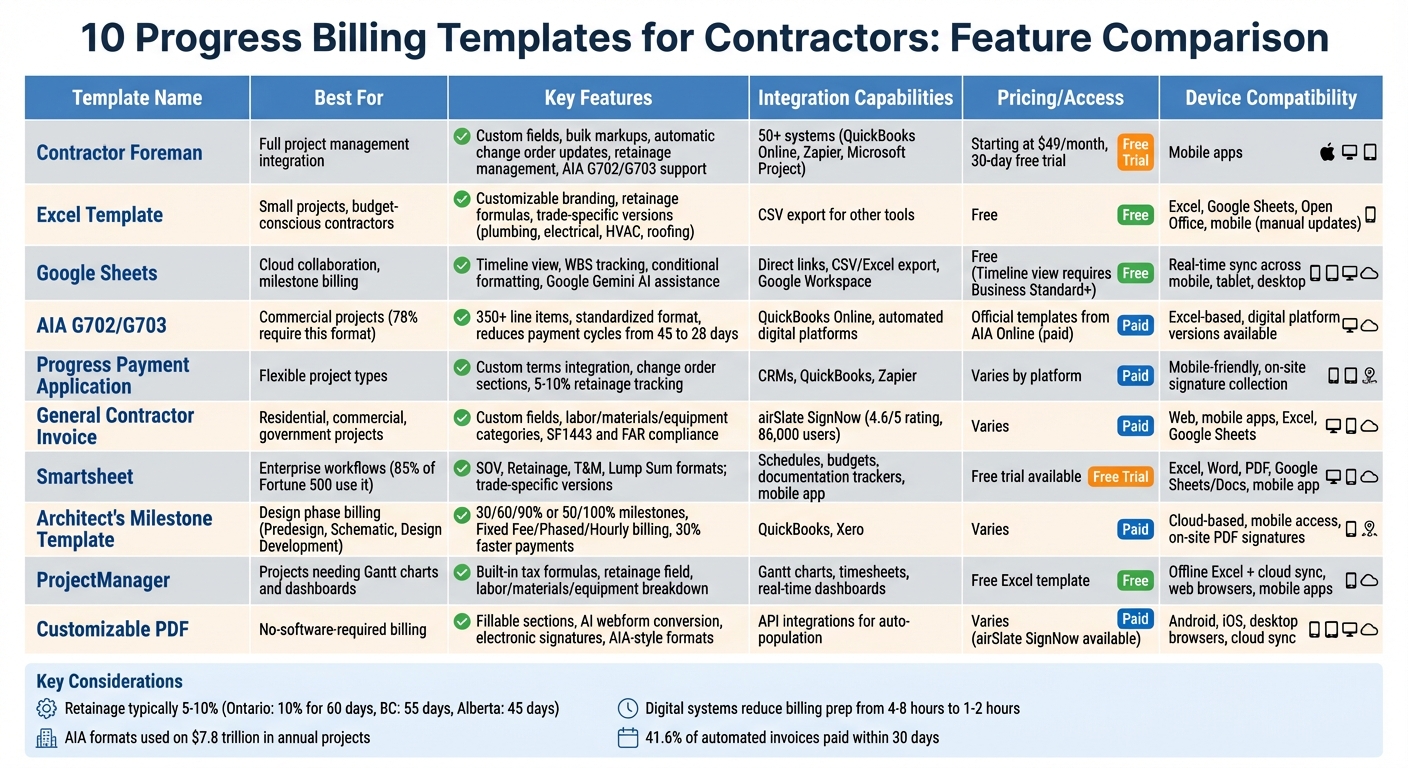
Progress Billing Template Comparison: Features and Best Use Cases for Contractors
What Makes a Good Progress Billing Template
A solid progress billing template should align perfectly with your project estimate and budget. Every invoice line item should correspond directly to the items in your original estimate.
Why? Because this approach ensures you’re billing for the exact work quoted, rather than relying on vague percentages or lumping unrelated tasks together. It’s not just about staying organized – it’s about protecting your profit margins and maintaining transparency with clients.
Your template should include fields to track the percentage of completion for each line item, as well as retainage details such as amounts held back, released, and the current net due. For instance, if your electrical rough-in is 75% complete but framing is fully done, you’d bill each separately based on their actual progress. At the same time, clients should see what funds are being withheld (typically 5%–10%) and when they’ll be released. This level of clarity helps avoid disputes and makes charges easy to understand. Plus, these features make tracking change orders more straightforward.
Another must-have is seamless integration of change orders. Your template should automatically update to reflect approved changes, ensuring the billing reflects the current scope of work – not just the original agreement. Additionally, offering centralized payment options like ACH, credit card, or check can make the payment process smoother and quicker.
Lastly, it’s critical to adopt a system where estimates drive budgets, and budgets drive billing. This creates a “single source of truth”, where every billed dollar directly ties back to your budget. By linking these workflows, you’ll speed up invoicing and eliminate duplicate entries or costly errors, all while ensuring financial accuracy.
sbb-itb-5eea312
1. Contractor Foreman Progress Billing Tools
Tailored Features for Contractors
Contractor Foreman gives you the ability to customize fields across estimates, invoices, change orders, purchase orders, and sub-contracts to ensure accurate tracking of building costs.
You can manage profit margins effectively using bulk markups (e.g., applying a 10% markup on all materials) or adjust specific items with line-item markups. The platform also supports flexible billing options, whether you prefer billing based on the percentage of work completed or the number of units installed.
Changes to orders automatically update the total contract, saving you from manual recalculations. Whether you need detailed itemized breakdowns or prefer lump-sum groupings, the system adapts to your needs. Retainage management is equally simple, allowing you to adjust holdback percentages without extra steps. These tools help improve invoice precision and cash flow management.
As Contractor Foreman highlights:
“The Estimate is the heart beat of the company. You know what works and what needs tracking. Let Contractor Foreman’s estimating custom fields keep that heart beat strong…”
Seamless Integration with Project Management
Contractor Foreman combines estimating, project progress, billing, and employee management in one platform, removing the hassle of juggling separate tools. Progress invoices automatically pull data from estimates, time cards, expenses, and purchase orders, cutting down on repetitive data entry. Beyond this, the platform integrates with over 50 external systems, including QuickBooks Online, Zapier, and Microsoft Project, making it easier to streamline your operations.
A user from Liercke Construction, LLC shared their experience:
“The integration of the whole platform is very good, including externally with QuickBooks Online. Ability to do time sheets in the field without separate software. Cost codes and cost items that can be used for different jobs, this is huge for us.”
This integration ensures that your billing and project management processes work together smoothly.
Compatibility with Standard Billing Formats
Contractor Foreman simplifies AIA-style billing by fully supporting G702 and G703 formats, so you’re covered if your general contractor requires these formats. Additionally, the platform supports local currencies in more than 75 countries and allows for custom tax rate settings, including group and reverse taxes, making it adaptable to various financial requirements.
Device-Friendly Accessibility
You can use Contractor Foreman on your phone, tablet, or computer through its mobile apps, which mirror the web portal’s functionality. This accessibility means you can collect payments directly in the field once a job is completed. With pricing starting at $49 per month (covering unlimited projects) and a 30-day free trial, Contractor Foreman offers a cost-effective solution for contractors looking to streamline their billing and project management processes.
2. Free Excel Progress Billing Template
Tailored for Contractor Requirements
Free Excel billing templates provide the flexibility to meet the needs of various trades. You can download a pre-formatted file, personalize it with your branding, tweak retainage formulas, and organize costs into categories like labor, materials, equipment, subcontractors, and permits. There are also specialized templates for specific trades, such as plumbing, electrical, HVAC, roofing, and excavation. To streamline future use, save your customized version as an Excel Template (.xltx).
As Microsoft explains:
“Using a template saves time by providing a pre-formatted structure with built-in formulas.”
Compatible with Standard Billing Formats
Excel templates can be adjusted to align with AIA G702 and G703 standards, simplifying calculations like % Complete = (Work Completed + Stored Materials) / Scheduled Value × 100. These templates also help you track the contract sum, change orders, and prior payments, while offering a detailed Schedule of Values (SOV) breakdown for larger projects.
Works Across Devices and Platforms
Excel templates are compatible with tools like Microsoft Excel, Google Sheets, and Open Office. They can be accessed and filled out on both office computers and mobile devices, making it convenient to input data from wherever you’re working. However, keep in mind that updates need to be entered manually, as these templates don’t sync in real-time.
Integrates with Project Management Tools
While Excel templates provide a structured cost baseline, they lack real-time syncing. If needed, you can export data as a CSV file for integration with tools like Contractor Foreman. This approach is ideal for smaller projects or when you need a cost-effective way to present a professional image. Up next, we’ll look at how Google Sheets can serve as an alternative for milestone billing, complementing these Excel solutions.
3. Google Sheets Milestone Billing Template
Google Sheets provides a cloud-based, flexible option for managing milestone billing, offering a practical alternative to Procore and other traditional spreadsheet solutions.
Tailored to Contractor Needs
Google Sheets templates for milestone billing can be adjusted to suit specific trades like carpentry, roofing, electrical work, and general contracting. You can include additional columns to track details such as Work Breakdown Structure (WBS) numbers, task owners, completion percentages, and “Finish Variance” to compare planned and actual deadlines. The Timeline view adds visual appeal, allowing customization by using card colors derived from cell backgrounds or conditional formatting. Additionally, Google Gemini can assist in creating tailored tables, outlines, and even handle complex calculations based on project-specific requirements.
Seamless Integration with Other Tools
Google Sheets integrates easily with project management tools through direct links, file exports/imports, and URL embedding. You can connect the Milestone Billing Template to other Google Sheets, such as a “Project Management Sheet” or “Tracker”, to maintain consistent data within the Google ecosystem.
For external platforms, exporting data as CSV or Excel files allows the import of milestones into other software. Tools like BuildBook even offer free templates for construction payment schedules in Google Sheets, covering common residential milestones like Foundation Completion (15%), Framing Completion (20%), and Roof/Windows (25%). These integration options ensure your data stays aligned across all tools.
Accessible Anytime, Anywhere
Because these templates are hosted on Google Drive, they can be updated in real-time across mobile devices, tablets, and desktops, making it easy to manage milestone progress from the job site. The Google Sheets app lets you access and update timeline-based billing templates on both Android and iOS devices while on the go. Sharing options allow you to assign view, comment, or edit permissions to stakeholders, ensuring everyone stays informed and up-to-date.
For businesses using Google Workspace Business Standard, Business Plus, or Enterprise editions, the interactive Timeline view is available. To ensure consistency across your team, you can use the “Publish to the web” feature to create a standardized version of your customized billing sheet for easy access. These features provide contractors with tools to maintain transparency and keep milestone tracking efficient and up-to-date.
4. AIA G702/G703 Schedule of Values Template
The AIA G702 (Application and Certificate for Payment) and G703 (Continuation Sheet) are essential tools for managing monthly progress payments on commercial construction projects. The G702 acts as a summary page, providing a financial snapshot of the project, including the contract sum, total completed work, retainage, and the current payment due. Meanwhile, the G703 breaks everything down further, offering a detailed Schedule of Values (SOV) that tracks completed work, stored materials, and the remaining balance for each task.
Support for Standard Billing Formats
These forms establish a shared “billing language” among contractors, architects, and owners, simplifying invoicing and speeding up payment processes. For context, AIA G702/G703 forms are mandated for 78% of commercial construction projects in the U.S. and are utilized on projects valued at over $7.8 trillion annually. When completed correctly, these applications can reduce payment cycles from 45 days to 28 days, whereas errors can delay payments by 2–3 weeks for each rejected submission. This standardized approach also paves the way for customizable billing solutions, which will be discussed later.
With the advent of digital platforms, these forms are now automated, making the billing process more efficient. The G703 continuation sheet can handle over 350 line items, making it indispensable for large-scale commercial projects.
Customizability for Contractor-Specific Needs
Official AIA G702 and G703 templates, available from AIA Online, can be edited in Microsoft Excel for precise calculations. The G703 offers flexibility for contractors to adjust “Column A” (Item Number) using custom cost codes or industry standards like the CSI MasterFormat for better organization. Additionally, contractors can modify the “Scheduled Value” for each line item to manage cash flow effectively, such as front-loading mobilization costs – provided the architect approves. These adjustments not only meet industry requirements but also allow contractors to tailor the forms to specific project needs, making integration with project management systems smoother.
A key tip: ensure the totals on the G702 and G703 forms match perfectly, as even minor math errors are a leading cause of rejection. To streamline reconciliation, subcontractors should be required to use the same AIA-style format as the prime contractor.
Ease of Integration with Project Management Tools
While traditional spreadsheets often lead to issues like version mismatches and broken formulas, modern digital templates resolve these problems by automating the integration of the SOV with progress billing. Contractors can now create or import an SOV at the start of a project, which then serves as the basis for all future pay applications. These systems automatically carry forward prior totals, ensuring consistency. Many platforms also integrate seamlessly with accounting tools like QuickBooks Online, allowing approved pay application values to sync directly with company financial records. This level of integration significantly improves cash flow and operational efficiency. By switching to digital systems, billing preparation time can drop from 4–8 hours per cycle to just 1–2 hours.
To avoid issues, establish your Schedule of Values at the beginning of the project and keep item numbers and descriptions consistent through to project closeout. General contractors should verify subcontractor progress before including it in a prime pay application to prevent over-billing risks.
Up next, learn how to refine these templates to meet a variety of contractor needs.
5. Contractor Progress Payment Application Template
A Contractor Progress Payment Application Template is a flexible tool that simplifies invoicing for commercial and residential projects. These templates allow contractors to provide detailed breakdowns of costs, including labor, materials, equipment, subcontractor expenses, and project-specific identifiers. They also account for approved change orders, enabling adjustments to the original contract amount and payment schedule as project requirements evolve. This flexibility ensures that contractors can create invoices tailored to their specific needs.
Customizability for Contractor-Specific Needs
Modern templates streamline the invoicing process by integrating custom terms directly from your customer directory. This feature allows contractors to switch between default system settings and client-specific terms without the hassle of manual edits. Additionally, templates organize change orders into dedicated sections within the Schedule of Values, ensuring a clear and structured financial breakdown. Indented descriptions further clarify individual line items for easy review.
To make the most of these templates, it’s essential to define project milestones early. Assign a specific percentage of the total project cost to each phase – such as foundation, framing, or roofing – so the template aligns with your billing plan. Don’t forget that retainage often ranges between 5% and 10% of each progress payment. These templates also integrate with project management tools, which can further enhance efficiency.
Ease of Integration with Project Management Tools
Digital progress payment templates work seamlessly with CRMs and accounting software like QuickBooks, ensuring that every cost adjustment is captured and billed accurately. Automation tools, such as Zapier, can connect PDF-based payment requests with other project workflows, reducing the need for repetitive data entry and saving time.
Accessibility Across Devices or Platforms
Many templates are designed with mobile use in mind. This means you can update work progress, collect signatures, and issue invoices directly from the job site. An integrated Files tab simplifies the process of attaching photos and documents, consolidating all supporting materials in one place. This mobile accessibility ensures that billing remains efficient and hassle-free throughout the project lifecycle.
6. General Contractor Invoice Progress Template
The General Contractor Invoice Progress Template is a practical tool for managing payments across various project types, including residential, commercial, and government work. Digital versions allow for adding custom fields, emphasizing important sections, and concealing sensitive information as needed. Spreadsheet-based templates are completely editable, enabling contractors to input specific contract amounts for both their work and that of subcontractors. This flexibility makes it a valuable addition to the progress billing tools already discussed.
Tailored for Contractor-Specific Requirements
To meet the demands of invoicing software for construction, these templates offer the ability to customize extensively. Costs are divided into straightforward categories like labor, materials, equipment, and additional expenses. These categories can be adjusted to account for prior payments or change orders. With spreadsheet formats, users can modify cells and formulas, while platforms like airSlate SignNow – rated 4.6/5 by 86,000 users – provide intuitive drag-and-drop customization options.
Compatibility with Standard Billing Formats
Many of these templates adhere to established professional standards, such as SF1443 and FAR guidelines, ensuring they meet both contractual and regulatory requirements. When completed with the necessary signatures, these forms serve as comprehensive documentation for seamless payment processing.
Device and Platform Accessibility
Modern templates are designed to be accessible across various platforms, including web browsers, mobile apps, and desktop tools like Excel or Google Sheets. This compatibility supports on-site billing and real-time cloud integration, making it easier to handle invoicing tasks efficiently.
7. Smartsheet Progress Invoice Template
The Smartsheet Progress Invoice Template offers a variety of formats – such as SOV, Retainage, T&M, and Lump Sum – designed to align with different project billing requirements.
Tailored for Contractors’ Specific Needs
These templates are highly adaptable, allowing contractors to personalize them with their company logo, client details, unique invoice numbers, and payment terms like “Net 30”. They also support detailed breakdowns of costs, covering labor (including hours and rates), materials (with quantities and unit costs), and additional expenses like permits or equipment rentals. Furthermore, specialized versions are available for various trades, including plumbing, electrical, HVAC, roofing, masonry, and landscaping.
Integration with Project Management Tools
Smartsheet links progress billing directly to essential construction management features like schedules, budgets, and documentation trackers. Automated workflows keep stakeholders informed as milestones are invoiced, while the mobile app allows field teams to update project statuses in real time, ensuring billing and reporting dashboards are always current. It’s worth noting that over 85% of Fortune 500 companies rely on Smartsheet for managing their workflows.
Multi-Device Accessibility
These templates are designed for flexibility, available in formats such as Excel, Word, PDF, Google Sheets, and Google Docs. This ensures compatibility with both digital processes and on-site printing needs. The mobile app further supports real-time updates directly from job sites. For those interested in exploring its capabilities, Smartsheet provides a free trial option to test the templates and platform features before making a commitment.
With its adaptability, integration capabilities, and accessibility, Smartsheet proves to be an indispensable tool for contractors managing progress billing.
8. Architect’s Milestone/Progress Billing Template
The Architect’s Milestone/Progress Billing Template simplifies invoicing by tying payments to distinct project phases. These phases – such as Predesign, Schematic Design, Design Development, and Construction Administration – ensure payments align with the completion of key deliverables. This structure also allows for tailored adjustments to meet the specific needs of various projects.
Tailored for Contractor-Specific Needs
This template is built with flexibility in mind, making it easy to adapt to different contractor requirements. Milestone triggers can be adjusted based on project complexity. For example, payments might be set at intervals like 30%, 60%, and 90% completion, or follow a simpler 50/100% model for smaller projects. The template supports multiple billing methods, including Fixed Fee, Phased Billing, and Hourly billing, giving you control over your invoicing approach. Additionally, it provides detailed line items for labor, materials, equipment, and subcontractor work, ensuring comprehensive financial documentation.
“By linking payments to clear deliverables, clients can see the value of your work at every stage. This transparency builds trust and reduces disputes.” – George Valdes, Monograph
Standardized Billing Formats for Efficiency
These professional templates align with the industry-standard Schedule of Values (SOV) format, ensuring compliance and clarity. Each line item outlines the total budget, percentage completed, previously billed amounts, and the current payment request. Dedicated fields for retainage and separate entries for approved change orders help maintain an accurate and up-to-date Schedule of Values. This standardized approach not only accelerates approval processes but also ensures that project owners and general contractors can easily interpret the invoice format. The structured format also enhances digital invoicing, tying directly into the next key feature: accessibility.
Accessible Across Devices and Platforms
Modern billing tools make it easy to manage invoices on the go. Mobile access allows you to update invoices and track expenses directly from the job site. With cloud-based platforms, you can capture client signatures and email PDF invoices on-site, speeding up the payment process. These templates also integrate seamlessly with accounting software like QuickBooks and Xero, reducing manual data entry and improving financial accuracy. Firms using automated billing and e-payment systems report payment cycles that are 30% faster, with 41.6% of invoices paid within 30 days.
9. ProjectManager Construction Billing Template
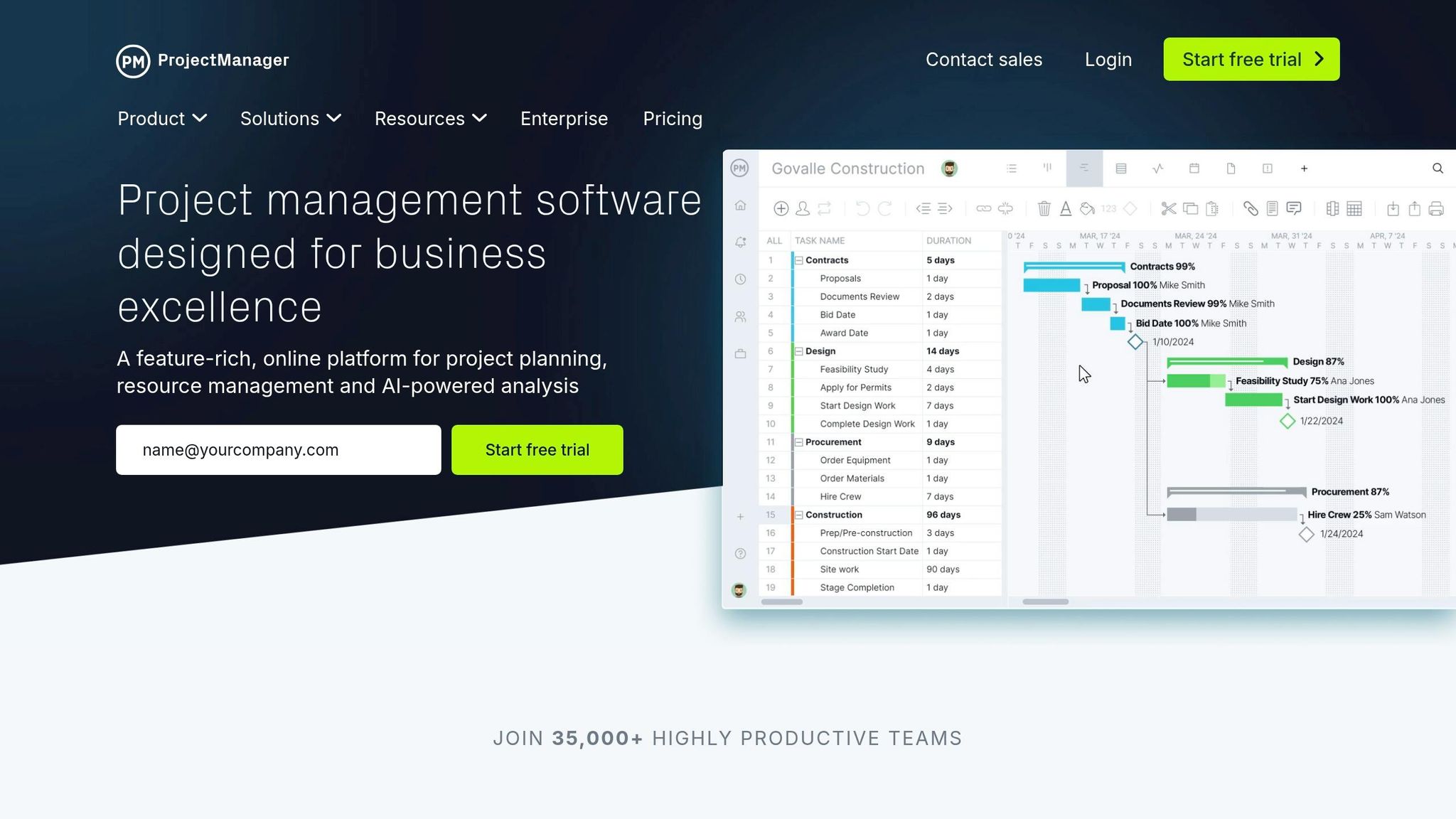
The ProjectManager Construction Billing Template is a free, Excel-based tool designed to simplify progress billing. With built-in formulas for tax calculations and totals, it helps minimize manual errors. It also includes a specific field for retainage percentage, making it easier to track withheld funds until the project wraps up.
Tailored for Contractor-Specific Needs
This template works well for projects of all sizes, whether you’re handling a small residential job or a large commercial build. It breaks down costs into categories like labor, materials, equipment rentals, managing construction subcontractors and their fees, and permits. Plus, it offers customizable fields – such as Project Name, Job Site Address, Invoice ID, and contact details – so you can keep track of key information and ensure accurate, professional financial records.
Works Seamlessly with Project Management Tools
While this Excel template can be used on its own, it also integrates smoothly with ProjectManager’s full software suite. The cloud-based platform links billing data with tools like Gantt charts, timesheets, and real-time dashboards, making project tracking more dynamic. Field teams can stay in the loop with in-app notifications and email alerts, ensuring everyone knows where tasks and projects stand.
“ProjectManager is online project and portfolio management software that connects teams, whether they’re in the office or out in the field.” – ProjectManager
Accessible Across Devices and Platforms
The template is versatile, supporting offline use while also enabling real-time updates through the cloud. For contractors working on-site, ProjectManager’s software offers access via web browsers and mobile apps. This setup allows instant syncing of billing details between office staff and field teams, speeding up approvals and improving cash flow management. The blend of offline functionality and real-time updates aligns perfectly with the demands of modern project management workflows.
10. Customizable PDF Progress Billing Template
A Customizable PDF Progress Billing Template gives contractors the flexibility to manage billing without the need for specialized construction management software. These templates work well alongside other digital tools, offering a versatile, standalone format. They include fillable sections for tracking labor hours, material costs, and additional charges, making them suitable for various trades like plumbing, electrical, or HVAC work. You can also add custom fields, emphasize key details, or hide sensitive information before sharing documents with clients.
Tailored to Contractor Needs
PDF templates can be adjusted to meet specific project requirements. Using AI-assisted tools, static PDFs can be transformed into mobile-friendly webforms that automatically map structured data back into the original layout. For contractors juggling different job types, this means starting with a base template – such as a Schedule of Values for general contracting or Time and Materials for electrical work – and tweaking it to align with industry norms. You can even embed electronic signature fields, making it easy for clients to sign digitally on any device.
Easy Access Across Devices
These PDF templates are compatible with Android, iOS, and desktop web browsers, enabling field supervisors to edit and sign documents directly on-site. With cloud-based storage, billing documents sync automatically across all connected devices. Platforms like airSlate SignNow, highly rated on both the App Store and Google Play, showcase this type of cross-platform functionality.
“Manage CONTRACTOR’S REQUEST FOR PROGRESS PAYMENT on any platform using airSlate SignNow’s Android or iOS applications and simplify any document-related tasks today.” – airSlate SignNow
This compatibility ensures that contractors can handle billing tasks efficiently, no matter where they are.
Aligned with Standard Billing Formats
Many customizable PDF templates follow AIA-style formats, modeled after the G702 and G703 structures. These include a summary page for contract totals and a continuation sheet for detailed line-item tracking. While these templates are designed to meet industry needs, they are not always official AIA Contract Documents. Be sure to check your contract requirements to determine if licensed forms are necessary. Additionally, API integrations can populate these templates with project data automatically, reducing errors and speeding up the approval process between contractors, architects, and owners.
Next, learn how to refine these templates further to suit your project’s specific requirements.
How to Customize Progress Billing Templates
Divide your contract into clear, manageable milestones – like site preparation, foundation, framing, and finishing. This phased billing approach replaces a lump-sum payment with smaller, scheduled payments. Not only does this give clients a clear construction schedule, but it also ensures a steady cash flow from start to finish. These milestone-based divisions simplify billing and help keep finances on track.
Add a retainage line item to withhold 5%–10% of each payment. For example, in Ontario, the Construction Act requires a 10% holdback for 60 days after substantial completion. Similar rules apply in British Columbia (55 days) and Alberta (45 days). Even in the U.S., knowing these standards can help you design templates that align with best practices and regulatory expectations.
Include key columns such as contract total, paid-to-date, current due, and remaining balance. This level of transparency helps prevent misunderstandings and allows clients to track their spending easily. When change orders are approved, list them as separate line items with unique document numbers. Avoid bundling them into the original costs – this creates a clear, auditable record and reduces confusion during payment reviews.
Adjust the layout to suit your client’s preferences. Some may want detailed breakdowns (labor hours, material costs, equipment rental), while others may prefer a simplified Schedule of Values. Before starting the project, confirm in writing whether progress will be tracked by time periods, specific milestones, or percentage of completion. Be sure to include essential project details, such as the site address, permit numbers, and purchase order references, to make invoices easy to reconcile with client records.
Use filters and group billing lines by task or resource to align with how your client tracks expenses. You can also group entries by time period (daily, weekly, or monthly) to keep invoices concise. However, double-check that no billable items are accidentally excluded by the filters, and verify totals before sending.
Using Progress Billing Templates with Contractor Foreman
Contractor Foreman simplifies progress billing by integrating it directly with project tracking. Say goodbye to juggling spreadsheets or manually transferring data. The platform organizes your Schedule of Values (SOV) into sections and automatically incorporates Change Orders, ensuring your billing aligns perfectly with the updated project scope. For example, when you generate a Change Order or Change Order Request from an RFI, any cost impacts are immediately captured and ready to be included in your next payment application. This integration keeps your billing process smooth and accurate from start to finish.
The platform also offers a dropdown menu that lets you easily switch between system defaults and client-specific terms during invoice preparation. This makes it simple to adapt to unique client needs. For longer payment applications, a handy scroll-to-top arrow in the Invoice Module saves you from endless scrolling through extensive line items.
Bulk editing features are another time-saver. You can update multiple fields – like Item Name, Cost Code, Quantity, and Unit Cost – all at once. This speeds up both the initial setup of your SOV and any adjustments needed mid-project. If you organize estimate items by sections, that structure carries over into bid packages and the SOV, maintaining consistency from bidding to final billing. To add a polished touch, PDF templates now include indented descriptions, making it easier for clients to differentiate between line items and detailed explanations.
Contractor Foreman also integrates with QuickBooks Online and Xero, syncing your project-level billing with your overall financial systems. Starting January 1, 2026, the platform will exclusively support these two accounting tools. Additionally, the updated UI – set to replace the Classic View in early 2026 – offers improved stability and performance for all billing-related tasks.
If you’re using the Unlimited Plan, you’ll get personalized training on billing and estimate modules, along with a complimentary Marketpath webpage to boost your online presence. With features like automated workflows, visual customization options, and dedicated support, Contractor Foreman ensures your billing process runs efficiently without adding extra administrative work.
Conclusion
Progress billing templates are a game-changer for maintaining steady cash flow, reducing manual work, and building trust with clients. Whether you prefer a straightforward Excel sheet, the AIA G702/G703 format, or a cloud-based tool like Contractor Foreman, the right template ensures accurate tracking of completed work, proper handling of retainage (often around 10%), and precise accounting for every line item. As Andrew Eckas from Knowify wisely notes:
“A single inaccurate payment application will cause all subsequent payment apps to be inaccurate.”
This highlights why accuracy is non-negotiable from the very start.
The templates we’ve discussed offer flexibility to match various project types and client preferences. By using a structured template, you can streamline data entry, improve transparency, and speed up payment processing – all of which are essential for a smooth workflow.
To get started, identify your client’s preferred billing method – whether it’s percentage-based, milestone-based, or AIA-compliant. Then, select a template that aligns with your needs and customize it with your company details, cost codes, and project-specific information. Tools like Contractor Foreman make this process even easier by linking your Schedule of Values to change orders, time tracking, and accounting software like QuickBooks Online via Zapier.
A well-organized billing system not only safeguards your cash flow but also minimizes disputes, allowing you to focus on what you do best – construction. Try out a few templates, find the one that fits your business, and transform progress billing from a challenge into an opportunity.
FAQs
How do I set up a Schedule of Values (SOV) for progress billing?
To create a Schedule of Values (SOV) for progress billing in Contractor Foreman, break down your project costs into specific phases, tasks, or categories, assigning a dollar amount to each. Head to the project management section, find the billing module, and enter your SOV line items. Make sure these entries match your project scope and contract terms. For step-by-step instructions and the latest features, check the user guides provided by Contractor Foreman.
What’s the best way to handle retainage on each invoice?
When dealing with retainage on invoices, the most effective approach is to calculate it as a percentage of the total project value. Make sure your invoices include clear fields that separately outline both the retention amount and the progress payments. This ensures the retained funds are properly documented and accounted for until the project reaches completion.
How should I include change orders in a progress billing template?
To incorporate change orders into a progress billing template, include specific columns for key details such as change description, date, cost impact, and approval status. These additions make it easier to monitor project adjustments and their effects on costs or timelines. Keeping this information organized within the template ensures more precise billing and smoother communication during the project.







