
Do you know the #1 most important thing in a long-lasting marriage?
It’s not lust. Not shared hobbies. It’s not knowing each other’s love language…
It’s good communication.
Well, construction is basically the same!
When communication is good, jobs run smoothly — schedules stay on track, crews stay aligned, and problems get solved before they blow up. But when communication is poor, it doesn’t just cause tension — it causes real (and expensive) setbacks:
Centralized messaging systems.
By putting all project communication in one place, your team isn’t jumping between different channels or trying to piece together what was said after the fact. Everyone stays on the same page as the project moves, which is exactly what prevents miscommunication from turning into expensive mistakes.
Here’s why it truly matters:
- $177 billion lost annually in the U.S. construction industry due to miscommunication.
- 52% of project rework stems from poor data and communication.
- Workers spend 14 hours per week fixing errors or searching for information.
By consolidating all communication – messages, files, and updates – into a single platform, teams can avoid delays, reduce errors, and improve coordination. For example, Structural Technologies cut engineering change times from two days to just 20-60 minutes after implementing a unified system.
Key benefits of having a Centralized messaging systems:
- Faster decisions: Real-time communication helps resolve on-site issues quickly.
- Fewer mistakes: A single source of truth ensures everyone works with accurate, up-to-date information.
- Improved efficiency: Integrated tools streamline workflows, saving time and reducing construction costs.
Platforms like Contractor Foreman offer features like instant messaging, photo sharing, and mobile access, making it easier for field crews and office staff to stay connected. Centralized messaging doesn’t just simplify communication – it helps projects stay on schedule and within budget.
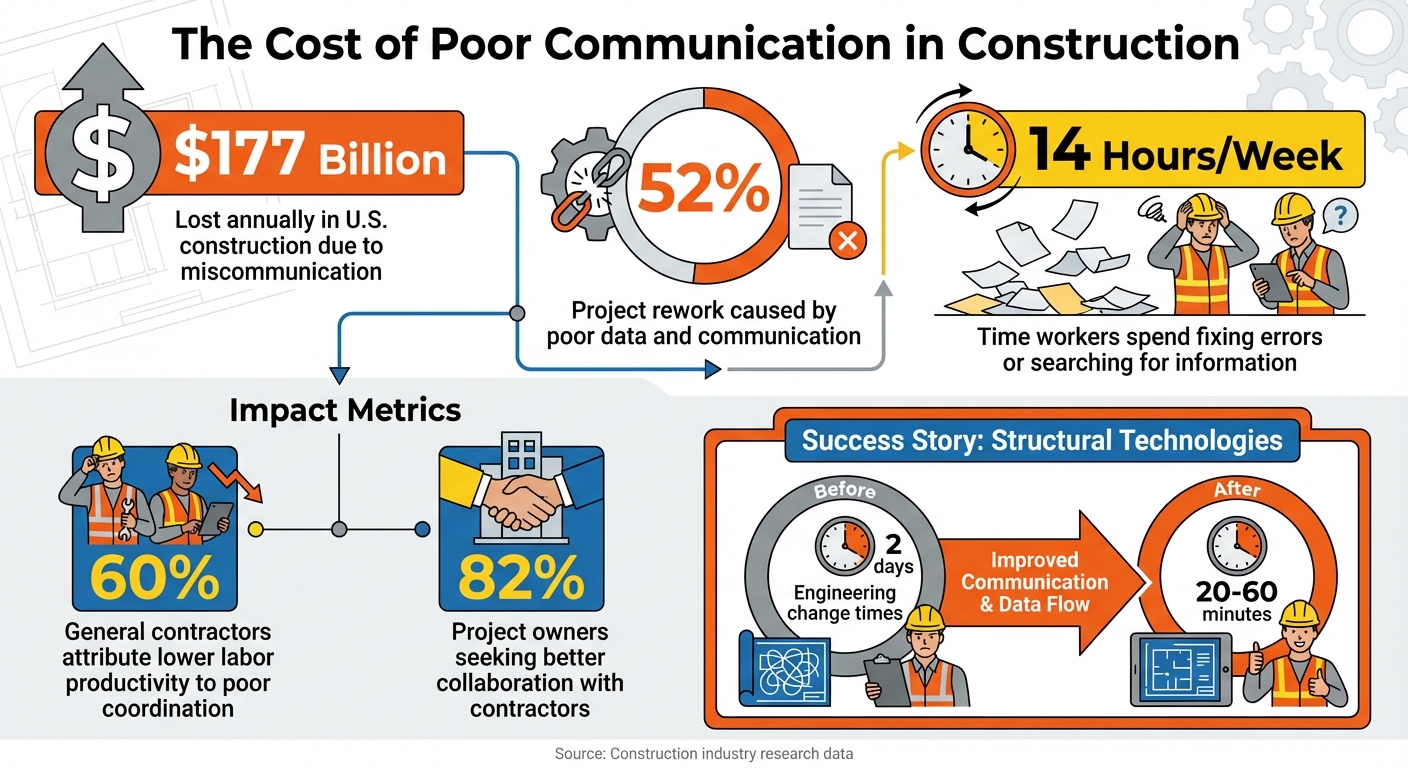
The Cost of Poor Communication in Construction: Key Statistics
Benefits of Centralized Messaging for Construction Teams
Real-Time Collaboration and Faster Decisions
In construction, delays can escalate quickly, especially when field crews encounter unexpected issues. Centralized messaging platforms solve this by enabling instant communication between on-site teams and office staff. Tools like @mentions and urgent flags ensure critical messages are prioritized, while photo and video sharing allows workers to visually convey problems instead of relying on lengthy explanations over the phone.
The results are tangible. Structural Technologies, for instance, reduced the time needed for engineering changes from one to two days down to just 20 to 60 minutes using centralized communication. This is a game-changer in an industry where 60% of general contractors attribute lower labor productivity to poor coordination and communication. Modern platforms streamline this process by linking chats directly to workflows such as RFIs, submittals, and schedules, giving decision-makers the context they need to act quickly. Field workers also benefit from instant updates on schedules, tasks, and budgets through mobile devices.
Fewer Miscommunications and Better Accuracy
Disorganized communication is costly. In fact, poor communication is responsible for $177 billion in annual losses in the U.S. construction industry.
Centralized messaging platforms address this by creating a single source of truth where all updates, documents, and decisions are stored and accessible to everyone. Features like timestamped logs and read receipts provide a clear record of conversations, which is invaluable for resolving disputes or tracking progress. This transparency reduces errors and eliminates the 14 hours per week that construction workers typically spend searching for project data, fixing mistakes, or resolving conflicts.
These platforms also bridge communication gaps between architects, engineers, and field crews by organizing discussions into dedicated channels for specific teams or tasks. This ensures everyone works from the same set of instructions and avoids outdated information. With 82% of project owners seeking better collaboration with contractors, centralized messaging delivers exactly what’s needed. The result? Fewer mistakes and smoother coordination across the board.
Better Project Coordination and Efficiency
Centralized messaging doesn’t just streamline communication – it fundamentally changes how teams coordinate their work. When integrated with tools like scheduling, task management, and daily logs, these platforms enable field crews to report roadblocks or submit Schedule Impact Requests that immediately alert project managers. This seamless integration ensures that communication drives action rather than getting lost in fragmented conversations.
Take Taurus Builders as an example. Superintendent Chris Moss highlighted how integrated scheduling software improved coordination:
“The ability to update a single task’s duration or start date within the lookahead and see automatic adjustments on the master schedule enables precise and confident communication of timelines to everyone involved”.
These platforms also extend their benefits to clients. Features like client portals or dedicated chat channels allow project owners to participate directly in discussions, speeding up approvals for change orders or material selections. This reduces the burden on project managers, who can focus on broader planning while subcontractors, designers, and clients handle smaller, direct interactions. The result is a more efficient workflow and better overall project outcomes.
sbb-itb-5eea312
How to Implement Centralized Messaging in Construction Projects
Choose the Right Platform for Your Team
Getting started means picking a communication platform that fits your team’s needs. Look for a tool that combines messaging, notifications, and file sharing while integrating seamlessly with your existing project management tools – like scheduling systems or daily logs. It’s also crucial that the platform works well on mobile devices, so field crews can stay connected, share photos, and address urgent issues right from the job site.
Before committing to a platform, map out your communication structure. Identify who needs to stay in contact – whether it’s owners, general contractors, subcontractors, architects, or engineers. Clearly define communication roles to ensure the right messages reach the right people. Once you’ve chosen your platform, set up channels to keep communication organized and efficient.
Organize Communication Channels and Groups
A well-structured platform prevents confusion and keeps discussions focused. Create distinct project-specific chats for each construction site and sub-groups for specialized teams, such as engineers, laborers, or subcontractors. This setup keeps updates relevant and avoids overwhelming team members with unnecessary information.
Separate internal conversations from client-facing updates. For example, establish dedicated client chats to share real-time progress on milestones or budget updates. Meanwhile, keep internal channels focused on daily tasks and problem-solving. For more sensitive conversations – like performance reviews or contract discussions – use private, direct messages. Assign project managers or team leaders as moderators to ensure discussions stay on track and productive.
Train Teams and Monitor Usage
Training is key, especially for teams accustomed to traditional calls or texts. Provide onboarding sessions that cover essential features like @mentions, sharing blueprints, and navigating channels. Tailor these sessions to different roles so everyone learns the tools that are most relevant to their work.
For example, Contractor Foreman encourages adoption by requiring users to complete a one-on-one training session and input basic project data – such as one estimate, one project, one time card, and one daily log – to qualify for their 100-day money-back guarantee. Regularly review usage metrics and audit logs to spot team members who might need additional help. Consider offering low-pressure office hours or refresher sessions to ensure everyone stays confident using the platform.
Messaging Features in Contractor Foreman
Contractor Foreman takes centralized communication a step further by embedding messaging features directly into its platform, keeping teams connected and projects on track.
Instant Team Messaging and Notifications
With Contractor Foreman’s Project Chat, project-related discussions are stored in a searchable, centralized hub. This means every conversation, decision, and update is easy to find when needed.
The @Mentions feature ensures accountability by tagging team members via email or SMS, complete with timestamped logs and read receipts. To keep conversations focused, you can organize them into team-specific channels. For private matters like performance reviews or contract discussions, the Direct Chat feature offers a secure space for one-on-one communication. Additionally, the Client Chat feature allows project owners and stakeholders to participate through a dedicated portal, ensuring transparency without cluttering internal team discussions.
Integration with Scheduling and Daily Logs
Contractor Foreman seamlessly ties messaging into its project management tools, making real-time updates effortless. For example, if a schedule change is discussed in chat, you can update the project timeline directly – no need to switch between apps. Task management is also integrated, allowing you to assign tasks, set deadlines, and track progress within the same conversation thread, reducing the risk of overlooked details.
Daily logs are another area where messaging integration shines. Field teams can create logs from time cards and link them to incident reports for better documentation. If a site supervisor shares a photo of unexpected conditions, that image becomes part of the permanent project record, fully timestamped and searchable for future use.
Mobile Access for On-Site Collaboration
For crews working in the field, Contractor Foreman’s mobile apps (available on iOS and Android) provide essential tools to stay connected. Team members can capture photos of completed work, share videos of installation techniques, or upload updated blueprints – all directly from the job site.
The mobile platform supports instant multimedia sharing, eliminating the guesswork of describing complex situations over the phone. For instance, if a plumber encounters an unusual pipe layout, they can take a quick photo and share it with the project manager and engineer for immediate input. Given that 60% of general contractors link reduced labor productivity to coordination and communication challenges, tools like these play a critical role in improving efficiency. This mobile-first approach ensures real-time collaboration, which is essential for keeping construction projects on schedule and within budget.
Measuring Success and Best Practices for Centralized Messaging
Tracking Metrics to Assess Impact
To understand how centralized messaging improves your operations, focus on tracking specific metrics. Key areas to monitor include issue resolution speed, project rework percentage, safety incident rates, labor hours per task, and timeline adherence. For example, measuring the time it takes to detect and resolve issues reveals how responsive your team is. Similarly, keeping an eye on project rework percentages helps identify whether better communication is reducing mistakes – since poor communication is a major contributor to rework.
Safety is another crucial area. Better coordination through centralized messaging often leads to fewer safety incidents and hazards on-site. On the efficiency side, tracking labor hours per task can highlight productivity gains, while monitoring timeline adherence helps ensure milestones are being met. Improvements in these metrics not only enhance project outcomes but also boost team morale and retention.
| Metric Category | Specific KPI to Track | Expected Impact |
|---|---|---|
| Efficiency | Time to resolve RFIs and project issues | Faster completion |
| Quality | Percentage of rework | Lower project costs |
| Safety | Number of safety incidents | Improved worker morale and compliance |
| Financial | Labor hours per task | Reduced waste and higher profit margins |
| Engagement | Message response time | Better team alignment and accountability |
These metrics can be seamlessly integrated into your regular project assessments, allowing you to track progress over time. Once you see measurable improvements, focus on maintaining and refining communication strategies to sustain these gains.
Best Practices for Effective Communication
With measurable improvements in place, it’s time to establish practices that ensure long-term success. One effective strategy is creating targeted communication channels for specific teams, such as separate groups for electrical and plumbing crews. This keeps conversations relevant and avoids unnecessary clutter. For urgent matters like safety hazards or schedule updates, use @mentions to ensure immediate attention.
“Communication isn’t complete unless the parties understand each other. When sharing information or instructions, confirm that the receiving party understands the message before moving on.” – Procore Technologies
Another useful practice is holding daily digital huddles via your messaging platform. These quick virtual meetings help teams align on goals and address challenges without the need for everyone to gather in person. Encourage field crews to use mobile apps for daily logs and photo sharing, giving office teams real-time insights into site conditions. Including clients in specific chat channels can also promote transparency and speed up approvals for construction change orders.
Conclusion
Centralized messaging simplifies project communication by offering a single, unified platform. Instead of juggling scattered emails and texts, your team has access to updates, decisions, and documents in one searchable space. This reduces errors and speeds up project timelines, directly tackling the communication issues that often disrupt construction projects.
With real-time updates, delays from emails and texts become a thing of the past. Field crews can instantly share site photos, clarify tasks, and address safety concerns using features like @mentions. This streamlined communication and top construction apps become productivity boosters, giving your business a competitive edge and positively impacting your bottom line.
Contractor Foreman ties all these benefits together in a platform built specifically for construction teams. Its instant messaging feature integrates with scheduling, daily logs, and project documentation, ensuring communication stays connected to the work itself. Whether it’s a superintendent updating the office remotely or a client weighing in on a decision, every interaction happens within the same efficient system that manages your projects. This integration not only makes daily operations smoother but also positions your business for growth.
And as your business expands, centralized messaging grows with you. Contractor Foreman’s Unlimited Plan, priced at $249/month, supports unlimited users and projects without adding extra software costs. With mobile access, field teams stay connected, ensuring growth doesn’t lead to unnecessary complexity.
FAQs
How does centralized messaging help reduce mistakes and rework in construction projects?
Centralized messaging streamlines communication, cutting down on errors and unnecessary rework. When all team members have access to the latest, most accurate information, it reduces the chance of mistakes caused by outdated instructions, unclear directives, or miscommunication.
With everything consolidated on a single platform, teams can share updates, clarify details, and address issues in real time. This not only keeps workflows running smoothly but also helps avoid costly delays. When everyone stays aligned, projects move forward with better efficiency and precision.
What are the must-have features of a centralized messaging platform for construction teams?
A messaging platform designed for construction teams needs to prioritize real-time messaging to enable fast responses and keep everyone informed as things happen. Features like group chats are essential for organizing conversations around specific projects or tasks, while @mentions help ensure the right people are looped in when their input is required.
The option to share photos and videos is a must-have for visual updates and documenting progress directly from the site. Additionally, private messaging provides a space for more discreet discussions or clarifications. Together, these tools help simplify communication, minimize delays, and boost teamwork – key elements for keeping construction projects running smoothly.
How does centralized messaging enhance safety on construction sites?
Centralized messaging plays a key role in improving safety on construction sites by ensuring clear, immediate communication among all team members. When safety alerts, incident reports, or critical updates are shared through a single platform, the risk of miscommunication drops significantly. Real-time notifications allow crews to act quickly when potential hazards arise, helping to prevent accidents before they occur.
This approach also simplifies the documentation of safety procedures and incidents, which is vital for meeting compliance requirements and promoting ongoing improvements. Tools like photo and video sharing make it easier for team members to visually report hazards, enabling faster resolution of issues. By keeping everyone – from field workers to project managers – aligned, centralized messaging helps create a safer and more efficient work environment.







