
“Every second counts.”
It’s a cliché that makes most of us roll our eyes and say, “yeah, yeah, whatever”—well, until we work in construction.
Because in construction projects, delays, errors, and cost overruns usually don’t come from bad decisions. They come from decisions made with outdated information.
Imagine this: a minor plan update adjusts tile dimensions, but it sits in someone’s inbox for five minutes. Out on site, the foreman gets impatient, assumes nothing’s changed, and tells the crew to start laying tile using the old measurements. Minutes later, rows are set—and by the time anyone catches it, the layout’s wrong and tile has to come back up.
That’s what happens when there are delays in communication. You’re no longer building—you’re fixing. And fixing is never cheap.
This is where real-time collaboration apps actually help. When everyone’s working from the same, current information, there’s less guessing, fewer delays, and far less rework.
Below is how real-time collaboration actually improves construction projects—and why it matters more than most teams realize.
Key Benefits of Real-Time Collaboration:
- Instant Updates: Teams access the latest plans, RFIs, and documents via a shared cloud platform.
- Improved Communication: Field crews and office staff stay aligned with real-time data sharing.
- Fewer Errors: Centralized document storage eliminates version control problems.
- Faster Issue Resolution: Mobile access allows field teams to report and address problems on-site.
- Better Budget and Schedule Control: Projects using collaboration tools report a 25% cost reduction and are 33% more likely to finish on time.
By connecting all stakeholders with up-to-date information, real-time collaboration reduces risks, improves efficiency, and keeps projects on track. Switching to tools like Contractor Foreman can streamline workflows, enhance communication, and save costs.
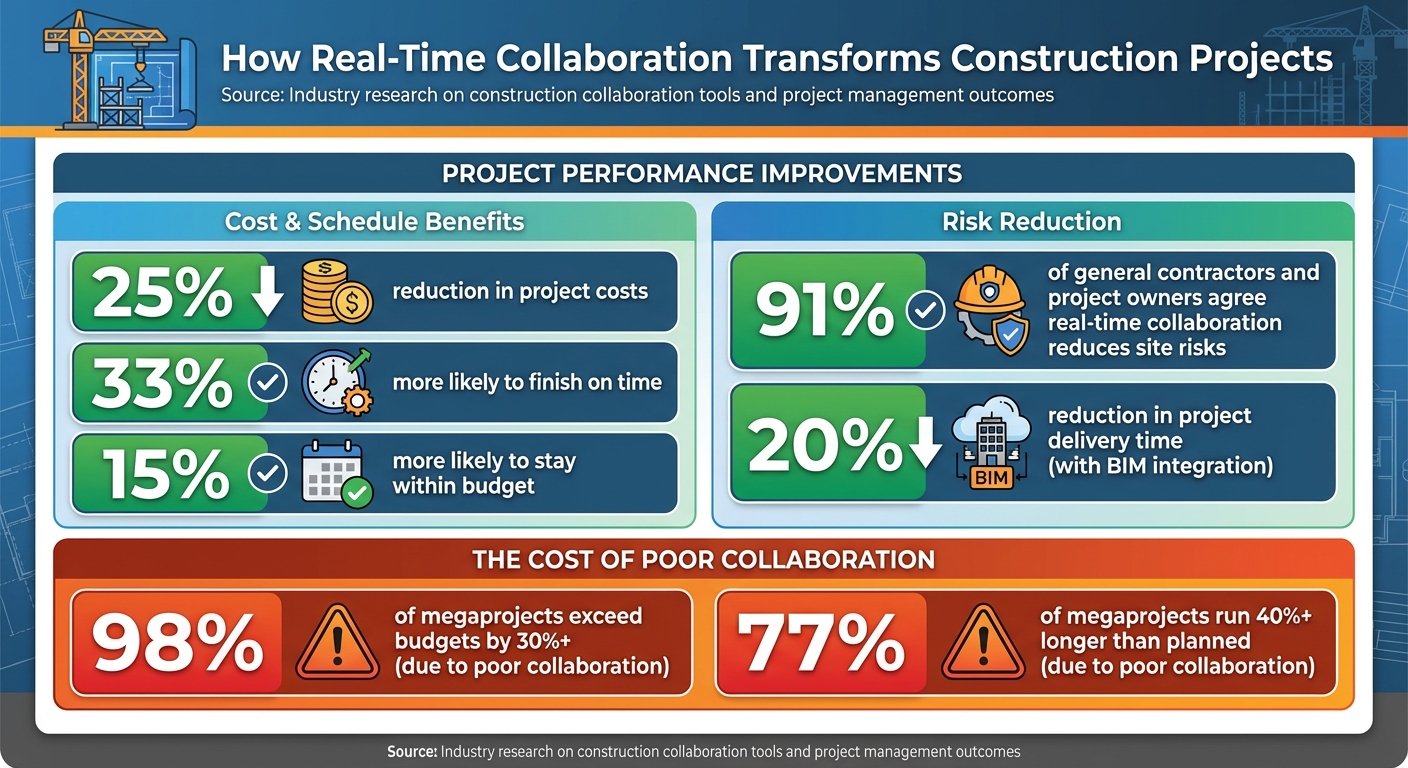
Real-Time Collaboration Benefits in Construction: Key Statistics and Cost Savings
Main Problems Solved by Real-Time Collaboration
Connecting Field and Office Teams
Construction delays often stem from a lack of synchronization between field crews and office staff. Miscommunication arises when teams rely on different plan sets shared through emails or printed copies, leading to errors and confusion. Additionally, phone calls or text messages often leave critical details undocumented, creating gaps in official records.
Real-time collaboration bridges this gap by enabling instant updates to plans and reports, significantly reducing delays. Field crews can use mobile devices to capture photos, notes, and punch-list items, which sync immediately for office review. For instance, when a foreman submits an RFI (Request for Information) directly from the jobsite, complete with attachments and markups, it’s automatically routed to the appropriate reviewer. In many cases, these issues – like material shortages or safety concerns – are addressed within minutes, ensuring swift resolution. This system also simplifies document version management, ensuring everyone works from the same, up-to-date information.
Preventing Version Control Issues
Relying on outdated drawings can be costly. When subcontractors maintain separate copies of specifications, addenda, and RFIs, conflicting interpretations on-site are almost inevitable. According to the World Economic Forum, poor coordination and collaboration are significant factors in 98% of megaprojects exceeding budgets by over 30% and 77% running 40% longer than planned.
Real-time collaboration platforms solve this by centralizing all project documents in a cloud-based repository. Approved versions are clearly labeled, and when revisions are made, the system automatically updates active documents while maintaining a history of past versions. Role-based permissions ensure only authorized users can publish updates, while instant notifications alert all relevant parties to changes. This streamlined approach minimizes confusion, reduces rework, and keeps projects on track.
Tracking Changes and Responsibility
Disputes over project scope, delays, or safety issues often arise when decisions among owners, contractors, and designers are poorly documented. Verbal agreements or scattered email communications make it difficult to confirm who approved a change, when it was communicated, or whether the field team followed the correct instructions. This lack of traceability can lead to finger-pointing, unresolved RFIs, or even litigation.
Real-time collaboration tools address this by maintaining a clear, centralized record of all decisions and changes. Every update is time-stamped and linked to the responsible party, ensuring accountability. This transparency helps prevent disputes and keeps projects moving forward efficiently.
How Real-Time Collaboration Changes Construction Workflows
Centralized Document Storage
Gone are the days of chasing down files scattered across emails, desktop folders, and paper binders. With cloud-based repositories, all project documents – such as drawings, RFIs, submittals, contracts, daily logs, and safety plans – are stored in one central location. This means everyone on the team has access to real-time updates. For example, when an architect uploads revised drawings, project managers, subcontractors, and field crews are notified immediately and can view the changes without delay.
This centralized system eliminates the risk of costly mistakes caused by outdated plans. In fact, 68% of projects using digital collaboration tools report fewer cost overruns compared to traditional methods. The platform keeps a clear version history, ensuring everyone is working with the correct information. Features like searchable document libraries and audit trails make it easy to track who uploaded what and when, which helps with compliance and risk management. With everything in one place, teams can seamlessly transition to live editing and more efficient workflows.
Live Editing and Markups
Real-time collaboration tools allow multiple team members to view, comment on, and annotate the same document at the same time, cutting response times down to minutes. For instance, if a site engineer spots a clash in a drawing and uses markup tools – like arrows, text boxes, or highlights – to flag it, the design team can see the issue immediately. They can then respond with a revised detail or comment directly on the document, eliminating the need for long email chains or scheduled meetings. Each change is timestamped and attributed, so there’s no confusion about who made what update.
This instant feedback loop keeps projects on track. Tools that incorporate BIM (Building Information Modeling) can reduce project delivery time by up to 20% by improving coordination and minimizing rework. When one team member updates a schedule or adds notes to a daily log, the changes appear instantly for everyone else. The platform also tracks revisions and maintains version histories, allowing teams to compare changes, revert if necessary, and ensure accountability at every stage. Plus, mobile access extends these benefits to field crews, keeping everyone connected.
Mobile Access for Field Teams
Mobile access takes the advantages of centralized storage and live editing straight to the jobsite. With tablets and smartphones, field teams can access the latest project information in real time. A foreman, for example, can pull up updated MEP drawings, annotate photos, and attach them to an RFI – all directly from the field. These updates sync instantly with the office, giving project managers immediate insight into site conditions and progress.
Even on large or remote jobsites, mobile apps often work offline and sync data when connectivity is restored. Field teams can easily access specifications, safety plans, and punch lists on their devices, ensuring they’re always working with the most current information. Companies that adopt cloud-based collaboration tools report an average 25% reduction in project costs, thanks to improved coordination and fewer errors. This real-time connection between the field and office helps identify issues early, speeds up approvals, and reduces the chance of expensive fixes later on.
Benefits of Real-Time Collaboration for Construction Projects
Better Communication and Coordination
Real-time updates create a seamless flow of information, significantly improving communication and coordination. When all team members – from field crews to project managers, subcontractors, and clients – access the same updates, the risk of miscommunication drops dramatically. A single source of truth ensures everyone is on the same page, enabling team members to comment directly on documents and tag colleagues for quick responses.
This level of transparency fosters trust across the project team. In fact, 91% of general contractors and project owners agree that real-time collaboration reduces site risks. When roles and responsibilities are clearly defined and visible to everyone, confusion fades, and coordination naturally improves. The outcome? Smoother workflows, fewer disputes, and a team united by common goals rather than individual priorities.
Fewer Errors and Less Rework
Better communication doesn’t just build trust – it also reduces costly mistakes. With access to up-to-date, version-controlled documents, teams avoid working from outdated plans. Real-time markup tools allow field crews to flag issues as they arise, enabling design teams to address them before they escalate into expensive problems.
Projects that leverage collaborative tools are 33% more likely to finish on time and 15% more likely to stay within budget. Early detection of design clashes through these tools prevents rework from the outset. For example, a hospital construction project that used BIM software allowed architects, engineers, and contractors to collaborate throughout the process. This approach reduced clashes and errors while enhancing overall project quality. The quicker teams identify and resolve issues, the less time and money are wasted on avoidable fixes.
Improved Schedule and Budget Control
Real-time collaboration doesn’t just prevent errors – it keeps projects moving efficiently. Up-to-date information accelerates decision-making, eliminating delays caused by waiting for approvals or data. Stakeholders can review and update project details instantly, ensuring that RFIs from the field receive answers within hours, not days. This speed reduces downtime and idle costs while improving resource allocation.
Companies that adopt cloud-based construction collaboration report an average 25% reduction in project costs, thanks to better coordination and fewer instances of rework. Real-time dashboards give project managers instant insights into schedule changes, budget performance, and unresolved issues. This visibility allows them to address potential problems early, preventing small delays from spiraling into major setbacks. When information flows freely between the office and the field, projects stay on schedule – and on budget.
sbb-itb-5eea312
How to Implement Real-Time Collaboration in Your Construction Business
Reviewing Your Current Workflows
Before introducing any new tools, take a close look at how your current processes operate. Map out how information flows – track the movement of drawings, RFIs (Requests for Information), and daily logs from the field to the office. Pay attention to delays caused by outdated documents, unanswered RFIs, or critical information getting buried in emails.
Talk to key team members, including project managers, superintendents, and foremen, to uncover pain points. Are there recurring issues like duplicate data entry or unclear responsibilities for updates? Try to quantify the impact: How often do errors lead to costly rework? How many change orders result from miscommunication? Research shows that poor collaboration can lead to cost overruns of more than 30% and schedule delays exceeding 40% on large projects. If your team still relies heavily on paper documents and email attachments or lacks a unified system for managing documents, it’s time to make a change.
Creating Collaboration Standards
Setting clear standards is key to eliminating confusion and ensuring every team member follows the same processes. Start with a well-organized folder structure, tailored to your projects. Include major categories like Contracts, Drawings, RFIs, Submittals, Change Orders, Safety, and Photos. Use consistent naming conventions for files, incorporating details such as the project code, document type, discipline (if applicable), and date in U.S. format (e.g., 2025-03-15_Project014_ARCH_PLAN_RevB). This approach keeps files easy to sort and search.
Next, establish role-based permissions. Internal teams should have broad access to files, while subcontractors, vendors, and clients only see what’s relevant to them. Restrict sensitive information, like financial details or internal cost codes, to management roles. Also, set clear rules for communication: define who is responsible for uploading and updating specific document types, establish timelines for updates (e.g., within 24 hours of approval), and ensure real-time notifications keep everyone in the loop. These standardized practices promote accountability and consistency across your operations. Once these standards are in place, integrating advanced tools can make workflows even smoother.
After creating standardized workflows, the next step is to implement a comprehensive tool like Contractor Foreman to enhance real-time collaboration. This platform serves as a central hub, combining project management, financial tracking, scheduling, and daily logs – all in one place. By eliminating the need to juggle multiple disconnected tools, Contractor Foreman streamlines your operations.
Its centralized document storage, paired with a mobile app for iOS and Android, ensures that everyone – whether in the office, on-site, or even clients – has access to the latest information from any device. Field teams can view updated drawings, upload photos, submit daily logs, and flag issues directly from the site. Meanwhile, project managers can monitor progress and budgets in real time from the office.
Contractor Foreman also integrates with QuickBooks and Zapier, automating financial processes and reducing manual data entry. The platform’s client portal allows you to share updates, photos, and change orders directly with owners, cutting down on email exchanges and ensuring everyone is working from the same information. With over 35 features, plus free training and support, Contractor Foreman simplifies collaboration for contractors across the U.S.
To get started, choose one or two pilot projects to test the system. Configure your folder structure, naming conventions, and permissions, and train the project teams involved. During the pilot, monitor metrics like RFI response times, rework caused by communication issues, and how well schedules are adhered to. Gather feedback from superintendents and subcontractors to fine-tune your workflows. Once the pilot shows improvements – faster issue resolution, fewer drawing-related errors, and better budget and schedule visibility – you’ll have the evidence you need to roll out real-time collaboration across your entire business.
Conclusion
Real-time collaboration is reshaping the construction industry by connecting all stakeholders with up-to-the-minute information and speeding up communication. Research shows that projects using these methods are 33% more likely to meet deadlines, 15% more likely to stay within budget, and can reduce costs by 25%. These improvements directly impact profitability, helping firms maintain healthy margins while building a reputation for reliability.
In today’s U.S. construction market, where tight margins and demands for transparency are the norm, real-time collaboration is no longer optional – it’s essential. Companies adopting these tools enjoy quicker decision-making, better risk management, and stronger relationships that lead to repeat business and referrals. On the flip side, those sticking to outdated methods like paper plans and long email threads risk slower responses, increased claims, and potential damage to their reputation as digital tools become standard.
The benefits go beyond staying on time and within budget. Real-time collaboration minimizes risk by ensuring crucial updates – like safety instructions or design changes – reach the right people instantly. Digital records that track every change with timestamps and author details simplify assigning responsibility, resolving disputes, and supporting claims. This not only reduces conflicts but also strengthens trust with owners and subcontractors.
To make the most of these advantages, start by reviewing recent projects to identify issues caused by miscommunication or outdated documents. Then, test a real-time collaboration platform on an upcoming project. Centralize drawings, RFIs, and daily logs in one system, give field crews mobile access, and standardize how updates are documented and approved. Tools like Contractor Foreman offer integrated solutions for collaboration, project management, scheduling, and financial tracking – accessible via web and mobile, with QuickBooks and Zapier compatibility. Moving to a unified digital platform can improve efficiency, strengthen your competitive edge, and boost profitability.
FAQs
How do real-time collaboration tools help avoid version control problems in construction projects?
Real-time collaboration tools solve the headache of version control by letting team members work on the same document at the same time. Changes are synced instantly, so everyone always sees the latest updates.
This eliminates the chaos of outdated files or clashing edits and creates a clear history of changes. By ensuring everyone is aligned, these tools simplify communication and boost the accuracy of projects.
How do real-time collaboration tools help manage budgets and schedules effectively?
Real-time collaboration tools simplify managing budgets and schedules by offering instant updates on project costs and progress. With these tools, team members can monitor task completion as it happens, keeping everyone aligned with the project’s timeline and financial goals.
They also allow teams to quickly communicate changes or address issues, minimizing delays and avoiding expensive mistakes. By improving coordination, these tools help projects stay on track and boost overall productivity.
How does mobile access improve communication between field teams and office staff?
Mobile access plays a key role in connecting field teams with office staff, allowing for instant communication and real-time updates. With the ability to access essential project details – like schedules and documents – from virtually anywhere, team members can stay aligned and informed.
This constant connection helps cut down on delays, reduces mistakes, and ensures projects stay on track. It empowers teams to make quick decisions and collaborate effectively, regardless of their location.
Related Blog Posts







