
OSHA — four letters you really don’t want to cross.
A serious safety violation could cost you up to $16,131. Repeat it or ignore it outright, and that penalty jumps to $161,323. Miss the deadline to fix a cited issue, and OSHA can add up to $16,131 for every day it stays unresolved.
No one needs that added expense and stress!
And that’s not a stretch — OSHA has been cracking down that hard. In 2024, OSHA issued 15,900 construction citations totaling $127.4 million in penalties — about $8,012 per citation.
That makes good documentation non-negotiable.
A construction compliance tool should give you a clear record trail for incidents, inspections, toolbox talks, corrective actions, and OSHA logs — and that’s worth factoring in when you’re choosing a construction app.
But who has time to comb through every platform’s website, help center, and feature list just to see what it actually covers?
We did that work for you. Below is a side-by-side comparison of construction compliance tools, based on how their features map to common OSHA documentation and safety workflows.
In 2024, OSHA issued 15,900 construction citations and $127.4 million in penalties, or about $8,012 per citation. That puts the focus on one thing: a tool must create a clear record trail for incidents, inspections, toolbox talks, corrective actions, and OSHA logs.
The review points to five different strengths:
- Contractor Foreman: best link between safety records, project files, and accounting
- Procore: strong project-level safety workflows, but OSHA log setup needs extra work
- SafetyCulture: strong mobile inspections and offline reporting
- Raken: direct OSHA ITA support and fast field reporting
- Fieldwire: strong hazard tracking tied to plan locations and task closeout
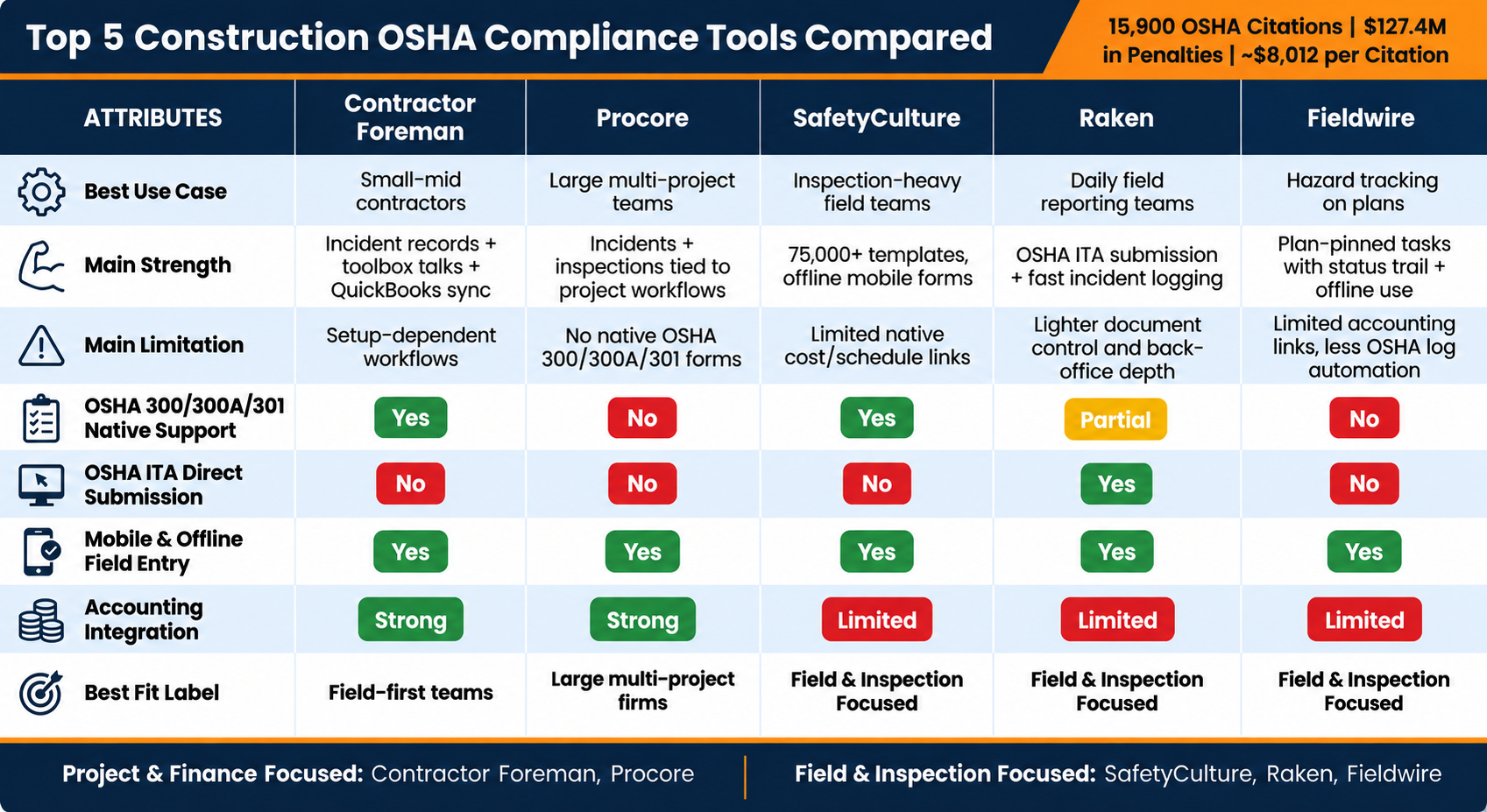
Quick Comparison
| Tool | Best Use | Main Strength | Main Limit |
|---|---|---|---|
| Contractor Foreman | Small to mid-size contractors | Incident records, toolbox talks, project files, and QuickBooks integration in one system | Setup quality affects tagging and workflow depth |
| Procore | Large multi-project teams | Incidents, inspections, and observations tied to project workflows | No native OSHA 300, 300A, or 301 forms |
| SafetyCulture | Inspection-heavy field teams | Mobile forms, offline use, alerts, and template library | Cost and schedule links rely more on integrations |
| Raken | Daily field reporting teams | OSHA ITA submission, incident logging, toolbox talks | Lighter depth for document control and back-office links |
| Fieldwire | Teams tracking hazards on plans | Plan-based tasks, due dates, status trail, and offline use | Limited accounting links and less OSHA log automation |
The strongest fit depends on the recordkeeping gap being fixed first: field entry, audit support, or project and accounting links. Across all five tools, the same pattern holds: the software only works when crews enter records on time and keep the jobsite trail complete.
The main split is simple: Contractor Foreman and Procore tie safety records more closely to project and cost data, while SafetyCulture, Raken, and Fieldwire focus more on field use, inspections, and hazard follow-up.
sbb-itb-5eea312
1. Contractor Foreman
Contractor Foreman keeps incident reports, daily logs, safety meetings, and project files in one place. For OSHA traceability, that matters. Records stay tied to each job instead of getting scattered across texts, paper forms, and office folders.
OSHA Record Mapping
If a crew member reports an injury from the field, that incident can flow straight into the OSHA 300 log. The same record can also populate Forms 300, 300A, and 301, which cuts down on duplicate entry. The system also flags recordable incidents for the OSHA 300A summary.
That sounds simple on paper, but it depends on one thing: crews have to record what happened while they’re still on the jobsite.
Field Documentation Workflows
Each daily log records project details, work performed, weather, crew presence, safety incidents, near misses, PPE checks, and inspector visits. Every entry is tied to a specific project and date. Photos and files added in the field are automatically filed into the project folder, so the office isn’t left piecing things together later.
Safety meetings are handled in the same system. Contractor Foreman includes more than 1,000 safety topics in English and Spanish, along with attendance, signatures, photos, and review questions. That gives teams a clean toolbox talk record they can use during OSHA inspections or internal reviews. Crews can also enter records, photos, and signatures from mobile devices on the jobsite.
Of course, none of that helps much if the records turn into a mess after the project closes.
Alert and Retention Controls
The Directory module tracks certifications and insurance and sends expiration alerts. Incident records and daily logs stay searchable after closeout, which helps during audits. Task tags can also send corrective actions and follow-up work to the right manager, so issues don’t just sit there.
Project and Financial Data Links
Contractor Foreman also connects safety records with project and cost data. It syncs with QuickBooks Online and Desktop in both directions, which helps tie safety-related costs back to the right project financial records. Through Zapier, teams can trigger follow-up tasks, assign corrective actions, or notify project stakeholders when an incident is logged. In plain terms, that means a safety event doesn’t stop at documentation – it can move straight into job costing and follow-up work.
2. Procore

Procore moves beyond basic file storage. It leans into field workflows you can set up around your team, with project-level tracking that helps you follow what happened, where it happened, and what came next.
For OSHA-related recordkeeping, Procore uses its Quality & Safety area to pull key field records into one place. That includes Inspections, Observations, Incidents, Daily Log, and Forms. If you’re looking for something close to task tagging, Procore gets there through its observation and action workflow, which can send follow-up items to the right crews or managers.
OSHA Record Mapping
Procore’s Incidents tool records details like incident type, severity, contributing conditions, and the people involved. Its Safety Hub brings together Observations, Inspections, and Incidents into charts that split recordable and non-recordable incidents, which gives safety teams a clearer view of where OSHA recordkeeping may come into play.
Procore does not natively create OSHA Forms 300, 300A, or 301. So most teams work around that by setting up custom fields and severity levels that line up with OSHA categories, then exporting the data to a spreadsheet or an outside EHS system for the official logs.
That setup matters because it turns safety data into usable field forms, inspection records, and project trails instead of leaving it scattered across tools.
Field Documentation Workflows
The Daily Log has a Safety Violations section that can track time, subject, safety notice, issued-to, compliance due date, comments, and attachments.
Teams can also build custom inspection forms and checklists for OSHA compliance walks, equipment checks, or task-based audits, then complete them on mobile devices in the field. If an inspection turns up a serious hazard, users can create an Incident record directly from that finding. That helps keep the OSHA paper trail tied to the same project and location.
Alert and Retention Controls
Procore can send alerts when incidents hit set severity levels, which helps EHS managers and project leaders react fast to events that may be recordable. Safety Hub also shows open inspections and overdue observations. Incident records, inspections, and safety files stay in one central system for audits.
Once a record is entered, speed starts to matter. The next issue is how fast that information gets to the teams and systems that need to act on it.
Project and Financial Data Links
Procore connects with major accounting platforms. That gives teams a way to tie safety data back to project costs, change orders, or equipment records when they want to see the cost impact of an incident.
It doesn’t automatically map OSHA-specific cost fields, but custom reporting can help close that gap. In practice, this is best used to connect incident costs and follow-up work, not as a stand-in for OSHA logs.
3. SafetyCulture
SafetyCulture stands out when field crews need fast OSHA-related documentation. Teams can complete inspections and incident reports on smartphones or tablets, and they can still do it offline on remote jobsites.
OSHA Record Mapping
SafetyCulture supports OSHA recordkeeping with customizable incident and inspection templates, plus digital 300, 300A, and 301 logs that teams can maintain and export for OSHA reporting. Templates can be set up to collect OSHA-related details like injury type, affected body part, days away from work, job title, and location. Its library also includes more than 75,000 customizable inspections and checklists, including OSHA-focused forms.
Still, OSHA recordability needs manual review. So SafetyCulture works best as a strong documentation layer, not a fully automated OSHA recordkeeping system.
That matters because the system only works if crews record the right details in the field.
Field Documentation Workflows
Crews can log incidents and hazards on mobile devices and attach photos, video, GPS location, weather, and notes. They can also tag records with categories like near miss, lost time injury, or property damage. That makes it easier to spot patterns and review recordability later. Offline capture helps fill a common gap too, especially when the jobsite has weak or no signal.
Once a report is entered, speed starts to matter. Supervisors need to see it, and follow-up tasks need to move.
Alert and Retention Controls
When someone submits an incident, SafetyCulture sends alerts to supervisors and safety managers through in-app notifications and email. Teams can also schedule recurring inspections, like daily housekeeping checks or weekly scaffold audits, with reminders built in. Completed inspections, incident reports, and supporting evidence are stored in SafetyCulture’s cloud archive, which helps with OSHA retention practices.
Project and Financial Data Links
SafetyCulture connects with construction platforms through API and direct integrations. One clear example is the Procore integration. Completed inspection reports can be uploaded as PDFs to the right project and stored in a dedicated SafetyCulture inspections folder.
That setup puts safety records next to project drawings, RFIs, submittals, and schedule data. In plain terms, it becomes easier to tie a safety event to a certain phase of work or a subcontract package. Exported incident data can also map to cost codes for injury costs, claims, and corrective actions through custom workflows.
That gives the record a job beyond the original field form, especially for scheduling, claims, and cost tracking.
4. Raken
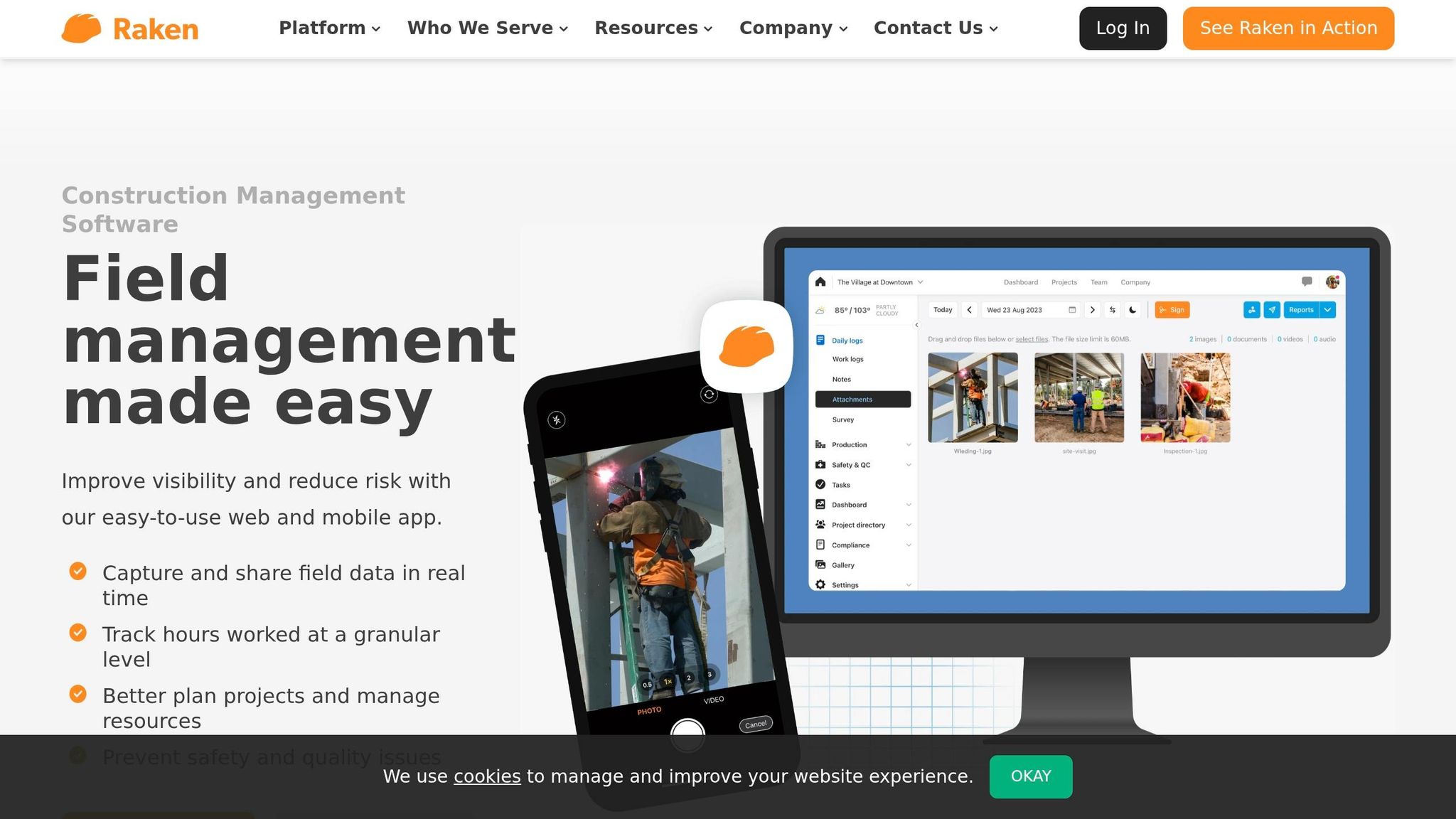
Raken puts OSHA traceability right into mobile field reporting and direct ITA submission. In plain terms, the main thing to check is simple: do the records stay tied to the jobsite, project, and people involved?
OSHA Record Mapping
Raken supports direct electronic submission of yearly work-related injury and illness data to OSHA’s Injury Tracking Application (ITA). Its incident records can capture injury type, recordable status, injured employee details, investigation notes, and outcomes. Users can also sort incidents as near miss, first aid, recordable injury, property damage, equipment failure, or environmental, while marking OSHA recordability at the time of entry.
That matters because it creates a cleaner trail from the first field report all the way to OSHA submission.
Raken’s Performance plan includes Checklists, Incidents, Forms, Safety Insights, and OSHA ITA integration for about $59 per user/month.
Field Documentation Workflows
Raken’s Safety & QC workflows pull daily reports, toolbox talks, checklists, forms, and incident records into one system with timestamps and location data. That setup helps teams avoid scattered paperwork and pieced-together records with construction management software for small business.
Safety & QC works on web and mobile, so field crews can log hazards and observations on site, while office staff review everything in one central record. If you’ve ever had to track down a missing form after an incident, you know why that matters.
The platform also includes 100+ preloaded toolbox talks on topics like fall protection and chainsaw safety, plus digital attendance sheets that become part of the compliance record.
Alert and Retention Controls
Completed reports, incident forms, toolbox talks, and checklist results stay stored in the cloud for audit review. Exportable PDFs also make OSHA inspections easier to handle.
Project and Financial Data Links
Once the field record is captured, the next issue is whether it connects well to project controls. Raken is strongest on the field documentation side. Its scheduling and accounting use comes more from reviewing safety records against job cost codes, subcontractors, and milestones.
5. Fieldwire
After mobile incident capture, Fieldwire moves the work from spotting the problem to tracking the fix. It pins safety issues directly to plan sheets as tasks, so each hazard stays tied to a clear jobsite location.
OSHA Record Mapping
Fieldwire does not auto-create OSHA 300/301 logs, but its task history gives teams the backup record they need. Each task keeps a timestamped trail of the exact location, hazard type, standard reference, interim controls, and final disposition. Those details line up with OSHA recordkeeping needs.
For recordable incidents, teams still need to confirm recordability, complete Form 301, and cross-reference the Fieldwire task ID. In plain English: the task only helps if the crew creates it when the hazard is found, not hours later when details start getting fuzzy.
Field Documentation Workflows
Tasks created on the plan build a corrective-action trail from start to finish. A foreman or safety tech can spot a hazard, create a task on the plan sheet, attach photos, and apply a safety form to record the hazard, controls, and required corrective actions right from a mobile device, even when offline.
From there, the task gets assigned to the right subcontractor or crew with a due date. Status then moves through stages like “Open”, “In progress”, “Ready for inspection,” and “Closed.” That simple status flow matters. It gives everyone a shared view of what still needs attention and what’s ready for sign-off.
Fieldwire also includes templates for safety audits, daily reports, and toolbox talks. That helps teams capture the same kinds of details across projects, including attendees and signatures.
Alert and Retention Controls
Fieldwire sends task notifications automatically when safety items are created, assigned, updated, or hit their due date. That helps keep corrective actions from getting stuck in limbo. Project-wide notifications also support urgent messages like stop-work orders or severe weather alerts.
Safety records stay connected to the project and can be exported as PDF or CSV for retention.
Project and Financial Data Links
Once a hazard is pinned to a plan, the next issue is whether that record can connect to schedules and cost tracking. Fieldwire handles that through exports and API, not native cost tracking. Its REST API and export tools move task and form data into scheduling or financial reporting systems, where teams can tie safety issues to phase, trade, cost code, or responsible party.
Contractor Foreman Feature Fit for OSHA Traceability
Contractor Foreman works best when OSHA records need to stay linked to the same project, schedule, and financial file.
That’s where the paper trail stands out most: records stay connected from the jobsite all the way to the project file.
Incident tracking is the clearest match. Incident records can feed the OSHA 300 log, which keeps the field report and the log entry in one system.
Safety Meetings record attendance, signatures, topic, date, time, and jobsite. That gives teams a solid toolbox talk record they can point back to later.
Project folders help keep backup material with the record itself. Photos, forms, and other documents stay attached to the project folder, and crews can add them from mobile devices in the field.
QuickBooks and Zapier push those safety records into job costs and connected workflows.
The main weak spot is simple: field entry has to happen on time. Automation doesn’t help much if crews wait too long to log events. The system is only as complete as the incident reports, daily logs, and meeting records entered when they happen.
That mix makes the next pros-and-cons review by function pretty straightforward.
Pros and Cons by Feature Area
The table below cuts the five tools into a fast decision view. It shows where each one lines up well with OSHA work, where it falls short, and who it’s built for.
| Tool | Strongest OSHA Mapping Strengths | Main Tradeoff | Best Fit |
|---|---|---|---|
| Contractor Foreman | Custom fields, task tags, and QuickBooks sync connect safety records to job data | Tagging and workflows depend on how well the contractor sets them up, so there is less out-of-the-box OSHA taxonomy guidance than in dedicated safety tools | Small to mid-size U.S. contractors who want project management, safety documentation, scheduling, and financial tracking in one system |
| Procore | Observations, inspections, and incidents can be assigned and tracked through closure | Powerful, but complex to configure for OSHA-specific workflows | Large contractors managing multiple projects with dedicated admin support |
| SafetyCulture | A large library of OSHA-oriented templates makes it flexible for inspection-heavy OSHA workflows | Direct ties to construction scheduling and cost tracking are limited, so broader OSHA traceability often depends on integrations | Trades and teams that need flexible, inspection-heavy OSHA workflows |
| Raken | OSHA ITA integration and fast field incident reporting keep records tied to the jobsite and submission-ready | Not a full document management system, and native scheduling and financial depth is lighter than broader construction management platforms | Field-reporting-focused teams that prioritize daily logs, toolbox talks, and fast incident submission |
| Fieldwire | Safety audit findings become corrective actions with owners, deadlines, and a plan-linked location trail | Accounting integrations are limited, and OSHA log automation is less prominent than in Raken or Contractor Foreman | Field coordination teams that need hazard tracking tied to plan locations and trade-specific tasks |
The main divide is pretty simple. Contractor Foreman and Procore do a better job tying OSHA records back to project finance, schedules, and job data. SafetyCulture, Raken, and Fieldwire lean more field-first, where the OSHA process starts with inspections, observations, photos, and incident details collected on-site.
Conclusion
This comparison comes down to one simple question: which tool turns field activity into an auditable OSHA record with the least friction? The answer depends on the OSHA job you need to handle first: field capture, audit readiness, or back-office integration.
Start with the feature area that matters most to your crew.
- Field capture first? Pick the tool crews will use on-site: fast mobile entry, photos, timestamps, and offline access.
- OSHA audit readiness first? Put the focus on time-stamped incident records that line up cleanly with OSHA logs.
- Accounting integration first? Pick the platform that keeps safety data linked to schedules and accounting without re-entry.
Smaller contractors usually need something simple. Larger firms usually need more control across workflows. If your team needs OSHA records tied to daily logs, safety meetings, and financial data in one system, an all-in-one platform keeps safety records, project data, and accounting in the same workflow.
The best pick is the one your team uses every time, so every record stays complete. A tool that field crews open every day will beat a more advanced platform that sits untouched. Test it on one or two active projects for 60–90 days using real OSHA events. Then look ahead 3–5 years and choose a tool that fits what you need now and where the business is headed, so you don’t have to switch platforms later.
FAQs
Which OSHA records should a construction tool track?
Track OSHA incident records for workplace injuries, near misses, and employee write-ups in one place. Then use that data to create and keep up your OSHA 300 Log, including year-end reports, without digging through scattered files when deadlines hit.
You can also store supporting documents and photos with each incident record. That keeps everything organized, easy to find, and ready when OSHA paperwork is needed.
How do mobile forms and offline reporting help OSHA compliance?
Mobile forms let supervisors log safety observations and incidents right from the field. That makes it easier to build complete records with photos and notes, which helps support OSHA documentation.
Offline reporting also matters more than people think. On many jobsites, spotty service can slow everything down. When teams can still enter reports without a connection, fewer items get missed, and incident and OSHA records stay more complete.
Contractor Foreman connects that field data to the project’s compliance trail, including automatic OSHA 300 log entries based on incident information.
What should I look for in OSHA log and accounting integration?
Look for two-way data flow that cuts out double entry and helps keep job costing on track. Incident records should connect straight to OSHA 300 log entries so they populate on their own and stay up to date.
It also helps when scheduling and daily job activity sync with accounting. And for audits, related documents, photos, and forms should live in the project workspace, where the team can store them and find them fast.







