
Mobile construction management tools have been sprouting like mushrooms on a damp jobsite in the past few years. Every one of them claims they’re the best, of course. And the cheapest, too.
But once you actually try them, EEENK! The app crashes the moment you lose signal, or the “basic” features turn out to be locked behind another upgrade.
Now you’re here, arms crossed and eyebrows raised, one bad login away from swearing off construction apps entirely.
We’re here to say: please don’t.
The right mobile construction management tool is the backbone of good management — keeping schedules tight, budgets under control, and communication clear, while saving thousands of dollars and wiping out a painful amount of admin work.
Looking for a mobile construction management tool that actually works for you?
Here’s a quick look at four popular options:
- Contractor Foreman: Affordable ($49/month), 35+ features, QuickBooks integration, ideal for small contractors.
- RedTeam Go: Simple setup, budget-friendly, QuickBooks integration, great for small to mid-sized teams.
- Fieldwire: Offline mode, voice-to-text, jobsite-focused, best for field coordination.
- Procore: Advanced features, 300+ integrations, tailored for large-scale projects, higher cost.
Quick Comparison:
| Tool | Key Features | Pricing | Best For |
|---|---|---|---|
| Contractor Foreman | 35+ features, QuickBooks sync | $49/month | Small contractors |
| RedTeam Go | Budget tracking, QuickBooks | Affordable | Small to mid-sized teams |
| Fieldwire | Offline mode, voice-to-text | Affordable | Field coordination |
| Procore | Advanced tools, 300+ integrations | Custom ($500+) | Large-scale projects |
These tools help contractors stay organized, improve communication, and manage costs effectively. Choose based on your team size, project complexity, and budget.
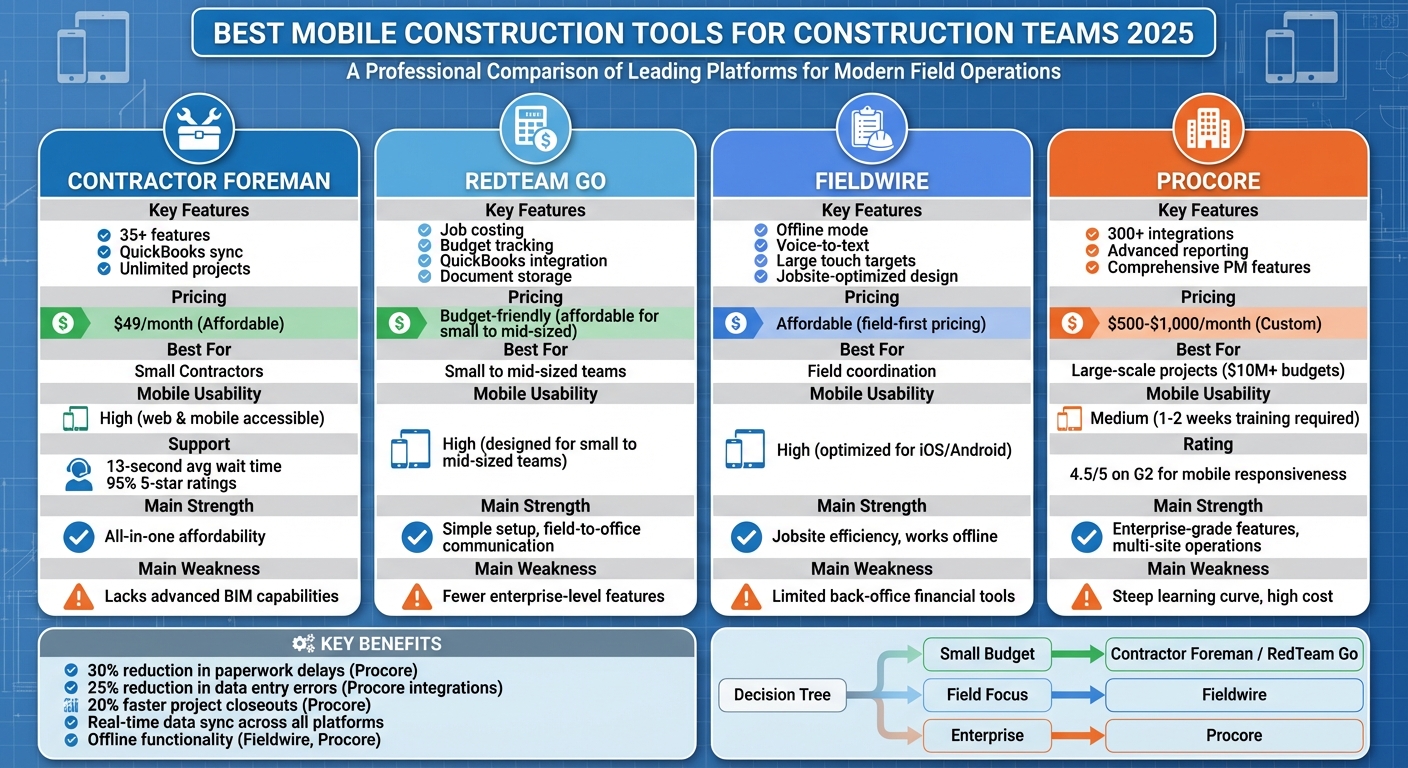
Mobile Construction Management Tools Comparison 2025: Features, Pricing & Best Use Cases
1. Contractor Foreman
Mobile Features
Contractor Foreman brings over 35 features to its iOS and Android apps, making it a versatile tool for construction teams. These features include daily logs, timecards, RFIs, change orders, and safety documentation, all accessible on mobile devices. Field teams can clock in and out directly from their phones, assign hours to specific cost codes, and attach site photos. Even better, data syncs automatically once the device reconnects to the internet. Superintendents can log details like weather conditions (in °F), crew size, and completed work, ensuring accurate records for potential delays or disputes – without waiting until the day’s end.
Push notifications also keep the team informed about schedule updates, approvals, and new assignments, helping everyone stay on the same page.
Field Usability
Built with small to mid-sized contractors in mind, Contractor Foreman balances powerful functionality with user-friendly design. Field crews can effortlessly update punch lists, safety checklists, and incident logs from their mobile devices, minimizing the chance of overlooked tasks during project closeout. Since field data flows directly into budgets and invoices, project managers can track costs and progress almost in real time.
In Zapier’s 2025 roundup, Contractor Foreman was recognized as “the best all‑around functionality” construction management software, highlighting its extensive tools at a competitive price point. To make onboarding easier, the platform provides training and support for new users.
The workflow isn’t just limited to the field – it integrates seamlessly with other tools for a more connected experience.
Integrations
Contractor Foreman works smoothly with QuickBooks Online and Desktop, syncing customer data, cost codes, invoices, and payments to maintain accurate financial records. It also connects with Zapier, allowing contractors to automate workflows – like pushing new leads into a CRM or triggering back-office tasks when contracts are signed – without needing custom development. Other integrations include CompanyCam, Stripe, Gusto, and Google Calendar, with plans to add Xero by mid-2026. These connections eliminate redundant data entry and make financial tracking more efficient.
Pricing
Our pricing starts at $49/month for one user with unlimited projects. For those needing more features or users, the Standard plan is $79/month for three users, and the Unlimited plan is $249/month. We also offer a 30-day free trial, a 100-day money-back guarantee, and discounts for annual billing, making it a flexible option for contractors of all sizes.
2. RedTeam Go
Mobile Features
RedTeam Go brings essential tools to small and mid-sized contractors through its iOS and Android apps. Whether it’s job costing, budget tracking, or document storage, the mobile platform ensures these tasks can be managed directly from the field. Field crews can log material costs or labor hours on-site, feeding real-time updates back to the office. Plus, the app enables instant sharing of documents – like blueprints or project photos – so everyone stays on the same page throughout the build.
The app’s design emphasizes ease of use, with a quick setup process and straightforward navigation. Teams can monitor budgets and progress in real time, helping to catch potential cost overruns before they escalate. This focus on usability ensures that on-site teams can operate efficiently, with tools designed for their specific needs.
Field Usability
RedTeam Go caters to contractors seeking a mobile-friendly solution without the complexity of enterprise systems. Field teams can access job details, track progress, and manage documents directly from the job site. Unlike more cumbersome platforms, RedTeam Go keeps things simple, making it easy for crews to jump in and start working. Experts highlight its suitability for small to mid-sized contractors who need efficient field-to-office communication. With its streamlined setup, teams can spend less time on configuration and more time focusing on their projects.
Integrations
To simplify financial management, RedTeam Go integrates seamlessly with QuickBooks [7]. This connection ensures that updates from the field – like expenses or labor hours – flow directly into office accounting systems. By reducing the need for manual data entry, the integration keeps financial records accurate and up-to-date, saving time and minimizing errors.
Pricing
RedTeam Go is priced with small to mid-sized contractors in mind. It avoids the hefty price tags of enterprise-level tools, offering a budget-friendly option that doesn’t compromise on functionality. This makes it an accessible choice for contractors looking for effective tools without exceeding their financial limits.
3. Fieldwire
Mobile Features
Fieldwire is built with the jobsite in mind, offering a mobile-friendly solution for both iOS and Android. It gives teams direct access to plans, punch lists, and tasks, even in offline mode. This means you can mark up drawings, complete checklists, capture photos, and submit RFIs without worrying about connectivity – everything syncs automatically once you’re back online. Push notifications keep everyone updated on schedule changes and safety alerts in real time. Plus, its large touch targets and high-contrast design make it easy to use outdoors, whether you’re dealing with bright sunlight or wearing gloves. Superintendents can quickly pull up the latest plans and assign punch list items on the spot, keeping the workflow smooth and efficient [7].
Field Usability
Fieldwire’s interface is designed to simplify on-site tasks. With just a few taps, you can access daily tasks, drawings, and timesheets, or log issues and update reports. The voice-to-text feature is especially handy in noisy environments, making data entry faster and less of a hassle. Built-in templates and dropdown menus make inspections and checklists quicker and easier to complete. Fieldwire’s reputation for streamlining field coordination has been highlighted in multiple 2025 software reviews, and it’s a go-to tool for subcontractors and on-site teams. Its simplicity means you can get started with minimal training, saving time and effort.
Integrations
Fieldwire connects the field to the office seamlessly by integrating with popular platforms like Procore, Autodesk (via Revit/AutoCAD exports), Box, Dropbox, OneDrive, and Google Drive. These integrations ensure that field photos and reports sync automatically to centralized systems, cutting down on duplicate data entry and keeping everything organized [7].
Pricing
Fieldwire’s pricing structure reflects its focus on efficient, field-first workflows without the hefty costs of enterprise-level solutions. While the exact cost depends on team size and the features you need, it’s consistently recognized as an affordable option for contractors who prioritize on-site efficiency over back-office financial tools.
sbb-itb-5eea312
4. Procore

Procore takes mobile efficiency to the next level, catering to large-scale operations with seamless connectivity and comprehensive tools.
Mobile Features
Procore’s mobile app, available for both iOS and Android, is designed to keep enterprise teams connected, even on the jobsite. It allows field crews to handle a wide range of tasks, including updating project data, tracking finances, managing quality and safety protocols, and addressing RFIs and punch lists. A standout feature is its offline mode, which automatically syncs updates once connectivity is restored. This is particularly helpful for remote or low-connectivity areas, enabling teams to capture photos, log progress, and update tasks without delays. These features help minimize paperwork-related delays by as much as 30%.
Field Usability
The app is built to handle the complexities of multi-site projects. With just 1–2 weeks of training, teams can quickly adapt to its features. Foremen benefit from tools like geolocation check-ins and voice-to-text notes, which simplify task management across multiple sites. Reviews on G2 praise the app for its reliability in challenging conditions, such as low-connectivity or dusty environments, giving it an impressive 4.5 out of 5 rating for mobile responsiveness.
Integrations
Procore works seamlessly with over 300 tools, including popular platforms like QuickBooks, Sage, Autodesk BIM 360, Microsoft Teams, and Zapier. These integrations significantly reduce data entry errors, cutting them by 25%.
Pricing
Procore offers custom pricing, typically ranging from $500 to $1,000 per month per project or user. This pricing model is ideal for teams managing projects with budgets of $10 million or more. For exact rates, you can request a demo. The platform’s ability to speed up project closeouts by up to 20% makes it a worthwhile investment.
Strengths and Weaknesses
Here’s a breakdown of the key strengths and trade-offs for each mobile tool discussed earlier.
Each platform offers unique advantages but also comes with certain limitations. Contractor Foreman stands out for its affordability at just $49/month and its all-in-one solution, boasting over 35 features. It supports unlimited projects, provides free training, and offers excellent customer service – users report an average wait time of 13 seconds and 95% of chats rated 5 stars. However, as a general-purpose tool, it may lack advanced enterprise-level options like BIM integration, which are often essential for larger firms.
RedTeam Go caters to small and mid-sized contractors with its focus on job costing, budget tracking, and document storage. Its straightforward setup and seamless QuickBooks integration make it a practical choice for bridging field and office operations. That said, it doesn’t include some of the more advanced features typically found in platforms designed for enterprise use.
Fieldwire shines in field coordination, thanks to its user-friendly interface, offline functionality, and jobsite-optimized design with large touch targets. Features like voice-to-text and built-in templates simplify tasks such as inspections and checklists. However, its focus on field-first workflows means it offers fewer back-office financial tools.
Procore is widely regarded as a go-to solution for managing large-scale projects. It delivers robust project management features, advanced reporting, and over 300 integrations. Additionally, its offline mode is well-suited for multi-site operations. However, its learning curve is steep, requiring 1–2 weeks of training, and its pricing is tailored toward enterprise budgets.
The table below summarizes the key points for easy comparison:
| Tool | Key Strengths | Main Weaknesses | Mobile Usability | Pricing (USD) |
|---|---|---|---|---|
| Contractor Foreman | 35+ features, unlimited projects, fast support | Lacks advanced BIM capabilities | High – web and mobile accessible | $49/month |
| RedTeam Go | Simple setup, QuickBooks integration | Fewer enterprise-level features | High – designed for small to mid-sized teams | Budget-friendly for small to mid-sized contractors |
| Fieldwire | Offline mode, voice-to-text, jobsite-optimized | Limited back-office financial tools | High – optimized for iOS/Android | Affordable, field-first pricing |
| Procore | 300+ integrations, comprehensive PM features | Steep learning curve, enterprise pricing | Medium – training may be required | Custom ($500–$1,000/month) |
Ultimately, your choice will depend on factors like team size, project demands, and budget. For smaller contractors, Contractor Foreman offers a cost-effective, feature-rich option. On the other hand, enterprise teams handling complex, large-scale projects might find Procore worth the investment despite its complexity.
Conclusion
Selecting the right mobile construction management tool boils down to identifying how well a platform aligns with your specific needs as a contractor. Smaller teams and specialty subcontractors often benefit from tools that balance affordability, ease of use, and essential features without overwhelming complexity. Contractor Foreman stands out in this category, offering tools like scheduling, daily logs, QuickBooks integration, and support for unlimited projects – all tailored for residential contractors and remodelers working within tight budgets.
For larger teams or more complex projects, the range of options expands. General contractors overseeing multi-site operations might lean toward Procore for its advanced capabilities, even if it comes with a steeper learning curve. Subcontractors focused on jobsite efficiency could find Fieldwire a better fit, while RedTeam Go provides a practical solution for small to mid-sized commercial contractors looking for a balance of features and usability. With these choices, contractors of all sizes can find a tool that matches their operational demands and workflows.
When it comes to meeting typical U.S. jobsite requirements – such as mobile access, imperial measurements, USD-based financial tracking, and QuickBooks integration – Contractor Foreman delivers a well-rounded solution. Expert reviews have highlighted its robust feature set and competitive pricing, making it an excellent all-in-one platform for many contractors aiming to streamline their daily operations.
FAQs
What should small contractors look for in a mobile construction management tool?
When choosing a mobile construction management tool, small contractors should prioritize user-friendly design, cost-effectiveness, and features tailored to their specific workflows. Key functionalities to look for include project management, scheduling, and financial tracking. Since contractors are often on the move, mobile accessibility is a must for real-time updates, and seamless integration with existing tools can help keep operations running smoothly.
It’s also smart to think ahead: look for a tool that can grow with your business and offers dependable customer support to resolve issues quickly. By focusing on these essentials, contractors can find a solution that boosts productivity and simplifies day-to-day tasks.
How do mobile construction tools boost efficiency and improve communication on-site?
Mobile construction tools simplify on-site operations by providing teams with instant access to essential project details, schedules, and documents through their smartphones or tablets. This means team members can quickly log updates, tackle issues on the spot, and coordinate tasks seamlessly – cutting down on delays and confusion.
These tools also improve communication with features like direct messaging, notifications, and task management. By streamlining collaboration and enabling quicker decisions, they help minimize miscommunication and keep projects moving smoothly.
What’s the difference between tools for small teams and those for large-scale construction projects?
The key distinctions between tools for small teams and those designed for large-scale construction projects revolve around their scalability, complexity, and features. Tools aimed at small teams are generally straightforward and easy to use, focusing on core needs such as project management, scheduling, and communication. They’re often budget-friendly and simple to set up, making them a great fit for smaller operations or contractors who are just getting started.
In contrast, tools for large-scale projects are built to manage more intricate workflows. These platforms typically offer advanced capabilities like detailed resource management, in-depth reporting, and seamless integrations with enterprise systems. They’re specifically designed to support larger teams and handle the demands of complex projects, ensuring productivity remains high even as the scope expands.
Take, for instance, platforms like Contractor Foreman. This all-in-one solution strikes a balance between ease of use and robust functionality. It supports unlimited projects and includes features such as financial tracking, scheduling, and integrations with tools like QuickBooks. This makes it a solid choice for small to medium-sized contractors aiming to scale their operations without overwhelming complexity.







