
Tired construction workers make mistakes.
And those mistakes can cost serious $$$.
Fatigue slows reaction time, hurts concentration, and makes it harder to make good decisions—all things you’d rather not combine with power tools, heavy equipment, heights, and expensive materials.
But here’s the tricky part: How do you know when someone is actually fatigued?
Dark circles? Yawning? Moving a little slower than usual?
Sure, those could be signs of fatigue. But you can’t exactly shut down the job every time someone yawns. Stopping work unnecessarily costs money, too.
So you need something better than guesswork.
You need practical ways to tell when fatigue is becoming a real safety risk—and when it’s time to actually do something about it.
That’s where these 10 fatigue monitoring checks for field crews come in.
At a glance, the checklist focuses on:
- Hours worked and time between shifts
- Break timing and cooled recovery areas
- Heat index or WBGT checks during hot periods
- Wearables or apps that are charged, connected, and logged
- Supervisor action when signs of fatigue show up
- Monthly trend review by crew, task, season, and shift
When to check: fatigue is easiest to control when crews check it before work, again during the shift, and then record what happened in one place.
The 10 Fatigue Monitoring Checks
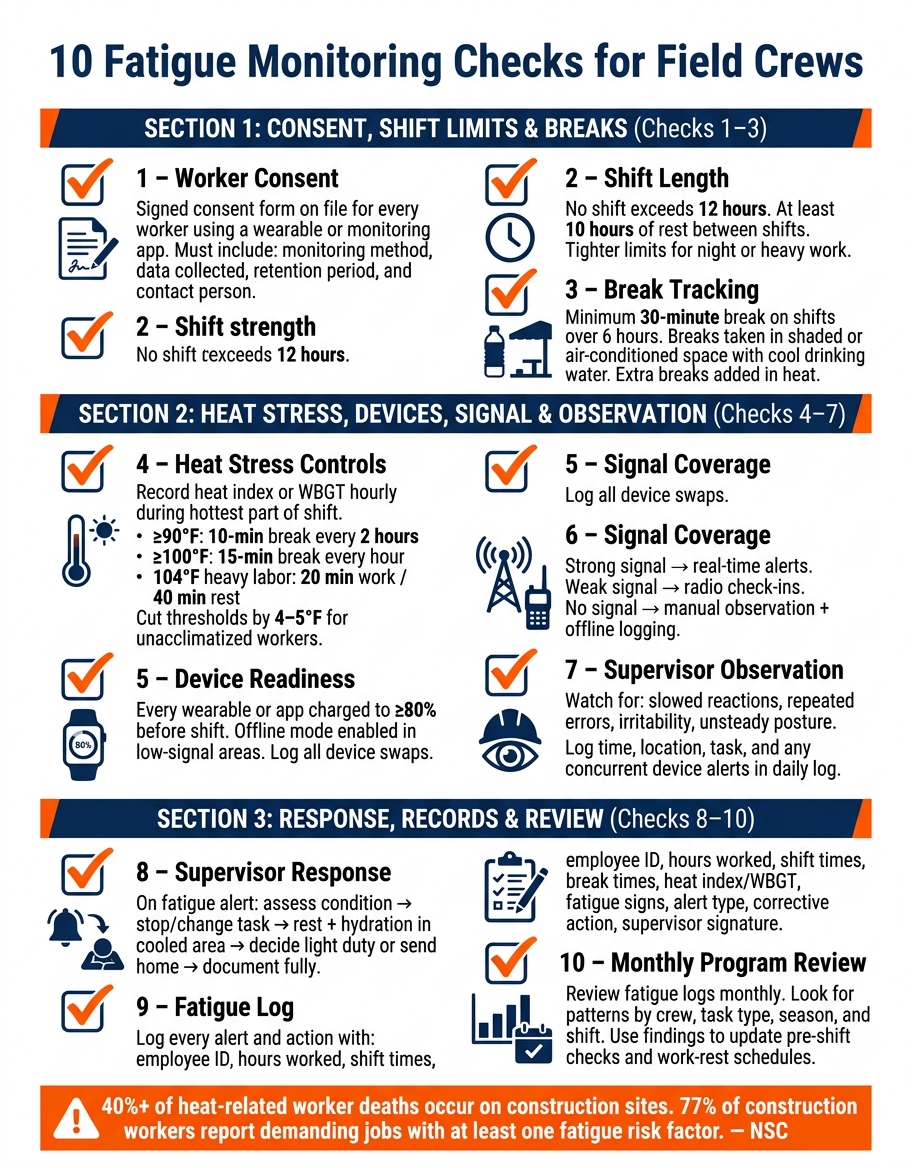
10 Fatigue Monitoring Checks for Field Crews
Use these checks before work starts and again during the shift. They’re simple: each one is either a yes/no check or a hard number a supervisor can confirm with timecards, daily logs, or direct observation.
Checks 1–3: Consent, Shift Limits, and Break Tracking
Check 1 makes sure every worker using a wearable or app has the right paperwork on file. Keep a signed consent form and privacy notice that explains the monitoring method, what data is collected, why it’s collected, how long it’s kept, who can access it, and who workers can contact with questions. Monitoring only works when people know what’s being tracked and what it’s for.
| Consent Element | Required |
|---|---|
| Description of monitoring method (wearable or app) | Required |
| Types of data collected and purpose (fatigue risk reduction) | Required |
| Data retention period and privacy protections | Required |
| Contact person for questions or concerns | Required |
Check 2 looks at shift length. Timecards should show that no worker goes past 12 hours in a single shift, and that there are at least 10 hours of rest between the end of one shift and the start of the next. If the work is at night or especially heavy, use tighter limits.
Check 3 confirms that breaks are planned, logged, and actually taken in conditions that help the body recover. A break area that feels almost as hot as the work zone isn’t much of a break. Workers should have shaded or air-conditioned space and access to cool drinking water. At a minimum, any shift longer than 6 hours should include a 30-minute break, with extra breaks added when heat conditions call for them.
Checks 4–7: Heat Stress, Device Readiness, Signal Coverage, and Observation
Construction crews face added risk from heat and long hours. The source content notes that more than 40% of heat-related worker deaths happen on construction sites, and heat is linked to about 36 worker deaths each year in the U.S. That is why fatigue checks need to be part of the daily routine, not just a policy on paper, but a core part of OSHA compliance in construction.
Check 4 links work-rest schedules to the current heat index or wet-bulb globe temperature (WBGT). At 104°F, workers doing heavy labor should work 20 minutes and rest 40 minutes each hour. For acclimatized workers, continuous heavy work should stop when WBGT reaches 77°F; a 50/50 work-rest split pushes that limit to about 82°F.
For unacclimatized workers, cut those thresholds by 4–5°F.
Supervisors should record the heat index or WBGT at least once per hour during the hottest part of the shift and note which work-rest schedule was used.
- ≥ 90°F: minimum 10-minute break every 2 hours
- ≥ 100°F: minimum 15-minute break every hour
Match the schedule to the hottest part of the shift, not the coolest.
Check 5 covers device and app readiness before crews head into remote or low-signal areas. Make sure every assigned wearable or monitoring app is charged to at least 80%, connected, and working. If a device is swapped because of low battery or a malfunction, log it. In low-signal areas, confirm that offline data storage mode is on so readings don’t disappear.
Check 6 looks at signal coverage across the site. Where signal is strong, use real-time alerts. Where cellular service is weak, use radio check-ins. Where signal is unavailable, rely on manual observation and offline logging.
Check 7 is supervisor observation – the human backup when device data is missing or incomplete. Watch for slowed reactions, more errors or near-misses, irritability, and unsteady posture. Record what you see in daily logs, along with the time, location, task, and any device alerts that happened at the same time.
Checks 8–10: Supervisor Response, Log Records, and Program Review
Check 8 spells out what happens after a fatigue alert or supervisor observation. Follow the same sequence every time: assess the worker’s condition, stop or change the task, provide rest and hydration in a cooled area, decide whether the worker can continue on light duty or should go home, and document the full response.
Check 9 covers the fatigue log. Every alert, observation, and corrective action should be recorded completely using the fields below.
| Fatigue Log Data Field |
|---|
| Employee name and ID |
| Total hours worked (including overtime) |
| Shift start/end time and rest interval |
| Break times and duration |
| Environmental conditions (heat index or WBGT) |
| Observed signs of fatigue |
| Device alert type and time |
| Corrective action taken |
| Supervisor signature |
Check 10 is the periodic program review. Review fatigue logs at least monthly and look for patterns by crew, task type, season, and shift schedule. For example, if fatigue keeps showing up during afternoon shifts in hot months, that may point to a heat exposure problem that work-rest scheduling can help fix. Use those patterns to fine-tune pre-shift checks and mid-shift verification.
Use these checks in pre-shift briefings and mid-shift verification.
sbb-itb-5eea312
How to Build the Checklist Into Daily Site Procedures
Don’t save the checklist for project kickoff and then forget about it. Use it every day.
The simplest way to make that happen is to tie each check to site routines that already exist: the morning huddle, the pre-task plan, and the end-of-shift log. That way, the 10 checks stop feeling like “one more thing” and start becoming part of how the day runs. Fatigue monitoring gets built into how work begins, not handled as an afterthought.
Start with the morning huddle, then check conditions again mid-shift.
Pre-Shift Checks and Mid-Shift Verification
Each morning, hold a short supervisor huddle that covers the heat forecast, recent hours worked, break timing, device status, and alert coverage. If consent is required, confirm it during the pre-shift huddle. Plan the heaviest tasks before peak heat.
Then verify conditions twice during the shift: once mid-morning and again mid-afternoon. At each check, confirm that breaks were actually taken, that heat-stress controls still match current conditions, and that no device alerts have been left unanswered.
NIOSH guidance backs frequent, brief rest breaks every 1–2 hours instead of fewer, longer breaks because they do more to prevent errors and injuries. On very hot days or during long shifts, add more check-ins and tighten the work/rest cycle. Record each check in the daily log.
Assigning Supervisor Actions for Each Alert Level
Supervisors need set response levels so the same alert gets the same action every time. On larger jobs, split observation, documentation, and stop-work authority across separate roles.
Tie each alert level to a clear response:
| Alert Level | Trigger | Supervisor Action |
|---|---|---|
| Level 1 – Low | Yawning, mild distraction, single low-severity device alert | Check in with the worker, remind them of the next break, monitor at the next mid-shift check |
| Level 2 – Moderate | Repeated alerts, slowed reactions, high heat + long hours | Move to a lower-risk task, enforce an immediate rest break, document in the daily log |
| Level 3 – High | Confusion, near miss, micro-sleep, alert during safety-critical work | Stop the task, remove the worker from safety-critical duties, provide cooling and rest, document the event the same day |
Document all Level 2 and Level 3 events the same day. Use the same response sequence on every jobsite.
Using Contractor Foreman to Track Fatigue-Related Records
Once alert levels and response steps are in place, the next job is simple: record every fatigue check in one system. Use the checklist data above to keep each fatigue record together instead of scattering it across paper forms, texts, and spreadsheets. Contractor Foreman puts timecards, daily logs, safety meetings, and incident reports in one place that field crews can open on mobile devices.
Timecards, Daily Logs, and Safety Meeting Records
Start with timecards. GPS timecards can log clock-in, clock-out, job codes, and breaks, and supervisors can connect them to scheduled shifts. When those timecards tie back to scheduled shifts, supervisors can flag workers who are getting close to fatigue-related shift limits.
Those same records can then flow into daily logs with weather and fatigue notes. Daily logs can track temperature, humidity, heat index, and custom fatigue fields, so a foreman can note details like a heat index above 95°F or an added break.
Then connect toolbox talks to that same daily record. Safety meetings can store fatigue and heat-stress toolbox talks with digital attendance and sign-off.
Storing Consent Forms, Incident Notes, and Trend Reports
The same system can also hold worker consent and incident records. Worker consent forms for fatigue monitoring devices can be created with the Document Writer, signed digitally on-site, and stored in each worker’s file. Supervisors can also track consent status in that file.
If a fatigue issue turns into a near-miss or incident, supervisors can log it, record symptoms and corrective actions, and connect it to OSHA 300 recordkeeping.
That matters during monthly reviews. Trend reports can show repeat patterns by crew, task, and season, which makes it easier to spot where fatigue keeps showing up.
| Record Type | Contractor Foreman Feature | Key Benefit |
|---|---|---|
| Shift hours and break compliance | GPS Timecards | Automatic break tracking and shift-length review |
| Heat conditions and fatigue observations | Daily Logs | Weather sync and custom fatigue fields |
| Fatigue training and attendance | Safety Meetings | Digital attendance and sign-off |
| Worker consent forms | Document Writer / Files | Digital signatures and consent-status tracking |
| Near-misses and supervisor response steps | Incidents Module | Documented actions and OSHA 300 recordkeeping support |
| Recurring fatigue trends | Reporting / Custom Tags | Cross-project filtering and trend analysis |
Plans start at $49/month.
Conclusion: A Field-Ready Checklist That Improves Safety
Fatigue is a jobsite hazard. It needs clear limits, fast action, and written follow-up. The checks here turn common fatigue risks – long shifts, missed breaks, heat, and missed alerts – into daily steps supervisors can use in the field.
Key Takeaways for Construction Teams
Each check ties back to something a supervisor can do that day:
- Get consent before using any monitoring device or app, and keep signed forms in each worker’s file.
- Control shift length by setting and enforcing maximum daily and weekly hours.
- Track breaks with time-stamped records.
- Treat heat stress as a fatigue trigger, not a separate issue.
- Verify devices are charged and working before every shift.
- Confirm signal coverage so alerts and data don’t get lost in low-service areas.
- Train supervisors to spot signs – slower pace, irritability, repeated errors – and document what they see.
- Use defined alert levels: adjust work, remove the worker from critical tasks, or start medical response.
- Record hours, breaks, heat, alerts, and supervisor actions in daily logs.
- Review trends monthly and update the checklist where fatigue shows up again and again.
The National Safety Council found that every construction employee surveyed had at least one workplace fatigue risk factor, and 77% reported demanding jobs.
So this checklist isn’t just for rare situations. It’s a baseline for every crew and every shift.
For day-to-day use, post the checklist in break areas, work it into toolbox talks, and log it digitally so supervisors can spot fatigue patterns across jobsites. Contractor Foreman keeps timecards, daily logs, safety meeting notes, and consent forms in one place for easier trend review. That makes fatigue monitoring part of the site record, not just something a supervisor has to remember.
FAQs
How do I start fatigue checks on a small crew?
Start with a consistent digital check-in process using a tool like Contractor Foreman. Set clear roles, spell out how devices should be used, and make reporting simple. GPS-enabled time tracking also helps you monitor hours and keep break schedules on track.
Train the crew to notice early warning signs, such as changes in performance, mood swings, or frequent illness. Use daily logs to record site conditions and crew status so fatigue risks can be flagged early and handled before they turn into bigger jobsite problems.
What should a supervisor do after a fatigue alert?
After a fatigue alert, the supervisor should act right away. That means checking the worker’s condition, reviewing site conditions, and looking at what was happening in the field when the alert came in. From there, they can decide if action is needed to lower risk.
They should also record the alert and any steps taken in the project’s incident log or daily log. If the same issue keeps showing up, a root cause analysis can help pinpoint what’s driving it and reduce the chance of it happening again.
How often should fatigue logs be reviewed?
Fatigue logs should be reviewed at the end of every shift. Going over them right away, while the details are still fresh, helps keep the record accurate and dependable.
Any safety concerns or log entries tied to safety should be handled immediately, even if some performance data gets reviewed on a weekly or monthly schedule. Contractor Foreman helps teams record this information in real time before crews leave the jobsite.
Related Blog Posts
- How Workforce Data Improves Construction Outcomes
- Shift Productivity Metrics for Construction Teams
- Risk Assessment in Construction: Software Guide
- 7 Crew Utilization Metrics for Construction Teams







