
Residential construction management is hard. Full stop.
Not “long day at the office” hard. More like “one missed delivery can set off a chain reaction” hard. You’re juggling budgets, the moods of your subcontractors, weather, and clients who just discovered Pinterest at 11 p.m.
If you ever see a builder staring into the distance on a job site, there’s a decent chance they’re mentally recalculating three problems at once.
And yet, some builders look surprisingly calm. You know the type— walking the site like everything is under control, greeting the crew, completely unbothered. Like delays are just suggestions and budget overruns only happen to other people.
They’re faking it, right?
RIGHT?!
Hmmm, not exactly. It’s easy to assume they’re just better at hiding the stress… that behind closed doors, they’re just as buried as everyone else. . But here’s the thing: some builders are actually genuinely calm because they’ve got everything under control.
It’s not that the job is easier for them.. They’re calmer because they’ve learned how to create systems that work for the whole team.
Residential builders who excel focus on one thing: organization.
They’ve stopped relying on luck and last-minute heroics. They know exactly what needs to happen next — and they’ve got the right people and processes to make it happen.
Here’s how top builders stay ahead:
- Centralized software ensures field teams, office staff, and clients access the same real-time updates.
- Financial integrations with tools like QuickBooks streamline invoicing, expenses, and payroll.
- Scheduling tools adjust timelines automatically, reducing delays caused by miscommunication.
- Daily logs track site progress, document issues, and create a reliable record for future reference.
- Client portals offer homeowners real-time updates, reducing back-and-forth and improving transparency.
- Mobile apps with GPS ensure accurate time tracking and instant field updates.
Whether managing budget changes, coordinating teams, or communicating with clients, these tools simplify every step – helping builders save time, avoid errors, and deliver better results.
Want to be like the top builders?
Tools like Contractor Foreman help builders stay in control by bringing everything together—projects, people, and paperwork—all in one place. That way you’re on top of things — always.
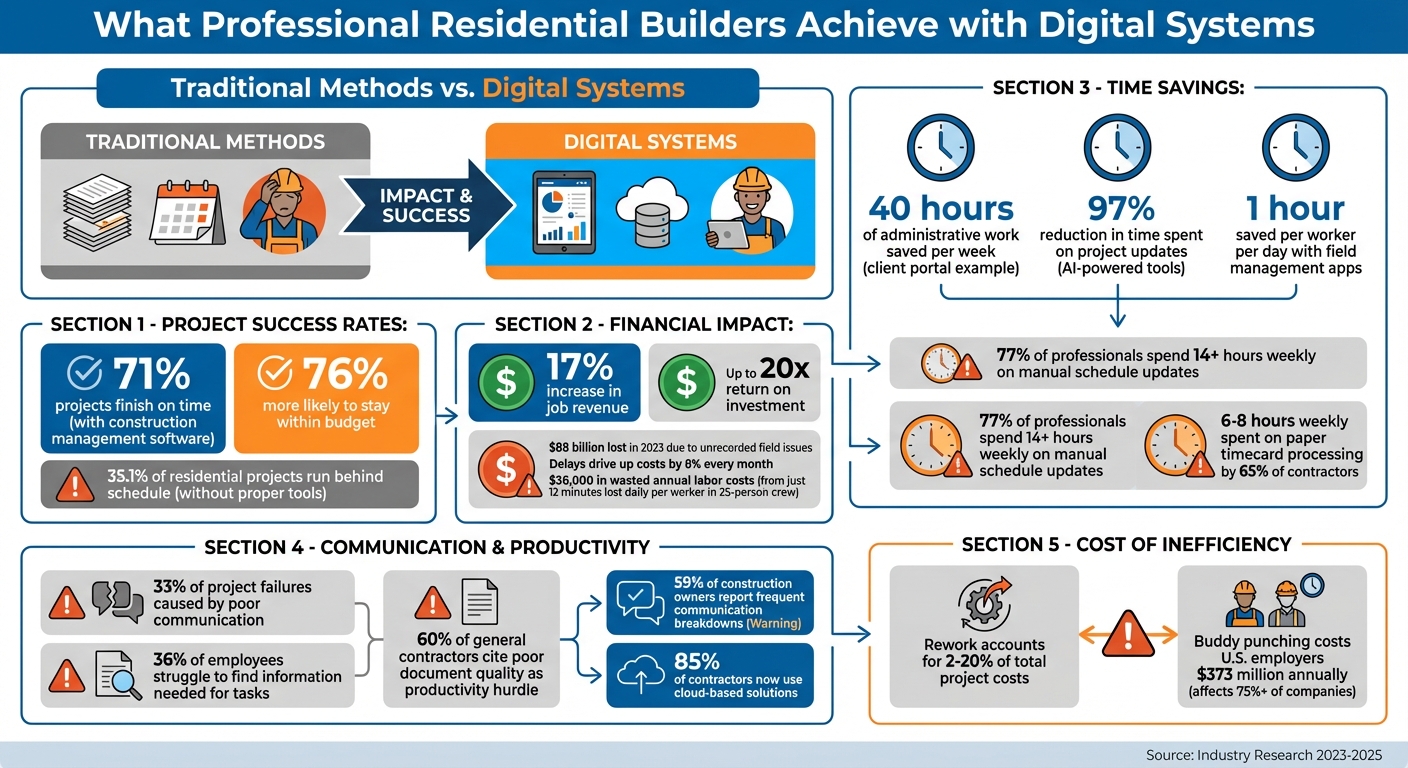
Construction Management Software Impact: Key Statistics for Residential Builders
How All-in-One Construction Management Software Works
Residential builders are increasingly turning to centralized platforms to streamline their operations. These systems consolidate every aspect of a project, eliminating the confusion caused by juggling multiple tools.
A survey shows that 36% of employees struggle to find the information they need to complete tasks, while 60% of general contractors cite poor document quality and coordination issues as major productivity hurdles. All-in-one software addresses these challenges by acting as a single, reliable source of information. Field crews, office teams, and clients all access the same real-time updates, ensuring everyone stays on the same page.
Contractor Foreman is a prime example of this approach. It manages everything from estimates to invoicing, with instant data syncing across devices – no manual updates required. For instance, a superintendent’s daily report is instantly accessible to the office, and schedule changes are communicated to field crews in real time. This seamless integration improves project tracking, financial oversight, and overall efficiency.
“Contractor Foreman has been a game-changer for us. It’s not just a tool; it’s become an integral part of how we operate, ensuring that we’re always on top of our projects and communicating effectively with our clients and team.” – Clayton Boudreaux, Boudreaux Builders
The platform connects with over 50 systems, including QuickBooks Online, Zapier, Gusto for payroll, and CompanyCam for photos. This integration eliminates repetitive tasks, such as double data entry. For example, it can automatically generate purchase orders or subcontracts based on bid packages or estimates.
Centralized Project Management
For professional builders, keeping track of tasks, timelines, and team responsibilities is essential. Contractor Foreman simplifies this process with tools like Gantt charts for Critical Path Method (CPM) scheduling, Kanban boards for task management, and daily logs for on-site activities.
These features work together to remove uncertainty. The Gantt chart provides a clear overview of the project timeline, helping identify delays – whether it’s behind-schedule framing or extended trim work. The Kanban board organizes tasks by status, making it easy to see what’s in progress, completed, or awaiting action.
Daily logs are another key feature. They record site conditions, crew attendance, and completed work, creating a detailed history that can settle disputes or answer questions later. Field crews can submit logs directly from their phones, complete with photos and notes, reducing paperwork.
The platform also integrates work orders, inspections, and punchlists into a single interface. This eliminates the need for multiple apps or endless email chains, streamlining communication and coordination. Forbes Advisor recognized these benefits, naming Contractor Foreman the “Best Construction Management Software” in both 2023 and 2024.
Financial Integrations for Budget Control
Managing budgets is another critical area where Contractor Foreman shines. Its integration with QuickBooks Online allows automatic syncing of estimates, invoices, and expenses. For example, when a purchase order is created in the field, it’s immediately reflected in QuickBooks, ensuring accurate, real-time job costing.
Zapier integration further enhances automation by connecting with apps like Zoho, MailChimp, Dropbox, and Google Drive. Builders can, for instance, send automatic invoice reminders via MailChimp or back up project photos to Dropbox without additional effort.
Change orders, often a source of financial stress, are also handled efficiently. When a homeowner requests a design change, the system logs it immediately and updates the budget, avoiding last-minute cost surprises. Builders can also generate AIA-style progress invoices (G702/G703 forms) and accept online payments through integrated processors.
Procurement workflows are equally streamlined. Instead of manually creating purchase orders from estimates, the system automates the process, reducing administrative tasks and minimizing errors.
Pricing Plans That Scale with Your Business
Contractor Foreman offers five pricing tiers to suit businesses of all sizes, with annual billing, a 30-day free trial, and a 100-day money-back guarantee. The plans are designed for everyone from solo contractors to large teams:
| Plan | Monthly Cost | Users Included | Private Training Sessions |
|---|---|---|---|
| Basic | $49 | 1 | None |
| Standard | $105 | 3 | 2 |
| Plus | $166 | 8 | 3 |
| Pro | $221 | 15 | 4 |
| Unlimited | $332 | Unlimited | Unlimited |
All plans include unlimited projects, access to 35+ features, and customer support with an average response time of just 13 seconds. The platform boasts a 95% five-star rating for its support, with users frequently praising the quick and helpful assistance.
The Plus plan ($166/month) is the most popular, offering enough user seats for small to mid-sized teams and three private training sessions to help teams get started quickly. For larger operations, the Unlimited plan ($332/month) removes user limits and includes unlimited training sessions.
Every plan includes core features like project management, financial tracking, scheduling, daily logs, client portals, and mobile access. The difference lies in the number of users and training sessions, allowing businesses to scale without losing historical project data. Plus, a price-lock guarantee ensures no unexpected rate hikes.
sbb-itb-5eea312
Better Scheduling and Daily Workflow Management
In the construction world, staying on schedule is easier said than done. A striking 35.1% of residential construction projects run behind schedule, often leading to costly overruns and frustrated clients. Delays reported by 61% of project owners can drive up costs by nearly 8% every month. One major culprit? Inefficient manual processes. Over 77% of construction professionals spend more than 14 hours weekly on tasks like manually updating schedules. Automating these processes – such as schedule updates and daily reporting – can save time and significantly cut down on delays.
Real-Time Scheduling Tools
Relying on outdated methods like Excel spreadsheets and email chains often creates chaos, leaving teams working from conflicting schedules. Modern scheduling tools eliminate this confusion with features like drag-and-drop Gantt charts that automatically update and notify all relevant parties when changes occur. For example, if rain delays a foundation pour, the system automatically adjusts downstream tasks and alerts subcontractors via text or email.
Take Jkath Design Build + Reinvent, a remodeling firm based in the Twin Cities. Between 2022 and 2025, they leveraged centralized scheduling tools to grow their annual revenue from $2 million to $5 million. This example highlights how digital tools not only improve communication but also reduce unnecessary back-and-forth.
Professional builders often rely on short-term lookahead schedules – covering 2 to 6 weeks – to coordinate upcoming tasks and ensure materials and resources are available when needed. Some advanced systems go a step further by connecting schedules directly to supplier price books. This allows builders to generate purchase orders directly from the timeline, avoiding procurement delays. These tools also streamline daily reporting, making it easier to track progress and adjust plans as needed.
Daily Logs for Progress Tracking
Daily logs are another game-changer for project management. These digital tools provide real-time updates on on-site progress, helping prevent disputes and ensuring everyone is on the same page. Yet, only 33% of construction firms currently use data-driven daily project insights. Forward-thinking builders require their site supervisors to submit daily logs via mobile apps, ensuring accurate and timely documentation.
For instance, Luke Stokes, owner of Allstate Landscape, used daily logs to resolve a costly dispute. After spotting construction equipment parked on a newly installed flower bed, he documented the issue with a timestamped photo. When the client later complained about damaged plants, this photo proved the damage was caused by other site activity – not his team.
Digital logs also automatically record weather conditions based on GPS location, providing solid evidence for weather-related delays. Users can attach photos and videos to document site conditions, creating a reliable record for future reference.
“Daily Logs for us serve all kinds of purposes, from communication with clients to site documentation to internal communication and record keeping”
– Scott Sanders, President and CEO, BrightLeaf Homes
For builders juggling multiple projects, daily logs offer a way to oversee progress remotely. Field crews can submit updates directly from their mobile devices, reducing the need for constant site visits and cutting down on endless email chains. This real-time alignment ensures smoother operations and better communication across teams.
Improving Client Communication and Project Transparency
Did you know poor communication is responsible for one-third of project failures? Professional builders sidestep this common issue by using digital tools that give clients direct access to project information. In fact, projects leveraging construction management software for home builders for communication are 71% more likely to finish on time and 76% more likely to stay within budget. This kind of streamlined communication not only keeps things on track but also fosters stronger client engagement.
Client Portals for Project Updates
Client portals are a game-changer for keeping homeowners in the loop. These platforms centralize all communication, making it easy for clients to check project updates in real time. A great example is Chris Ledet Homes, which introduced a customer portal between 2024 and 2025. By offering homeowners instant access to photos, schedules, and messages, the company significantly reduced the number of “status update” calls and saved about 40 hours of administrative work per week. This efficiency allowed them to scale from building eight homes annually to thirteen.
These portals also boost financial clarity. Clients can monitor budgets, track invoices, and make payments directly through the system using credit cards or ACH transfers. This not only speeds up cash flow but also eliminates confusion about where funds are allocated. For change orders, clients can review, approve, and sign modifications electronically, creating a formal audit trail that helps avoid disputes down the road.
AI-powered tools are also stepping in to simplify client updates. For instance, in March 2025, Michael Gutelli, co-founder of Clark + Aldine, adopted an AI-driven update tool to manage 15–17 active projects. This tool reduced the time spent on project updates by 97%, cutting what used to take half a day down to just minutes.
While client portals take care of communication, document management systems further enhance transparency and collaboration.
Document Management for Better Collaboration
Digital document management systems ensure that everyone involved in a project is working from the same, up-to-date set of plans and contracts. Rework in construction projects can account for 2% to 20% of total costs, but centralized document systems help minimize these errors. They maintain version control and provide clear audit trails, showing who accessed or approved documents and when.
Builders can also set role-based permissions to control what clients can view. For example, polished proposals and approved change orders can be shared with clients, while internal rough estimates remain private. This approach strikes a balance between maintaining professional boundaries and ensuring transparency where it counts. Additionally, linking documents directly to specific tasks or change orders within the software provides immediate context, reducing confusion.
Here’s how some key features of these tools benefit both builders and clients:
| Feature | Builder Benefit | Client Benefit |
|---|---|---|
| Daily Logs | Tracks site activity for liability protection | Offers visual proof of daily progress |
| Digital Selections | Avoids delays in material ordering | Simple way to browse and approve finishes |
| Online Payments | Speeds up cash flow and reduces manual billing | Secure, convenient payment options (Credit/ACH) |
| Centralized Chat | Keeps all project history in one place | No more digging through emails or texts |
| Gantt Charts | Helps manage subcontractor schedules | Provides a clear visual timeline for move-in dates |
These tools not only streamline operations for builders but also create a smoother, more transparent experience for clients. Everyone wins.
Mobile and GPS Features for Field Work
In 2023, U.S. builders lost over $88 billion due to unrecorded field issues, often caused by poor data management and unclear communication. Mobile apps equipped with GPS capabilities are helping bridge this gap by enabling real-time documentation and location verification directly from the field. These tools complement centralized management systems, ensuring more accurate time tracking and on-site updates.
GPS-Driven Timecards
GPS-enabled timecards tackle common problems like buddy punching, where employees clock in for absent coworkers. This practice impacts over 75% of companies and costs U.S. employers more than $373 million annually. By using geofencing – a virtual boundary around job sites – workers can only clock in when physically present within the designated area.
Time lost adds up quickly. For instance, losing just 12 minutes daily per worker in a 25-person crew can result in $36,000 in wasted annual labor costs. GPS tracking assigns labor hours to the correct project and cost code, ensuring payroll reflects actual time spent on specific tasks, such as framing or electrical work. This eliminates the manual errors and guesswork that plague paper timecards, a process that consumes 6–8 hours weekly for 65% of contractors.
Modern systems also account for connectivity issues. Data is stored offline during signal loss and syncs automatically when a connection is restored. For builders managing multiple sites, GPS breadcrumbs log drive time between locations, creating an accurate record for payroll and client billing.
Beyond accurate time tracking, mobile apps play a crucial role in improving field communication with instant updates.
Mobile Apps for On-Site Updates
Mobile apps allow field teams to capture and upload photos instantly, providing real-time proof of work quality. This is particularly important for tasks like waterproofing or structural details that become hard to inspect once covered. GPS-tagged photos offer undeniable evidence, which can be critical for warranty claims.
Real-time updates also prevent outdated information from delaying decisions. For example, if a superintendent spots a material delay or quality issue, they can log it immediately with photos and notes. This allows project managers to adjust schedules or order replacements without waiting for end-of-day reports. This responsiveness matters – 59% of construction owners report frequent communication breakdowns among team members. Field management apps can save up to 1 hour per worker per day by streamlining these processes.
Role-based permissions add another layer of efficiency. Subcontractors can access only the plans and tasks relevant to their work, ensuring sensitive project data remains secure while keeping everyone aligned. Additionally, all documentation – photos, RFIs, daily logs – is stored in a centralized system, eliminating the chaos of scattered personal texts or email threads. This creates a searchable, audit-ready record that simplifies project management.
Conclusion
Residential builders are transforming their operations by using technology to eliminate the chaos of scattered spreadsheets, misplaced paperwork, and disjointed communication. The difference between builders who struggle to stay profitable and those who excel often lies in adopting a centralized system that connects every aspect of their business – from GPS-enabled time tracking for field crews to real-time budget management for office teams.
With streamlined communication, builders achieve measurable results: on-time completions rise to 71%, job revenue increases by 17%, and the return on investment can reach up to 20x. These improvements lead to fewer disputes, quicker payments, and satisfied clients who are more likely to recommend your services. Contractor Foreman provides these tools through an all-in-one platform, ensuring everyone stays on the same page.
And the best part? These benefits come without hefty upfront costs. Contractor Foreman offers flexible pricing, a 30-day free trial, and a 100-day money-back guarantee. Start small – use it for your current projects, automate repetitive admin tasks, and add mobile tools for field updates over time. Even small steps, like improving document management or scheduling with the best programs, can save time and cut expenses.
The construction industry is increasingly embracing digital-first operations, with 85% of contractors now relying on cloud-based solutions for better visibility. Going digital not only simplifies every stage of a project but also builds the trust that drives repeat business and referrals. Builders who adopt these tools now set themselves up to handle growing workloads, maintain control, and achieve sustainable success.
FAQs
How does construction management software help streamline projects?
Construction management software streamlines projects by centralizing all critical information into one platform. This means no more scattered data or confusion – everyone, from field crews to office staff, has real-time access to the same up-to-date information. With improved communication and task coordination, teams can respond to changes swiftly, cutting down on delays and reducing mistakes.
It also simplifies essential workflows like scheduling, procurement, and budgeting by integrating them into a unified system. This makes it easier to allocate resources, monitor progress, and spot potential problems early on. By enhancing teamwork and enabling better decisions, projects move along faster, with fewer errors, ultimately saving time and money.
How do GPS-enabled timecards benefit construction projects?
Using GPS-enabled timecards in construction projects brings a host of benefits that can streamline operations and enhance accuracy. These timecards allow you to track employees’ hours and locations in real-time, cutting out common issues like time theft, buddy punching, and mistakes tied to manual timekeeping. The result? Payroll gets processed more accurately and on schedule, minimizing administrative hiccups and payroll discrepancies.
Another big plus is the real-time location data these tools provide. Managers can easily monitor attendance, confirm crew locations, and fine-tune schedules. This leads to smarter resource allocation and helps keep projects moving forward without unnecessary delays. Plus, the transparent and verifiable records they generate are a win for compliance, helping to avoid disputes over hours worked while promoting fair labor practices.
By saving time, trimming costs, and boosting project oversight, GPS-enabled timecards are quickly becoming a must-have tool in modern construction management.
How do client portals improve communication and build trust in residential construction projects?
Client portals simplify communication and create a sense of trust by offering a single, secure space where clients can access all their project details in real-time. Homeowners can keep tabs on progress, review important documents, and approve changes – all without the endless chain of emails or phone calls. This not only cuts down on confusion but also speeds up decisions and keeps everyone on the same page.
With live updates and direct communication channels to the project team, client portals bring a level of transparency that keeps clients involved every step of the way. They help stick to project timelines and budgets while delivering a smooth, collaborative experience that leaves clients feeling satisfied and confident.







