
EVERY CENT MATTERS.
Our parents drilled this into us while clipping coupons and refusing to turn on the AC in 105-degree heat. We rolled our eyes so hard we probably pulled something…
“It’s fine, Dad. It’s like three dollars!”
How cheap!
Then we grew up and started running a construction business.
Somewhere between the fourth emergency rebar order and explaining to a client why the kitchen is now $40,000 over budget, we went very quiet. We sat down. We thought about Dad.
He was right about things. Well…partially. Scrimping and saving is just one way to protect your margins — the rest is simply not letting money slip through the cracks. And in construction, it does that constantly, and usually not because anyone made a huge, almost-criminal mistake. It’s death by a thousand unbilled extras and miscounted materials!
Want higher profits in construction? Here’s the secret: saving every penny helps, sure. But the biggest money-saver and profit-driver is how well you manage it. So manage better.
Good news: you don’t have to figure this out manually. Good software can do this for you!
Here are the features that matter the most:
- Scheduling Tools: Gantt charts, task dependencies, and automated reminders help reduce delays and keep projects on track.
- Estimating & Job Costing: AI-assisted takeoffs and real-time variance reporting improve bid accuracy and reduce surprises.
- Financial Management: Construction billing software and integrated accounting tools ensure steady cash flow and prevent cost overruns.
- Client Communication: Portals and communication logs minimize misunderstandings and rework, saving time and money.
- Field Management: Digital daily logs and GPS-based time tracking improve site documentation and labor cost accuracy.
Builders using integrated software report profit increases of up to 32% and faster project completion times. Tools like Contractor Foreman, starting at $49/month, offer these features to help home builders of all sizes maintain profitability.
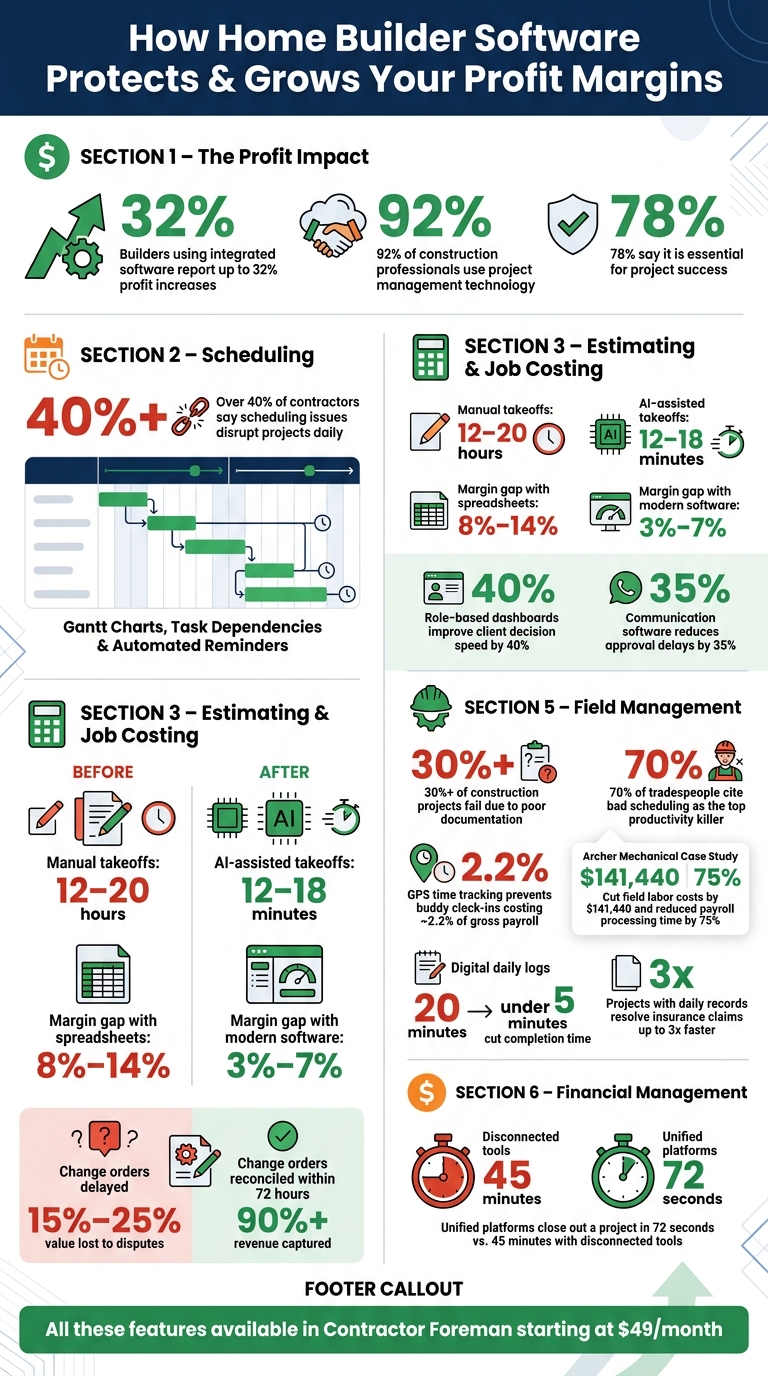
How Home Builder Software Boosts Profit: Key Stats & Features
Software Features That Directly Affect Profitability
Addressing profit leaks caused by scheduling errors, inaccurate bids, and cash flow issues requires software with specific features designed to tackle these challenges. Not all tools are created equal, and the ones that truly impact profitability focus on scheduling, bidding accuracy, and cash flow management. Here’s what to prioritize.
Scheduling Tools That Reduce Delays
Delays can be a costly problem. In fact, over 40% of contractors say scheduling issues disrupt their projects on a daily basis. Even small setbacks can snowball into major profit losses.
Features like Gantt charts with task dependencies and standardized scheduling templates help streamline project timelines. These tools ensure that when one task is delayed, downstream activities adjust automatically. Automated reminders also reduce crew no-shows, keeping projects on track.
The Critical Path Method (CPM) takes this one step further by identifying which tasks directly impact your project’s finish date, allowing you to allocate resources strategically.
“We are overall happy with the software functionalities, implementation and most importantly their development team listens to what the customer has to say about the product and is constantly enhancing the functionalities.” – Albert Chen, VP Accounting, Fernbrook Homes
Once scheduling is under control, the next step is ensuring your bids are precise and protect your margins.
Estimating and Job Costing for Accurate Bids
Underbidding is a quick path to shrinking profits in residential construction. Modern estimating tools, featuring phase-grouped cost codes and real-time variance reporting, can narrow margin gaps to around 3%-7%, compared to the 8%-14% typical with spreadsheets.
Manual takeoffs are another time sink. Measuring a 30-to-60-sheet custom home plan by hand can take 12 to 20 hours, while AI-assisted tools can complete the same task in just 12 to 18 minutes. Faster, more precise takeoffs not only save time but also reduce costly surprises during construction.
Change orders, if not managed promptly, can also drain profits. Builders who wait until the end of a project to reconcile change orders often lose 15% to 25% of the value due to disputes. Automating change order tracking and updating budgets as soon as changes are approved can help capture over 90% of the revenue when processed within 72 hours.
The estimate is the heartbeat of the company. You know what works and what needs tracking.
Accurate estimates are just one part of the equation. To maintain steady profitability, financial management tools must align with the actual build process.
Financial Management for Better Cash Flow
Even the most accurate estimates won’t protect your margins without reliable financial tools. Progress billing – where invoices are issued based on the percentage of project completion – ensures a steady cash flow throughout the build cycle.
Equally important is integrating estimating, financial, and accounting tools. This ensures real-time tracking of costs and prevents unpleasant surprises. As one user of Contractor Foreman noted:
“The integration of the whole platform is very good, including externally with QuickBooks Online. Cost codes and cost items that can be used for different jobs, this is huge for us.” – Chuck A., Liercke Construction, LLC
When these systems work together, teams can identify cost overruns as they happen instead of discovering them after the fact. Builders using unified platforms can close out a project in just 72 seconds, compared to the 45 minutes required with disconnected tools.
sbb-itb-5eea312
Client Communication Features That Reduce Rework
Smooth client communication goes hand-in-hand with accurate scheduling and budgeting to prevent costly rework.
Even when estimates are spot-on and timelines are well-planned, profits can still take a hit if communication falters.
Did you know that over 65% of homeowner complaints are tied to communication issues rather than the quality of the construction work? Misunderstandings often lead to rework, which can eat up anywhere from 2% to 20% of a project’s total budget. Features like client portals and communication logs can help eliminate these misunderstandings and keep projects on track.
Client Portals and Communication Logs
A client portal acts as a central hub for everything: progress photos, approvals, change orders, and budget updates. By consolidating this information, it cuts down on unnecessary calls and texts, ensuring everyone stays informed. Builders using role-based dashboards report a 40% improvement in how quickly clients make decisions on materials and change orders. Additionally, communication software tailored for the construction industry can reduce approval delays by 35%.
Portals that require electronic, timestamped signatures for change orders take the guesswork out of approvals. This ensures that every change is documented and billable, avoiding disputes. Integrated features like searchable chat logs help clarify any ambiguities, minimizing the risk of costly revisions. These tools not only improve clarity but also align budgets with client expectations.
“Contractor Foreman has been a game-changer for us. It’s not just a tool; it’s become an integral part of how we operate, ensuring that we’re always on top of our projects and communicating effectively with our clients and team.” – Clayton Boudreaux, Boudreaux Builders
Real-time financial updates are another key feature. They provide visibility into original contracts, billed amounts, and remaining balances, which helps prevent budget surprises. Automated notifications for milestones, inspections, and deliveries save project managers hours by reducing the need for constant status updates.
“I am impressed at how much it offers for the price. I like that it has almost everything in one place from the client portal to schedules, to budgets, and so on.” – Shawn B., Avan Company LLC
Even smaller home builders can benefit. Contractor Foreman’s Basic plan offers these client portal features at a price point that makes centralized communication accessible, helping protect margins without requiring a large software investment.
Field Management Tools for Real-Time Project Data
Client portals are great for offsite communication, but when it comes to the field, accurate management is what keeps your project on track and your profits intact. The reality is, most of the financial risks in construction happen on the job site. If crew hours aren’t logged properly or site conditions aren’t documented, you’re left making costly guesses. In fact, over 30% of construction projects fail due to poor documentation, and nearly 70% of tradespeople cite bad scheduling as the main reason for drops in productivity. Modern field management tools help eliminate these gaps by combining real-time updates with scheduling and budgeting tools, ensuring every part of the process stays on point.
Daily Logs and Time Tracking
Digital daily logs are a game-changer, replacing outdated manual methods with structured, timestamped entries recorded on-site.
With pre-designed templates, you can cut the time it takes to complete daily logs from 20 minutes to less than five. These logs capture everything – weather conditions, safety issues, crew activities, and task progress – as it happens, rather than hours later when details are fuzzy.
But these logs aren’t just about keeping records. When linked to your project schedule, they highlight deviations in real time and create timestamped documentation that’s invaluable for resolving disputes. As dispute resolution consultant Bob Frisby explains, daily reports act as “a Living, Unimpeachable Witness.” Projects with consistent daily records even see insurance claims resolved up to 3x faster compared to those without.
GPS-based time tracking takes accuracy a step further. It prevents unauthorized clock-ins, a common issue where one worker clocks in for another, which can cost businesses around 2.2% of their gross payroll. Geofencing ensures clock-ins only happen when workers are physically on-site. For example, Archer Mechanical adopted real-time tracking with facial recognition and managed to cut field labor costs by $141,440, while slashing payroll processing time by 75%. For home builders working with tight budgets, this level of precision directly impacts profitability.
Platforms like Contractor Foreman make this process even easier. Their tools include GPS-driven timecards and daily log features, all starting at $49/month. Field crews can log hours, upload site photos, and add notes directly from their phones. That data feeds seamlessly into job costing and payroll systems, keeping your financials accurate from the job site to the office.
Conclusion: Picking the Right Features to Protect Your Margins
Every feature, from scheduling tools to field management systems, plays a part in safeguarding your margins. Profitability in home building often slips away through small, avoidable mistakes – like overpriced bids, unbilled change orders, or payroll errors. The right software helps plug these leaks before they grow into bigger financial problems.
These tools work by addressing the critical areas where profit tends to disappear, offering real-time insights and better cost control. They give you a detailed view of where every dollar is spent and ensure you have the control to direct it effectively.
92% of construction professionals already use project management technology, and 78% say it’s essential for project success. The challenge isn’t awareness – it’s selecting a platform that aligns with how your business operates on a daily basis.
Contractor Foreman is designed with that in mind. Starting at just $49/month, it includes over 35 integrated features, such as GPS-powered timecards, automated change orders, and QuickBooks syncing. It’s built to provide smaller and mid-sized builders with the same financial clarity large firms rely on – without the overwhelming complexity or high costs.
The features you prioritize should directly address the areas where your margins are most vulnerable. Opt for software that eliminates guesswork and ensures every dollar is accounted for, helping you retain more profit on every project.
FAQs
Which features deliver the fastest ROI for home builders?
To see a quicker return on investment, prioritize tools that streamline operations and offer real-time financial insights.
Features like integrated job costing and budget tracking allow you to keep tabs on actual expenses versus estimates, helping you avoid cost overruns. Automated scheduling tools that sync with updates from the field can quickly resolve resource conflicts, improving overall efficiency. By centralizing project management, estimating, and scheduling, you can cut down on manual tasks and fragmented communication – potentially saving thousands of dollars per project each year.
How do I know if my bids are accurate before I break ground?
To improve bid accuracy, start by using standardized templates for recurring project types. These templates should account for key elements like materials, labor, and overhead while allowing flexibility for adjustments.
Pair this with software connected to live supplier databases to ensure your material costs are always current. This eliminates outdated pricing and helps you stay competitive.
After completing a project, conduct post-project audits to compare your initial bid with the actual costs. This step helps refine future estimates by identifying areas where your projections were off.
To mitigate risks, include a 10%-20% contingency in your bids. Additionally, break down your estimates into specific categories – materials, labor, permits, and equipment. This level of detail reduces the reliance on guesswork and ensures a more transparent and accurate bid.
What should I track daily in the field to protect margins?
Keeping an eye on labor, materials, equipment, and subcontractor activity every single day is crucial for protecting your margins. Here’s how you can stay on top of things:
- Labor: Track labor hours by cost code, such as framing or electrical work, to ensure you’re staying within budget for each task.
- Materials: Monitor material usage closely. Log deliveries, note any damages, and keep track of returns to avoid unnecessary waste or overspending.
- Subcontractors: Record subcontractor activity daily. This includes what tasks they’re completing and how their work aligns with your project timeline.
- Other Factors: Don’t overlook weather conditions or safety incidents – both can impact costs and timelines in unexpected ways.
Using digital tools can make this process much easier.
These tools allow you to collect real-time data, helping you identify budget variances or profit leaks within just 24–48 hours, rather than waiting for the end-of-month reports. This quick turnaround gives you the chance to address issues before they become costly problems.







