
Every construction company is looking for more work. The smarter ones are looking for more profit.
But before you chase the next project, take a closer look at the money leaking out of your current operation. Because if there are holes in your bucket, no amount of water will ever fill it. In simple words, no amount of new work will build a successful construction business if you keep losing money.
We all know this, of course. But the problem is that profit leaks aren’t always obvious. Small inefficiencies and unnecessary expenses may seem harmless—a scheduling mix-up here, an unexpected equipment repair there—but they add up over time.
The good news?
Most of them are surprisingly easy to fix!
Here’s how to do it:
- Track costs in real-time: Use construction management software to monitor labor, materials, and budgets. Contractors using these tools see profit margins improve by 15–20%.
- Improve cash flow: Automated invoicing and payment systems reduce collection times from 82 days to 25 days.
- Optimize workflows: Centralized communication tools cut admin time by 20–30% and prevent costly delays.
- Reduce waste: Digital tools help track material usage, minimize losses, and improve labor productivity.
- Use data for better decisions: Real-time analytics identify cost overruns early and improve budget accuracy.
With 82% of construction companies failing within 20 years, adopting these strategies is critical to staying competitive. Start by auditing your current systems and integrating tools that provide real-time insights.
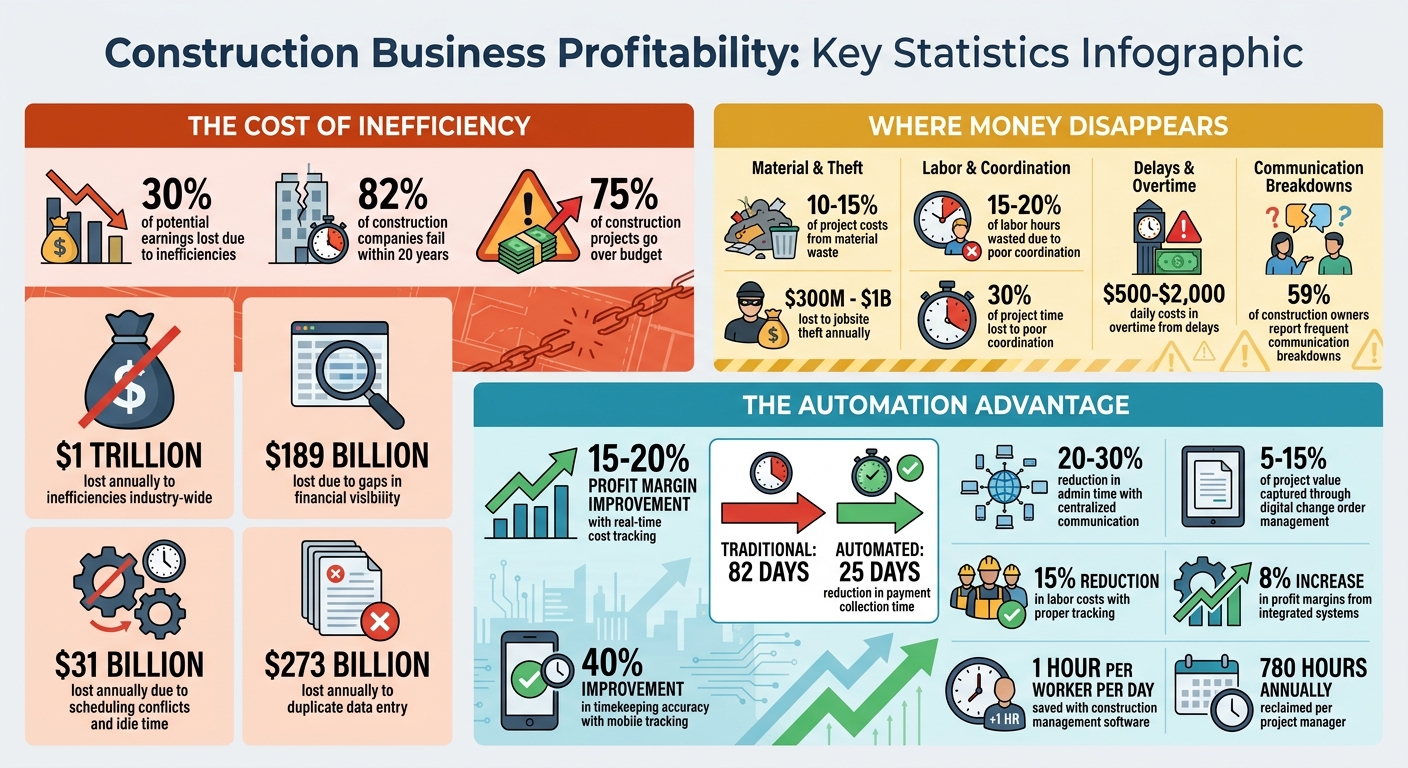
Construction Business Profitability Statistics and Cost-Saving Opportunities
Using Construction Management Software to Improve Finances
Keeping a close eye on finances is what separates thriving contractors from those just scraping by. Construction management software helps tighten financial oversight, safeguarding slim profit margins and increasing overall profitability. By tracking every dollar in real time, this software gives you the clarity to manage those razor-thin 5% margins effectively. It also allows you to spot issues early and make corrections before they escalate.
Track Costs in Real Time to Control Budgets
With construction management software, you can categorize costs—such as labor, materials, subcontractors, and equipment—to improve construction cost estimates – so you can quickly identify discrepancies and protect your profits. When teams log hours and upload receipts daily, the dashboard updates instantly, giving you real-time insights rather than delayed, weeks-old data.
This level of tracking has a measurable financial impact. Contractors using real-time monitoring often see profit margins improve by 15-20%. The key lies in comparing committed costs (like purchase orders and subcontracts) with actual expenses, giving you a clear view of your remaining budget at any point. If labor hours spike or material costs unexpectedly rise, automated alerts flag the problem so you can act before profits take a hit.
Another advantage is digital change order management.
This feature documents and prices scope changes online before the work begins, ensuring you capture the extra 5-15% of project value that might otherwise go unbilled. The system updates contract amounts and budgets automatically, so nothing slips through the cracks.
Chuck A. from Liercke Construction, LLC shares: “The integration of the whole platform is very good, including externally with QuickBooks Online. Ability to do time sheets in the field without separate software. Cost codes and cost items that can be used for different jobs, this is huge for us.”
By keeping costs under control, you set the stage for better cash flow management.
Improve Cash Flow with Better Financial Reports
Financial reports take raw data and turn it into actionable insights.
Weekly Work-in-Progress (WIP) reviews, for example, compare budgeted costs to actuals and project final margins based on current trends. This gives you a clear picture of where each project stands financially. Profit and loss statements for individual jobs help pinpoint which ones are boosting your bottom line and which are draining resources, enabling smarter decisions.
Cash flow forecasting becomes easier with a 13-week rolling forecast. This tool tracks expected cash inflows against outflows like payroll and material costs, offering a 90-day warning system to help you avoid cash shortages. While the industry average for collecting payments is 82 days, firms using automated invoicing systems can reduce this to just 25 days. By generating AIA-style invoices (G702 and G703 forms) within 24-48 hours of milestone completion and accepting online payments via integrated processors (2.9% for credit cards, 1% for ACH transfers), you can speed up your cash cycle significantly.
Integration with QuickBooks eliminates the need for duplicate data entry – a process that costs the construction industry $273 billion annually. Bills, invoices, and payments sync directly with your accounting software, reducing errors and saving time for more important tasks. Accounts receivable aging reports also keep you on top of collections, helping you identify slow-paying clients and maintain Days Sales Outstanding below the 45-day benchmark.
sbb-itb-5eea312
Streamline Project Workflows to Boost Efficiency
After securing financial control, aligning project workflows becomes the next step in cutting delays and avoiding unnecessary expenses.
Inefficient workflows can be a profit killer. While financial tools protect your margins, well-organized workflows ensure every second is used wisely. The construction industry alone loses $31 billion annually due to scheduling conflicts and idle time. Poor coordination can eat up as much as 30% of project time, translating into daily costs of $500 to $2,000 in overtime and related expenses. The key isn’t working harder – it’s eliminating inefficiencies.
Connect Teams with Shared Communication Tools
Disjointed communication slows everything down. Field crews texting, office staff emailing, and subcontractors calling to clarify details creates a perfect storm for lost information. A centralized communication platform solves this by keeping everyone aligned, cutting administrative overhead by 20-30%. Instead of chasing down phone calls or wading through email threads, teams can access a single dashboard with plans, schedules, and RFIs all in one place.
Mobile apps with GPS check-ins add another layer of efficiency. Project managers can track progress in real time, making quick schedule adjustments to prevent minor delays from spiraling into bigger issues. This streamlined approach to communication sets the stage for better planning and fewer mistakes.
Reduce Rework with Better Planning and Documentation
Outdated information is a recipe for rework. When crews rely on old plans, costly errors are almost guaranteed. Digital documentation eliminates this risk by creating a centralized, always-updated repository for plans, specifications, and RFIs. With instant updates, decisions are based on the latest information.
Tools like drag-and-drop Gantt charts give managers a clear view of crew availability and equipment locations, reducing overlaps that cause 15-20% of labor hours to go unproductive. Digital daily logs turn scattered paperwork into searchable records, helping managers pinpoint recurring issues – like frequent supplier delays or repeated safety problems – and tackle the root causes rather than just the symptoms. By cutting down the 3+ hours spent daily on manual admin tasks, project managers can reclaim up to 780 hours annually per person.
standardized templates for RFIs and change orders streamline approvals, ensuring every detail is accounted for. Mobile-friendly forms even allow on-site signatures for change requests, so extra work is documented and accounted for without delay.
Allocate Resources Efficiently to Cut Waste
Once workflows are running smoothly, the next step is to focus on how resources are used. Mismanaged resources can seriously eat into profits. For instance, material waste can account for 10–15% of project costs, and jobsite theft racks up losses between $300 million and $1 billion every year. On top of that, labor inefficiencies – like poor coordination – can waste 15–20% of work hours, further chipping away at profitability.
Monitor Material Usage in Real Time
Simply tracking purchases isn’t enough. Materials often go missing or are damaged between delivery and the jobsite, which chips away at your bottom line. Using digital purchase order systems helps centralize material approvals, ensuring every dollar spent is accounted for. When deliveries arrive, field teams should verify quantities against purchase orders and document any shortages or damages with photos before signing off. This quick 5- to 10-minute process can prevent paying for materials that never actually arrived.
Keep tabs on material usage for every phase of a project. Automated cost coding can assign materials to specific budget categories, making it easier to pinpoint and address cost overruns. Real-time inventory tracking also helps avoid over-ordering, which can quietly drain profits. Beyond managing materials, optimizing equipment and labor productivity is just as essential for reducing waste.
Maximize Equipment and Labor Productivity
Idle equipment and inefficient labor practices can be just as costly as material loss. By centralizing equipment data and using real-time tracking, you can monitor location, usage, and expenses – helping you cut down on rental costs and minimize downtime. For owned equipment, set internal hourly rates that factor in purchase price, maintenance, and fuel so you can bill usage more accurately.
Labor, which typically makes up 40% to 60% of total project costs, demands precise tracking. Mobile time-tracking tools capture hours directly at the jobsite, eliminating the errors that come with manual timesheets. Take this example: In February 2025, a residential contractor working on a $12 million housing project adopted GPS-enabled time-tracking software integrated with their ERP system. This move boosted timekeeping accuracy by 40%, reduced labor costs by 15%, and increased overall profit margins by 8%. Additionally, assigning labor hours to specific cost codes can highlight underperforming project phases, enabling quicker adjustments.
Improve Team Collaboration to Prevent Delays
Poor communication can throw even the best-planned projects off track. The statistics don’t lie: 59% of construction owners report frequent communication breakdowns among project team members. When field crews, office staff, subcontractors, and architects aren’t aligned, delays pile up fast. While streamlined workflows and efficient resource allocation are key, strong team collaboration is just as essential to keeping projects on schedule.
Solve Problems Faster with Digital Communication
Field teams need quick answers to keep the work flowing. Digital communication tools make this possible by connecting everyone to the same real-time information. For example, mobile access lets field workers instantly submit RFIs (Requests for Information) with photos and descriptions, while office teams can send updated blueprints to the field in seconds. This responsiveness can save teams up to 1 hour per worker per day when using construction management software.
Tools that link messages and markups directly to blueprints or 3D models reduce confusion and cut down on endless email chains and phone calls. Standardized digital workflows take it a step further by automatically routing RFIs and change orders to the right person. Even in areas with limited connectivity – like tunnels or large steel structures – offline access ensures progress tracking continues without interruption. By resolving issues quickly and keeping everyone informed, these tools help projects move forward smoothly.
Keep Everyone Updated with Progress Tracking
Progress tracking tools create a single source of truth for the entire team. When everyone has access to the same drawings, change orders, and submittals, the risk of working off outdated plans – and the costly rework that follows – is dramatically reduced. Automated daily reports summarize completed tasks, weather conditions, and delays, keeping owners, architects, and subcontractors informed without the need for manual updates.
Digital checklists and task assignments also play a big role in maintaining quality and accountability. Team members can clearly see their responsibilities and deadlines, avoiding confusion and ensuring steady progress. Yet, only 18% of construction companies currently use mobile applications for project data and communication. This leaves a huge opportunity for businesses to stand out by adopting these tools. Not only do they speed up problem-solving, but they also align with broader goals of reducing delays and improving profitability.
Make Better Decisions with Data and Analytics
Data and analytics are reshaping how construction projects are managed, bringing real-time precision to workflows and resource allocation. By leveraging accurate, up-to-date information, you can make decisions that keep projects on track and within budget.
This is critical because 75% of construction projects go over budget, often due to relying on outdated tools like spreadsheets. The industry loses nearly $1 trillion annually to inefficiencies, with $189 billion directly tied to gaps in financial visibility. Analytics tools bridge these gaps by turning raw data into actionable insights, helping you protect your margins and plan smarter.
Find Cost-Saving Opportunities with Analytics
With analytics tools, you can monitor costs against your budget in real time, receiving insights within 24–48 hours instead of waiting for month-end reports. This speed matters because even small cost overruns can spiral out of control. For instance, a general contractor working on a $25 million healthcare facility used real-time analytics to identify material cost overruns caused by supplier delays. Acting quickly, they negotiated bulk discounts with alternate vendors, saving $200,000 and bringing the project back on budget.
Metrics like the Cost Performance Index (CPI) – which measures the value of completed work against actual costs – are key to tracking efficiency. A CPI below 1.0 signals inefficiency, meaning each dollar spent isn’t delivering full value. Similarly, keeping the Labor Cost Ratio under 40% helps catch productivity issues early. In June 2025, Rogers-O’Brien Construction used analytics to analyze patterns in Requests for Information (RFIs). They found that many light fixture RFIs were flagged unnecessarily. By addressing the root cause, they reduced fixture-related RFIs from 9% to 3.2%.
Another contractor managing a $12 million housing development implemented mobile time-tracking integrated with their system. This improved timekeeping accuracy by 40%, leading to a 15% drop in labor costs and an 8% boost in profit margins. These results highlight how real-time insights can directly translate into measurable savings.
By staying on top of expenses and addressing inefficiencies promptly, you set the stage for better risk management and long-term planning.
Predict Risks and Plan Better with Forecasting Tools
Forecasting tools take financial tracking to the next level by offering a forward-looking perspective. For example, Variance At Completion (VAC) predicts whether a project will finish over or under budget based on current spending trends, acting as an early warning system for necessary adjustments. A 13-week rolling cash flow forecast provides a 90-day view of liquidity, helping you avoid cash flow issues – a challenge faced by 84% of construction firms, even those that appear profitable on paper.
The difference between traditional and real-time forecasting is striking. Traditional accounting reports can lag 45–60 days behind actual performance, while real-time analytics deliver insights within 24–48 hours. This allows for immediate adjustments to crew schedules, supplier contracts, or change orders. Weekly Work-in-Progress (WIP) reviews – comparing budgeted costs to actuals – help catch overruns early and improve final margin accuracy. Automated alerts for cost deviations over 5% further enhance this process, turning data into a strategic advantage.
Conclusion
Key Takeaways for Construction Businesses
Profitability in the construction industry depends on tight cost control, efficient workflows, and informed decision-making. Unfortunately, operational inefficiencies and limited financial visibility cost the industry billions annually. In fact, many businesses lose out on 15–30% of potential earnings simply because they lack the ability to monitor operations in real time.
But the solution is straightforward: automation. Automated systems reduce budgeting and invoicing errors, while real-time cost tracking helps identify overruns before they escalate. Tools like AIA-style invoicing and online payment options can significantly improve cash flow – critical in an industry where liquidity challenges remain a constant concern. Mobile-enabled platforms also provide instant access to project data, offering a competitive advantage, especially when only 18% of businesses currently use such technology.
Visibility is the game-changer. Regularly comparing estimated costs to actual expenses helps safeguard profit margins, which typically hover around a slim 5%. Contractors using real-time profitability tracking often see margins improve by 15–20%. Embracing digital tools not only tackles inefficiencies but also lays the groundwork for long-term growth.
How to Get Started
Making the shift to real-time insights and streamlined systems can deliver immediate results. Begin with a systems audit to pinpoint data gaps and inefficiencies in your current processes. From there, try Contractor Foreman’s 30-day free trial to explore features like real-time cost tracking, mobile time cards, and QuickBooks integration – all without any upfront commitment.
Introduce new technology gradually. Start with a pilot program – perhaps on one project or with a single crew – to iron out any issues before scaling up. These steps align with the earlier-discussed benefits of real-time tracking and operational efficiency. The important thing is to act now. With 82% of construction businesses going under within two decades, waiting could mean falling behind competitors who are already embracing modern tools while you’re stuck managing outdated spreadsheets instead of focusing on growth.
FAQs
What should I track first to improve job profitability?
Tracking costs in real-time is key to boosting job profitability. By keeping a close eye on daily expenses such as labor, materials, and change orders, you can catch potential overruns early and tackle them before they eat into your profits. Real-time monitoring allows you to fine-tune workflows, plug profit leaks, and make smarter decisions to ensure your projects stay on budget while maximizing overall profitability.
How can I shorten payment cycles without upsetting clients?
Sending invoices promptly is key to shortening payment cycles while maintaining good client relationships. Aim to send invoices on the same day the work is completed. Encourage project managers to stay on top of cash flow metrics, such as days sales outstanding (DSO), to keep everything on track.
Make payments easier for clients by offering electronic payment options and flexible terms. Additionally, keep your cash flow forecasts updated and monitor costs in real time. This helps you spot potential delays early, ensuring smoother payments and stronger relationships with your clients.
How do I roll out new software without disrupting crews?
To introduce new software without causing chaos, it’s important to follow a clear and organized approach. Begin with detailed planning – evaluate your current workflows and choose software that aligns with your specific requirements. Before rolling it out, test and configure the system to identify and address any potential problems.
Get your team involved early by providing training and open communication. This helps ensure they understand the benefits and feel confident using the new tool. When you’re ready to go live, start small with a pilot project. This allows you to monitor its performance, make adjustments, and fine-tune the system for smooth integration into daily operations.







