
- Google Drive: Real-time collaboration, version control, and easy sharing with strong security.
- Dropbox: Handles large files like CAD/BIM with file recovery and Office integration for seamless editing.
- Box: Securely manages complex construction documents with advanced workflows and mobile tools.
- Autodesk Docs: Centralizes project data with tools for clash detection and real-time updates.
- QuickBooks: Links financial data with project documents to reduce manual errors.
- Zapier: Automates workflows across 8,000+ apps for effortless file syncing.
- Microsoft OneDrive: Offers AutoSave, version history, and integrations with Procore and Fieldwire alternatives.
- SharePoint: Tracks changes, enables real-time coauthoring, and integrates with Procore.
- DocuSign: Simplifies contract signing with secure, mobile-friendly e-signatures.
Quick Comparison
| Integration | Key Features | Price (Starting) | Security Highlights |
|---|---|---|---|
| Google Drive | Real-time edits, version control, collaboration | Free/$6 per user | AES 256-bit encryption, 2FA |
| Dropbox | File recovery, Office integration | $15 per user | Password-protected links, SOC 2 compliant |
| Box | Advanced workflows, CAD/BIM support | $15 per user | AI threat detection, 256-bit encryption |
| Autodesk Docs | Clash detection, mobile updates | Custom pricing | Folder-level permissions |
| Bluebeam Revu | Markups, activity logs | Custom pricing | Project/folder-level access controls |
| QuickBooks | Links estimates and invoices | $30 per month | SOC 2 and GDPR compliant |
| Zapier | Automates workflows across apps | Free/$20 per month | SOC 2 and GDPR compliant |
| Microsoft OneDrive | AutoSave, Procore sync | $5 per user | Personal Vault, ransomware detection |
| SharePoint | Coauthoring, Procore integration | $6.80 per user | Unified audit logs, sensitivity labels |
| DocuSign | E-signatures, mobile access | $10 per user | Audit trails, eIDAS-compliant signatures |
These tools reduce time spent on admin tasks by up to 30%, improve collaboration, and ensure secure document handling. Whether you need real-time updates, automated workflows, or secure file sharing, these integrations can transform your construction project management. For a complete solution, explore our all-in-one construction management features.
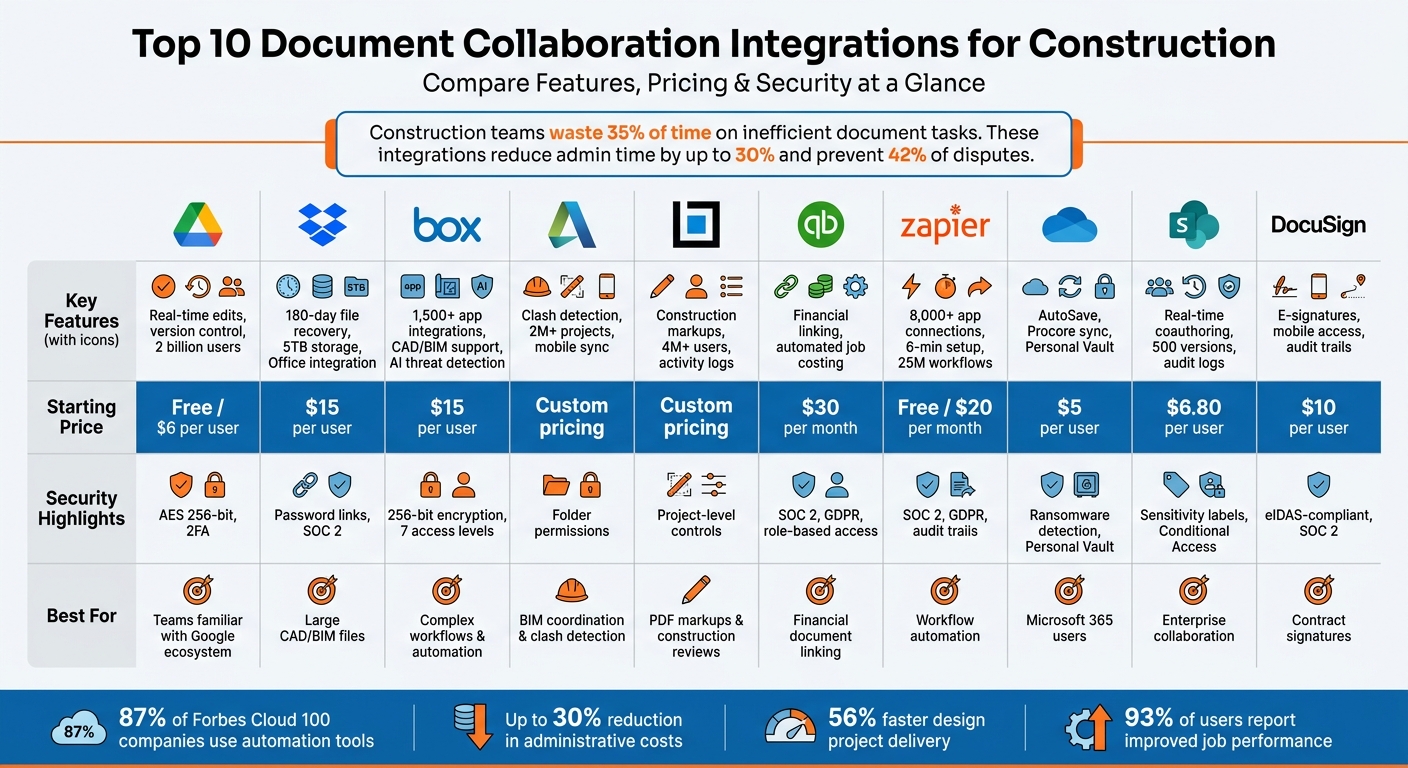
Top 10 Document Collaboration Tools for Construction: Features, Pricing & Security Comparison
1. Google Drive Integration
Google Drive has become an essential tool for construction teams, offering seamless cloud access both on-site and in the office. With a massive 2 billion users worldwide and holding a 47.4% share of the cloud storage market, it’s a platform that most team members are already familiar with. This integration streamlines version management and makes team collaboration much easier.
Version Control Capabilities
Version control in Google Drive varies depending on the file type. For Google-native files like Docs and Sheets, the platform automatically tracks every change, maintaining a continuous version history. You can view, restore, or name up to 40 versions. For files like PDFs, CAD exports, or images, you can use the “Manage Versions” feature. By uploading a new file with the same name, you can keep links intact while maintaining a version history.
One limitation for non-Google files is retention. Older versions are kept for 30 days or up to 100 revisions. For important files like signed contracts or permits, you can select “Keep forever” to ensure they’re not deleted. Additionally, you can create named versions to mark milestones such as “Final Bid” or “Permit Set”, making it easier to locate specific revisions during audits.
To stay on top of updates, files with recent changes are marked with a blue dot. For a detailed comparison of changes, the “Compare documents” tool under Tools > Compare documents can generate a new file highlighting all differences between two versions.
While version control is a key feature, Drive’s collaboration and sharing capabilities are just as impressive.
Ease of Collaboration and Sharing
Google Drive shines when it comes to real-time collaboration and customizable sharing permissions. You can assign “Viewer” or “Editor” roles at either the file or folder level, ensuring subcontractors can access only the information they need without exposing the entire drive. For reviewing contracts or specifications, the “Suggesting” mode is especially helpful, allowing team members to propose edits without altering the original document.
Integrations with tools like Contractor Foreman via Zapier take collaboration to another level. Teams can automate tasks such as creating dedicated Google Drive folders for each new project or work order. Zapier reports that 87% of Forbes Cloud 100 companies rely on automation to connect apps like Google Drive with construction management systems, and setting up these workflows typically takes less than 6 minutes. Once synced, any new files added to a folder are automatically included, keeping the project’s knowledge base current.
Security and Access Control Features
Collaboration on Google Drive is backed by strong security measures. Drive encrypts data using AES 256-bit encryption at rest and employs Transport Layer Security (TLS) during data transfer. Additional safeguards like two-factor authentication (2FA) and phishing detection help protect accounts from unauthorized access. File owners can also restrict collaborators from downloading, copying, printing, or emailing specific files using the Security Limitations View.
However, Google manages the encryption keys, meaning it doesn’t offer “zero-knowledge” encryption.
As the Material Security Team explains:
“Because Google holds the keys, it does not offer true zero-knowledge encryption… this means that, under certain circumstances… Google can decrypt and access your files”.
For highly sensitive documents, like bids or financial records, it’s wise to conduct regular sharing audits to remove public links or unnecessary collaborators. Enforcing multi-factor authentication (MFA) is another effective way to prevent unauthorized account access.
sbb-itb-5eea312
2. Dropbox Integration
Dropbox provides a centralized hub for construction teams to store and manage essential documents like CAD, BIM, and PDF files. With 5 TB of storage starting at $15 per user per month for Standard plans, it’s designed to handle the heavy data needs of construction projects across multiple devices.
Version Control Capabilities
One of Dropbox’s standout features is its file recovery and version control. Standard plans allow users to retrieve deleted files and access previous versions for up to 180 days, while Advanced plans extend this to an entire year. For added efficiency, integrating Dropbox with Contractor Foreman via Zapier automates file version updates, ensuring everyone is working with the most current information.
Ease of Collaboration and Sharing
Dropbox takes collaboration to the next level by combining version control with seamless sharing tools. Mobile access allows on-site teams to preview and edit files directly, even uploading site videos to project folders in real time. For example, project managers assembling submittal packets can share them with external engineers through secure links, avoiding cumbersome email attachments. Joe Hersom, a Project Manager at EJ Prescott, saw significant time savings – over 500 hours – by switching from manual processes to Dropbox for organizing and sharing submittals.
Its integration with Microsoft Office further simplifies workflows. Users can edit documents directly in Dropbox, with changes saved automatically.
Kendall Pouland, Director of Tech & Innovation at Tellepsen, highlighted this convenience:
“Dropbox not only delivers on its promise of reliable mobile access to our files but, through the integration with Office, makes it dead simple for our users to edit those files and save them back to Dropbox no matter where they are.”
Integration with Construction-Specific Tools
Dropbox connects seamlessly with tools like Autodesk, Bluebeam, PlanRadar, and Procore, breaking down data silos. For Contractor Foreman users, Zapier automates tasks such as creating project folders for new clients or saving field-uploaded files directly to the cloud. Additionally, Dropbox Sign integrates with Procore to speed up contract processes, enabling teams to send and sign agreements up to 80% faster while saving completed documents in the right folders automatically. These integrations enhance Dropbox’s core features, making it a key player in construction document management.
Security and Access Control Features
Dropbox provides robust security measures, allowing administrators to set detailed permissions to control access to sensitive documents like blueprints and contracts. Shared links can include password protection and expiration dates to limit access for external contractors. The platform tracks file access, creating accountability, and complies with SOC 2 and GDPR standards, offering full audit trails. Alex Serriere, CTO at TEECOM, shared his experience:
“The flexibility offered by Dropbox’s approach to security has made it much easier to manage than our file server ever was. By sharing the responsibility for setting permissions with our project managers we are able to reduce the burden on IT and optimize sharing for end user needs.”
3. Box Integration
Box serves as a secure platform for managing document collaboration in construction projects. It ensures that architects, engineers, and contractors can access and work on the most up-to-date documents. The platform supports complex file types like CAD/CAM and BIM, allowing users to upload, preview, and comment on files from any device. With pricing starting at $15 per user per month for business plans tailored to construction, Box also includes advanced security features.
Version Control Capabilities
Box simplifies version tracking by automatically updating files when a new document with the same name is uploaded. Business and enterprise plans offer free version history retention, providing detailed audit trails with timestamps for every file change, comment, or decision. While Personal Pro accounts allow access to the last 10 file versions, business plans offer higher limits to accommodate larger teams.
Ease of Collaboration and Sharing
Box makes real-time collaboration seamless. Tools like Box Canvas and Box Notes enable teams to co-edit workshops, storyboards, and project plans, complete with live comments. The Box Mobile app includes features such as document scanning with Optical Character Recognition (OCR), allowing field teams to convert physical documents into searchable PDFs or upload audio and video directly to the cloud. With Box Hubs, users can organize content into easy-to-navigate galleries, streamlining access. These collaborative tools have been shown to speed up design project delivery by 56% and reduce design revisions by 29%.
Integration with Construction-Specific Tools
Box integrates with over 1,500 apps, including popular platforms like Microsoft 365, Google Workspace, Slack, and Zoom. For construction workflows, Box pairs with Adobe Workfront to create proofs directly from Box files. The Box Relay feature allows teams to automate workflows with simple drag-and-drop functionality, cutting down on manual document handling. Through Zapier, users can automate tasks such as creating project-specific Box folders or saving field-uploaded files to designated cloud locations, further streamlining operations.
Security and Access Control Features
Box offers seven distinct collaborator access levels, such as Uploader, Previewer, Viewer-Uploader, and Editor, giving project managers the ability to control who can view or edit sensitive blueprints. Shared links can be secured with passwords and set to expire, ensuring temporary contractors only have access for a limited time. The platform employs 256-bit AES encryption for files at rest and TLS 1.2 for data in transit, meeting compliance standards like HIPAA, GDPR, and FINRA. Additionally, AI-driven threat detection and granular access controls safeguard sensitive project data, even when working with external subcontractors.
4. Autodesk Docs Integration
Autodesk Docs, a key part of Autodesk Forma Data Management, acts as a centralized hub for managing construction project data. It’s already trusted by builders on over 2 million projects. The platform ensures everyone – architects, engineers, and field teams – works with the most up-to-date information by maintaining precise version control as updates are published. Plus, with over 400 pre-built integrations, including ERPs, CRMs, and analytics tools, it blends seamlessly into existing workflows.
Version Control Capabilities
Every time a document is uploaded, Autodesk Docs tracks its versions. The “Compare” tool makes it easy to spot updates by overlaying two versions of a drawing or model and using color-coding to highlight changes. Users can also set up watch groups to get notifications on updates to specific files or models. These documents sync directly to mobile devices, ensuring that field teams always have the latest information at their fingertips. This level of real-time tracking simplifies collaboration across teams.
Ease of Collaboration and Sharing
Collaboration gets a boost with advanced markups that automatically sync to mobile devices, keeping everyone aligned. The “Bridge” feature allows teams to share select sheets and files across projects while maintaining updates between them.
Russ Dalton, Americas BIM Director at AECOM, highlighted the benefits:
“With BIM coordination and multi-discipline collaboration, our project was delivered with less than one percent rework. On a typical job, we expect to have between eight to ten percent.”
Integration with Construction-Specific Tools
Autodesk Docs goes beyond basic document management by supporting specialized construction workflows. Features like Model Coordination for clash detection, Bid Management, and tools for managing RFIs, submittals, and daily reports make it a construction management software. Its integration with BuildingConnected Pro ensures that any updates to bid documents during the bidding phase are automatically reflected in Autodesk Docs, streamlining the document lifecycle from pre-construction to the build phase. Review and approval tools further enhance efficiency, ensuring only construction-ready documents are distributed.
Security and Access Control Features
Autodesk Docs provides robust tools for managing document access. Administrators can control visibility at a folder level, tailoring permissions to meet project needs. These customizable sharing options ensure sensitive information stays secure, accessible only to authorized stakeholders. This granular control reinforces the platform’s ability to unify project data while maintaining high security standards.
5. QuickBooks Integration for Document Linking
QuickBooks integration bridges the gap between financial records and project documentation by linking estimates, invoices, and contracts directly to your accounting data. This approach eliminates the hassle of double-entry – manually inputting the same information into both project management and accounting systems. Double-entry not only wastes time but also increases the risk of errors and version mismatches. With this integration, changes like approved orders or generated invoices sync automatically across platforms, reducing manual input errors.
Integration with Construction-Specific Tools
Using Zapier, QuickBooks connects seamlessly with construction-focused platforms, automating workflows. For instance, you can set up tasks that automatically attach files or notes in QuickBooks Online whenever a submittal or RFI is approved in your project management system. A great example is Contractor Foreman, which syncs leads, customers, and financial documents between systems. This integration allows real-time job costing and instant access to financial data. Brian T. from Tower Interiors Group LLC shared:
“Contractor Foreman is more intuitively understandable to me and our type of business. They use the same terminology as we do and understand our problems”.
It’s worth noting that QuickBooks Desktop integration for certain platforms will be discontinued starting January 1, 2026. To maintain smooth document linking, users must transition to QuickBooks Online.
Security and Access Control Features
The integration prioritizes security, offering role-based permissions and detailed audit logs to track every change. These features help safeguard sensitive financial documents while ensuring only authorized users have access. Additionally, automated workflows between construction tools and QuickBooks via Zapier comply with SOC 2 and GDPR standards, providing peace of mind.
For external collaboration, the Client Portal feature allows secure sharing of financial documents, eliminating the need for unencrypted email exchanges. With 99.9% uptime powered by AWS servers and advanced data encryption (both at rest and in transit), the integration ensures top-level protection for your financial records.
6. Zapier Integration
Zapier simplifies construction document workflows by connecting Contractor Foreman to more than 8,000 apps and 450 AI tools. It acts as a bridge, linking your core construction management tasks with a wide range of apps. For instance, you can automate file transfers from Contractor Foreman to platforms like Google Drive, Dropbox, or OneDrive. This kind of automation helps tie together various construction tools effortlessly. In fact, 87% of Forbes Cloud 100 companies rely on Zapier, and 93% of users say it has improved their job performance.
Integration with Construction-Specific Tools
Creating automated workflows with Zapier is quick, usually taking under six minutes. For example, uploading a file in Contractor Foreman can trigger Zapier to save it to cloud storage, set up folders for new clients, or attach documents to QuickBooks Online transactions. If you’re managing contracts, the DocuSign integration can automatically organize documents into specific workspaces while controlling user access.
Zapier also works with tools tailored for construction, such as CompanyCam and magicplan. It can handle tasks like adding barcodes to PDFs with PDF.co or extracting data using AI-powered tools. With over 25 million workflows in action, the platform showcases its adaptability.
Security and Access Control Features
Zapier doesn’t just focus on automation – it also prioritizes security. It adheres to enterprise-grade security standards, including SOC 2 and GDPR compliance, and provides detailed audit trails for every automated action. You can customize permissions when adding team members to shared folders, assigning roles like “Owner”, “Editor”, or “Viewer”. For Dropbox, you can automate settings such as password protection and expiration dates for shared links, ensuring sensitive construction plans remain secure.
The OneDrive integration includes an “Include Version History” feature, which keeps track of document revisions during automated transfers. This ensures a comprehensive audit trail for important files like blueprints and contracts. Additionally, you can set workflows to automatically revoke workspace access for team members who leave a project, maintaining tight control over your data.
7. Microsoft OneDrive Integration
Microsoft OneDrive provides dependable cloud storage and collaboration tools tailored for construction teams. Its integration with Contractor Foreman ensures that both field teams and office staff can access the most up-to-date files, anytime they need them.
Version Control Capabilities
OneDrive’s AutoSave feature keeps track of every change made to a document, making it easy to restore earlier versions when needed.
Through Zapier, OneDrive integrates seamlessly with Contractor Foreman, offering an “Include Version History” option to preserve all document revisions. The system also includes configurable “Conflict Behavior” settings, which help manage version conflicts by determining how to handle files that already exist in a destination folder. These tools make version tracking straightforward and enhance collaboration.
Ease of Collaboration and Sharing
Sharing documents through OneDrive is simple and secure. With detailed permission controls, you can decide whether subcontractors can “Edit” or only “View” specific files, reducing the chance of unauthorized changes to critical plans. Shortcuts to shared folders allow field teams to quickly access essential project documents. For additional security, you can set expiration dates on sharing links, ensuring sensitive files like blueprints or contracts remain protected.
Microsoft Copilot further enhances efficiency by enabling quick summaries, version comparisons, and PDF reviews directly from the context menu. This is particularly helpful when dealing with complex specifications or amendments to contracts.
Integration with Construction-Specific Tools
OneDrive doesn’t just stop at storage and sharing – it integrates with other construction tools to simplify workflows. For example, adding a file to a OneDrive folder can automatically generate a corresponding document within Procore projects. Similarly, Fieldwire, a tool used on over 4,000,000 projects globally, syncs plans and files from OneDrive for both offline and online access. This real-time synchronization ensures that field teams always work with the most current versions, reducing errors caused by outdated information.
“Real-time synchronization ensures your documents are always up-to-date. Keep your project files and plans neatly organized and accessible within Fieldwire.” – Fieldwire
Contractor Foreman’s OneDrive integration is powered by Zapier, which adheres to SOC 2 and GDPR compliance standards for enterprise-grade security. It also boasts a user rating of 4.3/5, reflecting its reliability and ease of use.
Security and Access Control Features
To protect sensitive information, OneDrive includes a Personal Vault, ransomware detection, file recovery options, and instant access management tools. These features ensure that your documents remain secure while remaining accessible to authorized users.
8. SharePoint Integration
SharePoint offers powerful tools for managing documents, making it an excellent choice for construction teams. When paired with Contractor Foreman through Microsoft 365, it revolutionizes how project files are tracked, shared, and secured.
Version Control Capabilities
SharePoint’s version control system automatically logs every change, recording the date, time, and user responsible for modifications. This is especially useful in construction, where maintaining accountability is crucial.
The platform separates finalized versions from drafts, streamlining workflows without adding complexity. By default, SharePoint Online retains up to 500 versions in its document libraries. Its check-in/check-out feature ensures that only one person can edit a document at a time, avoiding accidental overwrites. When multiple users collaborate, SharePoint tracks individual updates and merges them into a new version.
“Document collaboration, co-authoring, and List updates with human beings is much better with versioning enabled. People make mistakes, and versioning provides a safety net.”- Patrick M Doran, Principal Author, Microsoft 365 Community
Keep in mind that each version counts toward your storage – two 10 MB versions will use 20 MB. For construction teams working with large blueprints or specifications, monitoring storage usage is key.
This robust versioning system supports smooth, real-time teamwork.
Ease of Collaboration and Sharing
SharePoint simplifies collaboration by enabling real-time coauthoring, even with external team members. This makes updating project plans or contracts a breeze. It also offers granular access controls at various levels – site, list, or item – ensuring that sensitive documents like blueprints or budgets are only accessible to authorized users. For added security, you can use the “Stop Inheriting Permissions” feature to restrict access further.
The platform’s AI-powered discovery tool helps teams quickly locate essential information by summarizing complex data and offering content insights. Additionally, construction teams can create branded project hubs to centralize news, resources, and apps for large-scale projects.
Integration with Construction-Specific Tools
SharePoint extends its capabilities by integrating with other construction tools, ensuring seamless synchronization of files and workflows. For example, it connects with platforms like Procore for two-way document syncing, so updates in one system reflect in the other almost instantly. It also works with tools like Microsoft Teams and Zapier for real-time document sharing and task tracking. Fieldwire users can benefit from automatic imports and synchronization of plans, ensuring field teams always have the latest documents, even offline.
“A typical situation is that users with access rights to Procore can’t see and work with documents stored in SharePoint, and vice versa. To optimize the document management process, companies have to integrate the two systems.”- ScienceSoft
Specialized connectors help resolve conflicts when multiple users edit the same file across different platforms, preventing data loss. For custom integrations, it’s important to configure API throttling to manage system stability during high usage.
Security and Access Control Features
SharePoint takes security seriously, logging every action and permission change in the Microsoft Purview Unified Audit Log for full compliance oversight. The platform also supports Conditional Access policies and sensitivity labels to protect data, even when shared externally. Built-in versioning allows recovery from accidental deletions or ransomware attacks.
For construction teams handling sensitive files, applying sensitivity labels ensures data protection throughout the document’s lifecycle. Features like Restricted Access Control and Conditional Access Policies provide robust governance, all while preparing your system for future AI integrations. SharePoint (Plan 1) starts at $6.80 per user/month (billed annually), offering 1 TB of cloud storage, versioning, and secure file sharing.
9. DocuSign Integration
DocuSign simplifies construction management by embedding electronic signature capabilities directly into your workflow. This eliminates the need for printing, scanning, and physically routing documents, speeding up processes for contracts, change orders, and subcontractor agreements.
Ease of Collaboration and Sharing
DocuSign centralizes signature-related tasks, allowing teams to sign, send, and track contracts effortlessly. With real-time tracking, project managers can instantly see when a document is delivered, viewed, signed, or declined, providing clear visibility into the approval process.
Field teams benefit from mobile access, enabling them to manage and sign documents on any internet-connected device. This feature is particularly helpful for avoiding delays when key personnel are on-site. Through Zapier, DocuSign integrates with Contractor Foreman to automatically route signed documents to the appropriate workspaces and send notifications for new agreements. This ensures that all project agreements are stored in one centralized system within Contractor Foreman.
Security and Access Control Features
DocuSign meets international security standards, including SOC 2 and GDPR compliance, to protect sensitive construction documents. Audit trails log every action taken on a document, creating a permanent record for legal and regulatory purposes. For high-value contracts, identity verification supports eIDAS-compliant Qualified Electronic Signatures (QES), ensuring stringent authentication for all signers.
Administrators can assign role-based access controls, restricting document visibility and signing permissions to authorized personnel only. Integration with tools like Procore connects DocuSign to Correspondence, Documents, Project Financials, and Invoicing, consolidating all project agreements in one place. This reduces the risk of lost documents and ensures there’s always a single, authoritative version of every signed contract.
Contractor Foreman users can easily integrate DocuSign via Zapier, keeping all signed agreements within their centralized project records for streamlined management.
Conclusion
Integrations can completely change how teams approach document collaboration, turning what was once a frustrating process into something smooth and efficient. By linking cloud storage platforms like Google Drive and Dropbox with construction management software, teams can access the same files instantly – whether they’re in the office or out on-site. This setup eliminates the headaches of juggling multiple file versions and ensures everyone is working with the latest blueprints, contracts, or RFIs.
The benefits are clear in terms of time and money. Companies that adopt modern document management systems with integrated workflows often see a 25% to 30% drop in administrative costs and delays. Studies also highlight how much time is wasted through inefficient document handling, emphasizing the importance of streamlining these processes.
Beyond cost savings, automation takes efficiency to the next level. Tools like Zapier remove repetitive tasks, such as manual file transfers or folder organization. Field teams can instantly upload photos or markups using mobile integrations, giving office staff real-time updates on as-built conditions. This real-time syncing helps avoid costly rework and keeps projects on track.
Within Contractor Foreman’s ecosystem, integrations with tools like QuickBooks and Zapier bring financial accuracy and real-time updates together in one cohesive workflow. Contractor Foreman connects seamlessly with QuickBooks to link financial documents and with Zapier to automate workflows, allowing you to integrate your preferred cloud storage and signature tools. This flexibility means you can create a document collaboration system tailored to your needs, all within a single platform. With 93% of users reporting that automation tools like Zapier have improved their work performance, these integrations aren’t just helpful – they’re a necessity for staying competitive in today’s construction industry.
FAQs
Which integration is best for managing large CAD/BIM files?
Contractor Foreman doesn’t specifically mention an integration tailored for managing large CAD/BIM files. However, it does work with tools like Kreo and Takeoff, which are designed to assist with construction design and estimating workflows. These capabilities might align with the requirements of CAD/BIM processes.
How do I prevent teams from using outdated drawings or specs?
To ensure you’re always working with the most current drawings or specifications, adopt solid document version control practices. Start by using clear naming conventions that include details like the project name, document type, version number, date, and status. This makes it easy to identify the latest version at a glance.
Store all documents in a centralized system with proper access controls to prevent unauthorized changes. Establish approval workflows so updates are reviewed and verified before being shared.
Additionally, train your team on these processes and consider using construction management software with built-in version control features. These tools make it easier to keep everyone aligned and working with the most up-to-date documents.
What security settings should I require for sharing files with subcontractors?
To keep sensitive project details secure, ensure that file access is restricted through authentication measures like login credentials or multi-factor authentication. Assign specific permissions to control who can view, edit, or download files. Opt for encrypted file-sharing platforms that integrate seamlessly with your construction management tools. Regularly audit access permissions and revoke them for users who no longer need them to maintain strict confidentiality.







