
“WE’LL MAKE IT WORK!” — the four words that built your reputation in construction.
When a client names their budget, you don’t wince. You say “well…that’s doable” and figure out how to actually deliver.
That figuring-it-out part?
That’s best done with top-down budgeting.
Top-down budgeting is a method where construction teams start with the total project cost and distribute funds across phases or components. This approach works best during early project stages or for managing multiple projects. It’s faster than traditional methods, cutting estimation time by 40–60%, and provides accuracy within 10–20% of final costs.
Using this method is how you keep the promise without eating the loss (and it’s how you keep the ulcers at bay too!). But it requires the right tools and consistent monitoring to make sure every step actually follows the budget.
In this article, we’ll cover the tools and tips to do top-down budgeting right.
Key features to look for in budgeting tools:
- High-level budget creation: Allocate funds using cost codes like CSI MasterFormat and customize work breakdown structures.
- Real-time tracking: Monitor budgets with variance tracking and dynamic Estimate at Completion (EAC).
- Change order management: Track cost impacts and reallocate contingencies efficiently.
- Portfolio dashboards: Consolidate financial data for multiple projects with drill-down capabilities.
Best top-down budgeting tools to try:
- Contractor Foreman: Affordable, all-in-one platform ($49/month) with QuickBooks integration and mobile access.
- Buildertrend: Ideal for residential builders with job costing and QuickBooks sync.
- Knowify: Designed for trade contractors with phase-based budgeting.
- Procore: Suited for large portfolios with robust financial tracking.
- Projectmates: Tailored for public agencies, offering earned value analysis.
- Premier: ERP-level platform for mid-to-large firms with cash flow forecasting.
Each tool supports different needs, from small contractors to large-scale operations. Choose based on your project complexity, required integrations, and portfolio management needs.
Key Features to Look for in Top-Down Budgeting Tools
Construction budgeting tools come with a wide range of capabilities. To make top-down budgeting effective for U.S. projects, focus on features that prioritize cost codes, compliance, and cash flow management.
1. High-Level Budget Creation and Allocation
A solid top-down budgeting tool starts with the overall project budget and allows you to allocate funds across phases, milestones, or cost codes. In the U.S., many firms rely on CSI MasterFormat cost codes to ensure consistency and streamline reporting processes.
Customization of the Work Breakdown Structure (WBS) is another critical feature. The best tools let you define cost types and sub-jobs, creating a hierarchy that aligns seamlessly with your company’s existing workflows.
Once funds are distributed, tracking how they’re spent becomes the next priority.
2. Real-Time Budget Tracking and Forecasting
Staying updated on your budget in real time – rather than relying on outdated data – can mean the difference between proactive management and costly surprises. Look for tools that offer real-time variance tracking, which compares your budget to actual costs as they occur, helping you catch overruns early.
Top-tier platforms also update Estimate at Completion (EAC) dynamically, using real-time data from commitments, actual costs, and change orders. Research shows that construction firms using specialized cost management software see a 57% improvement in tracking and managing project costs. Additionally, companies that leverage real-time insights are five times more likely to make faster decisions.
3. Change Order and Contingency Management
Managing change orders effectively is crucial to keeping budgets stable. The best tools track change events, allowing you to assess potential cost impacts before they escalate into formal change orders.
Another must-have is contingency reallocation. If a cost code comes in under budget, your tool should let you move those savings into a contingency line without needing to rebuild the entire budget. Multi-tier approval settings for change orders also add accountability and governance to the process.
For broader oversight, portfolio-level visibility is essential.
4. Portfolio and Program Dashboards
Managing multiple projects requires a unified view. Executive dashboards that aggregate financial data across your portfolio help leadership identify trends, compare project performance, and flag underperforming jobs – all in one place.
The ability to drill down into details is a game-changer. Dashboards that let you click from a portfolio summary to specific transactions provide powerful tools for audits and strategic decision-making.
sbb-itb-5eea312
Contractor Foreman: A Full-Featured Tool for Top-Down Budgeting
Contractor Foreman is a construction management platform designed for contractors, packing over 35 features to streamline project management, financial tracking, scheduling, and client interactions. When it comes to top-down budgeting, this platform provides a structured approach to setting high-level budgets, breaking them down by cost codes, and keeping tabs on spending in real time across all active projects.
“I like that it has almost everything in one place from the client portal to schedules, to budgets.” – Shawn B., Avan Company LLC
Budget Creation and Cost Code Allocation
Contractor Foreman’s Estimates module is key for creating project budgets. It connects with 1build.com, giving you access to real-time local material and labor pricing to ensure estimates align with current market rates.
The platform also offers a two-tier cost code system, which supports imported codes like CSI MasterFormat or NAHB cost codes, as well as fully customizable options tailored to your workflow. For quick adjustments, the Bulk Markup tool allows you to apply a percentage increase (e.g., 10%) across entire categories, simplifying profit margin calculations.
Real-Time Financial Tracking and Reporting
Contractor Foreman tracks spending through two perspectives: Committed costs (e.g., Purchase Orders and Subcontracts) and Actual costs (e.g., Bills and Expenses). This dual approach helps catch budget variances early.
The Financial Dashboard gives you a high-level overview of project health, with the option to dive into specific transactions. Reports like Work in Progress (WIP) and Budget vs. Actual provide insights into where spending is over or under budget across all projects. Time card data is automatically synced into job costing reports, ensuring labor costs are allocated to the correct cost codes without manual input.
Integration with Accounting Systems
To keep financial data consistent, Contractor Foreman integrates seamlessly with QuickBooks Online (available with the Plus plan at $166/month or higher). It also connects via Zapier to over 50 other tools, including Zoho, Dropbox, and Mailchimp, automating workflows across your software suite.
Mobile Access and Multi-Project Management
Contractor Foreman is accessible on web, iOS, and Android, ensuring field updates are instantly reflected in office financials. It also supports unlimited projects across all plans, making it ideal for managing budgets at a portfolio level without incurring additional per-project fees. Considering that only 18% of construction businesses regularly access project data via mobile apps, Contractor Foreman’s real-time mobile access bridges a critical gap. Pricing starts at $49/month, with a 30-day free trial and a 100-day money-back guarantee.
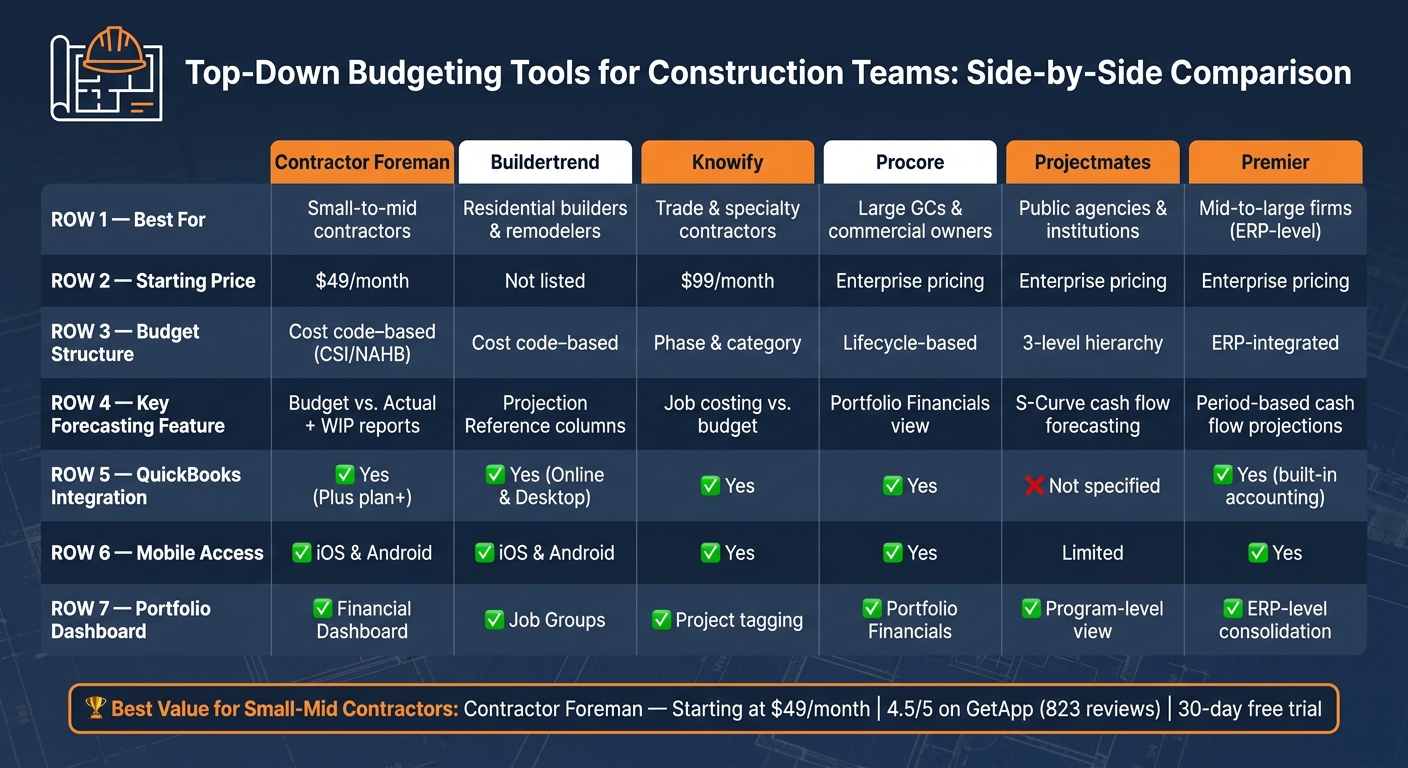
Top Construction Budgeting Tools Compared: Features, Pricing & Best Use Cases
Construction teams have access to a variety of platforms that support top-down budgeting. While Contractor Foreman offers an all-in-one solution, these tools are designed to address specific needs within the construction industry.
Buildertrend Construction Budgeting
Buildertrend is tailored for residential home builders and remodelers. Its workflow kicks off a “Job Costing Budget” from a signed estimate, providing a financial baseline that tracks original, revised, actual costs, and committed expenses in real time. For teams juggling multiple projects, Job Groups allow budgets to be combined across related projects, such as units within a multi-family development.
Buildertrend also integrates with QuickBooks Online and Desktop, helping users save up to $8,000 annually on bookkeeping while reclaiming over 5 hours of productivity each day.
Knowify Construction Budgeting
Knowify is designed for trade and specialty contractors, including electrical, plumbing, and HVAC professionals. It breaks down project budgets into phases and cost categories like labor, materials, equipment, and subcontractors, making it easier to allocate high-level budgets into detailed line items. The platform also accounts for labor costs by including insurance, taxes, and benefits, helping contractors avoid underestimating expenses. Its project tagging system enables users to group and analyze financial performance across similar project types over time. Pricing starts at $99 per month.
For larger-scale needs, platforms like Procore expand these capabilities to manage more complex, multi-project portfolios.
Procore Budget and Cost Management
Procore is aimed at commercial contractors and general contractors managing large, multi-project portfolios. Its budget tool syncs contract modifications and change orders directly into the budget, eliminating double-entry. The Portfolio Financials feature consolidates financial data from all active projects, giving executives the ability to drill down from overarching trends to specific details. Procore is trusted by over 15,700 teams worldwide.
Projectmates Construction Cost Management
Projectmates is built for public agencies, universities, and institutional owners managing capital programs. It organizes data into a hierarchical structure of Groups, Line Items, and Sub Items for detailed cost tracking. The platform also features Earned Value Analysis (EVA), which links budget sub-items to schedule tasks to assess cost performance against the project timeline. This helps teams predict total completion costs before overruns occur. For cash flow planning, Projectmates supports both Straight Line and S-Curve forecasting models.
Premier Construction Budget Management
Premier is an ERP-level platform designed for mid-to-large firms seeking deep financial control throughout the project lifecycle. It supports top-down budget creation with built-in variance analysis, comparing original budgets to revised figures and actual expenses as the project progresses. Premier also includes cash flow forecasting tools that help finance teams project future cost requirements by period, making it especially useful for firms managing bonded work or complex draw schedules. Its integrated accounting capabilities handle job costing, subcontract management, and payroll in one system, reducing the need for multiple tools.
The table below provides a quick comparison of these tools, highlighting their focus areas, budget structures, and key forecasting features:
| Tool | Best For | Budget Structure | Key Forecasting Feature |
|---|---|---|---|
| Buildertrend | Residential builders | Cost code–based | Projection Reference columns |
| Knowify | Trade contractors | Phase & category | Job costing vs. budget |
| Procore | Large GCs & owners | Lifecycle–based | Portfolio Financials view |
| Projectmates | Public/institutional owners | 3-level hierarchy | S-Curve cash flow forecasting |
| Premier | Mid-to-large firms | ERP-integrated | Period-based cash flow projections |
How to Choose the Right Top-Down Budgeting Tool
When it comes to finding the right budgeting tool, the key is aligning the tool’s features with your team’s workflow and the complexity of your projects. This ensures you can manage budgets effectively at every level.
Budget Hierarchy and Depth
A good budgeting tool should mirror the structure of your projects. Look for platforms that support multi-tiered data structures, such as Category, Subcategory, and Item levels. This allows you to break down high-level budgets into detailed, actionable line items. Advanced tools often include features like sub-budgets and dynamic fund transfers, making it easier to adjust as projects evolve. Another useful feature is the ability to save successful budget structures as templates. This not only speeds up future setups but also reduces the chance of overlooking critical cost categories. A well-structured system paired with instant financial insights can make a big difference.
Real-Time Visibility and Reporting
The ability to view live data is crucial. Evaluate tools based on their real-time dashboard capabilities, which should display budget discrepancies, Work-in-Progress (WIP) schedules, and cash flow forecasts. Tools with automated alerts for deviations are particularly valuable. According to Mastt, automated cost management can save over 16 hours per project each month and reduce report preparation time by 60%.
Integration and Workflow Compatibility
Integration is non-negotiable. Choose tools that offer bi-directional syncing with accounting or ERP systems to eliminate redundant data entry. It’s also important for the tool to integrate with field management systems. When field teams can log costs directly from job sites, the office gets instant updates without chasing paperwork. Teams using integrated systems report saving 3–4 days per project by avoiding manual reconciliation. This level of synchronization ensures that financial data stays accurate and up-to-date across all platforms, providing a clear picture of project finances.
Portfolio Management Capabilities
If you’re managing multiple projects, having a unified “control tower” view is critical. This feature consolidates costs, risks, and schedules from all active projects into a single dashboard. With this kind of visibility, executives can identify trends, reallocate resources, and address at-risk projects before they impact overall performance. For instance, Procore users reported a 57% improvement in their ability to track and manage project costs after adopting integrated portfolio financial tools.
Conclusion: Choosing the Right Tools for Construction Budgeting
Choosing the right tool is essential to ensure your top-down budgeting strategy works effectively.
The tools you use should provide real-time visibility, seamless accounting integration, automated tracking for change orders, and mobile features that keep field updates aligned with office dashboards. Without these basics, even the most well-thought-out budgeting strategy can fall short.
For small-to-mid-sized contractors, Contractor Foreman offers all these features in a single platform, starting at just $49/month. Its combination of real-time integration and cost-code management makes it a reliable choice. Many users praise its QuickBooks Online integration and the ability to reuse cost codes, which help maintain budget accuracy across projects.
“The integration of the whole platform is very good, including externally with QuickBooks Online… Cost codes and cost items that can be used for different jobs, this is huge for us.” – Chuck A., Liercke Construction, LLC
The platform boasts a 4.5/5 rating on GetApp, based on 823 verified reviews. Users frequently mention its affordability and comprehensive financial tracking.
As Lindsey-Leigh M. from JWH Construction Services, Inc shared:
“This software packs more punch than you would expect at its meager price point. It offers so much in the way of construction management that it is almost unbelievable.”
A strong budgeting tool delivers the clarity needed for quick and informed decisions, helping teams address small issues before they grow into larger problems. By connecting field data with financial oversight, Contractor Foreman empowers teams to act with confidence. Plus, with a 30-day free trial, you can see firsthand if it suits your workflow before making a commitment.
FAQs
When should I use top-down budgeting on a construction project?
Top-down budgeting shines during the early phases of a project – think conceptual planning or feasibility studies – when detailed designs aren’t available yet. It’s particularly useful for large, complex projects that require broad financial oversight or when timelines are tight, and quick cost estimates are a priority. This method also helps establish a fixed budget early on, steering the design process and supporting the project’s long-term success.
How do I set up cost codes and a WBS for top-down budgets?
To get started with top-down budgeting, it’s essential to align your cost codes with your estimating process. Begin by grouping similar job phases into categories such as:
- Labor
- Materials
- Subcontractors
- Equipment
A clear and logical numbering system is key for easy reference and organization. This helps ensure that every part of the project is accounted for and tracked efficiently.
If you’re using Contractor Foreman, you can manage your cost codes seamlessly. The platform allows you to add, edit, or even import cost codes under the cost code settings. This ensures you can track expenses accurately and keep your budgeting process streamlined.
What’s the best way to keep budgets accurate when change orders hit?
When change orders come into play, staying on top of your budget can get tricky. That’s where financial management software comes in handy. Tools like Contractor Foreman take the guesswork out of budget adjustments by automatically updating the contract amount and revised budget as soon as a change order is approved.
This automation not only saves time but also reduces the risk of manual entry errors. Plus, it ensures that all new costs are accounted for, giving you a clear view of both the original and revised budgets in real time. With this level of accuracy, you can keep profitability on track, even as project scopes shift.







