
- What Makes an AI Feature Worth Using in Construction Software
- 1. AI-Powered Scheduling and Delay Prediction
- 2. Automated Daily Logs and Field Reports
- 3. Smart Document, Drawing, and RFI Search
- 4. Budget Forecasting and Cost Risk Alerts
- 5. Photo Tagging and Progress Tracking
- 6. Communication Assistants for Teams and Clients
- 7. Risk Alerts and Issue Prioritization
- 8. Workflow Automation Across Project Tasks
- Where These AI Features Show Up in Real Construction Software
- AI Feature Types and Their Best-Fit Workflows at a Glance
- How to Choose Which AI Features to Adopt First
- Conclusion
- FAQs
- Related Blog Posts
The best AI features in construction management are the ones that take annoying, mind-numbing work off your plate—and ideally catch expensive problems before they turn into really expensive ones.
Think about how much time gets wasted on these tasks: writing daily logs, digging through documents for one RFI, checking photos for progress, updating schedules, or figuring out which issue needs attention first.
Did we just hear you sigh?
Good news: AI can do a lot of that grunt work in a fraction of the time.
And we’re not talking about saving five minutes here and there. Documentation tools can save 5–10 hours per project manager per week. Early delay warnings can help avoid $20,000 to $50,000 in preventable costs on a $2 million job. Document search can cut lookup time by up to 90%.
Here are the AI features that can make construction management a whole lot easier:
- Best for field reporting: automated daily logs and photo tagging
- Best for office coordination: document and RFI search and workflow automation
- Best for cost and schedule control: delay prediction, budget forecasting, and risk alerts
- Best starting point: the workflow with the most re-entry, missed updates, or slow approvals
Quick Comparison
| Feature | Main job it helps with | Main result |
|---|---|---|
| AI-powered scheduling | Timeline control | Spots delay risk weeks earlier |
| Automated daily logs | Field reporting | Cuts manual paperwork |
| Smart document and RFI search | Finding project info | Finds drawings, specs, and answers fast |
| Budget forecasting and cost alerts | Cost control | Flags overruns before they grow |
| Photo tagging and progress tracking | Visual records | Links photos to work, dates, and issues |
| Communication assistants | Team and client updates | Drafts updates and keeps messages consistent |
| Risk alerts and issue ranking | Problem triage | Sorts urgent items from lower-priority ones |
| Workflow automation | Approvals and routing | Moves RFIs, invoices, and tasks with less handwork |
A strong setup keeps AI inside the same system used for schedules, logs, RFIs, budgets, and client updates.
That is where time savings and cleaner decisions tend to show up fastest.
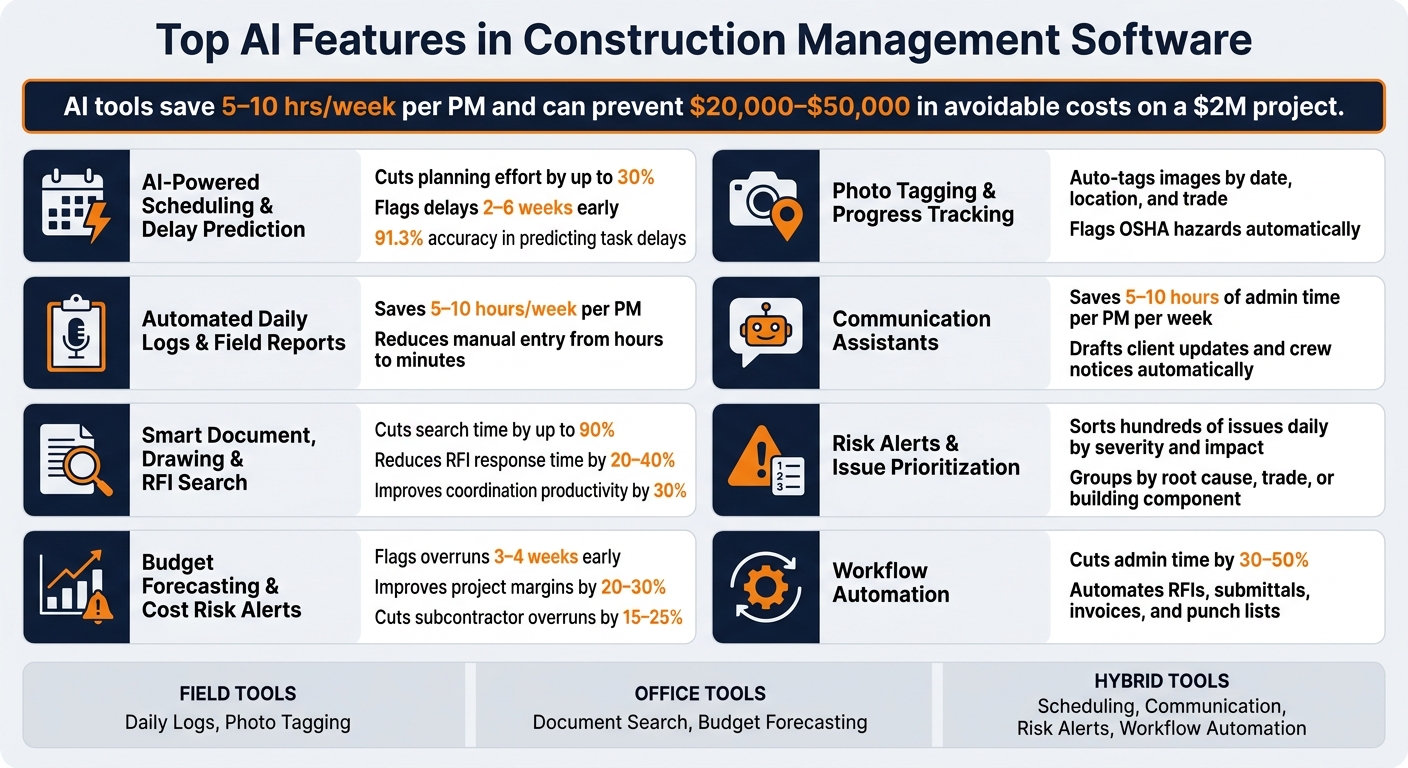
Top AI Features in Construction Management Software: Benefits at a Glance
What Makes an AI Feature Worth Using in Construction Software
An AI feature is only worth your time if it does one of three things: saves time, cuts mistakes, or helps you make better calls.
That’s the filter.
The best tools trim admin work, use data your team already enters, and fit the way both the office and the field already operate. That’s how you tell the difference between useful AI and software that just sounds advanced.
Features that connect job costing, scheduling, and accounting do a lot of heavy lifting. They cut down on double entry and reduce errors at the same time. When data gets entered once and flows where it needs to go, budgets, schedules, and financials stay in sync. Centralized logs, schedules, and financials also make project history easier to search and defend later.
After automation is working, prediction becomes the next layer that matters. A good AI tool doesn’t just tell you what already happened. It points to what’s likely to happen next. Predictive analytics can cut schedule delays and reduce unplanned change orders. These tools tend to work best when they have at least 6 months of project history to learn from.
Field use is the last test, and it’s a big one. If crews have to add extra steps, adoption usually slips fast, and data quality goes with it. Mobile features like voice-to-text logs and photo tagging fit the way crews already handle daily reports and progress tracking.
The features below pass these tests in different parts of the job.
sbb-itb-5eea312
1. AI-Powered Scheduling and Delay Prediction
Schedules get old fast. A late delivery, a smaller crew, or a stretch of bad weather can throw off site work in a hurry.
AI helps keep the schedule useful by turning it from a static document into a live forecast for faster decisions. Instead of having a scheduler manually rework hundreds of activities after each change, the system takes in daily field data like crew hours, percent complete, material delivery status, and weather. It then updates task durations and resequences work to protect key milestones.
That can save a lot of time. AI scheduling can cut manual planning effort by up to 30% and reduce overruns on complex projects. In one simulated 1,200-task commercial project, AI scheduling lowered both planning effort and total delay versus a static baseline. It also hit 91.3% accuracy in predicting task delays greater than three days, with a mean absolute error of just 1.8 days. Of course, that kind of accuracy depends on the quality of the field data going in.
Delay prediction works best when field data is connected. Strong systems pull from labor productivity logs, material delivery tracking, RFI and submittal cycle times, inspection status, and weather feeds tied to the jobsite ZIP code. When those data streams stay connected and consistent – and teams use standard activity codes and cost codes across projects – the model can flag at-risk tasks 2 to 6 weeks before a delay would usually show up in a normal schedule update.
That changes the conversation. Instead of rebuilding the schedule by hand, teams get earlier warnings and a clearer sense of what to do next. Owners also get finish-date forecasts that rest on data, not gut feel. Those same project updates can also feed the automated logs and reports crews already need.
The biggest payoff tends to show up on complex, multi-trade jobs like commercial buildings, infrastructure, healthcare, industrial, and data center work. On those projects, dependency chains run long, and one slip can trigger problems across the board. The same data that makes schedules sharper also strengthens daily logs and field reports.
2. Automated Daily Logs and Field Reports
Daily logs do a lot of heavy lifting on a jobsite. They protect the project record and help with claims, team coordination, and schedule control by recording who was on site, what work got done, what materials showed up, and what the weather was like. The catch? When someone has to fill them out at the end of a long day, details get missed, entries get rushed, and some reports don’t get done at all.
AI helps by drafting daily logs from photos, voice notes, crew activity, and material deliveries. A superintendent can speak notes into a phone or tablet right in the field, and speech-to-text turns that into a draft report. That can cut paperwork from hours to minutes. Contractors using these tools say they save 5–10 hours per week per project manager on documentation alone. And that time savings goes even further when the log also tracks weather, site access, and delivery timing.
A few features have an outsized effect here:
- Automated weather tracking pulls local conditions into the record, which helps support weather delay claims.
- GPS-verified timestamps show who was on site and when, which can reduce timecard fraud.
- Material delivery updates entered in the field can sync with related purchase orders, so procurement records stay current without extra typing.
That same record can then support billing, dispute review, and delay documentation.
There’s one guardrail that matters: AI-generated logs should stay in draft form only until the superintendent reviews and approves them. That step keeps the record tighter and leaves the superintendent as the final authority on what happened.
Those same records become even more useful when teams need to search drawings, RFIs, and job history fast. Understanding RFIs in construction is key to maintaining this project record.
3. Smart Document, Drawing, and RFI Search
Smart search helps crews make faster calls in the field by pulling up the right drawing, spec, or RFI response right when they need it. With natural-language search, people can ask plain-English questions and quickly get the right spec section, drawing callout, or past RFI response – without digging through file names or folder trees. That kind of speed matters most when teams are answering RFIs, checking revisions, and keeping work moving.
A superintendent might type something like “fire rating requirement for Level 3 corridor walls” and get the matching spec section, drawing callout, and earlier RFI response tied to that issue. The best tools don’t just give an answer. They link back to the source, so users can check the document before they act.
The time savings can be hard to ignore. AI document management software search can cut search time by up to 90% and improve coordination productivity by 30%. AI-assisted RFI workflows can reduce response time by 20–40% and cut manual drafting time by 50–70%. That means fewer crews standing around waiting for an answer – and less risk of moving forward with stale direction.
Smart search also helps limit mistakes that come from old information. By putting the latest approved revision first, the software helps crews avoid building from superseded drawings.
This works best for project managers, superintendents, estimators, and trade partners on document-heavy commercial, healthcare, or infrastructure jobs.
Once teams can find the right information fast, the next move is using that same project data to forecast cost risk.
4. Budget Forecasting and Cost Risk Alerts
Once teams can pull up project data fast, that same information can tighten up cost forecasts. Most overruns don’t appear out of nowhere. They usually start as small misses in labor hours, material pricing, or change orders.
AI budget forecasting updates the most likely final cost as the job moves forward. It uses actual invoices, committed costs, pending change orders, labor hours, and labor cost to keep that forecast current. Then it compares current job performance against the original estimate and data from past projects. If a line item starts drifting over budget, the system can flag it 3–4 weeks before the variance shows up in the budget.
That’s when the forecast starts doing real work. If labor hours or material costs move past budgeted thresholds, automated alerts go out so the project team has time to step in before a small issue turns into a bigger one. AI-driven cost control has been linked to a 20–30% improvement in project margins, and AI can also score subcontractor performance to cut subcontractor overruns by 15–25%.
There’s a catch, though. Forecast accuracy falls off when daily logs, hours, or change orders are incomplete. Teams that get the most from these tools treat data entry like part of the job, not an afterthought.
General contractors with several projects running at once tend to see the biggest payoff, since AI can watch financial performance across active jobs at the same time. That edge stands out most on healthcare and commercial projects, where trade coordination adds more layers of cost risk. These financial signals work best when they’re paired with field data that shows actual progress as it happens.
5. Photo Tagging and Progress Tracking
Once daily logs capture what happened in the field, photo tagging turns that record into something teams can actually use later. Jobsite photos lose a lot of their use when they aren’t tagged and tied to the job record. When field crews upload photos through the daily log, the system auto-tags each image and files it under the right log entry, date, and activity. It also stores those photos under the project on its own, so the record is there when delays, change issues, or disputes come up.
AI now does more than just store photos. It can review jobsite images for safety risks and suggest what to do next, including flagging OSHA-related hazards and recommending corrective actions.
This matters most for specialty subcontractors. A clean, timestamped progress record can help speed up payment approvals and guard against unfair rework claims. Automatic tagging also gives teams a clear progress trail for payment approvals, rework disputes, and weekly client updates.
Those visual records can also help teams spot problems earlier, which leads into issue prioritization and risk alerts.
6. Communication Assistants for Teams and Clients
Once field updates are logged, AI can turn them into ready-to-send messages for crews, PMs, and clients. That matters because keeping everyone on the same page is one of the toughest parts of any project.
A simple example is task notices. If the schedule shifts, AI can send updated assignments and timelines to crews and subcontractors right away, which cuts down on manual follow-up.
On the client side, AI can draft routine replies and project summaries. Costs, budgets, and change orders can then be routed to a project manager for review before anything is sent. That review step matters. Best practice is to have a manager check AI-drafted messages before they go out.
Client portals also help by keeping approvals and communication history in one place. On top of that, AI can generate project reports and performance metrics from live project data, so client updates reflect what’s actually happening on the jobsite.
For PMs and office staff, this means less time spent writing the same updates over and over. For crews, it means faster direction when plans change. For clients, it means more consistent communication.
Once communication is automated, the next value is knowing which issues need immediate attention.
7. Risk Alerts and Issue Prioritization
Once schedules, logs, and budgets are tied together, AI can turn that information into a live risk queue. AI risk management takes project data that would otherwise sit in different places and turns it into a ranked list of issues, so teams can see what’s most likely to hit cost, schedule, or safety.
Some Procore alternatives sort hundreds or even thousands of issues each day. They rank them by severity and likely impact, then group them by root cause, trade, or building component.
That ranking matters most on jobs with lots of trades and tight handoffs. AI can group similar risks, flag overdue actions, and spot repeat patterns before they start dragging the schedule.
Safety managers, PMs, and supervisors don’t all need the same alerts. Each one should see the items tied to their role, whether that’s high-risk inspections, re-sequencing calls, or field action in a specific area. It also helps to set thresholds, so only urgent deviations trigger immediate alerts. If every issue gets pushed out at once, people start tuning them out. Send instant alerts only for issues that threaten cost, schedule, or safety. Batch the rest for review.
Those alerts do their best work when they flow straight into the next step: task routing and workflow automation.
8. Workflow Automation Across Project Tasks
Once AI spots a risk, workflow automation helps move it forward. It assigns tasks, sends items through approval paths, and tracks follow-up without long email threads or constant spreadsheet updates.
This works best for RFIs, submittals, daily log approvals, document routing, invoice and pay app processing, and punch lists. The rules manage where items go. AI tools help draft, sort, and flag them for human review. With RFIs and submittals, a short field note or plan detail can become a structured item the team can track from start to finish.
AI-driven automation can cut admin time by 30% to 50% on pilot projects when used for field reports, invoice processing, and crew dispatch. That kind of time savings hits hardest where teams deal with a heavy flow of repeat work day after day.
The people who gain the most are usually project engineers, PMs, superintendents, and accounting staff. Project engineers spend less time cleaning up and formatting RFIs, and more time working through the issue itself. Accounting teams can have invoices and pay applications matched against contracts or purchase orders, with odd entries flagged before anyone signs off. If materials show up as delivered in a daily log, the related purchase orders can update on their own, which helps keep procurement in step with what’s happening in the field. Of course, that only works when the inputs are clean and the approval path is set up the same way each time.
The ROI tends to be strongest on mid-to-large, multi-party projects like commercial, healthcare, higher education, and industrial work, where document volume is high and missed steps can create real contract risk. On smaller jobs with loose, informal processes, setup time can cost more than it saves. Clean templates, naming rules, and approval chains help the system send items to the right place. AI needs steady, consistent data to sort and route well. If the inputs are messy, the output usually follows.
Where These AI Features Show Up in Real Construction Software
The best way to judge AI is to look at where it shows up inside the software crews already use every day: schedules, daily logs, documents, budgets, and client communication. That’s where it either helps the work move or just gets in the way.
Contractor Foreman is a clear example of an all-in-one construction management platform that builds AI into the same modules that already run those jobs. In plain English, the AI isn’t off to the side. It sits inside the workflows teams are already using.
On the safety and field side, Contractor Foreman includes AI Safety Photo Analysis, which scans uploaded images for OSHA-related hazards and recommends corrective actions. It also includes AI Safety Topic Generation. Describe the work being performed, and the platform creates an OSHA-aligned safety meeting topic with discussion questions in English or Spanish. Those features plug right into daily logs and safety meeting workflows already used on the jobsite.
On the financial side, Financial Tabs track committed versus actual costs, which helps with budget forecasting and risk awareness. Kanban boards give PMs a fast view of task status and stalled work. The Client Portal puts schedule access, document sharing, approvals, and invoices in one place.
These examples show where AI fits inside a working platform. The table below maps each feature to the workflow it serves best.
AI Feature Types and Their Best-Fit Workflows at a Glance
The table below shows where each AI feature fits best, what it helps with most, and how contractors often use it in day-to-day work.
| AI Feature Type | Main Workflow Improved | Primary Benefit | Workflow Location | U.S. Construction Example |
|---|---|---|---|---|
| AI-Powered Scheduling | Project Timeline Management | Prevents 15–25% of schedule-related delays | Hybrid | Flags a critical-path conflict on a foundation pour |
| Automated Daily Logs | Jobsite Activity Tracking | Saves 15–20 minutes of manual entry per PM per day | Field | Turns a voice memo into a formatted daily log with weather attached |
| Smart Document, Drawing, and RFI Search | RFI and Drawing Management | Reduces RFI response time from 30 minutes to approximately 30 seconds | Office | Finds structural steel specs in a large drawing set in seconds |
| Budget Forecasting & Risk Alerts | Financial Oversight | Reduces unplanned change orders by 10–20% | Office | Flags a cost overrun risk on an electrical budget item before it becomes a change order |
| Photo Tagging & Progress Tracking | Field Documentation | Automates progress verification and safety checks | Field | Flags missing PPE and auto-tags the image by location and trade |
| Communication Assistants | Team and Client Updates | Saves 5–10 hours of admin time per PM per week | Hybrid | Auto-replies to a homeowner asking about a scheduled tile install |
| Workflow Automation | Task and Milestone Management | Reduces administrative burden across the project lifecycle | Hybrid | Triggers lien waiver generation when a payment milestone is complete |
A simple way to think about it: field tools help crews capture info fast, office tools help teams find and track records, and hybrid tools connect both sides.
That distinction matters. If your biggest pain point is slow paperwork in the field, daily logs or photo tracking may be the right place to start. If the bigger issue is chasing RFIs, drawings, or budget risks in the office, search and forecasting tools usually make more sense first.
Use this map to pick the first AI feature based on the workflow where it can do the most good.
How to Choose Which AI Features to Adopt First
Start with the workflow that burns the most time or leads to the most rework. Then match that pain point to the AI feature tied to that part of the job. Construction teams spend 35% of their time on non-productive work, including searching for project information. That stat makes the first step pretty clear: fix the time drain first.
Your role on the project matters too. General contractors who manage multiple trades and subcontractors tend to get the fastest payoff from smart document and RFI search and communication assistants. Self-performing contractors and subcontractors usually deal with more friction in the field, especially around manual reporting and cost tracking. For them, automated daily logs and photo tagging are often the best place to start. Project executives who oversee several jobs at once usually feel schedule pressure and budget drift the most, so budget forecasting and risk alerts often move to the top of the list.
| Contractor Role | Biggest Daily Pain Point | Best First AI Feature |
|---|---|---|
| General Contractor | Searching for project info, coordinating trades | Smart Document/RFI Search, Communication Assistants |
| Self-Performing / Subcontractor | Manual field reporting and cost capture | Automated Daily Logs, Photo Tagging |
| Project Executive | Cost overruns and schedule slippage | Budget Forecasting & Risk Alerts |
Also watch for manual re-entry points. If someone is copying field notes into a report, retyping timecard data for payroll, or moving the same job data between systems by hand, that’s a strong signal that automation can help right away.
Another warning sign is communication drag. When updates are scattered across emails, phone calls, and text threads, people miss things. A communication assistant can cut down that back-and-forth fast.
The main idea is simple: don’t adopt everything at once. Pick one or two features tied to the workflows causing the most avoidable delay or rework, such as logs, search, forecasting, or communication. That keeps the rollout focused and helps the team avoid tool overload. Start with one workflow, get the team using it well, and then add forecasting and risk alerts once the data is being used in a steady way.
Conclusion
Put all of this together, and the picture gets pretty clear: these AI features don’t replace seasoned project managers. They take manual tasks off their plate, flag problems sooner, and help keep planning, field work, cost tracking, and team communication on track.
For contractors, that time adds up fast. Teams using AI-powered project management tools save 5–10 hours per project manager each week on documentation, and avoiding just one delay on a $2 million project can save $20,000 to $50,000.
The smart move is to start small. Pick the workflow that’s causing the most lost time or rework, roll out that feature first, and expand only after the team is using it day in and day out.
FAQs
Which AI feature should I adopt first?
Start with high-impact, repetitive tasks that create daily admin work. Estimating, scheduling, daily logs, and document control often give you the fastest return because they’re usually where projects get bogged down and time slips away.
A simple first step is routine documentation, like daily logs or client communication templates. If you’re running a small team, don’t try to fix everything at once. Pick one problem area, run a short pilot, and track the time saved before you expand.
How much project data does AI need?
AI does its best work when all project data lives in one central system. That means structured data like schedules, labor hours, budgets, equipment use, and progress reports, along with semi-structured data like meeting summaries, RFIs, and daily logs.
Real-time inputs matter too. Weather, material lead times, and financial records give AI the context it needs to spot dependencies and risks before they turn into jobsite problems.
It also helps to keep cost codes and templates consistent across projects. That gives your team one source of truth, so the insights coming from AI are more dependable and easier to act on.
Do AI-generated reports still need review?
Yes. AI-generated reports still need human review. That’s how you make sure the information is accurate, matches the job’s actual conditions, and meets your quality standards.
Use AI as a co-pilot for first drafts of logs, estimates, or schedules – not for final sign-off. Contractors are still legally responsible for any document they submit, so every AI draft should be checked against actual project data, site limits, and your own professional judgment.
Related Blog Posts
- AI in Construction: Benefits and Opportunities for Residential Builders
- Why More Contractors are Using AI in Construction Management
- 20 Best AI Tools for Construction Project Management
- Will AI Replace Construction Workers? Here’s the Truth







