
“Never miss a deadline again!”
“Your schedule—FINALLY under control!”
Every subcontractor scheduling platform basically says some version of this. Smarter crew scheduling. Smoother communication. Fewer delays. A jobsite that somehow runs itself…
And the thing is…a lot of them deliver on at least some of it. Which is exactly why you’ve had three tabs open for two weeks. It’s just not easy to pick one!
So here’s a straight look at the top subcontractor scheduling tools for 2026 — what each one actually does well, and where it falls short.
- Contractor Foreman: Affordable, all-in-one scheduling with real-time updates, mobile access, and integrations like QuickBooks and Google Calendar. Plans from $49/month.
- Procore: Ideal for large-scale projects, offering predictive analytics, real-time collaboration, and extensive integrations. Pricing starts around $375/month.
- Buildertrend: Tailored for residential builders, featuring automated task dependencies, client portals, and QuickBooks integration. Plans start at $199/month.
- Fieldwire: Focused on field operations with Kanban boards, Gantt charts, and offline functionality. Free for small teams; paid plans from $39/user/month.
- Jobber: Best for small crews, with drag-and-drop scheduling, route optimization, and client notifications. Pricing starts at $49/month.
- Assignar: Built for heavy construction, offering compliance tracking and resource allocation. Custom pricing available.
- CoConstruct: Excellent for custom home builders, linking client decisions to schedules and automating updates. Starts at $99/month.
- Autodesk Build: Advanced scheduling with 4D BIM, Lean Construction tools, and over 400 integrations. Pricing starts at $117/month.
Quick Comparison
| Tool | Best For | Starting Price | Key Features | Mobile Support |
|---|---|---|---|---|
| Contractor Foreman | Small to medium contractors | $49/month | Unified calendar, Gantt charts, QuickBooks integration | iOS, Android |
| Procore | Large commercial projects | ~$375/month | Predictive analytics, real-time updates, 500+ integrations | iOS, Android (offline) |
| Buildertrend | Residential builders | $199/month | Task dependencies, client portals, QuickBooks integration | iOS, Android |
| Fieldwire | Field teams, specialty trades | Free/$39/user/month | Kanban boards, Gantt charts, offline mode | iOS, Android (offline) |
| Jobber | Small crews, home services | $49/month | Route optimization, drag-and-drop scheduling | iOS, Android |
| Assignar | Heavy construction | Custom pricing | Compliance tracking, resource allocation | iOS, Android |
| CoConstruct | Custom home builders | $99/month | Client-linked schedules, automated updates | iOS, Android |
| Autodesk Build | Large teams, BIM integration | $117/month | 4D BIM, Lean Construction tools, 400+ integrations | iOS, Android (offline) |
Each tool caters to different needs, from small teams to large enterprises. Choose based on project size, industry, and required integrations.
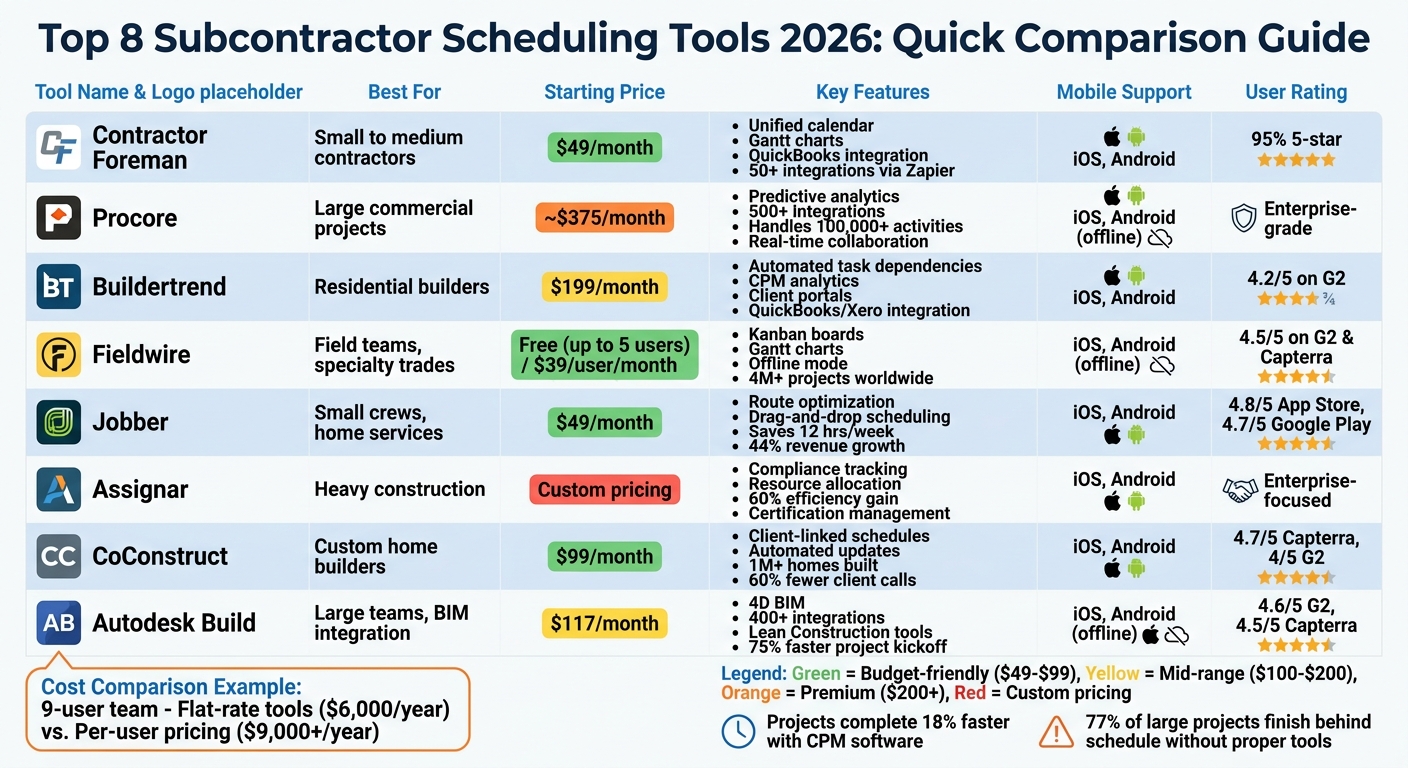
Comparison of Top 8 Subcontractor Scheduling Tools 2026: Features, Pricing, and Best Use Cases
1. Contractor Foreman
Contractor Foreman tackles the scheduling headaches faced by small and medium-sized contractors by combining scheduling, crew coordination, and field communication into one platform. It eliminates the need for juggling multiple tools, streamlining operations for contractors.
> Scheduling Features
The platform’s scheduling tools allow you to assign workers to tasks in real time using a unified calendar, Gantt charts, Kanban boards, and drag-and-drop task lists. These tools help identify conflicts and even let you filter assignments by licenses or certifications. Work orders and to-do lists simplify task coordination, while the integrated team chat ensures instant communication. Field crews can also update task progress and log hours directly from job sites using time cards, keeping everyone on the same page.
>Integrations with Other Tools
Contractor Foreman connects seamlessly with over 50 systems through direct integrations and Zapier automation. You can sync schedules with tools like Google Calendar, Outlook 365, or Microsoft Project for a smoother workflow.
For financial tracking, the platform integrates with QuickBooks, Gusto, and Xero (available mid-2026) to connect labor hours and schedules directly to payroll and job costing. CompanyCam integration lets you attach site photos to scheduled tasks or daily logs, while Angi Leads funnels new opportunities straight into your project schedules. Zapier also allows for automated notifications or task creation when schedule changes occur.
>Mobile Accessibility
Whether on iOS, Android, or desktop, Contractor Foreman ensures your team can update progress, log hours, and access project documents in real time from anywhere.
>Pricing Plans
Plans start at $49/month for a single user and go up to $249/month for unlimited users. Every tier includes unlimited projects, advanced scheduling features, financial tracking, and more. There’s also a 30-day free trial and a 100-day money-back guarantee. Customer support averages a 13-second response time and boasts a 95% 5-star rating.
With its integrations, mobile access, and user-friendly pricing, Contractor Foreman stands out as a valuable tool for subcontractor scheduling in 2026.
sbb-itb-5eea312
2. Procore
Procore is a comprehensive platform tailored for managing multi-phase commercial projects. Since February 17, 2026, it has offered global scheduling capabilities, making it a powerful tool for large-scale enterprises. With features like real-time collaboration and predictive analytics for scheduling, Procore helps teams stay on track by forecasting project completion probabilities based on current progress trends.
>Scheduling Features
Procore stands out with its real-time collaboration tools, enabling teams to update schedules simultaneously without losing data. Field staff and subcontractors can transform master schedules into digital lookaheads, which account for dependencies to ensure materials and crews are ready when needed. This feature streamlines subcontractor schedules and ensures on-site tasks are aligned. Managers can assign specific activities to trade partners, maintaining clear task ownership throughout the project.
The platform is designed to handle projects with over 100,000 activities, offering predictive analytics to assess completion probabilities based on progress data. Users can also filter schedules by trade, task type, or responsibility, allowing them to focus on the most critical details.
>Integrations with Other Tools
Procore integrates seamlessly with over 500 apps and tools available in its marketplace, including Oracle Primavera P6 and Microsoft Project. It connects with Procore’s own modules, linking delays to specific RFIs, observations, or submittals, ensuring transparency and accountability. The platform also syncs project management data with accounting systems and ERPs, enabling real-time tracking of material costs and labor. For teams with unique workflows, Procore’s open API allows for custom integrations.
>Mobile Accessibility
Procore’s mobile apps for iOS and Android offer offline functionality, which is especially useful for subcontractors working in remote locations. Subcontractors can track time, submit RFIs, and complete inspections without an internet connection. Once reconnected, all data syncs automatically, ensuring no information is lost.
>Pricing Plans
Procore uses a value-based pricing model tied to the Annual Cost of Construction (ACC), which represents the total dollar volume of projects managed by a company. This approach allows businesses to invite unlimited subcontractors and partners without incurring extra costs. Pricing starts at approximately $375 per month for base tiers, while enterprise-level plans for larger firms range from $10,000 to over $50,000 annually.
3. Buildertrend
Buildertrend is tailored for residential builders and remodelers handling high-volume projects who need advanced scheduling tools. With over 1 million homes built using the platform, it offers features like automated task dependencies, Critical Path Method (CPM) analytics, and baseline snapshots to compare planned versus actual timelines. According to the 2025 State of Residential Construction Industry report, 27% of projects are delayed, and 30% exceed budget without proper tools – issues Buildertrend aims to address. These capabilities help streamline workflows and reduce delays in residential construction.
>Scheduling Features
Buildertrend simplifies scheduling by automating task dependencies. If one phase is delayed, connected tasks adjust automatically, avoiding bottlenecks and keeping subcontractors on track. Users can view schedules in various formats, including Gantt charts and calendars, and receive real-time updates via text, email, or push notifications when schedules change or new tasks are assigned.
Subcontractors benefit from personalized portals where they can access timelines, documents, and their project status. By automating dependencies and providing timely notifications, Buildertrend tackles common scheduling challenges head-on.
The platform is versatile enough for both simple remodels and large-scale developments. Many users report increasing their project capacity by over 50% and cutting build times by 4 to 6 weeks.
>Integrations with Other Tools
Buildertrend integrates with popular construction accounting software like QuickBooks and Xero, calendars such as Google Calendar and Outlook, and CRM tools like HubSpot. It also offers open API access for custom integrations. Internally, its scheduling tool connects with modules for Change Orders, Invoices, Selections, Bids, and Job Costing. This ensures that when schedules shift, related financial and operational data updates automatically.
>Mobile Accessibility
The Buildertrend mobile app, available for iOS and Android, provides full scheduling functionality. It includes offline support, agenda and Gantt views, and a free subcontractor portal. Field teams can use features like the Time Clock to log hours and submit Daily Logs with progress photos directly from job sites. While the app is packed with features, some users report occasional stability issues, leading them to use the mobile browser instead.
>Pricing Plans
Buildertrend offers flat-rate plans starting at $449–$500 per month with an annual contract. Promotional rates can go as low as $199 for the first month, while advanced plans can exceed $800 per month. Mid-to-large firms typically spend between $8,000 and $10,000 annually. The platform holds a 4.2/5 rating on G2, with users praising its client experience and onboarding process, though some mention a steep learning curve for subcontractors.
4. Fieldwire
Fieldwire is designed to simplify daily crew management and subcontractor scheduling, making it ideal for specialty contractors and large field teams. With over 4 million projects worldwide using the platform, it tackles the common scheduling delays that plague construction projects. According to McKinsey, 98% of large construction projects either exceed budgets or fall behind schedule, often due to poor execution in the field. Fieldwire aims to address these challenges by improving task management and on-site communication.
>Scheduling Features
Fieldwire provides three main scheduling views to suit different needs: Kanban boards for priority management, Gantt charts for visualizing task timelines, and Calendar views for date-focused planning. It supports lean construction techniques like pull planning and three-week look-ahead sessions, letting foremen easily drag and drop tasks to shift deadlines. The “related tasks” feature helps identify potential trade conflicts, allowing teams to make adjustments proactively. Notifications are sent instantly via push and email when tasks are assigned, keeping everyone in the loop. Users can also bulk-import tasks via CSV, duplicate existing tasks, and set up recurring ones for regular inspections.
Fieldwire’s task management system has proven effective for companies like TekWorks, which handled 400 projects in a single year using the platform. Similarly, Colt Builders used Fieldwire to coordinate 1,200 employees and subcontractors on large-scale wood framing projects. However, Fieldwire’s Gantt charts lack task dependencies, meaning changes to one task don’t automatically adjust linked tasks. This makes it less suitable for complex Critical Path Method (CPM) scheduling, though it excels in day-to-day task dispatching. Its scheduling features also integrate well with other digital tools, enhancing overall coordination.
>Integrations with Other Tools
Fieldwire connects with widely used tools like Microsoft Project and Smartsheet to bridge the gap between master schedules and field tasks. It also integrates with popular cloud storage platforms, including Box, Dropbox, Google Drive, and OneDrive/SharePoint, ensuring that plans and documents stay up to date. For analytics, it works with Power BI and Smartsheet, enabling cross-project data visualization. The platform also includes a Revit plugin for BIM coordination and supports 360° photos on higher-tier plans. An open REST API, available on Business and Business Plus plans, allows custom integrations with accounting or CRM systems. Recent updates have added DocuSign integration for electronic signatures on forms and reports.
>Mobile Accessibility
Fieldwire’s mobile app ensures seamless communication and task management in the field. The app opens directly to project pages, reducing navigation time on-site. It also provides offline access by storing project data locally, so crews can continue working without internet and sync updates later. Mobile features include viewing and marking up 2D plans and 3D models, capturing geotagged photos, logging punch items, and completing digital checklists. Recent updates have introduced dark mode, Apple Pencil support, and QR code integration. The app supports 19 languages, making it accessible for international teams.
>Pricing Plans
Fieldwire offers a free Basic plan for small teams, supporting up to 5 users, 3 projects, and 100 sheets. Paid plans include:
- Pro: $39 per user per month (billed annually, or $54 monthly) with unlimited projects and custom statuses.
- Business: $59 per user per month (billed annually, or $74 monthly), adding features like custom forms, 360° photos, and a BIM viewer.
- Business Plus: $79 per user per month (billed annually, or $94 monthly), which includes RFIs, submittals, change orders, and budgeting tools.
Fieldwire holds a strong 4.5/5 rating on G2 and Capterra. Users appreciate its focus on field operations and offline functionality, though advanced features like RFIs and change orders are reserved for the highest-tier plan.
5. Jobber
Jobber is used by more than 350,000 home service professionals, particularly those in residential contracting and specialty trades with smaller crews. While it’s tailored for HVAC, plumbing, and landscaping businesses, its scheduling tools are also effective for subcontractors. On average, users save 12 hours per week on administrative tasks, and many report revenue growth of up to 44% within their first year.
>Scheduling Features
Jobber offers an easy-to-use drag-and-drop calendar, letting dispatchers quickly schedule, reschedule, or reassign tasks [34,36]. The Team Comparison View displays multiple crew calendars side-by-side, making it simple to identify open slots and avoid double-booking [34,35]. Its Find a Time feature highlights open slots and suggests the most efficient scheduling options. Jobber’s Route Optimization tool, powered by AI, calculates the fastest and most fuel-efficient routes in real time, saving technicians 30–60 minutes of drive time daily.
Jobber also sends push notifications to mobile devices when schedules change, keeping teams updated without the need for phone calls [34,36]. Its online booking system allows customers to schedule appointments directly through a business’s website, automatically adding bookings to the calendar based on pre-set preferences [34,35]. For recurring jobs, like weekly maintenance visits, users can create repeating tasks that populate automatically.
These features integrate smoothly with other tools, further streamlining daily operations.
>Integrations with Other Tools
Jobber connects with QuickBooks Online to sync customer, invoice, and payment data, though this integration only works one way (from Jobber to QuickBooks) [35,38]. Through Zapier, it links to over 8,000 apps for advanced automation. Other notable integrations include:
- CompanyCam: Syncs job site photos seamlessly.
- FleetSharp: Provides live GPS tracking for crew locations.
- Wisetack: Adds consumer financing options directly into quotes.
- Stripe: Powers Jobber Payments for secure credit card processing [35,38].
However, users should periodically verify that QuickBooks data has synced correctly, as the one-way integration can occasionally be unreliable.
>Mobile Accessibility
The Jobber mobile app, available for iOS and Android, ensures crews stay connected no matter where they are. In January 2026, the app introduced a full offline mode, allowing technicians to log work even in areas without cellular service. With the app, field crews can view schedules, get turn-by-turn directions, log hours, and capture or annotate photos. They can also collect client signatures and process payments directly on-site [35,38]. Additionally, the “On-My-Way” text feature sends automatic updates to customers about technician arrival times, reducing calls by nearly 80%. The app has a strong reputation, earning a 4.8/5 rating on the App Store from over 13,000 reviews and a 4.7/5 rating on Google Play [35,38].
Pricing Plans
| Plan | Monthly Cost (Billed Annually) | User Limit | Key Features |
|---|---|---|---|
| Core | $49 | 1 User | Basic scheduling, quoting, invoicing |
| Connect | $129 | Up to 5 Users | Online booking, automated follow-ups, QuickBooks sync |
| Grow | $249 | Up to 15 Users | GPS tracking, two-way SMS, job costing |
Additional users beyond plan limits cost approximately $29 per month per seat. Opting for annual billing can reduce subscription costs by up to 40%. Jobber has a 4.5/5 rating on Capterra from over 1,200 verified reviews, with users frequently praising its straightforward scheduling tools. However, its reporting capabilities may not meet the needs of larger enterprises, and the one-way QuickBooks integration could be a drawback for businesses requiring bidirectional syncing.
6. Assignar
Assignar supports more than 800 customers in heavy construction industries like rail, excavation, and demolition – areas where managing equipment and ensuring labor compliance are top priorities. The platform is built for large subcontractors managing civil, infrastructure, or industrial projects across multiple sites. Like other leading scheduling tools, Assignar focuses on real-time visibility and compliance, helping large subcontractors streamline operations. By cutting out manual processes, users report becoming 60% more efficient and saving over 5 hours each week on payroll tasks.
>Scheduling Features
Assignar’s drag-and-drop scheduler offers a clear, visual interface. Managers can quickly view available personnel and equipment, then assign resources to tasks with a simple drag-and-drop action. Notifications are sent instantly to the relevant team members. The platform’s Recommendation Engine further simplifies the process by suggesting workers based on their certifications and availability, eliminating the need for manual checks.
Resource allocation is directly tied to licenses and certifications, ensuring that only qualified workers are assigned to specific tasks. Managers can also monitor resource availability across all active projects in real time. This level of compliance tracking is essential for contractors who need to confirm that workers meet credential requirements before assigning them to specialized roles.
These scheduling capabilities integrate seamlessly with broader project management workflows, enhancing efficiency across the board.
>Integrations with Other Tools
Assignar connects field data directly to ERP and accounting systems, removing the need for duplicate entries and reducing errors. This field-to-finance integration ensures that data flows smoothly from “boots on the ground to books in the office”, creating a unified source of project information. The platform automatically generates shareable reports for payroll, job costing, and labor utilization. Contractors save an estimated 3 days per month on administrative tasks like T&M (time and materials) invoicing and compliance checks.
>Mobile Accessibility
The Jobsite App is designed to keep workers and supervisors connected in the field. Workers can receive assignments, clock in and out, and complete digital timesheets directly from their mobile devices. Field supervisors, on the other hand, can adjust schedules, add or remove workers from shifts, and push updates for the next day – all through the app. Teams can also submit digital forms for site diaries, safety checklists, and compliance documents in real time.
With its mobile-friendly features, Assignar ensures that field operations run smoothly while keeping everyone informed.
>Pricing Plans
Assignar offers custom enterprise pricing or annual per-user contracts tailored to the needs of multi-site operations. While specific pricing details aren’t publicly available, interested users can request a demo or contact the sales team for a personalized quote.
7. CoConstruct
CoConstruct stands out in construction project management by directly linking client decisions to project schedules. This feature minimizes miscommunications and delays, making it a valuable tool for custom home builders and remodelers. The platform has been instrumental in the construction of over 1 million homes, offering a seamless connection between client choices and scheduling. For example, when a homeowner selects a cabinet style or flooring option, the related installation task is automatically activated in the schedule. This ensures subcontractors only begin work once materials are confirmed, reducing potential setbacks.
>Scheduling Features
CoConstruct provides a variety of scheduling tools, including Gantt charts and calendar views with drag-and-drop functionality. Users can assign tasks, define dependencies, and highlight critical paths. If dates shift, dependent tasks are automatically updated, and subcontractors are notified, eliminating the need for manual follow-ups and reducing scheduling conflicts.
Subcontractors benefit from automated email or text notifications for new tasks and weekly updates. They can confirm dates via reply and upload photos of completed work, creating a searchable record of progress. Builders, meanwhile, can share schedules and checklists with clients through a portal, which cuts down on phone inquiries by as much as 60%.
Reusable templates further simplify project setup by reducing repetitive tasks. These scheduling tools also integrate effortlessly with other platforms, enhancing overall efficiency.
>Integrations with Other Tools
CoConstruct works seamlessly with tools like Google Calendar and QuickBooks, ensuring smooth coordination across platforms. It syncs with Google Calendar, Outlook, and iCalendar, making calendar management straightforward. Additionally, budget changes and change orders automatically update schedules, keeping everything aligned in real time.
>Mobile Accessibility
The CoConstruct mobile app, available for iOS and Android, allows crews to access assignments, view task details, and update progress directly from the job site. Subcontractors can confirm task dates and upload photos of completed work through the app, giving project managers instant updates. The app also includes GPS-based directions to job locations, adding another layer of convenience.
>Pricing Plans
CoConstruct’s pricing starts at $99 per month, with advanced features available through custom plans tailored to specific project needs. For these higher-tier options, users typically need to contact the sales team for a quote. The platform has received strong reviews, boasting a 4.7/5 rating on Capterra and a 4/5 rating on G2, with users frequently highlighting its excellent customer support and coaching services.
8. Autodesk Build
Autodesk Build offers a cloud-based scheduling solution tailored for construction teams, streamlining project timelines and ensuring everyone has access to up-to-date information. By centralizing master schedule data, both office and field teams can stay aligned. The platform also connects critical documents – like RFIs, submittals, photos, issues, and assets – directly to specific schedule activities. For example, Construction RFI software automatically flags related tasks and estimate potential delays.
The platform incorporates Lean Construction principles for weekly work planning, enabling teams to manage short-term tasks, address handoffs, and tackle roadblocks. Users can visually compare up to five schedule versions and apply advanced filters based on date, resources, or task status.
>Scheduling Features
Autodesk Build is designed to simplify subcontractor coordination by linking project schedules with budget activities, giving teams a clear picture of time-related costs. Many users report a drastic reduction in schedule update times – from an average of two days to just four hours. Field teams can access schedules by day, week, or month using the mobile app, making it easier to stay on track.
Companies like Oahu Metal & Glazing have seen significant results, cutting project kickoff times by 75% through streamlined operations. Similarly, Modular Power Solutions has standardized its manufacturing processes to maintain consistent project progress.
These scheduling tools become even more powerful when paired with the platform’s extensive integrations.
>Integrations with Other Tools
Autodesk Build supports over 400 pre-built integrations, connecting seamlessly with ERPs, CRMs, document management systems, and analytics tools. It also works with other Autodesk Construction Cloud tools, such as BIM Collaborate and Autodesk Docs, to link essential documents directly to schedule activities.
>Mobile Accessibility
The platform’s mobile app, available for both iOS and Android, ensures that field teams can stay connected, even offline. Teams can access 2D drawings, 3D models, punch lists, daily reports, and live task updates. Weekly work plans are also viewable directly from the job site, keeping crews informed and efficient.
>Pricing Plans
Autodesk Build starts at $117 per month, with enterprise pricing based on annual construction volume. Its scheduling tools are included in both the Core and Complete tiers. The platform has earned high user ratings, with a 4.6/5 score on G2 and 4.5/5 on Capterra, where users highlight its ability to centralize communication and improve efficiency.
Comparison Table
Picking the right tool means weighing pricing, features, and accessibility to find the best fit for your needs. Below is a breakdown of eight platforms, highlighting key differences in pricing, scheduling features, integrations, mobile support, and user limits.
| Tool | Pricing | Main Scheduling Features | Integrations | Mobile Support | User Limits |
|---|---|---|---|---|---|
| Contractor Foreman | $49/month (1 user) to $249/month (unlimited) | Gantt charts, automated notifications, resource allocation, calendar syncing | QuickBooks, Zapier | iOS, Android (web & mobile) | 1 to unlimited users |
| Procore | Custom pricing; starts ~$375/month | CPM scheduling, resource leveling, RFI-to-schedule impact tracking | Microsoft Project, Primavera P6 | iOS, Android (offline mode) | Based on project volume |
| Buildertrend | $199/month to $599/month | Gantt charts, weather sync, automated reminders | QuickBooks, Xero | iOS, Android | Unlimited users per tier |
| Fieldwire | Free (up to 5 users); $39/user/month (Pro), $59/user/month (Business) | Task-based scheduling, punch lists, offline mode | Limited third-party apps | iOS, Android (offline mode) | 5 users (free); unlimited (paid) |
| Jobber | $30–$80/month | Dispatch scheduling, client notifications, route optimization | QuickBooks, Stripe | iOS, Android | Varies by plan |
| Assignar | Custom pricing | Equipment & crew allocation, resource clash detection | Limited ERP integrations | iOS, Android | Based on project volume |
| CoConstruct | Starting at $99/month | Visual timeline, client portal, automated trade alerts | QuickBooks, Xero | iOS, Android | Varies by plan |
| Autodesk Build | ~$85/user/month | Drawing-linked schedules, 4D BIM, weekly work planning | 400+ integrations (ERPs, CRMs, BIM tools) | iOS, Android (offline mode) | Per-user pricing |
If you’re managing a smaller team, flat-rate pricing can save you money. For example, Contractor Foreman’s unlimited plan at $249/month or Buildertrend’s flat-rate pricing of $499/month is far more economical for a 9-user team compared to Autodesk Build, which costs ~$85/user/month. That team would spend over $9,000 annually with Autodesk Build versus around $6,000/year with a flat-rate option.
Offline mobile support is another game-changer for job sites with spotty connectivity. Tools like Fieldwire, Procore, and Autodesk Build automatically sync data when service is restored. Additionally, most platforms integrate with accounting software like QuickBooks or Xero, making financial management a breeze. These features highlight how the right tool can improve scheduling and overall project efficiency.
Conclusion
Subcontractor scheduling tools play a major role in keeping projects on track and profitable. In 2025 alone, schedule-related delays cost the construction industry billions, with 77% of large projects finishing behind schedule. The right software can serve as a central hub, improving communication between owners, general contractors, and subcontractors. Plus, mobile updates can dramatically cut the schedule update cycle – from 2 days to just 4 hours.
When choosing software, it’s important to match the tool to your specific needs. For instance, small to mid-sized contractors might prefer flat-rate pricing models, such as Contractor Foreman’s unlimited plan at $249/month, which allows for team growth without added costs. Residential builders should look for tools with strong client-facing portals, while large commercial projects often require software with deeper integration capabilities. Each project type demands a tailored approach to scheduling.
Practical advice: Test mobile usability with someone from your field team who isn’t tech-savvy. If they can’t log time or access the schedule within five minutes, adoption in the field will likely be a challenge. Additionally, ensure the tool integrates smoothly with your financial software for construction, like QuickBooks or Xero, to avoid duplicating data entry. While simpler Gantt chart tools may suffice for projects under $500,000, larger projects exceeding $10 million often call for advanced CPM (Critical Path Method) engines. These steps – testing mobile functionality and ensuring accounting integration – can save time and headaches down the road.
“Construction scheduling software separates profitable contractors from those bleeding cash on delays.” – Jessica Chen, ConstructionBids.ai
Contractors using CPM software complete projects 18% faster, and AI-powered tools can identify 23% more critical conflicts. Choosing the right tool not only helps control costs and reduce delays but also protects your bottom line.
FAQs
What features matter most for subcontractor scheduling?
Effective subcontractor scheduling relies on tools that streamline communication and improve project coordination. Here are some key features to look for:
- Real-time communication: Enables instant updates and collaboration to keep everyone on the same page.
- Crew management: Simplifies overseeing multiple teams and their tasks.
- Easy shift assignment: Makes scheduling shifts quick and hassle-free.
- GPS-based time tracking: Tracks crew locations and hours worked with precision.
- Integration with project updates: Ensures schedules align with the latest project changes.
These features work together to help construction teams stay organized, minimize delays, and maintain smooth operations.
How do I pick the right pricing model for my crew size?
When deciding on a pricing model, think about your team’s size and the nature of your projects. For smaller to mid-sized teams, flat-rate or per-user plans can be a practical choice. On the other hand, subscription-based models with tiered options often suit larger teams or more complex projects. Be sure to weigh factors like scalability, overall costs, and the features included to ensure the model fits your needs effectively.
Do I need offline mobile access on job sites?
Offline mobile access is a game-changer for job sites. It lets crews update tasks, share photos, and log work – even when there’s no internet connection. This means updates stay on track, avoiding project delays and keeping everything running smoothly.







