
“$145,000 Fine Over One Missing Guardrail.”
“Contractor Buried After Trench Collapse.”
“Project Delayed Six Months Over Safety Violations.”
Headlines like these might seem like someone else’s bad luck if you don’t work in construction. But for contractors, they hit different — because the same thing could just as easily happen on your site.
If reading those headlines made you gulp, take a breath. There’s a way to make sure they never become your headline.
It starts with building risk assessment into your everyday workflow instead of leaving it to a binder no one opens until an audit.
That’s why more teams are moving risk assessment out of binders and into software, so crews can report hazards from the field, supervisors can assign fixes with due dates, and safety teams can prove what happened, when, and who closed it out.
That matters for day-to-day site safety, OSHA requests, insurance reviews, and spotting trends across jobs.
What this guide covers:
- How to turn risk assessment steps into a software workflow
- Which forms to build for hazards, inspections, and incidents
- How mobile forms, offline use, and photo proof help in the field
- When alerts should go out for high-risk issues and overdue fixes
- How to store records by project for audits and follow-up
- What to review each month across hazards, trades, and work phases
- How Contractor Foreman fits into that process at $49/month
The big takeaway: paper may work on one small site, but once you run several projects, it gets hard to trace missed guardrails, trench checks, incident reports, and follow-up photos. Software fixes that by giving you a time-stamped record from hazard found to hazard fixed.
2. Map the risk assessment process to software workflows
Software turns each assessment into a tracked workflow, not a one-time checklist. This means that each step in the risk assessment should trigger a clear action in the system: identify the hazard, score the risk, assign the fix, and confirm closure by project.
Build digital forms for hazards, inspections, and incidents
A basic hazard form should always capture the project name, date (MM/DD/YYYY), time, work area, trade, and the supervisor on site. Standard dropdown categories – Falls, Struck-by, Caught-in/between, Electrical, and Material Handling – help keep reporting the same across crews and projects.
Conditional logic makes forms easier to use. If the work involves height, show fall-protection checks. If it’s electrical work, show lockout/tagout. If it’s a concrete crew, show formwork checks. Everyone else skips those sections, which saves time and cuts clutter.
For incident reports, required fields should include injury type, body part affected, whether the event is OSHA recordable, and a root cause narrative. Require worker, witness, and supervisor signatures to create a timestamped review record. Use custom fields for trench depth, load limits, and heat-stress thresholds.
Use project templates to keep every job consistent
Templates fix one of the biggest headaches on busy jobs: every superintendent doing things their own way. Instead of building a safety packet from scratch for each new job, the company sets the format once and rolls it out across projects.
Four core templates cover most of what a U.S. contractor needs:
- A daily safety log with the crew list, weather in °F, toolbox talk topic, observed hazards, and controls in place
- A pre-task plan with the step-by-step work sequence, hazards for each step, required PPE, and crew signatures
- An inspection form with standardized naming like “Weekly Scaffold Inspection – [Project] – Week Ending MM/DD/YYYY”
- An incident/near-miss report with severity, injury type, root cause, and corrective actions
Contractor Foreman lets contractors build these templates once and apply them across projects, which keeps documentation consistent.
Turn findings into assigned corrective actions
Spotting a hazard doesn’t help much if nobody owns the fix. That’s where software earns its keep. Any failed or non-compliant checklist item should turn into a task with a clear owner, priority level, due date (MM/DD/YYYY), and a direct link back to the original form or inspection record.
Priority should match the risk. Use Critical for same-shift hazards like missing guardrails, High for serious defects, and Medium or Low for housekeeping issues. Statuses should stay simple too: Open, In Progress, Completed, Verified.
Once the assignee marks the task complete, a supervisor or safety manager should verify closure before the status moves to “Verified.” The best proof is a follow-up photo or a new inspection entry. That two-step closure process creates an auditable trail for OSHA inspections and internal reviews, replacing verbal follow-up with documented proof. That same record then feeds the mobile updates, alerts, and project files covered next.
sbb-itb-5eea312
3. Collect field data with mobile forms, photos, and alerts
Once your workflows and templates are in place, the next hurdle is simple: will crews use them in the field? If the process feels slow or clunky on a phone or tablet, adoption drops fast. On a jobsite, nobody wants to fight with an app just to log a safety item.
Submit assessments and daily safety logs from the jobsite
This is where field use makes or breaks the system. Foremen and crews can fill out pre-task assessments, near-miss reports, daily logs, and corrective actions right from their phones or tablets.
Offline mode matters here. A lot of jobsites have weak service, dead zones, or patchy Wi-Fi. When that happens, the app should queue submissions and sync them on its own once a signal comes back, so nothing gets lost. Each submission is also time-stamped, which ties the record back to the job.
A six-month study across three sites found 28% fewer accidents where crews used the app, along with more hazard and near-miss reporting.[6]
Use photos to document conditions and corrections
Written hazard notes are easy to argue with. Photos make things much harder to deny.
Crews should attach images directly to the right form or task instead of leaving them in a personal camera roll, where they can disappear later. A simple way to handle this is to add a before photo when the hazard is logged, then attach an after photo when the corrective action is done. When both images sit inside the same task, you get a clean record from start to finish.
Tag each photo by:
- project
- location
- date
- category (such as PPE, equipment, housekeeping, barricades, or signage)
That setup helps safety managers filter images later. For example, they can pull every fall protection issue from one project in Q1 2026 and look for patterns by trade, area, or phase of work. Contractor Foreman lets teams attach photos to daily logs, safety forms, and tasks, so visual proof stays in the permanent project record.[1]
Send alerts when high-risk issues need immediate action
A hazard report from the field doesn’t help much if the right people don’t see it right away.
Use the same Critical, High, Medium, and Low system to trigger alerts. If someone submits a high-risk issue, the safety manager gets an immediate notification and can step in at once.
Set alerts around three triggers:
- high or critical hazards
- recordable incidents or near-misses
- overdue corrective actions
Automatic notifications escalate high-risk submissions and overdue fixes. These live records also feed the project archive and trend review in the next section.[5]
4. Store records by project and review what the data shows
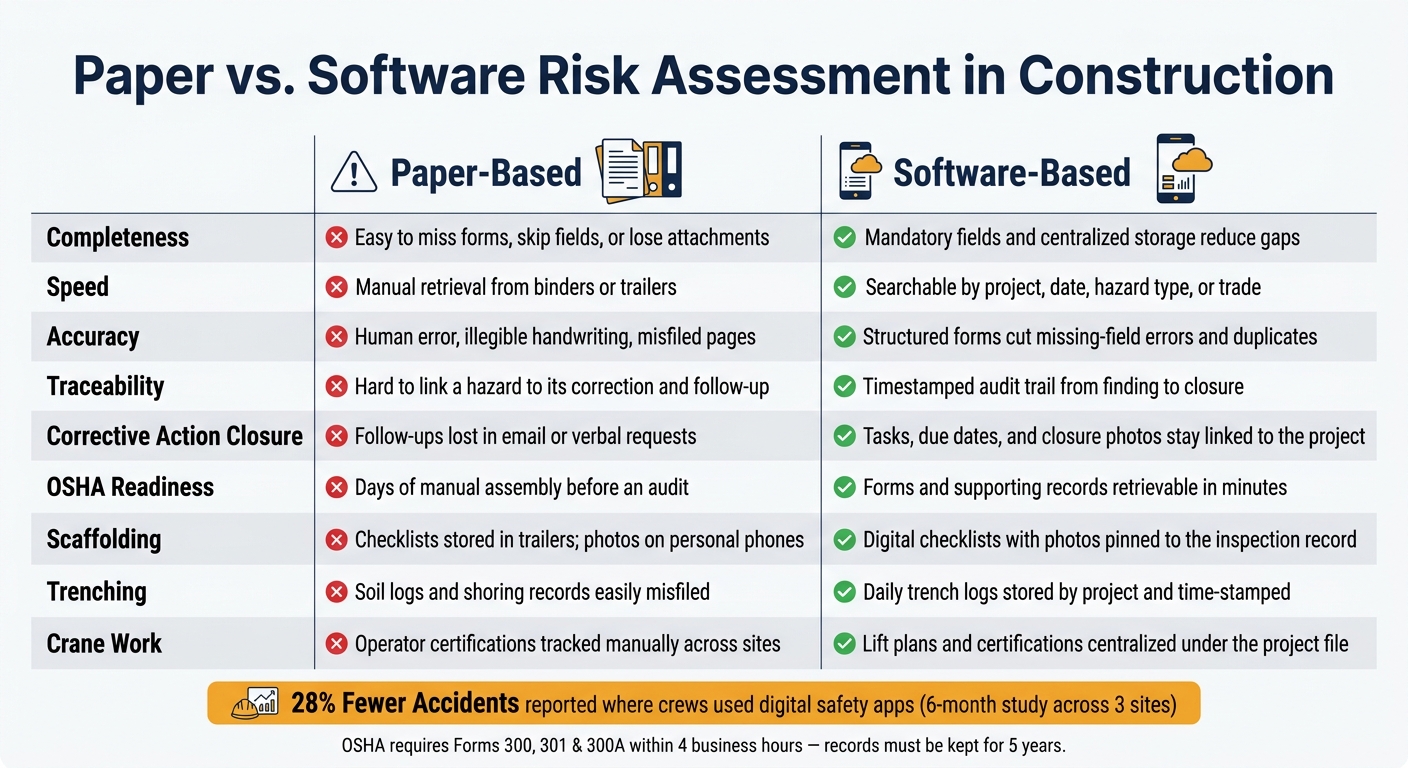
Paper vs. Software Risk Assessment in Construction: Side-by-Side Comparison
Field documentation only works when people can find it fast. Store every record by project so it’s there when you need it. That project-based setup makes reviews faster and easier to defend.
Centralize forms, tasks, photos, and meeting records by project
Every safety record – inspections, incident and near-miss reports, toolbox talks, corrective action tasks, and photos – should sit in one project file. Not buried in email threads, stuck on personal phones, or left in site trailers.
OSHA can require Forms 300, 301, and 300A within four business hours, and covered employers must keep them for five years.[4][7][8].
Contractor Foreman puts daily logs, custom safety forms, toolbox talk records, and tasks under each project, so the full record trail stays tied to that project.[3][1]
Track patterns across hazards, trades, and work phases
Stored records start to matter when you can sort and review them. Use the same tags across every form:
- Hazard type: ladder, PPE, housekeeping, trenching
- Trade: carpenters, electricians, ironworkers
- Phase: foundation, structural steel, enclosure, finishes
That way, reports can show patterns you might miss day to day.
For example, if ladder-related findings go up 30% during framing on mid-rise projects over a six-month stretch, that’s a clear signal. Add ladder safety to toolbox talks and increase supervisor spot checks during that phase.
Review hazard frequency reports and corrective action closure rates at least once a month. A high number of overdue corrective actions usually points to a supervision or resource gap, not just a paperwork issue.
Paper vs. software recordkeeping: side-by-side comparison
The table below shows where paper tends to fall short and how software fixes those gaps.
| Area | Paper-Based | Software-Based |
|---|---|---|
| Completeness | Easy to miss forms, skip fields, or lose attachments | Mandatory fields and centralized storage reduce gaps |
| Speed | Manual retrieval from binders or trailers | Searchable by project, date, hazard type, or trade |
| Accuracy | Human error, illegible handwriting, misfiled pages | Structured forms cut missing-field errors and duplicates |
| Traceability | Hard to link a hazard to its correction and follow-up | Timestamped audit trail from finding to closure |
| Corrective action closure | Follow-ups lost in email or verbal requests | Tasks, due dates, and closure photos stay linked to the project |
| OSHA readiness | Days of manual assembly before an audit | Forms and supporting records retrievable in minutes |
| Scaffolding | Checklists stored in trailers; photos on personal phones | Digital checklists with photos pinned to the inspection record |
| Trenching | Soil logs and shoring records easily misfiled | Daily trench logs stored by project and time-stamped |
| Crane work | Operator certifications tracked manually across sites | Lift plans and certifications centralized under the project file |
That same setup also makes it easier to run this process inside Contractor Foreman.
5. Apply Contractor Foreman to construction risk assessment
Contractor Foreman keeps the full risk assessment workflow in one place, with records stored by project. Plans start at $49/month and include unlimited projects.
Use custom forms, daily logs, and safety meetings in Contractor Foreman
Custom forms help you set up inspection checklists, pre-task plans, PPE checks, and incident reports. You can add required fields, drop-down menus, and U.S.-format date and time stamps (MM/DD/YYYY). Save a form as a template, then use it again on the next job instead of building it from scratch each time.
Daily logs record the details that matter on site: crew count, weather conditions in °F, equipment on site, and safety notes. That means a foreman can log crew count, weather, equipment, and corrective actions in one timestamped entry linked to the project. It keeps the record clean and easy to trace later.
The same project file also covers training and toolbox talks. You can schedule toolbox talks, record attendance, and attach hazard notes to the project record. Contractor Foreman comes with more than 800 pre-loaded topics in English and Spanish. That gives you a documented record of pre-job training without juggling separate files.
Track corrective actions with tasks, schedules, and mobile updates
If an inspection turns up a hazard, you can turn it straight into a task.
Assign it to a specific person, like a site superintendent, trade foreman, or subcontractor lead. Then set a due date and flag it as high priority when the risk calls for it. The task stays visible on the project dashboard, so it doesn’t slip through the cracks.
Field crews can update task status from their phones. They can mark it in progress, upload a photo of the fix – like guardrails installed or lockout/tagout applied – and close it out once the issue is handled. Each update is timestamped and tied back to the project record. In plain terms, you get a clear audit trail from the first hazard note to final proof that the fix was done.
Conclusion: Build a repeatable digital risk assessment process
Put together, these features make risk assessment something your team can repeat from project to project.
Paper systems tend to fall apart as jobs pile up. Software gives you one searchable place for forms, photos, alerts, and records. In Contractor Foreman, that shows up in a practical way: custom forms keep inspections consistent, daily logs record jobsite conditions as they happen, safety meetings create a training record, and task tracking makes sure hazards are fixed and closed out with photo proof.
For small and midsize U.S. contractors, the payoff is simple: clearer accountability, faster action on serious hazards, and records that can stand up to an OSHA audit or insurance review.
Over time, project data also helps you spot patterns, like recurring hazards, high-risk phases, or subcontractors that keep missing the mark. That makes it easier to adjust training, scheduling, and supervision before the same problems show up again.
FAQs
How do I start digitizing risk assessments?
Start by swapping paper forms and spreadsheets for a construction management platform like Contractor Foreman. It gives you one place to keep safety protocols in digital templates that you can adjust to fit each job, while making hazard reporting immediate instead of delayed.
On-site, crews can use mobile devices to log photos, signatures, and job-site details as the work happens. That cuts down on manual paperwork, helps with compliance through digital checklists, and sends alerts when high-risk conditions show up or tasks are overdue.
What should every construction hazard form include?
Every construction hazard form should be clear, complete, and tied to a person. In practice, that means including:
- detailed hazard descriptions and unique identifiers
- required fields so key information doesn’t get left out
- photo or video evidence with timestamps and GPS tags, when available
- assigned owners, status indicators, and electronic signatures
These details help with regulatory compliance, accurate tracking, and a defensible audit trail.
How often should safety data be reviewed by project?
Construction risk assessment needs to start before any work begins and keep going through the full project.
That matters because job sites change fast. New crews show up, weather shifts, equipment moves, and one small change can create a new hazard. So safety data and site walkthroughs should be reviewed on a continuous basis as the project moves forward. That’s how teams keep safety measures in step with what’s happening on the ground.
Contractor Foreman helps with this by giving teams a way to log hazards in real time, track safety measures, and send automated alerts when assessments are overdue or high-risk conditions are flagged.







