
You know what nobody thinks about until it’s too late?
PHOTOS.
Not the Pinterest-worthy shots of a finished kitchen or the “look how far we’ve come” before-and-after that you publish on your website.
We’re talking about the boring ones—the unglamorous, nobody-asked-for-this documentation photos that prove the foundation was poured right, that the framing passed inspection, that the crack was already there before you touched a single thing.
Yep, the ones that could save you tens of thousands of dollars and a possible lawsuit.
It’s not laziness. It’s just that in the middle of a hectic job site, stopping to snap a photo feels like the least urgent thing in the world.
But here’s what skipping it actually costs.
70% of construction disputes come down to poor documentation. The average one drags on for 12.5 months and costs $60.1 million to resolve.
And most of them? Completely avoidable, especially with the right tools.
Here’s what you need to know:
- Why photos matter: They resolve disputes, prove work quality, and protect against false claims.
- Financial impact: Proper documentation can cut rework costs by 25% and speed up dispute resolutions for 92% of firms.
- Key practices: Capture pre-construction conditions, concealed work, daily progress, and milestones.
- Tools to simplify: Use apps like Contractor Foreman for organized storage, tagging, and real-time uploads.
Photos do more than document – they safeguard your work, build trust, and save time.
Let’s dive into how to do it right!
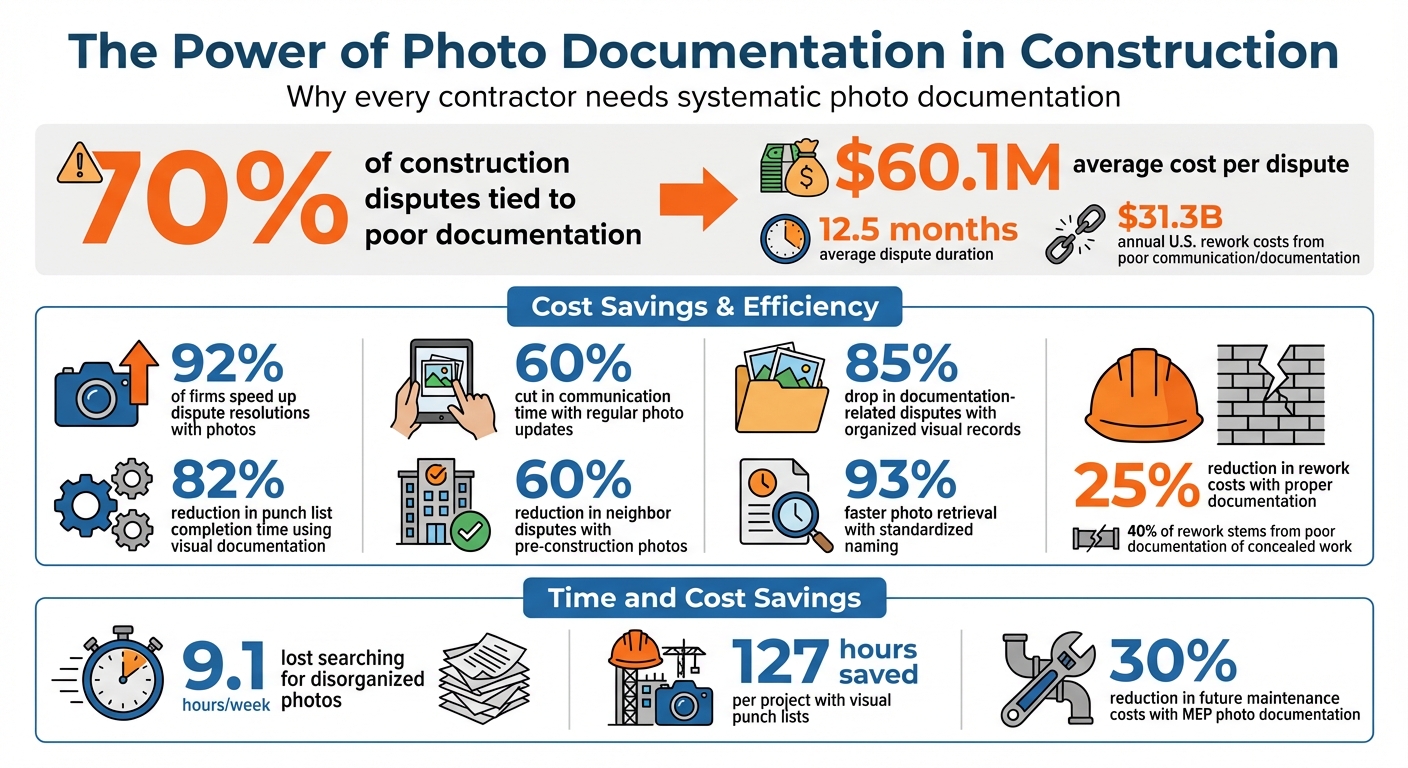
Construction Photo Documentation Statistics: Cost Savings and Risk Reduction
Why Photo Documentation Benefits Contractors
Photo documentation acts as a powerful tool for contractors, protecting them from potential legal disputes, client misunderstandings, and safety liabilities.
Every photo you take becomes part of a detailed record that helps clarify what happened on-site, ensuring smoother client interactions and better safety oversight.
Protection from Legal Disputes
Real-time photos provide visual evidence that can be critical in resolving disputes.
Many construction disagreements arise from factual uncertainties – like site conditions, the timing of damage, or whether work was completed correctly. Photos captured during the project serve as reliable evidence for courts and insurance adjusters, helping to resolve these issues effectively.
They also prevent blame games among subcontractors. When multiple trades are working on the same site, before-and-after photos make it clear what your work area looked like at the start and finish, reducing the chances of others shifting responsibility onto you.
Photos are especially crucial for documenting concealed work. Once drywall is installed or concrete is poured, elements like framing, electrical systems, or waterproofing are no longer visible. Without photographic evidence, you could face warranty claims or insurance disputes. Notably, 40% of rework stems from poor documentation of these hidden components.
Pre-construction photos are equally important. Capturing images of adjacent properties, existing cracks in sidewalks, and pavement conditions before breaking ground can protect you from false claims of damage caused by your work. In urban settings, this practice has been shown to reduce neighbor disputes by 60%.
Weather documentation is another key area. Photos of conditions like standing water, snow, or extreme temperatures can support requests for schedule extensions or cost adjustments.
Building Client Trust Through Transparency
Beyond legal protection, photo documentation strengthens client relationships.
Regular photo updates allow clients to track progress visually, even from a distance. This reduces the need for frequent site visits and cuts communication time by up to 60%.
Attaching photos to invoices also speeds up payment approvals. When clients see clear evidence that milestones have been achieved, they’re more likely to approve payments promptly. This can be a game-changer, especially considering that poor communication and flawed project data cost the U.S. construction industry $31.3 billion in rework annually.
Annotated photos help explain project decisions to nontechnical clients in a way that’s easy to understand. This visual clarity not only demonstrates professionalism but also builds trust, turning one-time clients into repeat customers. Firms that organize their visual records effectively have reported an 85% drop in documentation-related disputes.
Documenting Safety Compliance and Problem Resolution
Photo documentation is also a critical tool for safety management. If OSHA conducts an audit, photos showing workers in proper personal protective equipment (PPE), safety barriers in place, and equipment in good condition can help defend against potential fines.
When a safety issue or defect is identified, capturing annotated photos of the problem – and then taking “after” photos once it’s resolved – provides clear evidence of corrective actions. This approach helps settle disputes before they escalate.
Digital photo records also streamline change orders and repair approvals. Instead of lengthy written explanations, you can visually demonstrate the issue to clients or office stakeholders. Using photos for construction punch lists, for instance, can cut time spent on these tasks by 82% compared to traditional paper-based systems.
Here’s a quick look at key documentation areas:
| Documentation Type | Key Elements to Capture | Benefit |
|---|---|---|
| Pre-Construction | Pavement, existing cracks, drainage, adjacent structures | Protects against damage claims |
| Concealed Work | MEP routing, waterproofing, structural connections | Reduces future maintenance costs |
| Safety Compliance | PPE usage, safety barriers, equipment status | Defends against audits and fines |
| Issue Resolution | Annotated defects, “after” repair photos | Provides proof of quality and adherence |
Every photo taken is a step toward protecting your work, building trust, and ensuring safety – all while saving time and money.
sbb-itb-5eea312
How to Take Quality Job Site Photos
Good job site photos do more than just document progress – they help ensure legal clarity and operational transparency.
The best part? You don’t need fancy equipment. A smartphone camera can do the job if you follow some straightforward strategies to capture photos that can protect you in case of disputes.
What to Photograph at Your Job Site
Start by documenting anything that might raise questions later.
Begin with pre-construction conditions: take photos of existing cracks in sidewalks, pavement conditions, drainage patterns, and utility locations. Extend your coverage at least 15 feet beyond the project boundaries – or up to 50 feet in high-risk urban areas.
During construction, focus on capturing concealed work. Photograph key elements like MEP systems, foundations, waterproofing, and rebar placements after inspections but before they’re covered by concrete, insulation, or drywall.
Daily progress photos are also essential. Record material deliveries, weather-related impacts, and safety measures. If problems or defects arise, document them thoroughly and follow up with photos once they’re resolved.
Finally, capture completed work and milestones. This includes punch list items, final landscaping, utility shut-offs, and the cleaned site. These photos not only verify project completion but can also be reused for marketing future projects.
| Phase | Key Elements to Photograph | Purpose |
|---|---|---|
| Pre-Construction | Adjacent properties, utility locations, existing cracks | Establish a baseline for pre-existing claims |
| During Construction | Foundations, MEP rough-ins, waterproofing, rebar placement | Document concealed work; verify inspections |
| Milestones/Daily | Material deliveries, weather impacts, safety practices | Track schedules, materials, and conditions |
| Post-Construction | Punch list items, landscaping, utility shut-offs | Prove completion; create turnover packages |
With these essential images in mind, consistency is key to making your documentation effective.
Tips for Consistent Photo Documentation
The 3-Photo Method is a reliable way to tell a clear story. For every issue or area, capture three levels of detail:
1.) Context Shot (wide-angle view for location),
2.) Mid-Range Shot (closer view of the subject area),
3.) Detail Shot (close-up of the specific issue).
This ensures that anyone reviewing the photos – whether a client, insurance adjuster, or attorney – can easily interpret them.
Always include a scale reference in detail shots. Use a tape measure, hard hat, or even a coin to show size.
Lighting and orientation matter too. Shoot with the sun behind you to avoid shadows, use landscape (horizontal) orientation for a broader view, and clean your smartphone lens before each shot to avoid blurry images. For textured surfaces like masonry, side lighting helps highlight depth, while a flashlight is handy for dark spaces like trenches.
Set up fixed photo points around your site – 1 to 5 permanent locations marked on your site plan. Taking photos from these same spots daily ensures a consistent time-lapse of progress that’s easy to compare.
Finally, make sure every photo includes metadata like GPS coordinates, timestamps, and photographer details. Many construction apps automatically capture this data, but double-check to ensure accuracy.
Once your photos are captured, organizing them properly will save you time and headaches later.
How to Organize Photos for Quick Access
Even the best photos won’t help if you can’t find them when you need them. On average, construction teams lose 9.1 hours per week searching for disorganized project photos. A standardized system can eliminate this waste and improve accountability.
Use a consistent naming format for all files, such as “ProjectName_Date_Subject” (e.g., “SmithRes_03062026_Foundation”). Keep names under 25 characters and use underscores or dashes instead of spaces for better compatibility. This approach can speed up photo retrieval by as much as 93%.
Upload photos daily – ideally by 6:00 PM – to a centralized cloud system. This ensures the records are timely and credible while protecting them from loss due to damaged or stolen devices. As TrueLook explains:
“A daily report submitted at 5:30 PM documenting unexpected soil conditions carries far more credibility than one written three days later after a dispute has already begun”.
Organize photos into folders or tags based on project phases, like foundation, framing, MEP rough-ins, and finishing. This makes it easy to locate specific images during inspections or warranty claims.
Annotate photos on-site while the details are still fresh. Use tools to add arrows, circles, or text labels that explain what the photo shows and why it’s important. Waiting until later risks losing critical context. Linking photos to daily logs or RFIs adds even more clarity to your records.
Photo Documentation Features in Contractor Foreman
Contractor Foreman simplifies photo management by centralizing capture, storage, and organization – all with unlimited storage and pricing starting at just $49 per month. It ensures your team stays protected while keeping documentation seamless. With a centralized repository, you can effortlessly upload, tag, and organize all visual records for quick access and retrieval.
Centralized Photo Storage and Management
Contractor Foreman streamlines documentation by automatically creating a structured file folder system for every project. You can also customize folders to fit your specific workflow. Photos are neatly organized as soon as they’re uploaded, and tagging them with custom labels – like “foundation”, “electrical rough-in”, or “punch list” – makes locating images during inspections or warranty claims a breeze.
Need to highlight something in a photo? Use built-in annotation tools to add arrows, text, or circles directly to images, whether for punch list items or safety concerns. Sharing is easy, too – selected photos can be sent through a dedicated client portal. When the project wraps, you can back up everything in seconds with bulk image downloads.
Adding Photos to Daily Logs and Reports
Photos aren’t just for storage – they can be directly linked to daily logs, providing a clear record of site progress, material deliveries, and equipment status in real time. Contractor Foreman’s preformatted reports automatically compile this data alongside images, creating professional documents that tie visual evidence to official project records. This feature is especially useful when resolving disputes.
You can also cross-reference daily logs with incident or accident reports, ensuring that photos of specific events are accurately linked to relevant documentation. Chuck A. from Liercke Construction, LLC shared:
“The integration of the whole platform is very good… Ability to do time sheets in the field without separate software. Cost codes and cost items that can be used for different jobs, this is huge for us.”
Mobile Photo Uploads from the Job Site
With Contractor Foreman’s mobile app, you can capture and upload photos directly into the appropriate project module – no need to save them to your phone’s gallery first. This feature saves time and eliminates extra steps.
On-site photos are instantly tagged and stored, making them easy to retrieve and link to the correct project. This real-time upload capability supports risk management efforts and provides solid documentation for resolving disputes. Plus, the app’s markup tools let field teams add arrows, text, or other notes directly to images, clarifying issues without lengthy explanations. Even better, you can access and annotate plans offline when needed.
How Photo Documentation Reduces Risks and Improves Results
Photo documentation does more than just capture moments – it actively helps prevent problems and reduces risks. With the average construction dispute in the U.S. costing $60.1 million and taking 12.5 months to resolve, the importance of proactive measures becomes crystal clear.
Early Risk Identification Through Visual Records
Using photos as part of your documentation process doesn’t just help resolve disputes – it can stop them from happening in the first place. Regular photo capture allows teams to identify potential issues weeks earlier than traditional methods, cutting rework costs by an average of 25%. By documenting work before it’s covered up, you can catch hidden errors, which account for 40% of rework and cost the industry $31.3 billion annually.
Photos also provide valuable insights into environmental conditions that can affect quality. For instance, in 2025, a facilities team saved $120,000 by using time-stamped photos to prove that flooring was installed at 17°F – far below the required 40°F minimum. Photos of site conditions like standing water, snow, or extreme temperatures can justify schedule changes and fend off unjustified delay claims.
When documenting critical milestones or potential issues, it’s essential to capture a mix of wide-angle, mid-range, and close-up shots. Including scale references, like tape measures or hard hats, ensures the images provide clear, undeniable evidence.
Creating a Photo Archive for Future Projects
A well-maintained photo archive isn’t just useful during a project – it can save time and money long after the job is done. Detailed MEP (mechanical, electrical, and plumbing) documentation can cut future maintenance costs by 30%, giving building owners a clear record of hidden features like conduit paths, shutoff valves, and structural connections. Years later, when repairs or upgrades are needed, these photos eliminate the guesswork and prevent unnecessary exploratory work.
Photo archives also double as training resources, offering real-life examples of both best practices and potential hazards. Construction attorney E. Aaron Cartwright III highlights their legal value:
“It’s absolutely amazing to use in court to tell the contractor’s story. … The people you’re talking to – judges, attorneys, peers – don’t know what contractors do. That’s why you need pictures to tell the story of what happened.”
To keep your archive organized, store photos in a cloud-based system and use standardized naming conventions like “YYYYMMDD-ProjectName-Scope” (e.g., 03152025-SmithReno-Kitchen). Add searchable tags such as “Foundation”, “Plumbing”, or “Change-Order” for quick access. This level of organization ensures the archive is ready to support warranty claims, insurance disputes, or compliance audits – even years down the road.
Beyond protecting your projects, a solid photo archive reinforces accountability within your team.
Improving Team Accountability with Photos
Photos not only help prevent risks but also ensure everyone on the team stays accountable. Requiring daily photo submissions – set to a firm deadline, like 6 PM – keeps field teams focused on capturing accurate, timely records. Visual punch lists, enhanced with tagged photos, can reduce punch list completion times by 82%, saving an average of 127 hours per project. When issues are assigned to specific trades with photographic evidence, there’s no room for miscommunication or blame-shifting.
Time-stamped and geo-tagged photos act as visual proof, protecting contractors from liability for pre-existing damage or mistakes. For example, in June 2022, a concrete contractor used time-stamped photos of warning signs and equipment to demonstrate that another contractor caused damage. This ensured the correct party was billed for repairs.
Conclusion
Photo documentation is a powerful shield against disputes, delays, and costly misunderstandings. Did you know that 70% of disputes arise from missing records? And in the U.S., the average dispute costs a staggering $60.1 million and stretches out for 12.5 months. Every photo you take serves as a critical piece of evidence – protecting your business, validating invoices, and keeping your team accountable.
Modern digital tools are key to managing this process effectively. With Contractor Foreman, you get centralized cloud storage and mobile uploads, ensuring your photos are secure, organized, and directly tied to daily logs. Linking photos to daily logs creates precise, time-sensitive records that can bolster your legal standing.
When it comes to disputes, clear documentation is everything.
As construction attorney E. Aaron Cartwright III explains:
“It’s absolutely amazing to use in court to tell the contractor’s story”.
Time-stamped and geo-tagged photos provide undeniable proof of what happened and when, cutting through any he-said-she-said debates.
Make photo documentation a daily habit. Capture pre-work conditions, concealed work, and progress milestones. Set clear deadlines for submissions to maintain consistency. With tools like Contractor Foreman, these practices become easier to implement, safeguarding your projects and keeping them on track.
Every photo you take builds a foundation of accountability and transparency.
“Good documentation isn’t busywork – it’s protection.”
FAQs
How many job site photos should I take each day?
There isn’t a one-size-fits-all answer to how many photos you should take each day, but consistency and thoroughness are crucial. Regular photo documentation – whether daily or at important milestones – helps ensure accurate progress tracking, supports safety compliance, and aids in resolving issues. The key is to focus on capturing essential moments and sticking to a standardized process. This approach creates a reliable visual record that promotes clarity, accountability, and effective dispute resolution.
What job phases are most important to photograph?
The key job phases to capture in photos are preconstruction site conditions, progress at major milestones, and critical installations or hidden work. Preconstruction photos provide a baseline and can help settle disputes. Progress photos document the project’s advancement and confirm milestone achievements. Photos of critical or concealed installations are essential for safety, quality assurance, and future reference. Together, these images create a thorough visual record that benefits all parties involved.
What should my photo naming and tagging system be?
A standardized system for naming and tagging your photos is essential for keeping things consistent and ensuring quick access when needed. Start by using clear and descriptive filenames that include key details like the date, location, and purpose. For example: 20250305_BLDG12_ZONE4_PROGRESS_V1. This format provides instant context at a glance.
Additionally, make use of metadata to enhance searchability. Include information like timestamps, GPS coordinates, and relevant keywords (e.g., safety, progress). These details make it much easier to locate specific photos at any point during the project lifecycle. A well-structured system like this keeps your visual records organized and accessible when you need them most.
Related Blog Posts







