
- Manual Construction Time Tracking Creates Hidden Costs You Don’t See—Until It's Too Late
- Fixing Time Tracking in Residential Construction: A 4-Step Framework
- Steps To Implement a Better Time Tracking System
- Real Firms That Switched to Digital Time Tracking
- What Stops Construction Firms From Fixing Time Tracking (And How To Get Past It)
- Final Checklist: What To Do Next
You pull up to the site just after 8:30 a.m., and two trucks are already parked outside. Somehow, four names are already written on the timesheet. One guy shows up late, another’s a no-show—and no one really brings it up. It’s just how things go.
However, on payday, everyone still gets paid for a full day’s work.
Now stretch that out over five days a week, across a few different builds, and you’re looking at thousands slipping through the cracks—quietly, consistently.
Time theft like this often goes unnoticed. If you add payroll mistakes, illegible handwriting, and missing timesheets, most construction firms lose thousands of dollars each year without realizing it until their margins shrink and bids no longer make sense.
Of course, that’s only part of the problem. Admin staff also spend hours fixing mistakes, chasing down supervisors for timecards, and double-checking payroll numbers. Field workers lose trust when checks come up short. Business owners often find themselves stuck in the middle, trying to figure out where the money went.
Manual time tracking doesn’t just slow things down; it also causes inefficiencies and quietly eats into your budget.
However, you don’t need more staff or tighter rules. You need a system with mobile time clock functionality for field workers that stops time theft at the source and runs payroll with no surprises.
Let’s break down the hidden cost of doing nothing—and what it takes to fix it.
Manual Construction Time Tracking Creates Hidden Costs You Don’t See—Until It’s Too Late
Paper timesheets and verbal reports feel easy until payday hits. Most construction businesses don’t see the full impact of manual tracking until costs spiral out of control.
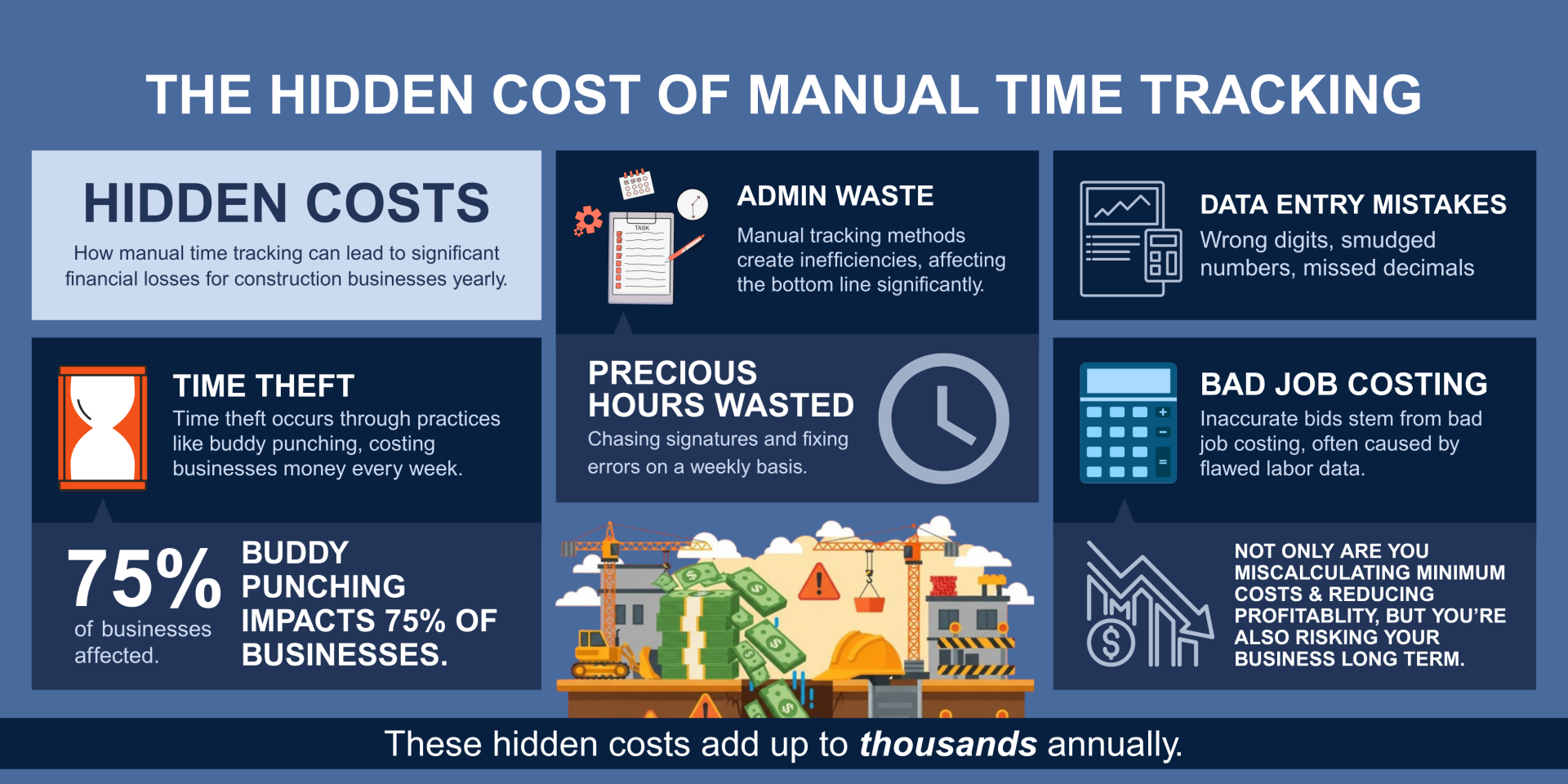
Data Entry Mistakes Stack Up Fast
One wrong digit. One rushed entry. One missed decimal. A smudged “8” looks like a “6.” Handwritten timesheets and manual inputs leave room for constant error.
Maybe someone forgets to round out the hours. If you multiply these mistakes by dozens of employees, the payroll department can spend hours correcting what should have taken minutes.
Time Theft Isn’t Rare, It Can Be Routine
Buddy punching happens on nearly every site that still uses paper time tracking. One crew member clocks in for another before they show up. Hours get rounded up. Once those inflated hours hit payroll, the money is gone.
In construction, where crews start early and supervisors can’t watch everyone, buddy punching becomes routine rather than exceptional. Crews are spread across multiple sites, often with thin supervision. These conditions make it easier to fudge time — and harder to catch.
A survey by the American Payroll Association found that 75% of U.S. businesses lose money to buddy punching. In construction, the cost adds up fast. For a 100-person crew earning $15/hour, if just 16% buddy punch by 15 minutes daily, that adds up to about $62,400 lost annually.
Admin Time Is Real Money
Office teams spend hours each week chasing signatures, fixing errors, and processing payroll manually. That’s billable hours lost. Your bookkeeper could be planning budgets, but they’re squinting at coffee-stained timecards instead.
Bad Time Data Wrecks Job Costing
It creates a domino effect. If your labor numbers are inaccurate, your project estimates won’t hold, and if bids are issued based on flawed data, you either lose the job or win it and still lose money.
Poor time tracking doesn’t just affect payroll. It erodes profitability from the ground up.
Want to see what digital payroll accuracy looks like? See how GPS-based time tracking works.
Fixing Time Tracking in Residential Construction: A 4-Step Framework
Paper timesheets might feel simple, but they create more problems than they solve. Errors, lost hours, and bloated admin work slow you down and, worst still, they cost real money. Most firms don’t realize the full extent of their costs until a job runs over budget or a payroll mistake triggers complaints from the crew.
Fixing time tracking doesn’t mean reinventing your entire process. You don’t need a full software stack or an IT department. You need a system that’s accurate, easy for your crew, and built for field conditions.
Starting involves a few simple steps. Audit what you’re doing now. Set clear check-in rules. Use a tool that ensures workers are honest and automatically integrates with payroll. Then, use the data to track where labor is allocated, so your bids, budgets, and schedules stay on track.
Here’s a breakdown of the 4-step framework that construction teams can apply without stalling jobs or overhauling everything at once.
1. Audit Your Current Tracking Process
Start by calculating how much time and money your team spends on time tracking each month.
- How often do you correct timesheets?
- How many hours does payroll spend fixing errors?
- What’s the average cost of time theft per crew?
Most firms underestimate this number. A simple audit often reveals thousands in hidden costs.
2. Set Clear Rules for Jobsite Time Collection
Every crew should know how, when, and where to clock in.
- Require daily check-ins verified by site leads
- Limit who can submit or approve hours
- Standardize shift start/end times across job sites
Structure prevents confusion and closes loopholes that lead to time theft.
3. Use Mobile Time Tracking With GPS
Digital systems track clock-ins with location data. Workers can’t check in unless they’re on-site.
- Geofencing prevents early or remote punch-ins
- Time stamps are automatic and tamper-proof
- Mobile access means no more paper timesheets
You can build your own system using spreadsheets, mobile apps, and GPS tools. However, at scale, this requires time and ongoing monitoring.
Project Management solutions like Contractor Foreman handle all this automatically, without the back-and-forth. Crews clock in on-site, hours sync to payroll, and job costing stays accurate.
4. Sync Time Tracking With Payroll
Manual re-entry wastes hours and introduces errors.
- Use software that connects time tracking with payroll
- Set up alerts for missing or flagged hours
- Track overtime, breaks, and shift changes in real-time
This step alone can cut payroll processing time by 70% or more.
Steps To Implement a Better Time Tracking System
You don’t need to rip out your process overnight. Start with one site or one crew. Here’s how most construction firms switch smoothly:
Step 1: Choose a Tool Built for Field Work
Look for a mobile time tracking app with:
- Cost code tracking for different project phases
- Offline functionality that’s critical for remote sites without cell coverage
- Log and track permit status to keep the proper paper trail
- Photo capture for job site verification
Try a demo of Contractor Foreman to see how it checks all these boxes without requiring new hardware or a complex setup.
Step 2: Get Crew Leads Involved Early
Your supervisors and foremen are the link between the field and the office. If they don’t buy in, your rollout stalls fast.
Before introducing anything new, sit down with them and walk through how the system will make their job easier by reducing paperwork, minimizing disputes, and expediting approvals.
- Show them exactly how the app works.
- Let them test it on their own phones.
- Get their feedback.
If they see it’s easy to use and reduces their daily admin load, they’ll help drive adoption across the crew. Their support is more effective than any top-down mandate.
Step 3: Your Competitors Are Already Ahead.
Construction companies using digital time tracking win more bids with accurate labor costs. Clients prefer contractors who can provide detailed time documentation. Better time tracking enables faster change order processing
Step 4: Roll It Out Site by Site
Rolling it out to every team at once creates chaos. Start small by picking one job site or crew where you have a supportive lead and clear timelines. Track usage, gather feedback, and measure early wins—like hours saved on payroll processing or reduced errors.
Then share those results with the rest of the company. Field teams pay attention when they hear another crew saved time and got more accurate checks.
Use that momentum to gradually expand the rollout. One site at a time builds confidence without disrupting operations.
Step 5: Integrate With Payroll
Once field tracking runs smoothly, connect it to your payroll system. That’s where the real time savings show up. Look for software that integrates directly—no CSV exports, no manual entry, no double-checking formulas in a spreadsheet.
With integration in place, hours flow straight from the field to payroll. Administrative staff stop chasing corrections, pay periods close faster, and checks are sent out on time. It’s one change that eliminates hours of busywork every week.
Step 6: Use Reports To Track Job Costs
With clean time data coming in daily, you can break down labor by job, phase, task, or crew. That reporting shows where labor overruns happen, and which bids missed the mark.
Over time, that visibility improves project planning and sharpens future estimates. You’ll stop guessing at labor budgets and start tracking them in real time. No more “gut feel” costing, just clear numbers that match the work being done on the ground.
Tip: Add hours by cost code or activity to simplify reporting inside the time tracking app.
Real Firms That Switched to Digital Time Tracking
Construction companies that replace manual tracking save time and prevent financial losses. These aren’t edge cases. They’re normal outcomes from removing paper and guesswork.
A Residential Contractor Stopped Time Theft
A 45-person crew transitioned from handwritten timesheets to a mobile GPS time-tracking app. That change came at a time when over half of employees admitted to committing some degree of time theft.
Within one month:
- Time theft dropped, and savings reached an estimated roughly 6–7% of payroll, aligning with industry research.
- Based on the contractor’s reports, payroll overages fell by $3,800. This is in line with industry trends, industry research (2–7%).
- Employee satisfaction improved, as paychecks consistently matched actual time worked.
GPS-enabled clock-ins with location verification helped eliminate buddy punching and inflated hours before they hit payroll. With less friction around scheduling and pay, foremen reported faster shift transitions and better team accountability.
Mid-Sized Firm Cut Payroll Processing by 85%
A regional general contractor had one full-time admin just handling payroll corrections. After switching to automated time tracking:
- Payroll prep dropped from 11 hours to under 2 hours per week
- Admin headcount stayed flat, even with 30% team growth
- Employee trust improved because checks matched hours worked
Cost Savings Add Up
Across multiple job sites, one firm saved over $42,000 per year by eliminating false hours and duplicate entries. No new hires. No extra oversight. Just better tracking with mobile tools.
What Stops Construction Firms From Fixing Time Tracking (And How To Get Past It)
Most construction owners are aware that paper timesheets create problems, but making a change often feels like a hassle or a risk. These four objections often arise, but none hold up under closer examination.
“We’ve Always Done It This Way”
The process may feel familiar, but that doesn’t make it effective. Every payroll cycle that involves chasing down missing timecards, correcting sloppy handwriting, or double-checking hours is a waste of valuable time.
It also introduces errors that chip away at trust and profit. Doing things the same way out of habit isn’t stability, it’s a slow bleed.
“My Crew Won’t Use Tech”
This comes up a lot, especially from firms with older crews. In reality, most field workers already use smartphones daily, and modern time tracking apps are designed for ease—tap to clock in and out.
It takes less than ten minutes to learn. Once crews see fewer mistakes on their paychecks, adoption becomes less of a problem.
“Software Is Too Expensive”
Initially, a software subscription may be an added cost, but it’s negligible compared to the expenses incurred by manual tracking: time theft, payroll corrections, administrative overload, and poor cost tracking.
In most cases, the system pays for itself in the first one or two payroll cycles. You’re not adding cost when you’re stopping the drain.
“We’ll Deal With It Later”
Every delay has a price. Each week you stick with paper or spreadsheets means more stolen time, errors, and overhead.
Waiting until a problem becomes urgent only guarantees more lost revenue. You don’t need a full overhaul. One small change—one job site, one crew—can show immediate results.
Final Checklist: What To Do Next
Manual time tracking drains money in ways that don’t appear on a P&L until margins slip and payroll becomes a weekly headache. Time theft, data entry errors, and excessive administrative work all add up.
If you have hesitations:
- Estimate how much time theft and payroll errors are costing you.
- Audit your current time tracking process across all job sites.
- Set clear check-in rules for every crew.
- Explore GPS-enabled time tracking tools built for construction.
- Connect time tracking directly to your payroll system.
You don’t need more oversight. You need a system that’s accurate the first time. One that gives your crews an easy way to clock in, keeps your payroll clean, and gives you real numbers to run your business.
The tools are built for contractors. They’re fast to roll out, easy to use, and proven to recover thousands in lost labor.
It’s not about adding another app. It’s about protecting your time, your money, and your team.
You’ve seen how the gaps form and what to do about them. Start small. Choose one crew. Track the difference.
You don’t need to overhaul everything overnight. Taking just one step, such as switching from paper to mobile check-ins, can result in thousands of dollars per month in savings.
Ready to simplify time tracking? Book a free demo or try our 30-day free trial to see how it works.







