
QuickBooks is basically the unofficial religion of construction payroll.
Everyone uses it. Everyone depends on it. So the second it doesn’t sync correctly? Your entire week turns into a slow-moving disaster!
And if you’re working with especially tight profit margins of 3–7%, that disaster isn’t just annoying — it’s expensive.
One payroll mistake, one compliance slip, one job cost that gets misallocated, and suddenly you’re not “a little over budget.” You’re working for free! Or worse, paying out of pocket just to finish the job.
Because construction payroll isn’t just cutting checks. It’s compliance, job costing, union rules — and trying to streamline cost calculations before small mistakes turn into expensive ones.
QuickBooks might be the backbone — but construction payroll only works if your tools integrate with it properly.
So if QuickBooks is already at the center of your operation, these are a few payroll tools that actually play nice with it.
Here are four that stand out:
- Contractor Foreman: Affordable at $49/month, offers two-way QuickBooks Online sync, GPS time tracking, AIA billing, and unlimited projects.
- QuickBooks Time: Best for payroll and labor tracking with GPS-enabled timecards and geofencing. Starts at $20/month plus $8/user.
- Knowify: Advanced job costing, AIA billing, and detailed financial tracking. Pricing starts at $99/month.
- FieldPulse: Syncs with QuickBooks Online/Desktop, supports offline mode, and simplifies field invoicing. Custom pricing available.
Quick Comparison:
| Tool | QuickBooks Integration | Key Features | Starting Price |
|---|---|---|---|
| Contractor Foreman | Two-way sync, supports Online | AIA billing, GPS time tracking, unlimited projects | $49/month |
| QuickBooks Time | Online/Desktop sync | GPS timecards, geofencing, payroll tools | $20/month + $8/user |
| Knowify | Real-time sync, advanced features | Job costing, AIA billing, WIP reporting | $99/month |
| FieldPulse | Online/Desktop sync | Offline mode, field invoicing | Custom pricing |
Using a QuickBooks-integrated tool helps keep payroll, job costing, and invoicing aligned from the field to the office. This gives contractors clearer visibility into project finances and reduces the need for time-consuming manual data entry.
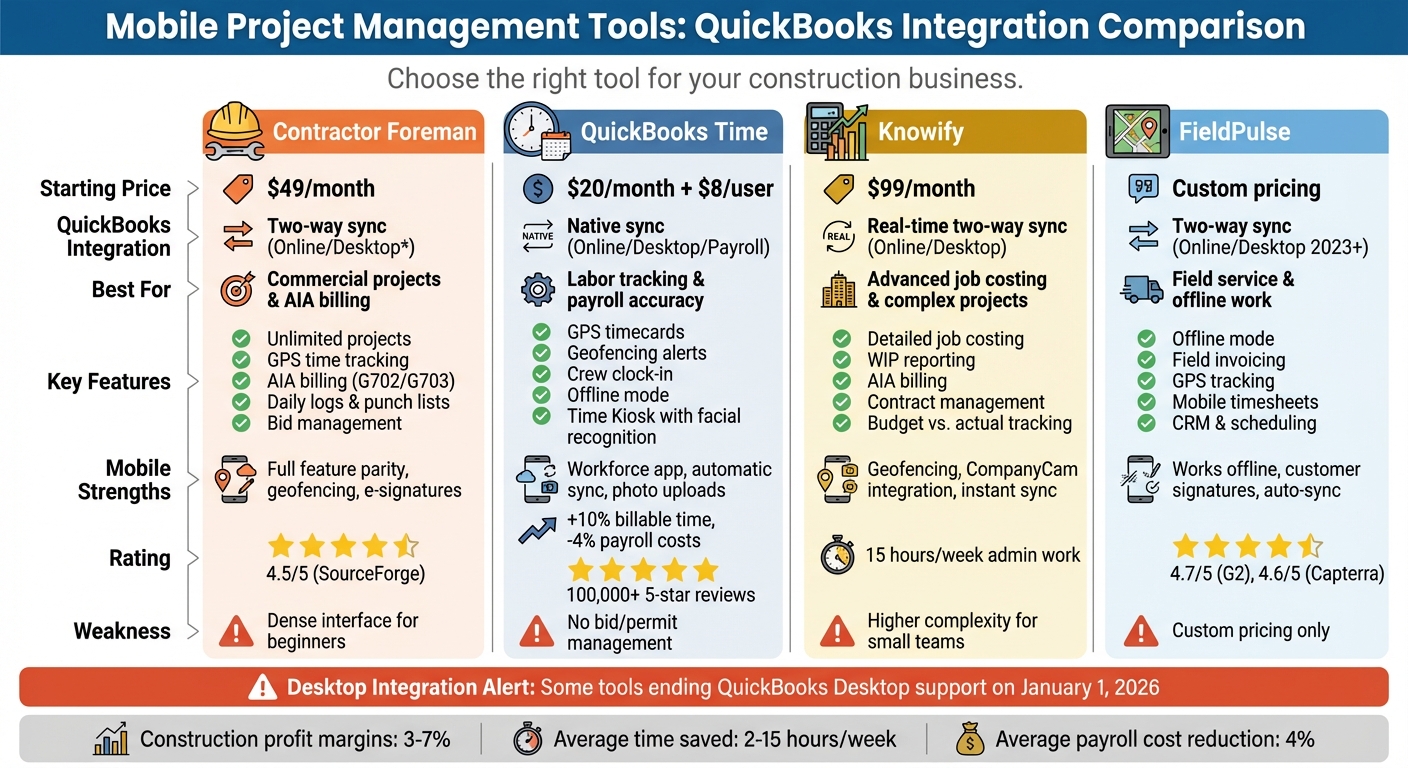
Mobile Project Management Tools with QuickBooks Integration Comparison Chart
1. Contractor Foreman

QuickBooks Integration Depth
Contractor Foreman offers a two-way sync with QuickBooks Online, making it easier to manage financial data without the hassle of manual re-entry. This integration ensures smooth syncing of customers, projects, cost codes, estimates, purchase orders, invoices, payments, and time cards between the two platforms. By eliminating the need for double entry, it saves contractors significant administrative time.
To maintain accuracy, the system uses an approval-based workflow. This means records like estimates and invoices must be verified in Contractor Foreman before they sync with QuickBooks. During the setup process, users can map default accounts and tax settings to avoid conflicts, and any mismatches are flagged with error reports before they affect financial records.
For contractors dealing with AIA billing, the platform simplifies the process by automating G702 and G703 form preparation, syncing them directly to QuickBooks. It also tracks retention and progress payments, reducing the need for manual calculations. Field time card data is exported automatically for payroll processing and job costing, while bills and purchase orders sync in real time to monitor expenses. This seamless integration is complemented by Contractor Foreman’s strong mobile capabilities.
Mobile Capabilities
With Contractor Foreman’s iOS and Android apps, contractors have full access to the platform’s features on the go. Field crews can log daily activities, upload photos, track materials, and manage incidents – all within the app. GPS-enabled timecards with geofencing ensure employees clock in only when they’re physically on-site, cutting down on time theft and boosting payroll accuracy.
The app also supports electronic signatures for change orders, contracts, and safety meeting attendance, making it easy to manage documentation in the field. A customizable mobile dashboard allows users to tailor their view, ensuring field crews and office staff see the data most relevant to their roles. By setting a “Default Project” in the app, users can filter out unnecessary information and auto-fill new records for specific job sites, reducing data entry errors. The app also includes tools tailored to construction needs, further enhancing its utility.
Construction-Specific Features
Contractor Foreman goes beyond basic project management with features like Gantt (CPM) scheduling, daily logs, permit tracking, RFIs, submittals, and punch lists. Its estimating module connects to a live costs database via 1build.com, providing up-to-date material and labor prices. It also supports digital takeoffs through Kreo, making the estimating process more efficient. The bid management system allows contractors to create invitations to bid (ITBs) and award subcontracts directly within the platform.
The system comes pre-loaded with CSI or NAHB Cost Codes, streamlining financial reporting without the need for manual setup. For contractors who collect payments on-site, the mobile app processes credit card payments at 2.9% and ACH payments at 1%.
As Brian T. from Tower Interiors Group LLC shared:
Contractor Foreman is more intuitively understandable to me and our type of business. They use the same terminology as we do.
Financial Workflows
Real-time job costing allows contractors to track expenses against budgets as they happen, offering immediate insight into profitability – a critical feature given that construction profit margins often fall between 3% and 7%. The platform supports both time and material billing as well as fixed-price contracts, with automated tracking of retainage and holdbacks. These financial tools are fully accessible via mobile devices and sync instantly with QuickBooks.
Contractor Foreman’s pricing starts at $49 per month and includes unlimited projects. The platform also offers a Price Lock Guarantee, ensuring no future price increases for the duration of the subscription. Contractors can take advantage of a 30-day free trial to test the QuickBooks integration with their own project data before making a commitment.
sbb-itb-5eea312
2. QuickBooks Time
QuickBooks Integration Depth
QuickBooks Time seamlessly integrates with QuickBooks Online, QuickBooks Desktop, and QuickBooks Online Payroll, eliminating the need for duplicate time entry. Once time data is entered, it flows directly into QuickBooks, allowing for instant invoicing and payroll processing. This real-time connection ensures that labor costs are always up to date, helping you better estimate job expenses and allocate resources efficiently.
The Elite plan takes it a step further with its project estimates vs. actuals feature. This tool allows construction managers to monitor budgeted hours against actual hours worked as projects progress. According to user feedback, this functionality contributes to over 10% more billable time, 4% lower payroll costs, and saves about 2 hours per payroll run on average. These efficiencies highlight the value of its software integrations and mobile functionality.
Mobile Capabilities
With the QuickBooks Workforce app, field teams can track time, submit timesheets, and even upload project photos from virtually anywhere – even without an internet connection. Once connectivity is restored, the app automatically syncs all data. GPS tracking ensures accurate location logging for employees while they’re clocked in, and the Elite plan adds geofencing to send workers automatic reminders when they enter or leave a designated job site. This helps ensure labor costs are allocated to the correct projects. For added convenience, foremen can use the Crew function to clock in an entire team from a single device.
The Elite plan also includes a Project Activity Feed, which facilitates real-time collaboration by letting teams share notes, photos, and updates instantly.
Financial Workflows
QuickBooks Time improves financial workflows by automating the transition from timesheets to invoices, cutting down on errors that often arise from manual data entry. The system also provides automated overtime alerts and supports DCAA compliance, ensuring adherence to labor regulations. For fixed job sites, the Time Kiosk feature uses facial recognition or a secure PIN for accurate clock-ins.
Pricing starts at $20 per month plus $8 per user for the Premium plan and $40 per month plus $10 per user for the Elite plan. A 30-day free trial is available for both plans. Additionally, QuickBooks Time is included at no extra charge with QuickBooks Online Payroll Premium and Elite subscriptions. On average, businesses report saving 11 hours per month on managing worker time.
3. Knowify
QuickBooks Integration Depth
Knowify takes integration with QuickBooks Online to the next level with a real-time, two-way sync that eliminates repetitive data entry. Whether you’re adding clients, vendors, expenses, or payments, updates made in one system are instantly reflected in the other. This isn’t just about transferring data – Knowify allows you to map its cost codes to specific QuickBooks accounts and Classes, giving you detailed financial tracking for your projects.
For QuickBooks Desktop users, Knowify offers a manual sync option, giving you control over when data is transferred. It also integrates with QuickBooks Online Payroll and the newer Intuit Enterprise Suite, which supports multi-entity reporting. According to Knowify, their integration is “the most comprehensive, two-way sync with QuickBooks Online of any software package in the world”.
Nathan Kohatsu, owner of UK Electric in Peoria, AZ, shared how combining Knowify with QuickBooks Online in 2024 transformed his family-run electrical business. By cutting 15 hours of admin work per week, his team could shift their focus to growing profits instead of dealing with manual reconciliations.
This robust integration also lays the groundwork for excellent mobile functionality.
Mobile Capabilities
Knowify’s mobile features work seamlessly with its QuickBooks integration, providing field crews with tools to stay connected on the go. Using iOS and Android apps, employees can track time with geofencing, ensuring they’re physically on-site when clocking in. These time entries, along with job updates and expenses, sync instantly, ensuring accurate job costing and payroll.
The mobile app also grants field teams access to schedules, job details, and project documents. Through its integration with CompanyCam, project photos and galleries are automatically synced to Knowify, keeping visual records organized by job site.
Construction-Specific Features
Knowify is designed with construction businesses in mind, offering tools tailored to industry workflows. It supports AIA-style progress billing (G702/G703), Work-In-Progress (WIP) reporting, and retainage management. Costs are tracked by phase and category – labor, materials, equipment, and subcontractors – offering much more detail than QuickBooks’ basic project tracking.
The platform also manages contracts, e-signatures, change orders, and compliance documents. Throughout each project phase, budget-vs-actual reporting keeps you informed.
Financial Workflows
From estimates to final payments, Knowify streamlines the entire revenue cycle. You can create and track purchase orders, vendor bills, and expenses, with all data syncing directly to QuickBooks for accounting and tax purposes. The platform also integrates with QuickBooks Payments, allowing you to include ACH or credit card payment links on invoices. Once payments are made, the revenue is updated in both systems instantly.
Pricing starts at $99 per month for the Core plan, which includes 1 user, fixed-price contracts, and AIA billing. The Advanced plan, at $249 per month, adds job costing and WIP reporting. For businesses needing unlimited users, inventory tracking, and QuickBooks Desktop integration, custom pricing is available for the Enterprise plan.
4. FieldPulse
FieldPulse takes financial workflows up a notch with its seamless integration with QuickBooks, making it easier to manage accounting tasks without duplicating efforts.
QuickBooks Integration Features
FieldPulse syncs effortlessly with both QuickBooks Online and QuickBooks Desktop (2023 version or newer) through a two-way synchronization system. Updates made in one platform are reflected in the other almost instantly, saving time and reducing manual data entry errors.
For QuickBooks Desktop users, the integration uses the QuickBooks Web Connector, which can run automatically every minute to keep data nearly up-to-date. This sync manages line items, tax rates, and default sales or purchase accounts, giving you flexibility in how financial information is shared between the two systems.
On-the-Go Financial Management
The FieldPulse mobile app, available for both iOS and Android, empowers technicians to handle financial tasks directly from the job site. They can create estimates and invoices, and record payments or expenses – all without needing to return to the office. The best part? All of this data syncs automatically with QuickBooks.
The app also features an offline mode, ideal for teams working in areas with unreliable internet. Technicians can capture customer signatures, update job statuses, and upload photos while offline. Once connected again, the app syncs everything seamlessly. Additional tools like GPS tracking and mobile timesheets enhance accountability and provide accurate job costing.
Streamlined Financial Processes
FieldPulse simplifies the entire revenue cycle by syncing field data directly with your accounting software. Technicians can track purchases, billing, and expenses efficiently, ensuring everything stays organized. The integration also prevents duplicate entries by syncing invoices from QuickBooks back into FieldPulse automatically.
The platform offers three pricing tiers to suit different needs: Essentials (basic tools like CRM and scheduling), Professional (includes QuickBooks sync and workflow automation), and Enterprise (adds multi-location management and API access). Pricing is customized based on team size and specific requirements, so you’ll need to reach out for a quote. FieldPulse receives high praise from users, holding a 4.7/5 rating on G2 and 4.6/5 on Capterra, with frequent mentions of its mobile-friendly design and excellent customer support.
Strengths and Weaknesses
Here’s a breakdown of the standout advantages and challenges of each tool, as previously discussed.
For U.S. contractors juggling QuickBooks integration and mobile workflows, each tool offers unique benefits and a few trade-offs. Contractor Foreman stands out for its budget-friendly pricing and a robust feature set, including unlimited projects for just $49/month. However, its interface can feel overwhelming for new users due to the sheer number of features. It has received a 4.5/5 rating on SourceForge, based on 35 reviews and 1,195 verified ratings, with users appreciating its all-encompassing approach to construction management.
QuickBooks Time shines in labor tracking and payroll accuracy, thanks to its seamless integration with QuickBooks Online, Desktop, and Payroll. Companies using it report a 10.06% increase in billable time and a 4.26% reduction in gross payroll costs. Its popularity is evident, with over 100,000 five-star reviews on iOS and Android. However, it lacks features like bid creation and permit tracking.
On the other hand, Knowify offers more advanced financial tools for managing complex projects. As a featured construction app by QuickBooks, it excels in job costing and contract management. However, its higher complexity can be a hurdle for smaller teams.
Below is a quick comparison of each tool’s strengths and limitations in terms of integration, mobile usability, construction workflows, and key weaknesses:
| Tool | QuickBooks Integration | Mobile Strengths | Construction Workflow | Key Weakness |
|---|---|---|---|---|
| Contractor Foreman | Syncs bids, bills, invoices, and change orders; supports Online/Desktop | Daily logs, safety meetings, punch lists | Bid management, inspections, permit tracking | Dense interface due to high feature volume |
| QuickBooks Time | Native sync for payroll, timesheets, and labor costs | GPS tracking, geofencing, Workforce app | Scheduling, labor tracking, Time Kiosk | Lacks bid/permit management |
| Knowify | Deep integration for job costing and construction financials | Mobile job costing, project tracking | Professional job costing, contract management | Higher complexity for small teams |
Conclusion
Choosing the right tool boils down to aligning your construction workflow with the financial tracking features you need most. For commercial projects, Contractor Foreman stands out with its AIA billing capabilities and unlimited projects for just $49/month. If labor tracking and payroll precision are your top priorities, QuickBooks Time delivers exceptional results. Meanwhile, Knowify shines for contractors requiring advanced bi-directional syncing for detailed job costing.
Mobile functionality is equally important as desktop features. Field crews need apps that can seamlessly handle GPS timecards, daily logs, and on-site photos.
This kind of mobile parity ensures real-time data flow from the job site to your accounting system, cutting down on redundant data entry.
Integration compatibility is another key factor. Starting January 1, 2026, some major integrations, including Contractor Foreman’s, will no longer support QuickBooks Desktop. To avoid disruptions, ensure the software you choose works with QuickBooks Online. Before committing, test the mobile app with your field teams to confirm it handles their most frequent tasks efficiently. Look for tools that use contractor-friendly language and provide responsive customer support.
For small-to-mid-sized contractors, Contractor Foreman offers a well-rounded solution with comprehensive features, a 100-day money-back guarantee, and a price lock guarantee. Larger firms with complex job costing needs might find Knowify worth the extra effort for its deeper integrations. Ultimately, the best choice is the one that integrates seamlessly with your QuickBooks setup and empowers your field teams to capture accurate, real-time data – no matter where the job takes them.
FAQs
How does integrating QuickBooks with Contractor Foreman enhance financial management for construction projects?
Contractor Foreman’s integration with QuickBooks makes managing finances much easier by automatically syncing job cost codes, expenses, and invoices. This means no more entering the same data twice, and it ensures that financial tracking for every project stays accurate and up to date.
This connection helps contractors cut down on mistakes, save valuable time, and keep a tighter grip on project budgets. With less time spent on administrative tasks, they can focus on getting their jobs done efficiently.
What mobile tools does Contractor Foreman provide to simplify on-site project management?
Contractor Foreman’s mobile app is built to help contractors stay efficient and organized while working on-site or on the move. With this app, you can handle GPS-based time cards, log daily activities, and manage estimates, invoices, and online payments – all from your smartphone or tablet.
The app also provides essential project management features like Gantt charts, permit tracking, and internal messaging. Its straightforward design makes it easy to coordinate tasks and keep finances in check, ensuring you can stay on top of your projects no matter where you are.
Why do Contractor Foreman users need to switch to QuickBooks Online by 2026?
Switching to QuickBooks Online by 2026 is a smart move for Contractor Foreman users looking to keep their financial workflows running smoothly. With real-time syncing for features like field timesheets, cost codes, and automated billing, it eliminates the hassle of manual data entry and cuts down on errors.
By transitioning, users can simplify project financials, save valuable time, and ensure seamless communication between the field and office. This shift keeps operations efficient and aligns with the modern tools essential for construction management.







