
“Hey—quick question. The cabinets are going in today… right?”
“HUH?! Where? Into the unfinished kitchen?”
And just like that, your morning is ruined.
Breathe in, breathe out. Managing construction projects is definitely not for the weak — or the well-rested.
Since the beginning of time, construction has always been a little chaotic. No matter how experienced you are, no matter how obsessed you get with your spreadsheets… something always comes up. And it always catches you by surprise.
Delays, budget overruns, miscommunication, scattered documentation… all of it treated like it’s just part of the job.
But I’m here to tell you: There’s a better way to manage.
Start with having a connected system.
Disconnected systems are the real culprit in construction chaos— and they’re costing you time, money, and way too many awkward phone calls. The solution isn’t working harder. It’s centralizing everything in one place.
That’s exactly what AI-integrated construction tools like Contractor Foreman are made for.
Key Takeaways:
- Time Wasted: 35% of professionals’ time is spent chasing information or fixing errors.
- Cost Impact: Delays cost $500–$2,000 per day, and 90% of projects face budget overruns.
- Communication Issues: Miscommunication causes 48% of rework and costs $31 billion annually.
- Disorganized Records: Workers spend 11+ hours weekly tracking down information.
By addressing these challenges, you can save time, reduce costs, and improve project outcomes. Contractor Foreman offers a 30-day free trial and plans starting at $49/month, making it an accessible option for contractors of all sizes.
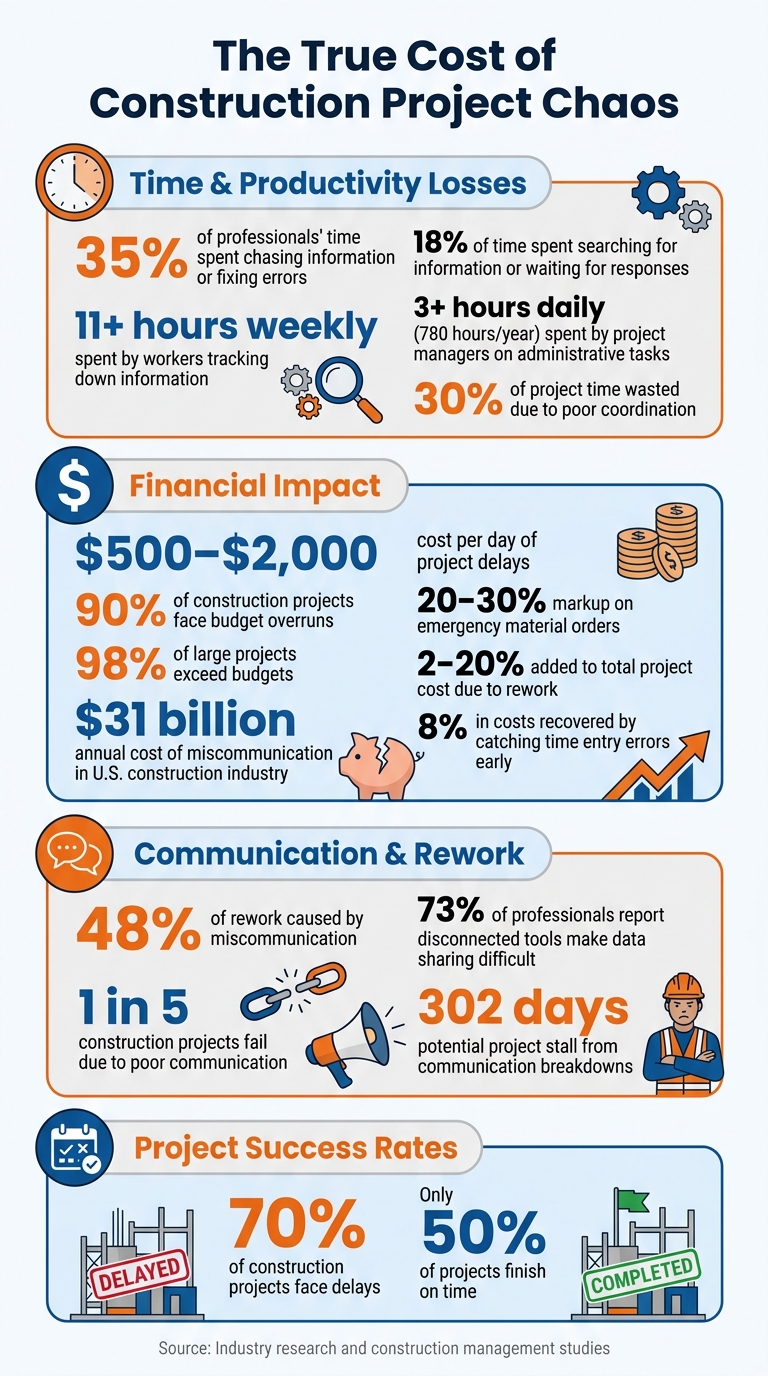
Construction Project Management Challenges: Key Statistics and Cost Impact
Common Problems in Construction Project Management
Construction projects often face recurring issues like schedule delays, budget overruns, poor communication, and disorganized records. These challenges can create chaos and hinder progress.
Schedule Delays and Missed Deadlines
One of the biggest culprits behind delays is communication breakdowns between office and field crews. Crews waiting for updated drawings or change orders can stall projects by as much as 302 days. In fact, one in five construction projects fails due to poor communication.
When crews act on incomplete instructions or outdated plans, they may install the wrong materials, leading to rework that eats up time and pushes deadlines further. Without mobile tools to access real-time updates, foremen often become overwhelmed, juggling calls, texts, and emails to keep the project moving. This lack of streamlined communication forces crews to make assumptions, which only compounds delays.
Delays don’t just slow down progress – they also come with financial consequences.
Budget Overruns and Poor Financial Control
Cost overruns plague 90% of construction projects. One of the main reasons is the lag in financial reporting, with contractors often discovering budget issues weeks after the fact. By the time the problem surfaces – usually during the next payment application – it’s often too late to adjust without sacrificing profit margins or scrambling for change orders.
“Regular cost monitoring throughout the project is essential… with appropriate recognition of risk and commitment to addressing issues as they arise.”– Irjet
Another issue?
Many systems track only actual invoices, ignoring committed costs like purchase orders or signed contracts that haven’t been billed yet. This creates a misleading picture of available funds. Add to that emergency material orders – often marked up by 20–30% due to theft, weather damage, or outdated plans – and budgets can spiral out of control.
Broad cost codes like “labor” or “materials” further obscure where the money is really going.
Poor Team Communication
Miscommunication is another major problem, costing the U.S. construction industry an estimated $31 billion annually. Nearly half of all rework (48%) stems from poor communication, and workers spend about 18% of their time searching for information or waiting for responses.
The reliance on disconnected communication channels – like emails, texts, voicemails, and paper notes – only adds to the confusion. Verbal instructions during morning meetings often lack documentation, leading to forgotten details and reduced accountability. These gaps don’t just waste time – they can also create safety risks. For example, unlogged verbal reports may leave the next shift unaware of hazards. Rework caused by communication issues can add anywhere from 2% to 20% to a project’s total cost.
Disorganized Documents and Records
Seventy-three percent of construction professionals report that using multiple disconnected tools makes sharing project data more difficult. Files, photos, and drawings scattered across spreadsheets, emails, and filing cabinets create daily headaches. Project managers often spend more than 3 hours a day on administrative tasks, adding up to 780 hours a year per manager. Meanwhile, 59% of workers spend 11 or more hours a week just tracking down project information.
This inefficiency, often called “Gray Work”, drains valuable time and resources. Manual data entry across separate systems leads to duplicated efforts and workflow bottlenecks, further slowing down productivity.
These challenges highlight the importance of having a centralized system to manage projects effectively.
sbb-itb-5eea312
How Contractor Foreman Centralizes Project Operations
Managing construction projects often comes with challenges like delays, budget overruns, miscommunication, and scattered documentation.
These issues usually arise from using disconnected systems. Contractor Foreman addresses this by bringing everything together in one platform.
Instead of managing multiple spreadsheets, emails, and paper files, contractors can rely on a single dashboard to track tasks, budgets, and deadlines. This approach reduces time spent searching for information and fixing errors caused by fragmented workflows. By combining scheduling, financials, and document management, Contractor Foreman helps teams work more efficiently and stay on track.
With over 50 features tailored for U.S. contractors, the platform supports industry standards like AIA G702/G703 progress invoicing. Field crews can update the system through a mobile app – even offline – while office staff monitor progress via a web dashboard. This seamless flow of information keeps everyone aligned and reduces the need for constant phone calls or status updates.
Together, these tools simplify project management and improve coordination across teams.
1. Project Management and Scheduling Features
Contractor Foreman simplifies scheduling with drag-and-drop Gantt charts and Critical Path Method (CPM) tools, making it easier to prioritize tasks and adjust timelines as needed. The visual interface highlights task dependencies, helping teams adapt to on-site changes. Field crews can submit daily logs, photos, and updates through the mobile app, allowing project managers to refine schedules in real time. The platform also maps crew availability by role and location, preventing scheduling conflicts and ensuring timely delivery and pickup of equipment. Considering that poor coordination can waste 30% of project time, this level of planning is indispensable.
Baseline tracking compares the original schedule to actual progress, pinpointing delays. With only 50% of projects finishing on time, these tools give contractors a competitive edge. Additionally, the platform streamlines RFIs and submittals, tracking them to prevent delays. Approvers can even respond via email without needing an account, speeding up the process and keeping projects on schedule.
2. Real-Time Financial Tracking
Contractor Foreman also excels in financial management. It monitors “Committed vs. Actual” costs, sending alerts when budgets are at risk.
The system automates tasks like change order processing and purchase order creation, reducing errors and keeping financial records accurate.
Integration with 1build.com ensures that material and labor pricing stays current in U.S. dollars, helping contractors create precise and profitable estimates. Purchase orders can be converted into bills with a single click, ensuring all expenses are accurately recorded. Contractors have reported recovering up to 8% in costs by catching time entry errors within days instead of weeks.
For invoicing, Contractor Foreman supports AIA G702/G703-style progress billing and automates invoices based on work completed or units installed. The platform also offers online payment processing, with ACH rates at 1% and credit card rates at 2.9%. Retainage tracking ensures financial security by automating holdbacks, such as 5% or 10%, until the project is complete.
3. Daily Logs and GPS-Driven Timecards
Field crews use the mobile app to submit daily logs and photos, providing project managers with a clear record of site activities.
GPS-driven timecards verify the location and activities of crew members, reducing the risk of time theft. Workers clock in and out through the app, with their locations automatically logged. This data flows directly into payroll and job costing reports, offering an accurate breakdown of labor costs by project and task. Digital logs also ensure that safety observations are documented and accessible, reducing the risk of overlooked hazards and ensuring smooth handoffs between shifts.
4. Document Management and Custom Fields
Document management is another area where Contractor Foreman shines. The platform provides unlimited storage with an automated folder structure. Users can upload and organize plans, contracts, permits, and photos, while also creating custom folders to suit their preferences. Word and Excel files can be edited directly within the app, eliminating the need to download and re-upload documents.
For plans and drawings, tools like redlining and measurement calculations allow teams to annotate PDFs and verify quantities or plan material orders. The platform also includes over 50 stock forms, 100+ pre-built reports, and a drag-and-drop builder for creating custom checklists and reports. The Document Writer feature uses a mail-merge system to generate professional contracts, warranties, and lien waivers instantly by pulling data from project records. Custom fields enable users to tailor RFIs, submittals, and equipment logs with specific data points like drop-down menus or text fields, ensuring they capture the details that matter most.
“Coming from one of the major providers to Contractor Foreman, I expected a lot less than what we have. In fact, I am impressed at how much it offers for the price. I like that it has almost everything in one place from the client portal to schedules, to budgets, and so on.” – Shawn B., Avan Company LLC
Improving Communication and Collaboration
Did you know that poor coordination can waste about 30% of project time?
A big chunk of this inefficiency comes from communication breakdowns between field teams, office staff, and clients. Contractor Foreman tackles this issue by centralizing communication and automating updates.
Field crews can submit updates directly through the mobile app, while clients access progress reports via dedicated portals. This setup keeps everyone on the same page without constant follow-ups. Plus, these communication tools integrate seamlessly with Contractor Foreman’s scheduling and financial features, helping to cut through project confusion.
Client Portals for Project Transparency
Contractor Foreman’s client portal ensures stakeholders stay informed without complicating the process. With read-only access, clients can view daily logs, progress photos, completed checklists, and milestones without the risk of accidental edits. Instead of chasing updates midweek, clients can log in anytime to see time-stamped documentation of progress. This level of visibility fosters trust and reduces the endless back-and-forth that often eats up project time.
Contractors can also set up automated updates – like sending a report every Friday afternoon – so clients receive consistent, polished summaries. On top of that, having visual records such as photos and safety checklists provides reliable evidence during disputes, offering a clear record of on-site activities.
Mobile Access for Field Teams
For field teams, Contractor Foreman’s mobile app is a game-changer.
Workers can clock in using GPS verification, submit daily logs, upload photos, and access updated drawings – all without making trips back to the office to scan or email documents. These updates sync instantly with the office dashboard, ensuring project managers always have the latest information.
This real-time connection reduces the risk of working with outdated plans and cuts down on administrative tasks. The GPS-enabled timecards also confirm worker locations and activities, helping to prevent time theft and improve the accuracy of labor costs.
Integrations with QuickBooks and Zapier
Contractor Foreman goes further by offering integrations that streamline operations.
Its QuickBooks Online integration syncs financial data like estimates, invoices, bills, and purchase orders, eliminating the need for double-entry and keeping records consistent across platforms. Meanwhile, the Zapier integration connects Contractor Foreman to over 50 other systems, enabling teams to automate workflows with tools they already use. For example, contractors can stick with apps like Google Calendar for scheduling or CompanyCam for photo management, while still centralizing project data within Contractor Foreman.
Looking ahead, a Xero integration is planned for mid-2026. These integrations, available on all plans starting at $49/month, provide real-time access to critical financial and project details. This makes it easier to stay on top of budgets and invoice schedules, reducing the guesswork and improving overall efficiency.
Steps to Implement Better Construction Management
Transitioning to centralized management can feel overwhelming, but it doesn’t have to be. Start with Contractor Foreman’s 30-day free trial to test features like scheduling, daily logs, and financial tracking – without any upfront costs. This trial period allows your team to explore the platform and see how it fits your workflows. Once you’re ready to commit, you can choose a plan tailored to your team’s size and requirements. For example, if you need AIA G702/G703 invoicing or online payment capabilities, the Plus plan at $125/month might be the right fit.
Selecting the Right Plan
Contractor Foreman offers five pricing tiers, ranging from $49/month for a single user to $249/month for unlimited users. The Plus plan, priced at $125/month, is a popular choice because it supports up to 8 users and includes three private training sessions. All plans come with unlimited projects and integrate seamlessly with QuickBooks and Zapier, so you won’t run into growth-limiting restrictions. If you opt for an annual plan, you’ll also benefit from a 100-day money-back guarantee, provided you meet the training and usage conditions.
These steps align with earlier discussions about centralizing project management, ensuring smoother execution and scalability.
Using Free Training and Support
Take advantage of the robust training resources Contractor Foreman provides to get your team up to speed quickly. Weekly group training sessions are free for all users, while private one-on-one sessions vary by plan – Standard includes two, Plus offers three, and Unlimited provides unlimited sessions. Additionally, Contractor University offers free interactive online courses, and the searchable Knowledge Base has over 500 answers to common questions. With an average live chat wait time of just 13 seconds and 95% of chats rated five stars, support is always close at hand.
To make the implementation process smoother, designate a “point person” within your team to lead the transition and field questions. These resources tackle the inefficiencies and communication gaps mentioned earlier, fostering a more collaborative and efficient team environment.
Migrating Data and Tracking Progress
When moving your existing data into Contractor Foreman, it’s best to take a phased approach rather than importing everything at once. Start by cleaning up your records – removing duplicates, outdated contacts, and errors. Focus first on foundational data like customers, vendors, cost codes, and schedule templates. If you’re on the Plus, Pro, or Unlimited plans, you can access professional “Setup & Implementation” services to guide you through the process.
For financial data, the QuickBooks integration simplifies migration. Once the system is live, enable GPS-enabled time tracking and geofencing to reduce time theft and streamline payroll. The dashboard provides real-time insights into budgets, schedules, and labor costs, allowing you to catch and correct issues – like time entry errors – within days rather than weeks. By following these steps, you’ll integrate your project data effectively and create a more efficient and organized management system.
Conclusion
Managing construction projects doesn’t have to feel like constant firefighting or a race against the clock. The chaos that often plagues jobsites usually comes from disjointed systems – forcing teams to juggle spreadsheets, paper logs, and endless phone calls. With 70% of construction projects facing delays and 98% of large projects exceeding budgets, the root issue isn’t the contractors themselves – it’s the absence of a unified system to handle everything in one place.
Contractor Foreman changes the game by centralizing operations. Its real-time financial tracking ensures small budget overages don’t snowball into major setbacks. GPS-verified timecards provide vital field visibility, while visual scheduling tools, like drag-and-drop Gantt charts, help teams avoid conflicts with crews and equipment before they disrupt timelines. Field teams can instantly update logs and upload photos using mobile access, while client portals cut down on manual follow-ups. Plus, integrations with QuickBooks and Zapier make it easy to connect with the tools you already rely on.
The platform is designed to be easy to adopt, offering a 30-day free trial, pricing plans starting at $49/month, and free training resources, including Contractor University courses. With an average support wait time of just 13 seconds and a 95% 5-star chat rating, help is always within reach.
These tools provide a solid foundation for more organized and efficient project management. Moving from chaos to control means adopting structure over hustle, a point echoed by industry experts: “Contractors who grow past one or two jobs at a time do it with structure, not hustle”. By centralizing your operations, you’ll spend less time chasing paperwork and schedules, leaving more time to focus on delivering projects on schedule and within budget.
FAQs
How fast can my team start using Contractor Foreman?
Your team can dive into Contractor Foreman right after signing up. The platform is built with simplicity in mind, allowing contractors to efficiently handle projects, track time, and enhance communication. Not sure if it’s the right fit? You can give it a try for free or schedule a demo to see how effortlessly it integrates into your workflow.
What should I set up first to stop delays and rework?
To avoid delays and unnecessary rework, it’s crucial to implement strong project management practices from the start. Begin by developing a detailed project schedule and resource plan that clearly defines tasks, deadlines, and responsibilities. Leveraging construction management software can help you monitor progress in real-time, allowing you to identify and address potential delays before they escalate. Additionally, establish clear communication protocols and use reliable document management systems to ensure everyone stays on the same page and to reduce mistakes caused by miscommunication or lost information.
How do I track committed costs vs. actual costs?
To stay on top of committed costs versus actual costs, leverage real-time cost tracking tools. These tools allow you to keep an eye on both budgeted and incurred expenses as your project progresses. Regularly compare actual costs – such as labor, materials, and subcontractor fees – against your initial budget.
Using centralized dashboards and mobile-friendly tools makes this process much easier. They provide a clear view of your financial status in real time, helping you spot potential overruns early. This way, you can take corrective action promptly and keep your projects running within budget.







