
How many hours have you spent chasing down inspection checklists?
How many more texting your crew for site photos they promised five follow-ups ago?
Then there’s documenting safety compliance, logging punch list items…and 1001 other things on your inspection checklist. Fun times.
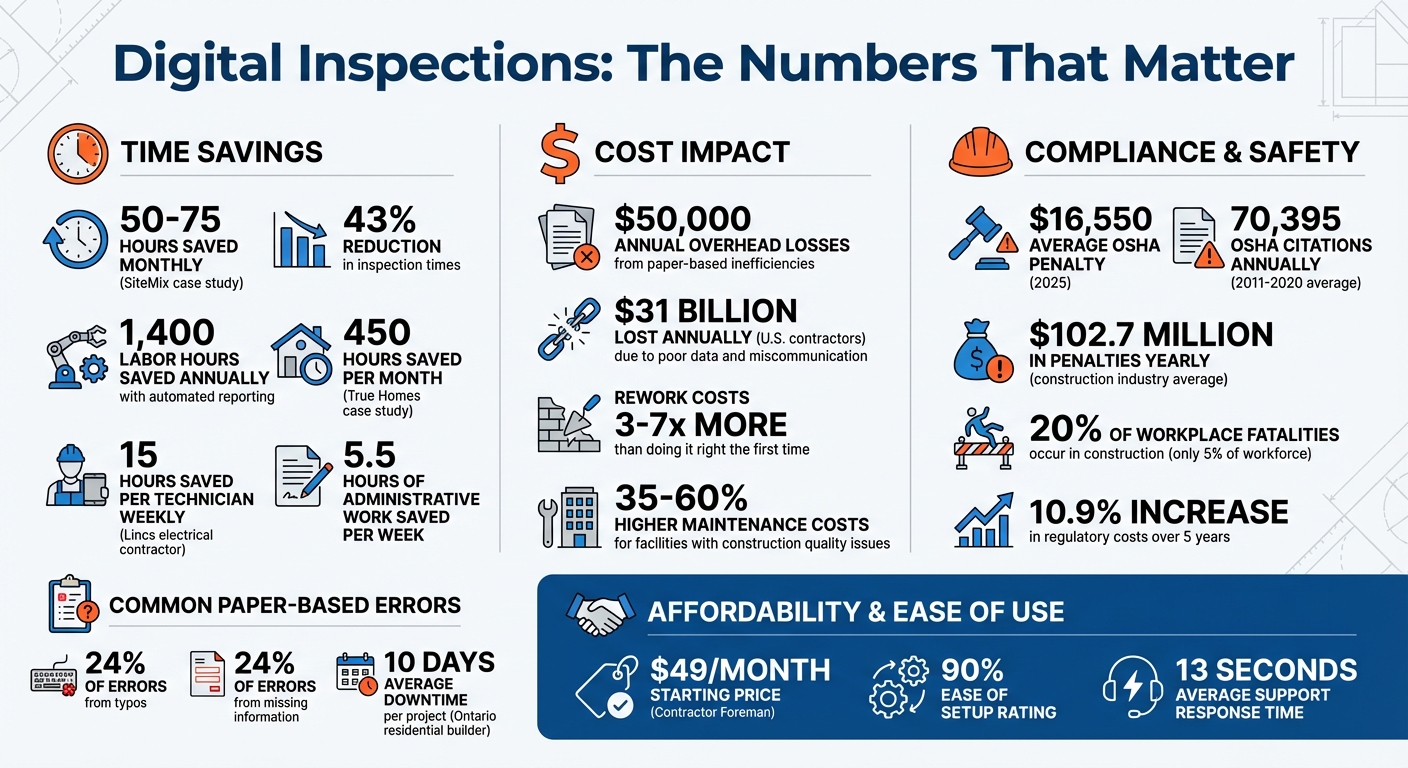
Do you know that the average contractor spends around 1,400 labor hours a year on admin-heavy tasks like inspections?
That’s not a small number. It’s actually a part-time job on top of your real job!
it’s enough time you could’ve walked the Camino de Santiago or taken a full month off in Thailand without checking a single email.
Here’s the good news: there’s an AI-powered construction tool that can do almost all of it for you!
With tools like Contractor Foreman, most of this busywork disappears. You set things up once—checklists, workflows, requirements—and the system handles follow-ups, tracking, and reminders like an annoyingly efficient assistant who never takes a day off.
Even better, it doesn’t forget things like we humans do. It won’t skip OSHA requirements because it’s tired, it won’t lose a punch list item because it thought someone else did it.
It follows the process you set to improve compliance. Every single time.
Here are the key benefits:
- Save up to 1,400 labor hours annually with automated reporting.
- Reduce inspection times by 43% or more.
- Avoid fines (e.g., OSHA penalties averaging $16,550 in 2025) with real-time compliance tracking.
- Simplify documentation with GPS-tagged photos, timestamps, and centralized records.
Tools like Contractor Foreman make this transition seamless, offering mobile access, customizable checklists, and automated notifications – all starting at just $49/month. With features like real-time updates, issue tracking, and detailed reports, digital tools are transforming how small contractors handle inspections.
Digital Inspection Tools: Cost Savings and Efficiency Benefits for Small Contractors
Why Small Contractors Struggle with Inspections and How Digital Tools Help
Common Inspection Problems for Small Contractors
Relying on paper-based systems often creates a logistical nightmare for small contractors.
When you’re managing multiple responsibilities with a small team, outdated documentation can lead to miscommunication and delays. For instance, a residential builder in Ontario faced an average of 10 days of downtime per project due to sluggish municipal inspections and poor documentation practices. This inefficiency resulted in annual overhead losses of around $50,000.
Communication issues are another major hurdle. Missteps between contractors, clients, and regulatory authorities often result in missed appointments or rejected submissions. These setbacks lead to rework, which can cost 3–7 times more than getting it right the first time. For smaller operations, such financial setbacks could turn a profitable job into a loss.
Regulatory complexity only adds to the challenge. Constant updates to building codes, OSHA regulations, and environmental rules increase the risk of misinterpretation and inspection failures. With construction representing 20% of annual workplace fatalities while employing just 5% of the workforce, compliance is not just about avoiding fines – it’s about safety. Additionally, regulatory costs for construction firms have risen by 10.9% over the last five years, further straining already slim profit margins.
These problems underscore the need for modern solutions, and digital tools are proving to be game-changers in inspection processes.
How Digital Tools Improve the Inspection Process
Digital tools are transforming inspections by bringing order and efficiency to the process.
For starters, they standardize data collection.
Features like “Required Fields” ensure all critical information is captured accurately, eliminating the errors and illegible entries common with paper forms. By moving to digital quality control checklists, contractors can avoid the omissions that bogged down traditional systems. For example, when True Homes implemented digital inspection software, their office staff saved 450 hours each month. Similarly, Lincs, an electrical contractor, cut 15 hours of paperwork per technician every week.
Another key advantage is real-time issue tracking.
Digital tools allow contractors to assign priorities and monitor resolutions from a centralized dashboard. Field crews can document problems with photos that include GPS tags and timestamps, creating an automated audit trail. This kind of visibility is essential – facilities with construction quality issues incur annual maintenance costs that are 35–60% higher than those built correctly. By catching and addressing minor problems early, digital tools help prevent them from escalating into costly repairs down the line.
sbb-itb-5eea312
Using Contractor Foreman to Manage Inspections
Getting Started with Contractor Foreman for Inspections
Contractor Foreman simplifies inspection management, making it a great fit for those seeking construction management software for small business.
You can link inspection records directly to permits in the Permit Manager, ensuring a clear and organized compliance trail. To make tracking easier, you can customize status colors – like green for “Passed”, red for “Failed”, and yellow for “Pending.”
For added flexibility, you can include custom fields tailored to specific trades. For example, HVAC contractors might track refrigerant pressures, while framers could monitor lumber grades. If you frequently perform similar inspections, the “Copy Inspection” feature lets you duplicate templates, saving time on repetitive tasks.
Building and Using Digital Checklists
Contractor Foreman offers two checklist options: the Basic builder for straightforward inspections and the Advanced builder, which includes conditional logic for more complex needs.
Paper forms often lead to mistakes – 24% of construction data errors happen because of simple typos, and another 24% come from missing information, like blank fields. Digital checklists solve these problems by requiring critical fields to be completed before moving forward. You can also mark frequently used forms as favorites for faster access. All inspection records are tied to specific projects or permits, keeping compliance documentation organized in one place.
These digital checklists sync effortlessly with the mobile app, allowing real-time updates from the field.
Conducting Inspections from the Field with Mobile Access
Once your digital checklists are set up, the mobile app brings full inspection functionality right to the jobsite, accessible on both smartphones and tablets. Field crews can create inspection records, take photos, and gather electronic signatures – all without needing to return to the office. Photos can be annotated and are automatically tagged with GPS coordinates and timestamps, strengthening your audit trail directly from the field.
The app also allows crews to contact customers via call or email to share findings immediately and capture signatures for change orders on the spot. And if questions arise during inspections, Contractor Foreman’s support team is just a quick call away, with an average wait time of only 13 seconds.
Tracking Issues and Managing Compliance in Real Time
How to Track and Fix Inspection Problems
When an inspection flags an issue, Contractor Foreman immediately notifies the right team members, saving about 5.5 hours of administrative work per week.
The software transforms inspection failures into punchlist items, which can be directly assigned to specific subcontractors or crew members. This ensures clear accountability. For instance, if a framing inspection reveals undersized headers, you can snap a photo, create a punchlist entry, and assign it to your framing crew – all from your phone. The system’s color-coded status tracking makes it easy to see which inspections are passed and which are still pending.
Having centralized digital records eliminates the hassle of searching for scattered documents. This is a big deal, considering that poor project data and miscommunication cost U.S. contractors more than $31 billion annually in rework. With automatic syncing between the field and the office, your team can focus on fixing issues instead of wasting time on paperwork.
On top of speeding up problem resolution, these tools also provide the documentation you need to stay compliant with regulations.
Meeting Regulatory Requirements with Inspection Reports
Regulatory compliance hinges on having complete and accurate documentation, and Contractor Foreman simplifies this by generating detailed inspection reports that meet local authority requirements. The system links inspection records directly to permits via the Permit Manager, ensuring that all required inspections are completed before moving to the next project phase. Between 2011 and 2020, construction companies faced an average of 70,395 OSHA citations annually, resulting in about $102.7 million in penalties each year. Proper documentation can help shield your business from becoming part of these statistics.
Contractor Foreman includes over 100 customizable reports to address a variety of regulatory needs. Photos taken during inspections come with GPS coordinates and timestamps, which strengthen your evidence during audits. For safety compliance, the software can automatically generate and maintain OSHA 300 logs based on reported incidents, making year-end reporting and audits easier to manage. Plus, companies with solid safety records often secure better insurance terms, and the detailed records you create with this system help meet insurer requirements.
To ensure nothing is overlooked, you can set up automated deadline reminders for key compliance milestones. For example, if an electrical inspection fails, the system automatically notifies both the electrical subcontractor and the project manager, keeping everyone on track and minimizing delays caused by missed follow-ups.
Conclusion
Switching to digital inspections can save time and make compliance much easier. By moving away from paper-based methods to a digital, field-focused system, small contractors can cut down on administrative tasks and avoid expensive errors that lead to rework. Contractor Foreman places inspection tools right in the hands of your team with mobile access, automated checklists, and real-time tracking, ensuring everyone stays aligned. This transition doesn’t just save time – it also helps ensure compliance runs smoothly.
The platform simplifies compliance by connecting inspections to permits and generating detailed reports that create a clear audit trail.
As Chris C. from Electrical Communications Unlimited shared:
“We are already seeing the benefits in project management and accountability as a company, not to mention the elimination of redundant data entry and a streamlined system”.
With pricing starting at $49/month, Contractor Foreman is tailored for small and medium contractors who need powerful yet easy-to-use features. It supports unlimited projects and offers a 30-day free trial, letting you test it on your jobs before making a decision. With a 90% rating for ease of setup and an average support response time of just 13 seconds, getting started is quick and hassle-free.
FAQs
What inspections should I digitize first?
Start by focusing on digitizing inspections that directly affect safety, compliance, and efficiency. Begin with daily safety inspections to quickly spot hazards and ensure protocols are being followed in real time. Transitioning to digital safety documentation and incident reporting can also simplify compliance efforts while improving accuracy. These steps are crucial for reducing accidents, adhering to regulations, and improving overall site management, making them ideal first steps in the journey toward digital transformation.
Can crews do inspections offline and sync later?
Teams can perform inspections even without an internet connection, thanks to offline-first inspection tools. These tools let crews gather data on-site without worrying about connectivity issues. Once they regain access to the internet, the system automatically syncs all the collected information. This approach ensures that inspections run smoothly, even in remote or low-connectivity areas, keeping the process efficient and accurate.
How do digital inspections help in an OSHA audit?
Digital inspections streamline OSHA audit preparation by offering organized, real-time documentation of safety measures and workplace hazards. They enable quick identification and logging of issues, ensuring precise records. With automated tools, record-keeping becomes simpler, providing instant access to data and generating detailed reports. This makes it easier to prove compliance, address violations swiftly, and minimize the risk of penalties. By adopting this proactive method, businesses can maintain consistent safety practices and improve audit outcomes.







