
In this article, we’ll cover what to include in a site inspection report and how to document each detail properly.
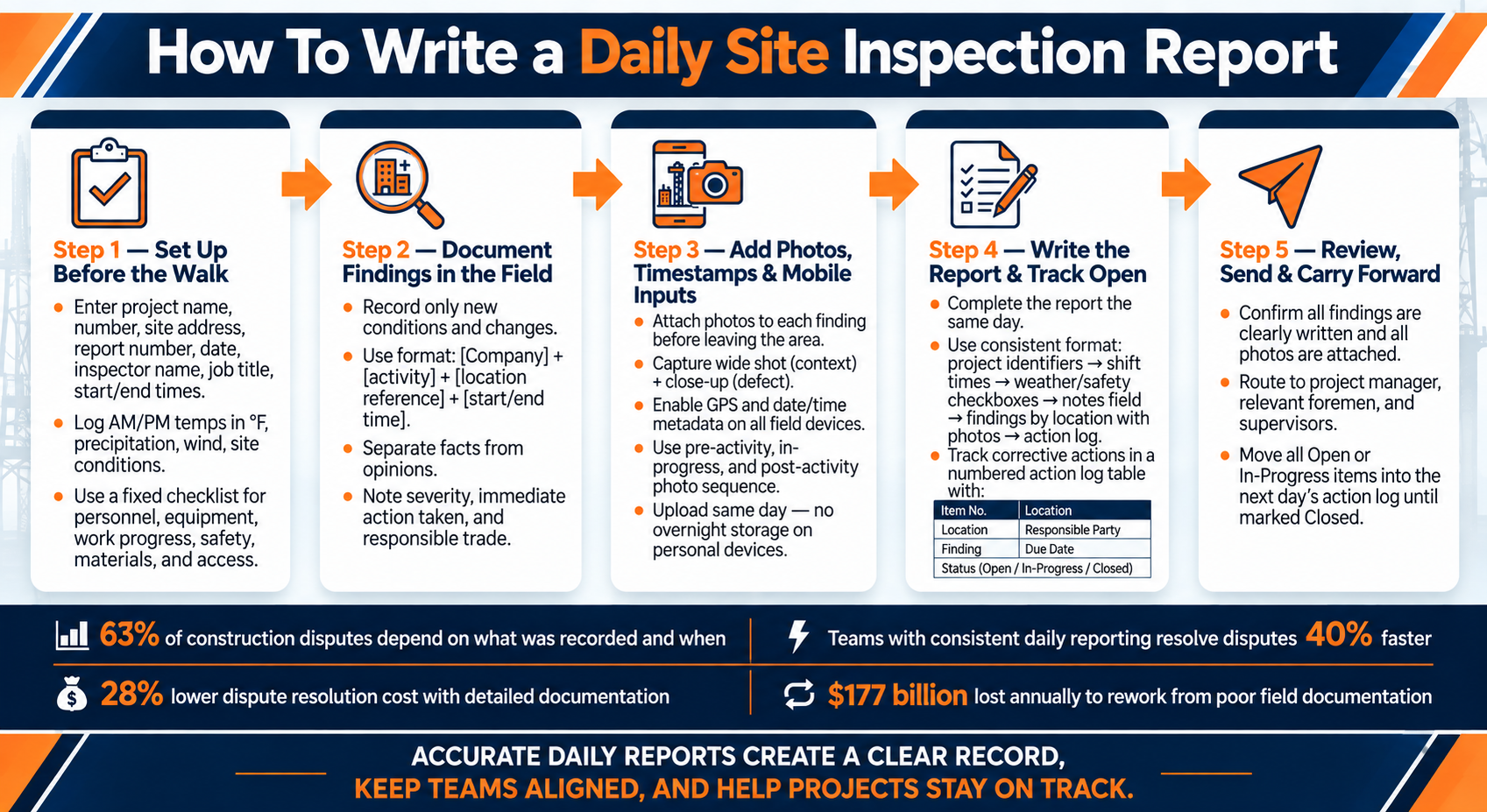
Daily Site Inspection Report: Step-by-Step Workflow
Set Up the Inspection Record Before the Walk
Set up the inspection record before the walk so each inspector collects the same core data. Missing fields lead to rework. Early setup also creates the base for the field notes added during the walk. A fixed checklist then keeps the pre-walk record fast and consistent.
Enter Project, Site, and Inspector Details
Each report needs a clear identity: project name, project number, site address, report number, date, inspection type, inspector name, job title, and start and end times. Start and end times define the inspection window and support production tracking.
Each company and subcontractor on site should also be listed, along with the trades present, headcount, and total hours worked. That gives the report more use for labor tracking and later verification.
Record Weather and Site Conditions That Affect Work
Log AM and PM temperatures in °F, along with precipitation, wind, and site conditions. Any delay or trade impact should be noted too.
Site access limits and any immediate safety observations belong in the pre-walk record as well. Location notes should use specific markers such as station numbers, grid references, room numbers, or elevations.
Use a Standard Checklist for Recurring Daily Items
A fixed checklist keeps inspections consistent across crew members and across days. Tick-box fields work well for recurring items such as personnel, equipment, work progress, safety, and materials.
| Checklist Category | Items to Cover |
|---|---|
| Personnel | Full names, trades, headcount, contractor and subcontractor affiliation |
| Equipment | Type and size on site, operating vs. idle hours |
| Work Progress | Tasks completed, locations in progress, quantities if applicable |
| Safety | Barriers, signage, permits, PPE checks, safety observations, who was alerted, and the response |
| Materials | Deliveries, supplier names, batch/ticket numbers |
| Access | Traffic control setup, site access limits, visitor names and purpose of visit |
Pre-populated static fields cut repetitive data entry and keep reports consistent across inspectors. Contractor Foreman supports web and mobile daily logs, which helps crews record the same fields in the field and pass them to office staff fast. The day’s record can then move to office staff without retyping.
sbb-itb-5eea312
Document Findings in the Field With Standard Entries
Use the pre-walk checklist as the baseline, then record only new conditions and changes found in the field. Vague notes don’t support decisions. A usable record needs four plain facts: who did the work, where it happened, when it happened, and why it matters. That structure turns a rough note into something that can stand up during review or a dispute.
Write Each Observation by Location, Condition, and Impact
Location comes first. Room numbers, grid references, station numbers, street names, and elevations remove guesswork. A repeatable entry format helps keep records consistent:
“[Company] performed [activity] at [location reference] from [start time] to [end time]. [Material/equipment details noted. Verification completed per spec.]”
That pattern works across trades and task types.
The condition note needs the same level of detail. Record the actual activity, the material used, and the equipment involved instead of broad wording like “work continued as planned”. If the work affects the schedule or another trade, state that plainly. The record should show what was delayed, stopped, or otherwise affected.
Separate Facts From Opinions
Opinion-based notes weaken the record and create room for disputes. Stick to observable facts. Avoid labels like slow, bad, or unprofessional. Measurements, counts, and visible conditions carry more weight.
Instead of a vague delay note, use a fact-based entry like this:
“Owner’s rep arrived at 9:15 AM and verbally instructed crew to stop work on the east wall pending RFI #47 response.”
That sentence records the person involved, the exact time, and the direction given.
Note Severity, Immediate Action, and Responsible Trade
Each finding needs three more details before the entry is complete:
- Severity
- Immediate action taken
- Responsible trade
If the finding affects another trade, name that trade and note the impact on follow-up work. Put severity, the on-the-spot response, and trade responsibility in the same entry, then mark the item as closed or carried forward.
Once the finding is written, attach matching photos and timestamps so office staff can verify it fast.
Add Photos, Timestamps, and Mobile Inputs
Written findings carry more weight when timely photos back them up. After the observation is written, attach the proof. Each finding should have its photos attached before leaving the area.
Attach Photos That Match Each Finding
Each photo should match a specific finding. The caption should name the exact location and the condition shown. A wide shot gives context. A close-up shows the defect.
Photos should also back up the severity and action noted in the field.
A simple sequence helps:
- A pre-activity shot shows the starting condition
- An in-progress shot shows active operations
- A post-activity shot records the finished state
That sequence shows progress without forcing extra writing.
Some things to remember:
Issues should be photographed separately, and the caption should include the batch or label number.
Photos should not sit overnight on a personal device. Same-day uploads keep them tied to the right daily report while details are still fresh.
Use Timestamps and Location Data When Available
Photos matter more when the time and place are tied to them.
Date, time, and GPS metadata should be turned on for field devices. Those settings should be checked before the walk. That metadata creates a clear record of when and where each condition was documented, which matters in disputes. Projects with consistent, detailed daily reporting resolve disputes 40% faster and at a 28% lower cost than projects with poor documentation.
The exact time of each photo or field note should be logged. Field records work best when events are captured as they happen, not pieced together later.
Capture Notes on Phones or Tablets for Faster Handoff
Once the evidence is time-stamped, the rest of the field note should stay in the same mobile workflow. Full narratives tend to slow field reporting. Mobile platforms with structured fields – manpower counts, equipment lists, quantity entries, and checklist items – move faster and stay more consistent than free-text notes.
Structured mobile entries cut down cleanup before the report is sent. Contractor Foreman supports mobile daily logs that upload and tag photos in the correct project folder for office review at the end of the shift.
Write the Daily Report and Organize Follow-Up
Once field notes and photos are captured, the daily report should be completed that same day. A messy or uneven format can bury items that need action.
Use a Simple Daily Report Structure
A consistent format helps office staff review reports fast. Pre-filled fields, checkboxes, and one notes field keep the process quick and steady.
Start with project identifiers and shift times. Add checkboxes for routine items like weather and safety. Then use a single notes field for anything unusual or outside the day’s plan. After that, list the day’s findings by location and link them to photos. End with open action items and follow-up from earlier reports.
Track Corrective Actions in an Action Log Table
Unresolved findings should move into one visible log so they do not disappear inside the narrative. Specific locations work better than vague area names. Station numbers, grid references, and elevations make follow-up much easier.
Each entry should include the responsible trade, due date, and current status.
| Item No. | Location | Finding | Responsible Party | Due Date | Status |
|---|---|---|---|---|---|
| 001 | Grid Line B / Level 2 | Exposed rebar at slab edge | Concrete subcontractor | Due next workday | Open |
| 002 | North stairwell, third landing | Missing handrail bracket | Steel subcontractor | Due next workday | In-Progress |
| 003 | Mechanical room | Unsealed conduit penetration at fire-rated wall | Electrical subcontractor | 09/10/2026 | Closed |
Each item needs a unique number so teams can reference it clearly in conversation, emails, or follow-up reports. The log should remain visible until the item is marked Closed.
Review, Send, and Carry Open Items Forward
After the log is updated, the report should go out right away. Before sending, office staff should confirm that each finding is clearly written and that every photo is attached. Submission should be part of the daily departure routine.
Once reviewed, the report should be routed to the project manager, relevant foremen, and supervisors tied to open items. Any item marked Open or In-Progress should move into the next day’s action log until it is Closed. Contractor Foreman, recognized as a top construction management software, keeps open items tied to the project record for fast review.
Conclusion: Keep Daily Inspection Reports Consistent, Timely, and Actionable
Once a report is reviewed and sent, the daily routine should look the same every time: a pre-walk record, objective notes logged by location, condition, and impact, timestamped photos linked to each finding, and same-day follow-up on open items.
Projects with consistent, detailed daily reporting resolve disputes 40% faster and at a 28% lower cost than projects with poor documentation. The U.S. construction industry also loses about $177 billion to rework each year, often because field notes never make it into the official project record.
That handoff works best when field and office teams work from the same record. Digital reporting keeps entries date-stamped, searchable, and easy to share. Contractor Foreman supports this by keeping daily logs, action items, and photos tied to the project record in one place, with access from the field or the office. A standard format keeps the project record usable for review, follow-up, and closeout.
FAQs
What should I do if I miss a same-day report?
Document the information as soon as possible. If an entry happens later than it should, the record should state that clearly and note the details with care.
Digital systems often show when a log was created or changed. That time stamp can shape how the record is viewed during a legal matter or dispute. Same-day records tend to carry more weight, so real-time logging should be the standard going forward.
How detailed should site photos and captions be?
Site photos should be detailed, timestamped, and geotagged. Daily reports should include 5 to 10 photos that show pre-activity conditions, work in progress, finished tasks, material deliveries, and safety issues.
Each photo should include clear notes that explain what happened, where it happened, when it was taken, and why it matters. Markup tools can point out key areas or problem spots at a glance. Daily uploads keep records accurate, organized, and easier to defend if questions come up later.
How do I track open inspection items across days?
Use a central digital platform to maintain a live audit trail. When an inspection turns up an issue, convert it into a punchlist item or task and assign it to the right crew member or subcontractor.
Color-coded status labels can make the workflow easier to scan at a glance, with markers for pending, failed, and passed items. Link those items to permits and project documents so they stay open until the issue is fixed. Regular dashboard reviews help project managers track progress and follow up on anything that’s still hanging out there.







