
“Whoever said “the more the merrier” probably wasn’t a residential builder.
More jobs means more revenue — no argument there. But it also means more grey hairs, more “quick questions” that are anything but, and more moments staring at your project list wondering how you got here.
Growth is great. Losing your mind in the process? Nah.
Because managing multiple jobs is less “strategic expansion” and more live-action obstacle course. Subs stack up, schedules implode, and clients pick the worst possible moment to “rethink everything.”
But it pays. So here we are.
Here’s the thing though — this isn’t a workload problem. It’s a systems problem.
You don’t need fewer jobs. You need fewer surprises.
Here are the tools and strategies that simplify operations:
- Centralize your tools: Platforms like Contractor Foreman consolidate scheduling, financial tracking, and communication into one place, reducing errors and saving time.
- Streamline scheduling: Use project tracking solutions like Gantt charts and calendars to manage overlapping timelines and prevent resource conflicts.
- Monitor budgets closely: Real-time financial tracking helps you spot issues early and maintain profitability.
- Improve communication: Daily logs, team chat, and client portals keep everyone informed and reduce miscommunication.
- Automate workflows: Integrations with tools like QuickBooks and Zapier eliminate repetitive tasks and improve efficiency.
Managing All Your Projects in One Place
Juggling multiple residential projects can quickly become chaotic. Disorganized data – spread across spreadsheets, texts, emails, and paper invoices – creates room for missed details and budget overruns. It’s a recipe for frustration.
Contractor Foreman simplifies this chaos by centralizing everything: leads, estimates, schedules, daily logs, and financials. Instead of hunting through email chains for change orders or digging through folders for permits, you’ll have a single, organized hub where every project detail is searchable and easy to access. This setup makes project tracking smoother and collaboration more straightforward.
Project Tracking Features
With Contractor Foreman, you can assign tasks to team members, set deadlines, and send real-time notifications, ensuring everyone knows their responsibilities.
The platform’s Gantt charts provide a clear view of milestones and task dependencies. It also uses CPM (Critical Path Method) and baseline tracking to highlight essential tasks and identify any progress gaps. This level of insight allows you to reallocate resources effectively, without needing to visit every site in person.
Beyond task management, the platform securely stores blueprints, change orders, photos, permits, and contracts. It automatically organizes files into project-specific folders, and tagging files makes retrieval quick and easy. You can even annotate PDFs and photos directly within the system or edit Word and Excel files online – no need for tedious downloads and uploads. Since both office and field teams work from the same up-to-date files, errors caused by outdated versions become a thing of the past.
Kanban boards and custom filters let you review task statuses at a glance and focus on what’s most urgent. Even better, these filters stay saved for future sessions, cutting down repetitive setup time.
Why One Platform Works Better Than Multiple Tools
Using multiple tools to manage projects often leads to data silos and wasted time. In fact, studies reveal that around 40% of construction time is spent waiting for deliveries, instructions, or searching for paperwork.
Contractor Foreman eliminates these inefficiencies.
Field updates sync in real time, so when a crew member logs hours or uploads job site photos, that information is instantly available to everyone who needs it. This seamless collaboration helps avoid the miscommunications that often arise with fragmented tools.
“This app has everything you need to run your projects, no need to have multiple apps anymore. I highly recommend giving Contractor Foreman a try for any business small to big.”
– Brian M., Morrell Electric
The platform also cuts down on redundant work. Opportunities can be converted into estimates with a single click, and approved estimates can be turned into active projects just as easily.
From there, you can generate purchase orders and subcontracts directly from the estimates, saving time and reducing errors. The global search function allows you to find any record, permit, or document – no matter how old – in seconds.
To further streamline operations, project-based permissions ensure employees only access data relevant to their assignments. The “Default Project” setting takes this a step further by filtering out unrelated data and auto-filling project fields for new records, reducing the risk of data entry mistakes.
With flat-rate pricing, you can manage as many projects as you need without worrying about hidden costs or limitations.
sbb-itb-5eea312
Scheduling Multiple Job Sites
Managing multiple remodeling and renovation projects means scheduling isn’t just helpful – it’s essential for keeping profits intact and avoiding costly setbacks.
Here’s why: Over 40% of contractors report daily scheduling issues disrupting their projects, and 68% of trades blame poor schedule management for reduced worker productivity. On top of that, major construction projects often run 20% longer than expected, with budget overruns affecting nearly 80% of them.
Contractor Foreman’s scheduling tools provide a clear, centralized view of all your job sites. They help cut down on miscommunication, flag delays, and identify potential conflicts before they impact your bottom line.
Calendar and Gantt Chart Tools
The platform’s Calendar offers a bird’s-eye view of all your residential projects.
With drag-and-drop functionality, you can schedule milestones, deadlines, and daily tasks effortlessly. For example, if a roofing job gets delayed by rain, you can quickly adjust timelines and see how it affects other tasks. The calendar supports daily, weekly, and monthly views, and you can filter by project, team, or trade to zero in on specific details.
Field crews can update task progress directly from their mobile devices, and those changes sync instantly with the office. This real-time syncing ensures everyone is working with the most up-to-date information. You can also account for non-working days – like holidays or company-wide breaks – so you don’t overbook or set unrealistic deadlines.
Gantt Charts, on the other hand, provide a visual representation of your project timelines. These charts display tasks as horizontal bars, showing dependencies, durations, and progress percentages. Let’s say you’re juggling a 30-day roofing job alongside a 45-day foundation pour. The Gantt Chart can reveal overlaps, such as needing the same electrician on two sites at once. Using the Critical Path Method (CPM), the tool highlights tasks that are critical to keeping the project on track. Plus, baseline tracking lets you compare actual progress against your original plan to spot delays early.
Together, these tools make it easier to coordinate schedules and avoid resource conflicts that could derail your projects.
Preventing Schedule Conflicts and Delays
Beyond visual scheduling, Contractor Foreman’s resource tools help you allocate crews and equipment where they’re needed most. Resource conflicts – like two sites requiring the same specialist at the same time – are a common cause of delays. The platform’s resource scheduler ensures labor and equipment are assigned strategically. For example, you can prioritize foundation work that must be completed before framing begins, keeping your critical path tasks on schedule.
Color-coded calendars and resource leveling features simplify team management. You can, for instance, limit framers to one site per week and add a 10% buffer for potential weather delays. This keeps your schedules realistic and manageable.
To keep everyone informed, the system sends automated notifications via email or text whenever schedules change. Crews know where to go before they even start their day. And for added convenience, you can sync Contractor Foreman with Google Calendar or Outlook 365, ensuring your work schedules don’t clash with personal commitments.
These tools make managing multiple job sites far less chaotic, keeping projects moving smoothly and on time.
Tracking Finances and Protecting Your Margins
Once you’ve streamlined schedules, keeping a close eye on your finances is just as critical to safeguarding your margins. Managing multiple residential projects requires diligent financial oversight. Without it, costs can spiral out of control – 30% of projects go over budget because expenses across sites aren’t properly monitored. For firms juggling multiple jobs, delays and disputes can chip away at margins by 5-10%. On top of that, labor and material shortages often push costs even higher. Keeping detailed financial records not only helps prevent budget overruns but also ensures your margins stay intact.
The Contractor Foreman platform simplifies this process by centralizing all your financial tools in one place. You can set budgets, log expenses in real time, and access live variance reports. For instance, if you’ve allocated $5,000 for lumber and find that it’s nearly spent with only 60% of the project complete, the system flags it immediately.
Monitoring Budgets in Real Time
Contractor Foreman’s Financial Dashboard provides an at-a-glance view of all your projects, while also allowing you to dig into the specifics of individual jobs. With real-time Job Costing Reports, you can compare “Committed” costs to “Actual” expenses, spotting potential margin issues before they escalate.
As Chuck A. from Liercke Construction, LLC puts it:
“The integration of the whole platform is very good, including externally with QuickBooks Online. Ability to do time sheets in the field without separate software. Cost codes and cost items that can be used for different jobs, this is huge for us.”
When a change order is approved, the system automatically adjusts the contract amount and updates the revised budget. This eliminates the need for manual calculations and gives you an accurate picture of your margins. Plus, you can apply bulk markups – like a 10% increase on all materials – ensuring consistent profitability across multiple cost items. The platform also integrates with 1build.com, giving you access to up-to-date local material and labor prices, so your estimates are spot-on from the beginning.
This seamless budget tracking leads directly into smoother billing management.
Managing Invoices and Payments
Contractor Foreman simplifies the billing process with automated templates tied to project milestones. Whether you’re using progress invoicing, AIA-style billing (G702 and G703), or time-and-material billing, invoices can be generated with just one click. You can even batch-invoice multiple jobs and monitor receivables in real time.
The platform also automates retainage calculations, such as withholding 10% for both client invoices and subcontractor payments. To manage transaction fees, you can set payment thresholds – allowing credit card payments for smaller amounts while requiring ACH payments for invoices over $20,000 (ACH fees are just 1% compared to 2.9% for credit cards). Clients can approve invoices directly through the portal, reducing payment timelines from 45 days to just 15, which helps maintain steady cash flow. And since everything syncs with QuickBooks Online, there’s no need for double data entry, keeping your records accurate and up to date.
Daily Logs and Team Communication
Managing multiple construction projects at once means you need precise daily logs and strong communication to keep things running smoothly. Did you know that 60% of project managers handle between two and five projects at the same time? On top of that, 90.9% of construction workers already rely on smartphones for their daily tasks. Keeping accurate records and maintaining open communication are key to staying on schedule and protecting profit margins.
Keeping Accurate Daily Logs
With Contractor Foreman, your smartphone becomes a powerful tool for daily documentation. You can track attendance, weather conditions, work progress, and material usage directly from the job site. Plus, the app automatically imports local weather data to help justify any schedule changes.
Need visual proof of progress or site conditions? The app’s integrated camera lets you upload photos and videos straight into the daily log, creating a clear visual record. Lindsey-Leigh M. from JWH Construction Services, Inc. shares her experience:
“This software packs more punch than you would expect at its meager price point. It offers so much in the way of construction management that it is almost unbelievable.”
Updates sync in real-time, so your office team can monitor progress without waiting for end-of-day reports. For example, if a material delivery is marked incomplete, you can take immediate action by contacting the supplier and reallocating resources to another site. This prevents downtime for your crew and helps protect your labor costs.
Keeping Teams Connected
When you’re juggling multiple sites, centralized communication is a game-changer. Contractor Foreman’s Team Chat consolidates all project-related conversations, eliminating the chaos of scattered texts and emails. If a crew member has a question – like where a fixture should go – they can message the project manager directly in the app, ensuring the conversation stays tied to the project for future reference.
Real-time task notifications keep everyone on the same page. Crew members know instantly when assignments are updated or completed, cutting down on unnecessary phone calls. GPS-enabled timecards add another layer of transparency – when workers clock in through the app, you can see exactly where they are and track their hours for each site. These tools not only boost onsite efficiency but also set the stage for smoother client communication down the line.
Managing Client Relationships
When you’re handling multiple residential projects, building strong client relationships is critical to protecting your margins. Poor communication is a major culprit behind project failures – causing 33% of them. On the flip side, projects with effective communication are 71% more likely to finish on time and 76% more likely to stay within budget. Those numbers speak volumes, especially when you’re managing three or four job sites at once.
Client Portals for Project Transparency
Contractor Foreman’s client portal offers homeowners 24/7 access to their project details, which can significantly reduce the need for constant phone calls. Through the portal, clients can view real-time schedules, logs, progress photos, and financial summaries. This level of transparency not only builds trust but also cuts down on repetitive status inquiries. In fact, some contractors have reported a 40% drop in client questions after adopting centralized portal access.
The portal also simplifies approvals.
Need a client to sign off on a change order or review an estimate?
They can do it electronically from any device, speeding up the process and creating a clear audit trail. Shawn B. from Avan Company LLC sums it up perfectly:
“I am impressed at how much it offers for the price. I like that it has almost everything in one place from the client portal to schedules, to budgets, and so on.”
Setting and Meeting Client Expectations
From the start, use the portal to establish that it’s the main source for updates, reserving phone calls for approvals.
Upload the project schedule and set up automated notifications for key milestones. For instance, if bad weather delays framing at Site B, document the delay in the schedule along with a note explaining how it affects the timeline.
The financial summary feature is another game-changer.
It ensures budget clarity by showing clients exactly how much of their contract has been billed and what remains. This helps avoid unpleasant surprises during payment discussions.
For contractors managing multiple projects, this transparency leads to fewer disputes, better margin protection, and stronger client relationships. It’s no wonder that 96% of growing companies cite customer satisfaction as a key factor in their success.
Connecting Contractor Foreman with Other Tools
Contractor Foreman goes beyond scheduling and financial tracking by integrating with other tools to simplify workflows and save time. With direct integration to QuickBooks Online and access to over 8,000 apps via Zapier, you can automate repetitive tasks that often eat into your profitability. These connections make managing projects smoother and more efficient, so you can focus on what matters most.
QuickBooks Integration for Accounting
The QuickBooks Online integration removes the hassle of double data entry. For instance, creating an invoice in Contractor Foreman automatically syncs it with QuickBooks, giving you real-time job costing without any manual rework. This feature helps track budgets across various job sites while reducing the likelihood of costly errors.
Starting January 1, 2026, only QuickBooks Online will be supported. For a smooth setup, the Integration Assistance feature helps map cost codes and accounts correctly. Brian T. from Tower Interiors Group LLC shares his experience:
“Contractor Foreman is more intuitively understandable to me and our type of business. They use the same terminology as we do and I feel like everyone that I have spoken with are actually contractors and not just a computer programmer selling their product.”
For contractors managing a high volume of invoices, tools like SaasAnt Transactions let you export data in CSV or Excel format and bulk-import it into QuickBooks. This process even includes error detection, making it ideal for handling large-scale accounting tasks.
But the benefits don’t stop at accounting – automation plays a key role in simplifying everyday tasks.
Automating Repetitive Tasks with Zapier

Zapier works by linking apps through a trigger-action system: when something happens in one app, it automatically triggers an action in another. According to surveys, 93% of users say Zapier has improved their efficiency, and setting up a new workflow typically takes less than six minutes.
Here’s how Zapier can streamline tasks across your residential projects:
- When you add a new customer in Contractor Foreman, Zapier can automatically create the same customer in QuickBooks Online.
- Uploading a project photo can trigger an automatic save to platforms like Google Drive or Dropbox.
- Lead generation tools, like Jotform or Angi Leads, can instantly create new project records without manual entry.
Contractor Foreman provides pre-built templates for popular workflows, such as syncing customer data, saving files to cloud storage, or adding new clients to email marketing lists. Even on the free plan, you can test basic automations, though updates to new data occur roughly every 15 minutes. These integrations free up your time, allowing you to concentrate on delivering successful projects and protecting your margins.
Contractor Foreman Pricing Plans
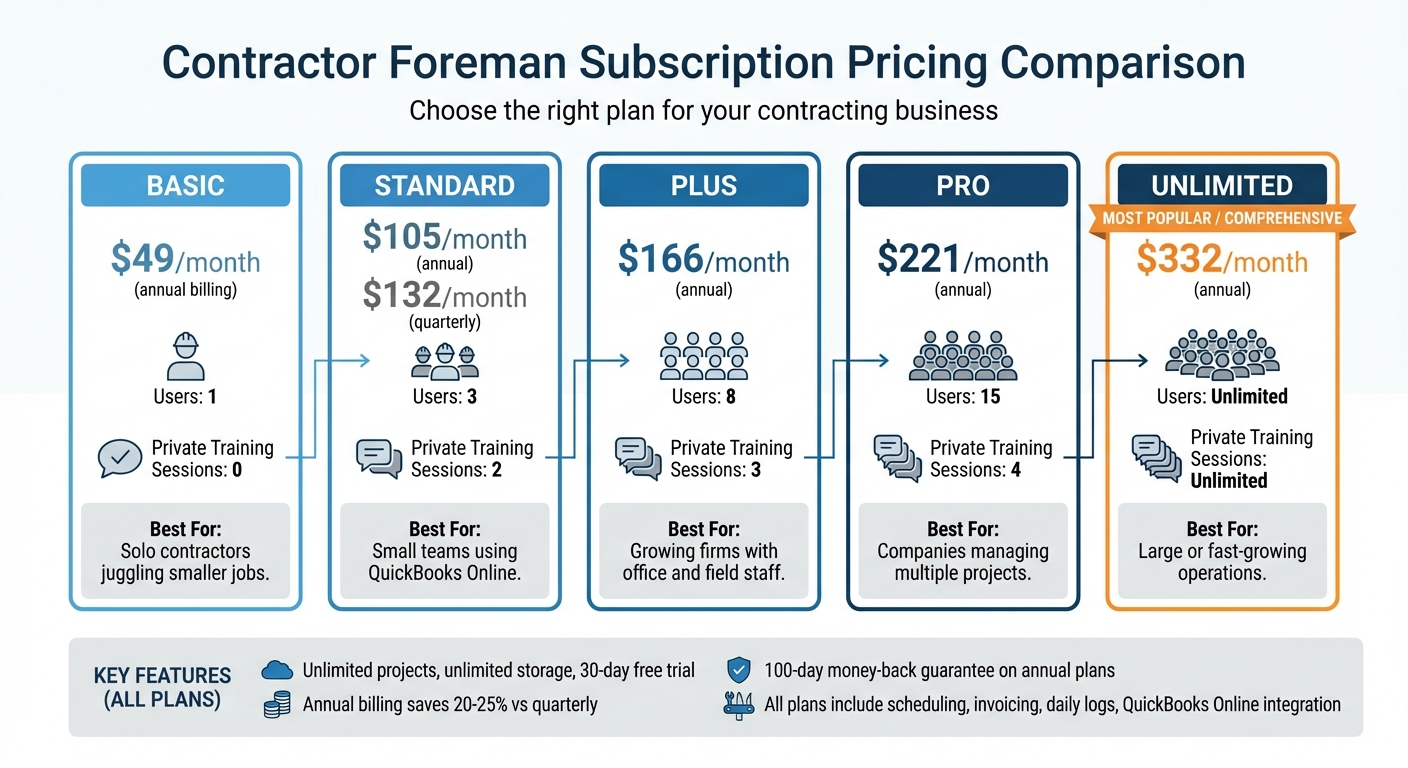
Contractor Foreman Pricing Plans Comparison for Residential Contractors
After organizing your projects and finances, picking the right pricing plan is key to keeping things running smoothly by optimizing your construction billing process.
Contractor Foreman’s pricing is based on the number of users, not the number of projects. This means your monthly cost stays the same whether you’re managing 5 jobs or 50. Every plan includes unlimited projects, unlimited storage, and a 30-day free trial so you can try it out before committing.
Plan Comparison
There are five plans to choose from, starting with the Basic plan at $49/month for solo contractors and going up to the Unlimited plan at $332/month for companies with large teams. Opting for annual billing saves about 20–25% compared to quarterly payments. For instance, the Standard plan costs $105/month when billed annually but jumps to $132/month if paid quarterly. All plans come with essential features like scheduling, invoicing software for construction, daily logs, and QuickBooks Online integration (support for QuickBooks Desktop ends on January 1, 2026).
| Plan | Annual Price | Users | Private Training Sessions | Best For |
|---|---|---|---|---|
| Basic | $49/month | 1 | 0 | Solo contractors juggling smaller jobs |
| Standard | $105/month | 3 | 2 | Small teams using QuickBooks Online |
| Plus | $166/month | 8 | 3 | Growing firms with office and field staff |
| Pro | $221/month | 15 | 4 | Companies managing multiple projects |
| Unlimited | $332/month | Unlimited | Unlimited | Large or fast-growing operations |
Selecting the Right Plan
Start by counting how many users – like office managers, field supervisors, or crew leads – will need access to the system for tasks like updating reports or logging time.
If you’re a solo contractor, the Basic plan at $588 per year gives you all the tools you need for project management. For teams of 3 to 8 users, the Standard or Plus plans are a better fit and include private training sessions to get everyone up to speed.
Larger crews might find the Pro plan more suitable, offering priority support and additional training sessions for $221/month (billed annually). This plan is built to handle multiple projects efficiently. For contractors scaling quickly or needing unlimited user access, the Unlimited plan provides free, unlimited training and no user limits. Plus, annual plans come with a 100-day money-back guarantee. To qualify, you just need to complete one training session and add at least one estimate, project, time card, and daily log.
Conclusion
Take charge of multiple residential projects without the headaches or shrinking profits. By using the strategies mentioned earlier, you can centralize scheduling, budgets, logs, and client communication in one platform. This eliminates the hassle of juggling scattered tools and manual updates. With real-time job costing, you can clearly identify profit and loss areas, while automated scheduling and instant syncing between the field and office ensure your team stays on the same page at every job site.
Contractor Foreman simplifies your operations by replacing spreadsheets, paper logs, and multiple apps with one unified system. Whether you’re managing 5 projects or 50, the cost stays the same. Tools like client portals, QuickBooks integration, and Gantt charts with baseline tracking give you the control and insights needed to safeguard your profits.
“Contractor Foreman has been a game-changer for us. It’s not just a tool; it’s become an integral part of how we operate, ensuring that we’re always on top of our projects and communicating effectively with our clients and team.” – Clayton Boudreaux, Boudreaux Builders
Try it for free for 30 days, with the added confidence of a 100-day money-back guarantee. See how much easier managing multiple residential jobs becomes when you have the right system working for you.
FAQs
How does Contractor Foreman help teams and clients stay connected?
Contractor Foreman makes communication easier by providing a single platform where teams and clients can access real-time project updates, share daily logs, and upload photos. This keeps everyone aligned and informed throughout the project.
With its client portal, clients can track project progress, approve documents, and directly communicate with the project team. This streamlined interaction boosts clarity, minimizes miscommunication, and helps contractors juggle multiple projects more efficiently while keeping clients happy.
How does Contractor Foreman help avoid scheduling conflicts on multiple projects?
Contractor Foreman makes scheduling easier by providing centralized tools that organize all your project timelines in one spot. With real-time updates, your team can instantly see changes, cutting down on miscommunication and minimizing scheduling conflicts.
It also simplifies crew management by letting you track team availability, assign tasks quickly, and handle time-off requests online. This digital approach keeps your residential projects running smoothly, ensuring better coordination and fewer delays.
How does Contractor Foreman simplify tracking project budgets?
Contractor Foreman makes budget tracking straightforward with its real-time financial management tools. Through a centralized dashboard, you can keep an eye on costs, expenses, and your project’s overall financial health. This means staying on budget and protecting your profitability becomes much easier.
One standout feature is its job costing tool, which helps you track expenses against your budget with pinpoint accuracy. It provides a clear breakdown of where your money is being spent on every project. Plus, Contractor Foreman integrates smoothly with popular accounting software like QuickBooks, cutting down on manual data entry and reducing the chances of errors.
By offering detailed financial reports and real-time cost tracking, Contractor Foreman equips you with the insights needed to make smart decisions, stay organized, and maintain strong profit margins across all your residential projects.







