
Balancing software training with daily tasks doesn’t have to disrupt productivity. Construction teams can learn new tools while staying focused on their work by embedding training into their regular routines. Here’s the approach:
- Integrate learning into daily workflows: Use short, focused lessons during meetings or while performing tasks.
- Assess workflows and skills: Map out current processes, identify pain points, and evaluate team skill levels to target training where it’s needed most.
- Appoint a training coordinator: Assign one person to manage the program, track progress, and provide support.
- Use role-specific training: Tailor lessons to each team member’s responsibilities, ensuring relevance and efficiency.
- Leverage on-the-job learning: Pair experienced users with learners and use real tasks for practice.
- Measure progress: Track software usage, task completion times, and error rates to evaluate effectiveness.
This phased, practical approach ensures teams gradually improve their skills while maintaining project timelines and reducing disruptions.
Review Current Workflows and Training Needs
Take a close look at your current workflows to identify where software training can improve efficiency. This initial step helps pinpoint areas where training will have the most impact while avoiding unnecessary disruptions to processes that already work well.
Map Existing Workflows
Start by documenting your team’s workflows in detail. Break down each major process step by step, noting every handoff, approval, and communication point along the way.
A workflow is essentially a detailed guide outlining roles and timing for specific tasks. Focus on workflows that often create challenges in construction projects. For example, design reviews, RFIs (Requests for Information), and change orders typically involve multiple communication channels, which can slow things down. Similarly, processes like invoice and payment handling often rely on manual data entry or paper trails that can delay cash flow.
Pay close attention to recurring pain points. Miscommunication between field and office teams, scheduling conflicts, budget overruns due to poor tracking, and siloed data that forces team members to hunt for information are all red flags. These are areas where software training can make a noticeable difference.
Also, evaluate the tools your team currently uses for critical tasks. Construction teams often rely on platforms like Google Drive for document storage, Google Sheets for project tracking, email for RFIs and change orders, and physical documents for daily logs and inspections. While these tools are helpful, they can lead to fragmented workflows that require manual updates across multiple systems. The aim is to identify where software can integrate seamlessly into daily routines, offering a more streamlined approach to scheduling, budgeting, and resource management. Document these opportunities as you map out each workflow.
Once workflows are mapped, the next step is to assess your team’s skill levels.
Check Team Skill Levels
With a clear understanding of your workflows, it’s time to evaluate how comfortable your team is with the software tools they’ll need. This step ensures training is tailored to their skills, avoiding frustration for beginners and boredom for advanced users.
Start by defining the specific skills required for each role to use the software effectively. For example, a project manager might need to master scheduling and budget tracking, while a field supervisor focuses on maintaining daily logs. Breaking down tasks into specific skills makes it easier to assess team members accurately.
Create a simple skill matrix, listing software functions along one axis and team member names along the other. Use a straightforward scale like “No experience”, “Basic”, “Proficient”, and “Advanced” to track skill levels. This visual tool quickly highlights gaps that need attention.
Ask team members to self-assess their skills using clear criteria. For instance, a “Basic” level might mean they can log into the software and view information, while “Proficient” indicates they can confidently create and modify records. Follow up these self-assessments with team discussions to gather additional insights. These conversations often lead to more accurate evaluations and ensure training aligns with actual job requirements.
Regularly review skill levels – every three months is a good starting point. Software updates, role changes, and growing confidence can shift training needs over time, so keeping assessments up-to-date ensures no one gets left behind.
Once workflows and skill levels are documented, appoint someone to oversee the training process.
Assign a Training Coordinator
To keep training organized and effective, designate a single person as the training coordinator. This individual will manage the process and serve as the go-to resource for questions and troubleshooting. They don’t need to be the most tech-savvy person on the team, but they should be approachable and well-respected.
The ideal coordinator is someone who understands how different roles interact within the organization, such as a project manager, senior superintendent, or office manager. These individuals often act as a bridge between field and office teams, making them well-suited for this role.
The coordinator’s responsibilities include scheduling training sessions, tracking module completion, and being the first point of contact for software support. While they don’t need to have all the answers, they should know where to find support or escalate issues when necessary.
Make sure the coordinator has direct access to software support resources and training materials. They should also be among the first to learn about new features so they can help the team adopt them smoothly. Additionally, the coordinator should collect feedback from team members to identify what’s working and what might need adjustment.
Clearly communicate to the team that this person is the designated training resource. When everyone knows who to approach for help, they’re more likely to seek assistance instead of struggling on their own. Having one point of contact also ensures consistent training messages and reduces the risk of conflicting advice.
Finally, officially recognize the training coordinator’s role and allocate dedicated time for them to focus on these responsibilities, especially during the initial rollout phase. This support is crucial to ensure the training process runs smoothly and effectively.
Add Training to Daily Routines
After mapping workflows and assessing skills, the next step is to seamlessly integrate training into everyday tasks. By embedding learning into daily activities, teams can enhance their skills without pausing projects. This incremental approach keeps progress steady while gradually building software expertise. Here’s how short, focused sessions and on-the-job learning can make training a natural part of the workday.
Short Training Sessions During Meetings
Set aside 5–10 minutes during regular meetings to spotlight specific software features. This method works well during daily huddles, weekly reviews, or safety meetings – times when your team is already gathered.
Each mini-session should focus on one feature relevant to the day’s agenda. For instance, if you’re reviewing the week’s schedule in a Monday meeting, spend a few minutes demonstrating how to adjust project timelines in your software. When discussing safety protocols, show how to log incidents or track completed training.
Make these sessions interactive and hands-on. Instead of just demonstrating features, have team members practice using them with real project data. This way, the learning sticks, and the team sees immediate benefits.
Rotate session leaders to tap into diverse expertise. A project manager might explain budget tracking one week, while a field supervisor walks through mobile logging the next. Peer-led training often feels more relatable than top-down instruction.
Keep track of what’s covered to avoid redundancy and ensure skills build systematically. Maintain a simple log of sessions and plan future topics based on upcoming needs. For example, if a big change order is on the horizon, schedule a session on managing change orders ahead of time.
On-the-Job Training
Training doesn’t have to stop at meetings. Incorporate learning into daily tasks to make it more relevant and practical. Pair software tools with routine activities so team members can see the benefits in real time and gain confidence through hands-on application.
Identify tasks that can transition to software-based solutions. For example, replace paper logs with digital entries, move RFIs from email to a centralized platform, or shift from spreadsheets to integrated financial tools. Focus on one change at a time to avoid overwhelming the team.
Use a buddy system to pair experienced users with those learning new features. For instance, a tech-savvy project coordinator can guide a superintendent through digital daily logs, or an office manager can assist field staff with mobile time tracking. This setup not only provides immediate help but also strengthens collaboration across roles.
Shadowing real tasks is another effective method. An experienced user works alongside someone learning the software, tackling actual project needs together. For example, while processing invoices, both individuals can navigate the software using real vendor bills and project codes. This ensures training addresses real-world challenges, not hypothetical scenarios.
Turn problem-solving moments into learning opportunities. If there’s confusion about project timelines, gather the team to explore scheduling features together. Tackling real issues makes training feel relevant and immediately useful.
After each session, dedicate a few minutes to reflect and gather feedback. Discuss what worked, what was unclear, and how the software can fit into daily routines. This helps refine the training process and reassures team members as they adapt to new tools.
Use Mobile and On-Site Training Resources
Field teams often need training resources that fit their environment. Mobile-friendly tools and on-site sessions can ensure learning happens wherever work does.
Short mobile videos are a great option for training on job sites. Create focused, 3-minute clips that demonstrate specific features using real project examples. For instance, a quick video on updating daily logs via smartphone is more effective than a lengthy overview. Team members can watch these during breaks or downtime.
Develop mobile-friendly reference guides with step-by-step instructions for common tasks, such as submitting time entries or uploading photos. These guides should be easy to read on smartphones or tablets, with clear visuals and simple text.
On-site training sessions during lunch breaks or shift changes can also be impactful. Focus on features like mobile logs, photo uploads, or time tracking – tools field teams use most often. Learning in the actual work environment helps team members see how the software integrates with their daily tasks.
Encourage peer support networks by identifying team members who are comfortable with the software. These “champions” can offer quick help to others on-site, making it easier for everyone to get assistance when needed.
Finally, take advantage of downtime for training. Whether it’s a weather delay or equipment maintenance, these moments can be used for skill-building. Keep training materials accessible on company devices so they’re always within reach when the opportunity arises.
Contractor Foreman provides a variety of free training materials that cover everything from basic functions to advanced features. These resources are tailored for construction teams, helping them quickly and effectively get up to speed with the software.
The training options are designed to suit different learning styles. Whether your team prefers hands-on demonstrations, self-paced tutorials, or immediate support for quick questions, Contractor Foreman has tools to fit those needs. These resources work alongside daily training and real-world practice, reinforcing the skills your team uses most.
Access Training Materials and Support
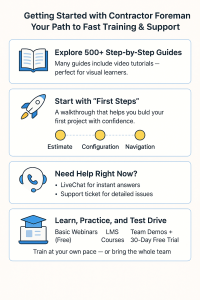
The platform’s FAQ Knowledge Base includes over 500 step-by-step guides, many with embedded video tutorials. These videos are a great fit for visual learners, showing features in action and making complex processes easier to grasp.
For those just starting out, Contractor Foreman offers a “First Steps” guided introduction. This walkthrough covers the essentials, like building estimates, setting up configurations, and learning navigation basics. Need help right away? Teams can use LiveChat or submit a support ticket for quick assistance.
Additional training options include free Basic Webinars and a dedicated LMS (Learning Management System) with courses available at no cost. The platform also offers free demos for individuals or entire teams, plus a 30-day free trial so users can test the software in their actual work environment.
Role-Specific Training Modules
The Knowledge Base organizes content by specific features and modules, allowing team members to focus on tools that match their daily tasks. This role-based approach makes learning more efficient and practical:
- Project Managers: Learn about Project Management, Change Orders, Estimates, and Invoicing. Video tutorials demonstrate how to track progress, manage budgets, and communicate with clients effectively.
- Field Supervisors and Foremen: Training focuses on Time Cards, Daily Logs, Safety Meetings, and mobile tools. Features like GPS-driven timecards and photo uploads ensure seamless field operations.
- Office Administrators: Get specialized guidance on Bills, Invoicing, managing the Client Portal, and integrating with tools like QuickBooks. This helps streamline administrative tasks such as financial record-keeping and client communications.
- Estimators: Dive into the Bid Manager and Cost Codes sections to learn how to create precise estimates and monitor project costs.
This modular structure ensures team members only focus on what’s relevant to their roles, avoiding information overload. As responsibilities grow, additional modules are available to expand their knowledge.
The role-specific setup also simplifies assigning training within your team. Experienced users can act as internal go-to experts, answering routine questions while more complex issues are escalated to Contractor Foreman’s support team. This approach keeps training efficient and collaborative.
sbb-itb-5eea312
Phased Implementation and Continuous Improvement
Rolling out software training in phases is an effective way to build skills without disrupting ongoing projects. By embedding training into daily routines, teams can transition smoothly into advanced software use while maintaining productivity and minimizing resistance to change.
This step-by-step approach allows organizations to address potential issues early and ensures that employees adapt at a manageable pace. Teams using phased implementations often experience higher adoption rates and fewer workflow interruptions compared to those attempting immediate, large-scale rollouts.
Phased Rollout of Features
Start your training program by focusing on the core features your team relies on most. For construction teams using Contractor Foreman, this could include essential tools like project setup, time tracking, and daily logs. These foundational elements provide immediate value while building confidence for more advanced tools later.
Begin with a pilot group of 3-5 team members. Over a 2-3 week period, train them thoroughly on basic features. Once they’re comfortable, they can act as internal champions, helping train the rest of the team.
Here’s a simple timeline to guide the rollout:
- Weeks 1-2: Cover essential daily tasks like logging time and basic navigation.
- Weeks 3-4: Introduce intermediate features, such as photo uploads and GPS tracking.
- Weeks 5-6: Expand to advanced tools, like financial tracking and reporting.
This gradual approach prevents information overload and builds skills progressively. It also helps you identify which features are most valuable to your team, allowing you to prioritize training efforts effectively.
Collect Feedback and Adjust Training
Continuous feedback is key to refining your training program. During the first month, schedule weekly check-ins with your pilot group to uncover any challenges or areas where additional support is needed.
Keep feedback simple and quick. A 5-minute conversation at the end of the week often yields better insights than lengthy surveys. Ask direct questions such as, “What feature was the most confusing this week?” or “Which training method worked best for you?”
Pay attention to patterns in the feedback. For example, if multiple team members struggle with a particular feature, it’s a sign your training approach for that tool needs adjustment. Track these trends over time to ensure your program evolves based on your team’s needs.
You might also consider setting up peer mentoring pairs, where experienced users guide newer team members. This method works well in construction environments where workers are used to learning hands-on from colleagues.
Update Training as Software Changes
Software platforms like Contractor Foreman frequently release updates and new features, so keeping your training program current is essential. Review updates monthly and make small adjustments to training materials as needed. Often, minor tweaks are enough to cover new features without requiring a complete overhaul.
For major updates, treat them as mini-rollouts rather than restarting your entire training program. Use the same phased approach: begin with your most tech-savvy team members, then gradually expand the training to the entire group.
Keep your training coordinator informed about upcoming software changes so they can prepare materials in advance. This ensures your team is ready to adapt without confusion. Align training updates with your team’s natural project cycles – seasonal reviews during slower periods are a great opportunity to introduce new features or refresh knowledge of tools that haven’t been used recently.
Not every update requires immediate training. Focus on changes that directly impact daily workflows, and save less critical updates for your regular monthly reviews. This approach helps prevent training fatigue while keeping your team aligned with the most important improvements.
Measure Training Impact and Workflow Efficiency
Tracking training success goes beyond just counting attendance. The real value lies in understanding how the training improves daily operations and enhances project results. Clear metrics are critical to determine if your investment in training is making a difference and to pinpoint areas that need attention.
This kind of evaluation helps identify the most effective training methods and highlights where additional support might be necessary. When done right, it can lead to better client communication, more thorough project documentation, and smoother workflows overall.
Key Metrics for Success
Start by monitoring how team members engage with the software. For example, track the use of essential features in Contractor Foreman, such as daily logs, time tracking, or photo uploads. Over time, you should notice an increase in usage as training takes effect.
Another metric to watch is task completion time. Measure how long it takes to handle routine tasks like generating reports, updating schedules, or processing timesheets. If these processes become faster, it’s a clear sign that training is boosting efficiency.
Error rates are equally telling. Keep an eye on mistakes like data entry errors, missed deadlines, or incomplete documentation. A drop in these errors indicates that the training is helping your team work more accurately and confidently.
Regular team surveys can also provide valuable insights. Gauge how comfortable employees feel using different software features. Over time, increased confidence and proficiency are strong indicators that the training is working.
Regular Workflow Reviews
Once you’ve established metrics, routinely review your team’s workflows to identify improvements. Pay attention to how information flows between team members, how quickly issues are resolved, and how consistent project documentation has become.
These reviews should also include an assessment of project timelines and budget tracking. If progress isn’t clear, it might mean certain software features or processes require more focus in future training sessions. Brief team check-ins can help uncover these gaps early, allowing you to adjust your approach as needed.
Look for visible signs of improvement. For instance, if team members start updating project photos and notes without needing reminders, it’s a good indication that the training is effective. Similarly, smoother client communication might suggest that employees are successfully using reporting tools and client portals.
Use Before-and-After Comparisons
A powerful way to measure progress is through before-and-after comparisons. By creating a visual summary of performance metrics – both before training and after a set period – you can clearly demonstrate improvements. This approach is especially useful for communicating results to stakeholders.
Training can also translate into financial gains. For example, calculate the hours saved on administrative tasks to see the return on investment. Additionally, monitor client feedback and project outcomes to further validate the impact of the training program.
These comparisons not only highlight short-term wins but also reveal long-term trends, helping you refine and improve your training efforts over time.
Conclusion
To successfully integrate software training, start by evaluating your team’s current skills, introduce new features step by step, and provide focused resources. Launching with a smaller group allows you to fine-tune the process, minimize resistance to change, and create internal advocates who can guide their colleagues through the transition.
Tailored training for specific roles is key. For example, project managers should focus on mastering scheduling and reporting tools, while field staff benefit most from learning mobile tools and daily logs. This targeted approach ensures faster skill development and better performance in areas critical to their responsibilities.
Contractor Foreman simplifies this process with free training resources like online tutorials, live sessions, and detailed documentation available on both web and mobile platforms. The platform’s role-based modules ensure that each team member gets relevant training tailored to their needs.
Keeping your training program effective requires regular updates and feedback. As software evolves and project demands shift, staying responsive to team input helps keep training relevant and useful over time.
Structured training leads to fewer errors, quicker task completion, and better project outcomes. It also boosts team confidence, resulting in smoother daily operations and improved client satisfaction.
FAQs
How can construction teams incorporate software training into daily workflows without disrupting projects?
To introduce software training into everyday workflows without interrupting operations, start by concentrating on training key team members like project managers and supervisors. These leaders can then assist the rest of the team, creating a smoother adjustment process for everyone.
Keep training sessions short and aligned with the team’s schedule. This way, downtime is kept to a minimum, and team members can quickly put their new knowledge to use in ongoing tasks. Opt for software platforms that provide free training and support, such as Contractor Foreman, to ensure your team has access to helpful resources.
By weaving training into daily routines and emphasizing hands-on learning, construction teams can gain confidence with new tools while keeping projects moving forward.
How can we customize software training to fit the unique roles and skill levels of our team members?
To design software training that truly resonates, start by evaluating each team member’s current skills and job responsibilities. Use tools like surveys or skills assessments to pinpoint their specific needs and areas for growth.
With this insight, you can craft personalized training plans that directly align with their roles while addressing any knowledge gaps. To make the learning experience even more effective, consider using flexible learning techniques that adapt the pace and content based on individual progress.
Another powerful approach is cross-functional training. By encouraging team members to gain skills outside their primary roles, you not only enhance their versatility but also foster better collaboration across departments. These strategies ensure the training feels relevant, keeps participants engaged, and delivers meaningful results for the entire team.
How can we measure the impact of software training on team productivity and workflow efficiency?
To gauge how effective your software training has been, start by looking at measurable factors like productivity boosts, how well workflow automation is being used, and how employees are applying their new skills. You can track these changes using tools like post-training performance reviews, team surveys, and analyzing data to see shifts in efficiency and output.
It’s also worth digging into the return on investment (ROI) for a clearer picture. Compare the improvements in productivity, time saved, and long-term business benefits against the costs of the training. By taking this broader view, you can better understand not just the immediate results, but also the lasting impact the training has on your team’s performance.







