
Circles. Arrows. Highlights. Notes.
At first glance, markup tools look like something an elementary school teacher would scribble all over a kid’s book report.
But in construction?
These things are a lifesaver!
Because construction projects run on documents — drawings, RFIs, punch lists, permits, site photos, change orders, inspection reports — and when multiple teams are reviewing and giving feedback on different versions across different devices in different locations?
Things get confusing—FAST.
And yet, a shocking number of teams still email PDFs back and forth, print markups nobody updates, and somehow act surprised when crews are working off outdated information.
That’s exactly what markup tools fix. They let teams highlight issues, flag revisions, leave comments, pin tasks, and visually communicate changes directly on project files instead of relying on endless email chains and “Wait…who approved this?” conversations.
And when integrated properly with construction software, markup tools help everyone stay aligned, catch mistakes earlier, and avoid turning small communication problems into $30,000 disasters.
Here’s a quick look at four popular tools and their features:
- Bluebeam Revu: Offers reusable markups, real-time collaboration, and mobile accessibility with tools like Bluebeam Studio and AI-powered Bluebeam Max.
- ActiveDraft: Focuses on enterprise integrations with browser-based tools for quick annotations, task linking, and mobile access without downloads.
- Drawboard Projects: Integrates with platforms like Revit and Procore, providing accurate measurement tools, task pins, and real-time syncing across devices.
- Autodesk Construction Cloud: Combines document management, issue tracking, and offline markup capabilities, linking annotations to RFIs and project tasks.
Quick Comparison
| Feature | Bluebeam Revu | ActiveDraft | Drawboard Projects | Autodesk Construction Cloud |
|---|---|---|---|---|
| Integration | Pre-built APIs, Studio | ActiveLink for enterprise | Revit, Procore, Slack | Autodesk Docs central hub |
| Collaboration | Real-time with Studio | Cloud-based syncing | Live workspace | Real-time and offline access |
| Markup Tools | AI-powered, reusable | Standardized, task-linked | Smart shapes, pressure ink | Linked to RFIs, submittals |
| Mobile Accessibility | Desktop, browser, mobile | Browser-based | Native apps for all devices | Offline and mobile app |
Choosing the right tool depends on your team’s needs, ease of use, and budget. Tools like Contractor Foreman offer simpler, cost-effective options starting at $49/month, while enterprise solutions like Autodesk cater to larger, more complex projects.
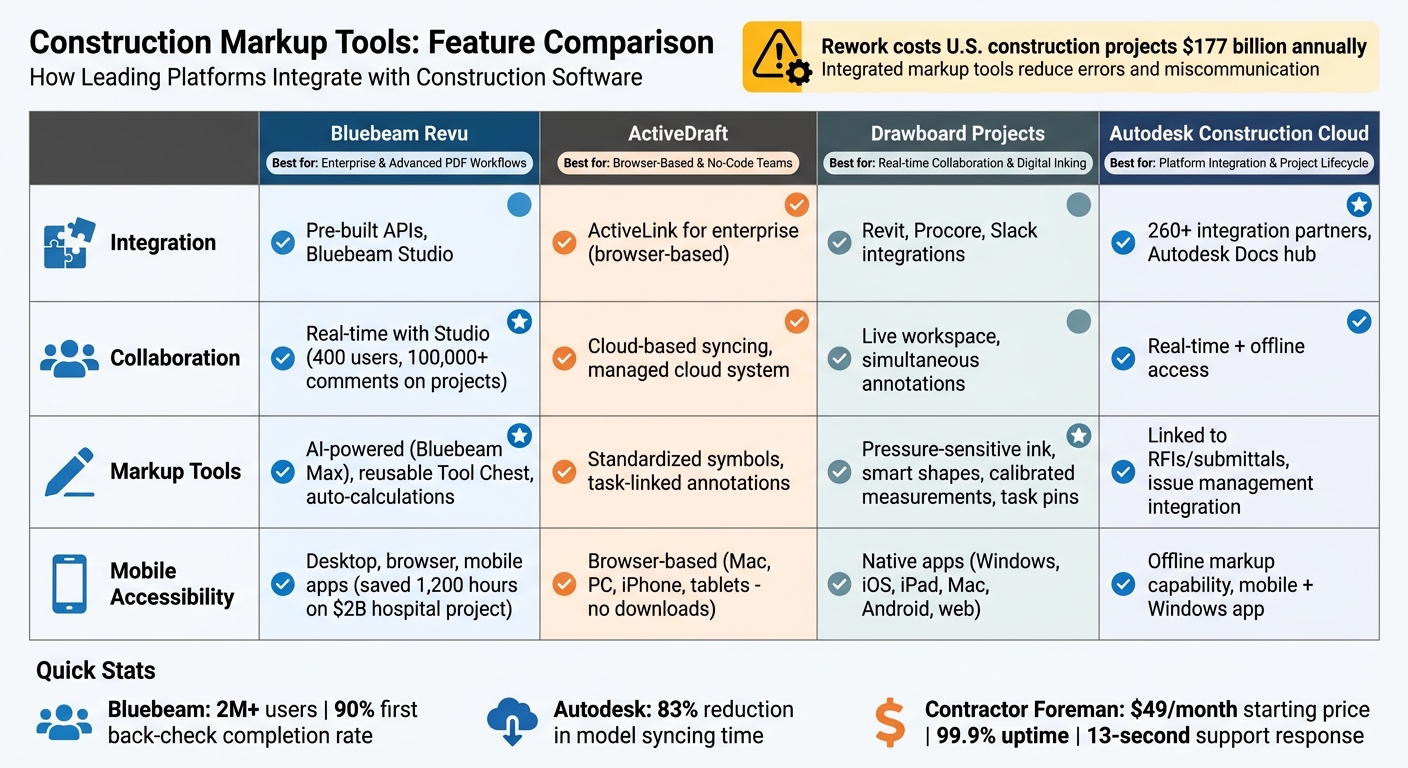
Construction Markup Tools Comparison: Features and Integration Capabilities
1. Bluebeam Revu
Integration Method
Bluebeam Revu connects seamlessly with document management systems through pre-built integrations and API access. This setup ensures annotated files sync automatically and allows direct linking to project dashboards and file repositories, creating a streamlined workflow for teams.
Markup Features
The Tool Chest is a major time-saver, letting teams reuse custom markups – like callouts, dimension styles, or approval stamps – across multiple documents. Bluebeam also incorporates AI-powered tools through Bluebeam Max, making the markup process more efficient. For example, its measurement tools automatically calculate dimensions in feet and inches, simplifying tasks for users.
Data Sync Capabilities
Bluebeam Studio enables real-time collaboration by allowing multiple users to work on the same document simultaneously. It keeps track of all changes, automatically saving revisions and attributing updates to specific users. A great example of its power is AECOM‘s use of these features, where 400 collaborators added over 100,000 comments during a large-scale school modernization project.
Mobile Accessibility
Bluebeam ensures on-the-go productivity with compatibility across desktops, browsers, and mobile devices. This allows field teams to review and update markups in real time. For instance, on a $2 billion hospital project, CannonDesign saved 1,200 hours by using Bluebeam’s mobile-friendly project management tools, enabling on-site superintendents to sync notes instantly with office teams.
sbb-itb-5eea312
2. ActiveDraft
Integration Method
ActiveDraft has shifted its focus to operating as an OEM, embedding its markup and collaboration engine directly into enterprise-level construction management systems. As of October 31, 2024, the company ended new user registrations for its standalone platform, prioritizing this enterprise integration approach instead. Through its ActiveLink technology, users can share documents via a simple browser link – no extra software or formal sessions required. This seamless integration supports its advanced markup capabilities.
Markup Features
ActiveDraft simplifies document management with tools that make markup, collaboration, and mobile access more efficient. Its in-browser measurement tools allow users to quickly confirm dimensions and generate estimates. The platform also offers a rich library of symbols and shapes for standardized edits, as well as annotation and callout tools to emphasize specific areas. A standout feature is the ability to link markups directly to project tasks, tying document reviews into broader workflows.
Data Sync Capabilities
The platform’s managed cloud system ensures real-time collaboration by automatically syncing markups, activity threads, and project files. This guarantees that all team members access the latest version of documents, improving visibility and coordination across project teams.
“The ease of use and built-in collaboration enables my teams to be on the same page at all times – both figuratively and literally.”
- Brian S., Project Team Member
Mobile Accessibility
ActiveDraft is fully browser-based, working across Mac, PC, iPhone, and tablets without the need for downloads. Although the dedicated mobile app was discontinued in late 2024, the platform remains accessible via mobile web browsers, allowing field teams to review and annotate drawings on any device with internet access.
3. Drawboard Projects
Drawboard Projects takes the idea of integrated markups and aligns it with the practical needs of modern construction management, offering tools designed to streamline workflows.
Integration Method
This platform connects seamlessly with leading construction software like Revit, Procore alternatives, and Aconex, as well as document systems such as SharePoint, OneDrive, and iManage. It also works with communication tools like Slack and Microsoft Teams, all through a robust API. These integrations make it easy to incorporate Drawboard Projects into existing workflows, enabling efficient, on-site markup capabilities.
Markup Features
Drawboard Projects isn’t just about integration – it also offers powerful annotation tools that cater to construction professionals:
- Pressure-sensitive ink for precision.
- Smart shape recognition for clean diagrams.
- A variety of line styles and hatch patterns to differentiate materials like concrete or timber.
- Calibrated measurement tools for accurate dimensions.
- A “Pins” feature that allows users to assign tasks, attach photos, hold threaded conversations, and set custom statuses.
“Drawboard PDF is an amazing app…I can measure all the elements in my architect’s blueprint, add effective annotations with ink or various line/polygon tools, calculate square footage, and even add text notes all using the pen on my device.” – Microsoft Store Review
Data Sync Capabilities
As a live workspace, Drawboard Projects allows multiple team members to annotate the same drawing simultaneously. Annotations, tasks, and comments sync automatically in real time, reducing errors and simplifying communication. This eliminates the need for endless file exchanges or messy email threads, tackling the rework challenges mentioned earlier head-on.
Mobile Accessibility
With native apps available for Windows, iOS, iPad, Mac, Android, and web browsers, Drawboard Projects ensures that on-site updates are synced instantly, keeping everyone on the same page no matter where they are.
4. Autodesk Construction Cloud
Autodesk Construction Cloud, now part of Autodesk Forma as of 2026, combines markup tools with document management, issue tracking, and field collaboration. With connections to over 260 integration partners, it serves as a central hub, linking data from the design phase all the way through project handover.
Integration Method
At the heart of the platform is Autodesk Docs, a centralized document management system that acts as the single source of truth for all project-related documents. Third-party tools integrate seamlessly using secure OAuth protocols, allowing direct synchronization and automatic updates. For example, when a new drawing version is uploaded, connected tools instantly detect the changes, triggering updates or re-analysis as needed. Additionally, the system maps team members across platforms, ensuring notifications and assignments are delivered to the right people without creating duplicate accounts.
This integration supports a smooth workflow where markup tools feed directly into project issues and RFIs, keeping everything connected and efficient.
Markup Features
Autodesk Construction Cloud stands out by linking annotations directly to RFIs, submittals, and centralized issue management. Teams can enhance their documentation by uploading photos for visual context or creating issues directly from their mobile devices. Analysis tools integrated into the platform can identify problems and push them back as “Issues”, complete with location pins, detailed descriptions, priority levels, and assigned team members.
Data Sync Capabilities
Thanks to its cloud-based system, Autodesk Construction Cloud ensures real-time synchronization across all devices. Markups are applied to the most current version of a drawing, minimizing the risk of working with outdated information. This feature is particularly critical in an industry where rework costs an estimated $31 billion annually.
Mobile Accessibility
Autodesk Forma’s mobile app goes a step further by offering offline markup capabilities. Field teams can log issues and create RFIs even without internet access, with automatic syncing when they reconnect. For office environments, a dedicated Windows app (compatible with Windows 10 or higher) provides access to updated project data on desktops, laptops, and Surface devices using unified credentials. This level of integration reflects a broader trend toward streamlined construction management, similar to platforms like Contractor Foreman that prioritize cohesive workflows.
Advantages and Disadvantages
Markup tools bring both strengths and challenges to integrated construction workflows. The effectiveness of these tools often depends on factors like integration quality, user experience, and how well they fit into specific project requirements.
Take Bluebeam Revu, for example. It’s widely regarded as an industry standard, with over 2 million users and a 90% completion rate on first back checks due to its precise annotation capabilities. However, it’s not without its challenges. The platform’s complexity and steep learning curve can make it difficult for field teams to adopt quickly, making it more suitable for advanced users who need highly customizable tools.
On the other hand, Drawboard Projects stands out for its intuitive design, offering a “pen and paper” feel and real-time collaborative markups that work seamlessly across devices. While it does have a free version, its advanced features are tailored more toward design and engineering professionals, which could limit its appeal for broader team use.
Then there’s Autodesk Construction Cloud, which delivers a comprehensive solution with perks like unlimited storage and deep integration with tools like Revit and Civil 3D. This setup can cut model syncing time by 83%. However, its complexity often requires dedicated administrative support, which can be a hurdle for smaller firms. Even with Capterra ratings above 4.3/5, its vast array of features can overwhelm teams that don’t need enterprise-level capabilities.
For those looking for an all-in-one project management software, Contractor Foreman offers a simpler approach. It combines built-in markup tools with strong connectivity through Zapier, starting at $49/month with a price-lock guarantee.
“Contractor Foreman is more intuitively understandable to me and our type of business. They use the same terminology as we do and I feel like everyone that I have spoken with are actually contractors and not just a computer programmer selling their product” – Brian T., Tower Interiors Group LLC
The platform boasts 99.9% uptime using AWS servers and an impressive 13-second average support response time. While it may lack some of the advanced features found in specialized tools, its user-friendly design addresses one of the biggest challenges in the industry: low field adoption.
Ultimately, the success of these tools comes down to how well they fit into workflows and whether they encourage widespread team adoption.
Conclusion
Choosing the right markup tool can make a huge difference in construction workflows. For contractors, having a tool that integrates seamlessly into their processes eliminates the hassle of juggling multiple files and ensures that markups are synchronized across teams.
Contractor Foreman’s built-in “Drawings & PDF Markup” tool stands out by offering features like redline highlighting, plan measurements for square footage and distances, and real-time annotations – all accessible on both mobile devices and desktops.
The platform takes productivity a step further by integrating with tools like CompanyCam for visual markups and Kreo for AI-driven takeoffs that feed directly into project estimates. These integrations do more than simplify document management – they improve the overall efficiency of project execution. Starting at just $49/month, Contractor Foreman provides these robust markup features without charging per-user fees.
The real key to successful markup integration, however, lies in user adoption. Tools with intuitive mobile interfaces and offline sync capabilities make on-site work smoother, while overly complex systems can deter usage. When markup tools are seamlessly integrated into project tracking solutions, financial tracking, and client communication, they eliminate the inefficiencies that often slow construction workflows. Contractor Foreman demonstrates how embedding markup capabilities directly into project management can revolutionize the way construction teams operate.
FAQs
What should I check to ensure markups sync to the latest drawing version?
To ensure your markups stay aligned with the latest drawing version, make sure your markup tool offers real-time synchronization across devices and versions. Features like automatic version control and update notifications are essential. These tools ensure that every team member is working with the most up-to-date drawings, reducing confusion and avoiding outdated annotations. This keeps collaboration smooth and efficient.
How can I turn a markup into an assigned task, RFI, or issue automatically?
Using construction management software, you can turn a markup into an assigned task, RFI, or issue automatically. The process usually starts with annotating documents using markup tools. Once that’s done, the markups are “flattened” during the review phase, making them permanent. These finalized annotations can then be linked or assigned as actionable items within the system. For step-by-step guidance, check the platform’s support documentation.
What offline markup features matter most for field crews?
Field crews often work in environments where internet access can be unreliable. That’s why having offline markup capabilities is a game-changer. These tools allow teams to:
- Add notes, photos, videos, and drawings directly on-site, even without a connection.
- Automatically sync all updates once they reconnect, ensuring nothing gets lost.
This combination keeps communication smooth and workflows running efficiently, even in remote locations.







