
- Align Your Meetings With Project Goals
- Build a Repeatable Meeting Process With Contractor Foreman
- Run Short, Focused Meetings That Respect Jobsite Time
- Use Contractor Foreman to Follow Through on Meeting Outcomes
- Build a Team Culture Around Accountability and Clear Communication
- Conclusion: Better Meetings Lead to Better Projects
- FAQs
“Wait, didn’t I tell you?” This is one of the most expensive lines in construction — right next to “Oh no, I wasn’t informed.”
And it’s not that you’re not trying to fix this. You’re holding meetings. In fact, lots of them — to the point that you’re sure your team thinks you’re the annoying Type-A manager from hell. But at this point, you don’t care — you just gotta do what’s needed for things to run smoothly.
Here’s the real question: Are your meetings actually working?
How many hours do you spend on them each week? 2? 5? Only for things to fall apart anyway because they forgot to mention something, or they went to pee while you were discussing it, or they misunderstood the whole thing.
Life is short. Don’t make yours shorter by drowning in meetings that solve nothing. There’s a better way to run them — so there’s less “wait, what did we agree on?” — and what’s even better? It can be done in half the time.
Here’s how top-performing construction teams do meetings right:
- Tailored Meetings: Match meeting types (e.g., daily huddles, weekly progress reviews) to specific project phases and goals.
- Data-Driven Agendas: Use tools like Contractor Foreman to centralize project data, ensuring meetings are based on facts, not assumptions.
- Clear Action Items: Assign tasks with clear ownership and deadlines during meetings, not after.
- Efficient Use of Time: Keep meetings short, focused, and relevant to jobsite priorities.
- Follow-Up and Accountability: Share meeting summaries quickly and track action items to ensure follow-through.
Align Your Meetings With Project Goals
Construction Meeting Types: A Complete Guide for High-Performing Teams
Meetings are essential in construction projects, but they need to be purposeful.
Misaligned meetings can waste valuable time on the jobsite. High-performing teams carefully choose the type of meeting, participants, and timing to align with specific project milestones.
Define the Types of Meetings Your Team Needs
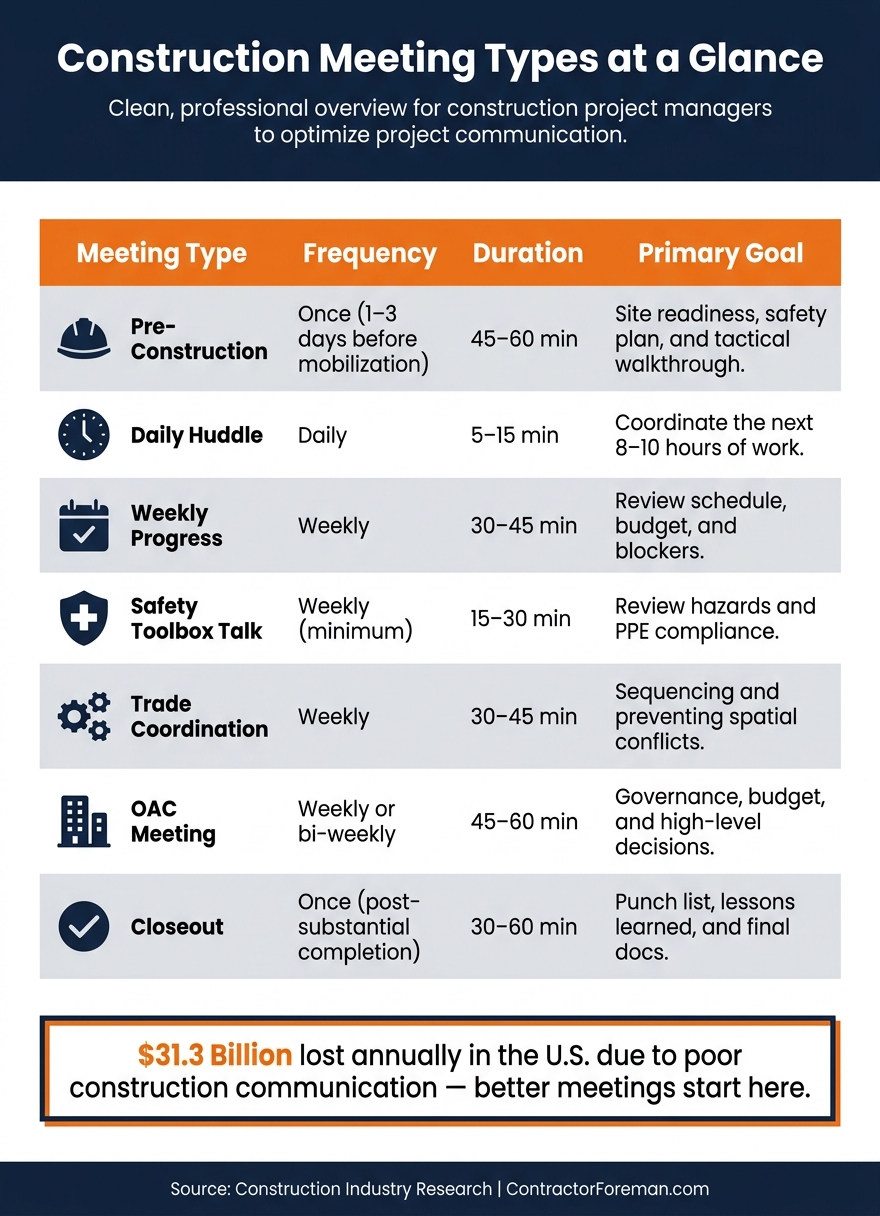
Construction projects evolve through distinct phases, and your meetings should reflect those stages. A pre-construction kickoff has an entirely different focus compared to a daily huddle, and a closeout session serves a different purpose than a weekly Owner-Architect-Contractor (OAC) review. Tailoring your meeting types ensures they’re aligned with the project’s current needs.
| Meeting Type | Frequency | Duration | Primary Goal |
|---|---|---|---|
| Pre-Construction | Once (1–3 days before mobilization) | 45–60 min | Site readiness, safety plan, and tactical walkthrough |
| Daily Huddle | Daily | 5–15 min | Coordinate the next 8–10 hours of work |
| Weekly Progress | Weekly | 30–45 min | Review schedule, budget, and blockers |
| Safety Toolbox Talk | Weekly (minimum) | 15–30 min | Review hazards and PPE compliance |
| Trade Coordination | Weekly | 30–45 min | Sequencing and preventing spatial conflicts |
| OAC Meeting | Weekly or bi-weekly | 45–60 min | Governance, budget, and high-level decisions |
| Closeout | Once (post-substantial completion) | 30–60 min | Punch list, lessons learned, and final docs |
Keeping meetings focused on their intended purpose avoids unnecessary distractions. For instance, daily huddles shouldn’t spiral into budget reviews, and trade coordination calls shouldn’t be sidetracked by decisions meant for owners.
Connect Meetings to Your Schedule and Milestones
To be effective, meeting schedules should tie directly to project milestones. For example, weekly progress meetings should reference the baseline schedule, highlighting any delays and identifying decisions needed before the next milestone.
A practical tool for this is the look-ahead schedule. By reviewing the next 2–3 weeks of planned work during coordination meetings, teams can identify potential issues like trade stacking, resource shortages, or spatial conflicts before they disrupt the critical path. This proactive approach shifts the focus from reacting to problems to preventing them.
As Nate Belcher, Assistant Project Manager at Hubbell Realty, explains:
“I think of the agenda as a living document – it’s a starting point to make sure we have a full detailed conversation. And we update it when we need to.”
This approach works especially well when paired with real-time project data, ensuring meetings are forward-looking and solution-oriented.
Use Contractor Foreman to Build Data-Driven Agendas
Showing up to a meeting without updated project data undermines decision-making. Contractor Foreman addresses this by serving as a single source of truth for your project. It consolidates daily logs, task statuses, RFIs, and schedule updates, ensuring your agenda reflects the current project status.
The platform’s integrated Gantt charts make it simple to identify dependencies and flag critical path items before meetings. Role-specific calendar filters allow project managers to focus on what’s relevant for each meeting type – keeping trade coordination calls free from owner-level budget discussions. Plus, Contractor Foreman syncs with popular calendar tools, ensuring all stakeholders operate from the same up-to-date information. This combination of live project visibility and streamlined scheduling results in agendas based on facts, not assumptions.
sbb-itb-5eea312
Build a Repeatable Meeting Process With Contractor Foreman
When it comes to effective project management, consistency is non-negotiable. A repeatable meeting process ensures clarity, accountability, and action across all phases of a project. Contractor Foreman simplifies this with built-in tools that eliminate extra administrative work while keeping meetings structured and efficient. Here’s how you can use its features to create, populate, and track meetings seamlessly.
Create and Customize Meeting Templates
Contractor Foreman’s Meeting Management module is your one-stop solution for scheduling meetings, organizing agendas, and capturing notes – all within the same platform. You can design reusable templates for various meeting types, like weekly progress reviews, trade coordination calls, or safety briefings. These templates ensure every session follows a structured and effective format.
For safety-focused meetings, the platform offers a dedicated Safety Meetings module under the People category. This tool handles compliance documentation, tracks attendees, and collects digital signatures. It keeps your safety records organized and ready for audits without adding extra steps. Additionally, the Forms & Checklists module allows teams to standardize templates for different meeting formats, ensuring no essential agenda item gets overlooked.
Populate Agendas With Live Project Data
A repeatable process thrives on accuracy, and Contractor Foreman’s Document Writer tool takes care of that by automatically populating meeting templates with live project data. Once you’ve set up an agenda template, the platform pulls in real-time information – such as contacts, schedules, punch lists, daily logs, RFIs, and submittals. This eliminates the need for manual updates or last-minute scrambling to gather details.
Why does this matter? Industry research shows that 35% of construction professionals spend over 14 hours per week on non-productive tasks like tracking down project information or resolving disputes. Automating agenda preparation reduces this inefficiency, freeing up time for more critical work.
Assign Action Items During the Meeting
Meetings only drive results when decisions translate into action. With Contractor Foreman’s To-Do’s module, meeting leads can assign tasks in real time, complete with clear ownership and deadlines. Field crews receive instant mobile notifications, ensuring immediate follow-through. For jobsite issues, tasks can be logged directly into the Punchlist module, complete with photos and geo-tags. This streamlined approach ensures that what’s discussed in the meeting gets executed on the ground, keeping projects on track and productive.
Run Short, Focused Meetings That Respect Jobsite Time
Meeting time on a jobsite is precious. The most effective construction teams treat it as a resource – planning, budgeting, and safeguarding it carefully. Keeping meetings short and to the point ensures that productivity on-site remains uninterrupted. Here are some strategies to help you maintain focus and efficiency during meetings.
Use a Time-Boxed Agenda to Stay on Schedule
Set a specific time limit for each agenda item before the meeting begins. This approach keeps discussions balanced and ensures no single topic takes over. Assign a dedicated timekeeper to monitor the clock and give the group a heads-up when time is running out.
If a topic starts to go off track or over time, jot it down in a “Parking Lot” with an assigned person responsible for following up later.
Sharing the agenda ahead of time also helps participants come prepared, speeding up discussions. When paired with top project tracking solutions, a well-structured agenda ensures decisions turn into actions without delay.
Start With Safety and Critical Path Items
Efficient time management begins with structuring meeting content wisely. Start with a brief safety update – commonly called a “safety moment” – to emphasize what’s most important. Keep this segment concise (about 5 to 10 minutes) and focus on specific examples like a recent near-miss or a high-risk task on the horizon. Rotating who leads the safety talk keeps it fresh and engaging.
After the safety moment, dive straight into critical path items that could impact progress. Avoid lengthy, open-ended updates by framing the discussion around three direct questions: What’s been completed? What’s next? What’s blocking progress? This focused approach quickly identifies roadblocks without dragging out the meeting.
Confirm Decisions and Action Items Before Closing
The final moments of a meeting matter just as much as the opening. Use this time to clearly summarize all decisions and action items. This recap ensures everyone leaves with clarity and avoids miscommunication.
Every action item should include an owner, a specific deliverable, and a deadline. A simple format to follow is: “[Name] to deliver [specific task] by [date].”
Teams that consistently wrap up meetings this way often see a sharp reduction in unfinished action items – sometimes by as much as 40% in just the first month of adopting this practice.
Use Contractor Foreman to Follow Through on Meeting Outcomes
A productive meeting loses its value if the decisions made are forgotten or ignored the next day. The real challenge lies in what happens after everyone leaves the jobsite. Contractor Foreman ensures that meeting notes turn into actionable, trackable tasks – eliminating the need for extra administrative work while keeping everyone accountable.
Send Meeting Summaries Automatically
Structured meetings are only as effective as their follow-up. Quick distribution of meeting notes is crucial. In fact, projects that share meeting minutes within 24 hours see 66% fewer disputed change orders compared to those without proper documentation. For a $500,000 project, this practice can save between $15,000 and $25,000 by avoiding disputes.
With the Document Writer module, you can create polished, reusable templates for meeting minutes. These can be exported as PDFs and shared with all stakeholders, including those who missed the meeting. The platform also captures digital attendee signatures and allows file or photo attachments to be added directly to the meeting record. This creates a seamless paper trail without adding extra steps.
“A decision made in a meeting without written documentation is a promise with no enforceability.” – Olivia Reyes, TaskTag
Track Action Items and Set Reminders
Assigning tasks during the meeting itself – not afterward – is what separates high-performing teams from the rest. Contractor Foreman’s To-Do’s module lets you assign tasks to team members on the spot. Team members get instant mobile notifications, and tasks are displayed in Kanban views for quick status updates. If decisions made during a meeting require schedule adjustments, the Task Notices feature sends updated assignments to all relevant contractors and employees with just one click.
To-Do’s and Work Orders also sync with Google Calendar and Outlook 365, so deadlines are visible in tools that your team already uses. This immediate tracking not only keeps everyone aligned but also sets the stage for meaningful performance reviews.
Review Past Meeting Outcomes to Improve Future Ones
Integration makes sending task notices and updates instantaneous, ensuring everyone on your team is always in the loop.
Starting each meeting with a brief review of the previous session’s action items is a simple yet powerful habit. It reinforces that commitments made during meetings are serious and must be followed through.
Contractor Foreman’s Daily Logs provide a permanent, searchable record of every task – who completed it and when – offering project managers a reliable reference for follow-ups. Over time, these logs reveal trends, such as recurring delays, repetitive bottlenecks, or tasks that consistently fall behind. By analyzing these patterns, teams can address inefficiencies and improve the effectiveness of future meetings.
Build a Team Culture Around Accountability and Clear Communication
For meetings to truly make an impact, teams need shared habits and mutual respect. When everyone understands the expectations and holds each other accountable, meetings become less of a chore and more of a tool to achieve meaningful results.
Set Ground Rules for How Meetings Are Run
Construction teams that treat meeting norms with the same seriousness as safety protocols see measurable improvements. By establishing consistent rules, teams can cut open action items by up to 40% in just one month.
Here’s how to make it work:
- Start on time: Punctuality respects everyone’s schedule.
- Assign a note-taker: This keeps the meeting leader focused on guiding the discussion.
- Stick to the “Name + Deliverable + Date” format: Every action item should clearly identify who’s responsible, what needs to be done, and by when. For example, “[Name] to provide [Deliverable] by [Date].“
- Limit updates to two minutes: This keeps the focus on blockers, not lengthy status reports.
- Use a “Parking Lot”: Off-topic issues can be noted for later, ensuring the agenda stays on track.
| Ground Rule | Why It Works |
|---|---|
| Start on time, every time | Respects everyone’s time |
| Two-Minute Rule for updates | Keeps focus on blockers rather than lengthy updates |
| “[Name] + [Deliverable] + [Date]” format | Eliminates vague ownership of tasks |
| Dedicated note-taker | Frees the meeting leader to steer the conversation |
| Parking Lot for off-topic items | Validates concerns without derailing the agenda |
These rules create a structure that promotes clear communication and accountability.
Create Space for Open and Honest Dialogue
Once the groundwork is set, the next step is fostering open communication. Teams thrive when members feel safe to speak up without fear of blame. This kind of psychological safety ensures problems are addressed early, saving time and money. Poor communication, after all, is a leading cause of construction disputes and cost overruns.
A helpful approach is to pre-brief involved parties on sensitive topics a day or two before the meeting. This gives them time to prepare thoughtful responses instead of reacting defensively. During the meeting, rely on data – like RFI logs or schedule updates from tools such as Contractor Foreman – to keep discussions objective and solutions-focused.
Another way to encourage participation is by rotating leadership roles for specific segments, like safety talks. This not only engages the team but also fosters a sense of shared responsibility.
Review and Improve Your Meeting Process Over Time
No meeting format is flawless from the beginning. The best teams regularly evaluate their process by asking, “Is this working?” Dedicate a few minutes every few weeks to gather feedback on what’s effective and what needs tweaking.
Use tools like Contractor Foreman’s Daily Logs and task history to identify patterns – delays, repetitive topics, or missed action items. This data-driven approach ensures meetings evolve to meet the project’s needs. Adjustments to templates, frequency, or roles can make a big difference over time.
The goal isn’t perfection but progress. By continuously refining your meeting culture, you’ll improve communication and set the stage for long-term project success.
Conclusion: Better Meetings Lead to Better Projects
A well-structured approach can turn meetings from frustrating interruptions into powerful tools that drive projects forward.
By tying meetings to key milestones, using standardized agendas, clarifying responsibilities, and tracking follow-ups, teams can see tangible improvements – fewer disputes, less rework, and projects that stay on track. These outcomes highlight the value of using integrated tools to streamline efforts and ensure accountability.
With features like data-driven agendas, real-time task assignments, and automated follow-ups, Contractor Foreman helps reduce manual work and keeps decisions progressing smoothly.
FAQs
Which meeting should we run for each project phase?
- Pre-construction: Start with a preconstruction meeting to review the project’s scope, timeline, assigned roles, communication methods, and how decisions will be made.
- Project start: Host a kickoff meeting to ensure everyone is aligned on expectations and individual responsibilities.
- Active construction: Plan weekly contractor and coordination meetings to address trade-specific issues. Include brief progress meetings to discuss updates, resolve blockers, and prepare for upcoming tasks. If necessary, schedule additional contingency or OAC meetings to tackle risks or make major decisions.
What data should be on a construction meeting agenda?
A construction meeting agenda is a tool to ensure everyone is on the same page regarding project goals and responsibilities. It should outline clear topics, set timelines, and assign ownership for each agenda item. Typical items to include are:
- Safety updates: Address any safety concerns or updates to protocols.
- Schedule performance: Review progress and discuss any delays or adjustments.
- Budget and change orders: Monitor financial aspects and evaluate any changes to the project scope.
- RFI and submittal logs: Track requests for information and submitted documents.
- Quality control results: Share findings from recent inspections or tests.
- Open action items: Follow up on tasks that need resolution.
For daily huddles or pre-construction meetings, you might also want to include topics like site readiness, specific safety hazards for the day, and immediate coordination needs. Keeping the agenda focused and actionable helps streamline discussions and ensures productive meetings.
How do we ensure meeting action items get done?
Detailed meeting minutes are your secret weapon for keeping tasks on track. Use them to clearly document who is responsible for each task, what needs to be done, and when it’s due. During the meeting, assign responsibilities right away to avoid any confusion later.
After the meeting, share the minutes promptly so everyone is on the same page. In follow-up meetings, revisit these action items to track progress and address any roadblocks. Regularly reviewing outstanding tasks and holding team members accountable helps keep the project moving forward without unnecessary delays.
By following these steps, you’ll create clarity, ensure accountability, and keep tasks on schedule – leading to better outcomes for your projects.







