
Sharing one file? Easy peasy.
Ten files? Totally manageable.
125 files from six job sites? Good luck finding the right file before 2032!
And by the time you actually find it, you’ve accidentally emailed the wrong version, argued with three subcontractors about whose plan is correct, and aged about half your hair to white.
The solution is simple: Cloud sharing.
Cloud sharing transforms construction projects by solving common issues like outdated blueprints, poor communication, and scattered documents. It ensures everyone works with the latest plans, communication flows smoothly, and costly rework becomes far less likely.
Here’s how it helps:
- Real-Time Updates: Teams instantly access updated blueprints, contracts, and permits on mobile devices, even offline.
- Version Control: Automatically tracks revisions, preventing mistakes caused by outdated plans.
- Improved Communication: Alerts, file sharing, and annotations keep everyone aligned, saving time and avoiding confusion.
- Integrated Workflows: Links documents to budgets, schedules, and quality control through integrated workflows, ensuring accurate data across teams.
- Secure Storage: Protects project files with encryption, role-based access, and disaster recovery.
With cloud tools, construction teams save time, reduce errors, and improve project outcomes.
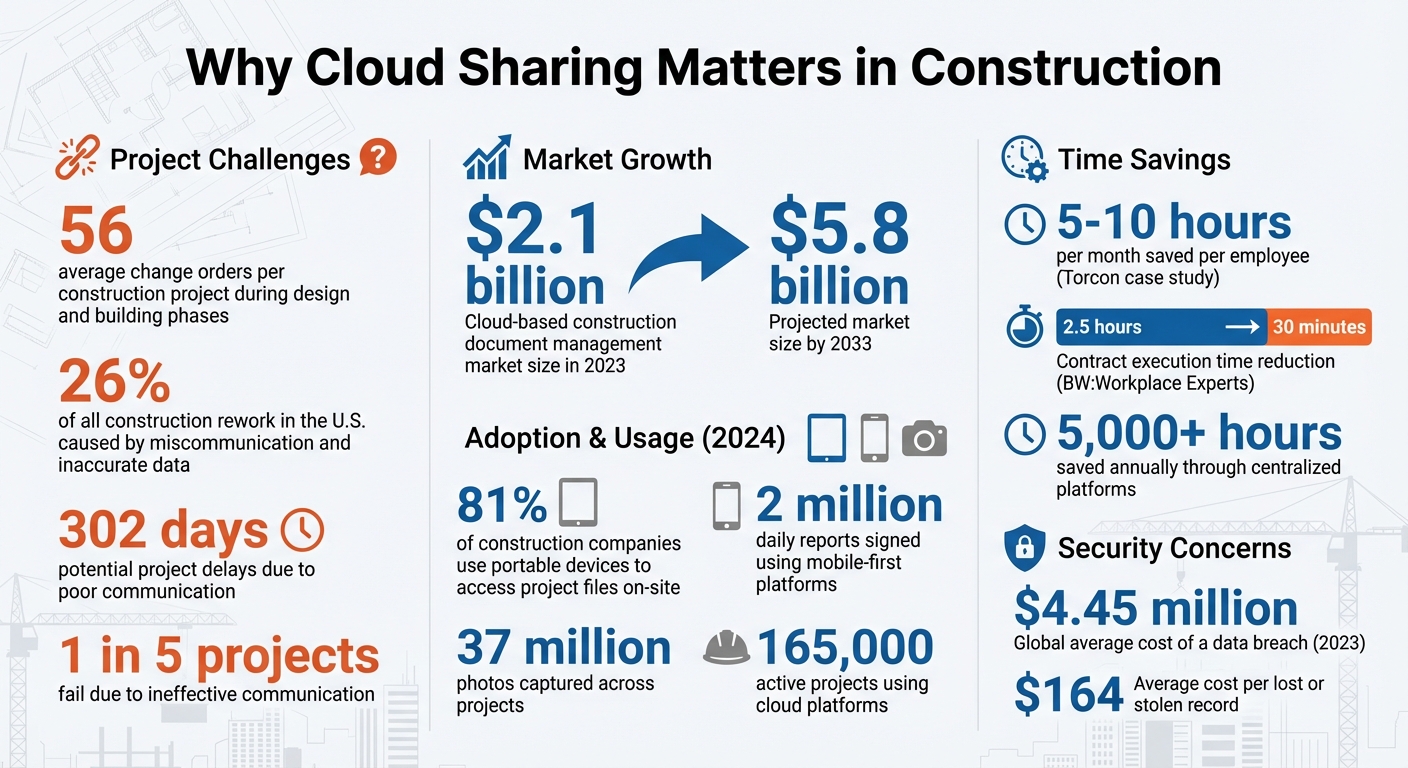
Cloud Sharing Impact on Construction Projects: Key Statistics
Centralized Document Storage and Access
Keeping all project documents in a single cloud-based location saves teams a ton of time and ensures everyone is working off the latest information. A centralized repository serves as the single source of truth, making sure contractors, subcontractors, and owners are always in sync with the same data.
This is especially important in construction, where the average project generates around 56 change orders during the design and building phases. With a centralized system, updates are instantly visible to every team member, whether they’re on-site or working remotely.
Real-Time Access to Project Documents
Field crews no longer need to make unnecessary trips to the office just to grab updated plans. Cloud storage makes it possible to access blueprints, contracts, and permits directly on smartphones or tablets – whether you’re up on scaffolding or in a job-site trailer. Some platforms even offer offline sync, so workers can view documents without internet access and have files automatically updated once they’re back online.
This kind of mobile access eliminates costly delays. Instead of waiting hours or even days for an email, a foreman can search for the exact file they need by type, version, or even specific text within a PDF. Security settings ensure that sensitive documents like contracts or financial data are only accessible to authorized personnel, while the rest of the team can instantly pull up critical drawings and specifications.
But instant access isn’t enough – keeping documents accurate and up-to-date is just as crucial. That’s where automated version control comes into play.
Automatic Version Control
One of the biggest risks in construction is working from outdated plans. Automatic version control solves this by tracking every revision and archiving older documents. For example, when an architect uploads a new drawing, the system automatically saves the previous version, notifies the team about the update, and ensures everyone is working from the latest plans. This reduces the chance of mistakes, like a demolition crew tearing down the wrong wall because of an outdated change order.
“A large number of rework requests are generated due to a lack of version control on drawings and plans. When the workers assembling the structure are working from an old set of plans that don’t reflect the latest change orders, rework is practically inevitable.” – Autodesk
Every action – whether it’s viewing, editing, or sharing a file – is logged automatically. This audit trail is a huge asset for regulatory compliance and resolving disputes. It gives project managers a clear record of how documents have evolved over time. By keeping one accurate, up-to-date repository, teams can confidently move forward, knowing everyone is literally on the same page.
sbb-itb-5eea312
Better Team Communication and Coordination
When teams have a unified document repository, effective communication tools take collaboration to the next level. Cloud sharing has reshaped how office staff, field crews, and external stakeholders stay connected throughout a project. Instead of waiting for emails or chasing updates, teams can share information instantly, ensuring everyone stays on the same page – regardless of their location. By consolidating communication into a single platform, teams avoid the confusion and inefficiency of juggling multiple channels where vital details often get overlooked.
Instant File Sharing and Alerts
Cloud platforms make it easy to share updated drawings, RFIs, and safety notices in real time. Built-in alerts notify the right individuals the moment a document is uploaded, a markup is added, or an issue arises. This eliminates the delays of relying on physical document exchanges or scheduling in-person meetings.
Field crews, for instance, can access the latest plans directly on their mobile devices, cutting down on costly on-site delays. Take Torcon, a construction management firm operating in New Jersey and Philadelphia: by adopting a modern cloud-based file-sharing system, they improved stakeholder collaboration and saved each employee between 5 and 10 hours a month.
Mobile accessibility also allows field teams to upload reports, photos, and observations in real time. In 2024, construction crews using a leading mobile-first platform signed two million daily reports and captured 37 million photos across around 165,000 projects. This seamless flow of information ensures that when conflicts or safety issues emerge, the right person is alerted immediately, enabling faster resolutions.
Beyond quick file sharing, these tools also offer real-time feedback capabilities, making collaboration even more dynamic.
Comments and Annotations on Shared Documents
Unlike static PDFs or paper plans, cloud-based tools allow multiple stakeholders – architects, engineers, contractors – to review, mark up, and annotate blueprints at the same time. This visual feedback eliminates much of the confusion that often comes with text-only communication.
Annotations are particularly valuable during design reviews, helping teams spot and address critical engineering challenges before they escalate into costly rework. For example, if a foreman notices a discrepancy between the plan and the actual site conditions, they can attach a photo and add a markup directly to the drawing. This feedback syncs instantly with the office, enabling project managers or architects to provide clarifications – all within the same document.
“It all boils down to workflow: the ability to review drawings quickly and easily, have the markups, have all of your RFIs and submittals, everything linked in.” – Kaitlin Frank, Superintendent, Dome Construction
Centralizing feedback on shared documents also prevents information from being scattered across email threads. For instance, BW:Workplace Experts, a fit-out and refurbishment company, used a centralized platform to streamline workflows. This reduced the administrative time for contract execution from 2.5 hours to just 30 minutes, saving over 5,000 hours annually. Keeping all feedback in one place ensures that everyone – from general contractors to subcontractors – works from the same clear instructions, minimizing miscommunication and delays.
Integrated Project Management Workflows
Cloud sharing becomes even more powerful when paired with project management tools. Modern platforms go beyond treating documents as standalone files – they link them directly to schedules, budgets, and quality control systems. With centralized storage and real-time updates, these integrations ensure that every team member, from field crews to executives, works with the most current project data.
For instance, when cloud platforms connect with cost and schedule tools, a simple markup on a drawing can instantly generate a change-order line item. Automated connectors can also sync field costs directly into accounting systems, streamlining month-end processes and reducing manual data entry errors.
This seamless integration boosts project efficiency. The market for cloud-based construction document management is expected to grow from $2.1 billion in 2023 to $5.8 billion by 2033. Contractors are moving toward comprehensive Common Data Environments (CDE) that manage workflows, metadata, and integrations with tools like BIM, scheduling, and cost management. These advancements are transforming daily operations and improving overall efficiency.
Live Updates to Schedules and Budgets
Real-time updates ensure teams stay aligned, helping to avoid costly overruns. When field teams log progress, snap photos, or issue change orders using mobile apps, those updates sync to the office immediately – or as soon as connectivity is restored. This instant communication allows project managers to identify and address budget concerns before they escalate.
Platforms like Autodesk’s Bridge automate updates across shared folders and sheets, keeping everyone informed without the need for email notifications or manual uploads. For example, when a general contractor revises a budget or adjusts a schedule, subcontractors see those changes immediately. This eliminates delays and ensures all stakeholders are working with the latest financial and scheduling data.
Field crews can also log daily progress, track labor hours, and document material usage on-site. These updates feed directly into budget tracking systems, providing immediate cost comparisons. Considering that miscommunication and inaccurate data cause up to 26% of all construction rework in the U.S., this level of accuracy has a major impact on project outcomes.
“The difference between a project that runs smoothly and one that bleeds profit often comes down to how effectively information moves across teams.” – Technology Counter Editorial Staff
Role-Based Access Controls (RBAC) ensure sensitive data remains secure. For example, a superintendent might view schedule updates and material costs for their area, while financial details for the entire project remain accessible only to the project manager and accounting team. This real-time data sharing supports effective collaboration while maintaining confidentiality.
Progress Tracking Across Multiple Teams
Managing progress across multiple teams becomes much easier when everyone works from a unified platform. Portfolio dashboards provide key performance indicators (KPIs) for multiple projects, allowing managers to quickly identify and address issues. For example, a red Cost Performance Index (CPI) might lead a manager to review specific invoices or timelines to pinpoint delays.
Standardized folders and reporting protocols ensure consistency when different teams – such as architecture, structural, and MEP – share data. If an electrician spots a plumbing conflict, automated alerts and clear reporting roles ensure the issue is addressed promptly, preventing small problems from turning into major delays.
The consequences of poor communication are significant: construction projects can be delayed by as much as 302 days, and one in five projects fail due to ineffective communication. Cloud-based progress tracking improves visibility, showing what each team has completed, what’s in progress, and where bottlenecks might form.
“Unless everyone is working off the same information, how can you confidently say things will be done correctly?” – Trimble
Teams can also share closed RFIs across projects, using past solutions to tackle similar challenges in future work. This cross-project knowledge helps teams avoid repeating mistakes and speeds up problem-solving.
Today, 81% of construction companies use portable devices to access project files on-site. Field managers can pull up reports during site walks, compare progress against schedules, and flag discrepancies on the spot. Even in remote locations without connectivity, offline sync capabilities allow crews to continue logging updates, ensuring no data is lost.
Contractor Foreman’s Cloud Features
Contractor Foreman operates on Amazon Web Services (AWS), the same trusted infrastructure that powers Amazon.com. This setup not only consolidates your project files but also ensures data remains protected throughout your workflows. The platform offers unlimited storage for all projects, with pricing starting at just $49 per month.
Security is a top priority. Contractor Foreman uses strong encryption to block unauthorized access and provides role-based access controls so you can decide who sees what. For example, you might grant a superintendent access to schedules and material costs while keeping overall financial details visible only to your project manager and accounting team. Plus, the client portal allows you to share specific files with clients in just a few clicks, all while keeping sensitive internal documents private.
Field crews can use the mobile app offline, accessing plans and forms without needing a signal. Updates automatically sync when connectivity returns. You can also edit Word and Excel files directly within the platform, eliminating the risks of downloading and re-uploading files. Integrations with tools like QuickBooks, Zapier, Google Calendar, and Outlook 365 keep your workflows connected and efficient. These features make collaboration easier while providing a secure and scalable storage solution.
Benefits of Secure, Scalable Storage
Secure cloud storage ensures your growing project data stays protected and easy to access. Consider this: a typical $500,000 residential project generates 200–300 documents, including permits, contracts, and construction RFIs. Paper systems simply can’t keep up. As projects increase in size and overlap, physical documentation often leads to lost files, administrative headaches, and costly rework. With the global average cost of a data breach hitting $4.45 million in 2023 – and each lost or stolen record costing $164 on average – digital storage isn’t just convenient; it’s essential.
Contractor Foreman provides automated backups and disaster recovery to protect your data from hardware failures or physical damage. Its audit trails make regulatory audits and dispute resolution easier by tracking document history. And because all files are stored in one searchable location, you avoid the risks of scattered folders and unsecured email attachments.
“A secure digital system gives you version history, permissions control, and built-in backup, so one mistake doesn’t erase weeks of work.” – Contractor Foreman
Conclusion
Cloud sharing delivers more than just convenience – it transforms how teams collaborate by offering centralized storage, real-time updates, and seamless workflows. It ensures that everyone, from field crews to architects, operates from a single, up-to-date source of truth. This eliminates outdated documents, scattered communication, and the inefficiencies that often lead to delays and rework.
Consider this: poor communication can lead to up to 26% of rework and delays stretching as long as 302 days. These aren’t just frustrating setbacks – they can significantly impact your project’s profitability. Cloud platforms tackle these challenges head-on by streamlining version control, centralizing documentation, and keeping teams aligned.
Industry experts emphasize this point:
“The difference between a project that runs smoothly and one that bleeds profit often comes down to how effectively information moves across teams.” – Technology Counter
Contractor Foreman combines these benefits into a single, user-friendly solution. With features like unlimited storage, mobile accessibility, offline functionality, and integrations with tools like QuickBooks, it’s tailored for contractors who need to manage their data efficiently without unnecessary complexity. Built on AWS infrastructure, it ensures your files stay secure while your team stays connected and productive.
Choosing cloud-based collaboration isn’t just about adopting new technology – it’s about safeguarding your bottom line, meeting deadlines, and delivering quality results. By automating version control and centralizing project data, cloud sharing empowers every team member to contribute to project success. When communication flows smoothly, so do your projects.
FAQs
How do we prevent crews from using outdated plans?
To ensure crews always work with the most up-to-date plans, establish a centralized document management system with clear version control. Implement standardized naming conventions that include version numbers and dates, making it easy to identify the latest files. Opt for cloud-based platforms to provide real-time access to updated documents, ensuring everyone stays on the same page.
Additionally, set up formal workflows and provide team training to reinforce the importance of accuracy and consistency. Conduct regular audits and monitoring to catch any discrepancies, helping to maintain current information and minimize errors on the job site.
What happens if the jobsite has no internet?
If the job site doesn’t have internet access, many cloud-sharing tools come with offline modes. These features let workers record data on-site and sync it once they’re back online. This way, construction can move forward without unnecessary interruptions.
How can we control access to sensitive files?
Managing access to sensitive files is made easier with cloud-based document management systems. By setting permissions and creating approval workflows, you can ensure that only authorized team members have the ability to view or edit specific files. This approach helps maintain security and control over critical documents, reducing the risk of unauthorized access.







