
“The customer is always right” —a fine rule for coffee shops and gift stores, a dangerous one for construction.
“Why didn’t you remind me again?” or “Wait—weren’t the premium fixtures included?” (when you clearly said they weren’t) isn’t just a pain to deal with… it leads to change order disputes, delayed timelines, strained relationships, and ultimately— LOST REVENUE!
Here’s the thing, however: it’s rarely bad intent on your client’s part—it’s the lack of organized, error-proof systems.
Important documents get buried in email threads, approvals happen over the phone, and by the time a dispute surfaces, nobody can find the proof they need.
The outcome? You end up absorbing costs that were never yours to carry — all because the paper trail didn’t exist.
A centralized client portal changes that.
Client portals make document sharing easier by streamlining all project-related files in one secure, accessible location. So instead of juggling emails, texts, and paper documents, contractors and clients can manage everything from blueprints to invoices in a single platform. This approach reduces wasted time, improves communication, and helps projects stay on schedule and within budget.
Key features include real-time updates, file organization, version control, secure sharing, and mobile access. These tools not only streamline workflows but also enhance clarity and collaboration for everyone involved.
Key Benefits of Client Portals:
- Centralized storage for contracts, plans, permits, and more.
- Real-time syncing ensures everyone works with the latest updates.
- Secure sharing with role-based permissions protects sensitive data.
- Instant notifications keep teams informed and responsive.
- Mobile access allows on-site teams to retrieve and update documents.
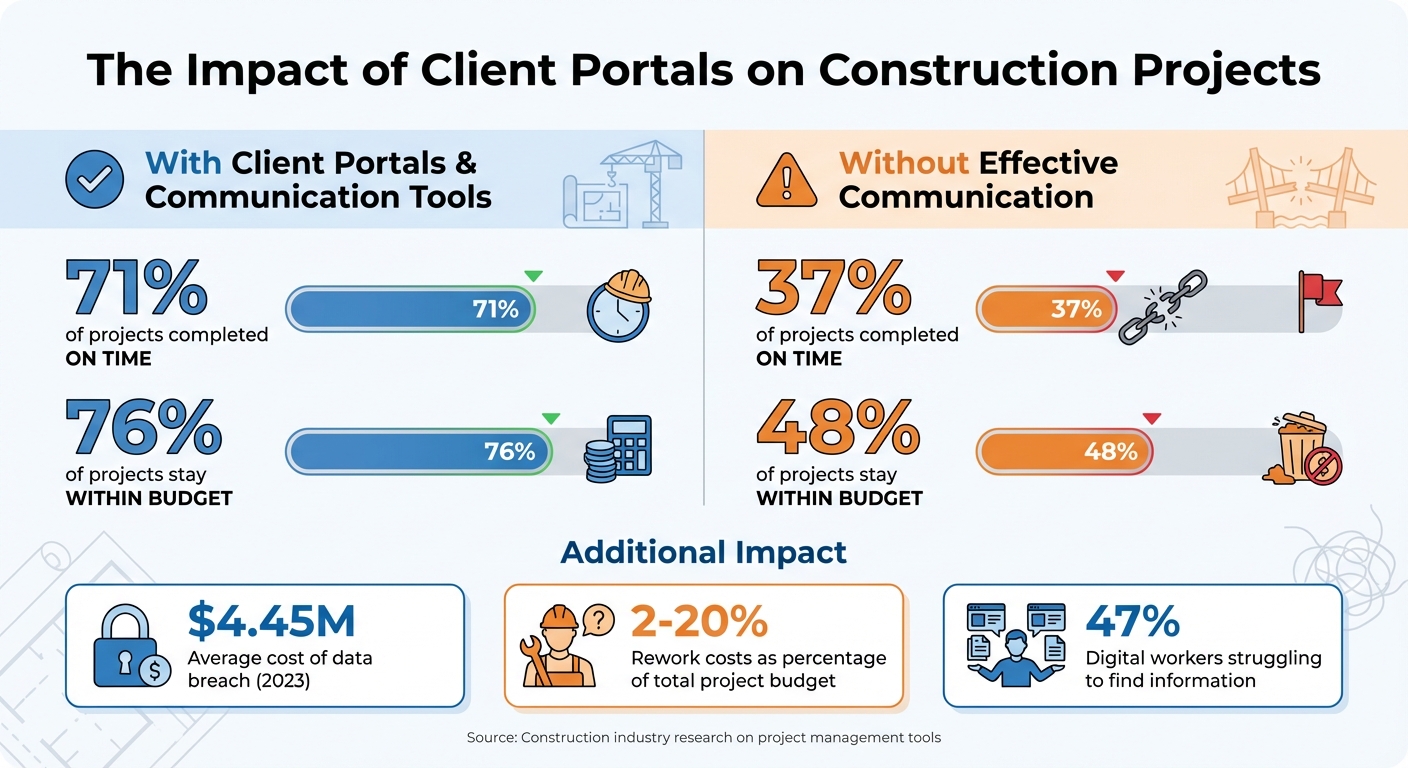
Impact of Client Portals on Construction Project Success Rates
What Client Portals Are and How They Work
A client portal is a secure, centralized platform that allows contractors and clients to access all project-related information in one place.
One of the standout features of a client portal is real-time syncing across all devices. Whether updates are made in the office or on-site, they are instantly reflected for all parties. This ensures everyone is working with the most current information, avoiding outdated versions and reducing unnecessary email exchanges. Contractors can also set permissions to control what clients see – for example, sharing change orders while keeping cost estimates private.
Many client portals come equipped with integrated communication tools. For instance, features like “Client Chat” link conversations directly to relevant project documents, keeping everything organized and easy to find. Clients can also approve estimates or change orders electronically, often from their mobile devices. This not only speeds up the approval process but also creates a clear audit trail for future reference.
“By using a construction client portal as a centralized hub for all project information, you can create clarity between all team members, contractors, and clients.” – Adam, Foyer
Main Benefits of Using Client Portals for Documents
These features bring tangible benefits to the jobsite.
With a single source of up-to-date information, clients can instantly access the latest plans on any device. This reduces confusion over changes or approvals and fosters transparency, keeping clients informed and building trust throughout the project.
Client portals also address common administrative challenges. Instead of chasing down signatures or resending documents, contractors can secure faster approvals and focus more on actual construction.
The impact is clear: projects that use effective communication tools, like management software, are completed on time 71% of the time and stay within budget 76% of the time. In contrast, projects with poor communication meet these benchmarks only 37% and 48% of the time, respectively.
“A centralized portal somehow helps the builder’s office crew to respond… reducing back-and-forth calls and messages means focusing more on building.” – Anna Ghazaryan, Author, Buildern
Another major advantage is financial clarity.
Client portals provide a clear view of contract amounts, billed totals, and outstanding balances, which helps reduce billing disputes and reassures clients. Some portals even offer secure online payment options, such as credit card or ACH transfers, making it more convenient for clients to settle invoices without relying on checks.
sbb-itb-5eea312
Key Features That Make Client Portals Effective
Client portals take file storage to the next level, turning it into a management powerhouse tailored to the complexities of construction projects. They solve everyday headaches – like hunting down the latest blueprints or ensuring clients only see approved documents – while keeping sensitive internal data, such as bid calculations or rough estimates, under wraps.
1. Central Storage and File Organization
A client portal serves as a central hub for all project-related materials.
Forget combing through endless email threads, scattered texts, or physical folders – everything from RFIs and submittals to contracts, permits, and photos is securely stored in one cloud-based location. This makes it easy for authorized users – whether they’re in the office, on-site, or working remotely – to find what they need without delay.
Advanced portals go a step further with file tagging and auto-generated folder structures, simplifying organization and retrieval.
For contractors managing multiple projects, a single login provides seamless access to all project files. Field workers can check plans, add comments, and pull up documents directly from their mobile devices. On top of that, in-platform editing allows users to annotate PDFs or update Office files online, ensuring everyone is always working with the latest version. This streamlined system also lays the groundwork for effective version control.
2. Version Control and Change Tracking
Once documents are stored centrally, keeping track of revisions becomes a priority.
Version control removes any confusion about which file is the most up-to-date. Each update – whether it’s a new schedule, blueprint, or document – is logged with a timestamp and user ID, creating a clear audit trail. This is invaluable for resolving discrepancies or tracing approvals. Real-time markup and redline tools let stakeholders annotate documents directly, so design changes or punchlist updates are instantly visible. This level of tracking is crucial, especially when rework can cost between 2% and 20% of a project’s total budget.
For RFIs and submittals, responses are integrated directly into the original record, maintaining a clear chronological history. Interactive charts automatically reflect task updates, and role-based permissions ensure that only authorized individuals can modify critical files.
3. Secure Sharing and Permission Settings
With organized storage and version control in place, secure sharing ensures that the right documents reach the right people. Strong security features protect sensitive information while enabling collaboration.
Role-based access control allows you to tailor what each stakeholder can see – clients might access invoices and change orders, while internal teams keep bid calculations private. To safeguard data, portals use AES 256-bit encryption (the same standard trusted by government agencies) for both storage and transmission. Many platforms also rely on ISO-27001-certified data centers to defend against physical and cyber threats. Considering the global average cost of a data breach hit $4.45 million in 2023 – and each lost or stolen construction record averages $164 – these measures offer significant financial protection.
Additional features like read-only access add another layer of security, allowing clients to view master schedules or plans without risking accidental changes. Some systems even let you set automatic expiration dates for shared files, ensuring sensitive data becomes inaccessible when it’s no longer needed.
“Role-based access… ensures that only authorized individuals can access specific information, reducing the risk of accidental or malicious data exposure.” – TitanFile
4. Instant Notifications and Mobile Access
Real-time notifications and mobile access keep everyone in the loop and enable quick decisions, even from the field. Instead of relying on emails that might get buried, stakeholders receive instant alerts through the portal or app – speeding up decisions like approving change orders. Field workers can access updated plans during inspections, manage change orders on-site, and upload progress photos without needing to return to the office. This kind of rapid communication is crucial: effective tools help 71% of projects finish on time and 76% stay within budget, compared to just 37% and 48% for projects bogged down by poor communication.
How to Set Up Document Sharing in Your Client Portal
Setting up your client portal effectively can simplify collaboration, reduce confusion, and keep your projects running smoothly. This guide will help you configure your portal for optimal organization and secure sharing.
Creating Folders and File Naming Systems
Start by building a structured folder hierarchy. A three-tier system works well:
- Top-Level Folder: A master company folder.
- Second Level: Individual project folders.
- Third Level: Subfolders for categories like contracts, plans, and invoices.
To save time, create a “PROJECT TEMPLATE” folder with all your standard subfolders. Duplicate it for new projects. Use a numbering system for subfolders (e.g., 01-Contracts, 02-Plans, 03-Invoices) to maintain a consistent order across devices.
When naming files, follow this format:
YYYY-MM-DD_ProjectCode_DocumentType_Description_Version.
For example:
2026-03-15_Smith-Remodel_Blueprint_Kitchen-Layout_REV-B.pdf.
This format ensures files are sorted chronologically and clearly labeled. Avoid vague names like “document1.docx”, and stick to underscores or hyphens to separate elements. Keep file names under 255 characters.
Organize your workspace further by separating “Active Projects” and “Completed Projects [Year]” into distinct folders. For field teams working in areas with limited connectivity, mark critical documents (permits, plans) for offline access in the portal’s mobile app.
Setting Up User Permissions and Access
Use role-based access control (RBAC) to assign permissions based on user roles, such as Client, Subcontractor, Designer, or Internal Team. Instead of granting full access to the portal, set folder-specific permissions. For instance:
- Place finalized invoices and approved plans in a “Client Documents” folder.
- Keep internal estimates and draft calculations in restricted areas.
Define access levels carefully:
- List: View file names.
- Read: Download files.
- Create: Upload new files.
- Update: Replace files.
- Delete: Remove files.
Clients typically need List and Read permissions to view approved documents. Subcontractors might also require Create permissions for uploading materials or drawings. For sensitive documents like master blueprints, apply view-only restrictions to prevent unauthorized downloads. You can also set expiration dates on shared links or folders to automatically revoke access once a project phase ends.
Review portal permissions quarterly to ensure only active clients and team members have access. Enable multi-factor authentication (MFA) for admin accounts and encourage clients to use it for added security. Once permissions are set, automate notifications and workflows to streamline document sharing.
Automating Document Updates and Sharing
Set up notifications to alert clients and team members when new documents are uploaded, files are updated, or comments are added. This reduces manual follow-ups and ensures everyone stays informed about changes like revised drawings or change orders.
Automate workflows for faster approvals. For example, when a subcontractor uploads a material submittal, the system can notify the project manager and architect for review. This speeds up decision-making and keeps the project on track.
For financial clarity, enable real-time syncing with accounting software for budget summaries, payment statuses, and cost updates. Clients can see changes immediately when payments are processed or allowances are adjusted. Some portals also offer document generation features, such as mail merge, to create contracts or warranties with pre-filled details.
Finally, ensure your portal includes automatic backups to protect against data loss from hardware failures. Many cloud-based systems handle backups without manual effort. Simplify client onboarding with magic links or passwordless access, encouraging more active portal use and reducing reliance on email attachments.
Types of Documents Commonly Shared Through Client Portals
Construction projects generate a wide range of documents, and client portals play a vital role in organizing and distributing them. These platforms not only simplify access but also enhance transparency while safeguarding sensitive information. Here’s a closer look at the primary document types managed through client portals.
Blueprints, Plans, and Project Schedules
With centralized storage and version control, design documents like blueprints and specifications are always up-to-date and readily available. Client portals ensure that stakeholders can access the latest versions instantly, reducing the risk of errors or miscommunications caused by outdated files or email mishaps.
Project schedules also gain clarity through real-time updates. Tools like Gantt charts visually represent timelines, showing how tasks interconnect and whether the project is on track. This clarity reduces the need for status inquiries and helps homeowners plan around key construction milestones.
Next, financial documentation benefits from similar levels of organization and security.
Invoices, Budgets, and Payment Records
Financial transparency and security are crucial, and client portals deliver on both fronts. Automated summaries display critical financial details, such as the original contract amount, total billed to date, and remaining balance, keeping all parties aligned.
The financial summary provides an easy to understand overview that helps your client see the original contract amount, billed amount, and any balance due. This keeps everybody on same page all the way through to completion.
Client portals also streamline change orders and estimates, creating a clear audit trail for every financial decision. Many platforms integrate with secure payment gateways, enabling ACH transfers or credit card payments. This not only accelerates cash flow but also provides immediate payment confirmations, a significant improvement over traditional paper checks. Notably, projects that use effective communication tools like client portals are 76% more likely to stay within budget.
Regulatory documentation also benefits from centralized access and enhanced security.
Permits, Compliance Files, and Change Orders
Client portals act as a secure hub for critical regulatory documents, including building permits, insurance certificates, signed contracts, and inspection reports. This ensures that essential files are never lost in a sea of emails. For example, if an inspector requests proof of insurance or a permit number, the required document can be retrieved in seconds.
Change orders also become easier to manage. Clients can review and approve RFIs (Requests for Information) and material submittals directly through the portal. These systems often track allowances automatically – if a client selects upgraded countertops, for instance, the cost difference is immediately reflected in the budget. Considering that rework can account for 2% to 20% of a project’s total cost, keeping clear and accessible documentation helps avoid costly mistakes.
Best Practices for Document Sharing
Once your client portal is up and running, keeping it efficient and secure is key. Beyond the initial setup, practices like regular file reviews and clear retention policies can make document sharing smoother and more reliable. By following these steps, contractors can avoid common issues and get the most out of their document-sharing tools.
Regular File Reviews and Cleanup
An overcrowded portal can make finding documents a hassle. When outdated or irrelevant files pile up, productivity takes a hit. In fact, nearly half (47%) of digital workers report difficulty in locating the information they need.
To keep things organized, schedule cleanups at logical points – like after major project approvals, at the end of each month, or when a project phase wraps up. Use standardized file naming conventions that include the project name, date, and document type. This makes it easy for anyone to identify files at a glance.
Features like pinning can also help by keeping essential documents, such as signed contracts or active permits, front and center. When files are updated, archive older versions instead of deleting them. You might need that history down the road.
“It’s very clear from a client perspective as well. Now they don’t have to question whether they uploaded something or not.” – Jessie Kay, Controller, Holt McNally & Associates, Inc.
By combining regular reviews with a structured setup, your portal stays efficient and user-friendly.
Document Retention Rules and Backup Systems
Construction projects generate a lot of legal and financial documents, many of which need to be kept for years, if not decades. Implement retention policies that outline how long each type of document should be stored. For example, contracts and permits generally require longer retention than daily progress photos. With features like unlimited storage, you can easily keep all necessary records and use bulk download tools to create offline backups.
Redundant backups are essential. Keep copies both in the cloud and offline to protect against data loss. This precaution ensures that even years later, documents are accessible if needed for warranty claims or legal disputes. It’s worth noting that the global average cost of a data breach hit $4.45 million in 2023, with each lost or stolen record costing construction firms an average of $164.
Meeting Industry Compliance Requirements
A strong client portal should also help you meet industry regulations, from OSHA requirements to lien waivers and insurance certificates. Use role-based access to limit sensitive documents to the right people. Regularly review and update user permissions to remove access for subcontractors or team members who are no longer involved in the project.
Secure cloud hosting and encryption are critical for preventing unauthorized access. Additionally, maintaining a centralized audit trail that tracks who viewed, edited, or approved documents is invaluable during disputes. Digital approvals for key items like change orders or selections create a legally binding, easily retrievable record – something far more efficient than sifting through paper files. By consolidating essential regulatory documents such as permits, contracts, and inspection reports in one location, you’ll be prepared for audits without the chaos of searching through file cabinets.
Solutions like Contractor Foreman (https://contractorforeman.com) are built with these best practices in mind. They offer features like unlimited storage, secure backup options, and tools for compliance management, making it easier to streamline your document-sharing processes and keep projects running smoothly.
Conclusion
Client portals simplify document sharing by centralizing essential files. By keeping plans, contracts, permits, and receipts in one place, contractors save time that would otherwise be spent digging through email threads or searching file cabinets. In fact, projects that leverage effective communication tools are 71% more likely to finish on time and 76% more likely to stay within budget.
Beyond organization, security and transparent access are key benefits. Features like encryption, automated backups, and detailed permission settings safeguard sensitive data, while clients gain valuable visibility into schedules, budgets, and photo galleries. This transparency fosters trust and eases concerns – especially when 80% of employees cite stress from poor communication as a major issue. Plus, when clients can review and approve change orders digitally, projects move along much faster.
Getting started with a digital system is easier than ever. Begin by introducing it to active projects, establish clear folder structures, and automate repetitive tasks. With mobile access, both field crews and clients can stay updated no matter where they are. These steps directly address communication challenges in construction, ensuring smoother workflows and better project alignment.
Platforms like Contractor Foreman (https://contractorforeman.com) bring these tools together in a single solution, with pricing starting at just $49/month. From unlimited storage to secure client portals and mobile-friendly features, it streamlines document management and communication. By cutting down on administrative tasks and improving collaboration, contractors can focus on delivering quality projects on time and within budget.
FAQs
How do client portals reduce document mistakes on a jobsite?
Client portals simplify document management on jobsites by keeping all files in one central location. This setup ensures that everyone is working with the most current documents, reducing the risk of version conflicts, miscommunication, or mistakes caused by outdated information. By organizing files efficiently, these portals help maintain accuracy and ensure projects stay on track.
What permissions should clients vs. subcontractors get?
When managing access to project information, it’s crucial to tailor permissions based on the roles involved. Clients should have view-only access to essential materials like project summaries, key documents, and financial details. This ensures transparency without compromising control over sensitive data.
On the other hand, subcontractors need more flexibility. They should be able to upload files, edit content, and collaborate on project-specific tasks and documents. This level of access helps them contribute effectively without unnecessary restrictions.
By assigning permissions according to these roles, you can strike the right balance between smooth collaboration and maintaining data security.
How do you handle offline access for field crews?
The provided sources do not outline methods for enabling offline access within client portals. As a result, specific steps for offline access cannot be verified. To obtain precise guidance, refer to the documentation or support materials for the client portal or software relevant to your workflow.







