
“Hmmm. These numbers don’t look right.”
The accountant turns her monitor toward the project manager.
“Huh? What’s missing?”
“The two change orders from last week,” he says. “And the extra labor hours…”
A few clicks later, they discover the concrete delivery from Tuesday isn’t there either.
How is that possible?
The field team logged all the info. The new software tracked them. It’s just that…IT DIDN’T REACH ACCOUNTING.
And that’s exactly how budgets become inaccurate.
Change orders get approved. Material prices jump. Crews log extra hours. And when accounting systems aren’t connected to the tools your teams use every day, financial data gets old fast.
And you know what happens when you’re making decisions using outdated financial data, right?
Yep, NOTHING GOOD.
Construction budgets often spiral out of control due to delays in tracking costs, manual errors, and outdated data.
The solution?
Integrating construction accounting software with project management tools. This way, you always gets real-time updates for labor costs, material expenses, change orders, and invoices. As a result, businesses reduce errors, save admin time, and improve budget accuracy significantly.
Here’s what you’ll learn:
- How integrations sync data like labor hours and purchase orders.
- The benefits of real-time updates for forecasting and cost tracking.
- Steps to set up and test integrations effectively.
- Key metrics to measure the impact on budget accuracy.
Bottom line: Accounting integrations create a single source of truth, helping contractors make informed decisions and avoid costly overruns.
What Are Accounting Integrations?
Accounting integrations are the automated links between your construction management software and your accounting platform.
These connections allow the two systems to exchange data seamlessly, removing the need for manual data entry. Financial records, labor hours, and purchase orders flow automatically between platforms, ensuring everything stays up-to-date. Let’s break down how this impacts budgeting accuracy.
For example, in the construction industry, this often involves pairing a project management tool like Contractor Foreman with an accounting platform such as QuickBooks.
Imagine a field technician logs their work hours on-site. With integration, those hours are automatically assigned to the relevant job cost code in QuickBooks. This keeps your accounting records aligned with real-time field activity, transforming your financial system from a static ledger into a dynamic tool for proactive budget management.
These integrations work bidirectionally: your project management software sends estimates, change orders, and invoices to QuickBooks, while QuickBooks updates your team with actual costs and payment statuses. This ensures everyone – whether in the field or the office – is always working with the same up-to-date numbers.
Key Data Flows for Budgeting
Some types of data have a bigger impact on budget accuracy than others. Here’s a breakdown of the four most critical categories:
| Data Category | What Gets Synced | Why It Matters for Budgets |
|---|---|---|
| Labor | Time cards, hours, overtime, burden rates | Provides real-time labor costs before payroll is finalized |
| Purchasing | Purchase orders, vendor bills, material costs | Assigns material expenses to the correct project phase |
| Project Scope | Change orders, contract modifications | Automatically adjusts budget baselines when scope changes |
| Commitments | Subcontractor invoices, retainage | Tracks costs incurred against contracted amounts |
By automating these data flows, your budget reflects real-time conditions, eliminating guesswork and improving accuracy.
Benefits of Real-Time Data Syncing
One of the biggest advantages of real-time syncing is eliminating delays in data updates. Without integration, your accounting system might show a project under budget simply because recent field hours or material costs haven’t been entered yet. This false sense of financial security can lead to common project budgeting mistakes that lead to overruns.
Real-time syncing also reduces manual errors by 70%, freeing up time for more critical tasks. Companies that automate these workflows typically save 30% to 50% of administrative time. To put it in perspective, manual data entry between systems can take up to 10 hours per week – that’s 520 hours a year, or the equivalent of a part-time employee.
sbb-itb-5eea312
How Integrations Improve Budget Accuracy
When your project management software and accounting platform are connected, budgeting becomes far more precise. Here’s how these integrations make a real difference.
Connect Job Costing to Field Data
Imagine this: the moment a foreman logs hours or a crew wraps up a phase, that information updates your job cost codes instantly. With integrated systems, labor costs, material purchases, and daily logs automatically sync to the correct accounting line items as the work happens. No delays, no manual data entry.
This kind of real-time update is critical, especially when dealing with fluctuating costs.
For example, if a crew is already 20% over budget by day four of a phase, an integrated system flags it immediately. Without this connection, you might not discover the issue until payroll processes – or even worse, during month-end reconciliation.
A good rule of thumb: if any cost code hits 90% of its budget while work is still ongoing, treat it as an active overrun. This early warning gives you time to renegotiate, adjust scope, or make other changes before the budget is completely drained.
This seamless data flow also sets the stage for accurate, real-time forecasting.
Keep Forecasts Updated in Real Time
Disconnected systems create frustrating lags that can distort your financial outlook. Integrated systems eliminate this issue by merging actual costs (expenses already paid) with committed costs (like issued purchase orders and subcontracts that haven’t been invoiced yet). This combination allows you to see a complete, up-to-date forecast at any time.
Here’s a quick comparison:
| Feature | Disconnected Systems | Integrated Systems |
|---|---|---|
| Data Latency | 3–14 days (manual entry delays) | Real-time (syncs as data is entered) |
| Visibility | Historical – shows what was spent | Predictive – includes actuals and commitments |
| Forecasting Basis | outdated spreadsheets or building construction cost estimates | Live cost-to-complete data |
| Change Orders | Often missing until job completion | Reflected instantly in budgets and invoices |
| Labor Tracking | Delayed from paper timesheets | Timecards sync directly to budgets |
This real-time synchronization doesn’t just improve forecasting – it also reduces errors, as explained next.
Cut Down on Data Entry Errors
Manual data entry is a breeding ground for mistakes. Currently, over half of contractors (53%) still rely on manual processes to transfer data between systems. This can lead to errors like misplaced decimals, incorrect job codes, or overlooked invoices.
With integration, data is entered once – usually in the project management tool – and flows automatically into accounting. Built-in validation checks catch discrepancies before they cause problems. The result? 70% fewer manual errors and a 40% increase in productivity.
Get Clearer Visibility Into Commitments
When all financial commitments are visible, budget forecasts become proactive rather than reactive. Budget shortfalls rarely come out of nowhere – they’re often hiding in committed costs that haven’t yet appeared in your financial reports. For instance, a subcontractor contract signed last month or a purchase order issued last week represents a real financial obligation, even if you haven’t received an invoice yet.
Integrated systems bring these commitments into your accounting view, ensuring your remaining budget reflects all obligations – not just what’s already been paid. This alignment provides project managers and finance teams with a shared, accurate picture of cash flow, eliminating the surprises that lead to last-minute budget crises.
Steps to Set Up Accounting Integrations
Knowing that integrations can improve budget accuracy is just the beginning. The real challenge lies in setting them up correctly. A rushed or poorly executed setup can lead to issues that rival the manual processes you’re trying to replace.
Map Your Chart of Accounts to Job Cost Codes
Start by aligning your Chart of Accounts (COA) with your job costing needs. This involves creating categories, setting up class tracking, and implementing phase codes that reflect your actual field operations. If your accounting structure doesn’t align with how your team works on the ground, synced data can end up in the wrong places, making your forecasts unreliable.
Consistency is key. Use uniform naming conventions across all systems to avoid sync errors or duplicate records. Bring your accounting and operations teams together for this process to identify potential blind spots. Audit your data by removing duplicates, retiring outdated cost codes, and standardizing naming practices.
Configure and Test Your Integration Workflow
Once your COA is mapped, connect your systems and define exactly how data will flow between them. Document the mapping of fields and set up sync triggers to ensure continuity, even if staffing changes occur.
Testing is critical. A solid way to test your setup is through parallel testing – running transactions through your new integration while maintaining the old manual process. Compare the results line by line to catch any issues. Here’s how you can approach testing:
- Create test records with simple, round numbers and manually sync them to confirm accurate mapping.
- Process an entire business cycle, like a payroll period, using both the integrated and manual workflows.
- Reconcile every transaction and note any discrepancies.
- Fix any errors in the mapping and retest until you achieve three consecutive cycles with identical results.
To minimize disruption, start with a pilot project on one active job before rolling out the integration across your entire company.
Standardize Field Data Entry
Inconsistent data entry in the field can derail even the best integrations.
Standardizing this process is essential to reduce errors. Train your field crews to use mobile apps that feature specific job codes and cost centers, ensuring data is entered accurately at the source. A single-point entry system – where the person closest to the work inputs the data – can make a huge difference.
“Running a project without real-time cost data is like driving with a speedometer that only updates once a week.” – Construction Cost Accounting
By implementing standardized data entry, error rates can drop from 4% to below 0.5%, and forecast accuracy can improve by 15–25% within the first year. These gains don’t just make reports cleaner – they also help recover real dollars by preventing budget overruns.
With these steps in place, your integration is ready to go, setting the stage for more accurate budget forecasting and smoother operations in tools like Contractor Foreman.
Using Contractor Foreman for Budget Forecasting
Contractor Foreman bridges the gap between field operations and financial reporting, making budget forecasting more efficient.
By syncing real-time data, it ensures that your financial records reflect what’s happening on-site. While QuickBooks manages your general ledger and financial statements, Contractor Foreman takes charge of operational details – tracking labor hours, materials, change orders, and purchase orders at the job and cost-code level. When these two systems are integrated, costs from the field flow seamlessly into your accounting records, providing accurate and up-to-date budget forecasts.
How to Set Up Accounting Integrations in Contractor Foreman
To set up the integration, start by organizing your QuickBooks Chart of Accounts and aligning your cost codes with QuickBooks. Follow the earlier best practices to access integration settings, choose QuickBooks Online, and authorize the connection. Map each cost code in Contractor Foreman to the appropriate QuickBooks account, such as COGS or expenses, and link each project to its corresponding QuickBooks customer:job record. Decide which data types – like timecards, invoices, purchase orders, bills, and change orders – will sync to keep your budget data current.
Before rolling it out across your company, test the integration on one active project. Have your team log labor hours, create a purchase order, and submit a vendor bill in Contractor Foreman. Then, check if the cost amounts and categories are accurately reflected in QuickBooks. If you notice discrepancies, like labor costs posting to the wrong account, adjust the mapping and try again. Once everything is aligned, you can implement the integration on a larger scale. These steps ensure a smooth setup and prepare you to take full advantage of Contractor Foreman’s budget forecasting capabilities.
Contractor Foreman Features That Support Budget Accuracy
Contractor Foreman offers several tools to keep your budget on track. GPS-driven timecards use geofencing to confirm that employees clock in only when physically on-site, ensuring labor costs stay accurate. Purchase order tracking provides visibility into both committed costs (what’s been ordered but not yet paid) and actual costs, giving you a clear picture of your budget. Change order management automatically updates the contract value and revised budget when changes are approved, keeping forecasts aligned with project adjustments. Additionally, the Project Financial tab consolidates critical figures – like the original budget, committed costs, actual costs, and estimated gross profit – into one dashboard. This creates a direct connection between field performance and financial planning.
“The integration of the whole platform is very good, including externally with QuickBooks Online. Ability to do time sheets in the field without separate software. Cost codes and cost items that can be used for different jobs, this is huge for us.” – Chuck A., Liercke Construction, LLC
Measuring the Impact of Integrations on Budget Accuracy
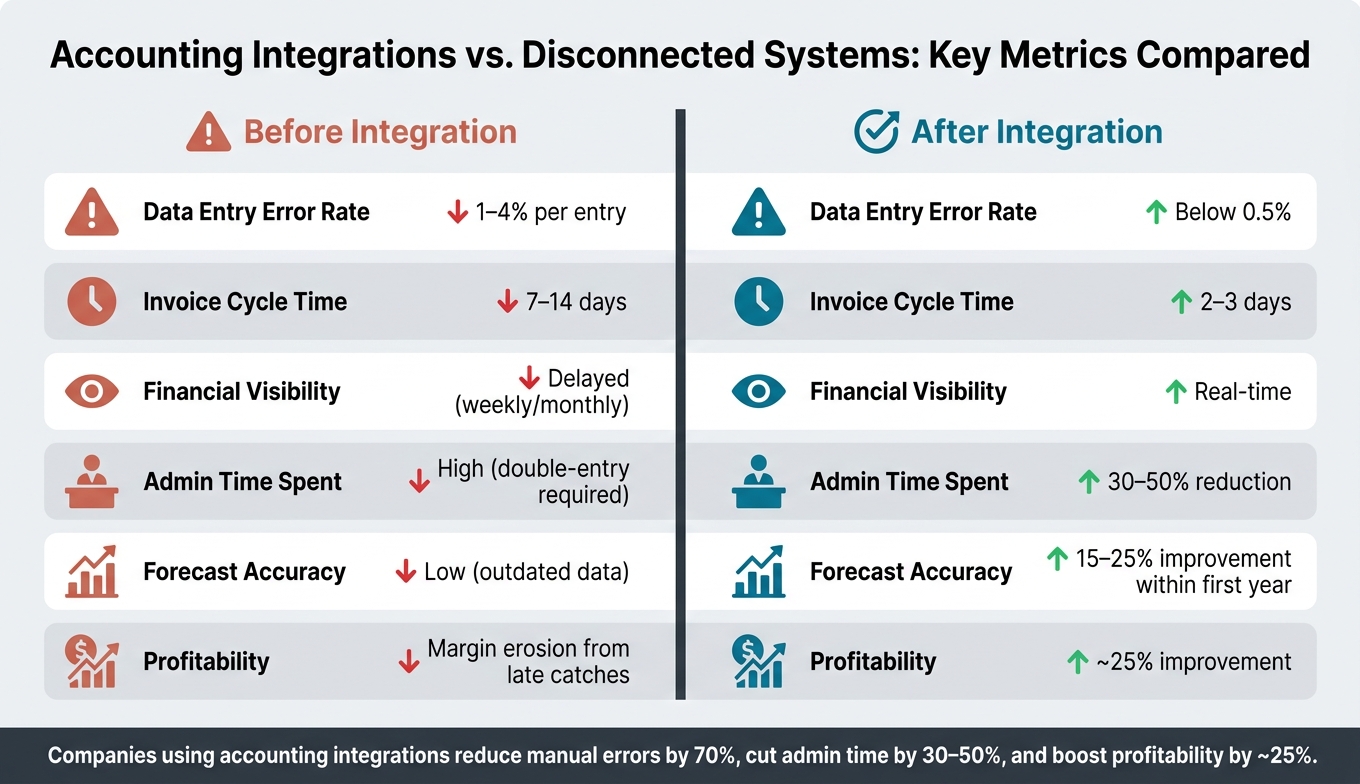
Accounting Integrations vs. Disconnected Systems: Key Metrics Compared
Once your integration is in place, the next step is evaluating how it affects budget accuracy. Tracking key metrics will help confirm whether the integration is delivering the expected improvements and highlight any remaining workflow inefficiencies.
By keeping an eye on these metrics, you can ensure the system is functioning as intended and maintain focus on creating real-time, data-driven budget forecasts.
Key Performance Indicators to Track
One of the most important metrics to monitor is budget variance – the gap between your estimated costs and actual expenses at both the job and cost-code levels. Before integration, this variance might only become obvious at the end of the month. With integration, you can spot variances as they happen and make adjustments before they escalate.
Other essential metrics include:
- Data entry error rate: Manual data entry typically results in a 1–4% error rate per transaction. Integration can bring this down to below 0.5%.
- Administrative time: Automating data synchronization can cut weekly spreadsheet reconciliation efforts by 30–50%.
- Change order capture rate: Keeping tabs on this metric helps prevent profit losses from missed or delayed change orders.
- Days to invoice: This measures the time between work completion and invoice submission. Integrated systems can reduce this timeline from 7–14 days to just 2–3 days.
Comparing Results Before and After Integration
To measure the impact of integration, compare real-world project data from before and after implementation. Focus on areas like error rates, the number of forecast revisions, and final budget variances.
Here’s a snapshot of how key metrics typically shift:
| Metric | Before Integration | After Integration |
|---|---|---|
| Data Entry Error Rate | 1–4% per entry | Below 0.5% |
| Invoice Cycle | 7–14 days | 2–3 days |
| Financial Visibility | Delayed (weekly/monthly) | Real-time |
| Admin Time Spent | High (double-entry required) | 30–50% reduction |
| Forecast Accuracy | Low (outdated data) | 15–25% improvement within first year |
| Profitability | Margin erosion from late catches | ~25% improvement |
These results highlight a ~25% boost in profitability, which isn’t just about better accounting – it reflects smarter, more informed decisions made earlier in the project lifecycle. By analyzing these comparisons, you can uncover opportunities to fine-tune your budgeting process even further.
Conclusion
Accurate budgeting in construction isn’t about working harder – it’s about working smarter with real-time data. By swapping out manual processes for automated, real-time data sharing between field operations and accounting systems, companies can reduce manual errors by up to 70%, cut administrative time by 30–50%, and increase profitability by an average of 25%. These improvements don’t just streamline operations – they directly enhance your bottom line.
What truly sets accounting integration apart is its ability to enable proactive decision-making. Instead of uncovering budget overruns after they’ve already happened, your team can spot potential issues mid-project and make adjustments right away. From tracking job costs to managing construction change orders and WIP reporting, this level of transparency ensures projects stay financially on track. It’s a game-changer for maintaining control and making informed financial decisions.
With Contractor Foreman, all these advantages come together in one platform. Featuring built-in QuickBooks integration, real-time financial tracking, and over 35 contractor-focused tools, it eliminates the headaches of double-entry and the risks of disconnected systems, giving you a single, reliable source of truth for every project.
Considering that 43% of contractors lack clear financial visibility, adopting integrated accounting solutions like Contractor Foreman can give your business a sharp competitive edge.
FAQs
What should I sync first to improve budget accuracy fastest?
To sharpen your budget accuracy, the first step is to clean and standardize your data. Begin by auditing your records to get rid of duplicates and ensure consistent naming conventions for jobs, customers, vendors, and cost items. Once that’s done, sync your foundational financial records and estimates. This creates a seamless, one-to-one connection between Contractor Foreman and your accounting software. The result? You eliminate manual errors and establish a single, reliable source for all your project financials.
How do I prevent bad field entries from messing up synced costs?
To keep synced costs running smoothly, focus on data standardization and aligning entries between Contractor Foreman and your accounting software. Make sure cost codes are consistent across both platforms – for example, match child codes in Contractor Foreman with QuickBooks Products and Services. Stick to standardized naming conventions and clearly define who is responsible for entering data. By mapping records to parent-child categories before integration, you can cut down on errors and avoid time-consuming cleanup later.
How can I prove the integration improved my budget forecasts?
Tracking key financial metrics over time and comparing them with data from before integration can showcase better budget forecasts. Tools like Contractor Foreman are great for monitoring budget variances, cost-to-finish estimates, and cost overrun frequency. Integration helps cut down on manual errors, ensures real-time data syncing, and saves time on reconciliation. These benefits often translate into a 15–25% increase in forecast accuracy within the first year.







